


What Is Product Data Management (PDM)?
Updated October 2026
Short answer: Product data management (PDM) is the process and software for storing, controlling and sharing product-related data throughout a product’s life, especially design and engineering data such as CAD files, drawings, bills of materials (BOMs), specifications and revisions. A PDM system gives teams one controlled source for the latest approved version, with version history, access control and change approval.
Which is the latest version of the design? Who changed the bill of materials? Which drawing did manufacturing build from? Product data management exists to answer those questions with certainty. This guide explains what PDM is, its key components and features, how it differs from PIM and PLM, the benefits and challenges, and how to choose a product data management system.
Product Data Management: Quick Summary
| Question | Short answer |
|---|---|
| What is it? | Managing and controlling product data, mainly design and engineering data, in one system |
| Typical data | CAD models, drawings, BOMs, part numbers, specifications, revisions, change orders, documents |
| Main users | Engineers, designers, R&D, manufacturing engineering and quality teams |
| Core features | Secure vault, version and revision control, check-in/check-out, BOM management, change workflows, search |
| Typical tools | PDM modules of CAD and PLM suites, for example SOLIDWORKS PDM or Autodesk Vault |
| Related systems | PLM (whole lifecycle), PIM (customer-facing product information), ERP (transactions) |
What Is Product Data Management?
Product data management refers to managing and controlling product-related information throughout its lifecycle within an organisation: the data related to the design, development, manufacturing and maintenance of a product. In software, a PDM system is usually the engineering tool that stores CAD files and related documents in a secure vault and controls who can change them (see an overview of PDM).
The term is also used more loosely for managing any product data, including the commercial information that marketing and eCommerce teams need. That customer-facing side is usually handled by a PIM (product information management) system, which often receives released data from PDM.
Why Product Data Management Matters
- One version of the truth: everyone works from the latest approved design, not a copy on someone’s laptop.
- Fewer costly errors: manufacturing builds from released drawings and BOMs, which avoids scrap and rework.
- Controlled change: engineering changes are reviewed and approved, and their impact is visible before release.
- Faster development: engineers find and reuse existing parts and designs instead of recreating them.
- Collaboration across sites: teams and suppliers in different locations share the same controlled data.
- Traceability and compliance: a full history of who changed what, when and why supports audits and regulations.
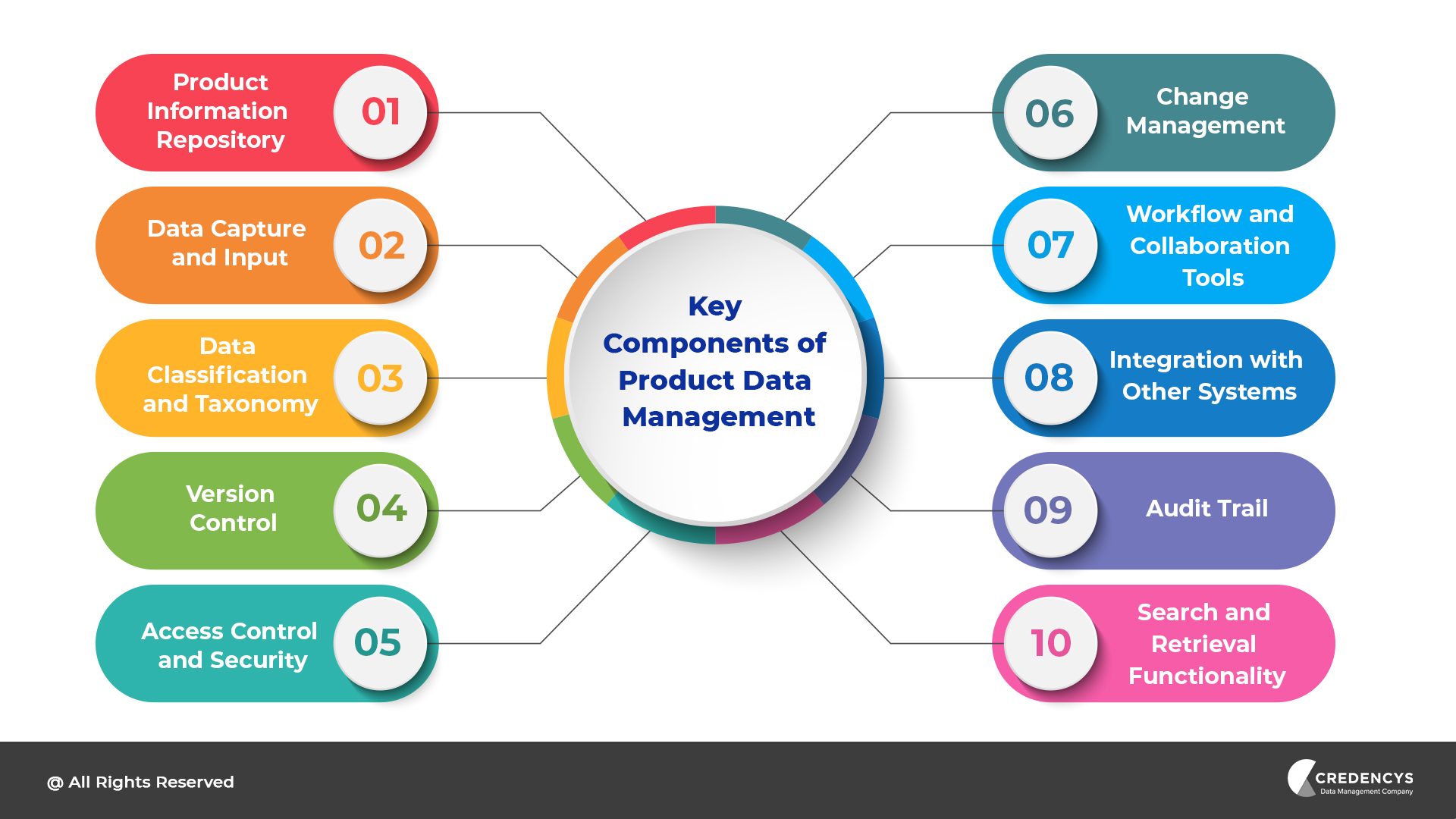
Key Components of Product Data Management
| Component | What it does |
|---|---|
| 1. Product information repository | A secure, central vault for product files and data |
| 2. Data capture and input | Bringing files and data in from CAD tools, documents and other systems |
| 3. Data classification and taxonomy | Organising parts and documents by type, family and attributes so they can be found and reused |
| 4. Version control | Keeping every version and revision, with the ability to compare and roll back |
| 5. Access control and security | Roles and permissions, check-in and check-out so two people do not overwrite each other |
| 6. Change management | Engineering change requests and orders, reviewed and approved before release |
| 7. Workflow and collaboration tools | Routing designs for review and approval across teams and sites |
| 8. Integration with other systems | Connecting CAD, PLM, ERP and PIM so released data flows onward |
| 9. Audit trail | A complete history of changes for traceability and compliance |
| 10. Search and retrieval | Finding parts, drawings and documents quickly by metadata and attributes |
Key Features of a Product Data Management System
Secure vault and metadata
Files are stored in a central, secure vault rather than on personal drives. Each file carries metadata such as part number, description, material, revision, status and owner, which makes it searchable and reportable.
Version and revision control
Every save creates a version; every approved release creates a revision (for example A, B, C). Teams can compare versions, see what changed and roll back if needed.
Check-in and check-out
An engineer checks a file out to edit it, which stops others from overwriting the same file, and checks it back in when finished. This prevents the classic problem of two people changing the same part.
Bill of materials management
The PDM keeps the structure of assemblies and their components, and the BOM that manufacturing and purchasing rely on. Where-used searches show every assembly that uses a part, so the impact of a change is clear.
Engineering change management
Change requests and change orders move through a defined review and approval workflow. Only approved changes are released, and every decision is recorded.
Integration and release
Released designs, BOMs and key attributes flow to the ERP for purchasing and production, to PLM for lifecycle processes, and selected data to the PIM for customer-facing content.
Who Uses Product Data Management?
- Manufacturers of machinery, equipment, components and consumer products
- Automotive and aerospace suppliers with strict revision and traceability requirements
- Electronics and electrical companies managing complex BOMs
- Medical device and regulated industries that need full audit trails
- Engineering and design teams collaborating across sites and with suppliers
Manufacturers that sell through distributors and online also need the customer-facing side: see PIM for manufacturing.
PDM vs PIM vs PLM
| PDM | PIM | PLM | |
|---|---|---|---|
| Focus | Engineering and design data | Customer-facing product information | The whole product lifecycle |
| Typical data | CAD, drawings, BOMs, revisions | Descriptions, attributes, images, channel content | Requirements, projects, quality, compliance, plus PDM data |
| Users | Engineers and designers | Marketing, eCommerce, content teams | R&D, engineering, quality, sourcing |
| Outputs | Released designs for manufacturing | Website, marketplaces, retailers, catalogs | Governed product definitions and processes |
Many PLM suites include PDM as a module. The PIM sits downstream and turns released data into sellable content. Read the full comparisons: PIM vs PDM and PIM vs PLM.
Benefits of Implementing a Product Data Management System
- Less time spent searching for files and recreating existing parts
- Fewer manufacturing errors caused by outdated drawings or BOMs
- Faster, better-controlled engineering changes
- Safer collaboration with suppliers and partners
- A reliable source of technical data for ERP, service and PIM
Challenges in Implementing PDM and How to Overcome Them
| Challenge | How to overcome it |
|---|---|
| Legacy files in shared drives with no structure | Clean up and classify before migration; migrate active data first |
| Resistance from engineers used to their own folders | Involve them early, keep check-in simple, show time saved |
| Unclear part numbering and naming rules | Agree standards before go-live and enforce them in the system |
| Integration with ERP and other systems | Decide which system owns each field and when data is released downstream |
| Ongoing governance | Name data owners and review rules regularly |
How to Choose a Product Data Management System
- CAD compatibility: does it work natively with the CAD tools your engineers use?
- Scale and sites: can it handle your data volumes, users and locations?
- Change management: does it support your engineering change process?
- Integration: can it pass released BOMs and data to ERP, PLM and PIM?
- Deployment: on-premises, cloud or as part of a PLM suite?
- Total cost of ownership: licences, hosting, implementation and administration.
How Credencys Helps with Product Data Management
Credencys focuses on the product data that customers, distributors and channels see, and on connecting it to the engineering and business systems behind it. We design and implement PIM and product MDM, integrate released data from PDM, PLM and ERP, and set up the governance that keeps it accurate. See our PIM services and product master data management. For example, a global industrial solutions leader centralised its product data and improved data accuracy by 85%, and a leading US wholesale distributor made backend processing 40% faster after a Pimcore upgrade.
Frequently Asked Questions
What is product data management in simple terms?
Product data management is keeping all the data about a product, especially design files, drawings, bills of materials and specifications, in one controlled system, so everyone uses the latest approved version and every change is tracked and approved.
What is an example of product data management?
An engineering team stores its CAD models and drawings in a PDM vault. When an engineer changes a part, the system creates a new revision, routes it for approval and releases the updated drawing and bill of materials to manufacturing, keeping the full history.
What is the difference between PDM and PIM?
PDM manages engineering data such as CAD files, BOMs and revisions for designers and engineers. PIM manages customer-facing product information such as descriptions, attributes and images for marketing and sales channels. Released PDM data often feeds the PIM.
What is the difference between PDM and PLM?
PDM focuses on managing engineering data and files. PLM covers the whole product lifecycle, including requirements, projects, quality, compliance and change processes. Many PLM suites include PDM as one of their modules.
Is product data management the same as master data management?
No. Master data management (MDM) governs core business records such as products, customers and suppliers across many systems. PDM controls engineering data during development. Product MDM and PIM handle the product record and its content after release.




Tags: