Top 5 Reasons Why 80% of Mobile Apps Fail within First Year (And How to Avoid It)

Is the mobile app development is still a growing industry?

In our opinion, the industry is undoubtedly at its peak right now.

Today, 9 out of 10 people own a smartphone and 10 out of 10 of those people use mobile apps in their everyday lives.

So, that’s good news for businesses considering to build their own mobile app, right?

Well, it’s not.

You see, both the Apple App Store and Google Play Store are jam-packed right now with an abundance of mobile apps trying to be successful all at once.

According to Statista, a combined total of more than 4.42 million apps were available on the Apple App Store and Google Play Store in August 2019.

Another study by 42matters revealed that a total of 3,214 Android apps are released every day on Google Play Store, while a total of 1,044 iOS apps are released every day on the Apple App Store.

So, even though the number of smartphone users is at an all-time high right now, the immense competition makes it challenging for businesses to survive in the market.

In fact, about 80 percent of mobile apps get abandoned after their first use, according to CIO.

Why? – Well, the truth lies in the mistakes made by businesses while developing their mobile apps.

And in this blog post, we’ve revealed the top 5 reasons why the majority of mobile apps get abandoned and fail within its first year.

If you’re an entrepreneur, startup, business, or an enterprise company who is planning to build a mobile app, you will find this blog post particularly useful.

With that being said, let’s dive right in!

5 Reasons Why Mobile Apps Fail

Below, we’ve shared 5 important factors that generally lead to mobile app failure and possible ways to avoid making such costly mistakes.

1 – Lack of Originality

In the haste and desire to get their mobile apps on App Stores, businesses nowadays duplicate their competitors’ apps, which bear no fruit in the long run and fail.

This is the number one mistake that many businesses are making right now.

The app stores are already oversaturated with similar mobile apps right now. So if you want your app to survive in the market, you need to come up with a very strong value proposition.

In other words, your mobile app must have its own unique value proposition to win users’ in today’s market.

To come up with a UVP, you can start by drafting a vision statement for your mobile app.

Writing a vision statement will help you increase the chances of success and set your mobile app on the path towards the end goal of your mobile application.

2 – Poor User Experience

When developing a mobile app, you need to take care of a lot of different components to provide a great user experience.

For starters, your overall app design must be intuitive and appealing.

Secondly, it should also perform all the basic functionalities easily.

Apart from this, there are a couple of factors that you must avoid such as:

  • Long loading times
  • Difficult features accessibility
  • Slow app performance
  • Long registration process

All these factors result in a poor user experience, which you need to avoid at all costs.

Besides all these basic UX factors, you must also practice design thinking and establishing an in-depth user understanding to learn about their needs and possible ways you can fulfill them through your mobile app.

3 – Failing to Solve a Real-Life Problem

Innovation is supremely important in the mobile app industry.

And as we mentioned in the first point, if you’re simply creating a replica of your competitors’ mobile apps, you’re destined to meet failure sooner or later.

However, if you have a unique, innovative idea that solves a real-life problem for your target audience, then your mobile app is primed to be successful.

On the other hand, if you’re simply creating a mobile app with features and functionalities that already exist in the market, then it will most certainly bring a downfall.

So, come up with a fresh idea, which will entice your target audience and solves their most painful, real-life problems.

4 – Lack of Proper Monetization Strategy

Most businesses believe that if they simply develop a mobile app and market it, they’ll automatically get thousands of regular customers and make a fortune.

In reality, it’s the complete opposite.

Today, mobile businesses who’ve built their mobile apps struggle to survive, and one of the common reasons behind this is the lack of proper monetization strategy.

You see, even if you overcome the first 3 challenges like being original, solving a real-life problem, and providing a great user experience, your mobile app still has higher chances of failing a viable monetization strategy is not in place.

So, before embarking on the mobile app development journey, it’s imperative to research and select the right monetization method for your mobile app.

Fortunately for you, we’ve recently written an extensive blog post on 9 proven app monetization strategies to make money from the app.

Feel free to check out the blog post: 9 Proven Strategies for App Monetization

5 – Too Few or Too Many Features

Another common reason why mobile apps are abandoned after their first use is due to either having too many features or too few.

We’ve seen hundreds of real-life examples where businesses loaded their applications with too many features in the hopes of luring their target users but ended up sending them off to their competitors.

Similarly, if you add too few features (i.e.: less than 5), then there might still be an adverse effect.

So, if you want to hit the sweet spot for the number of features in your mobile app, the best approach is to go with MVP development.

MVP or Minimum Viable Product is a development technique used to build software products with only core features to test the idea in the market and receive feedback from the early adopters.

Conclusion

Any successful app did not rise on the top instantly. Most popular apps like Uber, Spotify, Netflix, etc. started with baby-steps and gradually grew to become the industry leaders that they are today.

Similarly, if you wish to survive and thrive in your niche, start small and scale big strategically. And if you need help, remember that our expert business consultants are always there for you to guide you on your mobile app development journey.

Feel free to reach out to us by filling the contact us form. And in case you’ve any queries, please share it in the comments below.

Frequently Asked Questions

Q:1 – What makes a bad app?

Ans: A bad app is any app that does not meet its target users’ needs and is poor in terms of user experience.

Q:2 – What percentage of mobile apps are successful?

Ans: According to reports, only 20% of mobile apps survive after its first year in the market.

Q:3 – Can a mobile app make you rich?

Ans: Yes. If you’ve built an app that is used by a vast amount of users, solves a real-life problem, and implemented the right monetization strategy.

Q:4 – What are some benefits of an app?

Ans: A mobile app can help to increase visibility, boost brand awareness, provide more value to customers, increases customer loyalty, and many more.

When Should You Consider Hiring Full-Stack Developers? [2023 Guide]

Are you thinking of hiring full-stack developers for your next project?

Well, hiring full-stack developers is a good idea, but you should hire only them if certain criteria are matched or if you can see a clear value-addition.

But what is a Full Stack Developer?

Unlike a specialized developer, a full-stack developer is someone who is capable of working on both, front-end as well as the back-end part of the project.

A specialized developer, on the other hand, is someone who is an expert in a single domain, which is either front-end, back-end, or software testing.

In simple words, full-stack developers are those rare skilled developers who have the required working knowledge of all development stages to build a full-fledged application.

However, hiring full-stack developers may not be a great choice in all cases.

Below, we’ve shared 3 instances where hiring full-stack developers will make more sense than hiring specialized developers.

3 Instances Where Hiring Full-Stack Developers is the Right Choice

Being one of the leading full-stack development companies, we often come across businesses that sometimes get stuck when it comes to making the decision – whether to hire specialized developers or full-stack developers.

If you’re in a similar dilemma, don’t worry.

You’re not the first who is confused about the decision.

In this blog post, we’ve revealed 3 cases where hiring a full-stack developer is a great option and why you should go for it.

1 – When You’re Just Starting Out or Building an MVP

It’s always a good idea to hire a single full-stack developer rather than 3 different specialists when starting out or building an MVP product.

This is mainly because of the fact that full-stack developers, compared to specialists, have a better understanding of all stages of project development and they can do so more efficiently than specialists.

In other words, full-stack developers are well-capable of turning your idea into a functional prototype product.

2 – When Your Business Needs a Technical Head

Full-stack developers are capable of and can easily fill the shoes of a technical head.

This is because most full-stack developers often have a great understanding of all components that go into developing a project, which can help to lead your project on its path to success.

Besides this, hiring a full-stack developer is also a great choice when you’re looking for a technical manager to supervise activities of your in-house development team.

3 – When You’ve Tight Budget

Let’s not hide the elephant in the room.

When you have a tight budget, it’s imperative to spend every cent wisely.

And when you hire a full-stack developer instead of a few specialist developers, you’ll obviously save a lot of money.

In other words, there is no need to hire multiple developers for each component of your project separately when you can easily get them developed by a single developer.

This way you will save a lot of money, which you can rather invest in other important areas of your project (i.e. marketing).

Bonus: Benefits of Hiring a Full-Stack Developer

1 – Bigger Picture

The main benefit of hiring a full-stack developer is that their services go beyond just writing code for your project.

In addition to coding, full-stack developers also have the experience needed to create a complete structure and add valuable input to your project as needed.

2 – Flexibility

When you’re developing a web or mobile application, you usually need front-end developers who can write code to create the user interface of your application, and back-end developers to write code for creating business logic to connect your application with the chosen content management system.

Full-stack developers, on the other hand, are well-versed with both front-end as well as back-end parts of the project and thus they offer great flexibility.

This basically helps businesses eliminate the need for conducting meetings between front-end and back-end developers, which greatly reduces the development time.

3 – Jack of all Trades & Master of One

As mentioned just above, full-stack developers are capable of working on both front-end and back-end, and this versatility helps businesses quickly identify bugs during the development process and eliminate them.

In addition to this, full-stack developers are also specialized in one of the technologies they have a working knowledge of, which is the main reason why businesses prefer to hire them in the first place.

Concluding Thoughts…

If you’re a startup or a business owner who is planning to build your own website or mobile app, hiring full-stack developers might be the right for you, especially if you’re building it for the first time.

Though specialized developers have their advantages, but they are more suited for building or upgrading complex solutions.

So, before you make any decision, it’s important to understand your requirements carefully.

We hope this blog post has helped you learn when to hire full-stack developers and when to hire specialized developers. In case you have any doubts, feel free to ask them in the comment section below.

Frequently Asked Questions

Q:1 – What is a full-stack developer?

Ans: A full-stack developer is a basically a programmer or an engineer who can work with both front-end and back-end of a website or mobile application, in addition to handling all database structure and basic DevOps.

Q:2 – What a full-stack developer do?

Ans: Full-stack developers usually work on the entire website or application all by himself as he has working knowledge and required skillsets to build a project.

Q:3 – Are full-stack developers in demand?

Ans: Yes, full-stack developers are in huge demand. In fact, enterprise companies and large-scale organizations treat them as invaluable assets in their business since they’re hard to find in today’s competition.

Q:4 – What does stack mean in coding?

Ans: A stack is basically a combination of technologies, programming languages, tools, and frameworks that goes into developing a project.


Flutter vs React Native – How to Select the Right One for Mobile App? (with Detailed Comparison)

Though native and cross-platform have their own pros and cons, organizations prefer cross-platform technologies for mobile app development due to many reasons.

Some of the competitive benefits offered by cross-platform technologies are cost-effectiveness and less time-consuming mobile app development.

Another reason people select cross-platform app development is it constantly evolves and launches modern technologies, frameworks, and platforms to meet the growing needs of the businesses and customers.

Flutter and React Native are the two leading cross-platform frameworks that are competing with each other to prove their worth for mobile app development. This post will help you to explore the key differences between these two technologies. Let’s have a detailed comparison.

Flutter vs React Native: A Detailed Comparison

Programming Languages

Flutter is based on the Dart programming language. It is very easy to learn and write the code. But, it is not so popular programming language and not used widely expect Google.

The adoption rate of Dart in the industry comparatively low. Moreover, the programming language helps in compiling the native code faster and simplifying the widget customization.

React Native used JavaScript as the core programming language. Undoubtedly, JavaScript is one of the highly popular technologies these days.

It is the highly preferred technology by developers for mobile app development. JavaScript is a powerful and widely accepted and adopted technology across the industry after years of use.

Verdict: JavaScript-based React Native is a more stable and reliable cross-platform framework to consider for your mobile app development.

User Interface

When it comes to create a user interface of mobile apps or build block components, Flutter and react-native are quite different from each other.

Flutter uses its proprietary visual, platform, structural, and interactive widgets. These widgets are inbuilt UI components and competent to replace the native UI components.

The framework has a flexible layered architecture that creates a customized UI design with native support and dynamism.

Well, the only drawback of Flutter is it doesn’t offer all the components that are essential for designing an app UI. The result is you need to compromise on user experience.

React Native uses native components of iOS and Android to create the UI. Moreover, it allows to select from the external UI kits such as React Native Elements, NativeBase, and React Native Material Kit.

Enabling developers with a large number of UI kits, it helps to design a robust UI for your mobile app.

Verdict: React Native is the best choice to create an engaging user interface for both the mobile operating systems.

Performance

If we talk about the app performance, then definitely Flutter wins the competition. Are you eager to explore how? Here you go.

Flutter develops apps without using the bridge of javascript for initiating interactions with the native components of the Android and iOS platforms. Thus, the speed of Flutter based development is expedited drastically compared to React Native.

React Native performs excellent when it comes to native app development. But when it comes to hybrid app development, sometimes developers face issues with application architecture.

Compare to React Native, Flutter allows developers to reuse the code. Moreover, the framework has a C++ engine that works flawlessly and supports the technology.

Verdict: Flutter gets the highest point in terms of delivering the best app performance as it runs hybrid apps with greater speed than React Native.

App Development Time

Flutter takes more time when it comes to mobile app development. The technology is new and requires considerable time for mobile app development. Flutter enables developers with high-quality usability but the framework demands more recognition compared to React Native.

React Native enables developers with the ready to use components that help them to utilize all elements to build an app without confronting many problems. It improves time to market of the mobile app, adds more to the user interface, and reduces development time tremendously. Using the capabilities of React Native, the app development process becomes quick and simple.

Verdict: React Native is the best option to pick to leverage accelerated mobile app development due to react to use components. While Flutter widgets are not adaptive so developers have to make the platform-specific adoption manually.

Documentation

Documentation one of the very time consuming and complex processes of mobile app development. And, Flutter facilitates developers with better documentation that simplifies their life by allowing them to create documentation of the mobile apps. Thus, as far the documentation is concerned, Flutter is the best choice.

Well, Flutter doesn’t have a strong community as React NAtive. But the support of the Google team is really good about the documentation. The Google team answers to the queries of Flutter documentation in a limited time span that helps the developers to get started with the Flutter sooner than React Native.

React Native has not so organized documentation process. Moreover, the framework removes the components which are useful in making the documentation process smoother. The framework offers general documentation and uses the external dev kits.

Verdict: Flutter is the clear winner when it comes to effective documentation of mobile app development.

Customer Base

Introduced in 2015 by Facebook, React Native leverages the larger customer base and industrial adoption than the Flutter that is introduced in 2017 by Google. React native is used by big brands such as Uber, Tesla, Walmart, Instagram, etc. On the other hand, Flutter is implemented by AppTree, Tencent, Alibaba, and more in their mobile apps.

React Native is already a well established and stable platform supported by a large community. Flutter needs time to gain stability like React Native. It has a bright future for sure and the ability to build next-generation mobile apps.

Verdict: Both technologies have their pros and cons. Developers need to make the right selection as per their design and development requirements.

Credencys Develops Cross-Platform Mobile Apps Using Flutter or React Native

Credencys has 10+ years of industry experience in developing Native, Hybrid and Cross-platform mobile app development. We have a team of 150+ seasonal developers to build custom mobile solutions. Though we have proven expertise in developing Flutter applications we hold more skills and experience in developing React Native mobile apps.

We have developed robust mobile solutions for startups, SMEs and large scale enterprises that help them streamline their business operations, boost customer engagement and retention, and cut down overhead costs. Get a cost-effective mobile solution by sharing your business ideas with our skilled team.

Frequently Asked Questions about Flutter vs React Native

Is Flutter better than React Native?

Tracking Flutter vs React Native performance, you can make the right choice for your mobile app development. Flutter allows developers to reuse the existing code. Thus, it makes their life easy. While React Native faces some issues with hybrid application architecture.

Will Flutter replace React Native?

Flutter uses its own components for Android and iOS app development by rendering them through an engine. On the other hand, React Native allows developers to bridge native models and native UI components.

Is Flutter faster than React Native?

Flutter compiles C/C++ library to Dart to make the app development less complex. This is consumed faster by the native code than a bridge between native models and native UI components of React Native. Thus, Flutter will deliver faster performance than react Native.

What is the difference between React Native and Flutter?

To build a mobile app, React Native uses components of the react library. The technology uses virtual DOM to communicate with the mobile platform UI components. Compared to Flutter, React Native provides less widgets. Moreover, the React Native components are highly adaptive.


10 Best React Developer Tools (to Speed Up React Development)

Invented in 2013 by Facebook, React started its journey as a JavaScript library that allows engineers to create highly dynamic user interfaces. But have you ever experienced the development capabilities of React?

Yes, React could be an amazing platform that develops more proactive and powerful mobile and web apps. There are around 30 to 40 different react developer tools that played a major role in making the react highly used and reliable.

Using React components, developers can build reusable and isolated blocks to create different applications. Beyond software solutions development, the tools help engineers deal with debugging, visibility, and performance.

Due to its versatile capabilities, React is used by all the big brands including Tesla, Facebook, Airbnb, Skype, and more. Here you have a list of the powerful react developer tools that empower developers to boost their productivity by

  • Bit
  • React Sight
  • React Developers Tools
  • Create React App
  • Storybook
  • React Bootstrap
  • React Styleguideist
  • Proton Native
  • React-Proto
  • Why did you render

Top 10 React Developer Tools for Web & Mobile App Development

1. Bit

It is the best tool for creating and sharing the react components. Bit enables developers with an online platform and a CLI tool where they can publish react components and share them with others.

Moreover, you can search for components created and published by third parties. Using third party stores you can access the full marketplace of components. You can easily understand that these components suppose to do just by reading some code.

Get a detailed view of each component and edit the code that used to render the preview. Ensure that the components fit into your needs before downloading and installing Bit for your project.

Bit offers a command-line tool that allows developers to track changes on each component individually without considering them as separate projects. Moreover, the tools allow to create your own component library.

2. React Sight

It is a chrome extension that you can install to perform react inspection related tasks. After installing the react developer tools extension in chrome, install React Sight extension.

React Sight displays your React app with a live component hierarchy tree of the entire app. Moreover, it supports redux, react fiber, and react-router.

While running local file URLs, ensure to enable “Allow access to file URLs” for both react sight and react developer tools. Install the extension in chrome and run the react app and open the react based website.

It is a react visualization tool with a prop tree viewer and live state that complements React dev tools.

3. React Developers Tools

The most obvious react tool to build react apps. Install the latest version (4th) of React developer tools extension in Chrome. The dev tools have tabs of components that are rendered on the screen. It also has subcomponents spawning from others.

Select the components and inspect or edit their props and state. Using the profiler tab, you can track app performance too. It helps to see how changing single components affect other components and help them to create a better component structure. Almost 1 million users are already using the Facebook invented tool.

4. Create React App

Invented by Facebook, create react app is a single command-line tool that allows developers to accelerate the process of setting up the environment for react app development. The react developer tool optimizes the app for production, sets up a developer environment, and enables programmers with a front-end build pipeline.

The tool allows developers to use any programming language for back-end development and save the time of engineers.

5. Storybook

React allows creating an intuitive UI using advanced components. When you want to create a UI that is separate from your business logic, this tool provides a sandbox. The sandbox works as a playground to create components.

The reason it is called storybooks because the sandbox documents the components as stories. Each story has stats. Each state can be compared with the visual test case. A story is basically a function that delivers value and is rendered to the screens.

6. React Bootstrap

Bootstrap is the popular CSS framework that provides a set of JavaScript functions and CSS classes to build wonderful UIs. It is very simple to use so you can use it without any technical knowledge of any of these technologies.

The React bootstrap has re-written the JavaScript bits to make it compatible with react. Not developers can use the bootstrap components just as they react components.

7. React Styleguideist

Another UI tool that is very interactive and interesting and can be used to create and showcase UI components. It allows developers to write UI code and simultaneously generate the UI. You can test the code and change the code in the rendered version if required.

8. Proton Native

Proton Native allows you to develop native desktop applications using react. Earlier, developers had to use JavaScript to build desktop react apps. The tool allows you to define the GUI elements and react components. The react developer tool is compatible with all Node.js modules as the Proton has a completely cross-platform nature.

9. React-Proto

This is the best react developer tool for engineers who focus more on visual design and less into coding. It allows you to create prototype UIs using drag & drop rather than writing code.

Well, this doesn’t mean it allows you to create app UI without writing a single line of code. It provides the prototyping components that developers need. You can take an image and use react proto to mark all potential components from that image as well as set props, names, and a hierarchy of the components.

Once you have all the components, export them into auto-generated code. You can customize the code later on. If you are working with a project that is already designed, then react proto is the best tool to save a lot of time for the initial setup of the project. Additionally, the app developed using this tool is compatible with all major systems.

10. Why did you render

When you want to debug the behavior of your component, this is the best tool to try. It is very important for developers to understand when to render and re-render the components as they are not always straightforward. Especially, if you have just started with the react development. Why did you render tool tells you when avoidable renders activate along with the reasons of why.

Takeaway

All the above react tools are used to serve different purposes such as to build web applications, create visuals, or write code. Well, these tools do not serve to any single purpose. You can use them together to complement each other.

Credencys has a team of React JS developers who have proven expertise and experience in using the advanced react developer tools. Offering end-to-end React JS development services, we speed up the app development cycle and help you to launch your web and mobile applications with improved time-to-market.

Frequently Asked Questions for React Developer Tools

How do I enable react developer tools in Firefox?

Using the react developer tools, you can inspect a react tree that involves components states, props, hierarchy, and much more. To install the react developer tools in your Firefox browser, just open the devtools and switch to the “Components” and “Profiler” tabs.

How do I open developer tools in Chrome?

To activate DevTools on any web page or app in Google Chrome, you have two options to choose from.

  • Open the Chrome menu (available at the top-right of your browser window) > select Tools > Developer Tools
  • Right-click on any page element > select Inspect Element

How do I add react extensions to Chrome?

To add react extensions in the Chrome browser, you need to go to chrome://extensions page and switch to developer mode. It allows you to locally install a Chrome extension. Now, either you can click on the LOAD UNPACKED and browse to [PROJECT_HOME]\build or just drag and drop the build folder.

What is a react developer?

React developer is an ultimate JavaScript library for front-end developers. It helps engineers to build a better web and mobile application by harnessing the potential of React technology.

Many organizations have started considering react as an essential skill for developers. It is very important for react developers to stay hungry to level-up or audit the skills related to Facebook’s prominent JavaScript Library.

Why is react so popular?

The key reasons behind the popularity of the react technology are: it is compatible with DOM API and allows developers to work with a virtual browser that is more efficient and easy-to-use than a real browser. Ultimately, the knowledge of JavaScript helps a programmer to be a better react js developer.


Retail App Development – 5 Features That Consumers Want Most!

Speed, customer experience, 24/7 access – these are the main elements that are driving the retail industry today.

But what is it that offers all three elements in one place?

Answer: mobile apps!

Right now, the worldwide retail industry is laser-focused on mobile platforms. And retailers who identified & invested early in mobile application development are now enjoying the fruitful benefits of it.

For instance, there were 150+ million US shopping app downloads in 2018, according to eMarketer.

Statista also revealed that after shopping online, 42% of consumers use a social network or shopping app, which suggests that these users either keep the shopping momentum going or tell their friends about their recent purchase.

All these data clearly prove that mobile app development is the way forward for the retailers and that the mobile apps will become the preferred choice for shopping in the coming years.

And in today’s blog, we’re going to share the 5 main features that consumers want the most in every retail app.

Retail App Development Features That Consumers Want The Most!

1 – Personalized User Experience

Online shopping experience has evolved a lot in the past recent years.

From desktop websites & mobile websites to mobile apps and now AI-powered applications, consumers today no longer have to deal with browsing through dozens of products to find what they want.

Today, retail apps are equipped with Artificial Intelligence & Machine Learning that help retailers to learn their customers’ buying preferences.

These preferences later help retailers to understand what exactly each customer wants and what is the best way to give it to them.

2 – Discounts through Push Notifications

Push Notifications are considered to be the most powerful tool to retain app users. And when they’re used right, it can sky-rocket your sales.

Today, most retail apps are leverage push notifications to keep their customers informed about their new products and about the exclusive discounts.

So, if you’re planning to build a retail app, implement a carefully planned push notification strategy to convert maximum users into paying customers.

For instance, you can leverage the customers’ behavior insights, preferences, and previous purchase history and notify them about the new discount offers on the items that they checked out recently.

3 – Loyalty Program

In today’s competitive world, a product differentiation strategy just simply doesn’t work.

And retailers have already realized it. Therefore, today most retailers offer some kind of loyalty program either through their website or mobile app.

A loyalty program, for those who don’t know, is a powerful strategy to retain the maximum number of customers by rewarding them on their repeat purchase.

And since today’s consumers spend 5+ hours on their smartphones, embedding a loyalty program in your retail app makes perfect sense.

In fact, according to Annex Cloud’s study, retailers who have implemented a customer loyalty program have witnessed the following results:

Increase in revenue by 5-10%.
Increase in the Customer purchase frequency by 5-20%.
Customers spending 5-20% more.

These data clearly prove that loyalty programs can successfully motivate the customers to buy more products and more frequently from a retailer.

4 – Fast Checkout

The checkout process in your retail app must be fast and easy.

And the reason is simple: Impulse buys.

Impulse buy is the most important advantage for retailers and the best way to capitalize on it is by making sure that the purchase process is done in the shortest number of steps possible.

In fact, if your customers face even the smallest glitch while shopping, they will most certainly abandon their shopping cart.

So, in order to combat this, implementing a fast checkout process is recommended. In other words, you can consider allowing your mobile app customers to save their addresses, card and other details to save their time and effort to make a purchase.

Apart from this, you can also implement fast return options so that customers don’t hesitate in making an impulse purchase, knowing that they can always easily return it.

5 – Wish Lists

Wish lists are among the customers’ top favorite features in shopping apps. Wish lists basically allow consumers to save, share, and shop products on the go.

In other words, the wish list feature helps consumers save their favorite items that they desire to buy or plan to buy in the near future.

Mobile buyers find the wishlist feature very helpful because it saves them a lot of time browsing the product catalog to find the one that they liked. Apart from this, the wishlist feature provides an immense amount of value to the retailers as well.

For instance, the wishlist feature helps online retailers improve the shopping experience of their customers, in addition to increasing the overall mobile app sales.

The bottom line is, wishlists feature offer so many benefits to both retailers as well as their customers that not implementing the feature could really affect the customers’ experience as well as revenue.

Concluding Thoughts…

So these are the 5 most important features to include in your retail mobile app. Besides these features, there are many other features that could add competitive value to your retail brand.

We, at Credencys, can help you implement these 5 most important features in the most cost-effective manner, while also suggesting the other relevant features for your retail brand.

So, if you’re interested in mobile application development for your retail business, contact us right away!

General FAQs for Retail App Development

Q:1 – What are retail apps?

Ans: Retail apps are basically mobile apps mostly developed by retail brands, businesses, and entrepreneurs to target smartphone users and convert them into customers.

Q:2 – Which are the best online shopping apps?

Ans: There are many best online shopping apps such as Amazon, AliExpress, Flipkart, and a lot of others. The basically depends on the product or item that you’re looking to buy.

Q:3 – How can I build my own app?

Ans: You can either use App Maker services such as AppyPie or outsource your retail app project to a mobile app development company, which is often recommended as they can help you build a retail app around your custom requirements.

Q:4 – Is there an app to find clothes from a picture?

Ans: Yes, there are many mobile apps that allows to find clothes and in fact any product from a picture. Here are the top 5 apps to find clothes from a picture:

  • Google Lens
  • CamFind
  • Amazon StyleSnap
  • Pinterest Lens
  • Screenshop


3 Food Delivery Challenges That Startups will Face in 2023 (And Their Solutions!)

The world is changing fast and so is the customers’ demands.

Back in the old days, for example, people longed for home delivery services for clothes, taxi, and food especially.

Today, it has turned into reality and food delivery is leading the on-demand economy.

The fame of food delivery apps is at its peak right now, and why not? – After all, it helps people to order their favorite food from their favorite restaurant within seconds.

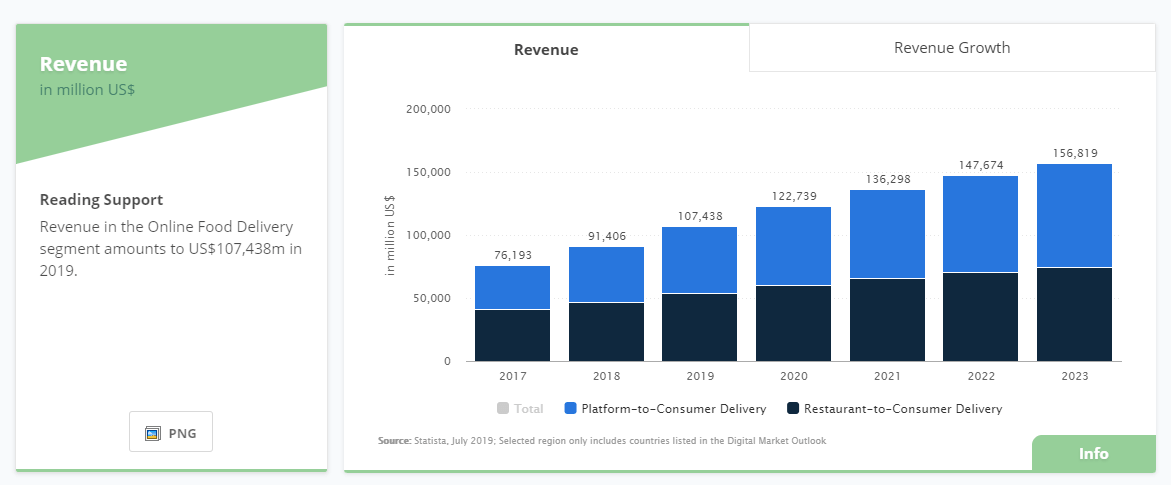
According to Statista, the global food delivery market has already surpassed $107,400 Million US dollars in 2019 and it is forecasted to reach $156,819 Million US dollars by 2023.

online food delivery challenges 2020

In fact, 53% of traditional food ordering is conducted online today, while 47% is offline, proving that the future of food delivery app startups is bright.

But, with the increasing demand for food delivery apps, the food delivery startups and businesses are also facing serious challenges.

In this blog, we’ve addressed 3 such food delivery challenges that startups and businesses in the food industry will face in 2022.

3 Food Delivery Challenges You Need to be Aware of in 2022

Online food delivery has experienced tremendous growth in the past 3 years.

But when it comes to establishing a new food delivery app-based startup, there are many serious challenges that one needs to overcome.

Let’s look at these food delivery challenges and their possible solutions so that you can thrive in the food delivery industry in 2022.

1- Disruption by Giant Companies

Though the online food delivery market has great potential, but with the arrival of giant companies such as UberEats & Amazon Restaurant, capturing the market share will be a serious challenge for new startups in 2022.

You see, these giant companies have all the resources required to capture the majority of market share and therefore the independent food delivery startups are struggling to just survive in the market.

So, what’s the solution?

Here’s an Idea: adopt the Walmart model.

Walmart is a global retail giant. But when they started, they strategically entered into unexplored and relatively untouched markets like small towns and villages in the beginning.

This strategy allowed them to grow into a big company before they entered big cities.

Similar to Walmart, you could expand your online food delivery services in unexplored markets in your country, grow your customer base, and then take things forward from there.

2 – Neglecting Customer Loyalty

As new food delivery startups entering the market more often than before, retaining customers has become a serious challenge.

In today’s digital era, the number of choices matters the most to customers. That means, if your competitor is offering better or just more options than what you’re offering, it would be really difficult to keep the same customers for a long time.

The more the merrier is the key for food delivery startups.

You see, customers love more options, whether it’s the number of restaurants, types of food, incentives, discount offers, the more option a business offers simply gain customers’ loyalty.

So, What’s the solution?

It’s simple! – Offer more options!

Treat your customers with exclusive deals on a regular basis, offer freebies, partner with more restaurants, and deliver in remote areas. This will help you making your customers feel special, which will ultimately help you in earning their loyalty.

3 – Delivery Fulfillment Timeline

Technology has ruined us. Today, customers expected everything to be delivered in a minimum amount of time, which makes adhering to the fulfillment timeline a must.

This is especially true for food delivery startups. For instance, if a delivery timeline is missed, not only the brand reputation gets ruined, but the business also has to wave off the delivery charges.

In other words, new food delivery startups must make their delivery process as efficient as possible to avoid such serious impacts on their reputation.

So, what’s the solution?

Answer: Adopt a reliable last-mile delivery solution.

Last-mile delivery software offers a lot of benefits to online food delivery businesses.

For starters, it helps to enhance transparency, optimize the delivery route, gives real-time status updates, and also reduces delivery costs.

Overall, getting a last-mile delivery solution can surely boost the efficiency of deliveries and increase profits for an online food delivery startup.

Conclusion

The future of the online food delivery industry is undoubtedly full of opportunities. However, new startups must combat these 3 main food delivery challenges to survive high competition.

So, make sure that your mobile app development partner develops your food delivery app that helps in overcoming these challenges.

And if you have any questions, feel free to ask them in the comments below.

General FAQs for Food Delivery Challenges

Q:1 – How can I improve my food delivery business?

Ans: There are many ways you can improve your food delivery business. For example, you can market your website on social media, you can build an app to accept online ordering, or you can allow customers to place a scheduled delivery.

Q:2 – What are food delivery apps?

Ans: Food delivery apps basically allow customers to order their favorite food from any restaurant via their smartphones and get it delivered at their doorsteps.

Q:3 – What are the benefits of online ordering?

Ans: Online ordering helps to make the ordering process easier for both customers and restaurants, get better insights into customers’ behaviors, and helps to stay ahead in the market.

Q:4 – What are top food delivery apps in the market?

Ans: There are dozens of top food delivery apps in the market. They are listed as below:

UberEats
DoorDash
Postmates
Zomato
Grubhub
Seamless
goPuff.


11 Best iOS Libraries that Accelerate iPhone App Development

iOS developers love the open-source libraries of the platform. Do you know why?

Advanced iOS libraries allow them to build robust iPhone apps in a hassle-free way and by saving a lot of time. 

These are ready to use libraries that developers can directly use during iPhone app development rather than creating an app from scratch. It benefits to developers to invest more time on designing the unique features and functions of the app. 

Using the iOS libraries, developers can improve the time-to-market of the app by achieving all milestones successfully. Credencys has proven expertise in developing iPhone apps for the diversified industry verticals. 

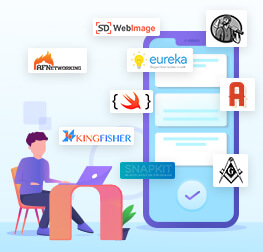
In this post, we have covered the 11 most promising iOS libraries that ensure the seamless iPhone app development. Integrate them into your iPhone apps to build the app faster. 

Top 11 Open Source iOS Libraries that Speed Up the iPhone App Development

1. AFNetworkin

It is the most reliable iOS library that helps developers in networking and seamless integration of APIs. AFNetworking is an open-source, lightweight and fast networking library that uses Grand Central Dispatch and blocks.

Basically, it helps developers optimize code with higher performance primitives, improve responsiveness of the app, and enable with the easier concurrency model. AFnetworking is used for macOS, iOS, Watch OS and TV OS. 

The library takes care of basic networking requirements to the advanced ones, including SSL pinning and Network reachability. It contains robust APIs that manage high-level networking abstractions effectively. 

2. Alamofire

Alamofire is an HTTP library that is developed on the top of NSURLSession. It is the best library to simplify the networking of your iOS app. Though many new libraries are out there, the Swift based Alamofire remains the prime choice of iOS developers.  

Using the utility methods of the library, programmers can handle all types of networking requests and creates a native-like networking interface using Swift. Moreover, it simplifies the many networking tasks such as making uploading, downloading and getting JSONS a piece of cake and providing network communication for a multi-player game. 

The unique features of the library include pause and resume networking operations whenever required, subclassable private storage that makes the iPhone app development conducive to programmers using Swift.  

Credencys used Alamofire in Anand Rathi, Market Place Application, IoT Solution, Samsung, Jeep

3. SDWebImage

Undoubtedly, AFnetworking is a fast and open-source library that allows to load images from the web seamlessly using AFNetworking and UIImageView. 

But, there is another library known as SDWebImage, an asynchronous image downloader with cache support. The library stores decoded, original and compressed image files on the disk and caches the UIImage in the memory. Thus, it helps free up the iPhone memory by offering advanced iOS image management. 

Credencys used SDWebImage in Jeep

4. Masonry

Masonry is a lightweight library that makes AutoLayout hassle-free using simpler syntax. To make the AutoLayout code more readable and concise, the library uses its own chainable DSL.  It provides different methods that shorten the dozens of code lines for AutoLayout to a single line. 

5. MBProgressHUD

It’s an ultimate library that addresses all the image related gaps that are not fulfilled by other image libraries. MBProgressHUD enables iOS developers with the class that allows them to display a translucent Heads-Up Display (HUD) over images with text. Moreover, during the image loading, it offers labels and progress indicators too.  

Thus, when the iOS app takes too much time in image loading or performing the tasks, translucent indicators of MBProgressHUD prevent your app from abandonment by relieving the user anxiety. 

Credencys used MBProgressHUD in Nuevacare, Hilco Global, Anand Rathi, Market Place Application, Samsung, Jeep

6. CocoaLumberjack

CocoaLumberjack is a complete solution for all your logging needs. It is a robust library that has more capabilities in comparison to the humble print or NSLog. It contains powerful features such as grand central dispatch, lockless atomic operations, and multi-threading. 

The library is easy to use and faster than NSLog as it allows to make functions with minimum coding. To allow developers to log to a file and console simultaneously, CocoaLumberjack send one log statement to multiple loggers. Due to its flexibility and simplicity, it is highly used in enterprise-level logging solutions for iPhone or Mac applications. 

Credencys used CocoaLumberjack in IoT Solution, Market Place Application

7. Kingfisher

It is a Swift based library for caching and downloading the images. Kingfisher improves your app experience by catching the downloaded images in both disk and memory. The amazing features of the library are independent components cancelable downloading that boost app performance and speed. 

Kingfisher perfectly caches the images that quickly display your app to the users by caching the images later. There are other extensions such as UIButton, NSImage, and UIImageView that help directly in setting an image from a URL. 

Credencys used Kingfisher in Anand Rathi, Market Place Application, IoT Solution, Samsung

8. SwiftyJSON

The name of the library itself suggests it helps engineers to deal with JSON data in Swift.  SwiftyJSON is a free, open-source and simplified library. It eliminates all the optional chaining that is messy for programmers. 

Almost all developers face such issues. SwiftyJSON is the perfect solution that provides a hassle-free approach that seemed tough to achieve earlier. Using this library, developers will no longer face the same error that directly improves their productivity and efficiency by allowing to create the code flawlessly. 

Credencys used SwiftyJSON in Hilco Global, IoT Solution, Market Place Application, Samsung

9. Eureka

It is the best iOS library that works as a form builder in Swift. Eureka is used in form intensive apps. It helps programmers to save time and efforts for creating forms with repetitive and complex code. 

Instead of performing the repetitive tasks to create the forms, the library allows to create highly dynamic forms with reusable code. Thus, developers need to write the code once and use the same code anywhere. 

Moreover, Eureka’s abstraction performs duplication and code validation. Being supported by a large developer community, it is the best updated iOS library.   

10. SnapKit

SnapKit is the very popular iOS library that makes the AutoLayout easier to create and setup. Written in Swift, it allows to build iPhone apps with less code compared to traditional methods. The result is the app has cleaner coding that is more manageable and easy to review. It has a safe design that makes that helps developers to minimize the errors and prevent them from invalid concerns. 

11. JSONModel

Most of the iPhone apps work using the internet and interact with the remote server to send and receive data every now and then. A few of them require a little bit of data while others consume massive data by interacting with a remote server on a continuous basis. 

These days all the apps use JSON to interact with a remote server. Here JSONModel plays its role. It is an open-source library that validates JSON data. Moreover, it helps developers to fetch the JSON from the server, parse it, and initialize your model classes with JSON response from the server. 

The core job of JSONModel is to display the data in JSON format when the server receives a request from the API. It is a real time-saver for programmers if they need to create a more complex data model. 

Crednecys Embraces Advanced iOS Libraries for iPhone App development

Credencys has a team of 50+ iPhone developers who have proven experience in developing powerful iPhone apps by integrating robust iOS libraries. It saves time for the developers in terms of creating the same features and functions again and again. The result is they focus on developing the most dynamic and complex features that add value to the ultimate user experience. 

Frequently Asked Questions about iOS Libraries

What is an iOS library?

The iOS library is a collection of code and resources. It compiles one or more iOS architectures too.  

What is the Swift library?

Swift based libraries provide a common framework for the development and testing in Swift for Swift applications and packages. 

What is the dynamic library in iOS?

Dynamic libraries are not linked to consumer-facing apps, so they won’t be the part of the executable file. Such libraries can be linked or loaded into an app when the app is launched or runs. 

What is the static library in iOS?

A static iOS library is a collection of compiled functions, resources, and classes that can be used by iOS developers for iPhone app development. Such libraries are complied binary or fat files and can be shared amongst the different projects.


Top 15 Android App Development Frameworks to Consider

Though iOS gives a tough competition to Android, the mobile operating system still holds the maximum share in the mobile app development market.

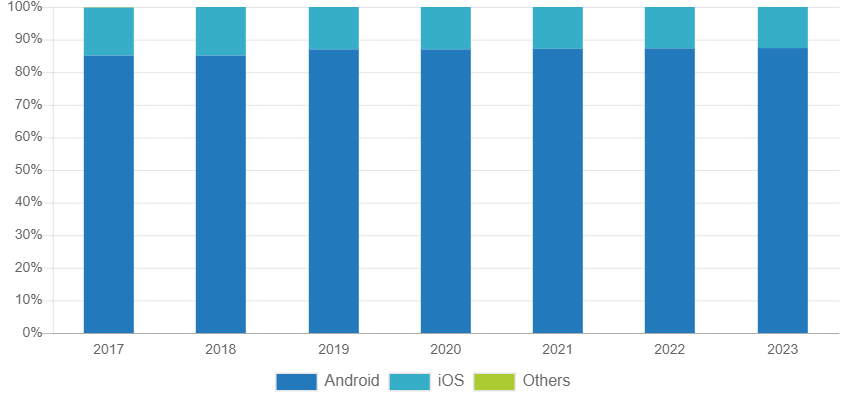
Mobile OS Market Share

Image Source: IDC

“In 2019, market share of the Android OS will increase to 87.0% from 85.1% in 2018. Volumes are expected to grow at a five-year compound annual growth rate (CAGR) of 1.7% with shipments of 1.30 billion in 2023.” – IDC

As per Statista, the Android has 2.8 million apps available on the Google Play Store in 2019.

The numbers prove that the Android OS continues to climb new heights with constant growth. Android is more flexible and open technology than iOS when it comes to development. This is the main reason businesses prefer Android app development. Moreover, it allows companies to reach out to a large audience.

Developers have different ways to build Android apps. The widely adopted way is to download Android Studio. It is an Integrated Development Environment (IDE) that provides necessary packages that help in Android app development.

Well, Android Studio just provides an environment for app development that is not enough to build an app. Selection of the right programming language is essential to write code for the Android app.

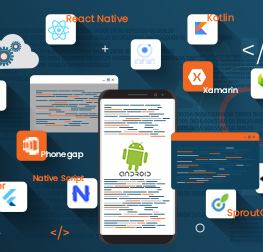
This post will introduce different Android app development frameworks to you so that you can select the best one for your Android app. Of course, Android app developers will suggest you the best suit. But, with a technology little knowledge, you can judge whether the selected tech stack is appropriate.

15 Best Android App Development Frameworks to Consider 2022

1. React Native

React Native is an Open source framework developed by Facebook to build native mobile apps. The JavaScript framework allows to develop apps through building blocks just like native apps. Thus, it is quite tough to identify whether the app is developed using React Native or Java.

Android app developers can optimize the React Native apps by adding codes written in other languages such as Objective C, Swift or Java. The technology has been used by various Fortune 500 companies like Walmart, Tesla, Instagram, and many others for mobile app development.

2. Ionic

Ionic is a free & open-source framework and used to build progressive web apps and native mobile apps. As it is a cross-platform technology, developers can develop an Android app and then transfer it to another platform.

It allows developers to build progressive hybrid apps using JavaScript, HTML5, or CSS3. Ionic offers features like live reload, logging, and emulators. Being an Angular and Cordova based technology, Ionic holds a large community of 5 million developers across the globe who have developed around 4 million apps using Ionic.

3. Kotlin

The programming language is invented by JetBrains. It is a modern platform that combines function, features and object-oriented programming. It is 100% interoperable with Java language and runs on the Java Virtual Machine (JVM). Google has declared Kotlin as an official IDE for Android app development in 2017.

The developers use it as a replacement of Java as it streamlines the app development process. Moreover, it can be used as a primary language for app development. As per a Stcekover Flow survey, Kotlin held the fourth position as a most loved programming language.

The large scale organizations like Uber, Twitter, Airbnb, Pinterest, Trello, Netflix are migrating their Android apps to Kotlin.

4. Corona SDK

It is a software development kit that is used to develop Android app 10x faster than any other Android app development frameworks. It is a multi-layered and lightweight programing language that builds an app with greater flexibility, usability, and speed.

Corona is highly used for gaming app development. It is available for free for both Windows and Mac OS X along with real-time testing support. The framework has a feature-rich API suite that contains networking, graphics, particle effects, widgets, and more.

5. Xamarin

This is the best framework for those who want to build Android apps without using Java. Xamarin is used by around 1.5 million users globally. It offers a complete set of C# code base to develop native apps for Android and other mobile operating systems. Developers also use Xamarin in Android Studio to build native apps using .NET code base.

6. PhoneGap

Developed by Apache and Adobe, the technology allows to build Android apps using web development technologies such as HTML5, CSS3, and JavaScript. PhoneGap is an open-source framework and allows developers to see changes in the app in real-time.

Highly used for Hybrid app development, the framework provides excellent performance and freedom to work without hardware-related limitations. It has a bunch of third-party software tools, extended plugin libraries, and a growing community to develop robust Android apps.

7. Sencha Touch

Sencha Touch is an enterprise-first framework introduced by the Android community for native mobile app development. The Android app development framework is based on HTML 5 and JavaScript that allows to build universal applications for the Android platform.

Offering 50 built-in native themes and UI components, it allows developers to create attractive apps. Sencha Touch is the first choice of big organizations due to its high-level flexibility, compatibility & performance, fast execution, and responsive touch features.

The programing language allows to develop Android apps with smooth scrolling and fluid animations that are highly adaptive. Android app developers can use the enriched UI, a huge collection of themes, a vast data package and an integrated MVC system offered by Sencha.

8. Cordova

It is a free and open-source framework that develops mobile apps using HTML, CSS, and JavaScript. Cordova is developed by the Apache and allows developers to build multi-platform mobile applications using a single code base.

As Cordova uses native device API for mobile app development, it is tough to know whether the app is developed using native languages or not. Moreover, Apache Cordova supports offline scenarios, it is an excellent platform to build desktop apps.

9. Unity

Unity is basically a game engine that is used to develop 2D and 3D augmented reality and virtual reality games and other situations. The technology is compatible with other platforms along with Android. Being a cross-platform technology, it allows developers to export games to multiple platforms like Windows, Web, PlayStation, iOS, Xbox, and more.

It creates an amazing experience for augmented reality and virtual reality using the Unity engine. The technology controls different graphic elements, game objects, momentum and more. It creates an interactive experience with immersive content that drives tremendous user engagement for the companies.

10. TheAppBuilder

TheAppBuilder allows to build Android apps with a code less user interface. Thus, developers can create an app without knowing the coding of different programming languages. Offering drag and drop interface, it helps in developing the app faster.

Pre-built blocks of the framework come with various features such as polls, feedback, push notification, content updates, and much more. TheAppBuilder allows developers to submit the app directly on the Google Play Store and businesses to integrate social media to drive user engagement.

Companies can generate analytics reports using the framework to identify the issues that affect app performance and fix them in time.

11. Flutter

Flutter is introduced by Google and written in dart language. It is a multi-platform SDK that allows to build robust mobile apps. It is quite different from other Android app development frameworks as it simplifies the cross-platform development process. If you want to develop hybrid applications, then Flutter the best option to choose from.

The technology provides a solid testing framework that allows developers to perform unit, functional, and UI tests. As Flutter contains hot-reload functionality, developers can perform testing seamlessly without restarting the application.

12. NativeScript

This is the best framework for hybrid app development and supported by Telerik, a Bulgarian software company. It is an open-source and free framework and allows developers to build apps using Angular, Vue, and TypeScript. It allows the skilled web developers to build advanced progressive web apps.

Using NativeScript for Android app development, you can achieve native-like UI and performance of the app. Providing JavaScript on the UI thread, the framework provides high performance on all native platform APIs.

13. SproutCore

SproutCore is a JavaScript-based framework that allows to build Android apps faster and with advanced features. Being an HTML5 based framework, it runs with a clear MVC design that optimizes the performance and scalability of the application.

The framework contains a set of tools that can be used in desktop-like applications for browser, including UI components, deployment & testing tools, and routing. With the help of these tools, SproutCore maintains the app code and business logic effectively.

14. Appcelerator Titanium

The titanium framework uses the functionality of JavaScript to call different APIs to boost app performance. It is an open-source framework that builds applications with a mobile-first approach. With Appcelerator Titanium, you can build a visually appealing and clean app that provides native-like look & feel and functionality.

Moreover, the framework builds a multi-platform mobile app using the existing code. The framework can be used in game development. When it comes to mobile app development, Titanium contains the hardware-specific features such as platform-centric notification, OS related controls, and Android menu buttons.

Other important features of Titanium are app monitoring, performance regulations, and automated testing on mobile devices.

15. jQuery Mobile

jQuery Mobile contains appealing function such as progressive enhancement, theme design, semantic makeup along with Cordova support. It has a large community support. The framework allows to write the code once for Android and reuse it across different mobile operating systems such as iOS, Windows, Blackberry, and more.

It builds responsive wen portal and mobile applications that are compatible with different smartphones, tablets, and desktops.

Key Takeaway

Selection of the right framework for your Android app development is a quite strategic decision. Credence has a team of 50+ Android app developers who have proven experience in developing robust business solutions for versatile industry verticals. We offer end-to-end Android app development services start from consultation, design, development, testing, deployment, and enhancement and help the organizations improve time to market of their Android apps.

General FAQs about Android App Development Frameworks [H2]

What is the Android application framework?

Android Framework is the stack of code that makes up the OS. It includes native libraries that may or may not be accessible to the Android developers.

What is the best framework for Android development?

For different Android apps, you need different frameworks. Every project has specific requirements. To address those specific needs, you need to choose different Android frameworks. With the help of an experienced Android app development company, you can make the right choice.

Which framework is used in Android Studio?

Java is the primary technology is used to develop the backend of Android apps. To create the design layout of Android apps, developers use XML. To build an app with Android Studio, you need to use both Java and XML.

Is Kotlin better than Java?

Get the detailed insights about the how Kotlin is better than Java by visiting 10 Reasons You Should Know Why Kotlin is Better than Java for Android App Development.


How to Select the Right iOS Architecture for Your iPhone App?

If you tend to judge the book by its cover (here, the post by its title ;)), then you might feel it is for iPhone app developers. Am I right?

Well, most of the iPhone developers have more or less understanding about different iOS architectures as per their experience level.

Undoubtedly, the selection of suitable software architecture is the job of iPhone app developers. But, your involvement is highly important in all decisions whether they are strategic and technical.

Of course, technology is not your forte so you can not make the right choice. But a basic understanding of different technical aspects helps you to get better insights about the decisions taken by your technology partner.

This post is written to serve this purpose. It enables entrepreneurs with an overview of the best iOS architecture patterns so that they can end up with having a quality and cost-effective iPhone app.

Why It Is Important to Choose The Right iOS Architecture?

Election of the right iOS architecture is essential to build a highly functional iPhone app. The software architecture focuses on how major elements and components within an iPhone app are used and interact with other key components and elements. It also helps in managing the algorithm and implementation detail of each component.

Selection of architecture depends on the complexity of your app. And, app complexity depends on a number of features and functions integrated into the app. Each feature contains a set of components, class, entity, and elements.

Without an appropriate software architecture, it is quite difficult to manage and update the application code on the go. Especially when the iPhone app developers need to fix any bug or address feature enhancement requirements.

Characteristics of A Good Architecture

  • Distribution: It’s about a balanced distribution of responsibilities across different entities with strict roles.
  • Testability: A good architecture simplifies the code testing by allowing developers to find and resolve the issue in the app run time, before the end-user encounters with it.
  • Ease of Use: The less the code, the fewer the bugs. It allows iPhone app developers to resolve the issues quickly. It directly reduces app maintenance cost.

Different Types of iOS Architecture

MVC

Model-View-Controler the oldest and highly popular design architecture for iPhone app development. Most of the iPhone app developers prefer this code as iOS SDK is developed based on this architecture. It separates the application code into three layers Model-View-Controller.

iPhone app developers prefer this architecture for small size and simple iPhone app development.

  • Model: In this layer, the data resides. It takes responsibility for modeling objects, parsing, and persistence.
  • View: This layer manages the UI elements where the user interacts. It takes the input from the users and provides the relevant output.
  • Controller: It plays the role of mediator between the model and the view.

Diagram

Apple's MVC Architecture

Features

  • Distribution – There is the least distribution of responsibility as View and Model are separated while View and Controller are tightly coupled.
  • Testability – Bed distribution means bad testability. iOS developers can only test the Model layer of the architecture.
  • Ease of Use – Least amount of code so quite easy to use and also least cost of code maintenance.

MVVM

The acronym of this architecture is Model-View-ViewModel. This architecture provides more separation of concerns. It is an augmented version of MVC architecture so that we can keep View and Controller smaller and easily manageable. We can incorporate MVVM into an existing MVC architecture as Model, View, and Controller of both the architecture patterns is similar.

iPhone developers prefer this architecture for medium size and complex iPhone app development.

  • Model: This layer manages the data logic
  • View: It takes responsibility for anything that users interact with. It could be anything that we see on the screen such as text fields, labels, etc.
  • ViewModel: The layer is responsible for exposing the data objects from the model to the view in the defined form.

MVVM considers ViewController as the View. So it doesn’t add a new layer. In this architecture, the code goes into the ViewModel instead of ViewController. The ViewModel passes the data to ViewController in a defined format to be presented on the screen to the end-users.

In this pattern, the ViewController provides passive view, it has no responsibility and no power to make decisions.

Diagram

Apple's MVVM Architecture


Features

  • Distribution – More distribution compare to MVC
  • Testability – Testability is easy as ViewModel has no binding with the View.
  • Ease of Use – Easier to use as responsibilities are divided and code management is easy. But the code maintenance cost is high.


VIPER

It is an adoption of Clean Architecture for iPhone apps. The architecture is specifically designed to build components for different user cases. It is the only architecture pattern of iOS that does not contain MV(X).

VIPER is an acronym of View, Interactor, Presenter, Entity and Routing. With these five layers, VIPER provides a lot more separation of concerns. The architecture can be considered when you have many different components.

iPhone app developers prefer this architecture for large size and extremely complex iPhone app development.

View: It sends the user actions to the presenter and displays the output provided by the presenter.

Interactor: It contains business logic and other data related entities. This layer fetches the data from the Model layer.

Presenter: The presenter layer contains the UI logic. It changes the view of data as per the format required by the UI. It mainly engages in the transformation of data.

Entity: This layer contains only data objects and does not include the method of data processing.

Router: It takes care interaction between different modules in order to control which view will be displayed and what will be the next view.

Diagram

Apple's VIPER Architecture


Features

  • Distribution – A great level of distribution of responsibility. It has the most separation of power.
  • Testability – Better distribution comes with easier testability.
  • Ease of Use – Extremely easy to use. But, there is a considerable cost of maintenance as developers need to write a huge amount of code for each component with very small responsibilities.

Conclusion

Having a decade long experience in developing the robust iPhone applications, Credences iOS team has implemented all the three architectures as per the complexity level of the project. Leverage hands-on experience of our iPhone app developers who ensure the quality and stability of your iPhone app.

Our experienced software engineers can understand your requirements and suggest the most suitable and cost-effective iOS architecture for your iPhone apps. Connect with our iPhone experts to explore our expertise and get the best suggestion for the effective execution of your project.

How to Generate Revenue Through Fintech Apps? (5 Proven Strategies)

There are a few industries where constant innovations not only improve the respective domain but also disrupt the other verticals as well. Undoubtedly, Fintech is one of them.

Fintech is the amalgamation of Finance and Technology. The world is continuously moving towards digitization by embracing advanced technologies. The finance industry also harnessing emerging technologies such as Blockchain, Data Science, Artificial Intelligence, Machine Learning, etc.

With Fintech apps, financial institutions transform their conventional ways of serving the people by delivering a wide verity of financial services in a new format.

Classification of Fintech Services

  • Payment (consumer payment, cryptocurrency, & payment backend infrastructure)
  • Investment Management (institutional & private investment management)
  • Capital Rising (alternative financing & crowdfunding)
  • Deposit & Landing (digital banking, personal finance & alternative lending)
  • Enterprise Financial Software (collaboration & workflow software, accounting & invoice software, data & analytics software)
  • Market Provision (financial social networks and matchmaking & comparison)

Overview of Fintech Market

Fintech is relatively a new domain compared to other industries. It’s an advanced version of the financial industry. Fintech is disrupted by the startups who align all the financial services and activities with advanced technologies to provide financial services to businesses and individuals. Fintech apps help financial services providers serve their customers quickly, effectively and continuously.

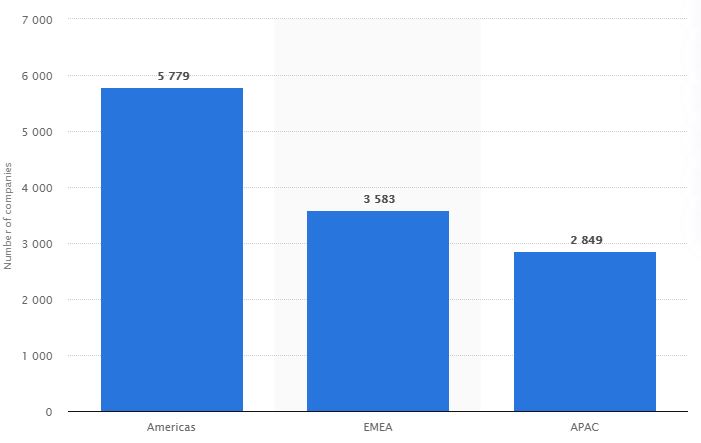
Fintech Startups by Region

Image Source: Statista

As a result, “There were 5,779 financial technology (Fintech) startups in the Americans in February 2019, making it the region with the most Fintech startups globally. In comparison, there were 3,583 such startups in Europe, the Middle East, and Africa, followed by 2,849 in Asia and the Pacific region.” – Statista

Though there are numerous Fintech companies across the globe, very few are getting customer attention along with revenue generation through Fintech apps. Robinhood, Acron, Mint, Venmo, Coinbase, and Tycoon are the best apps in the industry.

This post contains the top five strategies that financial service providers have to consider to monetize their Fintech apps. Let’s redefine the business model of your app to empower your revenue stream.

5 Strategies to Make Money from Fintech Apps

Advertising [H3]

The most common and simple way to generate revenue from Fintech apps is by displaying commercials in the app. The app owners get paid by the third-party ad networks for running their advertisements. You can also earn bucks for each time users clicked.

You can associate with banking tutors, trading businesses, loan firms, etc. to promote their products and services through your app.

Another way to make money through Fintech apps is by considering banner ads and rich media.

Banner Ads

Banner ads appear on the home page of the app. You can display them with different sizes and at different places (top or bottom) on the screen.

Rich Media

Rich media are interactive advertisements that engage users for a long time, so they do not quite the session. The rich media ads could be mini-games, video, text, images, audio, etc. It is a smart way to run the commercials without hurting the user experience.

Subscriptions

This one of the most successful strategies to monetize Fintech apps. Allow users to use your app for the free trial for one month. After a month, if they want to use your app, they need to pay. If they are comfortable with your app, they will definitely subscribe it.

It is the most secure way of money making. As subscriptions are changed with flat rates, third party integration or percentage plannings are not needed. It’s a direct way to generate revenue for your finance business.

Peer to Peer Lending

The concept is all about an individual can take a loan from another individual using the Fintech app. It cuts down the layer of any intermediary and financial institution.

With this model, an individual can lend money to other individuals and earn interest. The main benefit to financial service providers is, they can charge a small amount as brokerage the connection. Thus, its an extra income source for the financial institutions.

This seems quite simple and easy to the borrower compared to passing through a complex process of financial institutions. Moreover, peer to peer lending removes paperwork.

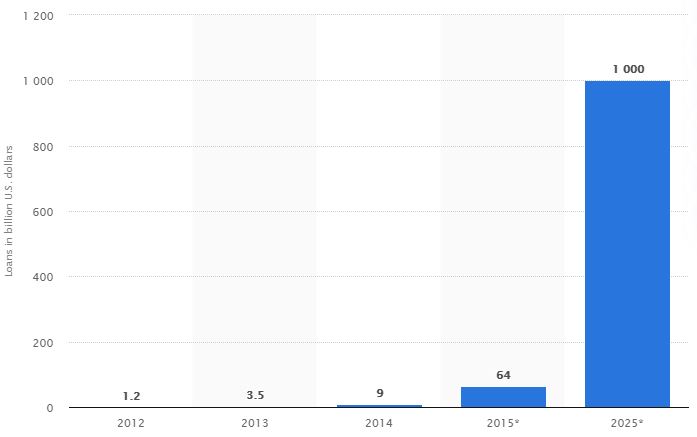
Value of Global Peer to Peer Landing

Image Source: Statista

“The global Peer to Peer lending market was US$3.5 billion by the end of 2013 and it is expected to reach one trillion in 2025.” – Statista

According to Bloomberg, “The P2P lending market is forecast to reach $370 billion by 2025, after growing at a CAGR of 5.6% during the forecast period 2019-2025.”

P2P is a popular monetization method that gains attention and acceptance across different regions like North America, South America, Asia-Pacific, Africa, and Europe. However, North America is the largest market of Peer to Peer lending.

Robo-advisors

Robo-advisors are highly admired money-making platform that generates revenue through trading. It replaces the human financial advisors.

Usually, customers take the help of financial advisors for the better management of their wealth. Robo-advisers provide automated and algorithm-driven financial services that are at little or no human intervention.

It is beneficial for both parties: customers and app owners. App owners can earn money by charging less commission than traditional advisors. Customers can buy services at lower prices. Moreover, Robo-advisors automatically allocate, manage and optimize the customer’s assets.

Additionally, the app is available for the customers all the time that is quite comfortable for them. You can try this advanced monetization tactic for your Fintech app development.

In-app Purchases

Most of the Fintech apps are free to download. Most of them are making money through in-app purchases. Considering this business model, you can sell your products or services directly to the customers and boost your revenue stream.

While going with in-app purchases for your app, keep experimenting with the different options and analyze which one works best for you. Later on, you can define your business strategy by focusing on highly impactful in-app purchases.

How Does Credencys Help in Fintech App Development?

Credencys has successfully developed varied Fintech apps by understanding client requirements and analyzing Fintech market trends. Along with the development, we equally focus on the UI/UX if the mobile application to make users comfortable with the navigation and flow of the application.

We have a team of 100+ Android & iPhone app developers who have better insights about the must-have features and functionality of a Fintech market. Thus, they won’t only help you in developing a robust Fintech app but also provide technical consultation to build a cost-effective business solution.

Frequently Asked Questions

How much does it cost to make a Fintech app?

It is quite tough to define the exact cost of Fintech app development. The app cost depends on the features and functionality you want to add in the app. The Fintech app required a lot of integration and API services so it charges more than any simple app. A simple Fintech app with basic features costs you around $30000 to $50000. If you want to consider advanced and complex functionality integration then it would cost more than $100000.

How much time it will take to develop a Fintech app?

The development time of the Fintech app is based on how many features and functionality you want to add in the app. The more features you consider, the app development will take more time. A simple app can be developed within 6-8 months. An app with all the advanced features takes up to 12 months.

What are the important features of a Fintech app?

The essential features of a Fintech app are multi-tier functionality, real-time processing, fast & secure transactions, batch processing, integration with other applications (baking &financial apps and backend of web applications), and more.

What are the popular Fintech apps?

The list of best Fintech apps contains Revolute, Coinbase, Staring Bank, Mint, Lemonade, Trigger, acorns, BudgetBakers, Lawnmower, Robinhood, and more.