How to increase your website conversion rate by personalizing your content with Pimcore DXP/CMS?

Personalization of web content according to the interest of the target audience group will surely increase website conversion rate. A hike in website conversion rate will increase earnings opportunities through the website.

As per the recent survey report, nearly 95% of companies have reported that they experienced a significant increase in their conversion rate once they started to personalize content according to the target audience.

Here in this article, we have discussed website conversion rate in-depth along with its benefits and working tactics for improving conversion rate. Also, we have elaborated the ways to increase website conversion rate through content personalization with Pimcore Digital Experience Platform (DXP)/Content Management System (CMS).

Table of Content

  • What is Website Conversion Rate?
  • Benefits of Having High Website Conversion rate
  • How to Increase Your Website Conversion Rate?
  • Top 10 Tactics To Improve Conversion Rate
  • Increase Website Conversion Rate through Content Marketing
  • How to use the Pimcore personalization engine?
  • How to personalize content for a specific content group?

What is Website Conversion Rate?

Website conversion rate is the ratio of your website visitors who take desired actions like purchasing/subscribing or engaging with your business.

On average, the conversion rate of a normal website would be around 2% which means for every 100 visitors you may get 2 customers. Well, those numbers seem to be pretty good as per the experts’ view.

However, the majority of websites have a conversion rate of 0.1 to 0.2% only. That means they get a customer from every 1000 visitors. According to marketing experts, there are so many ways to improve your site traffic and also the conversion rate.

We are going to discuss those possible ways later in this post before that let’s get a brief idea about the benefits of having a high conversion rate.

Benefits of Having High Website Conversion rate

For every business having a good conversion rate is essential to achieve online business goals. Here, we have listed a few vital benefits that every business owner can avail of by having a high conversion rate on their business website.

1. Better Understanding of Your Customers

If you are an online retailer, understanding your customers from the deep down becomes necessary. By knowing who your customers are, what they need, you can keep the stock ready upon their orders and market to them effectively which plays an important role. In such situations, Conversion Rate Optimization (CRO) can help improve your entire eCommerce business.

CRO allows you to develop your buyer personas for your online store; therefore makes it viable to the right audience. Providing a product or service as per the customer’s preference is more important than just selling it.

2. Get More Customers with High CRO

If you are already implementing strategies to bring down your cost per acquisition, then CRO can help you perform the same in eCommerce. Optimizing your online store consistently can help you understand your customers even better than what you do now. Therefore, you can focus on making your online store engaging and streamlined to grab customers’ attention and convert them into real customers.

3. Improves Your Website Profits

This is one of the greatest benefits of conversion optimization because a simple improvement in your conversion rate can show a drastic change in your profits. In advertising and promotions, you need to wait for results whereas, in CRO, you get immediate results and tangible profits, which will only double your current profits.

4. CRO is your secret weapon

Your competitors may or may not be using CRO for their business. But, once you start, your competitors can easily figure out what you are working out for search engine optimization or social media marketing.

However, CRO is unlike other tools that let you achieve amazing results that neither you nor your competitors can imagine. It is not a simple tool for your competitors to analyze the efforts you put into increasing your conversion rates.

5. Leverages Your website traffic

CRO performs exceptionally well and works with the current website traffic of your online store. Though you have to invest in time and money during the initial period for a page to get optimized, once you see it working, you will really start getting more traffic for your webpage through CRO and also due to SEO and other marketing efforts.

6. Reduces Your Customer Acquisition Cost

If you are disparate in looking for funds to invest in some SMM campaigns or PPC, increasing your conversion rate is a great way to arrange some money for promotions. Since you optimize your site, traffic that comes from other campaigns will definitely improve as well. Therefore, you save good money from CRO and can utilize it for any other promotional activities you have been doing for your website traffic improvement.

When your focus is more on improving conversions, your customer acquisition costs will come down automatically and gradually. Therefore, converting these visitors to customers becomes easy for you and there will be an increase in sales as well.

The above section would make you aware of those benefits of having a high website conversion rate. Now, take a look over the working tactics to increase your website conversion rate.

How to Increase Your Website Conversion Rate?

People who are in the online marketing sector would be aware that conversion rate is the lifeblood to achieve marketing goals. A higher conversion rate will help you earn more bucks from your website.

Here we have provided those 10 best and working tactics for boosting your website conversion rate instantly.

Top 10 Tactics To Improve Conversion Rate

1. Add a pop-up on your site

In a survey conducted by Sumo, it was termed that the average conversion rate for all pop-ups is 3.09%. If you do it in the right way, it may increase up to the top 10% of pop-ups at which the average conversion rate comes to 9.28%.

Anyhow to get a high conversion rate, here are some of the tips you can make use of:

  • Try different offers such as PDFs, premium content, and other different products until you find the right one for your kind of flow. But make sure that you do not keep a 30-second delay timer on the pop-up, since it may annoy your visitors.
  • Keep the pop-up in such a way that it can easily be closed by visitors.
  • Set a cookie to the pop-up, so it appears only once to users. Moreover, you will have pop-up tools that allow you to do this.

By doing so, you can experience a higher conversion. Therefore, the rest of the methods may not be considered as well.

2. Delete unnecessary form fields

If you have ever had the intention of filling a form online, would you do it if it is too lengthy?

Of course not. Right?

Therefore, if you are planning to get details from your visitors, remove unnecessary fields from the form and get only what you need and helpful to you as well. It also increased the number of signups and shows an improvement in your conversion rate.

3. Add testimonials, reviews, and logos

No customer likes to be the first person for your product/service; therefore, to ease their mind, provide some testimonials or reviews/feedback of your previous customers. In case you are serving B2B, then add some logos of clients to instantly build trust with new clients/customers.

In case you have quality social proof that buffers notable uncertainty, then you can expect an extreme conversion impact even up to 400% sometimes.

4. Keep your website distraction-free for visitors

Your website should be clean and clear and it must be free from distractions. Make your landing page clear, easy to navigate and concise, and do not include any additional information if not required at all. Provide accurate information only according to your visitor’s interests and not anything else.

Make sure that your landing page has only the following so that it is simple to understand:

  • Headline and subheadings
  • Benefits and features
  • Info-graphics or images with text that shows what you are offering
  • Testimonial or customer reviews

At the same time, you should be able to clearly gather what is distracting your visitors on your website and remove it, which results in a higher conversion rate.

5. Ensure the initial step is very easy

If your website includes registration, make it very simple since it is the first step of your conversion process. Therefore, begin the process by entering an email address, and from there keep collecting more information.

As long as the initial step is easier, the chances of your visitors taking action become higher and keep them going on until the end of the registration process.

6. Link your website to a third-party signup service

Rather than creating a new account, visitors find easy and even quicker registration with alternate options such as linking through a Google account, Facebook, or any other social media account. This will create an impact on your conversion rate since dozens of websites have tried this third-party method.

7. Make your CTA copy stronger

Not just sign-ups and starting a trial may not give you the best conversion rates, instead of improving your call to action can give you a good conversion rate and take you to a win-win strategy. Start your CTA with the word Yes (“Yes I want my offer/discount!”) which creates a positive vibe in your visitor and sometimes, can turn out as luck.

This idea works a lot better than your CTA and can show an increase in your conversion rates.

8. Add live chat to your website

Many visitors to your website may want to buy your service but may have some hesitation due to certain reasons. They might have some finicky questions in mind which they would like to clarify but get stuck in one place. If you have a live chat option either the moment they enter your website or depending on the heatmap places they are navigating the live chat option can greatly help.

Moreover, it helps customers who do not like to have a wait time on calling your customer support.

9. Try implementing another offer

Your landing page design, copy, and other related factors may need to be focussed, but that does not mean that you overlook the importance of selecting the right offer. If your offer is very appealing to the market, the conversion rate automatically increases.

In case the conversion rate does not increase, then you should provide an offer until it is appealing to the market. If one does not click, you can try as long as you find a winner.

10. Issue a money-back guarantee

No customer will like to get at risk; therefore they always look for the loophole where either they get a new product or money-back. A money-back guarantee assists get away from fears and move from previous objections.

Do not worry and overthink that you may lose your returns because of implementing a money-back guarantee. Money-back guarantees your conversion rates get increased extensively. Nevertheless, other tips mentioned are indirect to improve trust in your brand, and even if something goes wrong, your customers will have the assurance that they will get their money back.

If your service or product is viable to add a money-back guarantee and you have not done it yet, implement it immediately. You will be astonished to see your conversion rates. But before you establish it, make sure you maintain certain limitations.

Increase Website Conversion Rate through Content Marketing

1. Keep your content updated

Your website may look eye-catching and you may get visitors as well, with great designs and a lot of blog content, but at the same time, your website can incur bounce rates if the content is not up-to-date. Therefore, keep your blog content updated and stay in line with the trend which will drive huge traffic to your website.

Once it drives traffic, later you have to plan how to convert these visitors to potential leads.

2. Show relevant content & make it highly visible

Websites that have more engaging and relevant content added with video representations have higher conversion rates and traffic compared to those websites that do not have so. This has been showcased in a study conducted by L2 in 2014 where the conversion rates were 20% higher for websites that had videos and relevant content with images.

3. Confirm your content copy is optimized

Content that is engaging, relevant, creative, and visible decides the half-success of your website. But if you do not optimize your content, it will not reach the target audience and at a certain point, you will find yourself left alone in the battle. Therefore, invest in SEO and ascertain that your content is regularly optimized with effective checking and time-to-time update.

This will increase the organic search of your website when new visitors enter your site when listed on the first page of Google and other browsers. However, it results in a high Google ranking which again brings traffic to your website.

4. Testing content and conversion rate optimization

When it comes to digital marketing and website designing, the conversion rate option (CRO) is a valuable concept. Ask us how. It is a process of increasing visitors to your website which definitely ends up in a sale. Though there are many ways to achieve this, many would like to begin it with A/B testing some content in order to see the results and then take necessary action.

Whichever content leads to high conversions, the same content you use for wider use for conversions to continue.

5. Tailoring your content

A great boon that digital marketing has offered to us is data. With Google analytic reports, you can see how customers do on your websites, their demography, how they come to know about your site, and how long they stay in your website, everything is captured. These data when analyzed and split down in deep, help you in creating tailored content.

You can understand your customers’ interests and disinterests and give them what exactly they are in search of. This will, in turn, show impact by increasing your website traffic and conversions, along with fetching you a top rank in Google.

6. Receiving feedback from verified users

The feedback you receive from your verified users can give you accurate information about the pros and cons of your website with respect to content or design; therefore rectifying it can move your place in Google to one or two steps ahead and still you will compete.

Moreover, it can help you generate different content to engage your target audiences since you show content according to their preference.

Other Vital Points to Note Down

  • To increase your conversion rates and keep your website effective to your visitors, it is ideal that you take efforts to minimize the conflict of interest between content creators and CRO experts if any. Scheduling changes in content and CRO campaigns combined is highly useful to drive traffic to your website but it can be a difficult task. However, with digital signage in place, you can now easily beat that condition as well.
  • Remember that your website should always run content as per your visitor’s desires. Otherwise, it may not drive traffic and you may tend to experience a huge loss to your brand, thereby resulting in poor conversion rates.
  • Sometimes, writing two different types of content with unique images and videos may work if the content you publish is eye-catching and interesting. Otherwise, it may not work as your visitors would have been habituated to using your original website and may consider the second one as your competitor or useless.
  • When you receive CRO test results, you might be required to change the layout of your website and can sometimes be lopsided by social sharing. Therefore, you should design a page with content that is not created for conversion purposes but for the purpose of only being shared. This will result in creating awareness for your brand and further enhancements when made.

But be sure while changing or removing content since it can create some confusion and induce a loss in traction if you lose track of what to change and when to change.

Many of you may or may not know the customization benefits of Pimcore and how to use its personalization engine. Therefore we would like to showcase some strong points of its usage and make you understand the incredibility of Pimcore personalization and how it helps improve your website conversion rate.

How to use the Pimcore personalization engine?

Pimcore provides a powerful engine that helps to increase the website conversion rate significantly. Features like behavioral targeting and personalization capabilities of Pimcore play a key role in improving conversion rate along with customer experience. Let’s understand how to increase website conversion rate by personalizing content with Pimcore.

Step 1: Determine your target groups

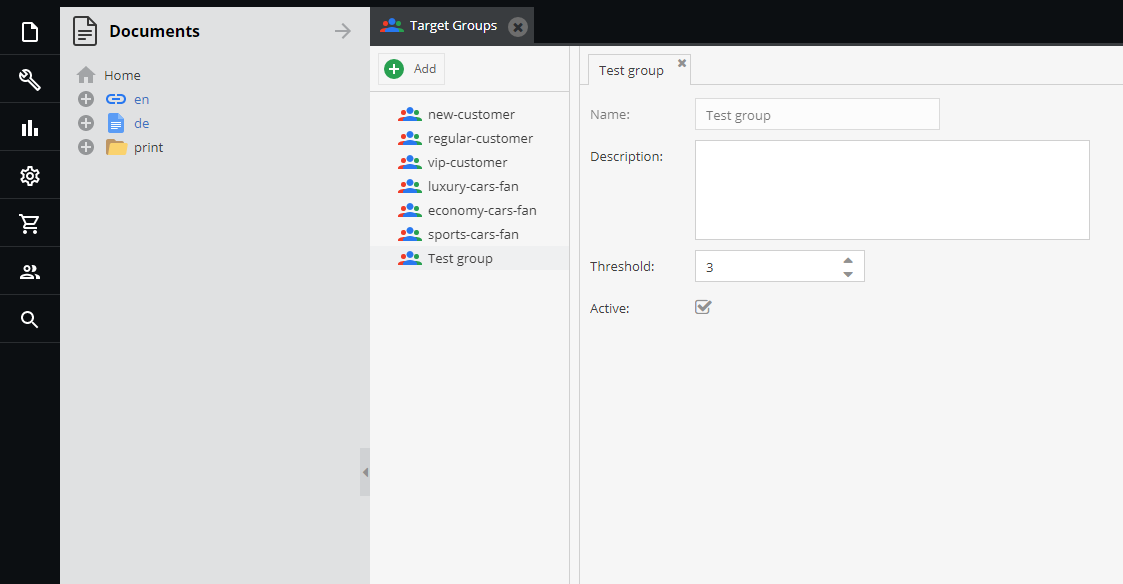
Defining your target group at the beginning can help you distribute different content according to the preference of the members of that group. To set your target groups, open the dashboard of Pimcore and click on Marketing. Now click on Personalization/Targeting and then on Target Groups.

Determine your target groups

You can see your existing target groups if any and can also create a new one on the same page. If you are not aware of using the Pimcore personalization engine to the core, then first take some small examples or test groups to try it once and then implement it in real.

Creating a new target group

While creating a new target group, you will have to provide a name, description, and threshold for it, to function according to your strategy. At the same time, Pimcore provides you with the facility to activate/deactivate target groups as per the need.

Creating a new target group

The threshold field plays a crucial role here where you can define a quantitative limit for a target group.

Step 2: Assigning a visitor to a target group

There are two ways to assign a visitor to a target group- one by assigning to a document and the next by using global targeting rules.

Using Global Targeting Rules

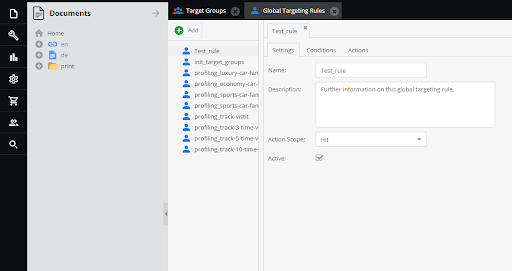
With global targeting rules, you can define a situation for a visitor to get assigned to a target group. To create a new rule, navigate to the left sidebar and click on Marketing. Now click on Personalization/Targeting and then click on Global Targeting Rules. Here, you can define settings, conditions, and actions for your targeting rule to work effectively.

Using Global Targeting Rules

Under settings, you have to define the name, description, and action scope. Since action scope can be a new topic to many, the following will help you understand how to set the action scope.

Pimcore provides four different action scopes, and each of them is unique in the following manner.

  • Hit – Denotes the actions run upon every request.
  • Session – Represents the actions implemented per session.
  • A session with variables – It means actions run per session with constantly changing visitor information.
  • Visitor – The visitor field represents actions implemented only once per visitor.

Now we know what action scopes can do, let us deal with defining conditions/situations to choose from.

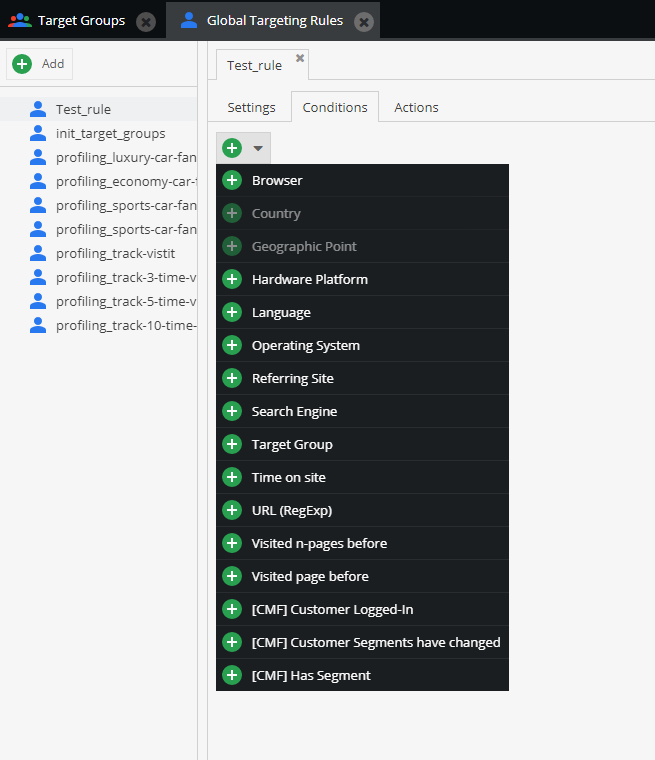
There are different conditions to choose and creating a huge number of combinations of conditions can make your personalization even more effective.

You can choose multiple conditions, some of those conditions are displayed in the image below for your reference.

Using Global Targeting Rules_1

For example; if you choose the URL condition and provide the URL link and specify the time on-site to your required period, and now you are good to go. Once you set the condition, you have to choose the right actions for it. There are six different action types available in which Assign Target Group is also one among.

Assigning a target group to a document

This part explains you more of personalizing your website for every specific target group and determining customer automation rules than that just assigning a target group to a document.

To assign a target group to a document, first, you should have the specific document opened. Once you open the document, click on SEO & settings which you can see in the top toolbar. Under the Assign Target Groups option, you can see different target group names available, from which you can select one or multiple target groups.

Therefore, whichever group you assign for the first time until you add a new group, every time you are assigned to the same target group.

How to personalize content for a specific content group?

Now you know how to assign a visitor or target group to a document, it is time to customize content and allocate it to your target groups.

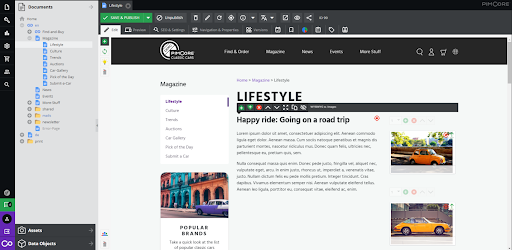
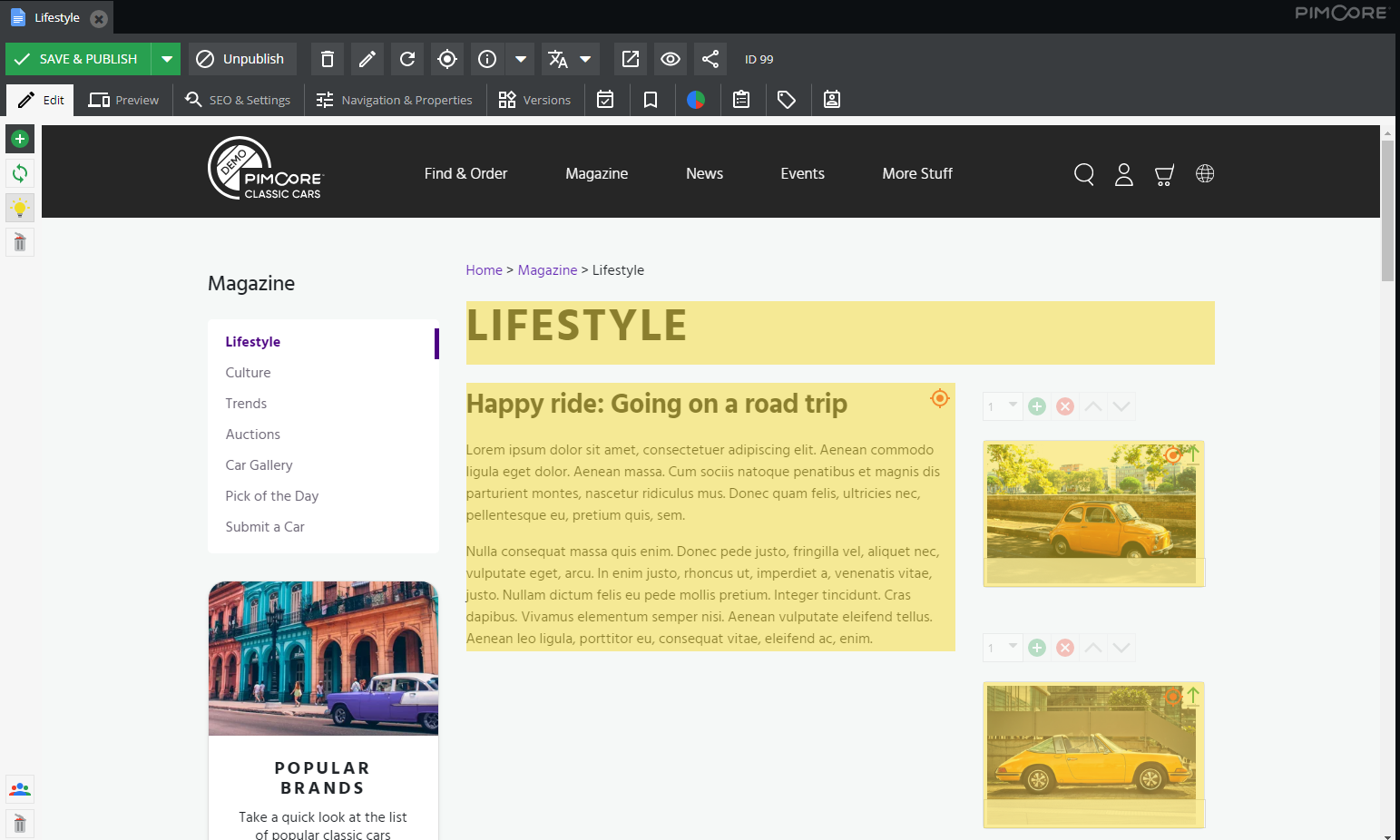
Open a document and click on the yellow light-bulb you can see on the upper left corner of the document. It will display you with the editable parts.

How to personalize content for a specific content group

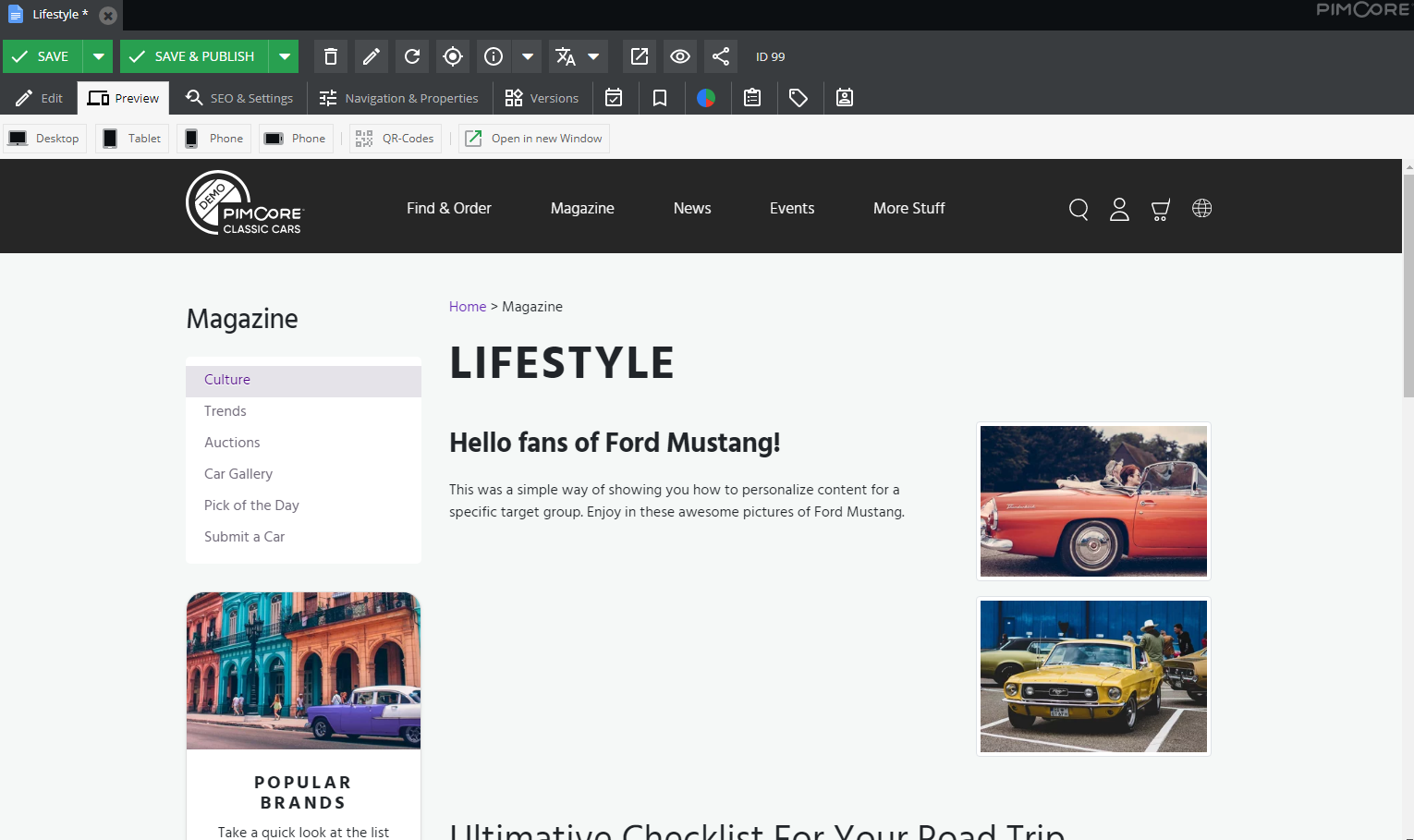
Now you can personalize content accordingly and show anything you want.

How to personalize content for a specific content group_1

Once you customize your content and images on the right and left side of the positions available on the page, it is all set to go.

How to personalize content for a specific content group_2

Conclusion

Conversion rate plays an important role in developing your eCommerce/non-e-commerce websites. Pimcore platform makes it easier than any other solution. It is easy to learn and get adapted as well, showing a huge improvement in your website conversion rate. Follow the procedure discussed above for personalizing content with Pimcore and experience an instant hike in your website conversion rate.

36 Signs That Proves Your Business Needs a Digital Asset Management (DAM) Solution

Production and management of digital assets is usually the job of the creative team. Out of both the tasks, their main role is to create conceptual and compelling artworks. And, that’s where their competency lies.

Ensure they invest their time and energy in creating outstanding pictures, documents, videos, and content instead of resizing the images, trawling through files, and other such miscellaneous tasks.

If your creative team is more involved in managing the digital assets rather than producing them, it’s an alarm for you.

Your creative team is already distracted by many secondary tasks. You have to make sure media asset management shouldn’t divert them from their core job and enforce extra responsibility.

That is where the Digital Asset Management (DAM) solution comes in. Consideration of DAM facilitates you and your team with a cartelized platform for storing, managing, and sharing the critical brand assets. It saves a lot of time, effort, and money of yours by allowing your creative team to do what they are the best.

Also, it helps you address many day to day operational and business challenges related to digital assets.

Let’s get started with the definition.

What is Digital Asset Management (DAM)?

Digital Asset Management is a platform that allows companies to store, manage, organize and share digital assets from a single system. It streamlines and automates many of your asset-related processes. DAM ensures the secure and effective management of digital assets.

To understand Digital Asset Management in detail, read An Ultimate Guide to Digital Asset Management (DAM).

36 Signs That Proves Your Business Needs a Digital Asset Management (DAM) Solution

1. It’s always a challenge where to find an asset

The creative team creates the digital assets, but different teams across the organization use them. These teams store assets in varied locations such as local folders, servers, email attachments, cloud storage, network, and hard drive.

When assets are scattered across multiple locations, it becomes time-consuming and confusing to search required assets quickly. Specifically when you have large asset libraries.

Additionally, if the systems (where they store and manage the assets) do not have the search functionality, they need to check through all the digital assets. There is no single way for anyone in the organization to find digital assets quickly and download them. It is the most irritating job ever.

How a Digital Asset Management solution helps you?

DAM allows you to store, manage and organize all the digital assets in a centralized platform. All the teams can access and use the needed brand assets. The creative team can share the assets with other departments or users (who want to use assets but do not have access to the solution) directly from the Digital Asset Management solution.

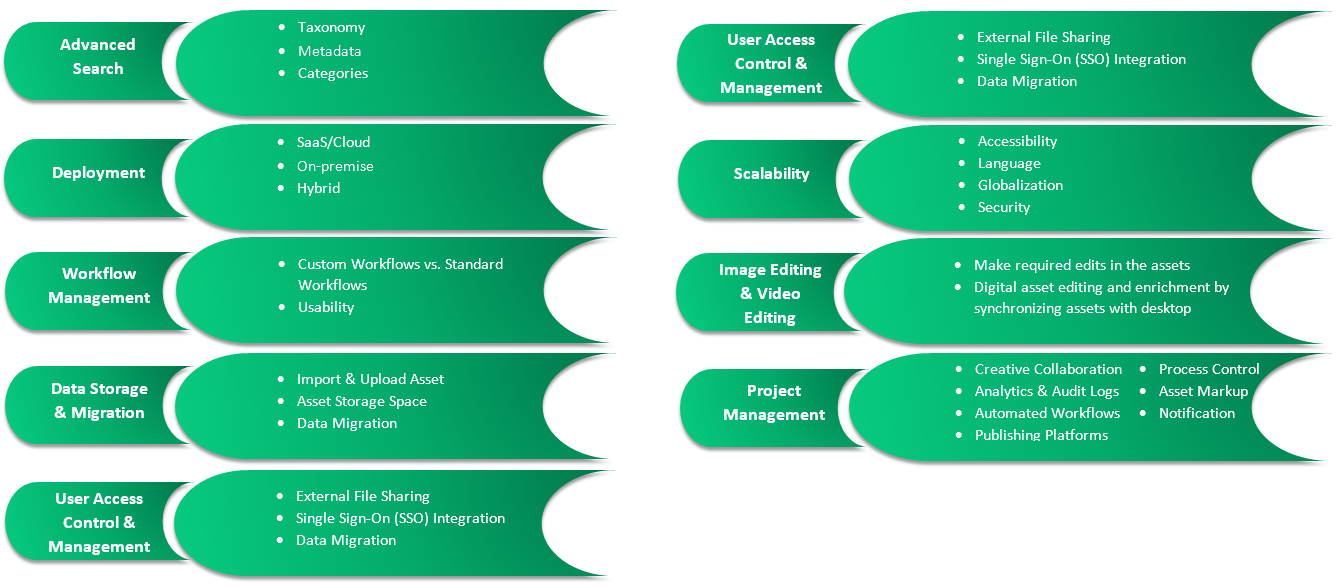
All the DAM platforms contain features like Advanced Search so that users can find the digital assets in a matter of seconds.

2. Your assets need to be explained a bit more

Do you have asset libraries with special instructions or restricted use cases? Does your marketing team frequently receive fines for violating the usage rights unknowingly on licensed photos? All this happens due to unorganized assets. If your assets are distributed in an organized way, you can deal with these challenges seamlessly.

How a Digital Asset Management solution helps you?

DAM allows you to manage your asset data in a centralized location in an organized way. It also permits you to define access and usage rights for each asset file, folder, or collection.

Digital Asset Management solution allows you to add metadata that involves product details, expiration date, usage rights, other information of each asset file. It ensures your teams can access only those assets for which they hold the access rights. Thus, there is zero possibility for unauthenticated usage of any critical brand assets.

The platform allows you to attach other relevant files like a model release form so that your teams can access all the required assets from a single location.

Additionally, as your business grows, you need to interact with your target audience using the different output channels. An advanced DAM ensures proper digital asset usage across your team – when, where, how, and by whom.

3. You are managing the digital assets in disparate systems

Usually, organizations prefer to store and manage the assets in different systems such as Enterprise Resource Planning (ERP) system, Project Management software, and other software.

If assets are available in separate systems, it becomes difficult for the teams to find, download and use the digital assets when needed. To improve organizational productivity and accelerate business operations, your team must have quick access to media assets.

How a Digital Asset Management solution helps you?

With the DAM system, you can gather all the assets in a single location. It allows you and your teams to find, download, and share the assets as and when needed in a matter of seconds.

If you save the files with proper metadata, it becomes easier for you to find the intended files from the millions of digital assets using the search functionality of the Digital Asset Management solution.

4. Managing and sharing the digital assets is resource-sensitive

Creating digital assets is not an option. It is a necessity. Companies need to develop videos, product images, PDF files, etc. to make online sales effective. Using the data sheets and product catalogs, your teams can also boost online and offline selling.

Earlier, most businesses prefer to invest in human resources instead of a solution for the reliable management of digital assets. It takes a lot of time to manage and share the digital assets across the organization.

Gradually, they realized this approach is not sustainable. It eats up a lot of time and effort of the team and impacts their productivity negatively.

How a Digital Asset Management solution helps you?

Production, quality checking, sharing, and publishing for digital assets without a DAM system become complex tasks. Especially, when you have thousands of assets to sell through multiple reseller channels. Why engage your staff in the jobs that could be done effortlessly by a robust Digital Asset Management solution.

Implementation of DAM empowers you with the many advanced capabilities

  • Automation of repetitive tasks
  • The centralized repository of digital assets ensures management, tracking, reporting, sharing, and security of assets
  • Increased sales opportunities and reduced operational costs
  • Less dependency on human resources to manage and share digital assets
  • It reduces the time for finding digital assets and accomplishes the intended tasks sooner

5. Your different systems do not interact with each other

Undoubtedly, the right combination of technologies makes your creative and marketing operations way easier. But, if these departments of your organization do not work in sync, you may end up performing excessive, inefficient, and redundant work.

For example, you are using a file-sharing tool that is integrated with your marketing software partially. It takes too long to organize, communicate and release the content requirements for an upcoming campaign. Calculate the waste of time and efforts you might face.

How a Digital Asset Management solution helps you?

Integrate DAM solution with your existing enterprise systems or third party applications for easier and quicker access to your content. Improve your asset management workflow by using the cross-system integration capabilities of a Digital Asset Management solution.

This integration allows you to create a single source of truth for your all critical brand assets. The centralized repository of all digital assets enables you with improved security, productivity, brand consistency, and accessibility. The Digital Asset Management platform empowers your asset tracking efforts too.

6. You cannot share media assets whenever required

How do you address asset sharing requests raised by internal departments?

You probably send the needed assets like images, videos, documents, PDFs, etc. through email attachments. Sending digital assets over email requires considerable back and forth between colleagues. Eventually, it becomes an annoying task that consumes a lot of time.

How a Digital Asset Management solution helps you?

With a DAM platform, your brand assets are accessible to all the people and departments having the access rights. Users can access the digital assets relevant to their specific work areas.

Additionally, it becomes easy to share a single document, a folder, or an entire collection of assets by sending an email directly from the system using a predefined template or giving permissions.

7. You want to establish a strong brand presence

Brand consistency is crucial to connect with your target audience and to engage with your partners and internal people of the organization. For many companies, branded experiences and tools help reinforce a corporate voice and culture that is consistent across every customer touchpoint.

How a Digital Asset Management solution helps you?

Do you want to extend your branding efforts to the toolset that you are currently using? It’s a good idea, but consideration of DAM is a smart decision.

Most of the Digital Asset Management platforms available in the market offer branding options. Based on the DAM platform you choose, you can leverage customization facilities such as button colors, images, logos, and more.

In case your content workflow is quite complicated and involves multiple stakeholders, the DAM solution ensures that your brand is the center or front for every contributor at every step.

8. You are managing digital assets across varied groups

When an organization operates from a single location, they need to manage digital assets for one team. However, all multinational companies that operate from different regions need to create and manage the brand assets for all the locations. For efficient asset management, they prefer to store and manage digital assets in groups.

How a Digital Asset Management solution helps you?

If you consider a DAM with fundamental capabilities, it allows you to manage only a couple of thousands of web-based images.

While selecting an enterprise-class DAM like Pimore you can manage hundreds of assets from multiple regions smoothly.

The Digital Asset Management system supports the creative team to create artwork in different file types. It helps your sales, marketing, social media, commerce, catalog creator, and website development groups perform their diverse initiatives. All these users can find the right assets rapidly.

9. It becomes difficult to demonstrate the effectiveness of your campaigns

At the end of every marketing campaign, you are answerable to top management for its performance. While generating the performance report, the marketing team struggles to collect the data that gives clarity on how the assets are being used in the campaign.

You might have the most convenient option for asset management such as a free cloud platform. It is the right choice if you need to handle a limited number of assets. But, if you are managing thousands and millions of media files within the free cloud platform, then it would be a critical job for you to handle such a huge amount of digital asset data within it.

Moreover, the cloud solution cannot help you with converting assets into the right format, distributing them across the multiple output channels, and controlling the access sensitive asset files.

To measure your camping performance and manage your multimedia library, you need to implement a custom DAM solution.

How a Digital Asset Management solution helps you?

Digital Asset Management platform provides statistics about the performance of your media assets on the different devices. You can access the data any time you want. It helps you judge which assets are the most used ones, the most profitable, and the most effective.

Based on this data, you can generate the report of marketing campaigns and present it to the management to prove ROI in which they are interested.

10. You want to achieve brand consistency

Marketers of all organizations focus on improving brand consistency across all customer touchpoints. When a wrong asset is distributed across varied platforms, it impacts your brand awareness and growth.

For example, when a wrong logo or outdated messaging is used on the branded content, it hurts the company’s brand reputation.

Changes in the assets happen regularly and communicating these changes to every team member is nearly impossible. Also, it is quite hard to ensure that outdated assets aren’t used in the random asset files.

How a Digital Asset Management solution helps you?

Compared to poor brands, consistent and well-managed brands make a far better business.
Implementation of the Digital Asset Management platform allows you to distribute the digital assets across the teams so that they access the required assets right away and accomplish their intended tasks.

DAM enables you with a centralized repository of all the digital assets so it becomes easier for you to communicate the asset changes across all the teams. It also ensures that all the users are using the right and latest digital assets. All you need to do is update the assets in the DAM solution.

No need to send the email of new assets and to keep checking the old assets get discarded. Now you have total control over your digital assets, and you can decide which team can access what digital assets.

11. There is no way to monitor your digital assets

When your digital assets are scattered in different systems, and anyone is allowed to access them, it becomes difficult to monitor the usage of the digital assets. This results in some critical issues like critical brand assets are misplaced or deleted.

To address this situation, you need to determine

  • Who uses digital assets?
  • How are the digital assets being used?

How a Digital Asset Management solution helps you?

To facilitate you with effective asset monitoring and tracking, many of the Digital Asset Management platforms allow you to integrate analytics. Also, some of the platforms provide you a quick overview of your account activity.

Integration of analytics allows you to check which sales deck is being used frequently or whether the PR team has downloaded the new logo. This analysis helps the marketing team to identify the most valuable assets.

Additionally, asset tracking and monitoring also contribute effectively to building a powerful brand presence.

12. Accessing assets is a bottleneck

Unorganized and scattered digital assets become a bottleneck for certain people and teams of your organization as they won’t be able to get the digital assets they require. It becomes highly frustrating when the person or department needs to perform multiple tasks within a short period. It also impacts the overall productivity of the organization and slows down the bottleneck.

If you continue to work with scattered and unorganized data as your team grows, this challenge converts into a pain point.

How a Digital Asset Management solution helps you?

Using the DAM platform, you can manage all the assets in a single location in a well-organized way. It enables your team with quick access to the digital assets and performs their intended tasks quickly.

Therefore, your team cannot only self-serve using a DAM platform but also download multiple assets at a time to accomplish discrete tasks in time.

13. You never know when your media asset will expire

Just like food products, some content and assets also have an expiry date. Once the copyright and usage rights have expired, you need to archive the content/asset, update them and renew the rights.

If ignored, this will be a big issue for you in the upcoming time when an expired asset will be distributed by mistake. It impacts badly on your brand reputation.

How a Digital Asset Management Solution helps you?

To ensure the assets expire on time, you can rely on the Digital Asset Management platform. It enables you with the digital asset right management. It allows you to schedule notifications and manage the accessibility of the asset files effectively.

14. You work with multiple asset types

Do you need only 3-4 types of specific digital assets such as images, videos, documents, and PDFs?

Of course not.

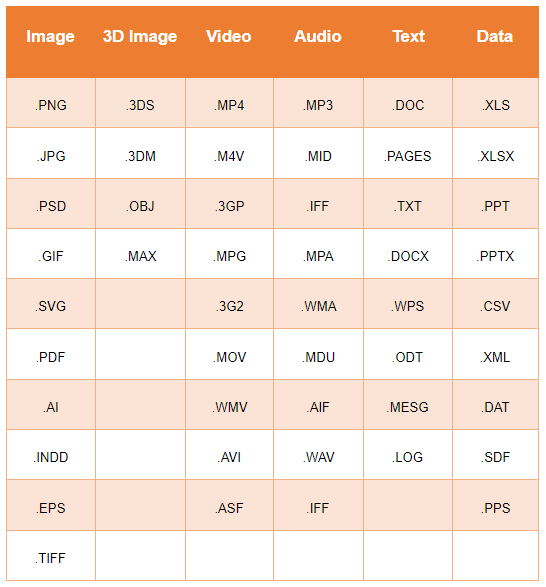
Every organization needs to create, manage and use a wide variety of digital assets. Every software is not competent to manage different types of digital assets.

How a Digital Asset Management solution helps you?

Using the DAM solution, you can optimize the media content like images, videos, and other digital assets. When an organization builds a compelling brand story, DAM allows such brands to create and manage different kinds of creative files to support their content.

Apart from providing a rich media library, DAM also supports additional types of content such as animation, 3D images, design templates for online and printed product catalogs, and more.

Being a centralized repository of all the brand assets, DAM helps you understand which assets are being used most often and by which user and group of users. Being a single source of truth, DAM enables you with analytics capabilities to analyze the digital asset performance.

15. File conversions are eating up too much design time

Your creative might receive requests for file conversations from other departments. To accomplish the file conversation requirements, they need to stop and start their project work very frequently. This workflow distracts the designers and creates bottlenecks for other departments too.

How a Digital Asset Management solution helps you?

DAM solution automated the file conversions once and for all. Define the common use cases and accordingly set the conversations in the solution. Now your teams can automatically download the asset files in the format and size they need.

For example, your marketing team needs to promote a content piece on different social media platforms such as Twitter, Facebook, LinkedIn, Instagram, and more. They need relevant media files such as images or videos in different sizes and formats as per the specific requirements of each platform. Leveraging role-specific conversions, your social media team can download the photos for their intended platform in the needed size and format.

Your creative team needs to upload a master file directly from any design software like InDesign or Adobe Illustrator. The rest of the file conversion process is taken care of by the DAM solution.

So, there is no more dependency on the design team to convert the file size and format they need to use every day.

16. Your digital assets are all over the place

When your assets are available in different locations in a scattered way, and not in an organized way, this makes it difficult to find the assets when required.

How a Digital Asset Management solution helps you?

Digital Asset Management solution not only manages all the assets in a centralized repository but also allows users to manage them in a well-organized way by creating a logical structure for all the digital assets. To make the digital assets searchable, DAM allows users to define taxonomy, categories, and metadata.

17. Anybody can access and use your brand assets

If there is no restriction on your brand asset usage, then the security of your assets is riskier. Anyone within or out of your organization can access the assets from your intranet, extranet, or local systems without your permission. Thus, the tracking of asset distribution becomes extremely difficult.

In the absence of a Digital Asset Management system, the creative team cannot control and loses power over the asset once it is distributed. To allow your different teams to work independently, it is essential to allow them to access the assets. In this scenario, the control over the asset use becomes difficult.

How a Digital Asset Management solution helps you?

If you want to provide your team with the freedom to use brand assets, you need to be well organized and set up appropriate workflows. DAM solution allows your creative team to create workflows for efficient editing and approval process and to control who can access certain assets.

Allowing your creative team with the flexibility to define custom workflows, DAM simplifies many of your business operations too.

For example, when the marketing team needs approval to use a product picture and the sales team requires to resize the presentation template, the creative team can easily and quickly manage and address these requests using DAM.

Using the Digital Asset Management platform, you can leverage quick turnaround time, reduce pressure on the creative team, and keep the brand assets under control.

18. Digital Asset Management process is repetitive

Most of the asset management processes are mundane and irritating. Your team needs to perform these activities every day. Here’s the list of the most time-consuming asset management processes:

  • Creating, associating, and managing metadata to digital assets
  • Sending the assets to the internal or external users
  • Updating systems to record the asset details
  • Naming, formatting, and resizing the digital assets according to the precise requirements for external users (resellers for distribution) and internal users (eCommerce and catalog systems)
  • Keep updating the databases that consist of the location of all digital assets that are scattered throughout the organization

How a Digital Asset Management solution helps you?

Considering the right DAM solution, you can streamline and automate all the above listed repetitive activities and many other tasks related to asset management. Through the automation, DAM enables you with a bunch of benefits of

  • Your teams can focus on more important tasks rather than performing the mundane activities
  • Automation of repetitive tasks frees up the resources that lower the costs of sharing and managing the digital assets
  • Decreased time to market of assets increases the overall sales and eventually boosts your revenue stream. For example, DAM makes it easier to send the assets faster to multiple sales and marketing channels

19. Secure file sharing with your internal and external teams is difficult

Most of the time only a limited number of people in the organization have access to digital assets. They continuously receive requests for asset sharing from internal (sales, marketing, catalog, eCommerce, production, etc.) and external (resellers, customers, etc.) users.

They used to keep sharing the assets manually through emails or drive links. Over a period of time, email and drive communication becomes confusing and tedious.

How a Digital Asset Management solution helps you?

Digital Asset Management enables you with a more sophisticated way to hold control over the asset. It’s called digital asset management governance where you can define who has access to what. Most of the DAM platforms have governance features built-in.

It allows you to define the user group with specific access rights and provides you granular control over file permissions. You can share the assets with vendors, other departments, and customers without worrying about the security of the assets with the surety that it won’t expose any sensitive information of your organization.

20. Finding a digital asset easts up a lot of time

Sending requests for asset sharing through an email is the most common practice in most organizations regardless of size. To address such requests, the creative team needs to dig into the massive media libraries, find the relevant ones and share them with the respective user through the email chain.

If your company is always following this practice for asset sharing, then you must be aware of how much time it sucks. Along with wasting a lot of time on the creative team, it interrupts the operations of other departments and the efficient workflow.

How a Digital Asset Management solution helps you?

Implementation of a DAM solution makes it simple for your creative team to find, manage, and share the assets directly from the system. It stores all the digital assets in one place and optimizes them for quick search.

Moreover, the Digital Asset Management platform allows you to create groups of assets that contain sales sheets, presentations, logos, product shots, and more assets that can be grouped. Digital Asset Management can be also developed as a visual platform.

21. Buying or creating the new assets instead of repurposing the existing assets

When a new project is in, you simply start creating everything from the scratch. Am I correct?

Rather than jumping into the asset production, check if you can reuse already available assets. Most of the time you can definitely have a few or many assets that you have previously created for another project and you can reuse them for this project.

Repurposing the assets often results in reduced production cost, less investment in creating artwork, and fewer errors.

If you think your team is spending considerable time and effort in creating, purchasing, and re-creating the assets that end up with unnecessary and duplicated digital assets, you should consider the DAM to avoid asset duplication and leverage quicker asset production, management, and distribution.

How a Digital Asset Management solution helps you?

In the DAM solution, you can create, store and manage your existing assets. You can also import your earlier artworks that you have created before the DAM implementation. Make sure you have provided metadata and category to each asset for asset standardization and searchability.

DAM allows you to access all the artworks so you can check which assets are created before and what is available to you. Utilize the centralized asset archives and search functionality that allows users to browse all the previous artwork and reuse or edit them as per their requirements. It saves time and money for creating images, documents, audios, videos, and more from the scratch.

As all the digital assets are stored in a single place, it becomes easier for your employees across the organization to view and use the sales and marketing assets that have been already produced or purchased. It results in improved ROI.

DAM allows you to maximize your number of files by using the already available assets. It also ensures all the existing assets are used by the utmost amount of people across the company.

22. You need to enrich content frequently

Asset enrichment is the default capability of a DAM, but many organizations have requirements to enrich the content as well. So, they are looking for solutions that address their asset and content enrichment needs.

How a Digital Asset Management helps you?

Many of the DAM platforms provide you content enrichment facilities along with asset enrichment. So, it becomes easier for you to manage a wide variety of content versions, channels, regions, local/global content variations, digital rights by dates, and more by implementing a DAM with advanced capabilities.

23. Having a manual process for sending digital assets to resellers

All the manufacturers do not go out to sell their own products. Right? They sell the products through distributors and retailers. To help all the resellers with effective sales, businesses need to share and update digital assets regularly. If the resellers do not have access to the updated asset data, they won’t be able to sell properly.

Updating the assets and sending the updated asset data to the reseller in a structured and formatted way is costly, slow, and resource-sensitive for many reasons.

  • Manufacturers have to send the assets to many resellers. This count can be hundreds to thousands in some cases
  • Each reseller buys a certain set of products from the manufacturers
  • All the resellers have their own formatting requirements for the digital assets they receive from manufacturers. For example, resellers’ formatting requirements for an image could include variety in image resolution, dpi, file naming, file type, image width and height, and more

To address such a wide range of asset formatting requirements, medium to large scale manufacturers engage a full-time resource to fulfill all the needs of resellers for the digital assets they require.

How a Digital Asset Management solution helps you?

Consideration of DAM solution automates the end-to-end digital asset formatting process. The platform allows you to

  • Create the profile of each reseller that consist of the details like
    • Which products do they sell?
    • Which digital assets do they need?
    • What is the formatting specification of the resellers for the digital assets?
    • How frequently do they raise the request for assets?
    • In which format they expect to receive the assets (online file sharing, DVD, FTP, etc.)
  • DAM solution allows you to store and manage assets with all type of formatting and send it to the respective resellers directly from the system

It improves the time-to-market of digital assets as the resellers have everything in hand that they need to sell the products or services. Eventually, it boosts the sales for resellers.

24. Tracking of missing digital asset is complex

Digital assets play a critical role in eCommerce as all the assets like product images, videos, guideline documents, etc. are quite essential for sales and marketing teams. If any of the digital assets are missing, then you are losing the business.

And, if you have digital assets scattered across the disconnected systems, then it is extremely difficult to determine which digital assets are missing.

For example, you are a large scale manufacturer that produces more than 10000 products. It is very obvious that you need to manage product-related assets including videos, pictures, documents, PDFs, information sheets like how-to videos, brochures, flyers, catalogs, and more. All the products have more than one image to enable consumers to display the product from different angles.

How a Digital Asset Management solution helps you?

DAM platform ensures your products have all the required assets. It becomes simplest for your teams to navigate through the assets as well as manage and find them. Also, you can hire a full-time employee for the structured and organized storage of assets.

All the digital assets are managed centrally in a Digital Asset Management platform. Most of the assets are associated with the products. Your teams are responsible for ensuring that the asset library is complete. They can access the software to generate reports on which assets are misplaced. Later on, based on the reports, the missing assets can be reproduced.

If you are using product workflow systems, then the DAM solution can be integrated with the systems in order to track asset production in real-time.

25. Having excessive admin procedure that slows down the productivity

In an ideal business world, employees are hired to perform a specific job. They need to focus on the activities which are relevant to their role.

If analyzed closely, almost every employee across your organization requires to perform a lot of other tasks every day. This distracts their focus from their primary activities and drains their precious time in performing the least important tasks.

Some of your teams are performing a lot of admin work that they are not supposed to do. Sometimes, the administration tasks eat up more of their time than the core job. This results in frustration as the resources are not able to utilize their skills and they need to do mundane tasks.

How a Digital Asset Management solution helps you?

Implementation of the DAM solution automates varied time-consuming tasks for you such as resizing and cropping the images and videos.

For example, you have uploaded a high-resolution image to Pimcore’s Digital Asset Management solution. It will automatically resize the image as per the predefined range of resizing and formatting options.

It benefits you in different ways such as

  • DAM eliminates all the manual steps of assets reformatting and resizing
  • DAM reduces your dependency on any additional software
  • DAM enables you with access to the finished assets that your team can use quickly

DAM simplifies the various admin tasks such as editing, locating, and distributing assets and saves a lot of time for your team. It helps your team to focus on more creative activities, create strategies, and generate revenue.

26. Asset quality control processes are inconsistent

Digital assets are highly used in varied sales and marketing processes. Therefore, it is essential to ensure consistency in asset quality. To maintain asset quality, you need to set up a workflow and standards for the quality control of the digital assets.

Quality control becomes a difficult task in the below-listed scenarios:

  • Assets are created by varied user groups at a different time within the organization
  • Assets are available in scattered across the disconnected systems throughout the organization
  • Absence of workflow tools for asset QA before they are published

Let’s understand the above points through an example.

Brands have thousands of product images that are captured over a while by different user groups such as cataloging, marketing, sales, eCommerce, etc. These images are used for marketing productions, distributing to the resellers to publish the products on their respective eCommerce platform, creating catalogs, and many other sales and marketing initiatives.

Images that are captured for marketing purposes contain high quality. On the other hand, the production shots are taken at lower quality. When all these mixed quality images get displayed on resellers’ product catalog and site, it hurts your brand image. With these images, you cannot convey a consistent brand message to your customers. This also results in poor sales.

How a Digital Asset Management solution helps you?

Most of the DAM platforms have built-in QA functionality that allows users to review the quality of assets before they get published on any catalog and site of resellers. It also contains an Asset History feature that allows users to view the versions of the assets.

Advanced DAM platforms like Pimcore allow you to connect any of your existing software like Image Production Management systems in the quality control workflow.

27. Management and standardization of asset metadata is challenging

Before delving into the main point let’s take a background of the digital asset metadata.

What is Digital Asset metadata?

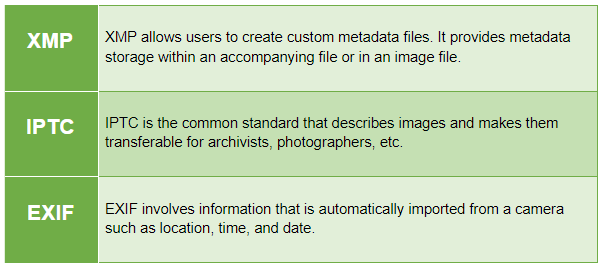
Metadata is the data that is embedded in the asset itself such as exchangeable image file format. Else, you can add the metadata directly to the digital asset such as tags, description, keywords, ownership, etc. through automated upload or manual data entry.

What happens in Digital Asset without metadata?

Without metadata, the assets are not digital assets at all. It is simply the electric files or rich media. These media files could be a product picture, a video, audio, a brochure, a flyer, a banner, a graphics file, and more.

Digital asset files that do not have metadata are difficult to manage and search for. Also, it slows the sales process a bit. Thus, it adds value to your business.

What happens with the Digital Asset with metadata?

A media file that contains metadata becomes the digital asset as it is manageable, searchable, and adds value to the business.

Metadata is a very important element in the DAM for the effective management and standardization of digital assets. When your assets are scattered across the different systems across the company, you won’t be able to apply metadata for the effective standardization of the assets.

Moreover, every asset has varying degrees of quality and complete metadata attached. Therefore, it becomes difficult to search, manage and share the assets with internal or external users.

How a Digital Asset Management helps you?

Implementation of DAM allows you to manage the media files with metadata in order to convert them into digital assets.

  • Create the metadata for each digital asset by using a built-in metadata form. It becomes easy to add and modify the asset metadata at any point in time
  • Using the metadata forms, you can enforce and define the standards for adding and managing asset metadata
  • Generate the reports for digital asset missing metadata
  • Empower users to collect the data and update the asset accordingly

DAM automates the process of updating and importing the metadata for digital assets

28. Personalization

Personalization is the key to success in today’s business. Content personalization is what every business is constantly working on. Along with content the relevant assets creation, management, and distribution gaining popularity as well.

In the absence of the right digital asset management system, it will be a mess of scattered and unorganized assets that negatively impact your sales and marketing initiatives.

How a Digital Asset Management solution helps you?

With a Digital Asset Management system, you can manage each asset that is created to address the need for personalized content. You can manage the different edited versions of the same image or videos within the DAM to address the personalization needs. You can organize your assets effectively and have them available whenever needed.

29. Designers waste time in recreating and reformatting the artwork file

In an organization, designers need to handle some small tasks related to or resizing the images. Sometimes, they need to recreate the digital assets from scratch if the original file is not found. All these image editings, formatting, and redesigning take a considerable time for the designers and hamper their productivity.

How a Digital Asset Management solution helps you?

Implementation of Digital Asset Management eliminates this problem completely. It automatically resizes and converts the media files into different formats and saves considerable time for the designers. In addition to that, DAM allows you to access the latest source files quickly whenever needed.

30. Longer time-to-market of each digital asset

Before delving into the main point, let’s understand the time-to-market in the context of digital assets. Time to market of digital asset can be defined through

  • Define which assets need to be created
  • Create digital assets
  • Quality Analysis and publish the assets in your DAM solution
  • Send the assets to your external users (resellers or customers) and to your internal users (eCommerce, sales, marketing, cataloging teams) through internal systems

We have already mentioned that digital assets are very crucial for sales and marketing assets. If your team can find the assets quickly, then they use them immediately to accelerate their sales and marketing process. Eventually, you can generate better sales for your business.

If your digital asset management process involves multiple departments, resources, non-automated workflows, and disconnected systems, then your asset time-to-market will be considerably longer.

How a Digital Asset Management solution helps you?

Using the DAM solution, you can easily and quickly identify which projects require digital assets and generate the reports for missing assets. By connecting the Digital Asset Management solution with your exciting production workflow systems, you can raise the request for the asset creation and monitor their progress.

Advanced DAM platform allows you to create assets within the solution by allowing you to integrate the third-party design software and has the built-in QA functionality. It allows you to check the quality of each asset before they are approved for publication and shared with the internal and external users for sales and marketing purposes as well as reselling of the products respectively.

31. Anytime, anywhere access to assets is not possible

If your assets are available across the disconnected systems, your team won’t be able to find and use them when needed. In this situation, your team has to deal with

Sales loss

In the absence of needed digital assets, your team won’t be able to provide any sales or marketing collateral with the client to enable the customer with a better understanding of intended products or services.

Asset duplication

Your team needs to create the new assets that result in asset duplication as an asset is already there in any of your systems. Moreover, the new asset is created in urgency so there are chances of potential inconsistency in terms of asset quality.

Ineffective accessibility of assets limits the search capabilities and your team cannot find and locate the assets they require. Also, asset duplication is the biggest issue as you have to invest time, effort, and resources twice to create the same asset.

How a Digital Asset Management solution helps you?

DAM platform works as a centralized repository of all your assets and simplifies the search and locate assets for the users whenever they require them. It allows you to manage the assets with proper tagging and categorization that enables you to search efficiently.

There is a complete elimination of asset silos across the company as the DAM solution enables your teams with easy browser-based access to the assets.

Moreover, you can define asset permission and business rules in the DAM and group the users with the digital assets. This ensures only authenticated groups of users can access the digital assets.

32. There is no way to process new assets

Once you complete the photo-shoot of a commercial, how do you proceed further with the product images? You probably send those assets to the Art Director, then to the creative team, after that to the printing company, and so on.

How a Digital Asset Management solution helps you?

When you share the new pictures with all the different members separately, imagine the time you invest in it.
Digital Asset Management solution provides the assets to all the team members starting from top management to junior executives they need in a matter of seconds. Most of the DAM solutions available in the market facilitate you with this feature. The platform also allows you to define the unique workflow and display the most relevant assets on a dynamic homepage.

33. It is difficult to enforce and monitor digital asset security

Producing digital assets like designing the graphics for brochures and flyers, editing and photographing product images, shooting videos, etc. is a time and effort-consuming activity and expensive too. As these assets are very critical for the sales and marketing departments, the backup and security of the assets are highly essential.

If you are managing the data in the departmental database, storage hard drive, local computers, network servers, and other systems that are not connected as well. It becomes quite difficult to monitor, enforce, and implement the backup and security. Soon, the asset becomes vulnerable and the chances of asset loss are inevitable.

How a Digital Asset Management solution helps you?

With DAM, all your assets are stored and managed in a single place so you can perform regular security checkups and data backup easily. It also allows you to set up policies to govern user permissions and rights. Thus, it ensures all your data is protected under strict digital surveillance.

34. Miscommunication amongst creative teams

A team in an organization keeps changing. Old employees leave, and new people join the company. They get trained with the processes of the enterprise. Every employee in the company has its own way of working too. As the people change in the organization, the processes become more and more complex.

If you are managing the assets in the disconnected systems and the new employees are unaware of previously created work by the old team, it becomes difficult for the new team to find which assets are completed and which ones are work in progress. They even do not get clarity on which user emailed what assets to who. This causes workflow redundancies.

How a Digital Asset Management Solution helps you?

DAM solution helps you to address the communication inefficiencies that are occurring across the different teams. The platform enables you with a single archive so that all the people across the organizations can have access to the same shared resources more effectively.

As DAM allows for remote access to the assets so your teams are working remotely from a different corner of the country or world. They can view and use the file created and referenced by their colleagues. Eventually, DAM helps you to minimize miscommunication by allowing everyone to access the same asset from a single system.

35. Your existing asset management system impacting your team’s potential negatively

When your assets are scattered in disconnected systems, it definitely impacts the productivity of your employees. They need to find and manage the assets on the priority so that they can use them for their interned sales and marketing initiatives.

Repetition of this practice drains their energy in performing the least important tasks that eventually impact your business success.

For example; you are managing the assets in Google Drive. When your sales and marketing team wants to use any asset in a catalog or collateral, it becomes challenging for them to find what they need from the organization’s disorganized Google Drive. Your team spends considerable time finding the right folder and the required image.

Sometimes, after investing the time, the team members would give up searching for the assets. In such cases, they need to recreate assets.

So, all these activities are time, efforts, and money consuming for your team.

How a Digital Asset Management Solution helps you?

DAM solution allows you to store, manage and distribute the digital assets across the organization as well as the external users like resellers and customers. Your teams can access the assets on the fly wherever they are whether they are working remotely or they are in the field.

By making the assets available to the teams all the time, DAM empowers the teams and allows them to perform their task seamlessly with full potential.

36. Your team and asset demands are constantly growing

As your team and the number of assets increases, the possibilities of scattered and misplaced assets, asset duplication, and other issues grow. To address these issues you need to have a cartelized repository to manage your wide set of assets which is scalable and flexible.

How a Digital Asset Management solution helps you?

Digital Asset Management platform can scale as your assets and team grow. It automates various processes and streamlines asset access across the organization. It is a valuable investment for the brand that is looking forward to designing multiple workflows in order to address the increased demand for assets.

The bottom line

Are you witnessing any r many of the signs listed above in your existing asset management processes? If yes, then it’s definitely the case of DAM. You should select the right Digital Asset Management Platform and implement it soon to streamline your asset management practices.

Credencys has outstanding experience in developing tailored Digital Asset Management solutions Using the Pimcore platform as per the specific needs of their business and industry vertical. To discuss your DAM requirements, book a 30 minutes free consultation with our DAM experts.

React vs. Ember: A Detailed Tabular Comparison with Pros and Cons

Developers around the globe look to complete their developing process of web or mobile applications as quickly as possible. However, the usage of the right frontend framework plays a key role in determining project completion time.

Meanwhile, picking the right frontend framework that allows developers to complete the frontend development quickly along by delivering a high User Experience is not an easy task for developers. Choosing the popular frameworks ReactJS or EmberJS could be the best solutions for achieving rapid frontend development.

However, a lot of developers are confused when it comes to deciding which is the best ReactJS or EmberJS. React Vs Ember is a subject that requires a lot of focus and determination over the project requirement. Here in this article, we have illustrated the in-depth comparison of React Vs Ember that will simplify your decision-making sense.

Table of Content

  • What is ReactJS
    • Market Share of ReactJS
    • Pros of ReactJS
    • Cons of ReactJS
    • Applications Powered by ReactJS
  • What is Ember JS
    • Market Share of EmberJS
    • Pros of EmberJS
    • Cons of EmberJS
    • Applications Powered by EmberJS
  • A Detailed Comparison of React JS vs EmberJS
  • Table of Comparison

What is ReactJS?

ReactJS is an open-source library framework that was specifically designed and launched by Facebook to build better interactive user interfaces for mobile applications and also for single-page applications.

ReactJS was launched in the year 2013 and ever since it’s been the number one priority among global developers. The simplicity, elegance along strong community support of the ReactJS front-end library framework has attracted many professional developers to make use of it for their development process.

Market Share of ReactJS

As mentioned above, ReactJS is the most preferred framework among the developer’s community and the survey report proves it. The survey report points that around 60% of the developers prefer to use ReactJS development regularly for their app development process.

Pros of ReactJS

  • Components can be reused
  • Uses SPA and SSR Architectures
  • Best of building large-scale applications
  • Fast Virtual DOM

Cons of ReactJS

  • Hard for proper documentation
  • Hard to integrate third-party plugins
  • Partial browser support

Applications Powered by ReactJS

Here are the lists of few popular applications which are powered by the ReactJS front-end framework.

  • Facebook Ads Manager
  • Bloomberg
  • AirBnB
  • Gryoscope
  • Myntra
  • UberEats
  • Discord
  • Instagram

What is EmberJS?

It is an open-source JavaScript framework that allows developers to build any application effectively within a short time. EmberJS framework is a Model-view-view-Model that enables developers to build highly scalable applications easily. The strong stability along with robust features of the EmberJS framework allows mobile app developers to build impressive mobile applications with better User Experience.

The reliability factor of the EmberJS frontend framework makes it the most preferred framework model by developers around the globe. Apart from saving a lot of app development time, using the EmberJS framework can reduce the overall project cost significantly.

Market Share of EmberJS

EmberJS is still growing the frontend framework in terms of community and also in the usage of developing complex applications. Although the framework EmberJS reached its popularity spike in-between 2012 and 2015, still it is in the state of far-cry as it is being discussed heavily by the developer’s circle around the world.

In a survey conducted by W3techs points, the frontend framework EmberJS is currently used by the margin of 0.1% by the websites which are exercising in the virtual world.

Pros of EmberJS

  • Easy Documentation
  • Strong and skilled Community
  • Fast, Comprehensive & Flexible
  • Server-side Rendering
  • Auto Template Update
  • Self Configuration

Cons of EmberJS

  • Hard To Learn
  • Heavy Weight
  • Hard to Customize
  • No Integration

Applications Powered by EmberJS

Here are the lists of few popular applications which are powered by the EmberJS front-end framework.

  • Discourse
  • Ghost
  • Wordset
  • HospitalRun
  • Kitsu

A Detailed Comparison of React JS vs. EmberJS

1. Technical Comparison

The presence of Virtual DOM in ReactJS is loved by users due to its high performance. Also, the usage of React fiber in ReactJS makes way to introduce new technologies in the web development process.

On the other hand, the presence of a data library in EmberJS helps data caching and querying data very easily. Also, EmberJS eliminates the inconvenience of data storage, data fetching, data caching, and so from the client-side.

2. Community Support

ReactJS is a very popular and widely used frontend framework by developers around the globe. With over 150k star ratings on the Github platform, ReactJS managed to find a place in the list of high growth frameworks right from the initial release.

On the other hand, EmberJS is so popular among big tech companies due to its strong foundation. Having more than 20k stars in the Github platform, EmberJS managed to gain a secured place among the growing community.

3. Learning Curve

Being one among the JavaScript library the learning process of ReactJS is so simple. Most of the developers manage to learn it in a day.

Learning could be difficult when it comes to EmberJS, especially for newbie developers.

4. Performance

ReactJS is a light weighted framework and delivers a brilliant performance. Features like reusable components, leaner architecture, JS page rendering gives a huge advantage for ReactJS to deliver super-fast performance.

Being a huge framework, the performance of EmberJS lags and it suits well for building large-scale applications. EmberJS is specially designed to handle complex functions and to resolve multiple problems at a time.

5. Security

Developers with best practices and proper utilization of features provided by ReactJS can protect its app users from cyber-attacks. Securing ReactJS applications requires considerable experience and it can’t be done easily.

EmberJS has Cross-site Request Forgery (CSRF) tokens which strengthen the security. Proper usage of CSRF tokens will lead to the pathway of next-level security for applications.

6. Code Architecture

Unlike EmberJS, ReactJS doesn’t have any default architecture. However, developers can make use of external libraries like Flux and Redux for building seamless architecture on their own.

The latest version of EmberJS supports Component-service architecture that helps app developers to build ambitious applications that satisfy the modern needs of app development.

7. CLI

ReactJS doesn’t have any official CLI since it follows component-based architecture; it maintains the same application code structure throughout entering programming codes.

EmberJS framework comes with high-end CLI (Command Line Input) and developers need to use the Ember CLI more frequently while coding.

8. Application Size

ReactJS is light weighted. Besides, the latest version of ReactJS comes with nearly 30% of the reduced size of the previous version.

Being a functional-view-controller framework, the EmberJS comes with a heavy size. However, if you remove all those additional libraries of EmberJS, the core size could come down to 128KBs.

9. Documentation

The latest version of the EmberJS framework comes with in-depth documentation with more information than the ReactJS documentation which offers only minimal information.

The documentation of EmberJS is poor when compared with ReactJS documentation.

10. API Development

ReactJS doesn’t have any predefined library to raise communication requests. However, within the react components developers can make use of any communication library.

The built-in library of EmberJS helps developers to make communication requests to the back-end which is essential for API development.

Table of Comparison

The below-listed table will elaborate React Vs Ember frameworks based on their features for easy understanding

Sr. No.FeaturesReactJSEmberJS
1TypeLibraryFramework
2Powered ByFacebookDeveloper’s Community
3Launch DetailsMar-13Dec-11
4Learning PerspectiveEasier than EmberJSA Bit Harder
5Filtering OptionNoneAutomatic
6Template EngineNoYes
7JSX UsageYesNo
8Animation SupportYesYes
9Input ValidationNot-SupportedSupported
10Local Storage SupportNoYes
11Data BindingOne-way Data BindingTwo-way Data Binding
12Routing & LinkingNoYes
13Server RenderingYesNo
14Github Star154K21.5K
15ArchitectureModel-View-View-ModelModel-View & Component
16Stack Overflow236.2k Questions23.6k Questions
17DocumentationGoodGood
18Top Companies UsingFacebook, Paypal, Walmart, etc.Netflix, LinkedIn, Sony, BMW, etc.

Suggestion To Choose Between EmberJS & ReactJS

  • If you are about to develop a light-weight application opting for ReactJS would be the best
  • Developers who are new to the developing environment can prefer ReactJS
  • If you planned to develop a strong server-side rendering application along with interactive UI preferring ReactJS would be the best.
  • Applications that require highly scalable technology and a python-like environment can prefer EmberJS
  • If you are looking for a framework that has a strong foundation along with strong community support then EmberJS is the best.
  • For sophisticated coding practices and to enjoy easy configuration utilizing the EmberJS framework could be the best.

Bottom Line

The in-depth comparison of React Vs Ember would surely improve the decision making sense of the developers when it comes to choosing ReactS or EmberJS for their project. It’s hard to predict the winner of React Vs Ember, each framework has its own set of pros and cons. It’s upon the project requirements and chooses the framework accordingly to avail better output.

Digital Asset Management (DAM): An Ultimate Buyer’s Guide 2023

Every organization produces a lot of content every day to sell or market its products or services. The proliferation of content creates some serious issues if you don’t have the right system in place to manage the related media assets like images, audios, videos, etc.

Without the right Digital Asset Management solution, it becomes difficult for you to share the assets with internal and external users of the company. Also, you cannot help users to locate and access the exact assets whenever they need them.

By considering a Digital Asset Management platform, you can start managing the media assets from the moment they are created, and throughout the asset lifecycle. Ensuring the secured and structured management of your critical digital assets, DAM allows businesses to save time, effort, and resources to recreate, search, distribute, and retrieve the assets.

Before making your mind about any DAM solution, it is very important to get clarity on your business requirements. Every company has different customer demands, content needs, and feature set requirements. So, to pick the right DAM, you require a proper evaluation, planning, and guidance.

This post is a must-read for you if you want to know about how to select the right DAM for your company and what aspects you should take care of during the platform selection process.

Table of content

  • 7 signs that prove your organization needs a Digital Asset Management solution
  • What is Digital Asset Management (DAM)?
  • Know your objectives for Digital Asset Management implementation
  • What are the capabilities of Digital Asset Management?
  • How does an ideal Digital Asset Management platform work?
  • What can you do with the Digital Asset Management solution?
  • What are the major benefits of Digital Asset Management? In-depth breakdown
  • Key business consideration while selecting a Digital Asset Management solution for your company
  • What are the Digital Asset Management essentials?
  • Questions to ask while selecting a Digital Asset Management solution

Let’s first focus on whether you require a DAM solution or not. Here’re the top challenges that you might have been facing in your day-to-day operations without a DAM system.

7 Signs that proves your organization needs a Digital Asset Management solution

Signs that Proves Your Organization Needs a Digital Asset Management Solution

1. You have no idea where to look for digital assets

How do you manage your media assets presently? There are three most common ways to manage digital assets. Here you go.

  • On online file sharing sites
  • In individual computers
  • In random folders on the intranet

If you are managing your assets through any of these methods, then it becomes a time-consuming task to find a single asset from such a huge data. There is no single way for your internal and external users to find the asset quickly, download them, and use them as per their specific requirements.

How DAM makes a difference?

DAM allows you to store, manage, and catalog all the data in a single place. So, it becomes easier for your teams and partners to find, download, share, and use the assets they want in a matter of seconds.

Say sayonara to myriads of long email threads and file-sharing apps.

2. Anyone can access your digital assets

If everyone across your organization can access your digital assets, then it’s not the right way to manage indispensable assets. This causes you some serious issues like damaged and missing files.

To address this inefficiency, you need to define the access rights for your internal and external users to ensure only limited users can access your digital assets.

How DAM makes a difference?

Digital Asset Management solution enables you with features like user role and permission that allows you to define access rights for each user for digital assets.

3. Finding the right assets takes too long

For example; you have uploaded an image of a red background in your cloud storage. How could you search for that image? You probably save the image with the file name “21st January 2022 red background for a marketing campaign”.

Are you able to remember this file name after a couple of months? Or in your absence, will any other user be able to find it?

Of course, not.

Storage of digital assets in the cloud server, intranet, internet, and individual computer makes asset finding difficult and time-consuming.

How DAM makes a difference?

A renowned DAM platform allows you to manage, organize, and sort needed assets through thousands of files in seconds. It allows you to create a good metadata structure for your digital assets to find the assets even when you don’t know what exactly you’re looking for. Additionally, to simplify the asset searching, you can apply filters by author, category, date, type, and more.

4. You cannot share the assets with internal and external stakeholders

Most of the time, only selective individuals have access to specific files. So, those individuals need to invest considerable time in sharing the asset files with others who need the assets but don’t have access to them.

How DAM makes a difference?

Why pass-through this pain when you have a more sophisticated way to share the asset quickly. Yes. I am talking about Digital Asset Management governance that allows you to define who can access what. DAM solution comes with built-in governance systems that allow you to define specific user groups with specific rights and provide granular control over file permissions.

You can share the digital assets with anyone regardless of your customers, external vendors, or internal teams with greater security.

5. You never know who supposed to do what with the assets

The content creation process involves many steps including briefing, creation, storage, validation, enrichment, conversion, and distribution. During this process, you never know who needs to do what to which asset file.

How DAM makes a difference?

Implementation of Digital Asset Management enables you with the history feature that allows you to access the history of all your assets. This feature also helps you keep workflows under control and manage media files with precision.

6. Your teams cannot access the digital assets remotely

Your team needs to work remotely in four scenarios.

1 – You are a multinational organization that has offices and employees across the world
2 – Your team members travel often
3 – You work with remote contractors and third party companies
4 – You might have other reasons for your employees work outside of your office

In all the above-listed cases, when it comes to sharing digital assets, it becomes an arduous task. To share digital assets, employees need to send several emails and wait until they receive a response from another party. This impacts negatively on their productivity, especially when your team needs to work in a different time zone.

How DAM makes a difference?

DAM eliminates this back and forth. It allows every authentic user of the solution who is working remotely to retrieve the assets quickly whenever and wherever needed, on any device.

7. Many people are involved in the digital asset creation process

Usually, graphic designers, photographers, marketing and sales teams, copywriters, content creators, etc. participate in the asset creation process. This list can be longer for you as per your content creation process. To manage digital assets effectively, you need a good process for collaboration.

How DAM makes a difference?

DAM solution allows you to annotate, tag a specific group or user, and store comments on what is required to be changed. This makes you sure that you are always using and working on the latest version of the digital asset as well as you can collaborate with the different stockholders in real-time remotely.

There are many more signs that you might be experiencing when it comes to digital asset management. Above I have covered the most common ones.

What is Digital Asset Management (DAM)?

Digital Asset Management is a process for storing, managing, organizing, and sharing digital assets securely and efficiently. Using a reliable DAM platform, you can perform this process seamlessly along with managing the user rights to ensure only users with permission can access the assets.

To get detailed insights about Digital Asset Management, read An Ultimate Guide to Digital Asset Management (DAM)

Know your objectives for Digital Asset Management implementation

Rather than selecting a Digital Asset Management platform randomly, I would suggest to make a well-planned decision by

  • Defining your objectives
  • Prioritizing the objectives
  • Determining who are the DAM users and stakeholders
  • Understanding how their participation in the DAM selection process will help you in achieving these goals

In turn, the users and stakeholders help you in deciding the capabilities and components that are required to streamline and simplify your asset management processes.

Here’re some goals related to Digital Asset Management that you want or achieve for your organizations knowingly or unknowingly.

  • Attain brand consistency
  • To have a “system for master record” of all your digital assets to help your teams not to worry about where to find the assets, what is the most current, and what is approved.
  • Reduce the asset integration time in digital marketing campaigns by improving customer experience
  • Streamline the digital asset production process
  • Make it easier for your marketing team to work and coordinate with external design agencies
  • Improve the consistency and quality of assets being created in the company with distributed marketing teams
  • Eliminate the manual process of requesting certain assets to groups and people specific files (headshots, logos, collateral, product images, camping assets, etc.) for your marketing team

What are the capabilities of Digital Asset Management?

Digital Asset Management (DAM) Capabilities

Most common capabilities of DAM

Asset repository

Digital assets, managed in a scattered way in different systems, won’t help companies to achieve efficiency. Implementation of a system where every individual has their own stash of images and/or documents will result in inefficiency, chaos, and waste.

Thus, every organization must have a centralized repository where they can manage and control all the digital assets with next-level security. This is what Digital Asset Management helps you with.

Asset creation

Using the built-in workflow management tools, Digital Asset Management helps organizations in the asset creation process. You might be thinking not to consider these tools as according to you they might be nice-to-have solutions.
If you have multiple agencies and/or departments working together, workflow management tools make the review, approval, and revision process faster and easier. It also simplifies the asset creation process by

  • Predefining roles and stages
  • Allowing you to know the status of every asset
  • Tracking the status of assets
  • Determining what required to be done with assets immediately based on the asset status

Consideration of the workflow management tools enables you with more efficient and faster asset creation that eventually saves a significant amount of money.

Asset consumption

The main objective of any organization for DAM implementation is to provide a way for its users to search and download the required digital assets on their own. Rather than wasting the time in responding to the asset-related requirements of marketers and creatives separately, DAM allows everyone to get the required assets on their own.

DAM saves time for the individuals who spend half of their time distributing and sharing digital assets with different departments, agencies, and partners. They focus more on productive tasks. This ultimately contributes to your ROI.

Along with managing the brand consistency, DAM allows employees to work independently by finding what they want, ensuring what they are using is the latest version, and promising that they are using the approved assets only.

Functional capabilities of DAM

Mobile-first

An advanced DAM supports all the latest technologies. It not only allows you to store and manage the assets but also distributes and displays them attractively on any device regardless of screen size. To achieve this, the DAM contains the capabilities like intelligent resizing, adjusting, and cropping of assets on the fly.

Cloud deployment

Cloud-based DAM is trending due to its capabilities like sharing of assets and effective global collaboration.

Digital asset delivery

DAM optimizes the digital assets and creates URLs for them. It utilizes Content Delivery Network for asset delivery to allow users to use the digital assets directly in mobile apps, websites, or other platforms. It allows users to access high-quality assets that also enables customers with fast loading.

Rich media management

Leverage the DAM capabilities of transforming the traditional file formats into the next-gen 3D models, image formats, 360-degree images, videos, and more. The built-in tools of the platform automatically resize, crop, transform, and transcode the version and creates multiple versions for different use cases.

Dynamic asset transformation

DAM allows you to create different variations and layouts for the assets to meet the changing needs of websites, mobile apps, and marketing processes. The platform generates variants by providing resizing, cropping, and image effects automatically.

It also allows generating new assets from the existing ones. For example; using the AI capabilities of DAM, you can create a short preview of a video. All these happen within the DAM so you do not need external tools for asset editing or downloading.

Non-functional capabilities of DAM

Integration

This is one of the most important capabilities of the DAM that you must consider during the DAM section process. Make sure that the platform comes with built-in connectors that allow the solution to connect with different types of systems including

  • Product Information Management (PIM) systems
  • Content Management System (CMS)
  • eCommerce platforms
  • Social Media
  • Customer Relationship Management (CRM) systems
  • Enterprise Resource Planning (ERP) systems
  • Digital Experience Management (DXP) Systems
  • Business Process Management (BPM) systems
  • Marketing tools, and more…

Performance

Do not miss to check the performance of the DAM before making a buying decision. The platform must be able to handle the heavy loads.

To check this, you can upload demanding files such as M4V video files with an H265 codec, TIFF files with 100+ megapixel, multilayer PDF files. Check if you could upload small JPEGs and a heavy video simultaneously and if the DAM platform contains multiple renders. Also, make sure the system handles concurrent downloads with five different users.

I would like to suggest you go for a Cloud/SaaS-based platform that allows you to build and implement dynamically scalable Digital Asset Management systems to ensure the excellent performance of the system.

User experience

Choose a DAM platform that has a web-based, user friendly, and seamlessly working user interface. There are many Digital Asset Management platforms available in the market that contain high-tech features and functionality but they have a steep learning curve that ultimately reduces productivity.

How does an ideal Digital Asset Management platform work?

How an ideal Digital Asset Management (DAM) platform works

Import the assets

DAM allows you to import assets either one by one or in bulk using convenient applications of images and metadata.
Asset security

After importing the digital assets, you should utilize DAM security privilege. The platforms ensure asset security with Access Control Lists (ACLs) and permissions that define which users can access or modify the digital asset based on their roles and responsibilities.

Asset storage

It allows brands to store and manage a large volume of creative assets and their metadata. Also, it facilities the users with fast retrieval of the asset.

Asset transformation

Advanced DAM converts the image formats automatically as per the requirements and creates the native thumbnails, without smart cropping or resizing.

Well, you won’t find this ability in all the DAM. There are a few platforms that allow users for manual editing of documents and images in the interface.

Asset enrichment

Once you have assets in place, you can enrich them easily using the metadata and generating analytics on asset usage.

Asset aggregation

You can track relationships between assets and versions or variants of the original assets using the DAM. Asset finding, bundling, and management become easier for you and your users.

Asset management

Each DAM system has its own structured process for working with assets that starts from asset creation, approvals, versions, to publishing.

Asset search

Implementation of DAM enables you with easy ways to search the required assets quickly. You can search for assets through metadata, workflow stages, collections, and image attributes.

Asset preview

DAM allows users to preview, videos, images, or other digital assets before downloading them.

Asset publishing

You can share the asset files with other creative users by using a link generated by the DAM.

What can you do with the Digital Asset Management solution?

What you can do with Digital Asset Management (DAM) solution

File management

  • Store, manage and catalog videos, images, audios, and other creative assets
  • Search assets by description, metadata, and title
  • Share the digital assets with every individual inside or outside the organization
  • Enable the end-users with dynamic URLs that support fast CDN delivery and on the fly image manipulation
  • Rather than sharing the file with another team who is responsible to upload the assets to a website or send the assets to the customers through emails, DAM allows you to add a dynamic URL link in the email or website
  • Leverage Artificial Intelligence to tag the video and images automatically in order to promote reuse and improve searchability

Marketing

Product marketing

  • Save all the creative files such as advertising materials, pack shots, 3D models, branding creatives, campaign material, SKUs, product data sheets, specifications, etc. related to products and their designing
  • Organize all these assets seamlessly and share them with distributors and retailers using DAM
  • To meet the specific needs of different marketing campaigns of retailers, DAM dynamically transforms advertising and branding material, product images, and packaging. For example; if you want to promote a badge your brand has earned, DAM allows you to add the badge to a product packing, poster, and advertisement without human intervention
  • Tagging to marketing assets happens automatically through AI. It allows to reuse assets for other marketing campaigns if required and improve searchability

Local marketing

  • If your brand is distributed in multiple locations, then DAM works as a storage of distributed brand assets to allow you to sell the product independently
  • Different teams can access the brand’s assets and use them in the local marketing content such as email marketing, store-front graphics, website creatives, and advertising
  • An advanced DAM extends and modifies all your generic brand’s assets and transforms them into the specific ones to help you serve the local marketing purpose
  • You can replace the text or graphics using DAM
  • Leverage automated transformation of brand images into a new format or size for local marketing creatives

Print and offline marketing

  • DAM allows creatives to search and access the assets to meet the printing requirements
  • Integrate the DAM that contains a web-to-print feature that allows you to send assets on an appropriate printer
  • Create different versions of assets with different images, different messaging or text, or different design rules and layout
  • DAM automatically generates the correct resolution for printing or image format

Brand management

  • Along with being a centralized repository of media assets of the organization, the DAM also serves the purpose of creating and managing the instructions and guidelines about using assets for the brand
  • Effectively manage a large number of brand assets/files for different campaigns, audiences, and channels
  • DAM allows you to extend brand assets with dynamic digital asset transformation. For example; the platform automatically removes the background, resizes or crops logos, and/or creates variants of an image to meet the specific requirements of multiple social media channels without the help of graphic designers

Media management

eCommerce

  • You can use a DAM for your online store where you can store, manage, and repurpose the product-related images, videos, and other media assets
  • You can easily address the quality-related needs of the eCommerce platform in terms of product images, sizes, colors, and other variants
  • DAM ensures to create and deliver high-quality images that are highly essential for the success of an eCommerce solution
  • Consideration of a highly advanced DAM platform facilitates the automatic transformation of product images into the correct format to make the display attractive. For example; high-resolution images for a product page or compelling thumbnails for a gallery
  • DAM creates a URL for each asset and allows you to add the required DAM asset URLs to the respective pages of your eCommerce solution

Website

  • You can easily generate, store and manage videos, images, and other creative assets for large scale websites
  • If you own a large-scale media, corporate, and news website that contains thousands of pages with millions of assets, then you can definitely consider the DAM. You can use these assets at different places in a website such as navigation, layout, and in between the page content
  • Distribute the assets across different devices having varied screen sizes using the DAM. It allows you to update the asset design across numerous pages automatically. For example; DAM automatically adjusts and crops the featured images for blogs.
  • Determine navigation icons and edit the icons directly from DAM without making any changes in website code

What are the major benefits of Digital Asset Management? In-depth breakdown

Benefits of Digital Asset Management (DAM)

Workflows automation

Define custom workflows

A feature-rich DAM allows you to design and configure custom workflow as per your specific operational requirements.

Asset approval workflows

Automate your asset approval workflow using the DAM. Once the digital assets are ready to get approved, respective authorities will receive a notification that the asset is ready for approval.

Reduced human error

The automated workflow of asset management, asset approval, and marketing processes allows you to eliminate the overhead cost caused due to human error as well as save time for your team too.

Project management workflows

Utilizing the product management workflow, you can easily consolidate the files and processes you required for successful project completion. DAM allows you to manage all the needed digital assets in a single location and access them on the fly.

Improved brand consistency

Complete control over the approvals

DAM facilitates you with approval and assigning capabilities to make sure that every piece of content that gets distributed physically and/or digitally is correct, accurate, and approved. It becomes easier for your marketing team to know how and where to track the campaigns they are working on.

Stronger brand presence

DAM allows your different teams to work together in multiple campaigns by managing the varied assets in a single repository. This helps you improve your brand consistency by spreading the same message across different output channels.

Consistency in creative assets and messaging helps you create a stronger impact of your brand on the customers. It also impacts your brand recall value as your brand stays top of the mind when a customer is determined to make a purchase.

Lower operating costs

Consolidate different platforms

A comprehensive DAM helps your team to complete a project by using all the required digital assets from a single source. Users from different departments know exactly which platform they need to use for the required assets. This saves them from performing an irritating process of finding the right information by logging in and out of multiple platforms.

Allowing you to manage all your projects from concept to customer effectively, DAM enables you with full control over each and every action. It saves time for your team for switching between various platforms. And, most importantly, it reduces the cost that you spend on platforms that you may not need any longer due to the ultramodern capabilities of DAM.

Advanced search capabilities

A user from your team with the access rights can use the DAM and search for the needed assets quickly and easily using the features like folder categorization, search-by color, keyword search (just like Google), and more.

Leveraging the search capabilities of a DAM, the users won’t spend extra time in finding the assets and being confused about where the required asset is stored in the solution.

Boost team productivity

DAM eliminates the assets search and usage-related issues for your associates as they know where they need to go to find the exact asset they are looking for.

Rather than interacting across different users and channels as well as searching through multiple platforms, they can use DAM to get the required assets. Enabling your teams with a streamlined process of asset management, DAM improves their productivity.

Simplify asset reuse

Instead of recreating or buying the images from scratch, DAM allows you to check if you have any images in your solution that you can re-use in your on-going project.

It again provides you benefits of time and money. You can save the time of your team that they spend on creating additional design and money spent on downloading the images from the stock photo sites when you already have an appropriate image that can be repurposed.

Prevention against legal problems

DAM provides you with features like digital right management that provide you protection against the issues like license abuse and asset misuse.

It provides you total control over your digital assets where you can define when and who can download the assets. Thus, the platform reduces the possibilities of license abuse and asset misuse. Eventually, it reduces the cost that you invest to deal with the legal issues.

Improved business processes

Single source of truth for all your assets

DAM is the single source of truth for all your digital asset-related requirements. It helps you overcome challenges with siloed departments. When all the digital assets are stored in a single location, it becomes easy for your teams to collaborate effectively and focus more on the success of the campaign.

Asset and project management integration

Improved and efficient processes are one of the major benefits of DAM implementation. Consolidate your assets and projects in a single location in order to improve the efficiency of your project and asset management process.

Key business consideration while selecting a Digital Asset Management solution for your company

Key business consideration of Digital Asset Management (DAM) platform

Plenty of Digital Asset Management platforms are available in the market that offers a wide variety of features. But, to select the best one, you should focus on the outcome that the platform delivers to your organization and not the features.

During the DAM selection process, make sure you are clear about the key purpose, primary users, internal user stories, metadata, file types, API requirements and integration, distribution channels, and budget.

Define the key purpose for DAM implementation

Before starting to search for a reliable DAM, it is very important to understand your key business objective for considering the DAM. And, during the selection of a DAM platform and vendor, keep this objective in your mind to ensure that you end up selecting the best fit for your digital asset management needs.

Who are the users of the DAM system?

Administrator

You need to elect a person as an administrator of the DAM solution. They will be responsible to keep updating digital assets, ensure everything is well organized, and make changes as and when required.

Identify this person during the DAM selection process only so they can participate in the training and decision-making process during the implementation.

Departments

Determine the users who are going to use the DAM on a regular basis in order to enable your organization with operational and business benefits. Define the departments in your company who will be using the DAM.

To gain maximum advantages out of a DAM solution, you need to conduct interviews of varied users from different departments to get a profound understanding of how DAM implementation helps them streamline asset management operations and improve productivity.

Number of users

Note that everyone that uses the assets is not considered as DAM users.

Yes, you heard it right.

Who are your users?

People who need to access the DAM to retrieve and search for the images as well as assign, approve, and complete the projects are your DAM users. You need to be clear about the number of users as it impacts the pricing of DAM.

Your authorized users can share digital assets with the people who are not using the Digital Asset Management system.

Provide the user information to your solution vendor when you view demos.

User stories

Define the ways that DAM is beneficial to your business. Also, determine how it will address your existing operational and business challenges. This information helps you to check the potential of the DAM solutions when you take the demos of different Digital Asset Management platforms.

Think about the relevant user stories by contemplating the below-listed elements:

  • What end result you want to achieve
  • Responsibilities and departments of the users involved in the story
  • All the roadblocks that users are facing contribute to complete the story
  • What actions the users need to perform

Ask the DAM vendor if they enable you with the Digital Asset Management solution that addresses the issues that you are facing in current processes as mentioned in your provided user stories.

Metadata

Metadata is an essential part of a DAM as it contains the information about each asset and makes the assets searchable and configurable to your existing workflows. Before creating metadata for your DAM solution, you need to check out

  • What kind of metadata are you currently using?
  • What types of metadata are you going to use while adding assets in the Digital Asset Management system?

Here’re the most common types of metadata

3 Most Common Types of Metadata

File types

You might be using varied digital assets such as images, videos, audio, and documents in different file types. While selecting a DAM, make sure your vendor provides you a solution that allows you to manage your asset seamlessly with your preferred file type.

Here’s the list of the most common file types that are usually supported by all the leading Digital Asset Management platforms.

Different Types of Files Supported by Digital Asset Management

API requirements and integration

DAM solutions should have proper APIs and integration in place to create a seamless working experience for your team and streamline the processes they are working with.

Thus, Digital Asset Management is usually used with some other systems as it is very rare that any organization needs a solution just to store and manage digital assets. Most of the time companies integrate it to manage product-related or business-related digital assets.

Implementations of DAM enables you with multiple possibilities listed below:

  • DAM holds some outstanding capabilities that replace the existing software you are using
  • DAM can easily be integrated with your existing software and third-party party applications
  • DAM will support the scalability and flexibility for the future

Here’re the few solutions with which DAM is widely integrated and used.

Product Information Management (PIM)

Product Information Management is used to manage a wide variety of products in a centralized location. PIM also allows them to market and sell the product through websites or eCommerce.

Integrating the DAM solution with your PIM system, you can manage the product-related videos, images, audios, documents, and many more digital assets in the DAM solution.

Content Management System (CMS)

CMS is considered the best marketing platform that allows you to promote the products or services related content to inform the customers about your offerings.

Integrating DAM solutions with CMS, you can create, assign, annotate, and compare the content versions as well as publish the content across multiple digital platforms. Thus, in some of the CMS solutions, DAM is the necessary requirement.

Digital Experience Platform (DXP)

Digital Experience Platform allows brands not only to manage the content but also the marketing related activities from a single platform.

DXP and DAM integration allows the companies to manage creative digital assets related to different marketing campaigns in a centralized location and use them as and when required.

Digital Commerce Platform

Yes, I am talking about your online store where you sell and promote your products or services.

Integrate DAM with your Digital Commerce Platform to manage all your offering related digital assets in a single location. DAM is highly used by almost all the B2B, B2C, and B2B2C organizations to ensure logical and structured asset management.

Master Data Management (MDM)

Master Data Management solutions allow organizations to manage all types of business data including products, services, marketing, sales, finance, accounts, human resource, employees, customers, and more.

Integrating DAM with MDM you can manage all digital assets like pictures, excel files, documents, videos, etc. in a single platform.

Project Management System

DAM contains project management capabilities too. It allows you to manage your marketing projects from scratch starting from concept to customer. So while selecting a DAM, don’t forget to discuss it with your vendor.

Enterprise Resource Planning (ERP)

Almost every organization uses Enterprise Resource Planning software to manage varied business data. Mostly, it allows to manage sales, procurement, and production-related information.

Integrating DAM with ERP, you can facilitate your sales team with the latest marketing collaterals, the procurement team with the quotation-related terms and conditions, and the production department with managing the documentation of guidelines and instructions to perform certain production processes.

Customer Relationship Management (CRM)

Customer Relationship Management solution saves all the customer-related information for an organization. Usually, customers share the requirements documents, pictures, and videos to convey what problems they are facing and what solutions they are looking for.

DAM allows you to manage all these documents, images, videos, and other digital assets that you have received and sent to the customers in a centralized repository.

Others

If you want to integrate the DAM for other third-party software or applications, then there you have multiple options to choose from. You can integrate with any of your existing enterprise systems and third-party applications to automate and streamline the digital asset management process.

Digital asset distribution channels

Once the assets get approved, you can use them for printing, digital channels, sharing to internal and external dealers, marketing, and packaging. Define your preferred distribution channel on which you want to deploy your assets to gain maximum benefit of DAM. Digital Asset Management solution allows you to work for any, many, or all the channels listed below.

Print

Before sending an asset from the DAM for printing, check out if there are approval workflows that are aligned with the printed materials process and what file types are available with you in DAM for that particular asset.

Digital platforms

You can store and manage the digital assets that you want to distribute across all your customer touchpoints in DAM. The platform allows you to establish a workflow for asset approval, scheduling and reporting. Thus, it provides you an opportunity for consolidating the programs in a single location.

Sharing with external dealers

Are you working with the external dealers to distribute your approved assets? Then, you need to consider a DAM that contains advanced features like rights management and assets sharing to improve asset time-to-market.

Marketing channels

All the companies are using digital assets for marketing campaigns and promotions. If you want to implement a DAM to fulfill this purpose, then the platform enables you with Marketing Asset Management capabilities where you are allowed for creating, editing, approving, versioning, distributing, and analyzing the digital assets.

Packaging channels

DAM allows you to create, manage, and approve the assets for packaging related media assets. Check with your Digital Asset Management solution vendor how they help you to improve the packaging process through packaging asset management. Make sure they offer advanced packaging focused integrations.

Budget

The most important for any business is the budget. Isn’t it?

Make sure to discuss the pricing of the DAM to check whether it fits into your budget or not. Along with investment you need to get clarity on ROI aspects too. The platform must increase your income after a certain time either by improving productivity or by reducing overhead costs.

The detailed understanding and analysis of the Digital Asset Management system ensure that you gain maximum ROI with all your expected features that are suitable for your budgetary constraints as well.

What are the DAM essentials?

Digital Asset Management Essentials

Advanced Search

When you have plenty of assets in your DAM, searching for the right asset quickly is the biggest challenge. By managing your digital assets in the DAM, you can leverage simplified asset search, navigation, and organization.

Taxonomy

Taxonomy allows you to classify and organize your assets and related information. You can also define the structure of your asset information using the DAM. So, make sure your solution vendor provides you a Digital Asset Management that has sophisticated taxonomy capabilities.

Metadata

Metadata represents information attached to the assets. It is very essential as it makes your content searchable. You can determine metadata based on the understanding of how you are going to use your assets.

Categories

Define the categories for your assets based on how people used to search for assets in your organization. Usually, they search for the asset by entering the brand, SKUs, product identification number, color, and more.

Create a list of categories you want to consider in your DAM solution and ask the solution provider whether they can include this category in the system.

Deployment

The Digital Asset Management solution should be flexible and scalable to meet your frequently changing business needs and achieve your specific organizational objectives. Digital Asset Management solution can be deployed in three ways

  • SaaS/Cloud
  • On-premise
  • Hybrid

Examine your business goals and DAM requirements to make the right choice for your business.

SaaS/Cloud

SaaS/Cloud-based DAM platforms are highly in demand as it enables your organization with the benefits of convenience and security.

On-premises

On-premise DAM allows you to drive your own software updates on your internal network. But you need to be dependent on your solution vendor to have full control over the system as they take care of the network connection, hardware, and initial configuration of the platform in your network.

But, the major benefit is you have all rights to run software updates and make required modifications in the system as and when required.

Hybrid

Hybrid is the right choice for companies who do not want to utilize the capabilities of SaaS/Cloud or on-premise models fully but want to consider specific elements of both the platforms. As the word itself says, the Hybrid Digital Asset Management solution enables you with the benefits of both types of models.

Let’s have a quick comparison of SaaS/Cloud, on-premise, and hybrid Digital Asset Management platforms so you can make the right choice.

Difference between SaaS, On-premises & Hybrid

Difference between SaaS Cloud DAM On-premise DAM and Hybrid DAM

Workflow management

Workflow plays an important role in any DAM as it gives you an understanding of how you can create, manage, consolidate, and distribute digital assets in different systems and multiple customer touchpoints.

When it comes to workflow management, you need to check whether the Digital Asset Management solution vendor provides you the custom or standard workflow as well as discuss the workflow usability with them too.

Custom workflows vs. standard workflows

Most of the Digital Asset Management platforms come with standard workflows that are built-in. But there are a few platforms that allow you to create a custom workflow for your Digital Asset Management system. It is better to go with the platform that provides custom workflow and gathers information on any associated implementation differences.

Usability

Check the workflow of the DAM and analyze how it is easy to configure, implement, and edit. The usability of the workflow is defined on the basis of the scalability and adaptability of the platform.

Data storage and migration

Digital asset import and upload

Before starting to upload the digital assets in the Digital Asset Management solution, it is good to get complete clarity about the asset uploading and importing capabilities of the platforms. It should contain various capabilities such as automated metadata, drag-and-drop uploads, uploading multiple files, file size capabilities, and editable metadata.

Asset storage space

Get the idea of how many assets you have right now that you want to shift to the DAM. Also, analyze how frequently and what amount of assets you need to upload in the solution. Once you have this data, discuss with the solution provider whether the solution is capable to fulfill your asset uploading requirements.

Data migration

After the DAM implementation, you need to migrate all your assets that are stored in disparate systems and local systems in the DAM. So, you need to do some homework where you need to check

  • How many assets do you have?
  • Where are the assets currently located?
  • What types of asset files do you have?
  • What kind of metadata do you want to attach with your assets while you add them in DAM?

It is crucial for you to understand the asset migration capabilities and process of the DAM platform before selecting the DAM.

User access control and management

External file sharing

DAM contains file-sharing capabilities and allows you to send the asset files to the people who need them. These people could be external users as well who need the assets but they don’t have access to the DAM for direct downloading of needed assets.

Moreover, the Digital Asset Management solution allows you to create collections of digital assets and share them with external users. But, while selecting a DAM, you need to discuss how to define permission for sharing the assets files with external users with your solution vendor.

Single Sign-On (SSO) integration

Talk with your vendor about user authentication options available with the DAM platform they offer. There is a Single Sign-On functionality available in many Digital Asset Management systems that allow users to sign in into the system with their corporate login credentials instead of using separate login to keep track of only authenticated users access the solution.

User roles and permissions

To ensure the security of your digital assets, it is very essential the DAM allows you to control the access rights based on user roles and permissions attached with each role. Integration of user roles and permission feature, you can have complete control over your digital assets and you have the right to decide who can edit, view, and organize the assets.

Scalability

Once you select a DAM you are going to use that platform for years. So it is very important to get an understanding of the scalability of the solution. Make sure that the platform can evolve as your business grows.

Accessibility

Create a list of users who are going to operate the system locally or globally. While selecting a DAM, make sure it consists of flexible accessibility options to ensure all your local or global users can seamlessly operate the solution and perform their tasks.

Language

Implement a Digital Asset Management solution that enables you with multi-lingual interfaces. It should allow users to create, manage, and distribute the digital assets in the native languages of targeted regions. It plays a key role in attracting your target audience available in different countries.

Globalization

Define your business goals and requirements for global expansion. Discuss those goals with your solution provider and understand how the Digital Asset Management platform helps you meet your international/global requirements.

Security

Security is the most important aspect for any software system and so for Digital Asset Management platforms as well. Go with the DAM solution that ensures you the high-end security standards for the safety of your critical digital assets.

Digital licensing and rights

International

Leverage digital rights and licensing to set your digital assets to adhere to embargo dates and different specifications related to international permissions.

Expiration dates

DAM allows you to define the expiration date for each asset. This eliminates the process of removing the assets manually from the Digital Asset Management system when the asset is no longer in use. Also, it ensures the users are using those assets only which are eligible for use.

Terms of use

Create terms of use that all the users need to agree to before downloading any asset from the Digital Asset Management solution.

Image and video editing

By managing the digital assets in the DAM, you can allow your creative and functional teams to make the required edits in the assets that are going to be used for packaging and non-packaging purposes such as marketing collaterals for print or digital use.

An advanced Digital Asset Management platform allows organizations to sync the images with the desktop in order to edit and enrich the digital assets on the go. As your files are seamlessly synced in the background, your creative team needs to work on their desktop only.

Project management

Creative collaboration

In a Digital Asset Management solution, when a creative is assigned to a task, they will receive an email notification. They can open the assets and start working on the assigned task.

In some of the platforms, you can utilize the sharing and synchronization capabilities of the system that allows the creative team to open the assets directly in their preferred third party software like Adobe application and start working on it right away. They do not need to work in the Digital Asset Management system.

Analytics and audit logs

Using DAM, you can publish the assets on the different output channels. Not only that, you can track the performance of each asset and understand which asset performs the best. With the help of an audit log, you check which assets have been downloaded and check the rights associated with them.

Automated workflows

Enabling you with automated workflows, DAM allows you to set appropriate sequences of the actions for your different marketing projects. These actions could be attaching appropriate images, due date, and assigning the creator to the project.

Publishing platforms

After the completion of the asset approval process, you can schedule to publish them on different sales and marketing channels such as Facebook, Twitter, Instagram, YouTube, etc.

Process control

Once you have assigned the project, you have a dashboard where you can have a full overview of the project completion status. You can check if the project is on track and meeting the deadline as well as see the bottleneck that slows the business processes.

Asset markup

Some Digital Asset Management platforms provide this feature to brands. It notifies them when the creative has completed the first draft of the design. You can review the assets and markup them with required revisions. Annotate the assets to describe the changes and edits you want to make and then provide them to the creatives for revisions.
Once you receive the new version of the asset, you can view both versions side by side and compare them in order to check the difference between the versions.

Notification

DAM allows you to set up email campaigns so that your teams are informed when you assign them a project or when an asset is ready for approval. Moreover, when any user downloads an image, you will be notified due to the copyright specific licensing limitations to control asset use.

Questions to ask while selecting a DAM solution

When you have multiple options, it is quite challenging to find the right one. There are multiple Digital Asset Management platforms available in the market and to select the best fit for your organization.

To check the potential of the Digital Asset Management solution, you need to ask a few essential questions to your solution vendors whom you have shortlisted. Compare the answers provided by the different solution vendors and select the best platform for you.

Here are the most common but most important questions that you must ask the vendors.

  • What is the data migration process in your DAM platform?
  • How does a creative team work within your DAM solution?
  • What are the integration capabilities of your DAM platform?
  • What is the strength of your DAM platform?
  • What kind of user roles, permissions, and rights management features does your DAM platform offer?
  • Does your DAM platform support 3D image rendering?
  • What kind of taxonomy, category, and metadata features does your DAM platform contain?
  • What kind of hosting option do you have?
  • How scalable is your DAM solution?
  • How easy are your DAM platform workflows to configure?

In the nutshell

Credencys has extensive experience working with Pimcore for developing a robust Digital Asset Management solution as per the specific business needs of every organization. It offers a wide range of feature sets that suit your basic and advanced requirements for digital asset management.

To learn about the hidden capabilities of Pimcore’s DAM, feel free to book a 30 minutes free consultation with our DAM experts.
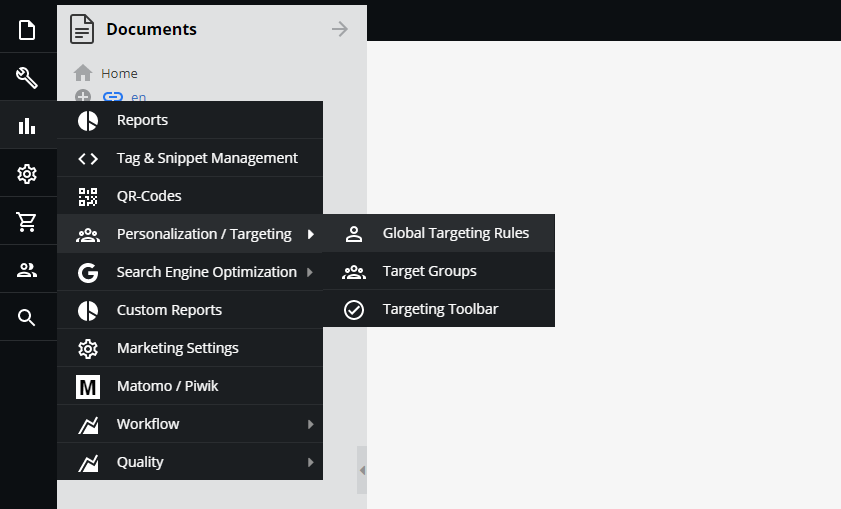
ReactJS Vs React Native – A Complete Expert Analysis

Both ReactJS and React Native are currently powering several popular and commonly used mobile applications and websites by people around the world. Though, React Native is almost similar to ReactJS, even in its workflow and syntax but their components are entirely different when compared with React.

Take a look over the upcoming sections of this blog, it will decode the key differences between ReactJS and React Native and gives app developers complete knowledge.

Table of Contents

  • What is ReactJS?
  • Features of ReactJS
  • Advantages of Using ReactJS
  • Drawbacks and Limitations of Using ReactJS
  • What is React Native?
  • Features of React Native
  • Advantages of Using React Native
  • Drawbacks and Limitations of Using React Native
  • Difference between React JS and React Native
  • Factors That Differentiate React JS and React Native
  • Comparison of ReactJS and React-Native in-terms of Simple Coding
  • Which is better-React or React Native?

What is React.JS?

React.JS is a JavaScript (JS) library that allows creating superfast and interactive user interfaces in mobile and web apps. As a developer, if your concern is particularly about the application’s view layer, then React.Js development is the best fit for you since it is an open-source library that serves as a component-based and front-end library as well.

React.JS naturally has the capability of parting the user interface (UI) into multiple components that makes it easier for coding to debug. Therefore this makes each component unique in terms of property and function.

Features of React JS

#1: JSX

React JS has JavaScript XML which is an extension of JavaScript and is used as syntax similar to how XML or HTML is used. This syntax when used is processed into JS calls of React framework. With extending ES6, React JS allows HTML like the text to go along with JS. Those who use JS need not use JSX necessarily, but if you use React JS, it is required.

#2: Components

We already know that React JS is full of multiple components and each component has its own logic and controls. You can use these components many times in your coding, especially when you work on large scale projects.

#3: Single data binding

One-way/single data binding gives complete control over your application and React JS is designed in the same manner following unidirectional data flow. More than a single data binding requires additional features to support the application since components keep changing but the data within them cannot be changed.

Therefore, React JS follows the Flux pattern that maintains the unidirectional data flow, making the application you develop to be more flexible and result in maximum efficiency.

#4: Virtual DOM

A virtual DOM functions similar to a one-way data-binding that represents the original DOM of the object. In case you make any changes in the web application, with the help of virtual DOM, the entire UI is re-rendered, thereby checking the difference between the previous DOM and the new one.

#5: Simplicity

React JS uses JSX as the coding platform that makes the application simple and easy for developers to code. Since it is a component-based approach, it provides the flexibility of reusing the code as per your need. This is how it is simple to use and easy to learn as well.

#6: Performance

Developers think that compared to other frameworks in the market, React JS is far much better to use because of its exceptional management of applications through virtual DOM. The DOM is a cross-platform and programming API that manages codes with HTML, XML, or XHTML.

Virtual DOM protects DOM from writing the code directly to it, and therefore, virtual components that turn into the DOM ensure the smoother and faster performance of React JS.

Advantages of Using React JS

#1: Better user experience with Virtual DOM in React

The main challenge with traditional DOM architecture is the way its processes keep changing in terms of user inputs, queries, etc. Therefore a server is required to constantly check the difference caused by these changes to provide the proper response. To do this, the traditional DOM has to update its trees of the whole document but might be challenging.

React manages to increase the speed of updates with the use of virtual DOM that provides a better UX to your application.

#2: Saves time with reusing React Components

Reusing components in React is the biggest plus with using the platform for app development. Developers find it easy since the same code can be applied wherever they need within the app architecture which saves a huge time in app development.

#3: Stability in codes due to unidirectional data flow

React.JS follows a single-way data binding and ensures changes made in child structures do not affect their parents, by using downward data binding.

#4: Constantly developing framework

React.JS is an open-source framework developed by Facebook with a lot of useful applications and additional tools from off-company developers. Therefore, developers get great community support while working with React.JS.

To learn about the more benefits of ReactJS, visit Why to Use React for Web Development and How Using React JS Can Add Value to Your Website?

Drawbacks and limitations of using React.JS

#1: Overhead costs and time

It becomes a frequent necessity for developers to download another react-enabled library, since the components may not match with the existing components used by React.JS, thereby resulting in increased overhead costs and time.

#2: Learning curve

Compared to React Native, developers may take more time to learn and adapt to React.JS, and therefore, new developers may find it hectic to create an app using React.JS.

#3: External library support

React.JS supports only very few native libraries although it gets support from several external and third-party libraries. External libraries can help developers to make use of both HTML and CSS features and create it into JSX.

But many developers fail to understand that doing so is involved with high complexities and steep learning curves as well.

What is React Native?

React Native is a JavaScript (JS) framework for developing real-time and natively rendering mobile applications for both Android and iOS. It was developed based on React, the best web app framework for producing single-page applications and which is Facebook’s JS library for creating attractive user interfaces.

Instead of targeting the web browser, React Native focuses on mobile applications. Along with the ability to create a native look and feel like applications using React Native, you can also share the codes you write between Android and iOS platforms and develop codes simultaneously as well.

React Native development basically supports app development in cross-functional platforms and has great potential to diversify to any future platforms as well.

Features of React Native

#1: Programming Language

React Native allows you to create native apps using JS, and apps that are developed through React Native can function on both the devices and platforms without negotiating on speed, efficiency, and quality.

Like how you develop effective and attractive web apps using React, React Native also lets you create mobile applications with the same quality and design. This is highly possible to React since it allows you to compose a rich mobile user interface (UI) from declarative components.

JS is an easy-to-learn language that anyone who comes with basic knowledge of web development can work on it. Therefore, it makes their job easy to work on React Native and quickly adapt to the mobile app framework.

#2: UI Focussed

React Native is very popular among developers who want to create quick mobile applications. React Native builds a hierarchy of UI elements to create a strong JS code, saving your time by providing a new way to build apps.

It allows customization in developing UI blocks using JS since it uses the fundamental UI building blocks by default in developing Android and iOS applications.

#3: Development Time

As we aforementioned, React Native allows you to develop mobile apps considerably in a very short time compared to other mobile app frameworks.

#4: Tested and Trusted

Many start-up companies prefer developing mobile apps using React Native because of its exceptional and user-friendly UI/UX features and the time is taken for development. Companies such as Walmart, Facebook, UberEats, Myntra, and more have developed their apps through React Native.

#5: Third-party Library Support

JavaScript is an ocean; therefore, it has great library support from the community and third-party as well. This helps developers extensively to choose and use features of their choice in mobile app development.

#6: Reusable components

React Native provides you with the facility of building blocks that can be reused any number of times as per your coding requirement. The components of React Native can be used to compile directly to native apps since it offers mobile app development on cross-platform services.

Advantages of Using React Native

#1: Cost-effective & re-usage of code

With React Native you can easily perform code deployment between two platforms because it provides flexible reuse of code service.

#2: Performance in mobile environments

React Native is a super-fast mobile app framework that performs exceptionally well in mobile environments compared to other web app frameworks. With using JavaScript for the development of coding, React Native stands out and supports start-up companies or fresher developers with a big hand in mobile app development.

#3: Hot Reload

Hot reload is one of the considerable benefits of React Native which is based on hot module replacement (HMR) that succeeds the first reload option and provides the same sequence of actions as the previous one.

#4: Live Reload

Live reload ensures reading and compiling a file that can be altered by developers anytime in front of a simulator. Moreover, it automatically reloads the app from the starting phase.

#5: React Similar Architecture

Like how React provides a modular and intuitive interface, React Native also provides the same benefits. React Native has a flexible environment for developers so they can easily update web apps whenever needed. Software testers can easily understand code logic for developing test scenarios in less time.

Drawbacks and Limitations of Using React Native

#1: The Pace of Development

Though React is a fast-moving framework, it becomes necessary for developers to update their knowledge with constantly changing technology. Some developers might not be comfortable with such a pace, and we should also understand that React’s core API has become more stable and seldom changeable.

#2: Poor documentation

With the constant releases of new tools in React Native, the problem arises when documentation backtraces. Though new libraries like Redux and Reflux are supporting to accelerate the work of a library or improve the complete React ecosystem. Therefore, finally, developers struggle with integrating these tools when using ReactJS.

#3: SEO hassle

There have been several statements of concern from developers that Google and other search engines lack indexing dynamic web pages poorly. Anyhow proper testing is required to ensure your app makes it out with SEO in Google.

Difference between React.JS and React Native

React JS is purely a JavaScript library that supports both front-end and backend in application development. It is used to create an effective user interface for mobile apps and websites. React Native is a cross-platform mobile framework that makes use of React JS for developing websites and applications.

The best part with React Native is it compiles to native app components which enable developers to produce mobile applications that can function well on multiple platforms such as Android, iOS, and Windows in JS.

In this blog, we will see the prominent factors that differentiate React JS vs React Native.

Factors That Differentiate React JS and React Native

#1: Setup and Bundling

React Native is a framework where React JS is a JS library that you can make use of for your website. If you are developing a new application with React JS, you will be required to choose a bundler like Webpack and identify which modules are needed to develop the application.

React Native has everything you need; therefore, you may not be likely to look for anything more. It is easy to set up and super fast in performance as well. It utilizes only one command line to execute in the terminal and then you are good to go.

#2: DOM Styling

React Native provides alternative components that work similar to HTML and does not use HTML for rendering the app. These components map the original real native iOS or Android UI components that are rendered on the app.

Most components available in React Native can be translated to something similar in HTML. Since your code cannot be rendered on an HTML page, you will not be able to reuse any libraries that you have already used with React JS which is highly capable of rendering any kind of HTML, Canvas, or SVG.

#3: Animation and Gestures

React Native provides a new way to animate different components of your app with JS. You will have to use the Animated API offered by React Native, which is the recommended way to animate a component. It lets you create different kinds of animations, based on the velocity connected to a gesture and can be used with various types of Easing.

React Native also provides Layout Animation which is very simple to use for transitions but currently works only for iOS and does not support Android. Moreover, React Native has a web API called the PanResponder that is similar to the JS touch events.

#4: Navigation

Many developers get confused initially when looking for navigation between HTML pages and think react-router can be the best choice. But in fact, React Native has a Navigator component that makes your job easy.

Like web apps, mobile apps do not have plenty of scenes executed in different directions. The Navigator component may initially seem to be complicated to use but provides you with everything you need to manage the transition between HTML pages.

#5: Platform-specific code

If you implement the same design for your app on multiple platforms with the same set of code, sometimes it can be confusing. React JS cannot give you the clarity of which code is used for which platform. Moreover, though you can apply the same code for Android and iOS apps, remember that the user interface and user experience looks different.

Therefore, if you want to reuse the code for multiple platforms define a universal design so that it stays intuitive and does not confuse with both platforms. In case you wish to define an independent set of codes for each platform, you will have a different DOM, stylesheets, and unique logic and animations for UI/UX guidelines, which is possible through React Native.

The upcoming table illustrates the basic difference between the React and React-Natives in-terms of their features.

Sr. No.FeaturesReactReact Native
1PlatformWebAndroid, iOS, JS
2Open-sourceYesYes
3Mode of presentationHTML, CSSNative components
4ArchitectureVirtual DOMVirtual DOM + Bridge Technology
5Mode of AnimationCSSNative
6Development StyleCSSJS Stylesheets
7OwnerFacebookFacebook


Comparison of ReactJS and React-Native in-terms of Simple Coding

Unlike the React JS, React Native doesn’t have any HTML elements for enhancing the presentational view. However, React Native has several components that suit a lot of developing mobile applications. The below mentioned simple coding elaborate it clearly.

Coding on React JS

Coding-on-React-JS

Coding on React Native

Coding-on-React-Native

The above coding example clearly showcases that React Native is not for designing web elements and by using React Native one can’t design the elements in a similar way which are styled by using React JS.

Which is better-React or React Native?

These are the straight simple differences to know of React vs React Native.

React JS

  • You can create flawless websites, web apps, single-page applications, etc. endlessly with React JS.
  • React JS creates a UI hierarchy with the JS library.
  • React functions on a virtual DOM which is faster than the conventional refresh model. Virtual DOM refreshes only a part of the page instead of refreshing the entire page.
  • React takes complete responsibility for rendering UI components and is considered as the V part of MVC architecture.
  • React is exceptional in reusing components that are the basic units of UI, thereby supporting in saving coding time.
  • It is simple and easy to learn as well with great community support.

React Native

  • React Native as a framework helps in creating cross-platform native apps. By creating splendid native apps,
  • you can run the same apps on Android and iOS as well.
  • React Native supports all features of React JS and allows developers to produce native apps in a web-style approach.
  • If you are a front-end developer, with learning React Native, you can easily become a mobile developer.
  • Both React JS and React Native are considered important pillars when it comes to the development of web or mobile applications because of this wide range of flexible functionalities and an array of evolving libraries.

Final Verdict

React JS vs React Native is hard to predict which one is better; it’s truly upon the mode of usage. Depending on which platform and what kind of application you wish to develop, both React JS and React Native can act efficiently. However, React Native has great features that React JS has and lets you develop dynamic applications in no time.

Frequently Answered Questions

1. Which should I choose between React JS and React Native?

React Native comes with all features inbuilt thereby making your job easy in terms of coding. It has all features similar to React JS and lets you develop extraordinary applications with great UI/UX.

2. When not to use React Native?

React Native lacks in the following:

  • Native libraries
  • A loosely held abstraction layer
  • More initializing time
  • Licensing and patenting issues

If your app requires any of these facilities, then do not choose to React Native.

3. When not to use React JS?

These are the limitations of React JS:

  • Overhead costs and time
  • Learning curve
  • External library support
  • Long data hierarchy

4. What kind of apps can I develop using React Native/React JS?

Here is the list of apps in the market developed using React JS and React Native. Maybe this can give you an idea.

  • Facebook
  • Instagram
  • Netflix
  • New York Times
  • WhatsApp
  • Myntra
  • Discovery VR
  • Discord
  • Airbnb

5. How much does it cost to develop an app with React / React Native?

Primarily, features of an app and UI/UX decide the cost of a React/React Native app. Therefore, you decide the compatible platform develop your app along with its features, which help you decide the cost.

How to Estimate Custom Software Development Costs for your Projects?

Custom software development can also be termed as the development of a peculiar digital technology solution for addressing the needs of a specific company. When compared with the development of off-the-shelf software development, the cost of custom software development is typically more expensive.

Usually, there should be a proper budget planning for developing software for every project to tackle the unexpected financial crisis. However, when it comes to custom software development predicting the average cost of custom software development is a bit harder, and we have discussed briefly why it is harder in this blog.

Before that, we discussed a few basic things about custom software development. Take a look.

Table of Content

  • What is custom software?
  • How to Develop A Custom Software?
  • Benefits of Custom Software Development
  • Factors Affecting Software Development Cost
  • How to Estimate Custom Software Development Cost?
  • Tips to Determine The Cost of Custom Software Development
  • Factors That Play a Crucial Role in Determining the Average Cost of Custom Software Development?

What is custom software?

Custom software is a user-specific product that is built as per the needs of any business user requirements and is different from the regular off-the-shelf software such as Microsoft Office which serves a common purpose to all businesses. Developing custom software involves several steps such as requirement analysis, code development, software testing, and finally, deployment.

Some of the important benefits of custom software are it provides personalized experiences to users, thereby increasing the return on investment and lowering the development cost. Since we just went through the basics of custom software, let us look at how to develop custom software and the factors that affect the custom software development costs.

How to Develop A Custom Software?

#1: Determine your software needs well prior

Defining crystal clear project goals enables proper development and execution of your custom software. Before you decide upon, it is ideal to brainstorm with managers and subordinates their views about what kind of changes in the system can make them adaptive, in the organization.

The custom software you develop should be ideated perfectly such that it influences all the departments of the organization positively. Therefore, before you implement your idea, know your current organizational measures and list out their pros and cons, which will make further processes involved easy.

#2: Get the right team to work on your custom software

You have multiple options to do this process. If you have an in-house development team, see if they are well-versed to work on the technology you wish to develop your custom software. If not, hire a new professional who can work efficiently and can do multi-tasking. Another option would be hiring freelance developers and pay them on an hourly basis and get the development done.

Otherwise, you can hire a technical expert on a contract basis and allow the person to train your existing team as well and work on the custom software development. Whichever you choose, make sure that it is cost-effective.

#3: Plan and set target milestones

If you have a proper roadmap for your project, it leads the entire project development cycle in the right way. Depending on whom you employ in custom software development, assign them the correct roles while creating the roadmap, and make sure that all the assigned tasks are completed within the available time and allocated budget.

This will help you with identifying any major changes and improvements needed if any.

#4: Carry out deepened testing

Testing plays a crucial role in custom software development and before deploying the new software across your organization. Two levels of testing are required for any developed software. Developers and IT professionals perform the initial level of testing, which provides you with the results of the functionality of fundamental features.

User testing is the second level which will be performed by real users to check whether the performance of the custom software is up to the mark. In developer words, we call it Beta testing. User feedback is more important in the testing phase because it helps you make real-time improvements to your custom software.

#5: Keep clean documentation of the entire process

Documenting each stage of the software development process is highly important so that it helps you as future references in case you make any changes or add any new features in between. You may have to document right from the project plan, implementation plan, test plan, scope statement, and training plan, to ensure everything is on track.

It also helps you define the usage of custom software, what resources are expected in this project development cycle, and several other details. If you develop some other custom software on the same technology, these documentations can help in aiding newcomers.

Benefits of Custom Software Development

#1: Tailored To Satisfy The Needs of Your Brand

Ready-to-use software/applications may have only some of the common features for the benefit of users, whereas custom software can be tailored according to your business needs and user expectations. Therefore, it increases the image of your brand among users extensively, thereby improves the scalability of the software in the future.

User’s demand for features keeps growing day by day, which means they need to include more customized features becoming necessary in the long-run. This is not possible in ready-made software and the Cost of Custom Software Development may be high if you change the features and developing the platform according to your needs.

#2: Optimized business process

Every organization has its own business model and different in-house processes. Preferring instant-to-use software can result in a mismatch of business needs and complications in being adaptive. However, if it is a large-scale enterprise, then definitely it requires the software to be designed and developed in a manner such that it integrates well with the business model and processes of the organization.

Therefore rather than replacing the software, custom software helps with optimizing your business processes.

#3: Custom software can lead to lowered costs over time

Ready-to-use software solutions may seem to be costing cheaper initially, but you should understand that it requires renewals/subscriptions on a monthly, quarterly, or yearly basis. Moreover, the extension of features becomes very difficult with such type of software. Custom software though may have higher upfront development and execution costs, keeps you stress-free from investing in more in the future.

Since you decide on which features to be in the software, it becomes easy to handle in the upcoming part. They do not incur any long-term recurring fees, thereby making it less expensive over time and show improvement in return on investment as well.

#4: You own your software; it adds credibility to your brand

The best thing about developing custom software is you hold the copyrights of the software and it adds value to your company among users as well. Whereas some software developed based on ready-to-use, for developing such software mostly utilized by the software companies and they own its copyrights. Added to that, for any kind of changes or implementation, it takes your life to get it done in ready-made software; whereas, it is quickly and easily performed in custom software.

With custom-made software, you will have complete control of activities that happen in your software, and you do not spend any money on licensing. Otherwise, if you require software for one-time use, then instant-to-use can benefit you more.

#5: Uniqueness

Every organization runs a unique business. If you look for a one-size-fits-all solution for all businesses, it may end up in failure and a waste of time, effort, and money. Therefore having custom-made software to suit your unique business requirements can accommodate the working model.

Some may worry about the Custom software development costs but still custom software can make your identity unique in the market standard and among your users as well. Moreover, the average cost of custom software development depends upon a few factors which are elaborated in upcoming sections. Custom software results in the immense growth of your business and returns on investment as well.

Factors Affecting Software Development Cost

Before you understand how to estimate the custom software development cost and the factors that influence the cost of developing custom software for your company, you must learn how general software development cost is influenced by various factors.

List of Top 10 Influencing Factors Of Basic Software Development Cost

1. The size of the software

The most important factor that determines almost half the development cost is the size of your custom software. For example, a simple mobile application or an online store offering your products will be cheaper than a multitasking ERP solution used by banks or hospitals. Similarly, CRM solutions, warehouse management, and security applications are premium software that is expensive and time-consuming to build before the final product is released. Make sure you know the exact features that your software should have when you explain it to your team.

2. Complexity

The complexity of your custom software can play a very important role in the final development estimate. The complexity refers to the overall purpose and additional requirements you have for your software development team. The more complicated it is, the higher the costs will be.

The features, design, user interface, and technological requirements are the main factors that make the software complicated or relatively simple. With traditional platforms and technologies, you can develop a simple software or application in just a few weeks. However, the degree of complexity can increase development time and the tools needed to add highly responsive functionality.

3. Design Structure

The Design structure covered by two main areas which are listed below:

Creative design: This is the creative aspect and visual elements of the software, including graphics, color schemes, and unique designs to attract customers on various platforms. Companies like Amazon have invested billions to make their designs as creative as possible. Therefore, they must want their projects to be perfect and attractive regardless of the investment cost.

UI/UX design: The user interface and user experience are the main aspects of software design that interact with users. It is important to find the best UI/UX designers who understand the process of designing B2B or B2C software for your company, and this can cost around $800-2000 separately.

4. Software development

For those who know the basic components of the development process, estimating development costs would not be an impossible task. But for a beginner, there is a whole step-by-step procedure included to create scalable and customized business software.

Implementing a design, platforms, front-end development, back-end development, and verifying that the software is bug-free can take some time. However, the process and timing also depend on the size and complexity of the project, as there are some challenges associated with development.

5. Integrations

Third-party integration or integration with other software involves significant research and effort, as you are not aware of potential security and performance issues. If it is a regular software or business application, buying third-party integrations and connecting to your application would not take much time for multi-integration such as WMS to track goods, payment gateways, shipping, and more. However, it can be expensive to include all of the pre-selected features.

6. Migration of existing data

Whether you have existing software or data to add to your new software, data migration is an accurate process. Data migration requires custom scripts, which take the data from your old system and remodel it to the new software. The steps are quite simple, but there are several channels to make data migration possible on the first attempt.

Most data migrations are completed after software development with translation functions according to your needs. The calculation of scripts, translation rules, migration space, and workload will take time and investment.

7. Time and budget

When it comes to estimating the average cost of custom software development, time has a significant impact on the cost of development. If you have a deadline in mind, your software development agency will need to increase the number of developers to meet your expectations and deadline. This can affect the total cost of the service and any additional costs.

On the other hand, if you have a budget within which you work, your development consultant will ask you to filter your needs or use software that fits your budget. You can choose to stick to your budget or focus on features depending on the size of your business.

8. Platform and features

Platforms on which you prefer to develop your custom software play a vital role in determining the custom software development costs. If you choose only one platform for your software, such as iOS, Android, or Web, the cost will be lower than choosing all three. Besides, the software and tools suggested by your team will add to the estimated cost.

The functions or pages you want in your software are a priority component of your idea. Therefore, you should make a list of features that you can’t commit to at any cost along with secondary features that can help reduce your development cost. Be sure to research the key features for high-performance software and consider an MVP to get the best result.

9. Testing

Once development is complete, your development team will make sure that the software is working properly. If there are bugs or errors, they will remove them and test the software on various devices. Testing is an inevitable part of any development project, and the cost depends on the total cost of development.

10. Maintenance and support

When your software is developed after weeks of technical work and implementation of changes, you have to prepare for extra costs such as updates and support costs. Maintenance and technical support are important to keep your software up and running for a long time. Usually, the software solution provider provides support and maintenance at a reasonable price, so you can anticipate the cost during the development budget.

Before completing the project, you should focus on the quality and features that will be beneficial to your business and worth the investment.

Find the right expertise in software development at a competitive cost

When choosing custom software services for your company, you should identify and research technical requirements and initial costs. At first, it may seem a bit complicated, but once you understand the basics (mentioned above), you will be able to create a budget for software development without any difficulty.

How to Estimate Custom Software Development Cost?

Businesses focus more on getting custom-made software for their customers rather than opting for an existing or a pre-defined model. The customized software is highly on demand since it is scalable, flexible, and can offer more in a personalized manner. Moreover, modern-day software solutions may not be the right fit for every business because of the type of businesses we see.

Upon the rising expectations of customers, businesses are looking for more customer-centric customizable software solutions. With the integration of technologies like artificial intelligence, the internet of things, augmented/virtual reality and machine learning, both businesses, and customers look for high-quality applications/software in usage.

Custom software development involves software tailored to your company’s specific needs. With the aid of developing custom software, companies can able to avail themselves of the digital solution for their specific needs. Moreover, custom software helps a lot in managing operations and to avail well-optimized data security.

In recent years, the demand for custom software development has increased, like optimization and accuracy for companies have become key factors in sustaining growth.

How much does custom software development cost?

For every product development, many factors are considered before the cost of the finished product comes out.

Similarly, developing custom software also has its own parameters while fixing up its cost. Like one other application, building custom software for your organization does not show much variance.

But there are certain critical considerations to take your investment on the right track, and how they show an impact on your project lifecycle. As per the recent study, the cost of developing custom software may vary from $2000 to $250,000 that depends on its size and requirements.

Regardless of the location and size of your company and the developers you choose, several key factors determine the total Cost of Custom Software Development. And few of those vital factors are discussed in brief here.

Custom Software Development Cost Influencing Factors

#1: Number of platforms

You can deploy your custom software on popular platforms such as Windows, Mac, Linux, Unix, Android, iOS, and Web. Depending on which platform you wish to deploy, the cost also varies accordingly. We all know that Android is one of the leading players in the current market and when you choose such a platform, the scalability enhances automatically.

Therefore, a robust software structure is required for efficient performance, which may need more effort in development.

#2: Development approach

Your project plan contains certain modules that may help you with executing a picture-perfect strategy and budget right from selecting a framework till you make a decision approach. Once you are set with the development approach, you may find it fast and reliable, with few errors as well.

This type of approach requires agile development where there is an iterative process involved in software development. The agile development process has certain steps that start with conception (the idea of your software product), initiation, and deployment. When the custom software development is under the initiation stage, it undergoes designing, code development, and testing.

#3: Launching the software

Launching deals with the timeline of the development of the custom software, and it is a crucial facet of the development process, which may affect the time of the product launch. Again, there are a few factors that may increase the time of your software development:

  • More number of features
  • Complexity added along to more number of features
  • Contains fewer features but with high complexity involved

These are the main concerns that start-ups and enterprises may encounter with developing custom software, which may greatly affect the timeline.

#4: MVP requirements

Any product before hitting the market can get the feedback introduced as a minimum viable product. This is one way you test whether your product will be successful after it is launched completely. Remember that an MVP may take up to 20–40% of your total development cost, but at the same time, it is worth it to get the feedback of your product users and revamp it according to their preferences and launch it finally.

In case you have complex features included, then releasing the MVP can get you some time to work on those challenges of the product.

#5: Complexity of software

Custom software provides the required scalability, flexibility, and maintainability of complexities involved in developing features, whereas standard software can cost you a high price than the custom one. Sometimes, complexity can also depend on the number of layers of users included testing the ability of the software.

If you want the price of the software development to be reduced, you should go for a less complicated architecture and a high-functional one.

#6: Design requirements

If your idea is to engage a large number of users towards your software, then creating some compelling and attractive designs with animations is always a great idea. High-end designs can result in huge development efforts and even increase the cost of custom software development.

Therefore, choosing a design that is appealing and simple can save you from costing more.

#7: Integration of systems

Custom software development should allow the integration of third-party APIs to include additional functionality to apps. With a clear understanding of the compatibility of third-party APIs with your customized software and the cost involved with integrations, you can achieve the finest output.

#8: Database migrations

If database migrations are not planned well, it can cost you double the development cost. Creating a backup of the existing database can save you from losing the data when database migration happens.

Tips to Determine The Cost of Custom Software Development

#1: Pick the right software

There are different types of software models available in the market, but choosing the right one at the first step is more crucial. It could be challenging to find a product that matches your unique needs. Therefore, to avoid the time you invest in thinking of the custom features, you may go for a boxed-product that has features close to your thoughts.

But what if you wish to extend the capabilities, integrations, maintenance, upgradations, training, and so on? So choose the right software at the beginning itself.

#2: Hire a suitable development team

You can choose between in-house developers and off-shore technical experts. Since we are looking at the cost aspect, off-shore experts win the race. If you prefer an in-house employee, you should provide insurance, perks, and productivity metrics and allowances sort of things. Though it is not a big deal, it is painful when you hire a new employee when migrating to a new technology which will cost you even more.

#3: MVP features to choose

Your product features will be the core reason for your product success; therefore, if you aim to increase your return on investment, then bifurcate your features into two priorities while you define your project requirements. Make your software’s primary features a top priority and the rest a second priority.

#4: Considering risks for future development

If you are developing a product, you should look at the futuristic approaches of its scalability and then make desired plans for its development. Failing to pay attention to considering risks may lead to loss of money and in some cases, users’ credibility as well.

#5: Impact of the funding type

The cost of developing custom software depends on what type of software you wish to develop. Small companies may go for a simpler architecture with low-cost development, whereas enterprise software comes with a bulk list of features that may end up in complexity and huge development costs also.

If enterprise-grade software needs substantial funding resources, then with investors such as NGOs, government authorities, and other firms, grant-funded software is highly feasible and scalable.

Factors That Play a Crucial Role in Determining the Average Cost of Custom Software Development?

1. Based on software type:

Enterprise-level custom software can cost you between $200,000 and $100, 00,00,000; mid-market software can cost you between $45,000 and $60,00,000; small-scale software can be between $10,000 and $5,50,000.

2. Based on working hours:

This may vary according to software type, technology, location, etc.

3. Size of the team:

Depending on designations, the number of employees, their salaries, etc. the cost of the software can vary.

4. Fixed-price package:

This is an agreement form of a standard package that depends on stakeholders and vendors.

Wrapping up, the blog concludes that custom software development is always better than the predefined model, keeping futuristic developments in mind. Also, take a look over the factors which we elaborated that have a strong impact on determining the average cost of custom software development and go for the development accordingly.

Final Words

As we mentioned, estimating the custom software development costs is difficult when compared with the development of ordinary off-the-shelf software development. However, if the project planning and strategy to estimate the cost of custom software development carried with perfection predicting the custom software development cost can be done at ease also it leads to reduce the development cost significantly.

Frequently Asked Questions On Custom Software Development

1. Which custom software is highly movable in the market?

It depends on your target users and which type of service can benefit and enable them to use your software all the time.

2. How is the cost of custom software calculated?

There is no predefined formula for calculating the cost of custom software as such. You can assume which features and factors to be considered for development, thereby it works out well.

3. How should I pay the software development cost?

Since there are different stages of the custom software development process, depending on how your developers work, you can release the payment.

4. How much, on the whole, does a custom software development cost?

As we said, depending on your project scope, requirements, and technical complexity, the cost of custom software development may vary accordingly.

CMS vs. DXP – How Both are Different From Each Other?

At the time, when the Content Management System (CMS) was introduced it became popular so quickly and delivered a great solution for the web content management system. But, since the Digital Experience Platform (DXP) has started overtaking the trend, CMS in the recent past.

We can see a huge transformation among developers and businesses as they are shifting from CMS to DXP. CMS in the long-run has long morphed into a Web Content Management (WCM) system, with multiple users working on the same content.

Later WCM was able to get through the challenges that CMS could not address. It allows the front-end interface to publish and control the entire content.

Where do both CMS and DXP take into consideration, and what is the key difference between CMS and DXP? Let’s discuss it in detail throughout this post.

Difference between CMS and DXP

This section brings you the key differences between CMS and DXP as well reveals some important aspects where CMS fails to address the challenges but DXP does pretty well.

Personalization

CMS comes with its own set of limitations. In today’s scenario, the world is running super fast behind high-end digitized technologies and therefore the demand for personalization across all touch-points has become a mandated thing. This is one reason that organizations that were using CMS now do not consider the platform to be so powerful.

Customer experience

On the other hand, DXP provides a plethora of benefits to businesses, supporting brand enhancement, and producing digital experiences with the help of websites, portals, IoT devices, apps, etc. Therefore, businesses aim to provide an integrated and modernized framework to deliver a cohesive and contextual digital customer experience.

Wider digital exposure

DXP offers businesses a seamless digital experience and helps them to reach the target audience with extensive web and mobile optimization, social media marketing, product information management for eCommerce, organic searches for WebPages, and more, in which CMS lacks.

Current trends in Digital Experience Platform (DXP)

1. CMSs are quickly evolving into DXPs

CMS allows users to manage documents, perform multi-author editing, and multi-user participation. In other words, CMS acts as a database repository to protect data such as metadata, content, and other types of information.

Rather than completely omitting CMS, businesses prefer CMS along with DXP to ensure complete visibility and accessibility of information.

DXP performs one step beyond CMS by connecting the complete data architecture and platforms included in the chain. With the rising customer expectations, businesses have to opt for digital experiences rather than just the CMS since integrated architectures highly favor customer expectations.

2. Hybrid headless approach is likely the future of DXP

CMS depends on headless content architecture and does not care about how and where the content is being displayed. This had been the biggest challenge for CMS users, which is now replaced by DXPs providing head-to-head optional capabilities as per the business need. Now users can manage their content display in the way they want since DXP is highly capable of doing timely segregation of the front-end and back-end layers.

Moreover, DXP highly emphasizes interoperability and cross channel continuity to provide customers a smooth experience when using digitalization. Prominently, DXP offers a suite of solutions to handle complexity in brand promotion and lead generation. DXP has the potential to manage inventory across different locations and integrate all analytic tools seamlessly.

3. The demand for architecture and infrastructure agility

With the increasing demand for modernized CMS solutions, the need for innovation is focused more on phasing it out. Organizations expect a high-level architecture that can deliver a global, anytime accessible, and high-end security service from the cloud i.e. more of a native cloud.

Therefore DXP is the end-to-end digitalized solution for addressing the instantaneous needs of users, offering experience composition and orchestration, delivery and management, and customer data management & analytics.

What are the core capabilities of a Digital Experience Platform (DXP)?

Let’s look at the capabilities of DXP from different angles.

1. Experience

  • Rich and responsive orchestration
  • Overall analytics and optimization based on customer touch-points
  • Customization based on context
  • Extensive search, navigation, and discovery

2. Management

  • A one-stop solution for managing product information, website content, eCommerce, and others
  • Makes Content-as- a-Service (CaaS) in the front-end
  • Provides complete access control and security administration
  • Easy collaboration and knowledge database

3. Platform

  • Scalable and flexible architecture and application development
  • APIs-based integration, extensibility, and interoperability
  • Headless approach
  • Multichannel support at different levels

What categorizes a DXP and a non-DXP?

  • DXP is a centralized platform that provides continuous utilization of information across any channel to the customers through their purchasing cycle. Whereas a non-DXP can be a club of new or existing platforms/technologies but fail to address the challenges involved in the integration.
  • API integration is enabled across different channels in DXP. The integration happens in the other way i.e. one-at-a-time focused such as a website, responsive mobile website, or a mobile app.
  • DXP is a great platform to support headless, head-optional, hybrid delivery, DevOps, and microservices. But, a non-DXP may support only a head-to-head approach which makes it difficult for users to manage their web content management system.
  • DXP enables an interactive and continuous conversation with customers across different types of channels, whereas the latter provides a unidirectional flow of communication channels like a plug-in and plug-out basis into your system for an instant reaction.
  • It combines both the business and IT developers to work for a common purpose i.e. customer experience. Other than DXPs work for either an IT system or a marketing system.

Advantages of having a Digital Experience Platform (DXP) system established

1. Large-enterprise management

As businesses grow over a period of time, large enterprises cannot handle a huge amount of content with CMS.

Therefore, an effective solution like DXP allows for multi-channel communication and instant access to content modification according to the changing requirements of the target audience. Even in security aspects, users prefer something more than new or creative to achieve their organizational goals.

2. Extreme customization

With DXP, organizations can extensively personalize omnichannel campaigns deep down. Also, digitalization makes the data centralized and easily accessible. So, organizations can twist and turn personalized data and make it contextually correct and reach the target customers.

3. Enhanced productivity

A DXP takes away excuses from employees in terms of data unavailability for the work progress to slow down/stop where they are. However, by doing so, it results in improved productivity of your organization, thereby focusing more on customer experience.

4. Enabling time-to-market in no time

DXP extensively supports eCommerce websites and has many features to boost such sites. These features can be integrated easily with CMS rather than needing individual integrations with eCommerce solutions that happen in the traditional model.

How to know if your business needs a Digital Experience Platform (DXP)?

  • You have all systems in place but with high restrictions for marketing and development teams that stop you from achieving your organizational goals.
  • When you do not have access to customer information.
  • When you cannot deliver customized experiences to your customers as per their needs.
  • You may have audiences from different demography and preferences when they try to connect with you through multiple channels.

What are the benefits of preferring an open-source Digital Experience Platform (DXP)?

DXP is a highly manageable modernized solution that addresses almost all pain points of the customer lifecycle. On the other hand, many DXP options fail to address the challenges in operations. Some of the understandable reasons can be lack of flexibility, very limited configurability, and added hidden costs too.

Users can easily avoid this stage by preferring open-sourcing because open-source DXPs offer great advantages over traditional solutions.

1. Flexibility

If your business focuses on extreme scalability and future optimizations, according to the increase in demand, then open-source DXP systems can greatly help. Right from APIs integration or adding up a specific feature to an enterprise-level strategy, a regular DXP platform cannot yield many results when surrounded by restrictions in the ecosystem.

Therefore, to enable and enhance multi-platform communication and to manage a wide range of enterprise-level data, you require open-source DXPs as per the need.

2. Innovation

The primary point of a DXP is to grow along with changing times. Since it is a dynamic platform, it has to be lean and agile to provide benefits to customers in many ways such as continuous and timely access to required information, applications, and interactions seamlessly.

Open-sourcing DXP can fulfill these requirements by allowing you to develop quick strategies and saving huge time, money, and effort when trying to execute from the start, independently. Moreover, open-source DXPs provide universal access to technology and prototyping tools for enabling and driving highly creative and innovative ideas, enhancing within no time.

3. Cost

Open-source DXPs allows businesses to have a clear-cut edge over traditional software with respect to costs involved in licensing, development, and operations.

Moreover, if you look at the result that these open-source DXPs have produced in the long run, it has reduced the total cost of ownership on businesses. Having open-source DXP implemented keeps away the vendor lock-ins and lets you own the intellectual property.

Final Verdict

Technology keeps changing and upgrading depending on the rising customer demand like how CMS has been taken over by DXP which is the largest trend in demand. Therefore from the business aspect, it is ideal that you implement the latest one to retain your customers.

How Product Information Management (PIM) Decides the Success of Your Retail Business

Information about anything helps people to make a decision about it, and the decision of buyers determines the success of the retail sale of any product. Isn’t it?

The management of information on a particular product plays an important role in its ultimate fate and can be a difference between success and failure. The marketing managers felt extreme pressure on how to manage the content of a product to make the product more desirable and ultimately successful in the retail market.

The issue with the product information management is not only related to the technical and complex nature of products but also with the small goods such as FMCG or Fastly Moving Consumer Goods.

So, let’s attempt to have a deep dive and an understanding of the concept of product information management in the success of a particular product with the help of this writeup in an extended manner.

However, before rushing into the theme of the topic, here is some more information about Product Information Management.

What is product information?

Typical product information includes many components. It consists of a catalog that contains various attributes of the product. The catalogs also have audio-visuals and pictures, descriptions of the product, and many other aspects as a merchandising element of the product.

These key facts about the product enhance the sale of the product across multiple platforms, both online and offline.

The availability of these important facts maintain the credibility of the product, and it maintains the brand visibility and consistency. The elegant representation of all these elements together is known as Product Information Management (PIM).

What is Product Information Management (PIM)?

In this highly detailed world, each product available in the market carries a variety of information along with it. This information is capable of impacting the decision of a buyer whether to choose the product or not. Therefore, you should not undermine the importance of information management in any given business, as it can make or break the deal of a buyer who makes a decision after thorough research before buying a product.

When a seller has to deal with a wide range of products along with its associated data and attributes manually, things become much more difficult. In such a case, streamlined product data has an integral role in ensuring the steady demand and growing consumer base of the product.

Especially during window shopping, it is the product information that persuades a buyer to choose the product. If the presentation of product information would not be in place, there is nothing to advertise about.

Product Information Management is more than this. To get detailed insights into PIM, visit What is PIM? – An Ultimate Guide for Product Information Management.

Role of Product Information Management (PIM)

These days, the retail sector has emerged as a very dynamic industry where the 4Ps of the Product could be altered and renewed daily, and hence the time-to-market is the need of the hour. Now, this marketing is taken care of by the Product Information Management solution.

The Product Information Management system basically links between different sources and channels of the product. Here are several examples to understand the concept in a better way.

  • Generally, sellers find it difficult to establish a real-time data link between the warehouse and logistics. As a result, an effective PIM connects data of warehouse or POS systems with digital channels of the third party, which may be the supplier or delivery logistics portals.
  • The centralized product description helps the sellers to procure the product on the basis of its market statistics and plan it accordingly.
  • PIM also takes care of customer engagement in electronic and print media.

Customer engagement and interest could be improved in the following ways:

  • The capability of Analysation: – When the correct and complete product information is accessible to the buyers, they can make the right purchase decision quickly.
  • Integrated and centralized system: – When the same information about a product is available across the multiple customer touchpoints, it generates credibility among the buyers in the long run.
  • Strong operational capability: – The efficacy of day-to-day operations could be improved by using master data.

PIM also has viable solutions for the dynamic nature of the retail market. Effective Product Information Management creates compelling packages and creates an environment that comforts each user regardless of their technical skills.

By managing the product data efficiently, workflow management becomes faster, and product visuals are crystal clear. Such management is done by integrating description with content tools like WCM, DAM, and e-commerce, etc.

Benefits of Product Information Management

There are numerous benefits of using capable Product Information Management for your business. A few are listed below

  • The product information lifecycle can be synchronized well with an effective PIM and MDM platform.
  • PIM enables the buyers to have a single source of detailed information on products, which increases the reliability of the product.
  • As the data across the platform and devices (i.e., website, mobile app, social media, and stores) remains the same, the level of customers’ trust increases further.

To learn more about the benefits of a PIM, check out What Are the Benefits of PIM (Product Information Management) Systems?

Challenges to Product information Management:

The informed class of the new age consumer has posed new expectations on sellers. Let’s have a look at a few of the challenges associated with Product Information Management.

  • The addition of numerous products on a daily basis.
  • The range of products for a seller creates more challenges, especially when the price list varies across different locations.
  • The difficulty in collaborations of internal and external departments.
  • Error-prone and less accurate updates about the product.
  • Low-grade product branding and merchandising.
  • Inefficiency in product processing often increases the cost of the product and management too.
  • Unnecessary information about the product.
  • Previous bad experiences of the consumer from the same or different brands.
  • Shortage or excess inventory in stocks

Do you want to know about more challenges related to product information management? Don’t miss to read the post on Most Common Product Information Management Challenges.

How can Product Information Management (PIM) be effective?

As you might get a basic idea about the advantages of Product Information Management, let’s discuss more the effectiveness of PIM.

Reliance on the product

Reliable systems are required to manage the complexity of product information. You need a platform (e.g., Pimcore) that supports any kind of data management and publishing requirements as it takes care of end to end connectivity.

The effective Product Information Management capability of the platform enables a seller to maintain the flexibility and quality of the product data, which results in an enhanced ability to improve the relationship of the brand with its customers. Such platforms bring entire product data and information in one place. This allows the sellers to manage and enrich the product information at a single location.

The product data can be managed by viewing the same data from different frames, i.e., a spreadsheet view, bulk update, and so on. Hence the data could be transformed, enriched, and localized.

Enhanced efficiency by reducing the manual entries

Effective PIM saves the time of the seller or the store manager by simplifying all the manual data entry. Besides, digitalization frees up the associated human force for your firm as well.

As per the researched data, the introduction of a PIM solution in your existing workflow reduces the work of more than 17% of the staff by 2 hours. Previously, they used to enter and validate the product data manually.

Precise and consistent information

Implementation of the PIM solution reduces the labor cost by 70% from an operational perspective. The enhanced accuracy further emboldens the trust of the buyer in the product. As data compiling and organizing is the primary job of the PIM system, users need to feed the correct information only.

Improvised logistics and associated savings

The money saved in one place could be easily utilized in another. The PIM saves money by accuracy which could improvise the logistics and supply chain.

Who must use Product Information Management (PIM)?

Any store with at least 50 items and with the possibility to grow more in terms of product range and varieties must go for a reliable PIM. As the growth of business expands, the inventory addition and management of new products becomes a full-time job. Hence manual entry would never satisfy the purpose.

With Product Information Management (PIM), the size of the company remains insignificant, and everything will become super easy.

Large companies with hefty amounts of data can expect a great outcome from an efficient PIM solution. The ideal PIM for your business is the one that allows

  • Selling and marketing a wide range of products.
  • Working with multiple channels to sell items.
  • Comprising numerous items.
  • Enhancing communication among employees and channels.

How does the PIM enhance the performance of a business?

PIM reaches its ultimate capability for a business when it is utilized for not only supply chain operations but also as an asset to enhance the performance of the business.

Such benefits include expanding the markets in new locations and spaces, where the business did not have a reach in the earlier days. Getting products faster to the market helps retailers to tackle the changing market demand.

PIM also enhances sales by allowing the entire team access to documents and publish the correct, accurate, and relevant information across multiple channels. It helps in the social media campaign of a firm too.

Product information management can help every business regardless of size. It makes an impact by following parameters

Organization

PIM reduces the wastage of productive time on unnecessary file shifting. PIM allows the user to access the information quickly. This minimizes the proximity to errors and promotes the product among the consumers, right from the organization level.

Unit growth

PIM also assesses the growth and efficiency of teams and units. E.g., if certain teams are doing well, their data can be shared with less efficient units to improvise their growth.

Marketing and multi-channel distribution

The quick access to product information and description helps the marketing team to establish a relationship with consumers. Such information allows the store to gather specific reviews, feedback, and suggestions too. With proper marketing and single-point information, PIM could easily update the same to different channels.

Convenience

PIM makes it easy to search, access, update, find and share the documents. They offer seamless collaborations, which make the life of employees happier by making the product data management easier.

Grievance redressal

The easy access to the document helps the team to take care of all probable grievances of the customer. Effective data management of PIM could also help the store in case of any eventuality of a consumer forum litigation, as the store can quickly gather the proof and prepare for the defense.

Future-oriented approach

The progress of a business was a long time hindered by an overwhelming amount of scattered data. An effective PIM unfolds the avenue of an easily manageable and easy to work database. The effective PIM solutions help the business to plan strategies for future consumers as well.

Summing up

The aware and informed consumer of modern times is assisted by smart devices, which not only help them to make decisions but also impacts their decision making. Here comes the role of Product Information Management (PIM).

An effective PIM not only encourages the buyers from going for a product but also improves the branding of the organization because of easily available information. The store and sales manager needs to work in sync to update the product information accurately and make PIM effective.

A PIM not only saves time for your team and increases sales, but it also prepares the ground for the product and sets up the base where a new product can also be launched. The reduced cost of unnecessary work helps the planners to direct the money to enhance the logistics and supply chain.

The efficiency of PIM coupled with logistics further improves the reliability of products and stores among the buyers. It helps customers make the right decision for the same product or choose from the wide range of products offered by the same store. Book a free call with us to understand how PIM can help you in your retail business.

What Is Product Information Management (PIM): [Purposes + Goals + Advantages]

There was a time when businesses were heavily dependent on manpower in order to offer a reliable solution, but the same is not the case today. The introduction of modern technology with the business sphere has made things relatively easier and efficient as well.

Product Information Management (PIM) is one such technology that is transforming the entire business world, and with the passage of time, more firms are adopting this particular software for better management of their store.

Here, in this blog, you will know each and every aspect of Product Information Management (PIM) and how it can help your business to grow further. But, before rushing to the theme of this article, let’s take a closer look at this framework.

What is Product Information Management (PIM)?

In the last few years, Product Information Management (PIM) has become extremely popular in the retail sector. As the name suggests, this particular software manages the entire data related to all the products available in a store. For example, it manages data like product catalogs, weights, sizes, reviews, descriptions, certification, and the list will go on.

Let’s take a look at different popular information management software that are helpful for different purposes.

1. PXM: PXM, also known as Product Experience Management, does the exactly similar job like Product Information Management (PIM). However, the software often used for centralizing information chains enhances the experience of the user in the long run. As your users are not going to get an in-hand feel of the product until they buy them online, it is important to provide the relevant information related to the product, and in that case, the importance of PXM increases further.

2. PDM: PDM, also known as Product Data Management, is often used for internal product data sharing. Here, most of the information is used by the product designers and engineers of the internal team.

3. PCM: PCM, also known as Product Content Management, is an add-on used in various e-commerce sites. Mostly, PCM is used for easy enrichment of products. PCM does not aggregate info from different sources, and therefore, it is often not considered as the right form of solution. However, PCM can handle multiple formats of product info, and it is capable of syncing across different channels from an SSoT.

4. MDM: MDM, also known as Master Data Management, has evolved as an efficient internal information management system for enterprise-level businesses. Where Product Information Management (PIM) is mostly focused on the marketing part of product and services, MDM manages the systems that are related to employees, processes, machinery, and so on. The cost of accessing MDM is significantly more than that of Product Information Management (PIM).

Analyzing the Major Purpose of Product Information Management (PIM) Software

Product Information Management (PIM) can easily be integrated with many eCommerce platforms, such as Shopify, Magento, WooCommerce, and so on. There are a number of advantages of Product Information Management (PIM) for e-commerce, and let’s explore them one by one.

These days, Product Information Management (PIM) has emerged as an essential multichannel marketing software extension, which allows the owners to maintain full control over all possible areas of the e-commerce strategies.

Every business owner understands the advantages of accessing the real-time data about each of their products, and Product Information Management (PIM) will do this job for you. Advantages of PIM  has the ability to track the real-time inventory data and send them to the right sales channel in the correct format. Besides, by using API, Product Information Management (PIM) also ensures automated syncing to the channel.

You need to understand that not every Product Information Management (PIM) solution includes all the connectors that you are required to launch your multichannel strategy in a quick manner. As Product Information Management (PIM) uses open-source code, the team is required to configure and establish connections to outbound and inbound channels.

Mostly, SaaS solutions like Pimcore’s Product Information Management (PIM) provide a significantly better user-friendly approach. It helps the connections to be maintained in the background by the assigned team.

The Basic Goal of Product Information Management (PIM)

Though there are a number of problems faced by businesses, nothing is more difficult than maintaining an information management system efficiently. Any product-based business needs to maintain a capable team in order to pass relevant information. The product information is required to pass to multiple sales channels, distributors, retailers, individual teams, and the long list will go on and on.

But, lately, Product Information Management (PIM) has emerged as a great solution in order to centralize the data that are scattered across the organizations in different systems, and the best part is each of the stakeholders can access the real-time information about a particular product effortlessly.

Thanks to Product Information Management (PIM), now you can manage all your data in a single repository, and you can easily manage a million sets of data quite easily. As a result, it is safe to say that Product Information Management (PIM) has taken a big part in the ongoing digital transformation of the business world.

But, it is obvious that you will develop a question of how Product Information Management (PIM) manages these complex affairs with so much ease. So, let’s explore these parts, and therefore, you will be able to get a rough idea about the mechanism of this particular software.

Generally, Product Information Management (PIM) helps business owners by storing and updating all the relevant information that is related to the existing product catalog. Product Information Management (PIM) is a cloud-based solution that provides a centralized information chain, and in the long run, it helps the business to grow further by increasing its productivity.

The system also ensures the information to reach the right person at the right place at the right time by going through the right channel. Therefore, the increasing shift towards cloud-based SaaS models in Product Information Management (PIM) solution has forced the business owners to think about this technology in a serious manner.

Here are the Advantages that You Can Expect from a Product Information Management (PIM) Solution

As a business owner, you must have known about ERP software that stores the data files across a company.

However, this software is quite complex and inefficient. But, by going with a reliable Product Information Management (PIM) solution, you can effectively sync the product information from the ERP; as a result, the Product Information Management (PIM) manages all your ERP data within it. So, without delaying further, here are some of the major advantages that you can expect by opting for a Product Information Management (PIM) solution.

  • It will identify all the available materials and will channel them to the right places.
  • Product Information Management (PIM) enriches the product datasheet.
  • It also detects the error present on the datasheet.
  • Product Information Management (PIM) plays a big part in improving Search Engine Optimization (SEO) for each of the pages by including the relevant keywords.
  • A reliable Product Information Management (PIM) solution improves the image of the brand and provides a better brand value.
  • It helps to create a significantly better impression for your product on the online customers.
  • By going with a Product Information Management (PIM) solution, you can improve the conversion rate for your business.
  • It reduces cart abandonment.
  • Product Information Management (PIM) will effectively synchronize images, product descriptions used by your brand in all channels.
  • Product Information Management (PIM) ensures the automatic update of products. It helps to improve the
  • shopping experience of your customers during the catalog renewal process.
  • By using a Product Information Management (PIM), each and every stakeholder will be able to access all the required information through a single source of truth.
  • Before releasing in public channels, Product Information Management (PIM) validates the content. As a result, it eliminates the chances of any potential public embarrassment.

Catalog Structure

One of the major advantages of Product Information Management (PIM) is its capability to aggregate the required information in different formats. A number of platforms ask for strict adherence to their catalog structures in order to offer continuity in their existing customer experience. In such cases, a Product Information Management (PIM) solution can work for you as it can automatically send multiple information to different channels.

A Product Information Management (PIM) solution, especially in the e-commerce sector, ensures a coordinated effort in the marketing team. After reviewing the new content, it also provides quality reports on them. By opting for a Product Information Management (PIM), you can also access the past record of modifications; therefore, you can easily track the changes and edits carried out in the catalog.

Data Centralization

By using a Product Information Management (PIM) solution, you can organize and separate your products according to your requirements. You can update the data, in case you need, and then as mentioned earlier, it provides up-to-date real-time catalog data to all necessary channels.

By using catalog printing and design connectors, you can eliminate any chances of a potential mismatch between the physical catalog and its digital counterpart. Products of the same collection are going to appear with similar info whether they are print-based or web catalog.
Many people do not realize that the process of centralization also includes the translation of the content in your website into other languages of your target region.

As a result, you can increase your business sphere considerably, which will have a positive impact on the revenue growth of your firm. Besides, a capable Product Information Management (PIM) solution also easily adapts to different marketplace norms.

In simple words, a Product Information Management (PIM) solution guarantees you to offer complete information about available products to all sales channels in a precise manner. Irrespective of the location, the data will be available to all members of your company on a real-time basis.

What Type of Firm Needs Product Information Management (PIM)

Many business owners make the mistake of assuming that Product Information Management (PIM) is relevant for the big firms in the market only. However, in reality, the same is not the case. Earlier, advanced hi-tech technology like Product Information Management (PIM) was exclusively available for the market leaders.

As a result, most of the small and medium scale firms were unable to access this kind of software. But, as time progresses, software like Product Information Management (PIM) is easily available for small-scale corporations as well.

Product Information Management (PIM) is extremely important for those firms who are expecting big growth in the next few years. When a business deals with a large volume of products and SKUs, the necessity of Product Information Management (PIM) can be felt for a smooth and efficient operation. Product Information Management (PIM) improves the performance of any form of business, be it vendor, retailer, manufacturer, distributor, etc.

The bigger the business size, the more you realize the importance of software like Product Information Management (PIM). In case of a larger catalog, the chances of error, and mismatch increases considerably. As a result, you need an efficient solution, like Product Information Management (PIM).

Even for an entry-level business, Product Information Management (PIM) is absolutely relevant. By integrating a hi-tech solution like Product Information Management (PIM), you can nullify the error counts and promote a modern technology-driven solution.

Here is the Information that a Product Information Management (PIM) Manage

These days, Product Information Management (PIM) is transforming the business approach as far as product data is concerned. Firms are now able to access a single database in order to manage the product information efficiently. Here are some of the important info that can be managed using Product Information Management (PIM).

  • Basic data like names and titles
  • Specifications of product
  • Relevant technical data
  • SKUs
  • Product description
  • Categories
  • Price of the products
  • Logos
  • Videos
  • Photos
  • Product classifications
  • Translations
  • Sales and marketing documents
  • User reviews and ratings
  • Search Engine Optimization (SEO) data for marketing requirements
  • Certificates
  • Stock data
  • Labels
  • Identifier codes
  • Product resources, such as instructions and guides

Wrapping it off

Now you must have understood the importance of a SaaS-based solution like Product Information Management (PIM). The software improves the efficiency of a firm considerably. By using an advanced solution like Product Information Management (PIM), you can easily handle a large amount of product data in thousands of categories.

Besides, you will get the option to customize the products according to your convenience. Therefore, in conclusion, PIM can change the way of your business for sure.

How to Increase ROI with Pimcore’s PIM

Most of the small to mid-scale organizations prefer to manage the product data in different systems and files manually. Eventually, they end up dealing with scattered data.

Managing the product data in ERP, spreadsheets, PDF, and other formats may help you to save the cost of developing and implementing a Product Information Management solution at the first sight. But, later on, you need to invest a lot of time and effort to get an insightful and unified view of all your product data.

Have you ever experienced this?

While managing the product data in a conventional way, it becomes difficult for you to aggregate the data seamlessly and get actionable insights on various product-related aspects.

Opting for a reliable PIM solution, you can collect and manage thousands of products efficiently in a centralized platform.

What is Product Information Management (PIM)?

Product Information Management is a centralized repository of all your product data. It collects, stores, manages, enriches, and distributes product data across the different sales and marketing channels. It allows you to create catalogs on the go to convert your prospects into customers.

Using PIM, brands can tell a consistent product story across the varied touchpoints and create and deliver compelling product experiences.

What are the Outstanding Capabilities of Pimcore’s PIM?

The very first reason for considering Pimcore’s PIM is, it is an open-source platform. That means, there is no licensing cost. All you need to consider is the cost of PIM implementation and customization.

Compared to other PIM systems, Pimcore provides an extreme level of flexibility by allowing organizations to integrate any number of tools and systems regardless of third-party software and existing enterprise systems.

Allowing to integrate other systems, Pimcore ensures to manage all the relevant data in PIM solutions. Not only that, the solution enables you with aggregated, consolidated and meaningful insights about the all data available in the product information management solution.

Core Capabilities of Pimcore’s Product Information Management

  • Manage product data effectively in a centralized repository
  • Integrate different third-party systems and database seamlessly
  • Manage product information in a well-structured and logical way
  • Eliminate data duplication
  • Update product quantity on the go
  • Allow different teams to access updated product information on the go
  • Perform data merging, data cleaning, and data enrichment
  • Manage and share the available quality of products
  • Provide an aggregated and consolidated view of all product data

To enable organizations with all these advanced capabilities, Pimcore’s PIM contains robust features like data management, data modeling, data quality/semantics, workflow management, and data integration and delivery.

Want to get more insights about Pimcore’s Product Information Management? Click here to know more

Integration with Other Pimcore Frameworks

You can integrate the PIM with the other Pimcore frameworks to empower your product and data related operations. You can integrate Pimcore’ Product Information Management with

Digital Asset Management (DAM)

Manage all the product-related media assets such as images, videos, documents, graphics, intellectual properties, etc. in a centralized repository.

Master Data Management (MDM)

Add and manage all the custom attributes of products in the MDM.

Digital Experience Platform (DXP)

DXP allows you to promote and sell the right product to the right customer at the right time through the right channel. Basically, it allows you to enable each customer with a personalized journey and experience.

Digital Commerce Platform

As the name suggests, it allows you to build B2B, B2B, and B2B2C portals where you can sell your products to your target audience.

Customer Data Platform

Allows you to leverage personalized marketing of the products by providing a 360-degree view of each of your customers. You can manage, consolidate, and segment customer profiles.

You can utilize all the capabilities and feature sets of Pimcore’s PIM as well as integrate them with other Pimcore frameworks as per your business needs with the help of an internal IT team, Pimcore, and Pimcore’s partners like Credencys.

By implementing a robust PIM solution, you can leverage a lot of benefits. And, one of the most important advantages is increased ROI.

Is it something that you are interested in?

Let’s delve into how Pimcore’s PIM boosts your inflow.

How Pimcore’s PIM Helps You Generate Better ROI?

The product information management system handles all the product-related data in an accurate, up-to-date, and complete manner with all required attributes. This empowers collaboration amongst your internal teams, improves governance, and provides syndication to all your sales and marketing channels to deliver persuasive product experiences.

Eventually, you end up achieving a new revenue stream and optimizing the existing ones.

Improved Product Time-to-Market

Product data enrichment capability of PIM accelerates new product onboarding. It allows you not only to save money but also to generate revenue by addressing the biggest pain point of all merchandisers that is a long and complex new product launch cycle.

Before moving ahead, let me ask one question.

How much time it will take to onboard a new SKU merchandise?

The most common answer to this question is around 6 or more than that. The reason behind such a long time duration is the complex or manual product data enrichment process that involves collection of the right product info, adding all relevant attributes, validation of data, and distribution of updated data on multiple output channels.

In this scenario, merchants have the products that are ready to ship, but due to the complicated and time-consuming data enrichment cycle, they need to wait until their products get launched on different digital platforms.
During this time, they have to pass through monetary loss.

The more new product SKUs you want to launch, the more downtime you need to face.

Without a PIM, the product onboarding will take around 6 weeks and more. But implementing Product Information Management, you can launch the products in almost half of the time that is in 3 weeks.

You can improve the product time-to-market as the PIM system streamline and automate many of your product onboarding processes.

To check the value of improved time-to-market, you should start by counting the number of products you release every year and the average sales price of those SKUs. It helps you to get an estimated value that these SKUs add to your each business day. Ultimately, multiply the value by the number of days a PIM like Pimcore reduces product onboarding time provides you better ROI.

Improved Data Quality [H3]

Product Information Management allows you to create and deliver compelling product experiences. But, of course, you won’t be able to achieve it with inconsistent and inaccurate product data.

Organizations that manage the data in spreadsheets or PDFs deal with a lot of errors when they try to aggregate, syndicate, and consolidate the product data. As multiple teams working in silos at the same time, the problems quickly multiply.

When you have a PIM solution in place, it becomes easy for you to manage the data centrally by improving the product data quality. You can update the data easily and access them quickly. This directly eliminates silos and error-prone tasks.

With better data quality,- you can boost the productivity of your team and improve the customer experience that indirectly helps you to generate greater ROI.

Efficient Product Data Enrichment

Time is money. For merchants, this is not just an adage. It’s a fact of their life. Especially, when they have to stay competitive in today’s omnichannel world.

Pimcore’s PIM allows startups to brands to accelerate the product enrichment process by engaging fewer resources.

As we all know product enrichment is closely associated with employee productivity cost, merchants need to analyze how many employees they need in order to manage the data in the defined format. Later on, they need to consider how much time the employees take for product data enrichment.

Let’s take an example; you engage your 10 employees for the product data enrichment tasks who invest 25% of their time in the task. It costs you approx. $250,0000.

Using Pimcore’s PIM you can faster your product data enrichment cycle by 50% and reduce your data enrichment costs up to $125,000 approximately.

Grow Your Business with PIM System

To increase product sales, what do you need?

You need to launch your products quickly on your website, eCommerce store, marketplaces, and other output platforms. Is it true?

PIM allows you to do the same by managing all the product-related data in a single platform.

Yes! You can manage product data, images, translations, etc. in the product information management system.

Moreover, PIM permits you to link the adapter to the market places for automated and quicker data syndication.
PIM allows you to update the required content and go live.

When the companies can update the product data on the go and publish it with no delay, they can increase online conversion by 10-20% through content completeness. Thus, PIM directly contributes to increasing sales, eventually, the revenue.

Multiple Catalog Management

Do your conventional ways of product information management allow you to expand your product line quickly?
Obviously, not.

PIM system enables you with endless capabilities that allow you to expand your product line in no time as well as create and manage multiple product catalogs.

Pimcore’s PIM solution allows you to create product catalogs for your suppliers, vendors, customers, marketplaces, etc. You can manage big stocks and better product lines effectively with the PIM. Moreover, it provides flexibility to the merchants to manage and sell more products across the different output channels.

For example; in the next four quarters, you are planning to expand your catalog by roughly 10,000 SKUs, 2500 in each of them. You need to estimate what these new SKUs means to your business.

If you earn $30,000,000 with 70,000SKUs, then how much return can you expect with 80,000 SKUs?

Using Pimcore’s PIM, you can earn approximately $1,40,000 as new revenue-based whether you’re selling main products or accessories and when the products are released.

Better Conversion Rate

Enabling customers with complete and quality product information, merchants can ensure them about the product they are planning to buy. Gradually, they can start generating better ROI.

Allowing you to manage product information in a better way, PIM improves Google indexing and search

functionality that helps you to increase the number of orders and conversion rates. Let’s have an example of this.

For example; your eCommerce site gets 20,000,000 annually. If you are getting a 2% conversion rate, you can generate 400,000 orders throughout the year.

Implementing the Pimcore’ PIM, you can give a relative lift of up to 6%. Suppose you are able to increase the conversion by 4.06%. Then, you can increase the number of orders by 406,000.

To calculate the revenue lift through the PIM system, you need to multiply the difference of 6000 by your AOV (Average Order Value). In this scenario, with $200 AOV, the merchant can expect an additional $1,200,000 revenue per year using the PIM.

Reduced Product Return

When you provide complete information about the product to customers, they feel confident about the products they purchase. The more customers are convinced the more they are satisfied with the product. This reduces the product return rate.

Product return is the burning issue for the merchants. According to a survey, up to 40% of the online orders are returned by customers that have an average cost of $25 per return. Calculate the loss of merchants.

Reduced rate of product return impacts your bottom line. The reason for the product returns could be the customers cannot understand the product they are buying. Law quality product information delivers poor product experiences that increase return rates.

Leveraging the advanced capabilities of PIM, merchants can deliver better product experiences. Pim implementation allows merchants to reduce the product return by up to 10% and boost the ROI.

For example; if you are making 400,000 transactions per year and 30% of the customers are sending their purchased items back that means 1,200,000. If we consider $25 per return the merchants have to bear a considerable amount as loss. With PIM, you can reduce the number of returns by 12,000. So approximately, you can save $300,000.

Verdict

Implementation of Product Information Management not only helps you generate a better ROI but also manages the product effortlessly by maintaining the data quality at the same time.

I hope the number mentioned here gives you a rough idea about how a PIM solution contributes to increasing your ROI either by saving operational costs and generating extra revenue streams.