AR in ER- an App to Help Remove Liver Tumor

It’s quite amazing and fascinating how quickly technology is helping humans in different sectors. Smartphones and tablets have found a way to guide/assist doctors in the emergency rooms now. They were quite helpful in providing clinical information and measuring important angles during orthopedic procedures but now an AR app exists for iPad which can assist in removing liver tumor. The app was launched by Fraunhofer Institute for Medical Image Computing MEVIS in Germany.

Liver tumor removal is quite difficult as it requires precise information about the exact location of blood vessels. Liver hosts a branching vessel structure through which one and a half liter of blood flows every minute. This makes the procedure even more risky because even a slight error in judgment could cause severe blood loss.

Now even before the AR app was launched, there existed software for liver operation which supported doctors. They could print a 3D x-ray images which had reconstructed locations of blood vessels in the liver for each patient. But while operating we would want that a doctor should have to switch his sight back and forth between the actual liver and the 3D x-ray, right?

So thankfully they came up with this AR app which could assist them without them having to deviate their attention from the patient. This app would be open in the camera mode and will superimpose the blood vessels on the original liver. It would also help doctors by telling them the exact measurements of removing the tumor by removing the blood vessels. The app can let the doctor to measure the length of the vessel by simple touching the screen. This is also helpful when doctors need to decide whether insertion of a new vessel is required or not. If it’s found that the tumor size is bigger than originally thought, doctors can make a quick decision and the app helps them there. It will tell them exactly which parts will be deprived of blood if the extra vessels are to be removed. This lets the surgeon decides whether the remaining organ volume is large enough for the patient to survive.

Agreed it isn’t as simple as it sounds, but it sure makes it a lot easier in the emergency room. Doctors have tested it in Germany and it was a success. The app is currently only for iPad and tablet devices because only they can be helpful in this. A phone’s screen would be quite small compared to a tablet.

It always amazes me how all of our worlds are coinciding these days. There’s literally a thin line of difference left between any two professions. Doctors are solving operations via augmented technology; AR developers are creating such app with the help of doctors. So in the end, this is all a mixed world.
Anyways, what are your thoughts on this awesome app? I personally think we can solve many other medical problems using AR. We just need to open our gates of imagination and let the thoughts flow! So let your comments flow and we can discuss there.

Taxi Apps – A Boon to Humans

Did you know that 50% of cab drivers time is spend in looking for a fare? Well I also wasn’t aware about this unlike you all. It was only when I was searching something on Google, I came across this and along with this; I found some amazing taxi apps. So I can easily say gone are the days waiting for bus or searching for a cab specially when you are tired and its pouring. Treat yourself to ultimate luxury through these apps. Now there won’t be any need of waving your hand to find a cab. All you have to do is just use these amazing apps and you get a taxi at your doorstep or either way.

Well I did a little research and found these apps really beneficial so let’s have a look at few of them. We shall begin with the Get Taxi App. The free mobile app can be downloaded from the App Store for iPhone, for Android it can be downloaded from the Google Play & one can download this app from Blackberry app world for your blackberry devices. Also, the Get Taxi App will soon be launched for Windows Phone.

One click and this app would send a black cab instantly. No need to wait as you can monitor your booked cab. In other words, you can always track the cab that is approaching to you on map in real time. Amazing, isn’t it? Another amazing thing that I like about this app is that it allows you to pay directly from the app. So even when you don’t have your wallet there is no need to worry about the payment as you can pay directly through the app and get the details and receipts in your email.

Well Get Taxi is an amazing app and now let’s move further to the next app and that is ‘taxicode’ app. You can book your next taxi through taxicode, as it not only offers the best airport pickup & transfer services but the services offered by taxicode are prompt & reliable. While booking through taxicode you can pay either by cash or by your credit/debit card.

The thing that amuses me about taxicode is the drivers are very friendly & polite and there is no charge for waiting time. Also along with this, the price remains fixed in actual sense as there are no hidden fees or any other hidden charges.

Coming to the next app and it is the taxibeat app, booking a cab through taxibeat.com will change your taxi experience forever. What makes taxibeat different from others is the liberty that they give to their customers. Yes while using taxibeat you get to choose your taxi driver. The choice can be made on specific needs. Other than choosing the driver, you can see the nearest cab, see the vehicle driver possess & check out the languages he can speak. Amazing isn’t it?

Well I am totally mesmerized researching and knowing just few things about the taxi apps. So now it’s time for me to experience it…

Sphero – Game Apps & More

Hello, everyone Sphero fan is here again. and is actually sorry. Yes, I owe all my readers an apology. As promised you in my last blog that I will be back soon with more detailed technical blog about Sphero. Deep research with completely detailed research but as soon mesmerized by the games played with this technical ball, I took quite a long time to get back to you and I really apologize for the same.

Let’s start up our discussion with the best three games that can be played with Sphero. Let’s begin with everyone’s favorite – zombie games. My favorite here for Sphero is ‘THE ROLLING DEAD’. Your surrounding turns into a video game when you play this game. Unlike other Augmented Reality games you’ve ever played, ‘the rolling dead’ is completely different and amazing. The robotic ball is a ball of fire, which shoots the zombies coming towards you. You need to look through the camera of your device and use Sphero as a fireball-shooting warrior against the zombies. Your challenge is to stay alive in this game.

The next game that I want to talk is ‘SHARKY – THE BEAVER’. A simple and lighthearted game actually relaxes you after a hectic day and the specialty of this game is the character. Your robotic ball turns into a cute beaver named Sharky who loves eating cupcakes and you can play this game anywhere and everywhere as this is not a marker based Augmented Reality game. In other words, Sharky the beaver is the first app ever to let you take 3D dimensional character for a walk around your house or anywhere else and since this character loves cupcakes you can interact with the real world by launching virtual cupcakes into Sharky’s mouth.

These two games can be played individually but now here is a game that you can play with your friends and see who wins this game. ‘Pass the Sphero’ is a party game, which can be played among 2 to 6 people. The target is pre selected by each one who is playing the game and the one who reach first wins. However, the twist here is that your Robotic ball is actually a ticking time bomb, which can explode at any time. Amazing, isn’t it?

Wow, I think I am just addicted to these games and I think once you play,you too might get addicted to it. So why not try it and your gaming experience.

Make Your Business Catalogue Interactive with Augmented Reality

Don’t you think it would be so much easier if you could carry your entire business catalogue with you anywhere you wanted? Yes that’s possible and that too with the help of augmented reality!

Augment, the brand has launched “Business Catalogue” which enables the sales person to carry the entire catalogue in 3D form with him on his iPad.

They had released the beta of premium app version earlier and now have come up with a full fledge version of this app which is available for $30 per month per user. There’s also a free version but as usual it has limited number of models and they need connectivity to upload to your team’s iPad.

In the premium version, the items are pre loaded in the iPad so that even when the sales executive is in a network less zone, he still will have full access to everything. Also there’s no hassle of waiting until the products load when the products are pre-loaded into the iPad app.

Augment has many clients which make their models in 3D and thus it is very helpful for them.

Even the new clients are supposed to make a 3D model and then send it to Augment.

This has gained quite popularity amongst the market due to the fact that this enables the clients to visualize any item before purchasing it via their tablets. It will also enable you to feel the painting you have your heart set on, in your living room above the fireplace. Yes that’s possible with the help of this app.

Don’t you think that this a very very helpful app? It helps all of us in so many ways! It helps the sales executives as they just have to carry an iPad and not the bulky catalogues. It helps the end users as they can see and feel their product in a whole new dimension and that becomes quite helpful in deciding what to buy and what to not.

Sphero – It’s Not Just A ball

There is always a fine line between stupid & clever. Just constantly seeing a ball rooming is stupid, but getting to do many things with it, is indeed clever, isn’t it?
We all love playing games. No matter at what age a ball has always fascinated us. In other words, ‘the ball’ has been a part of our lives in many ways but we have never noticed it. I mean when most of us were toddlers including me the only thing that was easy to play with was the ball, coming to teens it were ball-based games like baseball, basketball, football and even cricket and the list goes on. Soon I had to play with my pet and his favorite toy was also a ball.
Now since I am a grown up and become a full techno freak, here’s a small gadget that takes me into my past memories reminding me about that favorite ball that I loved playing with. A robotic engineering company – Orbotix has created Sphero.

Sphero is a robotic ball, which can be controlled remotely by an Android or iOS device and unlike other seen games this gaming gadget can be controlled with a tilt, touch or swing of your tablet or smart phone. Sphero gives you a “mixed- reality” experience. You get this experience as the ball is real and one can see its augmented form through some amazing apps. Wow, it looks as if I can enjoy my young memories still, with my favorite gadgets and so let’s have a look at the specialty of Sphero.

Both iOS & Android users can use Sphero. Sphero’s Bluetooth connection makes him ready to play as fast as you can launch an app. He also glows in thousands of colors. Now this is amazing but what I feel the best is its speed, Sphero speeds up of up to 3ft per second and a 50ft plus range. Also all the classic games that we all loved playing, are mixed with technology and can be played with Sphero

Well only, these handful features have impressed me and I want to know more features, more apps, more games and many more things about Sphero and so I shall stop here and start researching and soon let you know my detailed research.

The Reasons Why We Love IOS 7

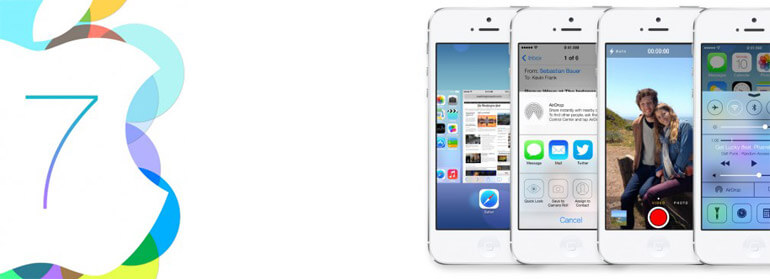
June – a month that witnessed the release of the latest operating system of Apple Inc. Yes, you all got it; I am definitely talking about the iOS 7. What has touched me the most is a promise from Apple. I know you all are wondering as to what is it? Well I would only like to say that the dawn of smart cars is here.

Today’s generation breathes & lives smart. Therefore, the good news is that Apple now plans to expand its reach by integrating iPhone into cars.

Surprised? Well now at this time almost the whole planet knows about iOS 7, which holds all kind of goods for many diversified industries and consumers.
So the feature – iOS in the car is just amazing. It would bring phone calls, iMessages, music, Apple maps and many more things to a vehicles in-dash display. According to Apple Inc, 95% of the cars sold today have some integration with iOS devices but the new feature has more to offer.
In iOS 7, the new feature allows drivers to use voice command through Siri. So now, I can rightly say Siri would act like your personal digital assistant. Siri would read messages for the drivers and it would also have access to information supplied by the Bing, Wikipedia and others.

The driver can ask Siri to play last voicemail, turn your Bluetooth on and switch it off as per your needs and increase and decrease the brightness.
Well I can just say that development is a continuous process, but sometimes it is at the cost of your safety. The features of the new operating system of Apple Inc when it comes to integrating with cars are just for the people who have grown up with these devices. Older drivers won’t be as demanding as the youngsters are. Many questions would pop-up in the young minds; some of them would be if they could use Facebook, twitter or other such social networking sites through this feature.

iOS in the car’ is a feature that would bring smart phone connectivity on the road but we believe that though there is great potential in harnessing this technology, the industry and the drivers would act responsibly relating to safety issues.

The Best seven New Features Of iOS 7

A company started by Steve Jobs, Steve Woznaik and Ronald Wayne has expanded from computers to customer electronics over the last 30 years. Undoubtedly, we all are iOS fans, but did you know that our favorite company had officially changed its name from Apple Computer, Inc to Apple, Inc in January 2007? Amazing isn’t it?
Well the most anticipated news is that Apple recently launched its latest operating system iOS 7, but the good news is that iOS 7 is filled with lots of new & better features than the previous systems so let’s have a look at the best new seven features of iOS 7.

Anti-theft Feature

Let’s us start with the Anti-theft feature. This feature tops my list though there are better features than this. This is because of its functions. We all know that absolutely no-security measures give 100% surety. I mean we have so many security measures but none of them are bulletproof. Today if we carefully observe then out of three, one robbery involves mobile devices. This is really scary, isn’t it? So here, for all Apple fans the new iOS 7 has an anti-theft feature, which would let you worry less about your iPhone being stolen. Now you would ask me that there is already a ‘Find my iPhone’ feature available in your iPhone then what is different in this ? Let me tell you the Anti-theft feature is different from your ‘Find my iPhone feature.’ Your iPhone cannot be traced because thieves just turn off the devices and wipe-them off before re-selling them. However when it comes to iOS 7, you have access to this completely new feature – Anti-theft feature, with which if anyone even steals your iPhone, he can use it only as a paperweight. The new activation lock setting is such that when a thief steals your iPhone he won’t be able to reactivate your iPhone without hacking your iCloud username as well as the password. Innovative isn’t it?

Modern Design

When I start speaking about design, I remember a famous quote from the father of Apple Inc – ‘Design is not just what it looks like and feels like. Design is how it works.’ Now I actually understand this quote by Steve Jobs on seeing the design of latest operating system. iOS 7 is designed in a completely new way from head to toe. In other words, the latest iOS version that is iOS 7 has a completely new design compared to the previous versions. The new operating system is flat and this is the biggest change since the launch of first iPhone. According to some websites, the modern look of iOS is confusing but I think you would just love it, as it’s simple to use. The new look is simple and cleaner. In addition, the new design gives you a transparency effect. That means you can view your favorite home screen photo that used to be hidden previously behind the apps while using iOS 7.

Back Button & iTunes Radio

Whether you believe or not, this time some ideas are actually borrowed from Blackberry 10 and third party iOS apps. There are security measures and the look is also completely new. The back button feature is not exactly a back button to go to the previous screen but a gesture. The back button is there when you need it. However, it doesn’t clutter up the screen when you don’t need it. As I said, the back button is a gesture and not exactly a button. Instead of the button you need to swipe in from the left side of the screen (bezel to screen) to start the feature. It works in many expected places like Safari Web Browser, apps like mail etc.

Along with this, another amazing feature is the iTunes Radio. Everyone after the launch started calling this, as the iRadio. I must say it’s a nice name for the iPhone Radio. As expected, this iRadio has a lot of similarity to the competitors as it gives the Pandora like experience. Like most of the streaming music apps, with the iTunes Radio you can play pre-loaded stations by genre or create your own ‘artist radio’ station. Well what I feel the best about this radio is that it’s different as it allows you to tie back to the iTunes store, allowing you to ‘wishlist’ your favorites and purchase those tracks, which you want to hear on demand. This app is free and ad-supported but ads are removed for iTunes Match subscribers.

Smarter Siri

This time we have a smarter Siri to our access. Therefore, I can rightly say Siri wants to know you better in iOS 7. There wasn’t any big focus on Siri in the keynote demo, but this feature has male and female voices, which are multi-linguistic. In other words, these voices can speak in French & German, with a promise that more languages would be spoken in the coming times. In addition to this Siri will no more mispronounce any name and if it does you can teach it the right pronunciation. Other than these things, it can control your device in a much better way than the previous versions. It can playback voicemails, turn on & off things like Bluetooth and it can increase and decrease screen brightness. The best thing about Siri is that it is now integrated with Twitter, Wikipedia and search results from Bing, so that it can read Wikipedia entries for you or just pull up web results.

Multi-tasking

Previously multi-tasking interface was accessed by a double tap on the home button, which brought up a small rack of app icons running in the background, but now in iOS 7 it shows larger windows with the app’s interface in action. The most important thing about multitasking is that that our favorite company Apple has claimed that though it’s better now, it won’t damage the battery life. Also along with this, all the apps are able to run in the background.

Notification Feature

The notification centre has gotten a makeover. In earlier versions, this feature was not of much use but now with the launch of iOS 7 things have changed. The notification centre splits your notifications wisely between various categories like “All”, “Missed” and “Today” giving you a glance at all your day’s notifications. Innovative I must say…!

So these were the seven best iOS 7 features but this is not all, there is a lot more to offer as this time Apple has come up with many new & exciting features like FaceTime & iMessage blocking etc.


iOS Software Development Kit – All You Need to Know

IOS SDK is a iOS software development kit developed by the Apple Inc, to develop native applications for IOS. An IOS uses XNU (an operating system kernel that apple inc. acquired and developed for the use in the Mac OS X Operating System) which used for developing on IOS is also based on X code.

The SDK are broken into the following Sets:

Cocoa Touch

Multi-touch Events & control

It is a touch sensing surface’s ability to recognize the presence of two & more point of contacts with the surface.

The functionality of Multi Touch is pinch to zoom, activating predefined programs

  • Accelerometer Support
  • View Hierarchy
  • Localization:

Localization & Internationalization are means of adapting computer software to different languages, Regional differences and technical requirements of a target market.

Internationalization is the process of designing a software application so that it can be adapted to various regions & languages.

Localization is the process of adapting internationalized software for a specific region or language by adding local specific component & translating the text.

  • Camera Support
  • Alerts
  • Web View
  • Image Picker
  • People Picker

Media

Open AL

Open AL (Open Audio Library) is a cross platform audio application programming interface. It is designed for efficient rendering of multi channel three dimensional positional Audio.
OpenGL is encoded in to source objects, Audio Buffers and single listener.

  • Source objects contain a pointer to a buffer, the velocity, position and direction of the sound. The listener object contains the velocity, position & direction of the listener.
  • Buffer contains audio data in Pulse code modulation format.
  • In Open AL application, sounds behave quite naturally as the user moves through the three-dimensional space of the virtual world.
  • It has two subsections of APIs the core consisting of the actual Open AL function calls, and the ALC (Audio Library Context)

Audio Mixing & recording

  • As the name suggests this API has the function of audio mixing process of multiple recorded sound and combined into one or more channels.
  • Video Playback
  • Image file Formats
  • Quartz
  • It is basically a graphic layer which refers to a pair of OS X technologies; it includes both a 2D renderer in Core Graphics and the composition engine that sends instructions to the graphics card.

Core Animation

  • Core Animation is the data visualization API used by IOS produced animated user interfaces.
  • Core animation can animate any visual element and it provides a unified way of accessing core image, core video and other quartz technologies. Core animation can be accelerated by the Graphical Processor (GPU).
  • It means core animation has the all the functionality of image, video & Quartz technologies. These functions clubbed in core animation and used by developers.

OPEN GL ES

  • It stands for OPEN GL for embedded System. Open GL (Open Graphic Library) is a cross language, multi platform API for rendering 2D and 3D computer Graphics. The API typically used to interact with GPU, to accelerate hardware accelerated rendering.

5 Quick points About Mobile Phone System Layer

These are the Mobile Phone system layer on which various applications can be developed.

1. Hardware Level

It is a first level or basic level of the mobile system. All the hardware is integrated in the ICs.

2. Operating system Layer

It is a layer of Operating system whether it an android or I phone operating system.

3. Libraries/ API (Application Programming Interface)

Libraries or Application Programming Interface can be on one layer and also on different layers.

Above this Operating system, there are various libraries are available which is developed by the OS developer. It is called a Native Library or core library. These Libraries are the set of programs and set of Instructions for the hardware embedded in the mobile device.
Application Programming interface is a software or protocol which used to communicate between hardware and the application layer. APIs act as a bridge between Application layer and the hardware. Each & every hardware has its different APIs.
Applications on application layer works by connecting each & every hardware by connection its APIs.

4. Third Party Library

Third Party APIs can be developed over the Native library/Native APIs Layer. The Library which doesn’t come as a part of operating system, It is taken from outside or it can be developed; such kind of library is called as third party library.
There are various third party library is available or it is continuously developed. One such kind of library is the Open CV.

Open CV: Opensource Computer Vision Library

Open CV is a library of programming functions mainly aimed at real time computer vision. Open CV is used in the different application development.
Open CV focuses on the real time image processing. OpenCV application area includes:

  • Facial Recognition
  • Gesture Recognition
  • Motion Recognition
  • Human-computer Interface

5. Application Layer

In the application Layer various applications will be developed from the help of the Native Library & 3rd Party Library while connecting with the hardware and OS Layer.
Additional Libraries:
There are also additional libraries with the native libraries. For example, if we want to develop an application in which you record a video by your phone and upload this video in real time on internet.

For that purpose, you have recorded one video but to upload the video in the same format, it is a very long process, for that purpose compression of the video should be done. So, the video can be uploaded easily and also can retrieve easily on internet.
For that purpose an additional library is available on IOS & Android OS. It is not a native library but it is additional library come with native library.

For Another example, if we want to develop one application in which you take a photo by your phone and the application gives you the various images results like concave image etc.
For that purpose, the image should be properly loaded in the application and there should be filters available in the OS library which gives the result which you want. Another example of filter is the font which is a filter of text.


Augmented Reality apps – Why We Love A Peek Inside

Augmented reality (AR) is a live, direct or indirect, view of a physical, real-world environment whose elements are augmented by computer-generated sensory input such as sound, video, graphics or GPS data. It is related to a more general concept called mediated reality, in which a view of reality is modified (possibly even diminished rather than augmented), by a computer.

So this was the technical definition of AR. Let’s talk something which a layman can also understand.

AR is something which modifies your real vision. Let’s take this example, you have your mobile, you start the camera and scan your hand and suddenly a small genie pops up into the screen of your mobile. Whoa where did that come from? When you look into the screen of your mobile you can see a genie on the palm of your hand but that’s not the reality. So how did it happen and what was that? That’s what augmented reality is. When we create an illusion of modifying the reality through our technology, that process is the augmented reality.
So now the question arises how did that genie pop in our mobile device? How is it done?
Basically for AR to happen, one needs a device with camera, preferably a mobile or tablet. An AR application scans the object/location/image and then the 3d model pops into our mobile.
AR technology is basically implemented with the help of many types of software. But before we talk about the type of software, let’s first discuss how many types of AR are there.

Basically there are three types of AR.
• Marker Based
• Marker less
• Location-Based

Marker Based AR

In this type of AR application, the app will scan the image and whenever it comes across the pre-defined marker for the app, it will project the 3d model on top of that image. Marker can be anything from a company’s logo to an image to a QR code. Thus any object or image having that marker will become the target. For marker based AR app to work perfectly, it will need a pre-defined marker to be specified to it. Although this was the first approach that came into existence with AR but now this has become bit redundant, reason being the fact that now AR software have much faster and amazing image processing algorithms. And thus there’s no need of specifying any marker.

Marker Less

In this type of Augment reality application, the app will scan any image or object and it won’t require any sort of marker for identification. Thus this approach becomes much easier. App won’t have to search for any marker and thus more options are available for the app. The scope will increase and it won’t be limited to some specific type of marker based image or picture. In this type app will scan the image or object based on the edges and texture. Undoubtedly this becomes a harder approach for the app but as mentioned earlier AR software have great image processing algorithms now and thus that is not an issue to worry about.

Location based

In this type of Augment reality application, the app will scan the location instead of image. It will use the GPS services to locate the exact location of the user. Many applications require the user to go to a certain location and then the AR effects happen.
After discussing the types of AR, let’s now discuss how an AR app is made. There are many types of software available today in the market to develop an AR app. These apps might be designed and made for various platforms as well.

For example:one might develop an app specifically for iOS or for android platform.

List of software available:
• Vuforia
• Metaio
• Junaio
• D’fusion
• Layar