


Databricks vs Snowflake: Data Migration Strategies for Modern Enterprises
As enterprises accelerate their cloud transformation journeys, migrating legacy data warehouses and lakes has become a strategic priority. However, choosing the right target platform, Databricks or Snowflake, can significantly impact performance, scalability, cost efficiency, and long-term innovation.
Databricks offers a unified Lakehouse architecture powered by Delta Lake and Apache Spark, enabling organizations to handle structured, semi-structured, and unstructured data while supporting advanced analytics, AI, and machine learning. Snowflake, in contrast, delivers a fully managed Data Cloud optimized for SQL analytics, business intelligence, and high-concurrency workloads with minimal operational overhead.
This guide provides a comprehensive comparison of migration strategies for both platforms, covering key considerations such as planning, tools, cost models, performance, security, downtime, rollback mechanisms, and post-migration validation. It also highlights best practices such as phased migration, pilot testing, and automation to minimize risk.
Understanding the Platforms: Databricks Vs Snowflake
| Architectural Differences: A clear understanding of architecture is essential before planning your migration. |
|---|
| Databricks Lakehouse Architecture | Snowflake Data Cloud Architecture |
|---|---|
| Built on open formats like Delta Lake and Parquet | Fully managed platform with separate compute and storage layers |
| Combines data lake flexibility with data warehouse reliability | Uses virtual warehouses for elastic compute scaling |
| Uses Apache Spark for distributed data processing | Optimized for SQL-based analytics and BI workloads |
| Supports batch and real-time streaming workloads | Offers built-in features like time travel, cloning, and data sharing |
| Typical Workloads: Each platform is optimized for different business needs. |
|---|
| Databricks is ideal for | Snowflake is ideal for |
|---|---|
| Machine learning and AI workloads | Business intelligence dashboards |
| Real-time analytics and streaming pipelines | High-concurrency SQL queries |
| Large-scale ETL/ELT processing | Data warehousing and reporting |
| Unstructured data processing (logs, images, IoT data) | Governed data sharing across teams |
| Ecosystem & Compliance: Both platforms support AWS, Azure, and Google Cloud and provide: |
|---|
| Enterprise-grade security (SOC 2, GDPR, HIPAA) |
| Encryption at rest and in transit |
| Integration with modern data tools (BI, ETL, AI frameworks) |
Migrating to Databricks Lakehouse
Migrating to Databricks involves more than just moving data; it’s about rearchitecting your data platform into a unified Lakehouse. This shift enables organizations to consolidate data engineering, analytics, and AI workloads on a single platform powered by Apache Spark and Delta Lake.
Unlike traditional migrations, Databricks allows you to modernize both data pipelines and processing frameworks, making it especially suitable for organizations dealing with large-scale, diverse, or real-time data.
Overall Migration Approach
The migration approach typically focuses on transitioning from legacy systems (data warehouses, Hadoop, ETL tools) to a Delta Lake-based architecture.
- Existing Spark or SQL-based workloads can often be migrated with minimal refactoring
- Legacy ETL pipelines (e.g., Informatica, SSIS) are replatformed using modern data pipelines
- Emphasis is placed on shifting from ETL → ELT and leveraging distributed processing
The goal is not just migration, but modernization for scalability and performance.
Tools and Automation
Databricks provides a robust ecosystem of tools to accelerate migration and reduce manual effort.
- Databricks Auto Loader
- Efficiently ingests large volumes of data from cloud storage
- Automatically detects new files and schema changes
- Delta Live Tables(DLT)
- Simplifies pipeline creation with built-in data quality checks
- Automates ETL workflows with reliability and scalability
- Databricks Notebooks(DLT)
- Enable collaborative development using Python, SQL, and Scala
- Replace legacy stored procedures and scripts
- Integration with Cloud ETL Tools(DLT)
- Azure Data Factory, AWS Glue, and others can orchestrate pipelines
- Useful for hybrid or phased migration strategies
Data Architecture Best Practices
A well-defined data architecture is critical for long-term success in Databricks.
- Adopt the Medallion Architecture(DLT)
- Bronze → Raw, unprocessed data
- Silver → Cleaned and enriched data
- Gold → Aggregated, business-ready datasets
- Standardize on Delta Lake
- Provides ACID transactions and schema enforcement
- Supports time travel and version control
- Separate Storage and Compute
- Store data in cloud storage
- Use clusters only when needed for processing
This structure improves scalability, governance, and performance.
Security and Governance
Databricks provides enterprise-grade governance capabilities, but they must be configured correctly during migration.
- Use Unity Catalog for centralized access control and data governance
- Implement role-based access control (RBAC)
- Enable data lineage tracking for compliance and auditing
- Ensure:
- Encryption at rest and in transit
- Secure cluster configurations
- Integration with cloud IAM (Azure AD, AWS IAM)
Key Benefits of Migrating to Databricks
- Unified platform for data engineering, analytics, and AI
- Scalability for large and complex datasets
- Open architecture with no vendor lock-in
- Strong support for real-time and streaming workloads
- Built-in capabilities for advanced analytics and ML
Migrating to Snowflake Data Cloud
Migrating to Snowflake is primarily about modernizing your data warehouse into a fully managed, cloud-native analytics platform. Unlike Lakehouse migrations, Snowflake focuses on simplifying data operations by abstracting infrastructure management and enabling high-performance SQL analytics at scale.
This makes Snowflake an ideal choice for organizations looking to streamline BI, reporting, and governed data access without managing complex data engineering infrastructure.
Overall Migration Approach
Snowflake migration typically involves data replication, schema conversion, and SQL transformation modernization.
- Legacy data warehouses (e.g., Teradata, Oracle, SQL Server) are migrated into Snowflake tables
- Existing SQL workloads are adapted to Snowflake’s ANSI-compliant SQL
- ETL pipelines are often redesigned into ELT workflows, pushing transformations into Snowflake
The focus is on simplification, scalability, and faster analytics delivery.
Tools and Automation
Snowflake provides several tools to accelerate migration and reduce manual effort.
- SnowConvert AI
- Automates conversion of legacy SQL, DDL, and ETL scripts
- Reduces manual rewriting effort and speeds up migration timelines
- Snowpipe
- Enables continuous, automated data ingestion
- Supports near-real-time data pipelines
- SnowSQL CLI
- Command-line tool for bulk loading and automation
- Third-Party Integrations
- Tools like Fivetran, Talend, or Informatica for data ingestion and orchestration
- Useful for complex enterprise migrations
Data Architecture Best Practices
Snowflake encourages a structured and optimized data warehouse design.
- Layered Data Model
- Raw → Staging → Curated → Data marts
- Supports clean separation between ingestion and analytics
- Leverage Native Features
- Use the VARIANT data type for semi-structured data (JSON, XML)
- Utilize zero-copy cloning for testing and development
- Optimize Storage and Compute Separation
- Store all data centrally
- Use independent virtual warehouses for different workloads
This ensures scalability, performance isolation, and efficient resource utilization.
Security and Governance
- Snowflake offers strong, built-in security and compliance features.
- Role-based access control (RBAC) for fine-grained permissions
- Dynamic data masking and secure views for sensitive data
- End-to-end encryption (in transit and at rest)
- Compliance support:
- SOC 2
- GDPR
- HIPAA
- PCI DSS
- Network security:
- Private connectivity (PrivateLink)
- IP whitelisting and network policies
Governance is largely out-of-the-box, reducing setup complexity.
Key Benefits of Migrating to Snowflake
- Fully managed platform with minimal operational overhead
- High performance for SQL analytics and BI workloads
- Seamless scalability and concurrency handling
- Strong built-in security and compliance
- Faster time-to-value for business users
Migration Planning: The Foundation of Success
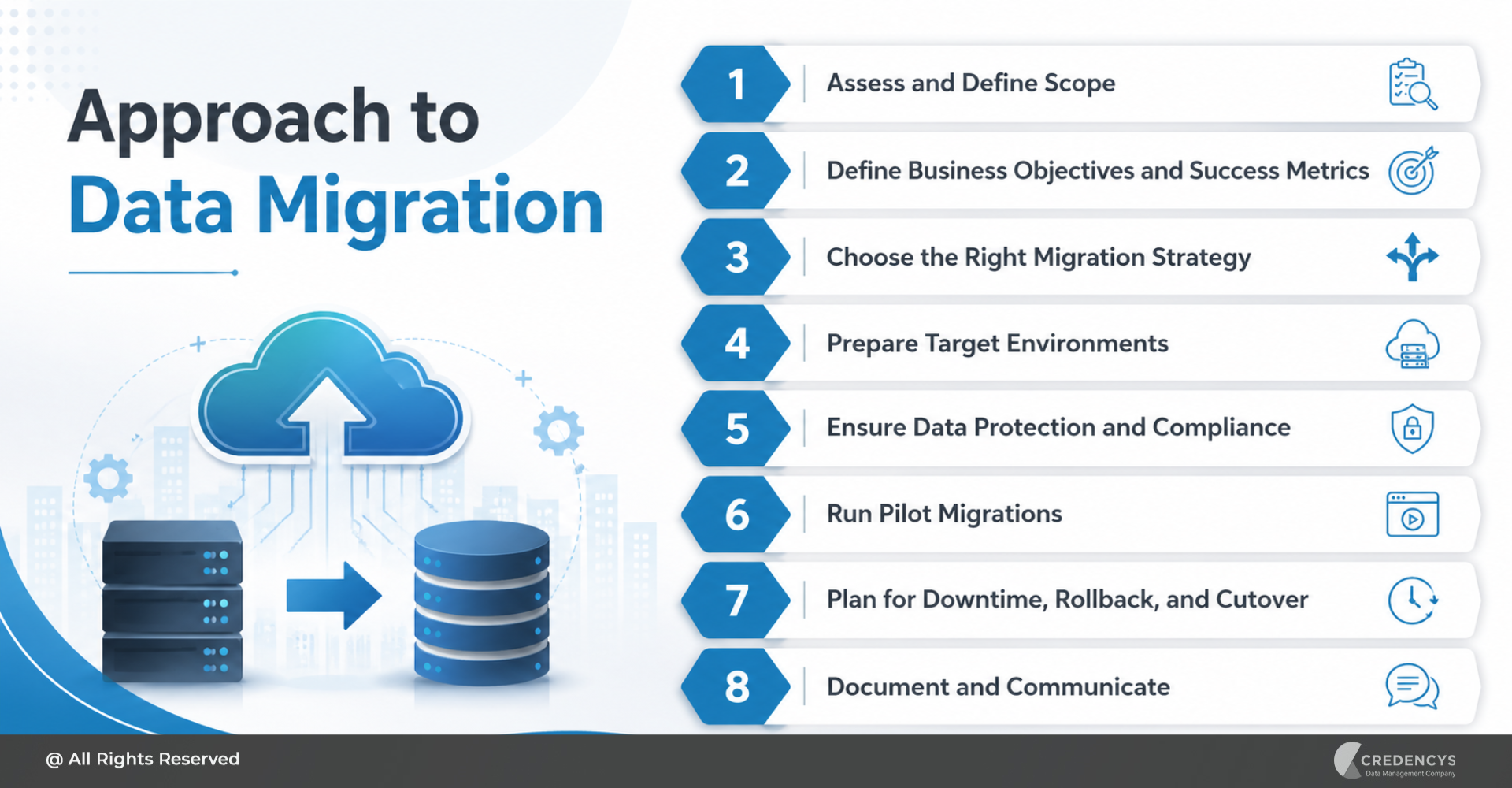
A successful data migration is not defined by the tools you choose, but by the strength of your planning. Whether you are moving to Databricks or Snowflake, a structured approach ensures minimal disruption, controlled costs, and predictable outcomes.
1. Assess and Define Scope
Begin with a comprehensive audit of your current data landscape. This includes identifying all data sources, pipelines, dependencies, and downstream applications that rely on the system.
Go beyond just inventory, evaluate data volume, velocity, formats, and sensitivity. Clearly defining scope helps avoid surprises mid-migration and ensures that no critical workload is overlooked.
2. Define Business Objectives and Success Metrics
Migration should be driven by business outcomes, not just technology upgrades. Establish clear goals such as reducing infrastructure costs, improving query performance, enabling real-time analytics, or supporting AI/ML initiatives.
Translate these goals into measurable KPIs, for example, “30% reduction in query latency” or “20% cost optimization.” These benchmarks help track ROI and keep stakeholders aligned throughout the migration journey.
3. Choose the Right Migration Strategy
Selecting the right migration approach significantly impacts risk and timelines. A phased migration allows workloads to be moved incrementally, enabling validation at each stage and reducing business disruption.
A big-bang approach may seem faster but introduces a higher risk, especially for mission-critical systems. Most enterprises prefer phased execution combined with parallel runs to ensure accuracy before full cutover.
4. Prepare Target Environments
Before migrating any data, ensure that your target environment is fully configured and production-ready. This includes setting up compute resources, storage layers, access controls, and monitoring systems.
For Databricks, this means configuring clusters, Delta Lake schemas, and governance tools like Unity Catalog. For Snowflake, it involves setting up virtual warehouses, schemas, and role-based access controls to ensure a smooth onboarding experience.
5. Ensure Data Protection and Compliance
Data security must be embedded into the migration process from the start. Create full backups or snapshots of all critical data to safeguard against accidental loss or corruption during migration.
Implement encryption both in transit and at rest and ensure compliance with relevant regulations. If required, plan for advanced security measures such as customer-managed encryption keys (BYOK) and audit logging.
6. Run Pilot Migrations
A pilot migration acts as a safety net before full-scale execution. Select a representative dataset or workload and migrate it in a controlled, non-production environment.
This helps identify performance bottlenecks, compatibility issues, and transformation challenges early. It also allows teams to validate tools, processes, and timelines before committing to full migration.
7. Plan for Downtime, Rollback, and Cutover
Even with the best planning, unexpected issues can arise. Define a clear cutover strategy, including the timing and approach for transitioning systems from legacy to the new platform.
Prepare rollback mechanisms in advance, whether through backups, snapshots, or platform-specific features like time travel or cloning. This ensures business continuity if anything goes wrong during the final migration.
8. Document and Communicate
Thorough documentation ensures transparency, governance, and long-term maintainability. Capture all migration steps, data mappings, transformation logic, and configuration settings.
Equally important is communication; keep stakeholders informed about timelines, potential risks, and expected outcomes. Clear communication minimizes resistance and ensures smoother adoption across teams.
Why Choose Credencys for Databricks & Snowflake Migration?
Migrating to modern data platforms like Databricks and Snowflake requires more than technical execution; it demands strategic planning, deep platform expertise, and proven delivery frameworks. This is where Credencys stands out.
As a certified partner for both Databricks and Snowflake, Credencys helps enterprises accelerate cloud data migration while minimizing risk, downtime, and cost overruns. Our team brings hands-on experience across industries like retail, eCommerce, manufacturing, and supply chain, ensuring your migration aligns with real business outcomes.
Why Enterprises Trust Credencys
- Certified partner for Databricks and Snowflake
- Proven experience across complex enterprise migrations
- Industry expertise in retail, CPG, manufacturing, and eCommerce
- Strong focus on governance, security, and compliance
- End-to-end support; from strategy to execution to optimization
Conclusion
Data migration is no longer just an IT initiative; it’s a strategic enabler of innovation, agility, and data-driven decision-making. Choosing between Databricks and Snowflake ultimately comes down to your organization’s priorities, workloads, and long-term data strategy.
If your focus is on advanced analytics, machine learning, and large-scale data processing, Databricks offers the flexibility and power of an open Lakehouse architecture. On the other hand, if your priority is high-performance SQL analytics, business intelligence, and ease of management, Snowflake provides a streamlined, fully managed experience.
However, the success of any migration doesn’t depend solely on the platform; it depends on how well it’s planned and executed. From defining clear objectives and choosing the right strategy to validating data and optimizing performance post-migration, every step plays a critical role in achieving desired outcomes.
This is where having the right partner becomes essential. With deep expertise in both platforms, Credencys helps organizations navigate complexity, reduce risk, and accelerate time-to-value, ensuring your migration is not just successful but transformational.



Tags: