


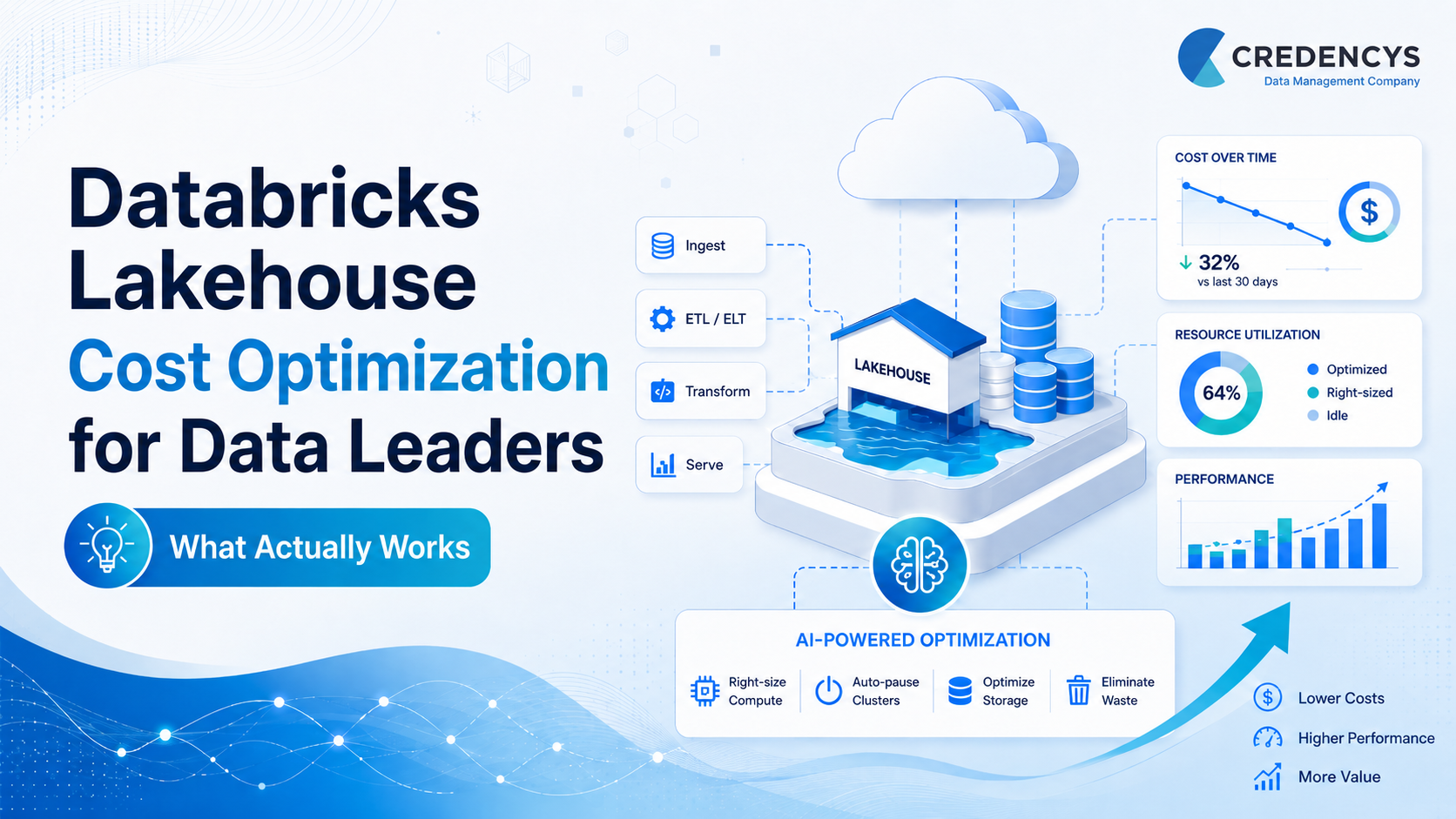
Databricks Lakehouse Cost Optimization for Data Leaders: What Actually Works
Databricks has become a go-to Data + AI platform for organizations looking to build scalable data pipelines, run large-scale analytics, and deploy machine learning models on a unified Lakehouse architecture. That flexibility, however, comes with a trade-off.
When we talk to most data leaders and we hear a familiar concern: COST.
While Databricks is widely recognized as one of the most powerful Lakehouse platforms available today, its usage-based pricing model can feel unpredictable. Even for large enterprises, justifying spend becomes difficult when analytics usage grows faster than budget controls.
In fact, industry studies estimate that 20–30% of cloud analytics spend is wasted due to idle compute, inefficient workloads, and poor cost visibility.
Databricks Lakehouse Cost Optimization is about designing, running, and governing the Lakehouse in a way that aligns platform usage with real business value. When done right, cost optimization helps data leaders balance performance, scalability, and return on investment.
In this article, we’ll focus on the architectural and operational principles that actually work in real-world Databricks environments.
What Makes Databricks Lakehouse Costs Difficult to Control
Databricks Lakehouse pricing is usage-based, which sounds simple on paper. You pay for what you use. But as environments scale, costs become harder to predict and even harder to control. The challenge is how people, workloads, and data interact inside it over time.
The Lakehouse model gives teams flexibility. They can spin up compute, run ad hoc queries, schedule pipelines, experiment with models, and serve analytics users across the business. This flexibility accelerates innovation, but it also means costs are driven by everyday usage decisions.
Several factors typically make Databricks costs difficult to manage:
1. Always-on and underutilized compute
Clusters often stay running longer than needed or are sized for peak demand that rarely occurs. Over time, idle compute and over-provisioned infrastructure can quietly increase spend.
2. Shared clusters with unclear ownership
Shared interactive clusters support collaboration, but they can blur accountability. When costs rise, it becomes difficult to identify which team, workload, notebook, job, or business unit is actually driving the spend.
3. Inefficient or over-scheduled jobs
Recurring workflows can run more frequently than required, overlap during peak hours, or process more data than necessary. These jobs continue consuming DBUs even when the business value does not justify the runtime.
4. Growing data volumes and query complexity
As data volumes grow, queries often take longer and consume more compute. Many teams respond by increasing resources instead of improving workload design, table layout, or query efficiency.
5. Limited cost visibility for leaders
Many organizations lack clear visibility into Databricks spend by team, project, workload, SKU, job, or workspace. Without this visibility, optimization becomes reactive. Teams address cost spikes after they happen instead of preventing them.
What makes this especially tricky is that Databricks does not always fail loudly when inefficiencies exist. Pipelines still run. Dashboards still load. Jobs still complete. The platform appears healthy, even as costs steadily increase.
This is why Databricks Lakehouse cost control requires more than technical tuning. It requires architecture discipline, usage governance, cost visibility, and shared ownership.
Databricks Cost Optimization: What has Changed?
Databricks cost optimization has evolved. Earlier cost-control efforts focused heavily on cluster sizing, auto-termination, and job compute. These are still important, but data leaders now need to think more broadly.
Today, optimization also includes serverless compute, Lakeflow Jobs, system tables, budget policies, predictive optimization, and intelligent data layout.
Databricks recommends serverless compute for supported workloads because it reduces the need to configure and manage infrastructure manually. Serverless compute is available for notebooks, jobs, and Lakeflow Spark Declarative Pipelines, and it scales according to workload needs.
Databricks also now uses updated Lakeflow terminology. Databricks Jobs is now called Lakeflow Jobs, and DLT is now Lakeflow Spark Declarative Pipelines. No migration is required, but using the current terminology makes documentation, governance, and team enablement clearer.
For cost-conscious teams, serverless standard mode is also worth evaluating. Databricks states that standard mode is best suited for automated batch jobs and pipelines that can tolerate longer startup times, and it can reduce costs by up to 70% compared with performance-optimized mode.
This means modern Databricks cost optimization is no longer just about asking, “Is this cluster too big?” Data leaders should also ask:
- Can this workload move to serverless?
- Can batch workloads use standard serverless mode?
- Are recurring workflows managed through Lakeflow Jobs?
- Can we track spend by workload, user, project, and business unit?
- Are predictive optimization and liquid clustering improving data layout?
- Are budgets, tags, and usage policies enforcing accountability?
What Principles Actually Drive Databricks Lakehouse Cost Optimization?
Databricks Lakehouse cost optimization is most effective when it’s guided by a few clear principles, not one-time tuning efforts. These principles help data leaders control costs without limiting the flexibility that makes the Lakehouse valuable in the first place.
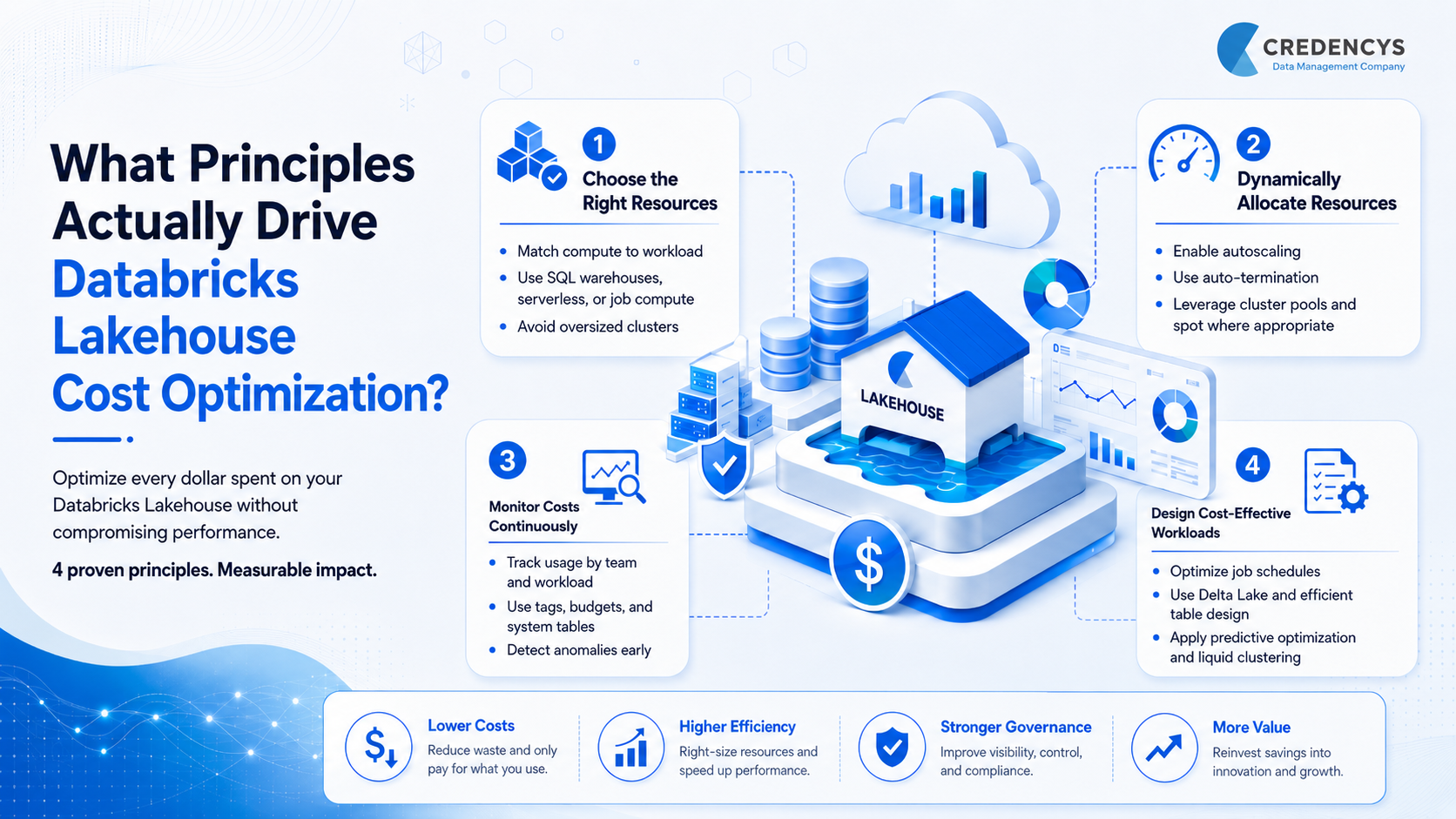
1. Choose the Right Compute for Each Workload
Many cost issues begin when teams use the wrong compute for the wrong workload.
A lightweight exploration notebook does not need the same configuration as a production ETL pipeline. A BI dashboard workload should not run on the same compute pattern as an ML training workload. A batch pipeline may not need performance-optimized serverless mode if standard mode can meet the SLA. Data leaders should encourage teams to:
- Match compute type to workload behavior
- Use job compute or Lakeflow Jobs for scheduled workloads
- Use SQL warehouses for SQL and BI workloads
- Use serverless compute where supported
- Avoid GPUs unless the workload truly benefits from them
- Review instance types and cluster sizes regularly
The goal is not to use the cheapest compute everywhere. The goal is to use the most cost-effective compute for each workload.
2. Dynamically Allocate and Release Resources
Static compute is one of the biggest sources of Databricks cost waste.
The Lakehouse is designed to scale, but costs rise when clusters stay active after work is complete or when teams size infrastructure for peak demand even though most workloads run below that level. Strong cost optimization practices include:
- Enabling autoscaling for variable workloads
- Applying auto-termination for interactive clusters
- Scheduling start and stop patterns for predictable usage
- Avoiding always-on compute unless business-critical
- Using cluster pools where faster startup is needed without unnecessary DBU charges
This is especially important for teams that run development, testing, analytics, and experimentation workloads throughout the day.
3. Monitor Usage Continuously, Not Reactively
Cost optimization fails without visibility.
Databricks provides system tables that help teams analyze cost and usage across the account. The system.billing.usage table allows teams to monitor billable usage, including DBU consumption, SKU details, serverless usage, and workload-level cost patterns.
This gives data leaders a much clearer view of:
- Which jobs are consuming the most DBUs
- Which users or teams are driving serverless usage
- Which workloads are creating cost spikes
- Which SKUs are growing fastest
- Which tags or projects are associated with spend
Databricks also provides job and Lakeflow system tables that can be used with billing system tables to monitor job costs and performance.
This level of visibility is essential for showback, chargeback, cost anomaly detection, and executive reporting.
4. Design Workloads and Tables for Cost Efficiency
Cost optimization is not only a compute problem.
Poor workload design, inefficient queries, small files, outdated table layouts, and unnecessary scans can all increase runtime and DBU consumption. Teams often try to solve performance problems by adding more compute, but that only shifts the cost problem.
Modern Databricks optimization should include both compute tuning and data layout optimization.
Databricks recommends predictive optimization for Unity Catalog managed tables. Predictive optimization can automatically run optimization operations such as OPTIMIZE and VACUUM when appropriate, helping improve query performance and reduce unnecessary storage and compute costs.
Liquid clustering is another important capability. Databricks describes liquid clustering as a data layout technique that replaces traditional partitioning and ZORDER for many use cases, simplifying table management while improving query performance.
For data leaders, this means cost optimization must move earlier into architecture and design decisions.
Databricks Lakehouse Cost Optimization Best Practices that Actually Work
Cost optimization works best when best practices directly support core optimization principles. Rather than applying everything at once, successful teams focus on a few high-impact areas and build discipline over time.
1. Choose Optimal Resources
The fastest way costs spiral is by running workloads on the wrong compute.
Use Delta Lake as the default format
Delta Lake improves reliability, performance, and data management for ETL and analytics workloads. Faster, more reliable jobs reduce unnecessary reruns and long compute runtimes.
Use Lakeflow Jobs for scheduled workloads
Scheduled ETL, batch pipelines, and recurring workflows should be managed through Lakeflow Jobs. This improves workload isolation, scheduling control, failure monitoring, and cost attribution.
Use SQL warehouses for SQL and BI workloads
BI dashboards, reporting workloads, and interactive SQL queries should run on SQL warehouses instead of general-purpose clusters. This helps separate SQL workloads from engineering and ML compute patterns.
Use serverless compute where supported
For supported workloads, serverless compute can reduce infrastructure management overhead and help teams avoid manually configuring clusters. It is especially useful when teams want faster scaling and less operational complexity.
Evaluate standard mode for batch workloads
For automated batch workloads and pipelines that can tolerate slightly longer startup times, standard serverless mode can be a strong cost optimization lever. Databricks states that it can reduce costs by up to 70% compared with performance-optimized mode.
Use GPUs only where they truly add value
GPU instances are powerful but expensive. Most workloads do not need them. Restrict GPU usage to deep learning, model training, or GPU-accelerated libraries where the performance gain justifies the cost.
Keep runtimes up to date
Newer Databricks runtimes often include performance improvements. Faster execution can reduce DBU consumption and lower total workload cost over time.
2. Dynamically Allocate Resources
Static compute is expensive when workload demand changes throughout the day.
Enable autoscaling
Autoscaling adjusts resources based on workload intensity. This prevents teams from sizing clusters for peak demand when most workloads run below that level.
Use auto-termination aggressively
Interactive clusters should shut down after a reasonable period of inactivity. This is one of the simplest ways to reduce avoidable spend.
Avoid always-on streaming unless required
Not every streaming workload needs 24/7 compute. For use cases without strict latency requirements, triggered or batch-style processing may deliver the same business value at a lower cost.
Use cluster pools where startup time matters
Cluster pools can reduce startup delays while avoiding unnecessary DBU charges when instances are idle. They are useful when teams need faster cluster availability without keeping full compute running.
Balance on-demand and spot instances
Spot instances can reduce infrastructure costs for fault-tolerant workloads. A practical pattern is to keep drivers on on-demand instances and use spot workers where reliability requirements allow.
3. Monitor and Control Costs Continuously
Data leaders cannot optimize what they cannot see.
Implement tagging from day one
Tag workspaces, jobs, clusters, SQL warehouses, and serverless workloads by business unit, project, environment, and owner. Databricks supports usage tags for attributing compute usage to teams, projects, workspaces, or users, which helps with cost tracking and budgeting.
Use system tables for cost observability
Use system.billing.usage to analyze billable usage across workloads, SKUs, serverless compute, and jobs. This gives teams a more accurate view than waiting for monthly cloud invoices.
Create budgets and alerts
Databricks budgets allow organizations to track account-wide spending or filter spend by teams, projects, or workspaces. This helps leaders detect overruns earlier and hold teams accountable.
Use serverless usage policies
Serverless usage policies can apply cost attribution tags to serverless workloads. This is especially useful as more notebooks, jobs, and pipelines move to serverless compute.
Run regular cost reviews
Monthly cost reviews help teams identify expensive jobs, idle workloads, inefficient queries, and unexpected usage spikes. These reviews should include data engineering, analytics, finance, and platform owners.
4. Design Cost-Effective Workloads
How workloads are designed often matters more than how they are tuned later.
Optimize job frequency
Not every job needs to run hourly or daily. Review job schedules based on business need, downstream dependencies, and data freshness requirements.
Reduce unnecessary data processing
Avoid full refreshes where incremental processing is enough. Use partition pruning, filtering, and optimized query patterns to reduce unnecessary scans.
Improve table layout
Poor table layout can increase query time and compute consumption. Use predictive optimization, liquid clustering, and data layout best practices to improve performance and reduce avoidable compute usage.
Avoid over-engineering pipelines
Some workloads do not need real-time processing, high-memory clusters, or complex orchestration. Simpler architecture often reduces cost and improves reliability.
Shift cost thinking left
Cost should be considered during architecture, pipeline design, and workload onboarding, not only after invoices increase. Data teams should evaluate performance, cost, governance, and business value before workloads move to production.
A Data Leader’s Checklist for Databricks Cost Control
| Area | What Data Leaders Should Check | Why It Matters |
|---|---|---|
| Compute | Are teams using the right compute type for each workload? | Prevents overspending on oversized or misaligned infrastructure. |
| Serverless | Which workloads can move to serverless compute? | Reduces infrastructure management and idle compute waste. |
| Batch Workloads | Can standard serverless mode reduce cost without affecting SLAs? | Helps lower costs for automated jobs that do not need instant startup. |
| Jobs | Are recurring workloads managed through Lakeflow Jobs? | Improves scheduling, monitoring, workload isolation, and cost attribution. |
| SQL Workloads | Are BI and SQL workloads running on SQL warehouses? | Keeps reporting workloads cost-efficient and separate from engineering compute. |
| Visibility | Can costs be tracked by team, project, job, SKU, and workspace? | Gives leaders clear insight into where Databricks spend is coming from. |
| Tagging | Are tags applied consistently across workloads? | Enables accurate cost allocation, showback, and chargeback. |
| Budgets | Are budget thresholds and alerts in place? | Helps teams detect cost overruns before they become major issues. |
| Workload Design | Are jobs running more frequently than the business requires? | Reduces unnecessary DBU consumption from over-scheduled workflows. |
| Table Optimization | Are predictive optimization and liquid clustering being used where relevant? | Improves query performance and reduces avoidable compute usage. |
| Governance | Is Unity Catalog supporting ownership, access, and metadata management? | Strengthens control, visibility, and long-term platform governance. |
| Business Value | Which expensive workloads deliver low business value? | Helps prioritize optimization based on measurable business impact. |
Case Study: Databricks Lakehouse Cost Optimization in Action
About the Client
The client is a large global enterprise running business-critical analytics and data workflows on a Databricks Lakehouse. As data volumes and usage grew, the platform became central to decision-making, but rising costs and performance issues began to limit its effectiveness.
Key Challenges
The organization faced rapidly increasing Databricks cloud spend, long workflow execution times, and inconsistent performance across Spark pipelines. A lack of standardization, inefficient resource usage, and limited governance made it difficult to control costs without impacting scalability or reliability.
Solution Implemented
Credencys conducted a deep assessment of Spark workloads, infrastructure usage, and cost patterns. The team optimized Spark performance, re-aligned infrastructure based on workload criticality, shifted non-critical jobs to cost-efficient compute, and implemented Databricks Unity Catalog to establish strong governance and future-ready data operations.
Business Impact
- 90% reduction in Databricks cloud compute costs
- Workflow execution time reduced from 2 hours to 10 minutes
- Improved platform reliability and scalability for analytics and ML
- Stronger governance and metadata management using Unity Catalog
Wrapping Up: How Credencys Helps Data Leaders Optimize Databricks Lakehouse Costs
Databricks Lakehouse cost optimization is not a one-time cleanup exercise. As data volumes grow, teams expand, AI workloads increase, and business users demand faster insights, costs can quickly drift away from business value.
Sustainable optimization requires ongoing visibility, disciplined workload design, intelligent compute choices, and governance that scales with the platform.
As a trusted Databricks Partner, Credencys helps enterprises bring clarity, control, and long-term efficiency to their Databricks Lakehouse environments. Our Databricks-certified experts combine deep technical expertise with a leadership-level understanding of cost, performance, governance, and measurable business impact.
We help organizations:
- Assess Databricks workloads and usage patterns
- Identify idle, over-provisioned, or inefficient compute
- Optimize Spark jobs and SQL workloads
- Improve job scheduling and cluster configuration
- Implement Unity Catalog for stronger governance
- Build cost visibility using system tables and usage data
- Establish tagging, budgeting, and cost attribution practices
- Create a practical roadmap for sustainable Lakehouse optimization
Final Thoughts
Databricks gives enterprises the flexibility to scale data engineering, analytics, and AI on a unified Lakehouse platform. But flexibility without governance can create unpredictable costs.
For data leaders, the path forward is clear. Cost optimization must become an ongoing operating model, not a one-time technical exercise.
The organizations that succeed are the ones that combine the right compute strategy, workload discipline, cost observability, intelligent data layout, and clear ownership.
That is what actually works.
FAQs for Databricks Lakehouse Cost Optimization
1. How can enterprises reduce Databricks Lakehouse costs?
Enterprises can reduce Databricks costs by right-sizing compute, using serverless where supported, enabling auto-termination, optimizing job schedules, monitoring usage with system tables, applying tags, setting budgets, and improving workload and table design.
2. What is the best compute option for reducing Databricks costs?
There is no single best compute option for every workload. SQL workloads should typically use SQL warehouses, scheduled workloads should use Lakeflow Jobs, and supported workloads should evaluate serverless compute. Batch workloads that can tolerate longer startup times may benefit from standard serverless mode.
3. How do system tables help monitor Databricks usage and spend?
System tables such as system.billing.usage help teams analyze billable usage by workload, SKU, job, user, workspace, and serverless usage. This gives data leaders better visibility into where costs are coming from.
4. When should teams use serverless compute in Databricks?
Teams should consider serverless compute for supported notebooks, jobs, and pipelines when they want to reduce infrastructure management, improve scalability, and avoid manual cluster configuration.
5. What is the role of Unity Catalog in Databricks cost optimization?
Unity Catalog supports governance, access control, metadata management, ownership, and table-level optimization. It also enables capabilities such as predictive optimization for managed tables, which can improve performance and reduce unnecessary cost.
6. How does predictive optimization help reduce Databricks costs?
Predictive optimization can automatically run operations such as OPTIMIZE and VACUUM on Unity Catalog managed tables when appropriate. This improves data layout, reduces unnecessary scans, and helps workloads run more efficiently.
7. How often should Databricks cost reviews be performed?
Databricks cost reviews should be performed at least monthly. High-scale environments may benefit from weekly reviews for expensive jobs, serverless usage, budget alerts, and workload-level cost anomalies.





Tags: