


Databricks Cost Optimization Best Practices: A Practical Guide to Reducing Lakehouse Spend
Why does your Databricks bill keep growing?
According to cloud cost management reports, over 30% of cloud spend is wasted due to inefficient usage, and analytics platforms are among the biggest contributors as data volumes, users, and AI workloads scale.
Databricks has become a powerful platform for data engineering, analytics, machine learning, and AI workloads. It helps enterprises unify data, accelerate processing, and build scalable lakehouse architectures. But as usage grows across teams, projects, and workloads, Databricks costs can increase quickly if compute, storage, jobs, and governance are not managed properly.
The good news is that Databricks cost optimization is not only about cutting costs. It is about improving price-performance, reducing idle resources, choosing the right compute for the right workload, and building a governance model that gives teams flexibility without losing financial control.
In this blog, we will explore practical Databricks cost optimization best practices that help enterprises control spending while maintaining performance, scalability, and business agility.
Why Databricks Cost Optimization Matters
Databricks costs are usually driven by a combination of platform usage, cloud infrastructure, compute uptime, workload design, storage choices, and data movement. In many organizations, costs rise because teams create oversized clusters, leave compute running, use all-purpose compute for scheduled jobs, run inefficient queries, or lack visibility into which projects are consuming resources.
Without cost controls, enterprises may face:
- Unexpected cloud bills
- Idle compute waste
- Over-provisioned clusters
- Inefficient ETL and SQL workloads
- Poor cost attribution across teams
- Limited accountability for resource usage
- Difficulty forecasting future platform spend
Cost optimization helps organizations build a more efficient Databricks environment where every workload is designed, monitored, and scaled based on actual business needs.
Best practices for Databricks Cost Optimization
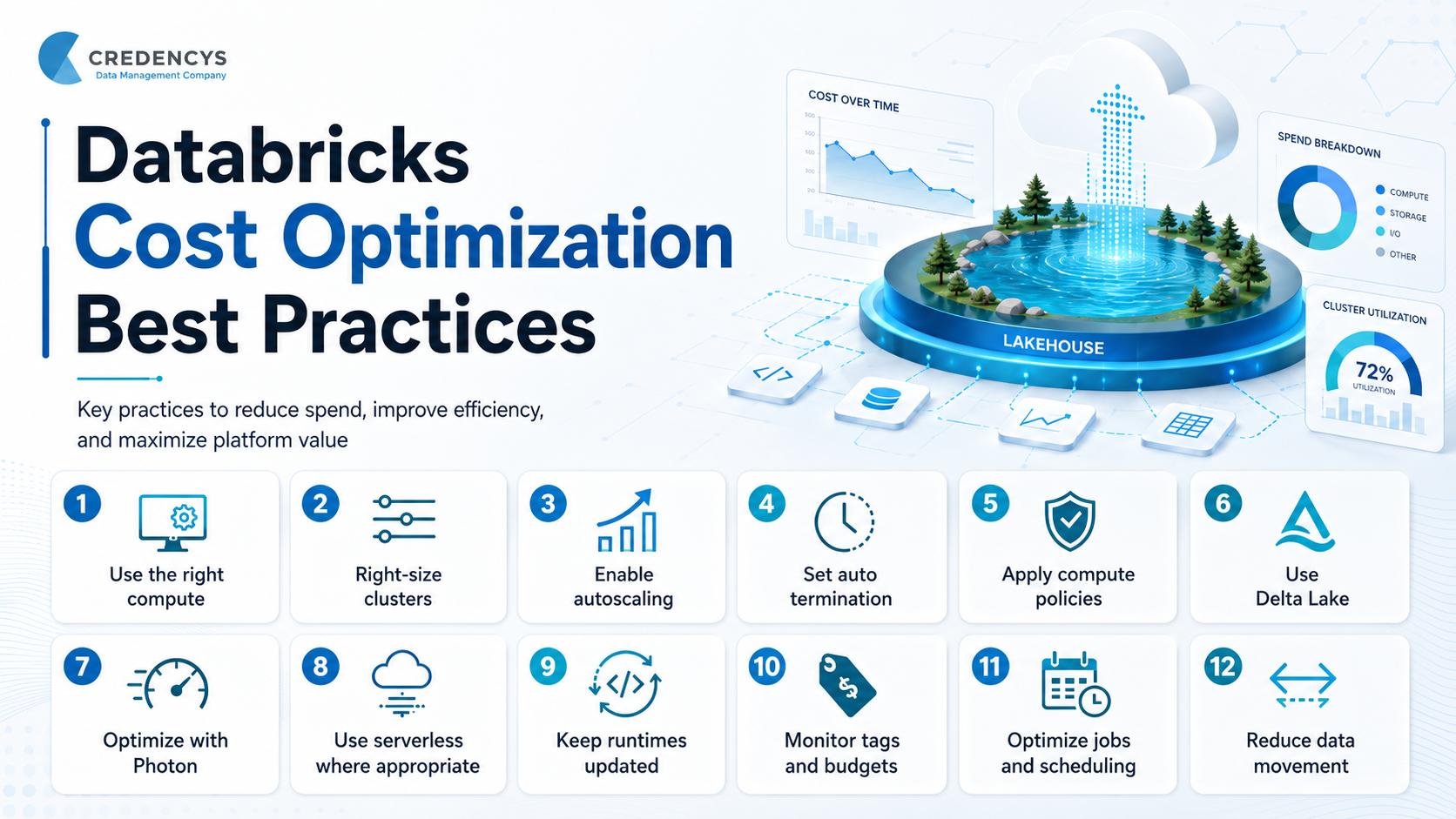
1. Use the Right Compute for the Right Workload
One of the most important Databricks cost optimization best practices is choosing the correct compute type for each workload. Not every workload should run on the same cluster or warehouse.
For example, interactive development, scheduled ETL jobs, SQL dashboards, streaming workloads, and machine learning models all have different compute requirements. Using one standard compute setup for everything often leads to unnecessary spend.
Use Job Compute for Scheduled Workloads
Scheduled ETL, batch processing, and production pipelines should typically run on job compute instead of all-purpose compute. Job compute is designed for non-interactive workloads and is usually more cost-efficient for automated jobs.
This also improves workload isolation. Each job can run on dedicated compute, reducing interference between teams and workloads.
Use SQL Warehouses for SQL Workloads
For BI dashboards, ad hoc SQL analysis, reporting, and business intelligence queries, Databricks SQL warehouses are better suited than general-purpose clusters. SQL warehouses are optimized for SQL performance and can help reduce cost per query when configured properly.
For analytics teams, this means faster query response times, better concurrency handling, and improved cost control.
Use GPUs Only When Required
GPU instances can be valuable for deep learning, model training, and workloads that use GPU-accelerated libraries. However, they are significantly more expensive than CPU-based instances.
A common mistake is using GPU compute for workloads that do not actually benefit from GPUs. Enterprises should restrict GPU usage through compute policies and reserve GPU instances for clearly defined machine learning or AI use cases.
2. Right-Size Compute Resources
Oversized compute is one of the easiest ways to overspend on Databricks. Many teams choose larger clusters “just to be safe,” but this often results in underutilized resources.
Right-sizing means selecting compute based on workload requirements, not assumptions. When sizing compute, consider:
- Volume of data being processed
- Query or transformation complexity
- Required parallelism
- Memory requirements
- Shuffle and spill behavior
- Data source and storage format
- Workload frequency
- Concurrency needs
- SLA or performance expectations
For development and testing, small or single-node clusters may be enough. For batch ETL, medium-sized clusters with autoscaling may work better. For heavy machine learning workloads, the configuration should depend on model size, training data volume, and library requirements.
The goal is not always to choose the smallest compute. The goal is to choose the most efficient compute that completes the workload at the lowest practical cost.
3. Enable Autoscaling for Variable Workloads
Many Databricks workloads do not require the same amount of compute throughout the entire run. Some pipeline stages need more workers, while others need fewer.
Autoscaling helps by automatically adding or removing workers based on workload demand. This reduces the need to keep large static clusters running throughout the job. Autoscaling is useful for:
- ETL pipelines with changing processing intensity
- Batch jobs with variable data volumes
- Development clusters used by multiple users
- Workloads with unpredictable demand
- SQL workloads with changing concurrency
However, autoscaling should be configured carefully. Setting the minimum and maximum worker limits too wide can create unpredictable costs. A practical approach is to define approved cluster sizes through compute policies, such as small, medium, and large configurations.
4. Configure Auto Termination for Interactive Compute
Idle compute is one of the most common causes of unnecessary Databricks costs. Users may start clusters for development, testing, or exploration and forget to shut them down.
Auto termination automatically shuts down compute after a defined period of inactivity. This is especially important for interactive clusters used by data engineers, analysts, and data scientists. Best practices include:
- Enable auto termination for all interactive clusters
- Set shorter idle timeout limits for development environments
- Use stricter policies for non-production workspaces
- Monitor clusters that remain active for long periods
- Educate users on the cost impact of idle compute
For many enterprises, simply enforcing auto termination can create immediate savings without impacting productivity.
5. Use Compute Policies to Control Cost
Compute policies help administrators control what types of compute users can create. They are essential for balancing flexibility with governance.
Without compute policies, users may create oversized clusters, select expensive instance types, disable auto termination, or run workloads on inappropriate compute. Compute policies can be used to:
- Limit maximum worker counts
- Require autoscaling
- Enforce auto termination
- Restrict expensive instance types
- Control GPU usage
- Set approved runtime versions
- Define standard cluster templates
- Apply cost-related tags
- Prevent misconfigured compute
This creates consistency across teams and reduces the chances of accidental overspending.
A good approach is to create standardized compute policies based on workload types, such as:
- Development
- Testing
- Production ETL
- Streaming
- Machine learning
- SQL analytics
- Data science experimentation
This gives users clear options while keeping costs under control.
6. Use Delta Lake and Performance-Optimized Data Formats
Data format plays an important role in Databricks cost optimization. Inefficient storage formats can increase processing time, query latency, and compute usage.
Delta Lake is the recommended storage framework for Databricks workloads because it supports reliable data pipelines, ACID transactions, scalable metadata handling, and performance optimizations.
Using Delta Lake can help reduce cost by improving workload efficiency. Faster jobs usually mean shorter compute runtime, which directly contributes to lower compute spend. Best practices include:
- Use Delta Lake for lakehouse tables
- Avoid inefficient formats for large-scale analytics
- Optimize tables regularly
- Use appropriate partitioning
- Reduce small file problems
- Use data skipping where applicable
- Clean up unused files with retention-aware maintenance
A well-optimized Delta table can significantly improve query performance and reduce unnecessary compute consumption.
7. Optimize SQL and DataFrame Workloads with Photon
Photon is Databricks’ high-performance query engine designed to accelerate SQL and DataFrame workloads. It can improve performance for data ingestion, ETL, analytics, and interactive queries.
From a cost perspective, faster execution can reduce total workload runtime. Even if a workload uses a performance-optimized engine, the overall cost can be lower when jobs complete faster and compute runs for less time. Enterprises should evaluate Photon for:
- Frequently executed SQL queries
- Production ETL jobs
- Dashboard workloads
- DataFrame transformations
- High-volume analytical workloads
- Repeated reporting pipelines
The best approach is to benchmark important workloads before and after enabling Photon. The decision should be based on total cost per workload, not just runtime improvement.
8. Use Serverless Where It Makes Sense
Serverless Databricks services can help reduce operational overhead and improve cost efficiency for selected workloads. Instead of managing always-on infrastructure, serverless compute can start quickly, scale based on demand, and terminate when not needed. Serverless can be especially useful for:
- BI workloads
- SQL warehouses
- Model serving
- Workloads with unpredictable usage
- Use cases that need fast startup
- Teams that want lower infrastructure management overhead
For BI and analytics, serverless SQL warehouses can provide faster startup and scale-down behavior compared to non-serverless options. This helps avoid paying for compute that remains idle between user interactions.
However, serverless should still be monitored. Organizations should use budgets, usage policies, and cost dashboards to track consumption.
9. Keep Databricks Runtime Versions Updated
Databricks Runtime versions include performance improvements, library updates, and workload-specific optimizations. Running outdated runtimes may prevent teams from benefiting from better performance and efficiency.
Keeping runtimes updated can help reduce costs because optimized runtimes may complete workloads faster or use resources more efficiently. Best practices include:
- Standardize approved runtime versions
- Avoid using outdated runtimes for production jobs
- Test upgrades in lower environments first
- Document workload compatibility
- Include runtime reviews in platform governance
- Update long-running jobs during planned maintenance cycles
Runtime upgrades should not be random. They should be part of a controlled platform lifecycle strategy.
10. Build Cost Visibility with Tags, Budgets, and Dashboards
You cannot optimize what you cannot see. Cost visibility is a major part of Databricks cost optimization.
Enterprises should set up tagging, budgets, and reporting from the beginning. Missing cost attribution makes it difficult to understand which teams, projects, environments, or workloads are driving spend. Useful tags may include:
- Business unit
- Project
- Environment
- Application
- Data product
- Owner
- Cost center
- Workload type
These tags help teams answer important questions:
- Which project is consuming the most compute?
- Which workspace has the highest monthly spend?
- Which jobs are becoming more expensive over time?
- Which teams are using serverless compute?
- Which workloads are running outside approved policies?
Budgets and alerts are also important. They help teams identify spending spikes before they become major issues.
11. Monitor System Billing and Usage Data
Databricks provides system tables that can help teams analyze usage and cost patterns. These tables can be used to monitor job costs, serverless usage, model serving costs, and overall platform consumption. A cost dashboard should ideally show:
- Daily and monthly spend trends
- Cost by workspace
- Cost by team or business unit
- Cost by job
- Cost by cluster or SQL warehouse
- Cost by environment
- Idle compute patterns
- Top expensive workloads
- Failed job costs
- Cost anomalies
This visibility allows platform teams to move from reactive cost control to proactive optimization.
12. Optimize Job Design and Scheduling
Cost optimization is not only an infrastructure problem. Workload design also matters.
Poorly designed jobs can consume unnecessary compute even if the cluster is configured correctly. Long-running jobs, repeated full refreshes, inefficient joins, excessive shuffling, and unnecessary data scans can all increase cost. Best practices for job design include:
- Avoid full table scans where incremental processing is possible
- Use efficient joins and filters
- Reduce unnecessary data movement
- Avoid duplicate processing
- Break complex workflows into manageable tasks
- Reuse compute for multitask jobs where appropriate
- Schedule jobs during required windows only
- Monitor job duration and failure rates
- Review expensive jobs regularly
For production pipelines, teams should track both runtime and cost per run. A job that becomes slower or more expensive over time may indicate data growth, skew, inefficient logic, or poor table maintenance.
13. Use Triggered Processing Instead of Always-On Streaming Where Possible
Streaming workloads can become expensive when compute runs 24/7. Not every near-real-time use case actually needs continuous processing.
For example, if the business only needs updated data every few hours, a triggered incremental workload may be more cost-effective than always-on streaming. Before choosing always-on streaming, ask:
- Does the business need second-level or minute-level latency?
- Can the workload run every hour instead?
- Can micro-batch processing meet the requirement?
- What is the cost difference between always-on and triggered execution?
- What happens if data is delayed by a few minutes or hours?
By aligning data freshness with real business needs, enterprises can reduce unnecessary compute costs.
14. Use Spot Instances Carefully
Spot instances can reduce infrastructure costs by using excess cloud capacity. They are useful for workloads that can tolerate interruption or longer completion times. Good candidates for spot instances include:
- Non-critical batch jobs
- Retry-friendly ETL workloads
- Development and testing jobs
- Stateless processing
- Jobs without strict completion SLAs
However, spot instances are not ideal for every workload. Production-critical jobs, latency-sensitive workloads, and jobs with strict SLAs may require on-demand instances.
A balanced strategy is to use on-demand instances for critical components and spot instances for worker nodes where interruption is acceptable.
15. Reduce Data Movement and Egress Costs
Databricks costs are not limited to compute. Cloud vendor charges may also include storage, data transfer, and network egress.
Data movement becomes expensive when teams frequently move large volumes of data across regions, clouds, platforms, or external systems. To reduce data movement costs:
- Keep compute close to data
- Avoid unnecessary cross-region transfers
- Reduce duplicate datasets
- Use data sharing carefully
- Monitor outbound data transfer
- Review integration architecture
- Avoid repeated exports of large datasets
- Design pipelines to process data in place where possible
A lakehouse architecture should be designed to minimize unnecessary movement while keeping data accessible for analytics, AI, and operational use cases.
16. Establish a Regular Cost Review Process
Databricks cost optimization is not a one-time activity. As data volume grows, teams onboard new use cases, and workloads become more complex, cost patterns change.
A regular cost review process helps organizations identify waste, improve accountability, and align platform usage with business value. A monthly review should include:
- Cost by workspace and business unit
- Top expensive jobs and warehouses
- Idle or underused clusters
- Jobs with increasing runtime
- Failed jobs with high cost impact
- Untagged resources
- Policy exceptions
- Serverless usage trends
- Storage and data movement costs
- Optimization opportunities
Cost reviews should involve platform teams, data engineering teams, finance, and business stakeholders. The goal is not to block innovation. The goal is to make usage visible, accountable, and efficient.
Databricks Cost Optimization Checklist
Here is a practical checklist enterprises can use to improve Databricks cost management:
- Use job compute for scheduled production workloads
- Use SQL warehouses for SQL and BI workloads
- Enable auto termination for interactive clusters
- Use autoscaling for variable workloads
- Apply compute policies across workspaces
- Restrict expensive instance types where needed
- Use GPUs only for GPU-accelerated workloads
- Use Delta Lake for optimized storage and processing
- Benchmark Photon for frequent SQL and ETL workloads
- Use serverless for suitable BI and model serving use cases
- Keep Databricks Runtime versions updated
- Tag workspaces, clusters, warehouses, and jobs
- Set budgets and spending alerts
- Monitor usage through dashboards and system tables
- Review expensive jobs regularly
- Avoid always-on streaming unless required
- Use spot instances for interruption-tolerant workloads
- Reduce unnecessary data movement
- Conduct monthly cost audits
Common Mistakes That Increase Databricks Costs
Many enterprises overspend on Databricks because of small but repeated mistakes, such as:
- Leaving interactive clusters running overnight
- Using all-purpose compute for scheduled jobs
- Creating oversized clusters for simple workloads
- Running full refreshes instead of incremental processing
- Not using auto termination
- Allowing unrestricted GPU usage
- Not tagging resources properly
- Ignoring failed job costs
- Keeping outdated runtime versions
- Running always-on streaming without real-time requirements
- Not reviewing cost dashboards regularly
- Allowing every team to create custom compute configurations
These mistakes are avoidable with the right governance, automation, and monitoring practices.
Final Thoughts
Databricks cost optimization is about building a smarter, more efficient lakehouse environment. It requires the right balance of compute selection, workload design, automation, governance, and financial visibility.
Enterprises should not approach cost optimization as a one-time cleanup activity. Instead, it should be built into the way teams design pipelines, run jobs, create clusters, monitor usage, and manage data products.
By using the right compute, enabling autoscaling and auto termination, adopting Delta Lake, monitoring cost attribution, and reviewing workloads regularly, organizations can reduce unnecessary spend while improving performance and scalability.
The best Databricks cost optimization strategy is one that supports both engineering efficiency and business growth. When teams understand the cost impact of their workloads, they can make better decisions, deliver faster insights, and scale the lakehouse with confidence.
FAQs for the Databricks Cost Optimization Best Practices
1. What is Databricks cost optimization?
Databricks cost optimization is the process of reducing unnecessary platform and cloud spend by improving how compute, storage, jobs, SQL warehouses, serverless workloads, and data pipelines are configured and monitored. It focuses on lowering costs without compromising performance, scalability, or business outcomes.
2. How can I reduce Databricks compute costs?
You can reduce Databricks compute costs by using job compute for scheduled workloads, enabling auto termination, right-sizing clusters, using autoscaling, applying compute policies, restricting expensive instance types, and monitoring idle or underutilized resources. Regular workload reviews also help identify jobs that are consuming more compute than required.
3. What are the best practices for Databricks cluster cost optimization?
The best practices for Databricks cluster cost optimization include selecting the right cluster size, enabling autoscaling, setting auto termination, using compute policies, choosing cost-effective instance types, using spot instances where suitable, and avoiding all-purpose clusters for production jobs. Teams should also review cluster usage regularly to identify idle or oversized clusters.
4. Does using Delta Lake help optimize Databricks costs?
Yes. Delta Lake can help optimize Databricks costs by improving query performance, reducing unnecessary data scans, supporting efficient data management, and enabling better workload reliability. When Delta tables are optimized with proper partitioning, compaction, and maintenance, jobs can run faster and consume less compute.
5. How do enterprises monitor Databricks costs effectively?
Enterprises can monitor Databricks costs by using tags, budgets, alerts, usage dashboards, and system billing tables. Cost should be tracked by workspace, team, project, environment, job, cluster, and SQL warehouse. This helps identify high-cost workloads, idle compute, failed jobs, and spending trends before they impact the overall cloud budget.







Tags: