Node JS Use Cases: When Is It Worth Considering for Web App Development?

If you’re wondering what’s with all the hype around Node JS, you’re not alone.

Since it’s emergence, Node JS has taken the web development world by storm.

In fact, many big companies like LinkedIn, Uber, Airbnb, and even NASA have adopted the technology in their products.

Why?

Because the benefits of NodeJS are unmatched.

In this article, I’m going to share everything about NodeJS, from what it is, to how it is different from other JavaScript frameworks and best Node JS use cases.

Let’s dive right in!

What is NodeJS?

The first thing you should know about NodeJS is that it’s not a JavaScript framework.

NodeJS is a server-side runtime environment that is built upon event-driven programming language that enables non-blocking I/O capabilities.

Thanks to this unique I/O model, building I/O-heavy and data-heavy web applications becomes very fast and easy using NodeJS.

Apart from this, the ability of NodeJS to use JavaScript on both front-end as well as back-end has also opened up many new avenues in web application development.

How Is It Different From Other JavaScript Frameworks?

Though there is no difference between NodeJS and other JavaScript frameworks in terms of the programming language used, what makes NodeJS different from the rest of the JavaScript frameworks is its different sets of APIs.

For example, unlike other JavaScript frameworks, NodeJS provides many APIs for backend development such as HTTP requests, streams, support for file systems, and child processes to name just a few.

Furthermore, since NodeJS uses JavaScript on both front-end as well as the back-end, it significantly increases the development speed.

Simply put, NodeJS development allows businesses and companies to save more as NodeJS holds the capability to handle the same amount of load with less horsepower.

Node JS Use Cases: When Is It Worth Using?

NodeJS, as mentioned before, gives a great boost to the productivity of your team since it uses the same programming language on front-end and back-end.

As a result, the development process becomes much faster, efficient, and cross-functional, which ultimately leads to lower development costs.

However, it’s also worth mentioning that NodeJS works best for only a certain kind of web applications.

Let’s discuss in detail different Node JS use cases to understand when is it worth considering for web application development.

1 – When You’re Building Streaming Web Apps

Thanks to the Native Stream API, NodeJS is an excellent choice for developing streaming web apps.

In addition, NodeJS also has a built-in interface of writable and readable streams that can be easily and efficiently processed and monitored.

These stream instances are nothing but Unix pipes which makes it possible to transmit parts of the application’s executable code to the local system while also keeping a steady connection for new components to download as and when needed.

As a result, streams in NodeJS don’t require caching and storing temporary data because it gives an open connection to the stream app’s data from the server to the local system.

In layman’s terms, the Native Stream API of NodeJS allows downloading only certain parts of the web application initially and the remaining parts are downloaded in the background when needed.

2 – When You’re Building Real-time Collaboration Tools

Real-time collaboration tools are basically Software solutions widely used for project management, co-browsing, audio and video conferencing, collaborative documents editing, and much more.

In these software solutions, lots of I/O requests and events occur concurrently. For example, in a project management solution, multiple users can write comments, update status, and attach media to a specific project.

Now, since NodeJS can handle heavy I/O operations efficiently due to its WebSockets and Event API, NodeJS has become a favorite choice among developers for building such real-time collaboration solutions.

Trello, for example, adopted NodeJS for its event-driven and non-blocking architecture to instantly update their collaborative environment.

3 – When You’re Building Complex, Single-Page Applications

Single-Page applications have become a common approach nowadays.

In SPAs, the entire application is basically fit on a single page to provide a desktop app like experience.

NodeJS is a perfect fit for building SPAs because it can efficiently handle the asynchronous calls and heavy I/O operations.

In addition, NodeJS also works well with data-driven single page applications in which the server acts as the backend to transmit data to the client, while the client-side does all the HTML rendering.

Lastly, Since NodeJS and browsers use the same language (JavaScript), the amount of time for context switching gets drastically reduced and developers can also use the same language structures and approaches in both back-end and front-end.

This ultimately results in better maintainability and faster development time of your single-page application.

4 – When You’re Building Real-Time Chat Applications

As you might already know, real-time chats are widely used on pretty much everywhere on the web these days. In fact, they’ve kind of become a necessity, especially for commercial sites and digital products.

The good news is, NodeJS has all the basic functionalities for building real-time chat apps. Node’s Event API makes it possible for developers to implement server-side events and push notifications, which are widely used in most real-time chats.

In addition, the WebSockets in NodeJS also facilitates a two-way exchange via an open connection, which is ideal for real-time chat apps development.

For example, you can install WebSockets libraries like sockets.io or WebSocket-node to easily deploy real-time chat functionality.

In sockets.io specifically, all you need to do is install the library on both client and server-side and create broadcasters and event emitters to push messages. The best part is, this entire setup can be done with just a few lines of code.

5 – When You’re Building Microservices Architecture

Microservices Architecture is basically an approach to develop a web application as a group of small, independent services in which each service plays a unique role in the business logic.

In recent years, microservices architecture has become extremely popular, especially after the emergence of Amazon, Facebook, and Netflix.

In this type of web application, microservices usually communicate through REST/HTTP protocol with JSON data structure.

NodeJS is the perfect technology to build such microservices architecture because NodeJS makes it easy to mount various instances of server for individual microservices and design appropriate routing addresses for them.

Additionally, the lightweight nature of NodeJS can significantly enhance the scalability, maintainability, and efficiency of a web application.

These benefits were first leveraged by PayPal in 2013. PayPal used NodeJS to modularize its app stack and split the development process into numerous microservices.

The result of NodeJS adoption helped the company to improve performance and reduce their codebase significantly.

Conclusion

NodeJS has become the number one choice among developers as well as companies for building modern web applications.

However, you should not use NodeJS if you’re developing a CPU-intensive web application as it may cause unresponsiveness due to its single-threaded nature.

On the other hand, NodeJS is the best choice if your web app involves dealing with heavy client-side rendering, frequent shuffling of data, multiple concurrent requests, and things alike.

That being said, if you’re planning to use NodeJS in your web application, hire Node JS Developer from Credencys to fully-utilize the capabilities of Node JS.

5 Finance App Development Challenges & How to Conquer Them

With over 5 billion smartphone users worldwide and 63% of them using at least one finance app on their smartphones, it is perhaps no wonder why so many businesses, brands, and companies are focusing on building finance apps.

While convenient access to finance is the key to success in the finance industry, there are however certain challenges that one needs to overcome on the path of successful finance app development.

For example, fintech startups must make their digital channels tight so that customers’ data are passed in the most secure way.

Another challenge comes with customer experience. Today, financial customers expect a certain level of care and if it’s compromised, the probability of earning them back in the future is significantly low.

These are just the highlights of some of the challenges that companies face when building a finance app. In this blog, we’ve listed the top finance app development challenges and how to overcome them.

That being said, let’s dive right in!

Top Finance App Development Challenges

1 – Data Security Issue

The issue of data security has become more prevalent in the last recent months. In fact, if there was a right time to protect customers’ data, it’s right now and within the finance industry.

Finance is one of the most sensitive areas for every person. So, it’s imperative that the finance app you develop protects your customers’ data as much as possible.

The best way to accomplish this is with facial and/or fingerprint authentication. These two under-appreciated features are the most-expected features in all finance apps.

Moreover, as the data security concerns evolve and continue to make headlines, it is crucial to continue innovating finance app security.

2 – Regulatory Issue

Of all the industries in the world, the financial services industry is one of the most regulated industries. This is why it’s necessary to ensure that every aspect of your finance app confirms all applicable regulatory environment.

For example, if your finance app is for customers in the Europe continent, it is compulsory for you to meet all the necessities of the General Data Protection Regulation (GDPR).

The GDPR policy basically advocates that mobile app owners can’t take the private information of their users on their will without getting their assent first.

3 – Customer Experience Issue

Mobile apps are not just about solving users’ problems. – it’s also about creating an experience so that users would want to use a mobile app as a part of their everyday lives.

Finance apps, as you might have anticipated, are no different. Therefore, you need to make sure that your users are not required to walk through a complex series of steps in order to complete a transaction.

In laymen’s terms, a user should not face any difficulty while using your finance app, even if he or she is carrying out a complex transaction. This is why you must take the customer experience of your finance app very seriously and make sure that your app is customer-centric and user-friendly.

4 – Customer Retention Issue

Customer experience of a mobile app is indeed an important aspect, but the true test of any mobile app’s success relies on how many users become engaged.

This is where customer retention comes into the picture.

According to a report, a mobile app losses nearly 90% of its active users 30 days after the app is installed.

On the other hand, the same report also revealed that a 5% increase in customer retention increases the profits between 25 to 95%.

So now that you have an idea of how important customer retention is, you need to focus on building trust with your customers by letting them know that you care about them. One way to accomplish this is through push notifications.

Although, you need to be careful with using push notifications as you don’t want to lead your customers to opt-out or worse uninstall your mobile app just to escape the annoying push notifications.

5 – Compatability Issue

One of the repetitive challenges that arise in almost every finance app development process is the compatibility issue. It means making sure that the finance app works across a huge range of devices.

If you’re developing a finance app, for example, then you need to ensure that every new update is backward compatible, meaning every new version of your finance app must work with the previous versions of smartphone operating systems both iOS and Android.

Conclusion

Finance apps are, of course, the need of the hour. They provide a wide spectrum of features, allowing customers to conduct all sorts of banking transactions. Though there are certain challenges that must be considered and taken care of, but if use the above-mentioned practices, you can easily make your finance app success in the industry.

7 Tips For Developing Better Node.js Apps in 2023 & Beyond

JavaScript, today, is the most preferred language to build web apps. And web applications that are built using JavaScript are often accompanied by Node.js.

Node.js was first introduced in 2009 by Ryan Dahl. it is a JavaScript runtime environment that is mostly used for the backend development of a web application.

Since its inception, Node.js has gained massive popularity worldwide and it is currently being used by many tech giants such as LinkedIn, Netflix, Paypal, Uber, and others.

But, what’s so special about Node.js that has led the world’s most popular companies to adopt it?

Answer: Asynchronous I/O.

The main unique value proposition of Node.js is that it allows a server to continually process other requests without urging the users to wait until the current process is processed.

However, Node.js is not only used for backend development alone. There are a few other use cases for which organizations have adopted the Node.js technology.

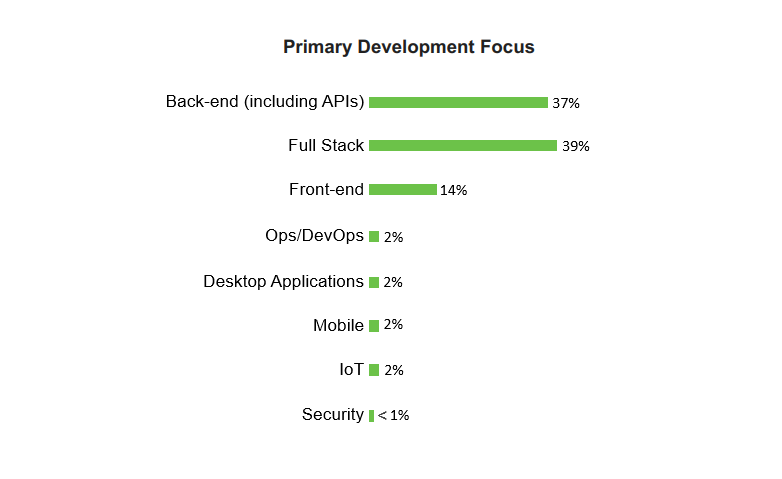
In fact, you’ll be surprised to know that the majority of times Node.js is used for full stack development.

primary data focus

Source: Nodejs.org

In this article, we’re going to share 7 tips that will help you build better Node.js applications. You can use these tips to either improve your existing node.js app or to build a new node.js app from ground zero.

Tip #1 – Group “Require” Statements at Beginning

If your Node.js app is facing performance issues, then using this tip is highly recommended.

“Require” is synchronous that halts the execution of code. Therefore, it’s best to group all of “Require” statements at the beginning of the code to avoid performance downgrading.

Best yet, you can utilize the Node’s in-built ‘module loading system’ for loading your modules that exist in other separate files.

Tip #2 – Use async-await

The support for Asynchronous in Node.js arrived late (with Node.js 8 release), while other languages like C#, Go, and Kotlin supported async since way back.

If you don’t know what synchronous and asynchronous means, then here’s the simple explanation:

In synchronous, the resources get blocked until a request is being processed, while in asynchronous, the resources don’t get blocked and I/O operations are processed parallely.

Now if your node.js application involves multiple operations and you’re using synchronous, then the performance of the will get highly-hampered.

With async-await, however, you can execute multiple I/O operations at once and the performance of your node.js app won’t get affected.

Tip #3 – Listen to Error Events

Leaving bugs even when you’ve identified them can come back later to create ugly scenarios in the future. And in Node.js, error handling is quite easy and can be done without much fuss.

Therefore, make it a habit to start listening to error events on a regular basis. Error events will help to spot errors early in the development process so that you can steer clear of total chaos in the future.

Tip #4 – Embrace Microservices

If you’re developing a large-scale application or just facing deployment issues, it’s time to embrace microservices.

Microservices are basically a self-functional system that along with other microservices form a large system. Each of these self-functional systems is a scalable, fully-functional, and deployable system.

In simple words, microservices are the big rock (the web app) that are made of small blocks (microservices) with each service being an independent unit. That means if one microservice fails, it won’t take much time to replace it. And as a result, they help to save costs and reduce the risk of development involved in developing a node.js application.

To embrace microservices, you can any of the following two technologies:

Kubernetes:

Kubernetes is an open-source system for automating deployment, scaling, and management of containerized applications.

Docker:

Docker is a software technology providing containers, which wrap up a piece of software in a complete filesystem that contains everything it needs to run: code, runtime, system tools, and system libraries.

Tip #5 – Modularize Your Code

If you have the habit of writing large chunks of code, then it would be really difficult for you to get most out of asynchronous I/O.

So, it’s better to write or organize your existing code into smaller chunks that improve the readability of the code. Writing code in small chunks will help you in the long run whether or not you’re developing a complex node.js application.

Tip #6 – Use Prettier to Avoid Code Style Controversies

When Prettier was released in 2017, it became an instant hit. Prettier is basically an opinionated code formatter that enforces a consistent code style, instead of showing simple code style warnings.

In simple words, Prettier removes all original styling done by you and reprints it from scratch into a consistent style.

Take the following code for example:

foo(reallyLongArg(), omgSoManyParameters(), IShouldRefactorThis(), isThereSeriouslyAnotherOne());

The above formatting might look fine, but once your application starts to grow, you might run into a situation where the function starts to break down because it’s too long.

Prettier, on the other hand, can eliminate this risk by reprinting it for you like below:

foo(
reallyLongArg(),
omgSoManyParameters(),
IShouldRefactorThis(),
isThereSeriouslyAnotherOne()
);

Tip #7 – Security Above Everything!

Security is something that should never be ignored or compromised, especially on the internet.

This is why ensuring that your node.js application is entirely secure is no longer an option but a necessity. And even if you think that your application is already secure, it wouldn’t hurt to double-check using Snyk and Node Security Platform.

These two platforms will help you find any sneaky vulnerabilities that your node.js might have.

Conclusion

Node.js has proven itself as one of the best tools for solving various problems and this is why so many tech giants prefer it over other tools these days.

Though it’s difficult to adopt it in both existing as well as for developing a new web application, but if you hire node js developer, you can easily leap over all of its difficulties and build a better web app than your competitors.

Netflix to NASA – 5 Famous Companies That Use Node.js

Since its inception in 2009, Node.js has gained immense popularity in the JavaScript market. And Netflix & NASA are just a few organizations using Node.js in their products.

To cut the long story short, Node.js is an open-source, light, and scalable JavaScript environment that allows writing server-side scripts.

Though Node.js is mainly used for developing real-time, data-intensive web applications, but mobile app development is also possible, all thanks to the node’s rich ecosystem.

In this blog, we’ve gathered information about the top 5 famous companies that are currently using Node.js in their software products.

5 Famous Organizations Using Node.js

#1 – Netflix

Netflix

Netflix is, without any doubt, the biggest video streaming service company worldwide. As of January 2019, Netflix has 139 million paying subscribers and is quickly approaching 150 million, according to CNN.

Currently, Netflix’s user interface is built using node.js. And the technology has proved itself so beneficial and effective that the company has already planned to use it for building other layers of their tech stack.

So, why Netflix choose to use Node.js?

The Netflix team decided to embrace Node.js in their software product to make the application modular, lightweight, and fast. As a result, the application’s startup time is now reduced by 70%.

Kristofer Baxter, Former Senior Manager of User Interface Engineering Department of Netflix, himself shared these findings on Netflix’s blog on August 5th, 2015.

#2 – eBay

Ebay

eBay is an ecommerce company that offers business-to-consumer and consumer-to-consumer internet sales services.

For buyers, the service is completely free to use. Sellers, on the other hand, need to pay fees for listing and selling items.

eBay currently operates in around 37 countries and according to Statista, eBay currently has 179 million active users across the world.

So, why eBay choose to use Node.js?

According to Principal Web Engineer of eBay, Senthil Padmanabhan, eBay adopted Node.js for two main reasons:

First, they wanted to make their product as real-time as possible such as maintaining live connections with the server.
And secondly, they also wanted to orchestrate a lot of eBay-specific services to handle I/O bound operations in a better way.

As a result, eBay is now experiencing many benefits including better speed, performance, transparency, scalability, and control over their product.

#3 – Paypal

Paypal

Paypal is the largest Internet payment platform that offers services like online money transfer and acts as an electronic alternative to traditional payment methods like money orders & checks.

The company, as of today, supports over 24 currencies and has 277 million active users according to Statista.

So, why Paypal choose to use Node.js?

Paypal adopted Node.js for building the consumer-side of their web application. Jeff Harrel, Vice President of Checkout and Identity Department at Paypal said that Node.js helped them unify their developers into a team and helped to write both the server and the browser applications write in JavaScript.

As a result, their new Paypal app was built 2x faster with less number of people, with 40% fewer files and 33% of less code compared to their previous Java-based application.

#4 – LinkedIn

LinkedIn

Launched in 2002, LinkedIn is a professional social network platform where employers connect with job seekers around the globe.

LinkedIn supports 24 languages and has over 303 million active monthly users and a total of 610 million members.

So, why LinkedIn choose to use Node.js?

LinkedIn adopted Node.js technology for empowering the server-side of their mobile applications.

As a result, LinkedIn’s new node-based app is 20x faster and their number of servers are also reduced from 30 to 3, compared to its previous Ruby on Rails version.

#5 – NASA

NASA

NASA, as you might already know, is the National Aeronautics and Space Administration agency of the US.

Node.js proved to be the most advantageous for NASA and helped the organization keep astronauts safer during their space expeditions.

The above statement may seem bold but that doesn’t change the fact.

So, why NASA choose to use Node.js?

NASA adopted Node.js technology after an unfortunate incident occurred in space. Simply put, NASA realized that their data was scattered on multiple locations and because of this one of their astronauts nearly lost his life.

So, NASA finally decided to move everything in the cloud and also developed their own end-to-end data system to prevent such incidents occurring in the future.

As a result, NASA now has 1 database for everything and their Data Access Time is also reduced by 300 percent!

Bottom Line? – Node.js is the Way Foward!

Node.js offers the greatest benefits and has now become the most preferred technology not just among developers but also among giant companies. Apart from the companies mentioned above, Google, Yahoo, and Github has also embraced Node.js into their production and are now experiencing the following innumerable advantages.

  • Rise in productivity
  • Fast processing
  • High scalability
  • Solid community support
  • And a lot more.

If you too wish to experience these advantages, Hire node js developer today!

Pros & Cons of Hybrid Mobile Apps Development

Mobile apps have been with us from the past 10 years, and since that time, they have significantly changed how we do business.

For instance, hybrid mobile apps development has now become a common approach among businesses today.

Earlier, however, mobile app developers had limited native-specific options. But, due to the growing demand for different mobile apps, hybrid app development technologies such as Ionic,Titanium, and Phonegap have emerged.

In fact, these technologies have shortened the development time and are offering better opportunities for building near-native mobile applications.

In today’s blog, we will discuss the pros and cons of using hybrid technologies for mobile application development.

But, before we get into the subject, we’d like to make one thing clear. In this blog, we’ve compared the pros and cons of Hybrid frameworks with Native mobile application development.

Apart from native and hybrid approach, you can also build mobile apps for iOS and Android platform using Cross-Platform frameworks like Xamarin and React Native.

Though both these cross-platform frameworks are very popular, but our focus in this blog will be to discuss the pros and cons of Hybrid frameworks that are Phonegap, Ionic, and Titanuim.

With that being said, let’s dive right in!

What is Hybrid App Development?

Hybrid mobile apps development is basically a practice of developing a mobile app for multiple platforms such as Android and iOS using a single code base.

As a result, it drastically reduces development costs. On the other hand, however, Hybrid app development does have a few disadvantages.

For example, the rendering time in hybrid approach is usually longer than the native approach as each OS needs a separate code base.

That being said, let’s look at the pros and cons of hybrid mobile apps development individually.

Pros of Hybrid Mobile Apps Development

1 – Lower Development Costs

Compared to native app development approach, the hybrid app development is proved to be 30% cheaper.

With the hybrid approach, the developers need to create only one project for both Android and iOS. However, as the need for customization increases, the cost of maintaining the mobile app on both platform increases as well.

2 – Fast Development

With hybrid app development approach, mobile app developers don’t need to write unique code for each platform.

The hybrid frameworks allow developers to mostly work with a single codebase to handle both iOS and Android app development.

Simply put, hybrid frameworks make it possible to reuse a big chunk of codebase between two platforms, making the development process faster than native.

3 – Greater Market Reach

Businesses often face the same dilemma – For which platform to build a mobile app first, iOS or Android?

No matter how much research you put into finding on which platform the majority of your audience is using, it is always a trade-off when you choose to develop your mobile app for just one platform.

Hybrid approach, therefore, is a better approach if you wish to capture a wide audience in the beginning. hybrid app development allows you to target users from both platforms at the same time.

4 – Support for Cloud & Enterprise-Level Solutions

Hybrid frameworks like Ionic, Titanium, and PhoneGap can be easily integrated on Cloud due to Exchange Integration Code.

These frameworks basically provide easy-to-use plugins that help developers to upgrade app functionality, aesthetics, and validity.

As a result, developers can easily integrate the hybrid apps into popular cloud services like Salesforce and AWS.

Cons of Hybrid Mobile Apps Development

1 – Slow Performance

Performance is one of the most important aspects of mobile apps and it depends on multiple things.

But, if you compare the performance of a native app with a hybrid app, both having the same functionalities, then the performance of the native app will be slightly faster.

Although, the difference in performance is usually a small one, especially if your app is a simple one.

2 – Functionality Limitations

If your mobile app involves complex features and functionalities, then hybrid app development might not be the right approach for you.

This is because few hybrid frameworks like phonegap don’t provide support for every native feature. And as a result, this restriction might impact the stability of your mobile app as a whole and make it sub-optimal.

3 – Long Wait for New Features

Every time Apple and Google releases a new feature for iOS and Android platform, it takes some time for hybrid app developers to add support for the new feature.

This is because the native apps are provided with new SDKs much faster than the cross platform frameworks.

This gives your competitors an advantage over you if they have built their mobile apps using the native approach.

4 – May Lack 3D Support

If you want to design eye-catching graphics or add 3D elements, then hybrid approach may not be right for you as you may face quality issues.

Although you can use third-party tools such as Unity 3D to fill the quality gap, but the overall efforts will be increased compared to the native approach.

Concluding Thoughts…

With all things considered, whether or not should you go with hybrid mobile apps development boils down to one thing. – Type of your mobile app.

Simply put, not every mobile app should be built using hybrid frameworks. But, the hybrid approach is also definitely worth considering, as it drastically decreases the cost and time of mobile app development.

How Mobile Supply Chain Solutions are a Boon for Logistics and Supply Chain Companies?

There was a time when you used to sign a paper whenever you received a delivery. However today, you’re still signing but on a smartphone instead of a paper. This might seem like a small change for you, but in reality, it is a massive shift for logistics companies. This small change saved millions if not billion dollars of supply chain businesses across the world.

Mobile supply chain solutions have helped companies not only to reduce their paperwork significantly but also to optimize various processes in supply chain management. Mobile apps for logistics have brought several benefits to every employee persona, starting from the managers to delivery persons.

9 Benefits of Mobile Supply Chain Solutions

1. Efficient Warehouse Management

One of the most crucial elements of supply chain management is warehouse management. A warehouse is a place where companies store all their inventories before dispatching them to their customers. Mobile supply chain solutions allow companies to store inventory data in the database, which will be divided into various categories based on the product type. Whenever an item, belonging to a particular product type, is checked in or checked out, the database will automatically update its information/details. Since all the inventory data is over the cloud, inventory managers can access it from anywhere at any time. Moreover, this new system will be capable of generating detailed reports, which would help managers to manage warehouses efficiently.

2. Easy Dispatch of Orders

Mobile apps for supply chain management can help you increase the speed of order processing as well as increase revenue by reducing the miles driven by delivery persons. These apps are integrated with a third-party route management software which helps drivers by calculating the optimum route. Here, a mobile app is used to display that optimum route to drivers.

3. Real-time information

Mobile supply chain solutions help drivers to get real-time information and data about various shipments. They can instantly receive information in case of a slowdown or delay, which improves dispatch operations, record keeping, inventory management, inspections, goods tracking, and more. Improvising all these processes will lead to better and optimized operations in your supply chain business.

4. Flexible Delivery Process

In supply chain business flexible delivery process plays a significant role in enhancing the customer experience. After ordering, a customer can ask for an address change or ask the delivery person to leave their product with a neighbor. Mobile apps for logistics can help you manage such actions seamlessly. This increase in control of the supply chain allows businesses to increase customer retention and generate better opportunities for a high level of cooperation between delivery person and customers.

5. Vehicle tracking

Mobile and GPS technologies allow us to track drivers and their vehicles. Mobile supply chain solutions help delivery managers to optimize the transportation process by allowing them to get real-time updates of every vehicle in transit. The GPS-enabled mobile app also helps drivers to learn about each other’s location, which allows them to collaborate in a better way.

6. Monitor Performance

Mobile supply chain solutions help managers to keep a check on performances of various operations and processes. It helps to monitor functions like load planning, transportation optimization, and load management. This enhanced visibility also helps them to increase agility, reduce performance gaps, predict specific problems, and make data-driven business decisions.

7. Go Paperless

Earlier, paper forms and services orders made the process of collecting information chaotic. Issues such as filling up incorrect and incomplete information ended up in unoptimized processes and inefficient order handling. Now, with the help of mobile supply chain solutions drivers, can collect information into a mobile device which gets stored in the databases of the company. Apart from this, mobile forms also help in collecting data of various matrices such as mileage and time taken by a driver to reach a particular destination.

Moreover, the mobile app becomes a one-stop place for receiving all the organizational as well as consumer updates. Replacing paper-based information with digital information saves the time of every employee and allows them to receive instant mobile reports safely and securely. This automation of various processes makes the data accessible to everyone, which increases productivity.

8. Manage Human Resource

Logistics is a business where a lot of human resource management is required because of the massive human workforce. Every new employee joining the company will require proper training to help them understand the business processes. A mobile app can also help them train to work effectively by providing them with an overview of your business and warehouse. These handheld devices can manage employees across various departments. The mobile app also acts as a bulletin board where employees can receive all the organizational updates.

9. Grow Faster with Emerging Technologies

IoT and sensor networks have taken a permanent place in supply chain management. Sensors collect information such as dead batteries, trailer temperatures, etc. which would affect a shipment. Mobile apps process the data coming from sensors, which helps employees to know whether a shipment is ready to be delivered or not. It will help companies to prevent shipping of damaged goods.

Conclusion

There has never been a perfect time for logistics companies to adopt and embrace mobile supply chain solutions. Whether it is a small or global level supply chain business, mobile apps are here to help them optimize processes and increase productivity. Mobile apps for supply chain management helps the firms to avoid disruptions in machines and data delivery, which streamlines the old school supply chain management and optimizes logistics operations.

Top 5 Tips for Improving Performance of a Node.js Application

You might already know about the popularity of JavaScript. It’s the #1 programming language of the web according to the latest Stack Overflow Survey.

But, did you know that the main reason behind JavaScript’s rapid adoption is because of Node.js?

For anyone who doesn’t know, Node.js is a leading JavaScript framework used for building fast and scalable web applications. It is built upon Chrome’s V8 JavaScript engine and is best known for its high performance and developer productivity.

The event-driven architecture and asynchronous I/O of Node.js help greatly in optimizing scalability and throughput during web application development.

However, Node.js does have a few weak points, which if not considered, can make a Node.js application prone to underperformance. This problem mostly arise when a Node.js app experiences rapid traffic growth.

If you’re facing the same problem of underperformance, use the following tips to immediately improve the performance of your Node.js application.

5 Tips to Improve Node.js App Performance

1 – Run Things in Parallel

If your Node.js app often requires multiple internal calls in order to fetch API data, you should consider using different middleware for each of the functions.

Though JavaScript comes with a built-in asynchronous component that doesn’t stop subsequent function calls from executing while it completes. But, if you wish to optimize the current performance, you can use the async.js module, which can help you better manage your asynchronous code.

Here’s an example of how you can run different functions in parallel using the async.js module:

node js

2 – Implement a Node.js Load Balancer

One of the best ways to achieve high performance in Node.js applications is by running multiple application servers as well as balance loads among each other.

Although, executing the Node.js load balancing can sometimes become tricky as Node.js enables data exchange with JSON objects through a high-level of interaction between JavaScript code running on the application servers and JavaScript code running in the web browser.

But, the load balancing implementation becomes easier with Nginx.

Nginx is basically an open-source HTTP server that has an in-built load balancing. The Nginx is also very easy to configure and has lots of features that actually make the configuration process easy.

Using Nginx, you can select particular processes to receive and handle more requests than others, add timeouts, enforce sticky sessions, and a lot more.

3 – Go Asynchronous

Since Node.js is single-threaded, it has lots of synchronous components that may potentially lock up your entire Node.js application.

While you can avoid using synchronous methods in the entire code of your Node.js application, but you might still need to use at least one external library having a blocking call. And this can affect the performance of your application.

So, when choosing an external library or a third-party module, make sure that it doesn’t revert any synchronous calls.

The best way to overcome this situation is to always use asynchronous APIs, especially in performance-critical functions.

4 – Cache Static Files

If your web application is fairly new with just a few dozen users, the performance will stay intact. The problem only starts occurring when the traffic grows.

When this happens, you’ve two choices:

You utilize as much as you can from the Node.js server.
Or, you add application servers and load balance them amongst each other.

Now, we’ve already discussed how implementing a load balancer using Nginx can significantly improve the performance. Implementing Nginx basically makes it easy to not only add load balancing but also caching.

Caching static files on the Nginx server drastically offloads the work from the application server and helps to achieve even higher performance.

5 – Plug Memory Leaks

In Node.js, each process has capacity of 1.5 GB memory heap, regardless of the total memory available. But, the V8 engine in Node.js has a built-in Garbage Collector (GC), which cleans inactive memory automatically in order to make it available to use.

Sometimes, though, the data in the memory expired for a long time escapes the garbage collector and results in a memory leak.

In simple terms, many times the memory usage keeps increasing and the garbage collector fails to clean it. And this needs an urgent fix.

But, tracking the memory leak is tougher than you think. The best way to track memory leaks in a Node.js application is to by taking memory heap snapshots and analyze them to identify objects and classes growing at a steady pace.

In fact, if you fail to diagnose the memory leak, there are high chances of your Node.js application running out of memory and being shut down.

If that occurs, you can always hire Node js developer to help you set up automatic alerts when a memory usage threshold is approaching the defined limit.

Apart from this, you should also consider taking stock of your application’s infrastructure and gather intel on its performance to detect if there are any resources available and ready to be scaled up for optimization.

Conclusion

Node.js application performance management is a challenge that could only be overcome through the ability to diagnose the root cause of the underperformance. But in most cases, the tips mentioned in this blog post can definitely help you improve the performance of your application.

Mobile Apps for Law Firms: How Much Worth is it to Invest?

Mobility is transforming every enterprise and small business. Enabling digital transformation throughout the organization have become a trend among enterprises. It helps them to improve the quality of service to their customers and increase operational productivity by streamlining various processes.

Experts believe that mobile apps for law firms will change their future forever. But how? Will it bring any operational change in the organization? Is it going to change the way lawyers used to operate? How efficient will an attorney get after using a mobile app? Will it help law firms to improve customer experience? Read further to know more.

9 Reasons to Invest in Mobile Apps for Law Firms

Whether it is to optimize internal operations or to engage clients, mobile apps for law firms bring terrific benefits to the businesses of legal services providers. Here’s how.

Internal Operations

1. Simplify Client Appointments and Time Management

Big law firms have to deal with hundreds of clients a day. Every person, including timekeepers, executives, lobbyists, etc. are very particular about managing appointments, time, and solutions for them as well as their clients. They prefer to do these activities on-the-go, which will help them save time.

A mobile app will be a perfect solution to this problem. It will help employees of the law firm to manage time and appointments better. The could have a feature which will automatically update as soon as a client makes an appointment. Once the meeting is set, the app will help attorneys to remind the date and time via push notifications.

The app could also track the time a client spends with an attorney. Since most law firms bill their customers per hour, mobile apps for law firms will support the accounts department by calculating billable hours.

2. Easy Access to the Library and Case Files

Lawyers often refer to old cases and law books. Hence, easy access to these files in digital will help them to increase their productivity. Mobile apps for law firms help lawyers to refer to any of the previous case files or legislation at any time from anywhere. Mobile apps not only help them to access the data on-the-go but also helps them to access it faster because of the search functionality. Using it, lawyers can search a particular document by case number, dates, client names, and keywords. This functionality will save the time of attorneys and the time and money of their clients.

3. Replacing Physical Paperwork with Digital Paperwork

Paperwork is one of the most essential aspects of legal business. Every law firm is dealing with a massive amount of paperwork daily. The reason why they require mobile apps for law firms is that it will help them to organize and manage all the paperwork in digital space. While communicating with clients, lawyers often take notes which help them to understand the case better. Unlike physical records, mobile apps can help them to store such crucial information in one place they provide them accessibility whenever they require.

Despite digitizing most of the paperwork, there will be some processes which will repel digitization and generate physical papers instead. Therefore the app must have the functionality to scan documents and create a PDF. This feature will help attorneys and executives to make multiple copies of a document and save it on the cloud to prevent it from getting misplaced.

4. Effective Employee Communication

Communication in large law firms is done mostly by email or messaging tools such as skype. Having a functionality of billboard in the app will help employees to stay updated on the events happening within the organization.

External Benefits

5. Safer Communication with Clients

A crucial element between the relationship of client and attorney is “confidentiality.” Legal firms are obliged not to share the information about any client and protect their integrity at any cost. Since the communication between clients and attorneys has to be extremely confidential using third-party communication platforms such as Skype or email can be dangerous. However, the messages sent on both the platforms are encrypted end-to-end; it is better to use a custom chat platform to prevent hacking. A built-in chat in the mobile app will solve the problem of secure communication.

6. Mobile Source to Face the Law Lingos

Professional and experienced attorneys are trained to make clients feel comfortable in every meeting/communication. To do that, attorneys need to avoid as many law lingos in the conversation as possible. However, a fresher might not be able to do the same as the experienced one. Mobile apps can help clients to understand various lingos instantly. The app will consist of a ‘law dictionary,’ which will help them understand every law lingo on-the-go without needing an Internet connection.

7. Boost Productivity On-the-go with E-signatures

One of the contributions that attorneys demand from clients is to sign various documents on-time. Sometimes clients need to remain present at a specified location to sign the documents. On the other hand, some document signing will not require the physical presence of the client. In that case, mobile apps for law firms can speed up the process of signing and authentication.

8. Increase Customer Loyalty

Mobile apps for law firms help them to deliver excellent customers service and hence, increase their loyalty. The app can help you provide excellent service by providing them customized feature based on their requirement. Features such as automatic appointment scheduling, communication with chatbots, etc. can significantly boost customer experience.

9. Generate Referrals or Reviews

Online referrals are a great way to increase business. An app can help you do that effortlessly. All you need to do is market the referral program to your potential customers and let them know the perks of it. Mobile apps also offer a great way to collect reviews from past clients. You can feature a form open for all where any customer can provide reviews. Another way to collect reviews is by sending push notifications to the clients as soon as their service ends. This way, you’ll be able to collect more reviews and hence more reputation in the market.

Conclusion

The primary reason for the existence of mobile apps for law firms is to challenge the status quo by modernizing the daily operations of a law firm and enhance the client experience. As seen above, mobile apps can become a significant driver to increase the productivity of employees on allowing them to stay a bit more organized by tracking documents, appointments, and billable hours on-the-go. A mobile app will help you solve concerns of a client faster as they increase communication efficiency.

If you are looking to develop an application which has all the above features then hire our mobile and web developers now. To learn more about how else can you increase your productivity through a mobile app, contact our experts.

Angular 8 Features – What’s New & What has Changed?

Angular 8 is finally released! And with it came a variety of new features and upgrade.

Talking about the release, the original launch date was planned for March or April, but the launch didn’t happen until the month of May.

But now that Angular 8 has now been launched, it’s time to learn what has changed and what are the new Angular 8 features.

With that being said, let’s dive right in!

New Angular 8 Features!

Our Angular development team has thoroughly analyzed the new Angular 8 from inside out and here’s what they’ve found.

CTA – Do you want to upgrade your Angular Application? – Let’s Talk!

1 – Angular Ivy

For over a year, the Angular Team has been telling about their new Ivy renderer, so it is obviously the major part of the Angular 8 update.

Ivy renderer is basically the new compiler of Angular framework. Though our Angular developers were really hoping for the final release of the new compiler, but unfortunately the Ivy renderer is only available as an opt-in preview in Angular 8 update.

Compared with the current Angular compiler, Ivy renderer will offer the following benefits:

  • Template type checking will be improved, which will allow catching more errors at build time
  • Payload time will be decreased, which will help browser download and parse applications faster
  • Rebuild times will also get faster

The best part is, Angular team has planned to make Ivy renderer compatible with existing Angular applications, meaning you won’t have to make major changes once it is finally released.

2 – Router

  • Location

A bunch of new stuff has been added to the location services in the new Angular 8 update.

Platformlocation, for example, provides access to the protocol, port, and hostname.

There is also a new getstate() method, which will help developers get the history.state.

All of these updates are really useful if you’re using ngUpgrade.

  • Lazy Loading with Import() Sytax

The Angular 8 update includes a new way to declare lazy-loading routes using the TypeScript syntax – import().

In the latest Angular version, this will be the preferred way of declaring a lazy-loading route and the Ivy renderer will only support this.

Here’s how you can change the lazy-loading route for Angular 8 for example:

Old way:

loadChildren: ‘.admin/admin.module#AdminTestModule’

New Way:

loadChildren: () => import(‘./races/races.module’).then(m => m.RacesModule)

As you can see, the schematic offered by CLI automatically migrates your declarations, making it easier to run ng update @angular.cli.

3 – Forms

  • FormArray.clear

The FormArray in the new Angular 8 now offers a clear method so that it becomes quicker to remove all the control it contains.

In earlier version of Angular, developers had loop over these controls and remove them one by one.

// `customers` is initialized with 2 customers
const customers = fb.array([customer1, customer2]);
customers.clear();
// customers is now empty

  • markAllAs Touched

The AbstractControl class in Angular now has a new method – markAllAsTouched, in addition to the existing markAsTouched, markAsPending, and markAsDirty methods.

As the name suggests, the markAllAs Touched method will mark an AbstractControl as touched and also its descendants.

AbstractControl is basically the parent class of FormControl, FormArray, and FormGroup, making the method available on all of the reactive form entities.

Here’s the syntax to use this new method:

form.markAllAsTouched();

3 – Support for TypeScript

Angular is finally going to include updates to the latest version of Angular’s dependencies, which are mainly TypeScript and RxJS.

In fact, it is now mandatory to upgrade to TypeScript 3.4 in the Angular 8 update.

Though it may look like just a small improvement, but if you look at the positive side then this update is extremely good since the TypeScript team always introduces new features in their every new release.

4 – Service Worker

  • Registration Strategy

The service worker registration in the Angular 8 update now has a new option to specify when the registration should take place. Earlier, the service worker had to wait for the app to be stable in order to avoid slowing the start of the application.

For example, if you had run a recurring asynchronous task in the previous version of Angular, the service worker would never get registered as Angular would consider application to be not stable due to the recurring task.

With Angular 8, however, you can use the new registrationStrategy option to handle the registration of the service worker.

For instance, suppose you want to register the service worker after 5 seconds. Here’s how you would do it in Angular 8.

providers: [
ServiceWorkerModule.register(‘/ngsw-worker.js’, {
enabled: environment.production,
registrationStrategy: ‘registerDelay:5000’
}),
// …
]

  • Bypass a Service Worker

In the new Angular 8 update, you can now also bypass the service worker for a particular request using the new ngsw-bypass header.

this.http.get(‘api/users’, { headers: { ‘ngsw-bypass’: true } });

  • Multiple Apps on Sub-Domains

In the earlier version of Angular, developers had no option to have multiple apps use @angular/service-worker on different sub-domains because that would cause the service worker to overwrite the caches of other sub-domains.

Now in Angular 8, this glitch has been fixed.

5 – Support for Bazel

Bazel in Angular 8 is an opt-in option for now, but it is expected to be included in the Angular CLI in version 9.

Bazel basically offers fast build time, which means you can build your application through an incremental build and deploy the last changes only.

6 – No More @angular/http

The Angular 8 will no longer support @angular/http. So, if you have an existing Angular application built using the previous version, then you need to make appropriate adjustments to the code and replace @angular/http with @angular/common/http.

7 – Builders API

The Angular 8 update has now added support to use Builders API, also referred as Architect API.

Builder is basically just a function with a bunch of commands that you pass to createbuilder() method through the @angular-devkit/architect package.

These builders are basically used for the following main operations:

  • Serve
  • Build
  • Test
  • Lint
  • e2e

In addition, developers can now also create their own custom builders in addition to the built-in builders from here.

Conclusion

Angular 8 has certainly brought notable features and improvements, making the framework much simpler and easier to use. The latest version looks quite promising and we look forward to leveraging all of these features for building modern Angular application in the near feature.

DIY App Builders – Why Saving A Few Bucks Can Hurt Your Business

The mobile app market is exploding like never before, and as a result, every small business wants to leverage its potential to expand their presence in the world.

However, most small businesses don’t often have the in-house expertise or the capital to outsource their mobile app development project to an agency.

This has led many business owners to opt for DIY app builders to build their dream app.

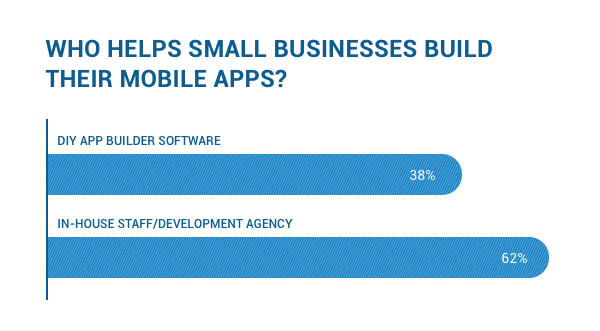
According to a survey, 38% of small businesses have used a DIY App Builder to build their mobile apps.

DIY App Builder New


While the option to build a mobile app for substantial low price sounds perfect on paper, but this route is actually more expensive and often leads to failure.

In this blog, we will explain what these DIY App Builders are and share 6 reasons why you should not use them to build a mobile app for your small business.

What are DIY App Builders?

DIY App Builders are basically online platforms that make it possible to create a mobile app without any coding experience.

These platforms basically have a drag-and-drop editor and some pre-defined templates that allow users to select themes and add features according to their preferences.

To use a DIY app builder, you need to pay a fixed amount of subscription fees on a monthly or yearly basis. These fees range from a few hundred dollars to a thousand or more dollars, depending on the complexity of your mobile app.

That being said, let’s look at the most popular DIY app builders.

Top DIY App Builders in The Market

Building mobile apps has certainly become much easier with DIY app makers.

Now, anyone can easily build and publish an app using one of these DIY app builders listed below.

Appypie

Appypie is the most popular DIY app maker available in the market today. In this platform, all you need to do is drag and drop your preferred features in its web interface to build your mobile app.

The price of Appypie starts from $30 USD per app per month and goes all the way up to $200 USD per app per month.

BuildFire

BuildFire is another powerful DIY app builder that has gained huge popularity in the market. The platform claims to have built over 10,000 mobile apps and has 10 million users.

The price of BuildFire starts from $53 USD per month to $500 USD per month.

AppInstitute

AppInstitute is a cloud-based DIY app maker which is often referred to as the ‘WordPress for mobile apps’. Founded in 2011, AppInstitute has now grown to over 140K users.

The price of AppInstitute starts from $42 USD per month to $340 USD per month and higher.

While these platforms may seem like an easy and quick solution for building your mobile app, but it’s always better to go with the traditional approach instead of using DIY app builders.

Here are the top 6 reasons why you should not use DIY app builders to build your business mobile app.

6 Reasons Why You Should Not Use DIY App Builders

The whole drag and drop technique to build a mobile app is indeed fast and fun, but most of the DIY app builders have too many drawbacks.

Let’s discuss these drawbacks and see why building mobile apps using DIY app makers is not worth it after all.

1 – It Violates Apple’s Guidelines

If you’re planning to build an iOS app using a DIY app builder, then the first thing you should know is that your mobile app will have a higher risk of being rejected from Apple App Store.

In 2017, Apple had updated its App Store Submission guidelines to widen its ban on templated apps that are being created using App generation services.

apple-guidelines

The main reason for bringing this update is because whenever an app gained instant popularity, hundreds of its clone apps were created and flooded the App Store.

As a result, the original creators were losing huge revenues.

So now, Apple has started to ban apps created using app generation services and has made it necessary to build mobile apps with the custom approach.

2 – They Actually Cost More In The Long Run

The subscription fees of DIY app builders may seem cheaper for developing mobile apps but that’s only in the beginning.

If you look at its cost from a long-term point of view, then it turns out to be more expensive than the traditional custom development approach.

For example, you will have to continually pay the annual subscription fees until your mobile app lives in the App Store. On the other hand, you will have to pay a one-time cost in the custom app development approach.

So, when you compare the long-term cost, the custom approach is quite cheaper actually.

3 – Limited Customization

No matter what all DIY app makers claim, you just cannot have the level of customization the custom approach offers.

Custom development allows building an app at any scale as well as usability, while in DIY app builders the options are often limited. You cannot have every possible customization even if you go with the most advanced subscription in DIY app maker platforms.

Simply put, after spending thousands of dollars on an app generation service, you might still end up with a mobile app in a web view which cannot take the full advantage of smartphone’s hardware & OS capabilities to its fullest.

Therefore, it’s always best to spend a little more in the beginning and take advantage of all of the hardware and operating system capabilities.

4 – Security Issues

Security is often users’ primary concern and if you build your mobile app using the custom approach, then you can easily double-check its level of security.

DIY app builders, on the other hand, don’t fully clarify their level of security. Hence, you’ll always be in dark as to whether the platform has a standard level of security or not.

So, if you’re serious about the security concern, then custom development is the right approach.

5 – Nothing Unique

If you’ve decided to use DIY app builder just because most of your competitors have done the same, then how are you going to stand-out?

In today’s competition, you just can’t expect to win users through a templated mobile app.

DIY app makers can’t really design a truly unique UI. They often provide a list of theme templates, which are most likely to used by your competitors as well.

What custom approach can do is just unmatchable by DIY app makers, especially when it comes to UI/UX design.

6 – Supports Limited Devices

Even though DIY app makers allow to create apps for multiple devices and operating systems, there is no guarantee that your app will work smoothly in all OS and devices.

As a result, you’ll end up neglecting a large number of devices, losing thousands of users along the way.

Custom app development approach, on the other hand, allows you to target and cater to a large number of audience with smooth user experience.

Conclusion

The development of your business mobile app is the foundation of the growth of your business. And if you make compromises by using any of the DIY app builders, then the end result might not be the best for your business.

Custom application development, on the other hand, can definitely be expensive in the beginning, but you can always outsource your mobile app development project to a different country where the costs are often lower.