Vue JS vs React: A Battle for the Best Front-End Framework (with Latest Updates)

From tech giants to small and medium businesses, everyone is adopting JavaScript to build web and mobile applications. The benefits of JavaScript are immense.

Many new frameworks and languages are popping every day, and it is quite tough for a developer to keep up with all of them. One needs to decide the concentration.

Vue JS and React JS are the most popular front-end frameworks in the software development industry. So, in this article, we’ll help you determine the right framework for your project by comparing Vue JS vs React.

In this article, you’ll learn the difference between Vue JS and React JS, their specialties, and benefits.

Vue JS vs React

An introduction to Vue JS

Vue JS is an opensource JavaScript library which is popularly used to develop single-page web applications. The aim behind creating Vue JS library was to make web development simpler.

Lately, it has caught the attention of several web developers across the world because it is a progressive web framework and can be used to build eye-catching User Interfaces.

Evan You, an Ex-Googler, introduced Vue JS intending to remove the pain-points of Angular JS and to create a lightweight version of it.

There are immense benefits of Vue JS, but one of the most significant ones is its ability to re-render without any action. It allows you to add any component, built earlier, whenever required.

An introduction to React JS

One of the reasons for React to be popular is because of its origin. It was introduced by Facebook. Today, it is being managed by Facebook and a community of over a million developers.

Contrary to Vue Js, React JS is recommended when one wants to build a website where there is a necessity to update data quite frequently.

With React, it is easy to build reusable User Interface components. One can build a reusable user interface by breaking them into components rather than using templates or HTML.

React is a “learn once and write anywhere” framework. A developer can also develop mobile apps in JavaScript using its mobile-specific framework known as React Native.

React presents the use of JSX or JavaScript XML, which is a syntax extension of JS. JSX can be used in debugging and creating UI components.

Benefits of React JS

  • React JS offers excellent flexibility and responsiveness.
  • Since it is based on the document object model, it allows browser-friendly arrangements of documents in XML, HTML or XHTML format.
  • It has a rich community of developers who offer their inputs all the time to make React feature-rich.
  • React is an amazing choice for businesses who want a highly scalable framework.
  • React JS is a continuously improving and evolving framework since millions of developers and Facebook back it.
  • Using the React component model, one can build not only web applications but also iOS and Android mobile applications.
  • React can be used to build stunning user interfaces, be it native mobile applications or web applications.

Benefits of Vue JS

  • Since Vue JS uses HTML-based templates, revamping an existing application is simpler in it.
  • Be it a complex web application or single-page web application, Vue JS can be used to integrate smaller components without affecting the whole system.
  • Compared to other front-end frameworks, Vue JS takes up less space and gives better performance.
  • Vue JS is one of the easiest frameworks to learn as it requires one to know basic JavaScript and HTML.
  • Vue JS has great adaptability since it provides hassle-free migration reusable templates and an efficient and straightforward structure.

An In-depth Comparison

Optimization and Rendering

We may not consider speed and performance as the most significant decisive factor, but it still matters. When it comes to rendering React has a mechanism that triggers the rendering of the whole component tree when the state of a component is changed.

Vue’s rendering is, on the other hand, out-of-the-box. It offers optimized rendering, which keeps track of various dependencies while rendering and works accordingly.

HTML vs JSX

React uses JSX, which is a declarative JavaScript XML. It allows developers to write components using JavaScripts. Vue JS, on the other hand, uses HTML templates to generate views.

HTML-based templates are familiar to more number of developers, and they are also beneficial when it comes to revamping the existing websites.

State Management and Routing Solutions

While upscaling an application, one needs to take care of state management and data flow, especially when he/she is working with component-based frameworks like React and Vue.

React offers an innovative solution and alternative to the popular MVC architecture, which is known as Redux/Flux architecture that provides unidirectional dataflow.

Vue JS, being the new framework, offers a more advanced level architecture called Vuex, which integrates into Vue and provides an unmatched experience.

Building Tools

Both Vue and React offer similar and good development environments. One can create applications with little or no configuration. In Vue, the configuration is called Vue-cli, and in React it is known as Create React App or CRA.

Conclusion

When to opt Vue JS over React JS?

If you’re looking to develop a world-class single-page web application, which has a faster, lightweight, and modern UI library, then you must opt for Vue JS.

If you have to work with developers who know HTML, then it is beneficial for you to work with Vue rather than React.

When to use React JS over Vue Js?

JavaScript is at the heart of React. So, if you hire a developer who knows JavaScript, it is recommended you to go with React.

React is Ideal for large-scale web and mobile applications. Moreover, it is backed by Facebook and millions of developers, which makes it an obvious choice for many novice programmers.

If you’re looking forward to building a mobile application as soon as you’re done with a web application, then React is a perfect choice for you.

Learn Node JS (FAST) – 3 Best Online Node JS Courses to Become an Expert!

Let’s start with the obvious question: why should you care to learn Node JS?

Well, firstly, learning something new has never hurt anyone. And if you’re a JavaScript developer, learning Node JS will greatly help you in advancing your career.

Secondly, Node JS has been adopted by thousands of giant companies worldwide including Netflix, Uber, LinkedIn, and many more. So, you will have an ample amount of opportunities in the industry.

That being said, if you want to learn more about what are the top famous companies that use Node JS, we’ve also written a comprehensive blog post on it.

What is Node JS?

Node JS is basically a JavaScript runtime environment that allows JavaScript developers to write server-side scripting. That means, you can build front-end as well as the back-end of a web application using the same programming language.

For instance, you can use Node JS for back-end development, and for the front-end, you can use any of the Best Node JS Frameworks available in the market.

So, now that we’re clear what’s so great and why you should learn Node JS, it’s time we share why you should consider learning Node JS from the below-mentioned 3 best online Node JS courses.

3 Best Online Node JS Courses

As you might already know, there are hundreds, if not thousands, of Node JS courses available online. But, to make your life easier, we’ve already identified the top 3 online Node JS courses.

These are the same courses that our developers at Credencys have used to master Node JS and become an Expert Node JS developer.

P.S.: If you’d like to hire Node JS Developer for your upcoming project, you’ve just found the perfect match!

Coming back to the subject, let’s talk about what makes these 3 Node JS online coursed great.

  • Expert Instructor: You might have already heard about the saying that goes like “You’re only good as your teacher”. Well, that almost sums up our argument here. The instructors of all the below-mentioned Node JS courses have been created by leading experts in the industry.
  • Great Lessons: This goes without saying. – You need great lessons to learn anything. And the courses we’re about to mention are packed with the latest information, updates, and awesome demo projects, articulated in the best way possible to make difficult topics and concepts easy to understand.

Now, let’s jump in to discover the top 3 Online Node JS Courses.

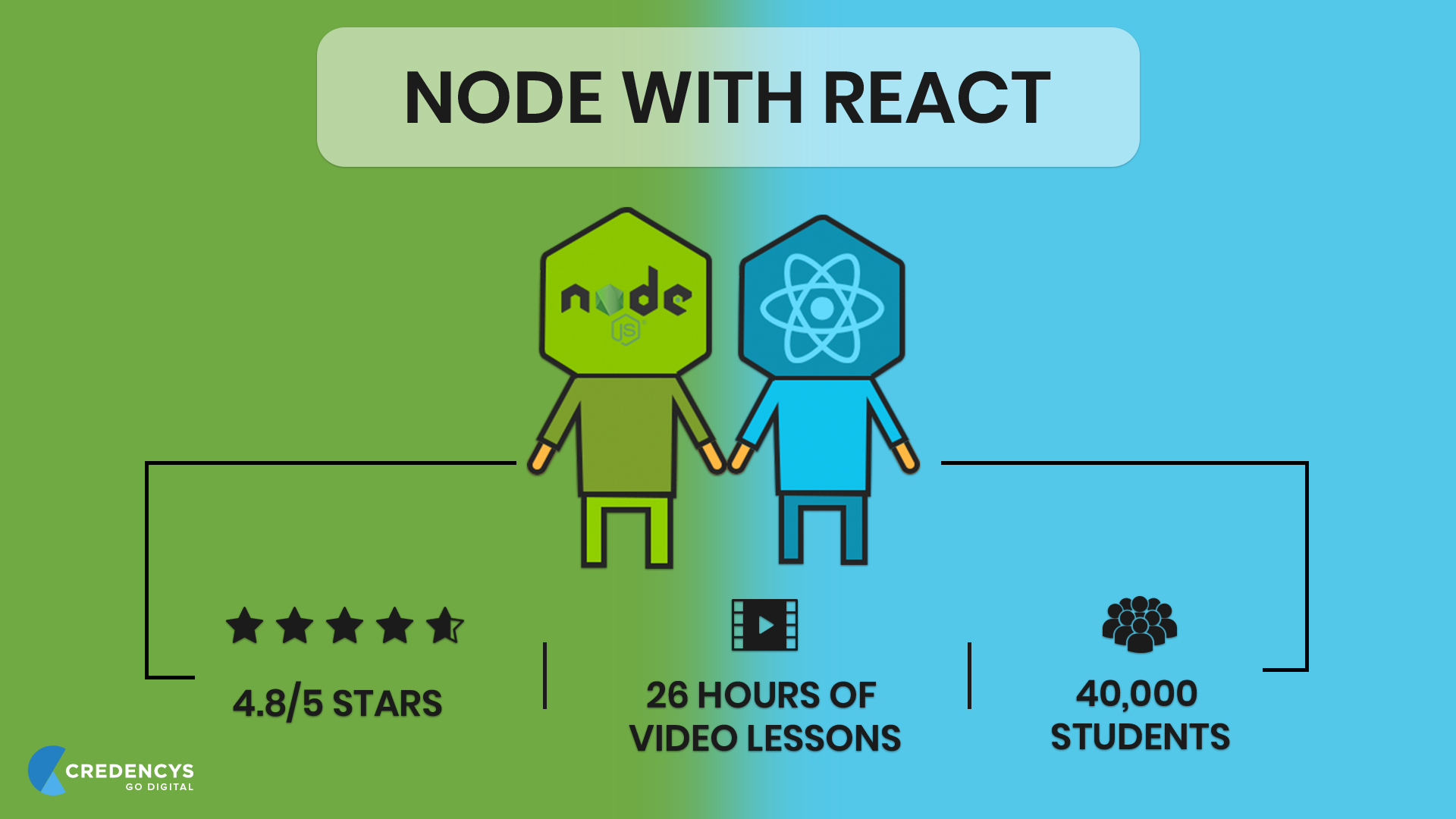
1 – Node with React

node with react

Node with React is a full-stack web development course created by a Node Expert named Stephen Grinder.

This course is relatively new and is packed with great lessons and content. And the best part is, you get to learn React and Node for the price of one course so we strongly recommend to check out this course.

The course is created in a way that once you finish all 25 hours of instructions, you’ll have developed your own web application using Node and React with proper hands-on experience.

Below are some of the things you’ll learn and master in this course:

  • Build and connect React app with Node JS backend.
  • Integrate Stripe to process credit card payments.
  • Send automated emails to users.
  • Fetch data from MongoDB to your React-Node App.

2 – The Complete Node.js Developer Course

The Complete Node js Developer Course

The complete Node.js developer is, hands down, the best Online Node JS on the internet.

This course was created and is taught by two most popular Node experts Andrew Mead and Rob Percival. From 100+ learning modules to 26-hours of on-demand video lessons, these guys have really thought of every aspect while creating this course.

While you don’t get the advantage of learning full-stack web development, but the complete Node.js developer course is project-based, meaning you’ll build several different Node.js applications throughout the course.

Specifically, here’s what you’ll learn to build in this course:

  • A to-do REST API
  • A note-taking app
  • A Weather App by using Dark Sky API and Google Maps
  • And a Real-Time Chat App

Besides these projects, you’ll also get the replies to every question or every time you run into a problem in this course.

Overall, this Node JS course is best for you if you want to become a freelance Node JS developer, build your own Node JS product, or just crack the interview at some large-scale enterprise.

3 – Learn and Understand NodeJS

Learn and Understand NodeJS

Though the complete Node.js developer course covers everything to learn Node JS and even master it, but if you really want to go in-depth, then this is the right course for you.

The above two Node JS courses basically teach you Node JS by showing what Node JS can do and helping you build a couple of projects, but this course is different.

This course focuses on teaching how Node JS works in-depth. In simple words, if you want to go where only a few go and learn the inner workings of Node JS, Learn and Understand NodeJS is the course for you.

This course starts from the very basic and history of Node JS. For example, the first chapter begins with looking at C++ written V8 JavaScript engine upon which the Node is built on.

Once you’ve learned that, you will then learn how Node event loop and asynchronous code works. During the final lessons, you’ll have an in-depth understanding of buffers, pipes, event emitters, streams, and working with files.

Overall, this course is especially for students who want to pursue their career as a Node JS developer.

Conclusion

Thank you for reading. We hope you find this list helpful.

Interested in other Node JS topics? We strongly recommend reading the following blogs too:

How to Install Node JS on Windows (with Pictures!)

Node.js, as you might already know, is one of the powerful JS frameworks out there. It is a lightweight and efficient JavaScript runtime environment that’s built on Google Chrome’s V8 engine.

Node JS was basically the first framework to bring JavaScript to the server-side. Before Node JS, JavaScript was only used for client-side scripting.

But, since Node JS’s arrival, it has dominated the backend technology space and has become the most preferred framework for building backends of different kinds of web applications.

In fact, Node JS offers so many benefits that many famous companies across the globe have adopted it in their software productions.

That being said, if you want to know in detail, what companies are using Node JS and what did they gain from it, we’ve written a separate compressive blog on it.

Once you read that article, you will know why Node JS is the most-preferred backend development framework and how Node JS can be beneficial to you in your next or existing project.

Coming back to the subject, using Node JS to build modern web apps will always require you to first install it.

This blog post will help you learn how to install Node JS on Windows as quickly as possible so that you can start building!

That being said, let’s dive right in!

How to Install Node JS on Windows

To use Node JS in your web app project, you need to install the following in your system first.

  • Node JS
  • Node Package Manager (NPM)
  • IDE or Text Editor

Let’s begin with how to install Node JS on Windows system.

Step #1

Before you do anything, first you need to make sure that your Windows system has sufficient space and RAM (minimum 4 GB).

Step #2

The next step is to download the Node JS from its official website.

Head over to https://nodejs.org/en/download/ and download the Windows Installer and Binary file.

Once you’ve downloaded both the files, go to your downloads folder where it is saved and initiate the installation process.

Step #3

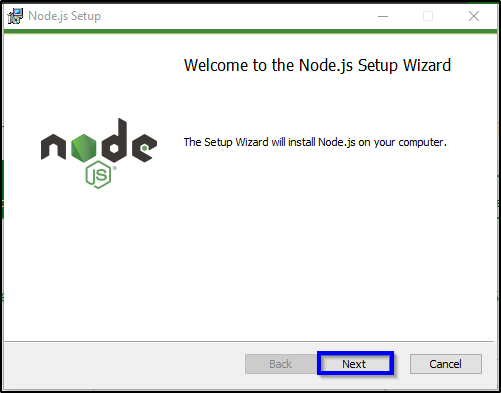
As you initiate the installation process, you’ll be prompted with Node JS installation wizard as shown in the image below.

node js setup wizard

Step #4

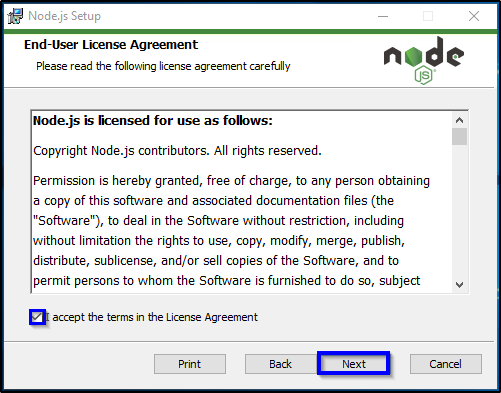
As highlighted in the above image, click on the ‘Next’ button a few times and you will reach the End-User License Agreement page in the installation wizard.

node js

As highlighted in the above image, click on the checkmark box that reads ‘I accept the terms in the License Agreement’ and click on the ‘Next’ button.

Step #5

In the next page, you will have an option to change the location to install Node JS to. You can either change it and keep it as it as.

node js

Step #6

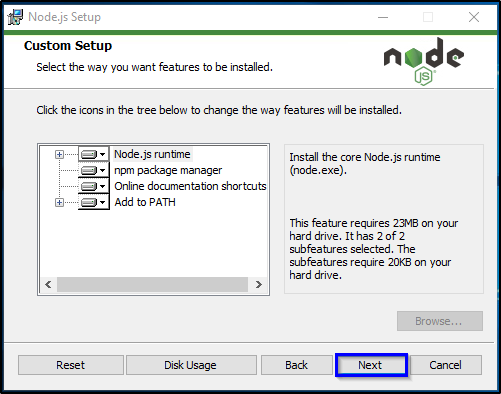
After clicking the ‘Next’ button, you will be prompted with a list of features to install.

node js

Step #7

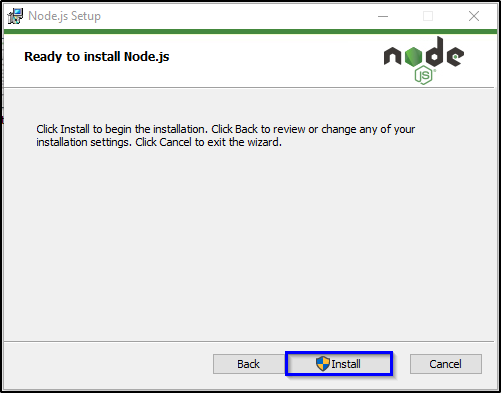
Click on the ‘Next’ button and then click on the ‘Install’ button as highlighted in the image below.

node js

Step #8

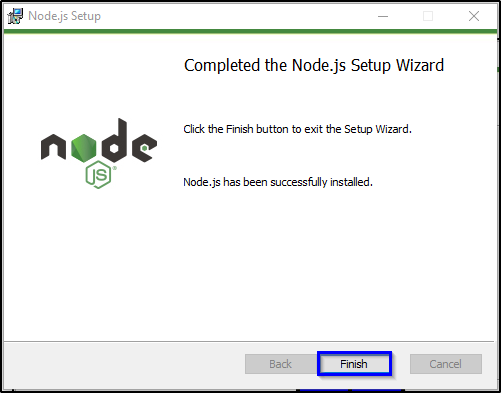
Once the installation is finished, exit the installation wizard by clicking on the ‘Finish’ button.

node js

With this step, you have finally installed the main part of Node JS on your Windows system.

The next step is to install the Node Package Manager (NPM) as we discussed in the beginning.

How to Install Node Package Manager (NPM) on Windows

Node Package Manager is written in JavaScript and is the default package manager of Node JS.

The NPM basically helps to manage modules and packages required for Node JS application functioning and gives a command-line client npm.

The difference between modules and packages in Node JS is that packages bundle up the important files required for a module.

Modules, on the other hand, are also known as JavaScript libraries that are incorporated into the Node JS project for a specific purpose.

Now, as far as the NPM installation is concerned, from Node JS 0.6.3 version, the NPM automatically comes with the Node JS as the default package manager. This means you don’t need to install NPM explicitly anymore.

As for the packages, you can use install, update, and uninstall Node JS packages via npm by using the following command:

– npm install package_name

Best IDE & Text Editors for Node JS Development

Now that we are done with the Node JS and NPM installation process, your system is now finally ready and you can start writing Node JS programs.

You can write your programs either using Node JS text editors or IDEs available for free.

Here, we’ve mentioned the Best IDEs & Text Editors that you can use for writing Node JS programs.

All of the above-mentioned IDEs and Text Editors work perfectly for writing Node JS programs.

So, what are you waiting for?

Get Started!

With this, we have finally completed the Node JS installation process. We hope you find this blog useful. If you face any issues or need help of any sort, hire Node JS developer to make sure everything is done in the right manner.


Top 8 React JS Tutorial and Courses to Follow (Updated)

React JS is one of the leading and fastest-growing JavaScript frameworks for web development. The framework is getting so popular that there are no chances for its disappearance in at least five years.

There are many job opportunities available for React developers. However, a developer needs to be skilled enough to handle the ups and downs of a development project.

To get yourself skilled, you need to follow the React JS tutorial. There are tons of tutorials available online from where you can get React JS training.

You might have heard speculations that it is one of the easiest frameworks to learn, which is true. However, it is also one of the toughest when it comes to mastering it.

To master it, all you need to do is follow these React JS tutorial and practice building the real websites and web applications. Below mentioned courses will help you accelerate your learning process.

Top 8 React JS Tutorial, Courses, Certificates to Follow

#1 React – The Complete Guide (incl Hooks, React Router, Redux) by Udemy

Maximilian Schwarzmüller is the tutor of this course. He is truly an expert when it comes to web development. He has taught 200,000+ students through online classes to date. He teaches various programming languages, and this is one of the most sought after courses taught by him.

  • This React JS tutorial will help you to start learning React from scratch.
  • You’ll receive training for React JS, animations, Redux, Redux Routing, Next.JS basics, and more.
  • You don’t have to be a JavaScript expert to start this course.
  • The course level is intermediate to expert.
  • This course will help you to shift from Angular or Vue to React.

#2 Become a React Developer – Nanodegree Certificate by Udacity

The Nanodegree program will help you to gain expertise in the UI library, which is known to be the heart of React. It is ideal for you to choose this course if you’re comfortable with JavaScript, HTML, CSS, command line, NPM, and Git. In this course, you’ll learn about the component model. You’ll also learn to manage complex state with Redux and build applications using React Native on Android and iOS.

  • Navigate the software and tools to solve real-life problems.
  • Work on hands-on projects as you cover the topics in the course.
  • Every topic is filled with a variety of demonstrations and examples.
  • Get personal coaching, one-to-one mentoring, and interview prep advice along with the course.

#3 Become a React Expert by Pluralsight

It is a multi-level React JS tutorial. First, it will help you get acquainted with the fundamentals of React such as JSX, component states, and Props object. Then it’ll take you to the intermediate level, which covers topics such as Redux, working with Flux, and working with other intricate elements. Finally, it will confront you with concepts like HOCs, API, external state, and more.

  • It provides a guided journey to developers from being a newbie to becoming an expert in React.
  • The course is filled with rich study material, videos, exercises, quizzes, and more.
  • It emphasizes both the conceptual as well as the practical aspect of the framework.

#4 Full-Stack Web Development with React Specialization by University of Hong Kong and Coursera

This course will help you to learn not only React JS but also Bootstrap, React Native, and server-side development. The course is filled with projects and practical exams through which you can learn the framework by implementing.

  • This course will help you become a full-stack developer with React as the primary front-end framework.
  • Learning with the Coursera community gives you a unique experience.

#5 Modern React with Redux by Udemy

This is one of the few courses available on Udemy that has 85,000+ student enrolments. The trainer of this course is Stephan Grider, who is a proclaimed web developer by many corporations in the San Francisco Bay Area.

  • This course teaches you to master the fundamentals of React and Redux by building apps with Webpack, ES6, and React Router.
  • After finishing this course, you’ll become a pro at Webpack, NPM, ES6/ES2015, and Babel JavaScript syntax.
  • The course will break down complicated topics into easier terms that will make it effortless to apprehend.

#6 The Complete React Developer Course (w/ Hooks and Redux) by Udemy

Taught by Andrew Mead, This React JS tutorial will help you to develop and launch React web apps using React v16, React Router v4, Redux, and Webpack.

  • Finishing this course will lead you to become an expert on React, React Router, and Redux.
  • You’ll get hands-on experience on ES6/ES7 JavaScript, user accounts, and set up authentication.
  • The trainer answers every question almost instantly.

#7 Advanced React and Redux: 2018 Edition by Udemy

Once you finish the above course, you can start with this advanced-level course, which gives you an intermediate understanding of Redux and Advance understanding of React. It will help you to excel in concepts like Testing, Middlewares, HOC’s, Authentication, and Deployment.

  • This course will help you learn to develop scalable APIs with authentication using Mongo, Express, and Python.
  • You’ll learn to set up testing environments using Chai and Mocha.
  • It will help you create Redux middleware from scratch and debunk what goes behind the scenes.

#8 GraphQL with React: The Complete Developers Guide by Udemy

This course helps you master GraphQL by developing React and Node. Similar to React, GraphQL was also developed by Facebook. It acts as an alternative to REST and other ad-hoc web service architectures.

  • You’ll learn the fundamentals behind structuring GraphQL servers.
  • Understand and learn the differences between Relay and Apollo.
  • Know everything about Apollo Data, Authentication, and Integration with React.
  • Understand how to develop servers that can be used with both React Native and React.
  • Learn to integrate React Router with GraphQL.

Conclusion

Alright. So, this was the list of my favorite React JS tutorials available online. Apart from these, there are many other courses as well, which can make you an expert on React.

Gaining extra competency on React from these courses will help you get more visibility among the companies looking to hire React JS developers.

FAQs:

1) Is React JS easy to learn?

Yes, React JS is quite easy to learn compared to other JavaScript frameworks. There is an abundance of material, courses, tutors, and online forums available that’ll help you learn React JS easily.

2) What is the best way to learn React JS?

If you’re a beginner, then the first thing you should do is to enroll for React JS basics class and then practice as many scenarios and functionalities as possible.

3) What should I know before I learn React JS?

You should have a good knowledge of HTML/CSS, know basic JavaScript commands and syntax, ES6, and should have a basic understanding of Webpack and NPM.

4) How hard is it to learn React JS?

React JS is one of the easiest libraries to learn among all JS libraries. However, if you already know enough of React JS and looking forward to becoming an expert, then it would be slightly tough for you.

5) Is React JS really worth learning, or is it just a fad?

It’s worth it. React has been widely adopted by many popular websites such as Netflix, Airbnb, and more. Unline other JS frameworks, learning React will open your doors to become a mobile app developer.


7 Best Node JS Libraries to Consider for Node JS Development

Looking back to the web development arena, JavaScript has come a long way and has become the most wildly popular programming language on the earth.

What was once only used for basic web designing, has now become the most important programming language of today and tomorrow.

Today, leading JavaScript frameworks like Node JS are supporting thousands of startups and businesses to earn millions of dollars in revenue.

Node JS is a JavaScript runtime environment that can sustain a huge load while providing the same level of smooth performance.

Ever since its inception, Node JS team has continuously pushed out frequent updates and by the looks of it, Node JS isn’t going to stop any time soon.

So, in this blog, we’ll celebrate the Node JS’s achievement by sharing the best Node JS libraries to consider for building Node JS applications.

7 Best Node JS Libraries

Before we begin, let us define what we mean by “best” Node JS libraries. That’s because the list of best Node JS libraries may differ depending on your perspective.

In this post, “Best” simply means a Node JS library is best compared to others for a specific purpose.

For instance, you might expect a Node JS library/package like Yargs included in this list because it’s one of the highly downloaded. But, and spoiler alert, it’s not.

We have only listed Node JS libraries that we know for sure are best for a specific purpose compared to other similar Node JS libraries.

That being said, let’s dive right in!

1 – Express

Express is although a JavaScript framework, but it also works as a library in Node JS. In fact, Express is one of the leading Node JS libraries for quickly developing web applications and APIs.

What sets Express apart from other similar Node JS libraries is its minimal structure. It gives a solid outline to Node JS developers for quickly building functional web applications.

It’s for this reason, many well-known companies like IBM, Uber, and many others have adopted it in their production.

2 – Async.js

Originally built to use with Node JS, Async is actually a utility module that provides over 20 powerful functions to increase the performance of a Node JS application by eliminating the render-blocking JavaScript.

Render-blocking is basically responsible for not loading any JavaScript content placed in ‘above the fold’ part of a page until the JavaScript itself has finished loading in a web page.

As a result, it affects the performance of a website.

This is where Async.js comes into the picture. With Async.js, you can load all JavaScript content alongside every other part of a web page faster than render-blocking.

In fact, Asynchronous has reinvented the way JavaScript interact with web applications.

3 – Request – Simplified HTTP Client

Modern-day web applications often require dealing with external HTTP calls for loading or fetching data from different external sources.

Therefore, it’s critical to have a reliable way to perform HTTP calls.

Request, a simplified HTTP client, is the most reliable HTTP client libraries that are out there.

With Request library, you can make a large number of HTTP calls easily, reliably, and securely to access content and data from external sources on the web.

4 – Socket.IO

Imagine a scenario where you had access to tools that can help you build a real-time Analytics application just as powerful as Google Analytics is today.

Socket.io allows you to build truly powerful and real-time applications where you can stream data or content directly externally through APIs.

One popular example where Socket.io has been used in a Twitter bot for collecting the latest news. Besides this Twitter bot, there are over thousands of companies including Trello and Banksalad using Socket.io to integrate real-time functionality in their applications.

5 – Underscore

Underscore is a popular Node JS library that offers a multitude of useful functional programming helpers.

In simple words, Underscore makes the web application development process a much more enjoyable affair through its rapid development workflow and also the programming helpers.

There are over 100 functional programming helpers embedded in the Underscore that fills the gap from opening an HTML document to writing code without having to worry about how complex functions operate.

6 – PM2

Node JS framework is often recommended when it comes to building large-scale applications.

But Node JS alone cannot do everything to build a successful large-scale application. Along with the Node JS, you also have to have proper process management.

PM2 offers both, proper process management and a load balancer to help with performance tweaks.

Simply put, PM2 gives you the tools to reload apps without any downtime, making your application stay online indefinitely.

7 – UglifyJS2

Performance is an important factor when it comes to building successful web applications. The more performance you can squeeze out, the faster your application is going to be.

Tech giants like Google have often talked about how, even a millisecond of performance increase, can gain you more business.

This is where UglifyJS2 comes into the picture.

UglifyJS2 basically helps Node JS developers to minify and trim your JavaScript files automatically, which can ultimately have a huge impact on your overall application’s performance.

Apart from this, UglifyJS2 also easy-to-use, flexible, and helps to saves those little bits of space and load-times so that you can gain the performance margins your application needs.

Conclusion

With this, we’ve now finally listed the 7 best Node JS libraries to build Node JS applications. If you happen to be a Node JS developer, we would love to hear your thoughts on this list down in the comment section below.

On the other hand, if you’re a business or company looking to hire Node JS developer for your next project, we can help you build top-notch applications, just like we’ve done for world-class brands like Cisco, Samsung, and many others.

What is React JS? Why Startups and Enterprises love React JS for Front-End Development?

React, React, React! It has now become a buzzword among the front-end developer community. React JS has become a synonym of front-end development. Be it a startup or an enterprise; everyone is rushing towards React for front-end development.

According to a survey by Stack Overflow, React has been the most loved front-end framework by developers all over the world.

Before understanding why and how React JS can upscale your business by increasing customer engagement 2x, it is paramount that you first understand what is React JS.

What is React JS?

Maintained by Facebook and a community of millions of developers, React JS is a JavaScript library. It is mainly used to develop user interfaces of web and mobile applications. It works on the aspect of Model View Controller or MVC.

Developers often use React as a base for developing single-page web applications and then use other libraries to provide extra support to their web application.

Why Startups and Enterprises love React JS (Top 10 Reasons)?

#1 Virtual DOM

Virtual DOM is a modern-day marvel for businesses. It helps you create a data structure cache memory within a memory unit, which allows you to update the browser DOM more efficiently.

#2 Development Speed

Time-to-market is one of the most crucial elements of any business, be it a startup or an enterprise.

Businesses are always looking for using technologies that help them to complete software development projects on-time and within the defined budget.

React JS has a plethora of reusable components which help developers to develop and maintain an application faster. Moreover, React powers React Native, which is a robust cross-platform mobile app development tool.

Having such interoperability helps businesses to build a strong mobile presence as well, along with the web.

#3 Stability

The technology used to develop web or mobile applications must remain relevant for at least a few years. With technology growing so fast, it is evident that the tools used to create applications may get obsolete in the future.

Having been backed by millions of developers and enterprises like Facebook and Instagram, the chances of it getting obsolete are negligible. React JS has been a stable technology even in the face of growing competition, such as Vue JS and Angular JS.

#4 Interactive Interface

React JS provides an opportunity to manipulate the interface flows and designing features in a fast and easy way.

You can hire React JS developers to update or develop an interface based on your tastes, desires, and principles. It can be done in two ways: loop and nest view.

#5 Advance Performance

React JS is a pro when it comes to handling graphics on a variety of devices such as a tablet, smartphone, or desktop.

It seamlessly loads any webpage on either of the devices mentioned above. React does it by automatically updating the on-page apps that do not require a reload for redrawing UI.

#6 Simple to use

One of the prominent reasons why React is one of the most loved libraries among developers is because of its simplicity. According to many developers, it is simpler than Angular JS.

React JS development simplifies the process of programming, development, and hence, administration of resources. React JS is not only a perfect framework for newbie developers but also an ideal framework for experts and experienced programmers.

Although React JS is simple to use, it has got all the advanced level functions and capability that can help pro-developers to create stunning webpages.

#7 Alternatives

Being an open-source library, React JS acts as a stone that can kill two birds at a time.

Developers can use React JS as the base library as well as an alternative to other libraries such as Angular, Backbone, jQuery, and more. React JS extensions comprise of all the functions available in these libraries.

Moreover, these extensions are prolonged with a broad spectrum of other functions, simplifications, additions, and useful changes, which have been implemented in React.

#8 Flexible Development

Businesses took the arrival of React JS for granted. They thought that it was just another library which would give its share in simplifying web development.

But, the truth is that React does more than simplifying web development. It has helped many developers to reduce several restrictions that hindered the process of web development.

React help developers to deal with future problems and strategy to govern the web development project one of the most comfortable and flexible ways.

#9 SEO-Friendly

Excluding the enterprises and startups in a monopoly business, every company requires to do SEO on their websites. They must rank higher on search engines. Using Node JS, React can render on servers easily.

It helps search engines to crawl the web application in its final form, making it simpler for webpages to index it properly.

Although some techniques and technologies can produce similar results, they are unstable and unsuitable for mission-critical applications.

React JS has been tried and tested by several organizations in the world for creating high-quality and reliable front-end and making the site SEO-friendly.

#10 Access to Developers

Being one of the most popular frameworks among the developer community, React JS is a framework which many developers opt to learn.

Hence, finding a React JS developer will be easier for you. Moreover, it is simpler to train a developer with React JS, who has a basic knowledge of JavaScript and front-end development.

Concluding Thoughts

It is quite evidential that React JS is your way to go for front-end development. Start from searching for an appropriate developer to maintaining and deploying the application, React JS provides a flawless experience to businesses.

Whether you are a startup looking to cut development costs or an enterprise looking to increase the conversion rate, React JS has all the capabilities to help you achieve your business goals.

FAQs on What is React JS

Q:1 – Is React JS a frontend or backend framework?

Ans: React JS is a frontend framework created by Facebook. Like any other frontend framework, it can work with most backends including Rails, PHP, Node.js, etc and can be served through any web server such as NGINX, Apache, and so on.

Q:2 – Why is React better?

Ans: One of the main reasons why React is better is because it provides developers with an ability to work on a virtual browser, which is more friendly than the actual internet browser. This virtual browser, in fact, acts as an agent between the actual browser and the developer.

Q:3 – What are the advantages of using React JS?

Ans: There are many advantages of using React JS and we’ve listed the key advantages below:

  • Guarantees stable code
  • SEO-friendly
  • Provides faster rendering
  • Boosts developers’ productivity
  • Helpful developer toolset
  • And so on…

Q:4 – Who uses React JS?

Ans: React JS is created and maintained by Facebook and today it is being used by 8183 companies worldwide out of which there are many reputed companies like Uber, Airbnb, Netflix, Twitter, and so on.


What is Node JS? The Most Popular JavaScript Framework Explained!

JavaScript’s rapidly rising popularity has brought notable advancements in the world of web app development.

For instance, we can finally build real-time web applications with two-way connections where both server and client can initiate communication and exchange data freely, all thanks to Node.js.

Another notable change that JavaScript witnessed after Node.js’s arrival is its ability to unify data format (JSON) with the language, which ultimately allows companies to optimally reuse developer resources.

Although, this is much of a JavaScript advantage than Node.js, but it’s still wise to add Node.js in your web application development stack.

What is Node JS?

Node.js, as you already probably know, is an open-source, cross-platform, JavaScript runtime environment that enables developers to execute JavaScript on the server.

In simple words, Node.js allows developers to write server-side scripting, while also executing JavaScript to create dynamic web pages on the front-end.

It is built on Google Chrome’s JavaScript engine that makes it possible to build fast and scalable web applications. The event-driven, non-blocking I/O model in Node.js what makes the framework lightweight and perfect for developing real-time web applications.

Besides this, Node.js also has a rich library of different kinds of JavaScript modules, which greatly simplifies the Node JS Development process.

Some JavaScript History Before Node JS

JavaScript came into existence in 1995 and since then it has taken over as the dominant language of the web. However, JavaScript was used, for the majority of its life, as a client-side scripting language to execute on the web browsers.

This limitation forced web developers to use a multitude of frameworks and programming languages for building web applications.

Though there were other projects that focused on bringing JavaScript to the server-side of web applications, but Node.js was first to make JavaScript code run on the server-side possible.

What is Node JS Used For?

Node.js, for its multitude of advantages, plays an important role in the technology stack of many high-profile brands today.

International brands and enterprise-level companies have utilized Node.js in production for developing different sorts of web applications.

Below, we’ve composed a list of hands-on solutions you can build by using Node.js.

  • Single-Page Applications
  • Data-Intensive Real-Time Applications
  • I/O Bound Applications
  • JSON APIs-Based Applications
  • Data Streaming Applications
  • Rest APIs
  • Command Line Tools

Why Use Node JS?

Now that you know what is Node JS used for, it’s time we jump onto the important point – Why use Node JS and not other available options in the market.

There are multiple reasons to use Node JS. Below, we’ve shared the most important reasons that explain why use Node JS in your next web application development project.

1 – V8 Engine

Though Node.js is not a Ford Mustang GT, but it also has a V8 engine. It is basically a JavaScript Engine built by Google that converts the JavaScript code into machine code, making the execution process extremely fast compared to other server-side frameworks.

2 – Rich Ecosystem

The Node.js has a rich ecosystem with a wide range of ready-to-use tools for building high-performance Nodejs applications.

The Node.js Package Manager (also known as NPM) amounts to over 700K today. You can easily search, install, and reuse any packages to save yourself from rewriting the same lines of code over and over again.

3 – Asynchronous Non-Blocking I/O

Node.js allows developers to process thousands of requests parallelly without any trouble. This, as a result, reduces RAM consumption and provides way faster performance.

4 – Full-Stack Development Environment

Node.js has played a critical role in increasing JavaScript adoption worldwide. As you already probably know, Node.js is the first JavaScript framework that paved its way to the server-side.

As a result, today startups to companies and large-scale enterprises have adopted it to build both front-end as well as back-ends of their products.

In laymen’s terms, Node.js has drastically cut the development time as well as costs since it eliminates the need for using multiple programming languages and thus hiring different engineers to build a web application.

5 – Microservices Architecture

Microservices, recently, has gained massive popularity over the monolithic one.

As Node.js offers a wide range of ready-to-use modules and event-driven non-blocking I/O model, it has allowed Netflix and other popular companies to adopt the practice of breaking their app to implement microservices solutions.

Popular Node JS Examples: Companies That Use Node JS

Node.js is wildly popular, not just amongst developers but also amongst big brands & tech giants. Microsoft, Netflix, and Paypal are just a few top companies that have embraced Node.js in their software products.

So, what are the other popular Node JS examples?

What are the other famous companies that use Node JS?

We’ve gathered information on which famous companies that use Node JS and written an entirely separate blog post.

In the above blog, you will find why Netflix, NASA, and other companies have adopted the Node JS technology and what exactly did they gain from it.

Spoiler Alert: You’ll be blown away with the growth they’ve witnessed!

Bonus: Node JS Interview Questions to Prepare

If you’re a Node JS developer, having interviews lined up for your next job, then the following Node JS interview questions will help you nail the interview confidently.

These are the questions that we (and most other IT companies) usually ask while interviewing the candidates. We will start from the basics to move towards some advanced questions that you should expect to be asked in your job interview.

On the other hand, if you’re a business looking to hire Node JS Developer for your projects, asking these questions can help you determine whether a candidate is a right fit for the job or not.

Without any further ado, let’s check them out.

  • What is Node JS? And What is Node JS used for?
  • What is the difference between non-blocking and asynchronous?
  • What is Event Loop in Node JS?
  • What is an error-first callback?
  • What is a callback and how can you avoid callback hell?
  • What are promises in Node JS?
  • What is NPM and what are its main functionalities?
  • What is an exit code in Node JS?
  • What is Steams in Node JS?
  • What is a Test Pyramid? Explain with an example.

Now, since most of the questions mentioned above can be answered in different ways, feel free to personalize your answer or add your work experience related to each question.

Conclusion

To summarize, Node JS is a powerful backend technology that can help you build modern web applications. In fact, we bet that once you use embrace Node JS into your existing project or a new one, you’ll eventually ask yourself “Why not use Node JS”?

Best Node JS Frameworks: The Definitive Guide (list of top 11 frameworks)

Ever since Node.js came out, it brought exponential growth in the usage of JavaScript programming language.

For instance, a majority of developers switched to JavaScript to build web applications, which ultimately made JavaScript the #1 programming language of the web.

Node.js is basically a cross-platform, open-source runtime environment designed to build scalable & fast server-side applications.

The non-blocking I/O model, event-driven attribute, and single-threaded asynchronous programming make Node.js efficient and lightweight. These three features have, in fact, led many brands and enterprises to adopt Node.js in their production.

For example, Netflix, Uber, and Paypal are a few companies that have adopted Node JS.

If you want to get in the details, then here’s an in-depth blog on 5 Famous Companies that use Node JS.

Of all the features that Node.js has to offer, the fact that you can use the same programming language for front-end and back-end is what increased rapid adoption of Node.js.

As a result, it led JavaScript developers to build numerous impressive JavaScript frameworks for developing modern web applications.

If you want to know what kind of applications you can build with Node JS, we’ve written a comprehensive article on Node JS Use Cases to get a better idea where Node JS should be used.

In this article, I will list 11 best Node.js frameworks that we’ve personally used for building dozens of web applications for our clients.

Top Node.js Frameworks to Consider in 2019

Here are the top 11 Node.js frameworks that will help you build better, fast, and scalable web applications, especially on the server-side.

That being said, let’s dive right in!

1 – Total.js

Total.js is a modular Node.js framework that uses MVC architecture. Besides Node.js, Total.js is also fully compatible with Backbone.js, Angular, Bootstrap, Polymer, and a few other front-end JavaScript frameworks.

Total.js, just like the Node.js, is also asynchronous and extensible. But, the best part about Total.js is that it doesn’t require any kind of tools such as Grunt, for example, to make it easy to use.

In addition, Total.js also comes with NoSQL embedded in it and supports the array and many other prototypes.

2 – Express.js

Of all Node.js frameworks, Express.js is believed to be the simplest one and also the most commonly used by Node.js developers these days.

In Express.js, developers are not required to add all of its structure in order to build Node.js application.

So, if you’re developing a simple Node.js application in which you will not always require extra templating features, you can use Express.js.

It’s a minimalistic framework that promotes stability and consistency.

3 – Socket.io

Socket.io is a fast and reliable Node.js framework designed for building real-time applications.

It comes with a simple yet convenient API that works on every device, browser, platform and also supports disconnection detection, multiplexing, auto-reconnection, rooms, and binary.

Simply put, it’s a JavaScript framework that provides bidirectional data flow between the server and the web client.

4 – Meteor.js

Forth on the list, Meteor.js is actually a full-stack JavaScript platform designed to help build modern web and mobile apps.

While the main benefit of using Meteor.js is its realtime update, but the most fascinating thing of this Node.js framework is its insanely rich & organized documentation and also its large community that helps newcomers learn fast.

However, there’s no better way to describe how awesome this framework is than mentioning its capability of serving one of the biggest projects like reaction commerce, which is amongst the most popular and largest e-commerce open-source projects.

5 – MEAN.io

MEAN, as you might have already heard, is a collection of open source technologies including MongoDB, Ember.js, Angular, and Node.js, which offers an end-to-end framework architecture for building dynamic web applications.

Simply put, it is another Node.js framework built on Express.js and is an ideal choice when you want to develop cloud-native full-stack JavaScript web apps.

6 – Loopback.io

Loopback is one of the highly-extensible Node.js frameworks popular for creating dynamic end-to-end REST APIs without having to write much code.

It was created to help JavaScript developers easily set up models as well as write REST APIs in a matter of a couple of minutes.

In addition, Loopback comes with model relation support, various ad-hoc queries, backend data stores, and add-on components with support for easy authentication and authorization setup.

7 – Keystone.js

Keystone.js is yet another lightweight, extensible, and open-source Node.js framework that is built on MongoDB and Express.js.

The main aim of Keystone.js is to help Node.js developers build database-driven APIs, applications, and websites.

In laymen’s terms, Keystone.js makes everything simple by allowing to choose and use only the needed features and dumping the ones that are not required.

In addition, Keystone supports form processing, session management, dynamic routes, and database building blocks along with a truly beautiful, customization User Interface, which makes Keystone.js a product JavaScript framework.

8 – Hapi.js

Hapi.js is one of the few yet popular Node.js frameworks that uses MVC architecture. Hapi was basically designed to help JavaScript developers write reusable components and app logic.

It is configuration-centric and offers various useful features such as caching, input validation, and authentication along with many others.

9 – Koa.js

Koa is a new Node.js framework built by the same developers who created Express.js.

Koa.js uses ES2017 async functions and was created to be a smaller, more robust, and more expressive Node.js framework for building web apps and APIs.

According to its official website, Koa does not bundle any middleware, which means the middlewares in Koa becomes more streamlined, making the framework to have more control over handling and configurations as a result.

The best part about Koa.js, however, is that it helps developers rid their apps of callback hell through promises and async functions with simplified error handling.

10 – Mocha.js

Mocha.js is one of the widely adopted Node.js frameworks that allows integrating only the good unit tests with your web application’s build routine for performing the tests.

Though it might seem like a bit of a chore, but oftentimes it helps to resolve issues faster while eliminating the regression of the codebase.

In simple terms, it is a JavaScript test framework that offers asynchronous testing, use of any assertion library, and test coverage reports for Node.js applications.

11 – Sails.js

Sails.js is yet another MVC-based Node.js framework that is also built on Express.js. Although, Sails’ MVC architecture resembles Ruby on Rails and it supports a more modern as well as data-driven style of API & Web app development.

In addition to this, Sails also provides support for easy WebSocket integration, auto-generated REST APIs, and is compatible with multiple front-end frameworks & platforms including React, Angular and Android, Windows, and iOS.

In a nutshell, Sails.js is an ideal choice if you’re developing real-time applications like a chat app.

Conclusion

There you have it! The best 11 Node.js frameworks to consider in your next web app development project.

Before you go, please note that all frameworks mentioned in this article were selected on the basis of its functionality and popularity. There are, however, a few other Node.js frameworks that are useful for building certain kinds of web applications.

So, if you’re developing a web app and sure as to which framework to use, we recommend that you hire node js developer to ensure you’ve made the right choice.

That being said, if you feel that we left out a Node.js framework that deserves a spot on this list, feel free to let me know in the comment section below.

10 Important Features to Consider while Developing an Educational App in 2023 (and Beyond)

Education system all around the world is facing a paradigm shift. Online classrooms are replacing traditional classrooms. Webinars are replacing seminars. Today, online learning is one of the fastest-growing businesses in the world. Mobile apps have been the primary driver in this revolutionary transformation. They have made the learning process not only more useful but also more fun.

Although there are tons of educational apps available on the play store and app store, none of them are similar. Every app has different features and capabilities. But, to make your education app successful, you need to consider a few mandatory features.

Critical features to consider while developing an educational app

#1 A powerful database with valid information

Education is all about making the information easier to consume for other people. To do that the first step would be to store the data. To hold information related to study materials, and guides, you need a reliable database. It should be able to hold a variety of information such as written content, audio, video, images, tables, and more.

A smoother database can ensure a smoother learning process since students will be able to access every information at their fingertips. The database should be so robust that it should be able to work even with slow internet speed.

#2 Resourceful and comprehensive content

Content is king. One of the primary reasons why people are heading towards online learning is because the content is much more valuable compared to classrooms. Valuable content is also the primary reason for you to increase the number of app downloads. Below are a few factors that you might consider while creating content.

  • Content has to be comprehensive and worth viewing, reading, or watching.
  • Before creating the content, you must define the target audience.
  • Content should be created in a simple and easy to understand language; keeping in mind all types of students with different grasping power and capacity.
  • Content should be responsive and mobile-friendly as it will be the primary medium for consumption.

#3 Interactive sessions and live tutorials

No matter how fantastic content you create in the form of videos or text, you must conduct live sessions at specified time intervals. Live sessions help you to connect with your target audience and know them better. It also allows you to communicate with your students face-to-face and identify their problems.

You can also provide a chat now section where students can post their queries and concerns. It can also help you to collect valuable feedback from the learners. This feedback will help you improve the in-app experience of learners.

#4 Mock tests and practice sessions

Practice makes a man perfect. Regardless of how fantastic content you create to simplify the learning process of students, if they don’t put that knowledge into practice, your efforts will go in vain. Mock tests and practice questions help students to increase their confidence.

You need to include mock tests and practice questions along with complete solutions in the app. It will help you increase your credibility and hence, profitability by keeping the extra practice questions paid.

#5 Track achievements and progress

Giving tests and practice questions is of no use if a student cannot track them and identify their weak areas or pain-points. Allowing students to track their progress will help them to get deeper insights about their achievements and failures. Whether a student is doing good or bad, progress tracking will help them to stay motivated to move further.

Keeping a diagnostic test at the beginning of the course is an excellent gesture to identify the current level of a student. Based on the test, you can customize the pace of the course. It will help students to learn at their speed and based on their grasping power.

#6 Seamless user interface

The user interface is one of the key points to note while developing an educational app. Since, the market is competitive, providing a user-friendly interface will give you an edge.

To create a seamless user interface, you need to choose the right color combinations. Moreover, you need to select the right media player to play all the audio and visual content. A slow or buggy media player can ruin the entire user experience.

#7 Personalization

As discussed above, every student is different, and so is their learning speed. You can keep 80-90% of the syllabus similar for every student. But, the remaining 10-20% should be personalized according to the requirements of every student.

You can also conduct a one-to-one meeting with a student if he or she is not performing well. It will help you to exemplify the exact pain areas of a student and serve them accordingly by providing them extra material or practice questions, or guidance in any form.

#8 Multi-language support

While developing an educational app, you must identify the primary and secondary languages your target audience speak. You then need to translate the app into those languages so that you don’t miss any of your target customers.

#9 Use of social networking platforms

Nowadays, to increase customer retention, it is crucial that you stay in touch with your customers all the time. Since everyone today is on either of the social media platforms, you must establish and maintain a strong presence on all of them. Social media platforms are a great way to expand your business for you can find more students on them.

#10 Push notifications

Push notifications are a great way to engage with users. It also helps you to interact with users. Moreover, it is a great advertisement tool, which allows you to share your new offerings and discounts on your courses.

Students should be able to customize push notifications according to their requirements such as notifying them for upcoming webinars, exams, reminding them to revise the syllabus and more.

Final Thoughts

The features mentioned above are only the basic and most important ones. These are the must-have features for your app. If you’re looking forward to developing an education app that is one of a kind, then you need to be aware of the latest tech advancements and provide creative learning methods to users.

7 Reasons Why Vue.js is The Trendiest JavaScript Frontend Framework

Since the last 2 decades, JavaScript has facilitated web developers to design responsive web interfaces for clients and consumers.

JavaScript brought dynamicity to websites through a number of frameworks and helped developers in extending functionalities and enhancing the user experience of websites.

Of all JavaScript frameworks, however, Vue.js is the trendiest JavaScript frontend framework with highest stars on GitHub (144K), beating Angular (49.9K) and React (3.7K) in Github Star Count.

Vue.js was created by Evan You, an ex-employee of Google. Vue was started as a small project with just one aim. – Extract good parts of Angular and build a framework that’s really lightweight.

Unlike other popular JavaScript frameworks, Vue.js is not backed by a huge tech company. – While Angular has Google’s backing and React was built by Facebook.

Vue.js, on the other hand, was created and is maintained by its community only.

And today, Vue has matured considerably and become a full-fledged JavaScript framework with its own grownup ecosystem and developer tools.

Though React and Angular are still kings when it comes to popularity and commercial usage. But Vue.js is also stepping into developers’ reality progressively.

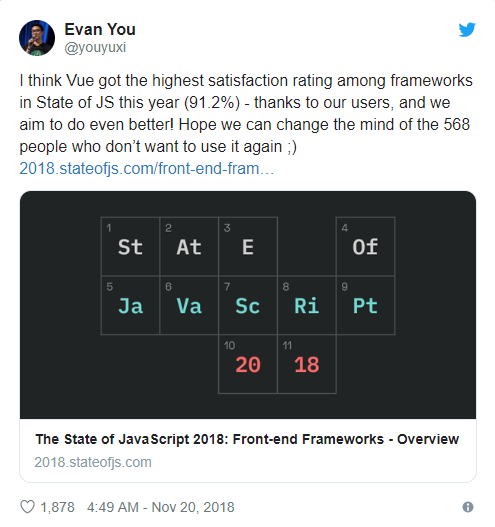
In fact, according to The State of JavaScript Survey, the number of JavaScript developers who have used Vue and would love to use it again has grown considerably from 19.6% in 2017 to 28.8% in 2018.

On top of that, Vue.js is also the number one JavaScript framework with the highest satisfaction rating among developers worldwide.

Reasons-Why-Vue-js-Is-Getting-More-Traction-Every-Month-2019-07-29-15-07-53

In addition to this, there are many other reasons why Vue.js is growing. In this blog, we’ve mentioned the,

Top 7 reasons why Vue.js is the trendiest JavaScript frontend framework:

Reason #1 – Flexible & Modular Development Environment

Vue.js uses components in web development. And component-based architecture is highly recommended for the goal of future scaling. Components provide lots of adaptability and flexibility to meet the project’s requirements.

Vue’s components are loosely coupled, which drastically decreases the development time, while improving the code reusability.
When building a large-scale application, however, Vue requires using a modularized build system But, Vue.js also provides sufficient flexibility by giving the ability to transform the source code into preprocessors through the Webpack & Browserfy bundlers recommended by Vue.

Reason #2 – Versatility & Huge Ecosystem

Vue has a huge collection of tools and libraries that facilitate web development. Among these tools and libraries, the most notable ones are vue-routing for routing and mapping and Vuex for state management.

In addition to the above, Vue also has its own Development Tools that come as browser extensions.

These development tools basically simplify the app debugging process by allowing you to live-edit your web application, time-travel debug back to previous working versions, and track custom events.

Reason #3 – High Performance

Though Vue is not the fastest JavaScript frontend framework, but it is considerably fast.

In mobile apps, for example, Vue launches an application faster than React and Angular both. Vue’s speed is an important factor to consider while choosing a frontend framework since 53% of worldwide users abandon a website if it takes more than 3 seconds to load.

Reason #4 – Vibrant Community

Vue’s community is booming and frontend developers from all around the world are constantly contributing to the further development of the Vue.js framework.

In fact, Vue’s popularity has reached a point where several huge conferences take place around the globe, which are solely focused on Vue.

Here are some of the upcoming Vue.js conferences that have already been organized.

Apart from huge conferences, there are also Vue Meetups organized on a regular basis in multiple countries. But if you’re around near any of these conferences, they’re definitely worth attending.

Reason #5 – Easier Learning Curve

One of the reasons behind Vue’s popularity is its easy learning curve that has been a blessing for all beginners and expert developers.

In fact, according to State of Vue.js 2019 report, the majority of developers admitted that the easy learning curve of Vue is what got them interested to test the framework in their applications.

If you’re a beginner, for example, you can just refer the materials given in Vue’s official guide and easily create a simple Vue.js Application, without needing the basic knowledge of build systems, JSX, ES2015, or even TypeScript.

To build a basic Vue.js app, all you need is a basic understanding of HTML, CSS, and JavaScript.

Reason #6 – HTML Templates

Vue.js provides HTML-based templates that greatly improve the developers’ productivity, especially for those with an HTML experience.

Apart from this, Vue’s HTML templates can also help in launching reactivity features in existing web applications.

Furthermore, the HTML templates compiled by the Vue.js will have the virtual DOM render functionality, which during the state change, will provide only a minimum number of manipulations to the DOM.

Reason #7 – Popular & Preferred By Industry Giants

Thanks to all the advantages mentioned above, Vue has not just gained popularity among developers worldwide, but also the industry giants.

Some of these companies using Vue.js include:

  • Facebook
  • Netflix
  • Adobe
  • Alibaba
  • Grammarly
  • GitLab
  • Behance

While we’re talking about Vue’s adoption, it’s also worth mentioning that while it’s easier to find React and Angular.js developers, but Vue’s learning curve is so easy that your existing team of developers can easily get familiar with the framework.

Hence, you would not require hiring Vue Developers separately, which will save you thousands of dollars in cost.

Conclusion

While Vue.js may not be the most popular JavaScript frontend framework yet, but it is definitely worth considering in your next project.

Although, if you’re developing a large-scale application and investing thousands of dollars, the reliance on a professional web development services company is recommended.