Pimcore Development Services: Scope, Process, Cost Factors, and What Enterprises Should Expect

Enterprise data ecosystems are becoming more complex. Product information is often stored in ERP systems, spreadsheets, supplier files, eCommerce platforms, internal databases, and disconnected legacy applications.

Digital assets may sit in separate folders or DAM systems. Marketing, product, sales, and operations teams often work with different versions of the same data.

This creates a major challenge for enterprises. When product data is fragmented, businesses struggle to launch products faster, maintain data accuracy, deliver consistent customer experiences, and scale digital commerce operations.

These challenges become even more serious for industries such as retail, CPG, manufacturing, automotive, and distribution, where product information is large, technical, and constantly changing. Pimcore helps enterprises address these challenges by bringing product information management, master data management, digital asset management, digital experience management, and commerce capabilities into a unified platform.

However, successful Pimcore implementation requires more than deploying the platform. Enterprises need the right data model, system architecture, integrations, workflows, customizations, governance, migration strategy, and long-term support.

That is where Pimcore development services become important. In this blog, we will explain what Pimcore development services include, why enterprises need them, how the development process works, what factors influence cost, and how to choose the right Pimcore development partner.

What Are Pimcore Development Services?

Pimcore development services include the consulting, configuration, customization, integration, migration, deployment, and support required to build enterprise-grade solutions on the Pimcore platform. These services help businesses implement Pimcore to align with their specific data structures, business workflows, user roles, integration needs, and digital experience goals.

For example, one enterprise may use Pimcore as a centralized PIM solution to manage product data across channels. Another may use it as an MDM platform to manage customer, supplier, product, and location data.

A retail brand may use Pimcore to manage product catalogs, digital assets, and omnichannel commerce experiences. Pimcore development services usually include:

  • Pimcore consulting and requirement analysis
  • Solution architecture and roadmap creation
  • PIM and MDM implementation
  • DAM setup and asset management
  • Custom module development
  • Workflow configuration
  • ERP, CRM, eCommerce, and marketplace integrations
  • Data migration from legacy systems
  • API development
  • Testing and deployment
  • Support and optimization

For enterprises, Pimcore development is not only a technology project. It is a business transformation initiative that impacts IT, product, marketing, eCommerce, sales, operations, and data governance teams.

Why Do Enterprises Need Pimcore Development Services?

Enterprises need Pimcore development services when their existing systems cannot support the scale, speed, and complexity of modern data and digital experience operations. Many businesses start exploring Pimcore when they face challenges such as disconnected product data, slow product launches, inconsistent customer experiences, and complex system integrations.

Here are some common reasons enterprises invest in Pimcore development services.

1. To Centralize Product and Master Data

In many organizations, product and master data are scattered across multiple systems. Product details may exist in ERP systems, supplier files, spreadsheets, eCommerce platforms, and internal databases.

This leads to duplication, inconsistent information, and poor visibility. Pimcore development services help enterprises create a centralized data foundation where product, customer, supplier, asset, and other business-critical data can be managed, enriched, validated, and distributed across systems and channels.

2. To Improve Data Quality

Poor data quality directly impacts customer experience, operational efficiency, and revenue. Incorrect product specifications, missing images, duplicate SKUs, incomplete descriptions, and inconsistent attributes can delay launches and reduce customer trust.

With Pimcore, businesses can define data models, validation rules, approval workflows, and governance processes. A development partner helps configure these capabilities based on enterprise requirements.

3. To Accelerate Product Launches

Launching products across websites, marketplaces, catalogs, dealer portals, and sales channels becomes difficult when data is scattered. Teams spend hours collecting product information, resizing images, checking specifications, updating descriptions, and manually uploading data to multiple platforms.

Pimcore helps centralize and automate these processes. With the right development approach, enterprises can reduce manual work, improve collaboration, and launch products faster.

4. To Deliver Consistent Omnichannel Experiences

Customers expect accurate and consistent product information across every touchpoint. Whether they interact with a website, mobile app, marketplace, printed catalog, dealer portal, or sales team, the product content should remain consistent.

Pimcore helps businesses manage product data, digital assets, content, and commerce experiences from a unified environment. This allows enterprises to deliver consistent and personalized experiences across channels.

5. To Integrate Pimcore with Enterprise Systems

Pimcore rarely works in isolation. For enterprise use cases, it often needs to connect with ERP, CRM, eCommerce platforms, marketplaces, data warehouses, analytics tools, supplier systems, and internal applications.

A Pimcore development partner helps design and build these integrations so data can move smoothly across the enterprise ecosystem.
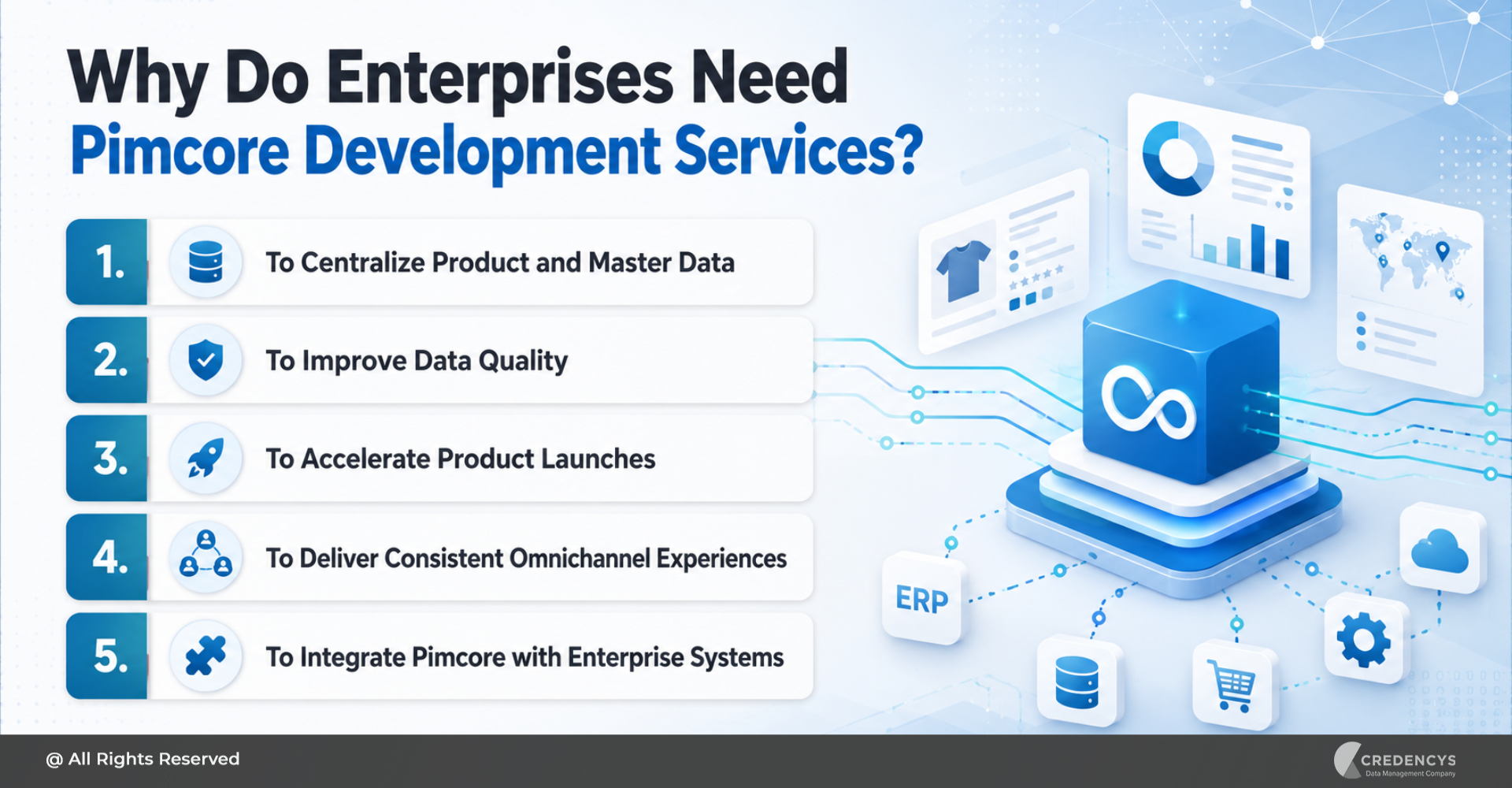
Why Do Enterprises Need Pimcore Development Services
What is Included in Pimcore Development Services?

The exact scope of Pimcore development services depends on the business requirement, industry, existing systems, and long-term digital strategy. However, most enterprise Pimcore projects include the following services.

1. Pimcore Consulting and Requirement Discovery

Every successful Pimcore project starts with discovery. At this stage, the development partner understands the enterprise’s current data landscape, business objectives, system architecture, user roles, and operational challenges.

This includes:

  • Understanding business goals
  • Reviewing existing systems
  • Mapping data sources
  • Identifying integration requirements
  • Studying current workflows
  • Defining user roles and access needs
  • Prioritizing key use cases

For example, a retail enterprise may want to reduce product onboarding time. A manufacturing company may need to manage complex product specifications.

An automotive company may want to structure fitment data and spare parts information. The discovery phase ensures that Pimcore development is aligned with real business outcomes.

2. Solution Architecture and Roadmap Creation

Once the requirements are clear, the next step is to define the solution architecture. This defines how Pimcore will fit into the broader enterprise technology ecosystem.

It includes:

  • Data model design
  • System architecture
  • Integration architecture
  • Hosting environment planning
  • User access and permissions
  • Workflow design
  • Security requirements
  • Performance expectations
  • Implementation phases

For enterprise projects, this stage is critical. Poor architecture can lead to performance issues, data duplication, integration challenges, and scalability limitations.

A strong architecture ensures Pimcore can support current needs while remaining flexible for future growth.

3. PIM and MDM Development

PIM and MDM are among the most common Pimcore use cases. PIM development focuses on managing product-related data, including SKUs, descriptions, specifications, categories, images, variants, pricing information, and product relationships.

MDM development focuses on managing core business data, including product, customer, supplier, vendor, dealer, location, and asset data. This may include:

  • Product data modeling
  • Attribute creation
  • Category hierarchy setup
  • Data validation rules
  • Product relationship mapping
  • Data enrichment workflows
  • Approval workflows
  • Role-based access setup

For enterprises, this creates a trusted foundation for accurate and scalable data management.

4. Digital Asset Management Implementation

Digital assets are essential for product experience and brand communication. Product images, videos, documents, brochures, manuals, certifications, packaging files, and marketing assets need to be properly organized and connected with relevant product records.

Pimcore development services can include DAM implementation for centralized asset management. This includes:

  • Asset folder structure
  • Metadata configuration
  • Asset tagging
  • Asset-to-product linking
  • Version management
  • Asset approval workflows
  • Channel-specific asset distribution

For industries such as retail, CPG, manufacturing, and automotive, DAM implementation is especially useful because product content often includes images, technical documents, videos, compliance files, and marketing materials.

5. Custom Pimcore Development

Every enterprise has unique processes. Standard platform capabilities may not always support complex approval workflows, supplier collaboration, dealer operations, internal dashboards, or industry-specific data structures.

Custom Pimcore development helps extend the platform based on business needs. This may include:

  • Custom dashboards
  • Custom modules
  • Supplier portals
  • Dealer portals
  • Product onboarding workflows
  • Approval processes
  • Business rule automation
  • API-based data exchange
  • Custom reports

The goal is not to over-customize Pimcore. The goal is to customize it to create measurable business value.

A good development partner will always balance native Pimcore capabilities with custom development.

6. Pimcore Integration Services

Enterprise Pimcore implementations often require multiple integrations. Pimcore may need to exchange data with:

  • ERP systems
  • CRM platforms
  • eCommerce platforms
  • Marketplaces
  • Data warehouses
  • BI and analytics tools
  • Supplier portals
  • Payment and shipping systems
  • Third-party APIs

Integration is one of the most important parts of Pimcore development. If integrations are not planned properly, teams may continue working with incomplete or outdated data.

A strong integration strategy ensures Pimcore becomes a connected part of the enterprise ecosystem.

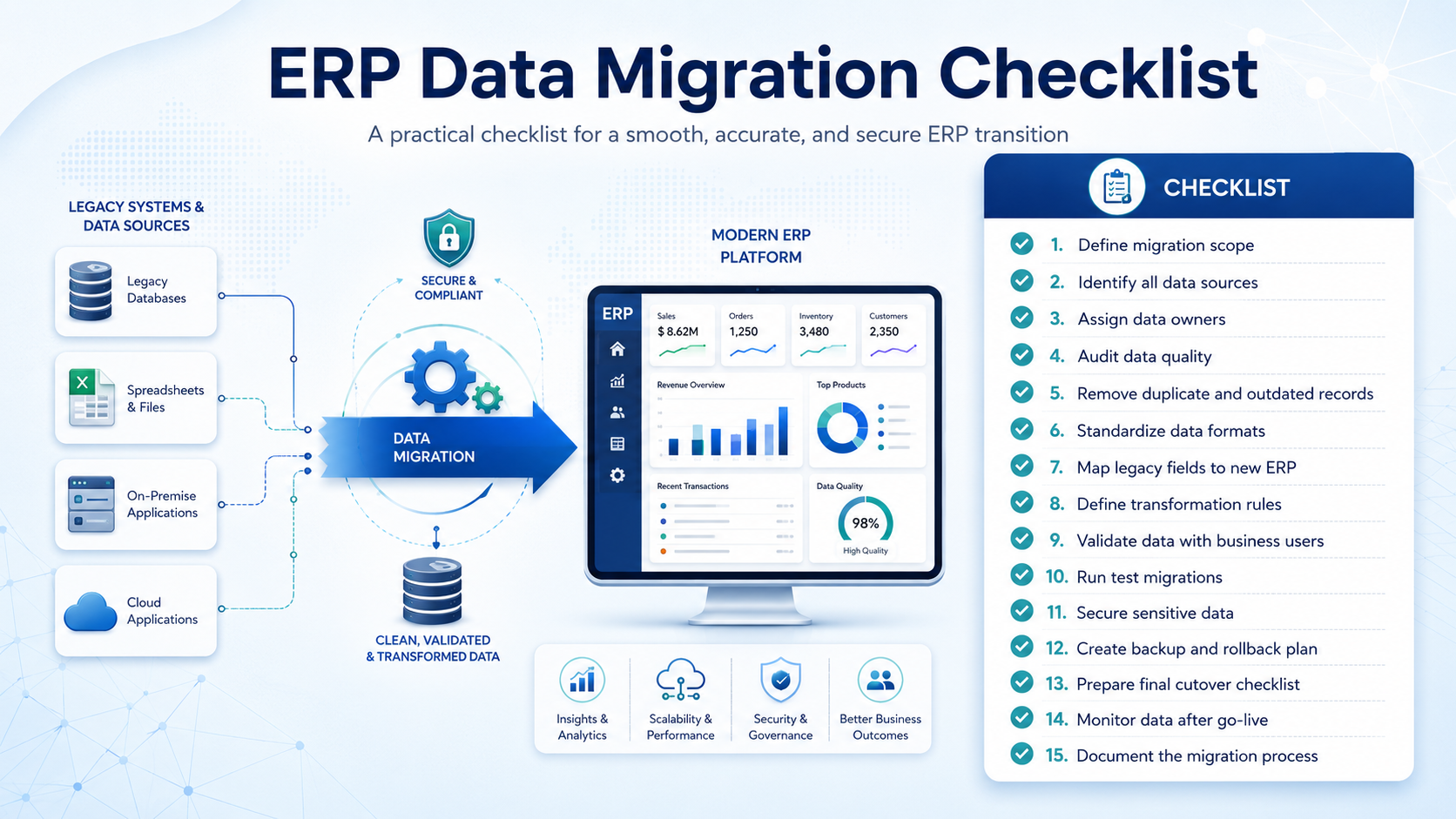
7. Data Migration Services

Most enterprises already have large volumes of data before implementing Pimcore. This data may exist in legacy PIM systems, ERP platforms, spreadsheets, databases, DAM tools, or custom applications.

Data migration services help move this data into Pimcore accurately and securely. This includes:

  • Data audit
  • Data cleansing
  • Duplicate removal
  • Attribute mapping
  • Data transformation
  • Import script development
  • Migration testing
  • Validation checks

Data migration is not only about moving data from one system to another. It is also an opportunity to improve data quality, remove outdated records, standardize attributes, and build a cleaner data foundation.

Pimcore Development Process: Step-by-Step Approach

A structured development process reduces risk and improves implementation success. Here is a typical Pimcore development process for enterprise projects.

Step 1: Discovery and Requirement Analysis

The process begins with understanding the business problem, current systems, data sources, user workflows, and integration needs. The goal is to define what Pimcore should solve and how success will be measured.

Step 2: Solution Architecture

The development partner designs the Pimcore solution, including data models, workflows, integrations, hosting, user roles, access controls, and implementation phases. This step ensures that Pimcore is scalable, secure, and aligned with long-term business goals.

Step 3: Configuration and Custom Development

Once the architecture is approved, the Pimcore environment is configured. Data objects, classes, attributes, category structures, permissions, and workflows are created.

Custom modules, dashboards, APIs, and integrations are also developed based on business requirements.

Step 4: Data Migration

Existing data is cleaned, mapped, transformed, and migrated into Pimcore. The migrated data is validated to ensure accuracy, completeness, and consistency.

Step 5: Testing and User Acceptance

The solution is tested across workflows, integrations, data quality rules, permissions, and performance requirements. Business users are also involved in user acceptance testing to confirm that the platform supports real-world operations.

Step 6: Deployment and Support

After testing, the solution is deployed to the production environment. The go-live phase includes final checks, deployment support, issue monitoring, user enablement, and post-launch optimization.
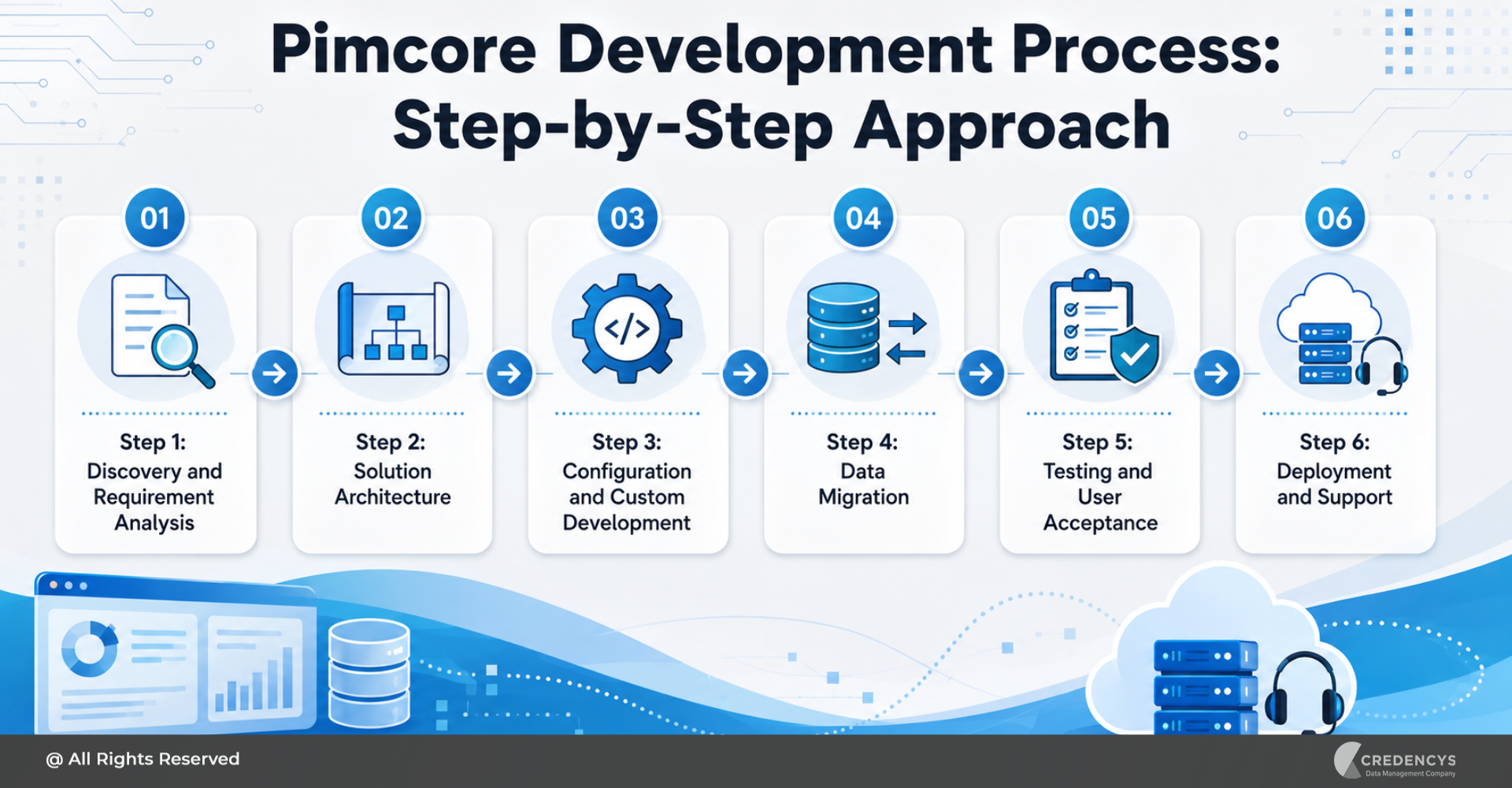
Pimcore Development Process Step-by-Step Approach

Key Factors That Affect Pimcore Development Cost

Pimcore development costs vary depending on the project’s scope, complexity, and enterprise requirements. There is no fixed cost because every implementation is different.

However, the major cost factors include:

1. Scope of Implementation

A basic PIM setup will cost less than a full-scale implementation covering PIM, MDM, DAM, DXP, commerce, custom workflows, and multiple integrations.

2. Data Model Complexity

Enterprises with complex product hierarchies, relationships, attributes, variants, and business rules require more detailed data modeling. This increases configuration and development effort.

3. Number of Integrations

Integrations with ERP, CRM, eCommerce, marketplaces, supplier systems, and analytics platforms can significantly influence cost. The effort depends on API availability, data flow complexity, security requirements, and the number of systems involved.

4. Data Migration Volume and Quality

Large volumes of messy, duplicate, or incomplete data require more effort to cleanse, map, transform, and validate. Clean data reduces migration cost and implementation risk.

5. Custom Development Requirements

Custom modules, portals, dashboards, reports, workflows, and business rules add to the development effort. However, these customizations may be necessary for enterprise-specific needs.

6. Support and Maintenance Scope

Ongoing support, upgrades, performance optimization, and integration monitoring should be considered as part of the long-term investment.

What Enterprises Should Prepare Before Starting Pimcore Development

Before starting a Pimcore development project, enterprises should prepare internally. This helps reduce delays, avoid scope confusion, and improve implementation success.

Start by defining clear business goals. For example, do you want to improve product data accuracy, reduce product launch time, centralize digital assets, improve omnichannel consistency, or replace a legacy PIM system?

Next, audit your existing data sources. Identify where product data, digital assets, customer data, supplier data, and catalog information currently live.

Enterprises should also identify key stakeholders from IT, product, marketing, eCommerce, operations, and data governance teams. Pimcore implementation affects multiple departments, so early involvement is important.

It is also useful to prioritize use cases. Instead of implementing everything at once, start with high-impact areas such as product data centralization, DAM, or eCommerce integration.

Finally, define governance and ownership. Decide who owns product data, digital assets, approvals, quality checks, workflows, and system administration.

Without clear ownership, data quality issues may continue even after implementation.

Common Pimcore Development Challenges and How to Avoid Them

Enterprise Pimcore projects can face challenges if not properly planned. Here are some common issues:

ChallengeHow to Avoid It
Unclear requirementsConduct detailed discovery workshops before development
Poor data qualityCleanse, standardize, and validate data before migration
Over-customizationUse native Pimcore capabilities wherever possible
Integration complexityDesign integration architecture early
Low user adoptionInvolve business users throughout the project
Performance issuesPlan hosting, scalability, caching, and testing carefully
Governance gapsDefine roles, permissions, workflows, and data ownership
Scope creepPrioritize use cases and follow a phased roadmap

The right Pimcore development partner can help enterprises identify these risks early and build a practical implementation roadmap.

How to Choose the Right Pimcore Development Partner

Choosing the right Pimcore development partner is one of the most important decisions in the implementation journey. The partner should not only understand Pimcore development but also enterprise data architecture, integrations, governance, and industry-specific workflows.

Here are the key factors to evaluate:

1. Pimcore Expertise

Look for a partner with strong Pimcore implementation and development experience. The team should understand Pimcore’s capabilities across PIM, MDM, DAM, DXP, commerce, workflow, and integration.

2. Enterprise Implementation Experience

Enterprise implementations are more complex than small business projects. The partner should have experience with large data volumes, complex workflows, multiple integrations, user permissions, and phased deployments.

3. Data Management Knowledge

Since Pimcore is often used for PIM and MDM use cases, the partner should understand data governance, data modeling, data quality, migration, and master data strategy.

4. Integration Capabilities

Pimcore often needs to connect with ERP, CRM, eCommerce, marketplaces, analytics, and internal systems. Choose a partner that can design scalable, secure, and maintainable integrations.

5. Industry Understanding

A retail Pimcore implementation is different from a manufacturing or automotive implementation. The partner should understand your industry’s product data complexity, channel requirements, and operational workflows.

6. Long-Term Support

Pimcore is a long-term enterprise platform. Choose a partner that can support your organization after go-live with maintenance, upgrades, enhancements, and continuous optimization.

Why Choose Credencys for Pimcore Development Services?

Credencys helps enterprises design, develop, implement, integrate, and optimize Pimcore solutions based on their business needs. As a Pimcore Strategic Partner, Credencys brings strong experience in product information management, master data management, digital asset management, digital experience management, and commerce solutions.

Credencys supports enterprises across the complete Pimcore development lifecycle, including:

  • Pimcore consulting
  • Solution architecture
  • PIM and MDM implementation
  • DAM implementation
  • Custom Pimcore development
  • System integrations
  • Data migration
  • Testing and deployment
  • Ongoing support and optimization

For enterprises in retail, CPG, manufacturing, automotive, distribution, and eCommerce, Credencys helps build scalable Pimcore solutions that improve data visibility, operational efficiency, and the delivery of digital experiences.

Conclusion

Pimcore development services help enterprises transform Pimcore into a scalable, integrated, and business-ready platform. From product data management and master data governance to digital asset management, integrations, custom workflows, and omnichannel experiences, Pimcore can support a wide range of enterprise use cases.

However, successful implementation depends on the right strategy. Enterprises need a clear roadmap, a well-designed data model, a strong integration architecture, a clean migration process, a governance framework, and ongoing support.

That is why choosing the right Pimcore development partner is critical. With the right partner, businesses can use Pimcore not just as a technology platform but as a foundation for better data management, faster product launches, consistent customer experiences, and long-term digital growth.

FAQs

1. What are Pimcore development services?

Pimcore development services include consulting, configuration, customization, integration, migration, testing, deployment, and support required to build enterprise solutions on Pimcore.

2. What is included in Pimcore development services?

Pimcore development services typically include requirement analysis, solution architecture, PIM and MDM setup, DAM implementation, custom development, integrations, data migration, testing, deployment, and ongoing support.

3. Why do enterprises need Pimcore development services?

Enterprises need Pimcore development services to centralize product and master data, improve data quality, automate workflows, integrate business systems, manage digital assets, and deliver consistent omnichannel experiences.

4. How much does Pimcore development cost?

Pimcore development cost depends on project scope, data complexity, number of integrations, migration volume, custom development needs, workflow complexity, hosting requirements, and support scope

5. Which industries benefit from Pimcore development services?

Industries such as retail, CPG, manufacturing, automotive, distribution, and eCommerce benefit from Pimcore development services because they manage large volumes of product data, digital assets, and channel-specific content.

6. How do I choose the right Pimcore development company?

Choose a Pimcore development company with platform expertise, enterprise implementation experience, strong integration capabilities, data management knowledge, industry understanding, and post-go-live support.
How to Choose the Right Pimcore Development Company for Enterprise Digital Transformation

Enterprise digital transformation is no longer limited to launching a new website, modernizing an eCommerce platform, or moving business systems to the cloud. For product-driven businesses, transformation starts with data.

As product catalogs grow, customer touchpoints expand, and sales channels become more complex, businesses need a reliable way to manage product information, digital assets, master data, workflows, and customer experiences from one centralized ecosystem. This is where Pimcore becomes a powerful platform for enterprises that want to bring structure, consistency, and scalability to their digital operations.

However, the success of a Pimcore project depends heavily on the expertise of the implementation and development partner. Pimcore is flexible, modular, and highly customizable, but that flexibility also requires the right strategy, architecture, data modeling, integrations, and governance.

Choosing the right Pimcore development company can help enterprises build a strong foundation for product information management, digital asset management, master data management, digital commerce, and omnichannel experience delivery. The right partner does not simply develop features. It helps businesses solve data challenges, streamline workflows, integrate systems, improve product data quality, and create a scalable digital ecosystem.

In this blog, we will explore how to choose the right Pimcore development company for enterprise digital transformation, what factors to evaluate, which red flags to avoid, and why Credencys is a trusted Pimcore development partner for businesses looking to unlock the full potential of Pimcore.

Why Choosing the Right Pimcore Development Company Matters

Pimcore gives enterprises the flexibility to manage product data, digital assets, master data, customer data, content, commerce, and omnichannel delivery from a unified platform. But to achieve real business value, the platform must be implemented and customized around the organization’s specific data structure, business processes, technology stack, and growth goals.

This is where the role of a reliable Pimcore development company becomes critical.

A basic development vendor may only focus on configuration or coding. But an experienced Pimcore development partner looks at the bigger picture. It understands how product data moves across the enterprise, how teams enrich and approve information, how digital assets are linked to product records, how ERP and eCommerce platforms exchange data, and how content needs to be delivered across websites, marketplaces, apps, print catalogs, and partner portals.

For growing enterprises, Pimcore development is not just a technical project. It is a data transformation initiative.
The wrong partner can lead to poorly designed data models, unnecessary customization, weak governance, integration issues, delayed timelines, and low user adoption. These issues can reduce the value of Pimcore and make it difficult for teams to manage product data efficiently.

On the other hand, the right Pimcore development company helps businesses:

  • Build a scalable product data architecture
  • Create clean and flexible data models
  • Improve product data quality and completeness
  • Connect PIM, DAM, MDM, ERP, CRM, eCommerce, and marketplace systems
  • Automate product enrichment and approval workflows
  • Reduce manual data handling
  • Improve omnichannel consistency
  • Support future growth across brands, regions, and channels

For enterprise digital transformation, the right Pimcore partner brings together technical development, data management expertise, integration capabilities, and industry understanding. This combination ensures that Pimcore is not just deployed as another system, but established as a central platform for scalable, governed, and connected digital operations.

Key Factors to Consider When Choosing a Pimcore Development Company

Choosing the right Pimcore development company requires more than checking technical skills or comparing project costs. Enterprises need a partner that understands Pimcore’s flexibility, product data complexity, integration requirements, governance models, and long-term business scalability.

Here are the most important factors to evaluate before making a decision.

1. Proven Pimcore Expertise

The first thing to look for is hands-on Pimcore experience. A reliable Pimcore development company should have practical knowledge of Pimcore’s core capabilities, including PIM, DAM, MDM, DXP, Commerce, data syndication, portals, workflows, and integrations.

Enterprises should evaluate whether the company has delivered Pimcore projects for businesses with complex data structures, multiple channels, large product catalogs, and enterprise-grade integration needs. Experience matters because Pimcore projects often require more than standard development. They need strong data modeling, process understanding, and platform customization.

2. Certified Pimcore Developers and Consultants

Pimcore-certified developers and consultants bring platform-specific knowledge that helps reduce implementation risks. They understand Pimcore architecture, development standards, data modeling capabilities, customization options, APIs, workflows, and integration patterns.

A company with certified Pimcore experts is better equipped to design scalable solutions, avoid unnecessary customization, follow best practices, and ensure that the platform remains flexible for future business needs.

3. Strong Product Data Management Experience

Pimcore development is deeply connected to product data management. The right partner should understand how product information is created, enriched, validated, approved, and distributed across channels.

Look for a company that can help with product hierarchies, categories, attributes, variants, relationships, classifications, localization, supplier data, digital assets, and channel-specific content. This expertise is critical for building a Pimcore solution that supports real business workflows instead of just storing data.

4. Enterprise Integration Capabilities

Most enterprise Pimcore projects require integrations with multiple systems such as ERP, CRM, eCommerce platforms, DAM systems, marketplaces, supplier portals, analytics tools, and data warehouses.

A strong Pimcore development company should be able to define a clear integration strategy, manage API development, enable data synchronization, support bidirectional data exchange, and ensure that information flows smoothly across the enterprise technology ecosystem.

Without strong integration planning, businesses may continue to face data silos even after implementing Pimcore.

5. Data Migration and Data Quality Approach

Data migration is one of the most critical parts of any Pimcore project. The right development company should not simply move old data into Pimcore. It should assess, clean, normalize, deduplicate, map, and validate the data before migration.

A strong partner will also help businesses define data quality rules, completeness checks, validation workflows, and governance standards to ensure that Pimcore becomes a trusted source of product information.

6. Custom Development Capabilities

Every enterprise has different processes, approval flows, data structures, and channel requirements. A Pimcore development company should be able to customize the platform without making it unnecessarily complex.

This may include custom modules, dashboards, user interfaces, product portals, supplier portals, marketplace connectors, workflow automation, APIs, and business-specific extensions.

The goal is not to customize everything. The goal is to customize only where it creates business value and supports long-term scalability.

7. Industry-Specific Understanding

Product data challenges differ across industries. A retailer may need faster catalog onboarding and marketplace syndication. A manufacturer may need technical specifications, spare parts data, and documentation management. A CPG brand may need packaging data, compliance details, and retailer-specific product content.

The right Pimcore development partner should understand the industry context and design the solution around business-specific product data requirements.

8. Scalable Architecture and Future Readiness

Enterprise digital transformation is not a one-time project. Businesses continue to add new products, brands, regions, languages, channels, suppliers, and customer experiences.

A reliable Pimcore development company should design the platform with future scalability in mind. This includes flexible data models, reusable components, integration-ready architecture, performance planning, governance frameworks, and room for future AI, automation, analytics, and omnichannel expansion.

9. Agile Delivery and Transparent Communication

Pimcore projects involve multiple stakeholders, including IT, product teams, marketing, eCommerce, operations, data teams, and leadership. Clear communication is essential.

Look for a partner that follows a structured delivery approach with discovery workshops, sprint planning, milestones, documentation, testing cycles, demos, stakeholder reviews, and clear reporting. This helps reduce confusion and keeps the project aligned with business expectations.

10. Post-Launch Support and Optimization

A successful Pimcore project does not end at go-live. After launch, businesses may need support for performance optimization, workflow improvements, integration monitoring, user training, upgrades, enhancements, and new channel rollouts.

The right Pimcore development company should offer long-term support and continuous optimization to help the platform evolve with business needs.

Red Flags to Avoid When Hiring a Pimcore Development Company

Not every technology partner that offers Pimcore services has the right mix of platform expertise, data management experience, and enterprise delivery capability. Choosing the wrong Pimcore development company can lead to delays, rework, poor adoption, and a solution that fails to scale. Here are the key red flags to watch for:

1. Limited Pimcore Experience

A company with only general web development or eCommerce experience may not be equipped to handle complex Pimcore requirements such as PIM, DAM, MDM, workflows, integrations, and omnichannel data delivery.

2. Weak Product Data Understanding

Pimcore development requires more than coding. If the company does not ask about your product attributes, variants, categories, taxonomies, localization, enrichment process, and channel needs, it may not understand enterprise product data complexity.

3. No Clear Data Migration Strategy

A weak partner may simply import old data into Pimcore without cleaning duplicates, fixing missing fields, normalizing formats, or validating data quality. This can carry existing problems into the new platform.

4. Poor Integration Planning

Enterprise Pimcore solutions often connect with ERP, CRM, eCommerce, DAM, marketplaces, supplier portals, and analytics tools. Without a clear integration strategy, businesses may continue facing data silos and synchronization issues.

5. Too Much Customization

Pimcore is flexible, but unnecessary customization can make the platform difficult to maintain and upgrade. The right partner should know when to configure, when to customize, and when to keep things simple.

6. Lack of Governance and Workflow Planning

Without clear ownership, approval flows, validation rules, and publishing processes, Pimcore can become another unmanaged data repository instead of a trusted product data platform.

7. No Industry-Specific Context

Retail, CPG, manufacturing, automotive, grocery, and distribution businesses all have different product data needs. A one-size-fits-all approach can miss important business requirements.

8. Weak Documentation and Support

Poor documentation and no post-launch support can make your internal teams dependent on the vendor for every change. A reliable Pimcore partner should provide knowledge transfer, user training, and ongoing optimization support.

9. Price-First Approach

Choosing the lowest-cost vendor may seem practical initially, but weak architecture, poor migration, and incomplete integrations can become expensive to fix later. Focus on long-term value, not just upfront cost.

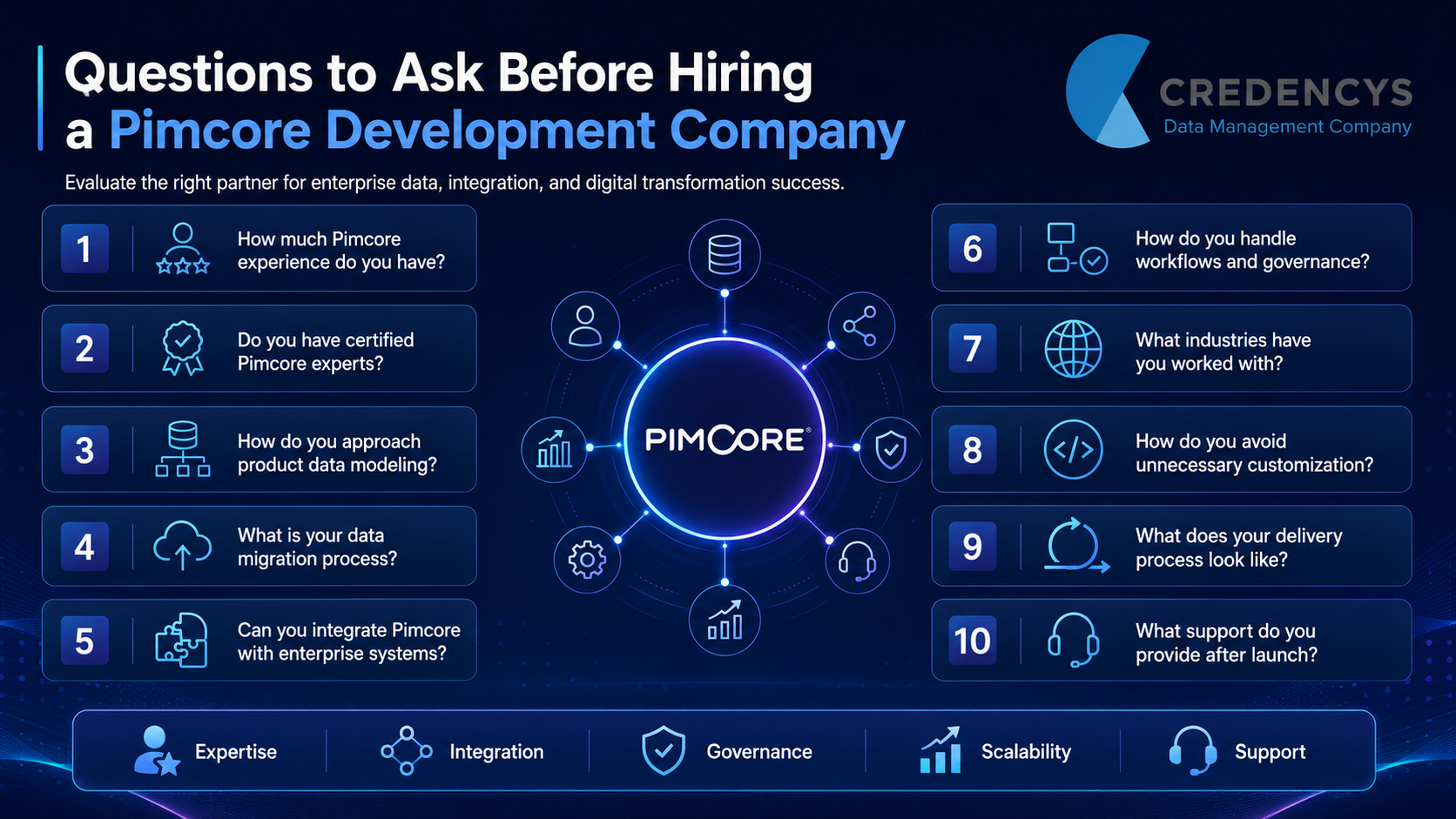
Questions to Ask Before Hiring a Pimcore Development Company

Before finalizing a Pimcore development company, enterprises should ask the right questions to understand the partner’s technical strength, data management maturity, delivery process, and long-term support capability.

Pimcore Development Company

Here are some important questions to include in your evaluation:

1. How much experience do you have with Pimcore projects?

Ask about the number and type of Pimcore projects the company has delivered, especially across PIM, DAM, MDM, Commerce, DXP, and enterprise integrations.

2. Do you have certified Pimcore developers and consultants?

Certified experts bring platform-specific knowledge and can help reduce risks related to architecture, customization, scalability, and best practices.

3. How do you approach product data modeling?

The company should be able to explain how it designs product hierarchies, attributes, variants, classifications, relationships, localization, and channel-specific data structures.

4. What is your data migration process?

Ask how the company handles data audit, cleansing, normalization, mapping, validation, test migration, and final migration.

5. Can you integrate Pimcore with our enterprise systems?

A strong partner should have experience integrating Pimcore with ERP, CRM, eCommerce platforms, DAM, marketplaces, supplier portals, analytics tools, and other business systems.

6. How do you manage workflows and governance?

The company should help define data ownership, user roles, approval flows, validation rules, publishing processes, and governance standards.

7. What industries have you worked with?

Industry experience matters because product data complexity varies across retail, CPG, manufacturing, automotive, grocery, distribution, and other sectors.

8. How do you avoid unnecessary customization?

Ask how the company balances Pimcore’s native capabilities with custom development to keep the platform scalable and maintainable.

9. What does your delivery process look like?

The partner should provide a structured process for discovery, planning, development, testing, demos, documentation, training, and go-live.

10. What support do you provide after launch?

Look for a company that offers post-launch support, performance optimization, upgrades, user assistance, and continuous improvement.

Why Enterprises Choose Credencys as Their Pimcore Development Company

Choosing the right Pimcore development company is easier when the partner has proven platform expertise, enterprise data management experience, and a clear understanding of how digital transformation works across complex business environments.

Credencys is a Pimcore Strategic Partner with a strong focus on helping enterprises build scalable data and experience management solutions. The company brings together Pimcore consultants, solution architects, developers, data specialists, and integration experts to help businesses centralize product data, improve governance, automate workflows, and deliver consistent digital experiences across channels.

As a Pimcore partner, Credencys is recognized for delivering advanced PIM and MDM solutions, along with expertise across PIM, MDM, DAM, DXP, and Commerce for enterprise customers.

Credencys’ Pimcore capabilities are built around the needs of modern enterprises that manage large product catalogs, disconnected systems, complex digital assets, and multiple sales channels. Instead of treating Pimcore as only a development platform, Credencys approaches it as a strategic foundation for product data management, master data management, digital asset management, commerce, and omnichannel delivery.

What Makes Credencys a Reliable Pimcore Development Company?

Pimcore Strategic Partner

Credencys is a Strategic Partner of Pimcore and helps businesses unlock the full potential of Pimcore for data and experience management.

Certified Pimcore Expertise

Credencys has a team of 100+ certified Pimcore developers with experience in implementing Pimcore solutions across different business requirements and industry verticals.

Strong PIM and MDM Experience

Credencys has successfully implemented 200+ PIM/MDM solutions, helping businesses create trusted, governed, and scalable product and master data ecosystems.

End-to-End Pimcore Development Services

From consulting and architecture to development, integration, migration, deployment, and support, Credencys provides full-cycle Pimcore development services for enterprise needs.

Enterprise Integration Capabilities

Credencys helps connect Pimcore with ERP, CRM, eCommerce platforms, DAM systems, marketplaces, analytics tools, and other enterprise applications to reduce data silos and improve operational efficiency.

Industry-Focused Delivery

With experience across retail, manufacturing, distribution, CPG, automotive, grocery, and eCommerce, Credencys understands how product data challenges differ by industry and designs Pimcore solutions accordingly.

Governance, Data Quality, and Workflow Automation

Credencys helps businesses define data ownership, validation rules, approval workflows, completeness checks, and publishing processes so Pimcore becomes a trusted system of record.

Case Study: How Credencys Helped SM Retail Streamline Product Management

Credencys worked with SM Retail, the Philippines’ leading omni-channel retail brand with more than 1,300 outlets nationwide. As the business scaled across physical and digital channels, its existing PIM system struggled with performance issues, delayed pricing updates, and challenges in syndicating accurate product data across channels.

The Challenge

SM Retail faced issues such as inaccurate product data, delayed launches, high operational costs, limited access control, and inconsistent product information across channels.

The Solution

Credencys deployed a custom PIM solution within four months and introduced PIM, DAM, and CMS frameworks for end-to-end product lifecycle management. The team also implemented role-based access, automated pricing updates, and product data validation workflows.

The Business Impact

The solution delivered:

  • 80% reduction in pricing update time
  • 50% improvement in operational efficiency
  • Stronger data governance
  • Improved product data accuracy and security

Read full case study here.

Final Checklist for Selecting the Right Pimcore Development Company

Before choosing a Pimcore development company, make sure the partner can support both your technical requirements and long-term digital transformation goals.

Use this checklist during evaluation:

  • Proven experience in Pimcore development and implementation
  • Certified Pimcore developers and consultants
  • Strong expertise across PIM, DAM, MDM, DXP, and Commerce
  • Clear understanding of enterprise product data management
  • Ability to design scalable data models and workflows
  • Experience with ERP, CRM, eCommerce, DAM, and marketplace integrations
  • Structured data migration and data quality approach
  • Industry experience relevant to your business
  • Capability to build custom modules, portals, dashboards, and APIs
  • Strong governance, documentation, and training process
  • Transparent delivery methodology with clear milestones
  • Reliable post-launch support and optimization

Final Thoughts

Choosing the right Pimcore development company is a critical decision for enterprises planning digital transformation. Pimcore gives businesses the flexibility to centralize product data, manage digital assets, improve data governance, automate workflows, and deliver consistent experiences across every channel.

But the success of the platform depends on how well it is designed, developed, integrated, and adopted.

A reliable Pimcore development partner should bring more than technical skills. It should understand enterprise data challenges, product information complexity, business workflows, system integrations, and long-term scalability.

For businesses looking to transform disconnected product data into a unified digital ecosystem, Credencys brings the right combination of Pimcore expertise, certified professionals, enterprise implementation experience, and industry-focused delivery.

With the right partner, Pimcore can become more than a platform. It can become the foundation for scalable product data management, faster digital operations, and stronger omnichannel customer experiences.

FAQs – Pimcore Development Company

1. What is a Pimcore Development Company?

A Pimcore development company helps businesses design, develop, customize, integrate, and optimize Pimcore solutions for PIM, DAM, MDM, DXP/CMS, Commerce, workflow automation, and omnichannel data delivery.

2. How do I choose the right Pimcore Development Company?

Choose a Pimcore development company by evaluating its Pimcore experience, certified developers, product data expertise, integration capabilities, data migration process, governance approach, industry knowledge, and post-launch support.

3. Why is Credencys a trusted Pimcore Development Company?

Credencys is a trusted Pimcore development company because it is a Pimcore Strategic Partner with certified Pimcore experts, strong PIM and MDM implementation experience, and proven expertise in enterprise data management, integrations, workflows, and omnichannel delivery.

4. What questions should I ask before hiring a Pimcore Development Company?

Ask about the company’s Pimcore project experience, certified experts, product data modeling approach, data migration process, enterprise integration capabilities, workflow governance strategy, delivery methodology, and post-launch support.

5. How can a Pimcore Development Company support enterprise digital transformation?

A Pimcore development company supports digital transformation by centralizing product data, improving data quality, connecting digital assets, automating workflows, integrating enterprise systems, and enabling consistent digital experiences across channels.

Data Migration Risks: Common Challenges and How to Mitigate Them

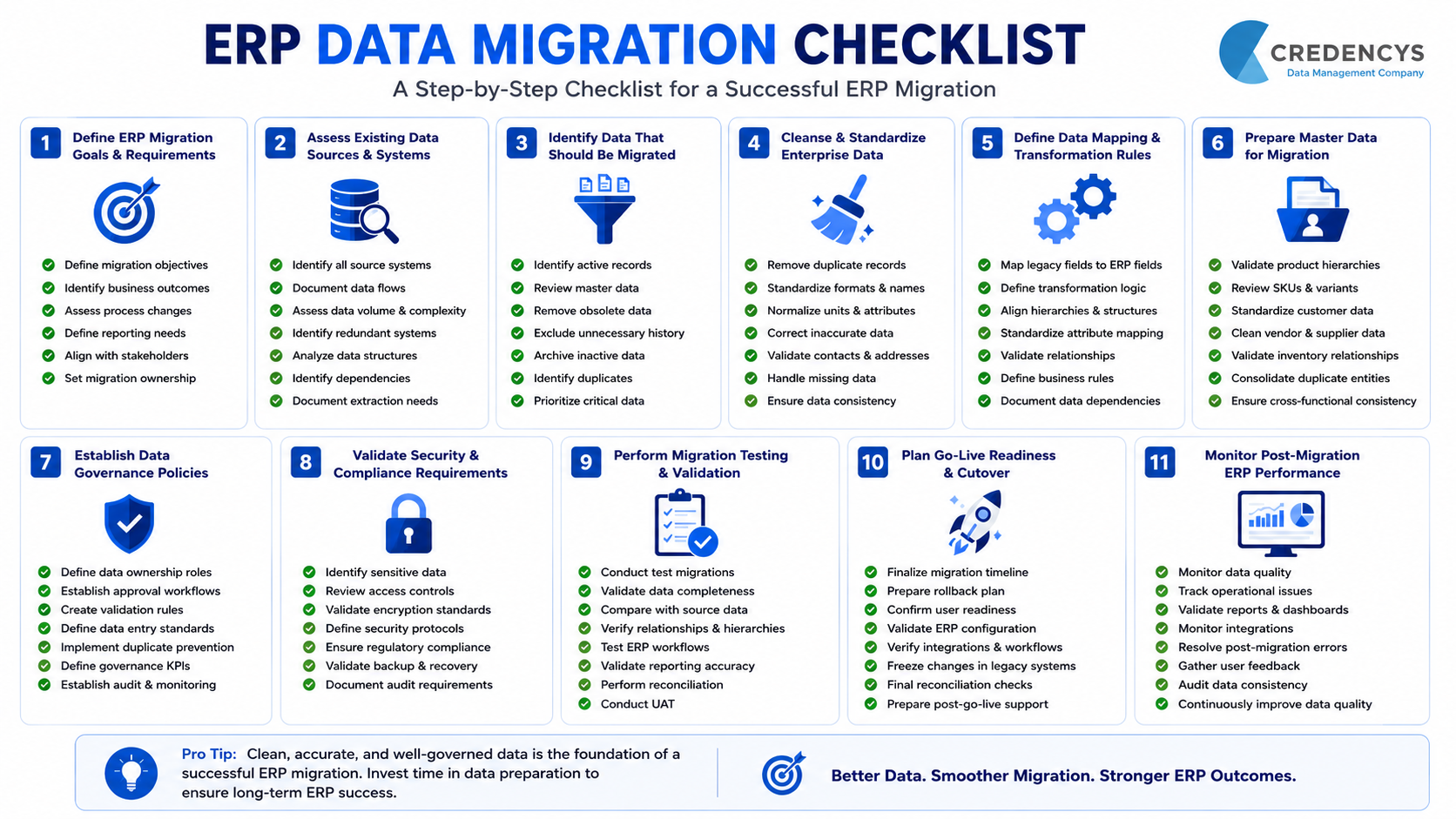
Data migration is a critical step in digital transformation, cloud modernization, ERP migration, data warehouse migration, and application modernization. It helps enterprises move from outdated systems to modern, scalable, and high-performing platforms.

But data migration is not just about transferring data from one place to another. When not planned properly, it can lead to data loss, data corruption, downtime, security gaps, compliance issues, reporting errors, and business disruption.

These risks can affect operations, customer experience, decision-making, and the overall success of modernization initiatives. That is why enterprises need a structured, secure, and validation-first approach to data migration.

In this blog, we will discuss the most common data migration risks, their business impact, and practical ways to mitigate them.

What Are Data Migration Risks?

Data migration risks are the potential issues that can occur when data is moved from one system, platform, application, database, or storage environment to another. These risks can affect the accuracy, completeness, security, accessibility, and usability of business data.

Data migration risks often arise during:

For example, an enterprise migrating customer data from a legacy CRM to a modern Customer Data Platform may face risks such as duplicate records, missing fields, mapping errors, privacy issues, and broken integrations. Similarly, a company migrating from an on-premise data warehouse to a cloud platform may face downtime, performance issues, security concerns, and data validation challenges.

The goal of data migration is not only to move data successfully. The goal is to ensure that the migrated data remains accurate, complete, secure, accessible, and ready for business use.

Why Data Migration Risks Matter for Enterprises

Data is the foundation of enterprise operations, analytics, automation, customer experience, and decision-making. When data migration goes wrong, the impact is not limited to IT teams. It can affect multiple business functions, including sales, marketing, finance, supply chain, operations, customer service, and leadership reporting.

For example:

  • Inaccurate customer data can affect personalization and customer engagement.
  • Missing product data can disrupt eCommerce and marketplace operations.
  • Incorrect financial data can create reporting and compliance issues.
  • Downtime during migration can interrupt business operations.
  • Security gaps can expose sensitive enterprise or customer information.
  • Poor data quality can reduce the value of analytics, AI, and automation initiatives.

For enterprises, data migration risk is not just a technical concern. It is a business continuity, compliance, and growth concern.

That is why every migration initiative should begin with proper planning, data assessment, risk identification, stakeholder alignment, and a clear mitigation strategy.

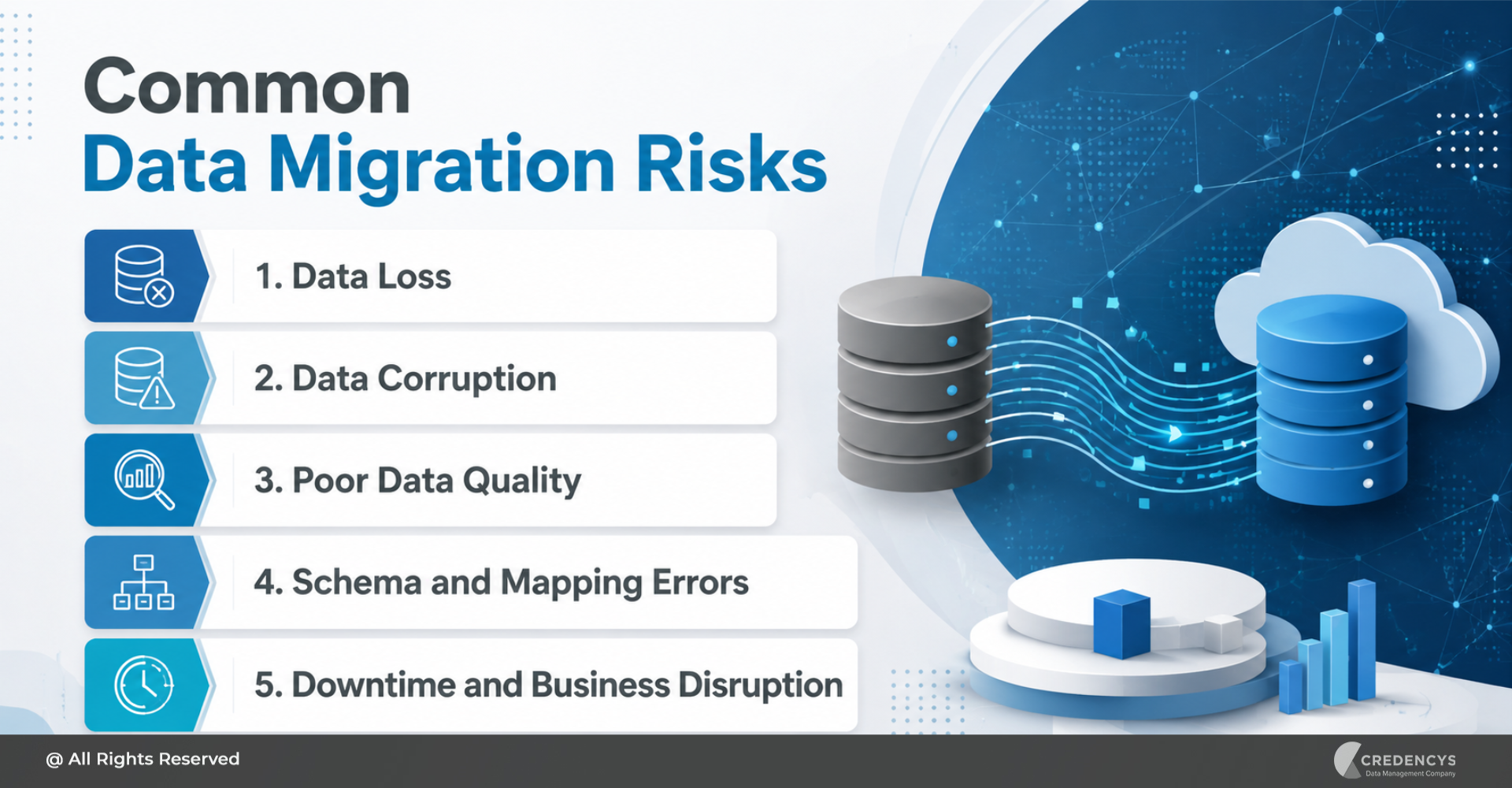
5 Common Data Migration Risks and How to Mitigate Them

Below are the most common data migration risks enterprises should identify and address before starting a migration project.

1. Data Loss

Data loss is one of the most serious risks in any migration project. It occurs when records, files, fields, or historical information are omitted, deleted, overwritten, or transferred incompletely during migration.

Why It Happens

Data loss can happen due to:

  • Incomplete data extraction
  • Poor backup planning
  • Incorrect migration scripts
  • Failed transfer processes
  • Missing source systems
  • Lack of reconciliation
  • Human error during migration

Business Impact

Data loss can lead to:

  • Missing customer, product, financial, or operational records
  • Reporting gaps
  • Compliance issues
  • Poor decision-making
  • Loss of business continuity
  • Reduced user trust in the new system

For example, if customer transaction history is lost during migration, sales and marketing teams may lose visibility into customer behavior, purchase patterns, and engagement history.

How to Mitigate Data Loss

To reduce the risk of data loss:

  • Create complete backups before migration.
  • Identify all source systems and datasets.
  • Define what data needs to be migrated, archived, or excluded.
  • Use automated validation and reconciliation checks.
  • Run pilot migrations before final cutover.
  • Compare source and target data after migration.
  • Keep a rollback plan ready.

A strong backup and validation strategy ensures that no critical business data is lost during migration.

2. Data Corruption

Data corruption occurs when data is changed, damaged, or altered incorrectly during migration. Even if the data is transferred, it may become unusable or unreliable if its structure, format, or values are corrupted.

Why It Happens

  • Data corruption can happen due to:
  • Incorrect transformation rules
  • Data type mismatches
  • Encoding issues
  • Faulty migration tools
  • Incomplete field mapping
  • Broken relationships between datasets
  • Manual errors during data handling

Business Impact

Corrupted data can result in:

  • Incorrect reports and dashboards
  • Broken business workflows
  • Failed system processes
  • Inaccurate customer or product records
  • Poor analytics output
  • Loss of confidence in the new system

For example, if date formats are converted incorrectly during migration, financial reports, customer records, and order histories may show inaccurate information.

How to Mitigate Data Corruption

To prevent data corruption:

  • Validate source data before migration.
  • Test transformation logic thoroughly.
  • Use field-level mapping and validation.
  • Perform checksum or hash-based verification.
  • Compare sample records before and after migration.
  • Run multiple test migrations before the production migration.
  • Involve business users in validation.

Data corruption can be difficult to detect after go-live, so validation should happen at every stage of the migration process.

3. Poor Data Quality

Migrating poor-quality data into a new system is one of the most common mistakes enterprises make. If legacy data contains duplicates, incomplete records, outdated values, or inconsistent formats, migration will only move those problems into the new environment.

Why It Happens

Poor data quality usually exists because of:

  • Duplicate records
  • Missing mandatory fields
  • Inconsistent naming conventions
  • Outdated customer or product information
  • Manual data entry errors
  • Lack of data governance
  • Siloed systems with different data standards

Business Impact

Poor data quality can affect:

  • Reporting accuracy
  • Customer experience
  • Marketing personalization
  • Inventory planning
  • Forecasting
  • Automation workflows
  • AI and analytics initiatives

For example, if duplicate customer records are migrated into a new CRM or Customer 360 platform, teams may struggle to create a unified view of each customer.

How to Mitigate Poor Data Quality

To improve data quality before migration:

  • Conduct data profiling.
  • Identify duplicates, gaps, and inconsistencies.
  • Cleanse and standardize records.
  • Define data quality rules.
  • Validate mandatory fields.
  • Remove outdated or irrelevant records.
  • Establish data governance ownership.

Data migration should not be treated as a simple lift-and-shift activity. It should be used as an opportunity to clean, standardize, and improve enterprise data.

4. Schema and Mapping Errors

Schema and mapping errors occur when data fields in the source system are not correctly aligned with those in the target system. This is especially common when migrating between platforms that use different data structures, naming conventions, formats, or business rules.

Why It Happens

Mapping errors can occur due to:

  • Different source and target data models
  • Missing field-level documentation
  • Incorrect data type conversion
  • Complex business rules
  • Incomplete stakeholder input
  • Lack of testing
  • Poor understanding of relationships between datasets

Business Impact

Schema and mapping errors can lead to:

  • Data landing in the wrong fields
  • Missing relationships between records
  • Broken workflows
  • Incorrect calculations
  • Failed reporting
  • Application errors

For example, if customer address fields are mapped incorrectly, shipping, billing, and service operations may be affected.

How to Mitigate Schema and Mapping Errors

To reduce mapping risks:

  • Create a detailed source-to-target mapping document.
  • Define field names, data types, formats, and transformation rules.
  • Validate mappings with business users.
  • Test complex relationships and dependencies.
  • Document all exceptions and special cases.
  • Review mapping logic before production migration.

Accurate mapping is essential to ensure that data works correctly in the target system.

5. Downtime and Business Disruption

Downtime is a major concern during enterprise data migration. Some migrations require systems to be temporarily unavailable while data is extracted, moved, validated, and activated in the new environment.

Why It Happens

Downtime can happen due to:

  • Large data volumes
  • Complex system dependencies
  • Poor cutover planning
  • Slow migration tools
  • Unplanned errors
  • Integration failures
  • Lack of rollback strategy

Business Impact

Downtime can result in:

  • Interrupted business operations
  • Delayed order processing
  • Poor customer experience
  • Lost revenue
  • Reduced employee productivity
  • Increased pressure on IT and support teams

For example, downtime during ERP migration can affect procurement, inventory, finance, manufacturing, and supply chain operations.

How to Mitigate Downtime

To minimize downtime:

  • Plan migration during low-impact business hours.
  • Use phased or incremental migration.
  • Define a clear cutover strategy.
  • Communicate downtime windows in advance.
  • Test migration timelines before go-live.
  • Prepare rollback and contingency plans.
  • Monitor systems closely during migration.

Enterprises should aim for minimal disruption, especially when migrating mission-critical systems.

Common Data Migration Risks

How to Reduce Data Migration Risks: A Step-by-Step Framework

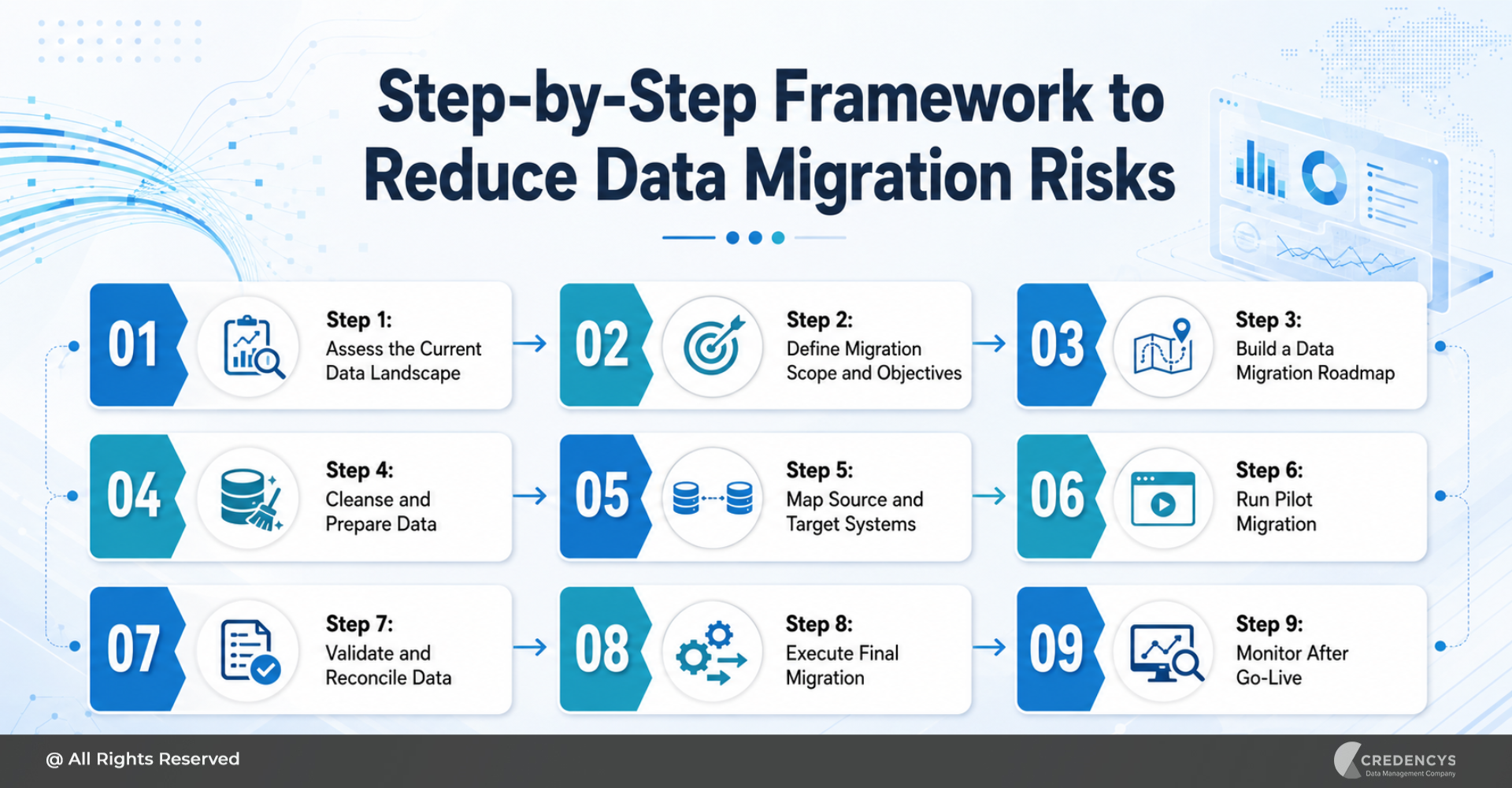
Reducing data migration risks requires a structured approach. Enterprises need to assess their existing data landscape, define migration goals, prepare data, validate migration logic, and monitor results after go-live.

Here is a practical framework to minimize data migration risks.

Step 1: Assess the Current Data Landscape

Before migration begins, enterprises need to understand what data exists, where it resides, who owns it, and how it is used. This includes:

  • Identifying all source systems
  • Reviewing data volume and complexity
  • Understanding business-critical datasets
  • Mapping dependencies
  • Identifying data quality issues
  • Reviewing security and compliance requirements

A clear assessment helps teams avoid surprises during migration.

Step 2: Define Migration Scope and Objectives

Not every dataset needs to be migrated. Some data may need to be archived, cleaned, transformed, or excluded.

Define:

  • What data will be migrated
  • What data will be archived
  • What data will be cleansed
  • What data will be transformed
  • What systems will be involved
  • What success metrics will be used

Clear scope reduces confusion, cost overruns, and project delays.

Step 3: Build a Data Migration Roadmap

A migration roadmap defines how the migration will be executed from planning to post-go-live support. It should include:

  • Project timeline
  • Migration phases
  • Roles and responsibilities
  • Data mapping approach
  • Testing plan
  • Security controls
  • Cutover strategy
  • Rollback plan
  • Post-migration support plan

A roadmap ensures that all stakeholders are aligned before execution begins.

Step 4: Cleanse and Prepare Data

Data cleansing is one of the most important steps in reducing migration risk. Before migration, enterprises should:

  • Remove duplicate records
  • Fix incomplete fields
  • Standardize formats
  • Validate business rules
  • Remove outdated records
  • Resolve inconsistencies
  • Define data quality standards

Clean data improves migration accuracy and increases the value of the new system.

Step 5: Map Source and Target Systems

Source-to-target mapping ensures that data moves correctly from the old system to the new one. This includes:

  • Mapping fields
  • Defining data types
  • Documenting transformation rules
  • Validating relationships
  • Identifying exceptions
  • Reviewing mapping logic with business users

Proper mapping reduces the risk of data corruption, reporting errors, and broken workflows.

Step 6: Run Pilot Migration

A pilot migration allows teams to test the migration process using a smaller dataset before moving all data. This helps identify:

  • Data quality issues
  • Mapping errors
  • Performance bottlenecks
  • Security gaps
  • Integration problems
  • Validation challenges

A pilot migration reduces risk before full-scale execution.

Step 7: Validate and Reconcile Data

Validation confirms that migrated data is accurate, complete, and usable. Teams should validate:

  • Record counts
  • Field values
  • Data formats
  • Relationships
  • Reports
  • Dashboards
  • Business workflows
  • User access

Reconciliation helps compare source and target systems to ensure data integrity.

Step 8: Execute Final Migration

Once testing and validation are complete, the final migration can be executed. During this phase:

  • Follow the approved migration plan.
  • Monitor migration progress.
  • Track errors and exceptions.
  • Communicate status to stakeholders.
  • Use rollback plans if required.
  • Validate critical datasets immediately after migration.

Execution should be controlled, monitored, and aligned with business priorities.

Step 9: Monitor After Go-Live

After the migration, enterprises should continue to monitor the new environment. This includes:

  • Data quality monitoring
  • Integration monitoring
  • System performance tracking
  • Report validation
  • User feedback collection
  • Issue resolution
  • Governance review

Post-migration monitoring helps ensure long-term stability and business value.

Step-by-Step Framework to Reduce Data Migration Risks

How Credencys Helps Minimize Data Migration Risks

At Credencys, we help enterprises plan and execute secure, scalable, and disruption-free data migration across legacy systems, cloud platforms, ERP systems, data warehouses, and modern data platforms. Our data migration approach focuses on reducing risks at every stage of the migration lifecycle.

We help enterprises with:

  • Data discovery and assessment
  • Migration strategy and roadmap creation
  • Data cleansing and standardization
  • Source-to-target mapping
  • Data transformation and validation
  • Secure data migration
  • Integration testing
  • Data reconciliation
  • Rollback planning
  • Post-migration monitoring and support

Whether you are migrating from legacy systems to the cloud, modernizing your ERP, moving workloads to Snowflake or Databricks, or consolidating enterprise data platforms, Credencys helps ensure that your migration is secure, accurate, and aligned with business goals.

Our experts follow a structured and validation-first approach to reduce data migration risks, minimize downtime, and accelerate time to value.

Conclusion

Data migration is a critical step in enterprise modernization, but it comes with several risks. Data loss, corruption, poor data quality, downtime, security gaps, integration failures, and inadequate testing can undermine business continuity and diminish the value of the migration.

The good news is that these risks can be reduced with proper planning, data assessment, cleansing, mapping, testing, validation, and post-migration monitoring. A successful data migration is not just about moving data.

It is about moving the right data, in the right format, with the right controls, and ensuring it supports business operations after go-live. Enterprises that take a structured and risk-aware approach can improve migration success, reduce disruption, and build a stronger foundation for analytics, automation, AI, and digital transformation.

FAQs

1. What are data migration risks?

Data migration risks are issues that can arise during the movement of data from one system to another, such as data loss, corruption, downtime, security gaps, and compliance failures.

2. What is the biggest risk in data migration?

The biggest risk is data loss or corruption because it directly affects business continuity, reporting accuracy, compliance, and user trust.

3. How can data migration risks be reduced?

Data migration risks can be reduced through proper planning, data profiling, cleansing, source-to-target mapping, testing, backup, validation, and post-migration monitoring.

4. Why do data migration projects fail?

Data migration projects often fail due to poor planning, unclear scope, poor data quality, lack of testing, inadequate stakeholder involvement, and weak governance.

5. What is a data migration risk assessment?

A data migration risk assessment identifies potential issues before migration, including data quality gaps, security risks, compliance concerns, integration dependencies, and the impact of downtime.

Pimcore Implementation: A Complete Guide to Building a Scalable Product Data Management Platform

Product data is no longer just backend information stored inside ERP systems, spreadsheets, or internal databases. It directly influences how customers discover products, compare options, make purchase decisions, and trust a brand across digital and offline channels.

But as businesses grow, product data becomes increasingly complex. Product attributes sit in ERP systems. Images and videos are stored in DAM folders. Pricing and inventory live in commerce platforms. Marketing descriptions are managed in spreadsheets. Regional teams create their own versions of product content. Suppliers send data in different formats. Marketplaces demand different product feeds.

This is where Pimcore implementation becomes a strategic business initiative.

Pimcore helps businesses centralize product information, master data, digital assets, customer information, and experience management capabilities within one flexible platform. Pimcore positions itself as a Data & Experience Management platform covering PIM, MDM, DAM, CDP, DXP/CMS, Commerce, Product & Digital Asset Experience Portals, and Data Syndication & Delivery.

For companies dealing with growing product catalogs, multiple channels, disconnected systems, and inconsistent product experiences, Pimcore implementation creates the foundation for scalable, governed, and omnichannel-ready product dadta management.

Building a Centralized Product Data Ecosystem with Pimcore

Pimcore implementation is the process of planning, configuring, customizing, integrating, migrating, and deploying Pimcore to manage enterprise product data and related digital experiences from a centralized platform.

A successful implementation does not simply install a PIM system. It creates a connected product data ecosystem where product information, digital assets, workflows, business rules, user roles, integrations, and channel-specific content work together.

Depending on the business requirement, Pimcore can be implemented for:

  • Product Information Management
  • Master Data Management
  • Digital Asset Management
  • Product Experience Management
  • eCommerce data management
  • Marketplace and channel syndication
  • Product and digital asset portals
  • Digital experience management
  • Data quality and governance
  • Workflow automation

Pimcore’s PIM page describes its product information management capability around consolidating and optimizing marketing, sales, and technical product information to support integration, efficiency, and actionable insights.

In practical terms, a Pimcore implementation helps answer questions like:

  • Where should product data be mastered?
  • How should product attributes, variants, categories, and relationships be structured?
  • Which systems will send data to Pimcore?
  • Which channels will receive data from Pimcore?
  • What approval workflows are needed before publishing?
  • How will product images, videos, manuals, and documents be linked to product records?
  • How will data quality, completeness, and consistency be measured?
  • How will business users enrich product data without depending on IT for every change?

The goal is to create a scalable product data foundation that supports the business today and can evolve as new products, markets, brands, channels, and customer experiences are added.

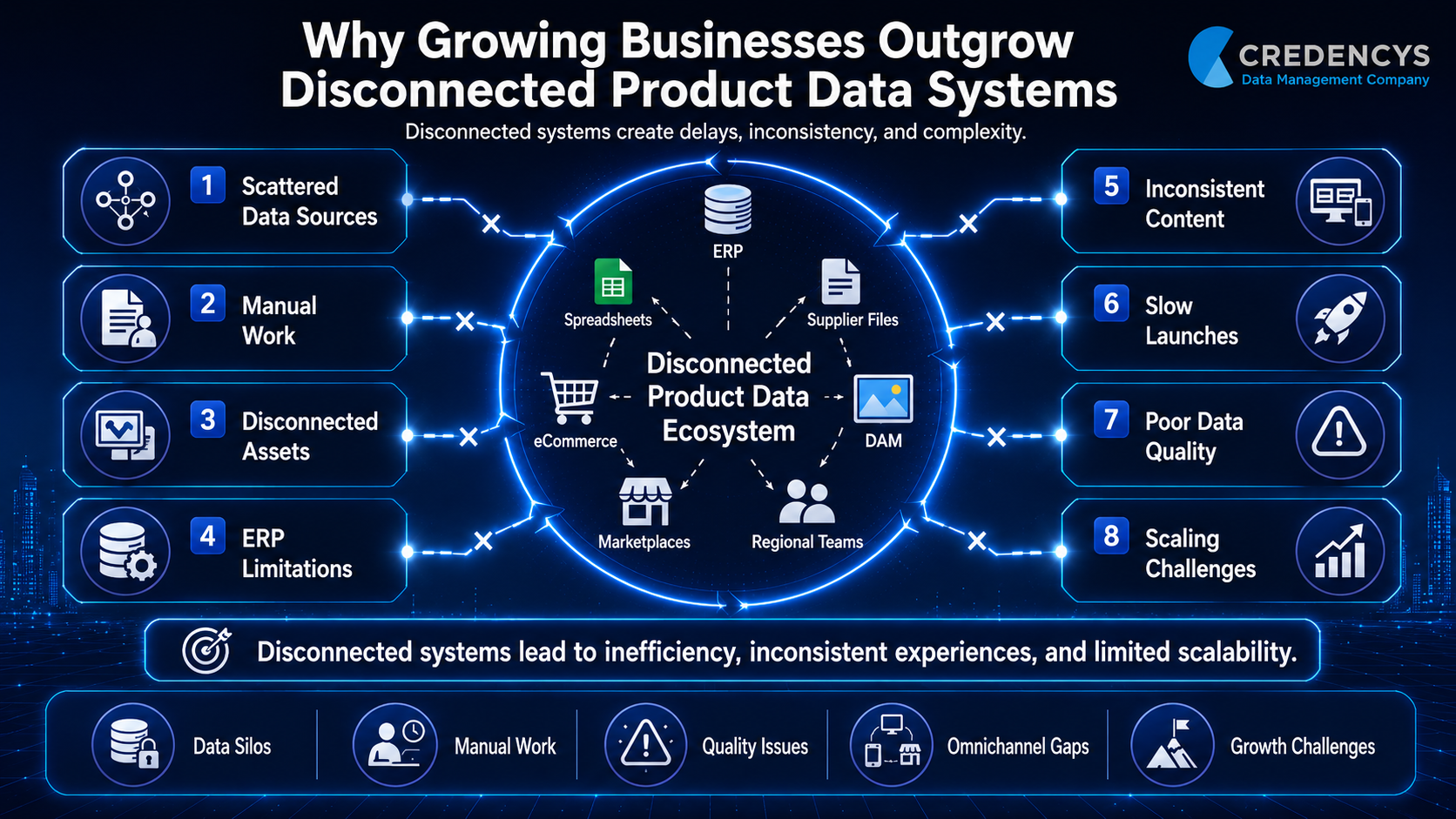
Why Growing Businesses Outgrow Disconnected Product Data Systems

Many businesses start with a simple setup. Product data may be managed in ERP, Excel sheets, shared drives, eCommerce platforms, supplier files, and internal databases. This works when the product catalog is small and the number of channels is limited.

Pimcore Implementation

But as the business scales, disconnected product data starts creating operational and customer experience problems.

Product teams struggle to maintain consistent attributes. Marketing teams rewrite descriptions manually. eCommerce teams wait for updated product images. Sales teams use outdated product sheets. Regional teams modify content independently. IT teams spend time fixing repetitive data issues. Customers see incomplete or inconsistent product information across different touchpoints.

Over time, this results in:

  • Slow product launches
  • Inconsistent product content across channels
  • Duplicate and incomplete product records
  • Manual enrichment and approval delays
  • Poor digital asset management
  • Higher chances of product content errors
  • Reduced customer trust
  • Difficulty expanding into new marketplaces
  • Limited visibility into product data quality

ERP systems are excellent for managing transactions such as inventory, pricing, procurement, orders, and finance. However, they are not designed to manage rich product experiences across websites, marketplaces, catalogs, mobile apps, print, distributor portals, and sales channels.

A dedicated Pimcore implementation helps bridge this gap by creating a single source of truth for product information and enabling governed distribution across multiple channels.

Pimcore highlights that PIM can improve time-to-market, data quality, and omnichannel delivery by centralizing product information, enforcing rules and validations, automating approvals, and supporting faster channel connections.

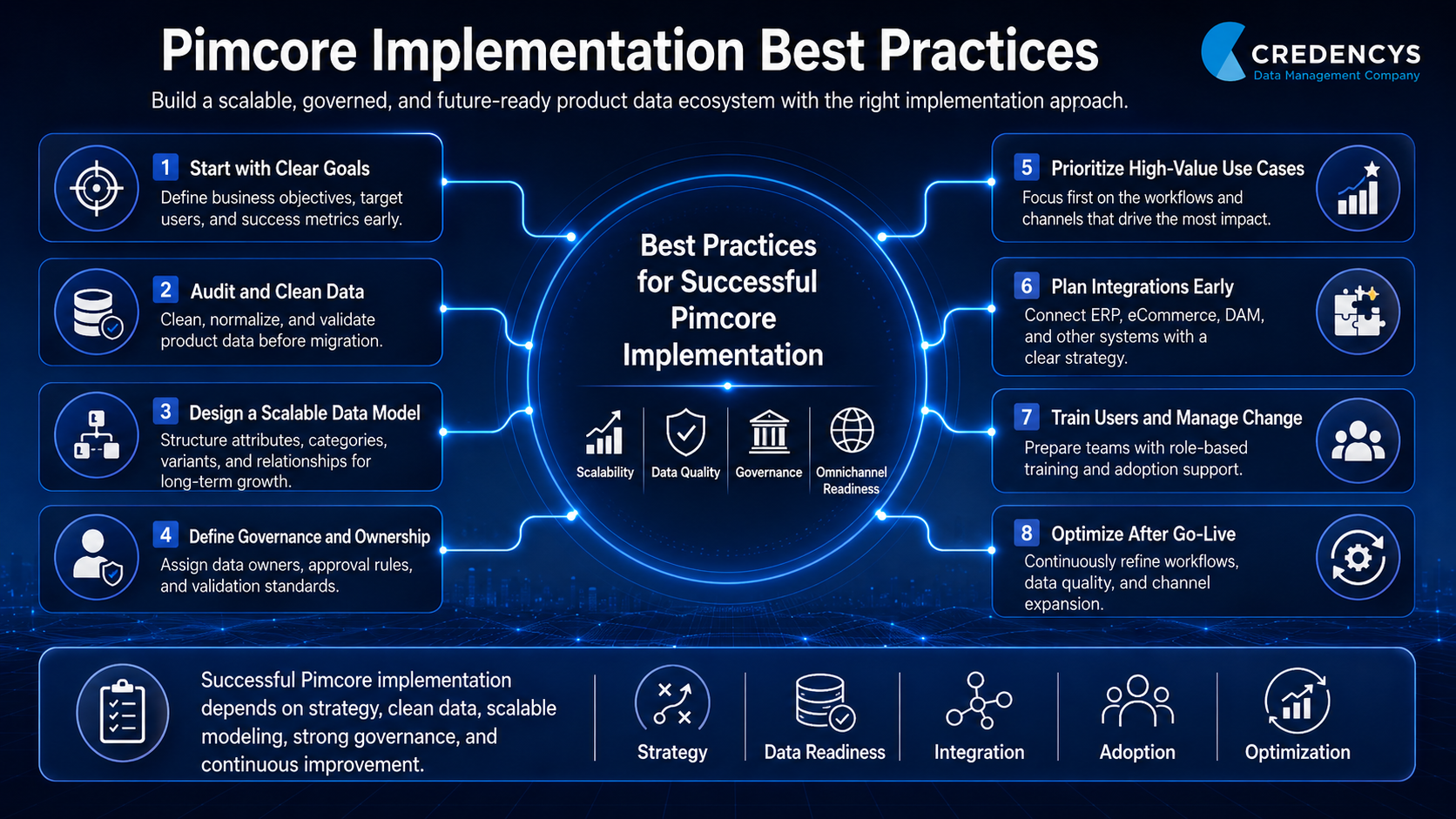
Key Goals of a Successful Pimcore Implementation

A Pimcore implementation should be planned around business outcomes, not just technical deployment. The goal is to create a product data management platform that improves speed, quality, consistency, and scalability.

1. Create a Single Source of Truth

The first goal is to centralize product data in one trusted system. This includes product names, descriptions, specifications, technical attributes, categories, variants, relationships, pricing-related information, compliance data, and channel-specific content.

When Pimcore becomes the central product data hub, teams no longer need to depend on multiple spreadsheets, disconnected tools, or duplicate records.

2. Improve Product Data Quality

Data quality is one of the most important success factors in any PIM implementation. Pimcore supports data quality management through validations, mandatory fields, completeness checks, dashboards, workflows, and automated enforcement.

This helps teams identify missing values, incorrect attributes, duplicate records, incomplete descriptions, and content gaps before product information is published.

3. Connect Product Data with Digital Assets

Product experience is not limited to text and attributes. It also includes product images, videos, manuals, certificates, installation guides, safety documents, lifestyle images, packaging files, and other digital assets.

With Pimcore, product data and digital assets can be connected in one ecosystem, helping teams deliver richer and more consistent product experiences.

4. Automate Workflows and Approvals

A scalable Pimcore implementation defines clear workflows for data creation, enrichment, review, approval, translation, compliance validation, and publishing.

Pimcore includes workflow and business process management capabilities that help centralize and streamline data and experience management, including automation and integration with tools such as Teams and Slack.

5. Enable Omnichannel Publishing

Modern businesses need to distribute product data across websites, eCommerce platforms, marketplaces, mobile apps, print catalogs, distributor portals, and internal systems.

Pimcore supports data distribution across channels and systems using flexible integration options and automated workflows.

6. Build a Scalable Product Data Foundation

A well-planned implementation prepares the business for future growth. New brands, SKUs, regions, suppliers, channels, languages, and data requirements can be added without rebuilding the entire system.

Step-by-Step Pimcore Implementation Process

Every Pimcore implementation should follow a structured approach. The exact process may vary depending on the business model, industry, product complexity, and existing technology stack, but the following steps form the foundation of a successful implementation.

1. Business Requirement Discovery

The implementation starts with understanding the business goals. This includes identifying why the organization needs Pimcore, what problems it wants to solve, and which outcomes matter most.

Key areas to assess include:

  • Current product data challenges
  • Product catalog size and complexity
  • Existing systems and data sources
  • User roles and team responsibilities
  • Current workflows and approval processes
  • Channel and marketplace requirements
  • Localization and regional content needs
  • Compliance and governance requirements
  • Reporting and data quality expectations

This stage ensures the implementation is aligned with business priorities rather than being treated as a purely technical project.

2. Product Data Audit

Before moving data into Pimcore, businesses need to understand the current state of their product data.

A product data audit helps identify:

  • Duplicate product records
  • Missing attributes
  • Inconsistent naming conventions
  • Poor category structures
  • Incomplete product descriptions
  • Unmapped digital assets
  • Incorrect product relationships
  • Outdated supplier data
  • Unstructured spreadsheets
  • Channel-specific data gaps

This step is critical because migrating poor-quality data into a new platform only transfers the same problems into a new system.

3. Data Model Design

The data model is the backbone of Pimcore implementation. It defines how product information will be structured, stored, enriched, and distributed.

A strong Pimcore data model includes:

  • Product hierarchy
  • Categories and subcategories
  • Product families
  • Attributes and attribute groups
  • Variants and configurable products
  • Product relationships
  • Digital asset links
  • Localization fields
  • Channel-specific fields
  • Supplier data structures
  • Compliance and technical specifications

Pimcore supports advanced data modeling with customizable data components, no-code model creation, and the ability to manage complex relationships across structured, unstructured, and binary assets.

This flexibility is especially useful for industries such as retail, CPG, manufacturing, automotive, grocery, and distribution, where product data models can be highly complex.

4. Workflow and Governance Setup

Once the data model is defined, the next step is to establish workflows and governance rules.

This includes defining:

  • Who can create product records
  • Who can edit specific attributes
  • Who approves product content
  • Which fields are mandatory
  • What happens when data is incomplete
  • How translations are reviewed
  • How digital assets are approved
  • How product data moves from draft to published status

Clear governance reduces manual errors and ensures accountability across teams.

5. Pimcore Configuration and Customization

Pimcore needs to be configured based on the organization’s data model, workflows, user roles, integrations, and channel requirements.

Configuration and customization may include:

  • Custom object classes
  • Attribute groups
  • Dashboards
  • User permissions
  • Data validation rules
  • Workflow states
  • Business rules
  • Import and export templates
  • Channel-specific views
  • Custom modules
  • Approval flows

The goal is to make Pimcore fit the way the business manages product data, while also improving processes that are currently manual, fragmented, or inefficient.

6. System Integration

Pimcore rarely works in isolation. It usually connects with several enterprise systems.

Common Pimcore integrations include:

  • ERP systems
  • CRM platforms
  • eCommerce platforms
  • Marketplaces
  • Supplier portals
  • DAM systems
  • Data warehouses
  • BI and analytics tools
  • Translation systems
  • Print catalog tools
  • Internal applications

Pimcore PIM supports integration with ERP and commerce systems using REST APIs, GraphQL APIs, Data Hub, ETL mappings, and webhooks for bidirectional data exchange.

This allows product data to be imported, transformed, enriched, validated, and distributed across channels.

7. Data Migration

Data migration is one of the most important phases of Pimcore implementation.

It includes:

  • Extracting data from source systems
  • Cleaning duplicate and incomplete records
  • Mapping old fields to the new Pimcore data model
  • Normalizing product attributes
  • Connecting digital assets to product records
  • Validating mandatory fields
  • Running test migrations
  • Reviewing sample data with business users
  • Migrating final data into Pimcore

The success of migration depends heavily on data preparation. Businesses should avoid a “lift and shift” approach where old, inconsistent data is moved without proper cleansing and structure.

8. Testing and Quality Validation

Before go-live, the implementation should be tested thoroughly.

Testing should cover:

  • Data accuracy
  • Workflow performance
  • User permissions
  • Product search and filtering
  • Data imports and exports
  • ERP and eCommerce integrations
  • Marketplace feeds
  • Digital asset mapping
  • Publishing rules
  • Performance under expected data volumes

Business users should be involved in testing because they understand real product data scenarios better than technical teams alone.

9. User Training and Change Management

A Pimcore implementation succeeds only when teams know how to use it effectively.

Training should be provided for:

  • Product managers
  • Data stewards
  • Marketing teams
  • eCommerce teams
  • Merchandising teams
  • IT teams
  • Regional teams
  • Supplier management teams

Training should cover day-to-day usage, workflows, data ownership, validation rules, content enrichment, asset management, and publishing processes.

Change management is equally important. Teams need to understand why the organization is moving to Pimcore, how their roles will change, and how the platform will make product data management easier.

10. Go-Live and Continuous Optimization

Once testing and training are complete, the Pimcore implementation can go live.

However, go-live is not the end of the journey. Product data requirements keep evolving as businesses add new products, channels, markets, brands, and customer experiences.

Continuous optimization may include:

  • Adding new workflows
  • Improving data quality rules
  • Expanding integrations
  • Optimizing performance
  • Adding new channels
  • Improving dashboards
  • Enhancing automation
  • Extending Pimcore to support more business units

The most successful Pimcore implementations are treated as long-term product data transformation programs, not one-time software projects.

Common Pimcore Implementation Challenges

Pimcore is a flexible and powerful platform, but implementation success depends on planning, governance, and execution. Businesses should be aware of common challenges before starting.

1. Poorly Defined Data Model

If the data model is not designed properly, teams may struggle with incomplete structures, duplicate fields, rigid taxonomies, or difficult product enrichment workflows.

2. Low-Quality Source Data

Incomplete, duplicate, or inconsistent data can slow down migration and reduce trust in the new system.

3. Lack of Data Governance

Without clear ownership, approval rules, and validation processes, product data issues can continue even after implementing Pimcore.

4. Complex Integrations

ERP, eCommerce, marketplace, and supplier integrations need careful planning. Poor integration design can create synchronization errors, delays, and data inconsistencies.

5. User Adoption Issues

If business users are not trained properly, they may continue using spreadsheets and manual processes outside Pimcore.

6. Over-Customization

Customizing every process too heavily can increase complexity and make future upgrades or changes difficult.

7. No Long-Term Roadmap

A Pimcore implementation should support future growth. Without a roadmap, businesses may solve today’s problems but struggle when they add new channels, products, or regions.

Pimcore Implementation Best Practices

To get maximum value from Pimcore, businesses should follow these best practices.

Pimcore Implementation

1. Start with a Product Data Strategy

Before implementation begins, define what product data means for your business. Identify key use cases, business goals, data owners, channels, and success metrics.

2. Clean Data Before Migration

Do not move messy data into Pimcore. Clean, normalize, deduplicate, and validate data before migration.

3. Design for Scalability

Build a flexible data model that can support future product categories, variants, languages, markets, and channels.

4. Prioritize High-Impact Use Cases

Instead of implementing every feature at once, start with the use cases that deliver the highest business value. For example, centralizing product data, improving data completeness, or automating eCommerce publishing.

5. Define Clear Ownership

Every important data field should have an owner. Clear ownership improves accountability and reduces confusion.

6. Automate Repetitive Processes

Use workflows, validations, and integrations to reduce manual work and improve consistency.

7. Involve Business Users Early

Pimcore is used by business teams, not just IT. Involve product, marketing, eCommerce, merchandising, and regional teams during discovery, testing, and training.

8. Choose the Right Implementation Partner

An experienced Pimcore implementation partner can help avoid common mistakes, accelerate deployment, and design the platform around long-term business goals.

Why Choose Credencys for Pimcore Implementation?

Choosing the right Pimcore implementation partner is critical because the success of your platform depends on data modeling, integration planning, migration quality, workflow design, customization, and long-term scalability.

Credencys is a Strategic Partner of Pimcore and helps brands deploy tailored Pimcore solutions to manage data and digital experiences from a single platform.

Credencys brings deep expertise across:

  • Pimcore consulting
  • Pimcore implementation
  • PIM and MDM implementation
  • DAM and digital asset management
  • Data modeling and governance
  • ERP, CRM, eCommerce, and marketplace integrations
  • Product data migration
  • Workflow automation
  • Data quality management
  • Omnichannel data delivery
  • Support and optimization

Credencys also highlights its team of 120+ certified Pimcore experts and its ability to help businesses unlock efficiency, growth, and digital leadership through Pimcore.

For retail businesses, Credencys offers RetailOne, a Pimcore-powered retail PIM accelerator that includes pre-built data models, stakeholder groups, integration templates, reference architecture, workflows, governance, supplier portal capabilities, AI/ML capabilities, and centralized digital asset management.

With experience across retail, CPG, grocery, automotive, manufacturing, and distribution, Credencys helps enterprises implement Pimcore in a way that supports business-specific product data complexity and future growth.

Final Thoughts

Pimcore implementation is more than a technology project. It is a strategic step toward building a scalable, centralized, and governed product data management platform.

For businesses struggling with scattered product information, disconnected digital assets, inconsistent channel content, manual workflows, and slow product launches, Pimcore provides the foundation to unify data and deliver consistent product experiences across every customer touchpoint.

A successful implementation starts with the right strategy, clean data, scalable data modeling, strong governance, seamless integrations, and user adoption. With the right implementation approach and the right partner, Pimcore can become the backbone of your product data and digital experience ecosystem.

ERP Data Migration Checklist: Steps to Reduce Migration Risk

According to Gartner, poor data quality costs organizations an average of $12.9 million annually through operational inefficiencies, reporting errors, and failed business initiatives.

During ERP migration, these risks become even more critical because inaccurate or incomplete data can disrupt operations, delay go-live timelines, and reduce user adoption.

Many ERP migration projects fail not because of the ERP platform itself, but because businesses migrate years of duplicate, inconsistent, and unstructured enterprise data into the new system without proper preparation.

A structured ERP data migration checklist helps organizations reduce migration risk, improve data quality, accelerate implementation, and build a scalable foundation for long-term ERP success.

In this guide, we’ll walk through a complete ERP data migration checklist covering assessment, cleansing, mapping, validation, governance, testing, and post-migration readiness for modern ERP platforms like Odoo, SAP S/4HANA, Oracle NetSuite, and Microsoft Dynamics 365.

Why ERP Data Migration is More Than Just Moving Data

Many organizations assume ERP data migration is simply about transferring records from one system to another. In reality, successful ERP migration requires businesses to assess, cleanse, standardize, restructure, validate, and govern enterprise data before it enters the new ERP environment.

Without a structured migration approach, businesses often carry forward years of bad data into the new ERP system, creating long-term operational and reporting issues.

Common ERP Data Migration Problems

  • Duplicate customer, vendor, and product records
  • Inconsistent product hierarchies and attributes
  • Missing inventory and transactional data
  • Broken relationships between datasets
  • Poor master data governance
  • Reporting and analytics inaccuracies
  • Failed imports and migration delays
  • Low ERP user adoption after go-live

A well-defined ERP data migration checklist helps enterprises avoid these issues while improving migration accuracy, scalability, and long-term ERP performance.

What is an ERP Data Migration Checklist?

An ERP data migration checklist is a structured framework used to prepare, validate, migrate, and monitor enterprise data during ERP transformation initiatives. It helps organizations ensure that business-critical data such as:

  • Product data
  • Customer records
  • Vendor information
  • Inventory data
  • Financial records
  • Operational master data

Transactional history is properly prepared for migration into modern ERP platforms like SAP S/4HANA, Oracle NetSuite, Microsoft Dynamics 365, and Odoo.

Benefits of Following an ERP Data Migration Checklist

  • Reduced Migration Risk: Structured planning minimizes failed imports, missing records, and operational disruptions.
  • Improved Data Quality: Cleansed and standardized data improves reporting accuracy and ERP usability.
  • Faster ERP Adoption: Users trust the new ERP system when migrated data is accurate and consistent.
  • Better Operational Efficiency: Well-structured enterprise data improves workflows, automation, and decision-making.
  • Long-Term Scalability: Governed and standardized data creates a scalable foundation for future business growth.

The Complete ERP Data Migration Checklist

Successful ERP migration starts long before data is imported into the new system. Organizations must evaluate legacy systems, improve data quality, align business rules, validate dependencies, and prepare governance processes to reduce migration risk. Below is a step-by-step ERP data migration checklist that enterprises can follow to ensure a smooth and scalable ERP transformation.

ERP Data Migration Checklist

1. Define ERP Migration Goals & Business Requirements

Before starting migration activities, organizations must clearly define what they want to achieve from the ERP transformation initiative. This includes identifying operational pain points, scalability goals, reporting requirements, compliance expectations, and future business needs.
Clear migration objectives help align stakeholders, prioritize datasets, and reduce unnecessary migration complexity.

ERP Migration Planning Checklist

  • Define ERP migration objectives and expected business outcomes
  • Identify operational inefficiencies in existing systems
  • Determine which business processes will change after migration
  • Define reporting and analytics requirements
  • Establish ERP scalability and growth expectations
  • Identify compliance and governance requirements
  • Align migration goals with business stakeholders
  • Create a migration ownership structure

2. Assess Existing Data Sources & Legacy Systems

Most enterprises operate with data spread across multiple ERPs, spreadsheets, databases, ecommerce platforms, POS systems, and custom applications. Understanding where data resides is critical before migration begins. A detailed assessment helps identify dependencies, duplicate systems, outdated datasets, and hidden migration risks.

Legacy System Assessment Checklist

  • Identify all source systems involved in migration
  • Document data flows between systems
  • Assess data volume and complexity
  • Identify duplicate and redundant systems
  • Analyze legacy database structures
  • Identify business-critical datasets
  • Review integration dependencies
  • Document data extraction requirements
  • Identify archived and inactive data

3. Identify Data That Should Be Migrated

Not all legacy data should move into the new ERP system. Many organizations unnecessarily migrate outdated, duplicate, incomplete, or unused records, increasing ERP complexity and reducing performance. Businesses should identify which datasets are relevant, accurate, and valuable for future operations.

Data Selection Checklist

  • Identify active product records
  • Review customer and vendor master data
  • Remove obsolete inventory records
  • Exclude outdated transactional history if unnecessary
  • Archive inactive datasets separately
  • Identify duplicate master data entities
  • Categorize structured and unstructured data
  • Prioritize business-critical data for migration

4. Cleanse & Standardize Enterprise Data

Poor-quality data is one of the biggest causes of ERP migration failure. Cleansing and standardization improve ERP usability, reporting accuracy, automation, and operational efficiency. This stage focuses on improving consistency across enterprise datasets before transformation begins.

Data Cleansing Checklist

  • Remove duplicate customer and vendor records
  • Standardize naming conventions
  • Normalize units, formats, and attributes
  • Correct incomplete or inaccurate records
  • Validate contact and address information
  • Standardize product categories and hierarchies
  • Remove inactive or unused records
  • Identify missing mandatory fields
  • Improve attribute consistency across datasets

5. Define ERP Data Mapping & Transformation Rules

ERP platforms often use different data structures, workflows, field types, and hierarchies. Data mapping ensures that legacy data aligns correctly with the architecture of the target ERP system. Transformation rules help businesses restructure data for compatibility and scalability.

Data Mapping Checklist

  • Map legacy fields to target ERP fields
  • Define transformation logic for data conversion
  • Align product hierarchies with target ERP structure
  • Standardize attribute mappings
  • Validate relationships between datasets
  • Define business rules for migration logic
  • Document data dependencies
  • Create transformation templates
  • Validate ERP compatibility requirements

6. Prepare Product, Customer & Master Data

Master data is often the most complex part of ERP migration because it impacts multiple departments and workflows.
Businesses must ensure that product structures, customer records, vendor profiles, and operational master data are scalable and standardized before migration.

Master Data Preparation Checklist

  • Validate product hierarchies and taxonomies
  • Review SKU structures and variants
  • Standardize customer master records
  • Clean vendor and supplier data
  • Validate inventory relationships
  • Standardize category structures
  • Consolidate duplicate entities
  • Validate pricing and operational attributes
  • Ensure cross-departmental data consistency

7. Establish Data Governance Policies

ERP migration should not only fix existing data issues but also prevent future data quality problems.
Governance policies help organizations maintain long-term ERP data quality, ownership, validation standards, and accountability.

Data Governance Checklist

  • Define data ownership roles
  • Establish approval workflows
  • Create validation rules for master data
  • Define data entry standards
  • Implement duplicate prevention processes
  • Define governance KPIs
  • Establish audit and monitoring processes
  • Create escalation workflows for data issues
  • Align governance policies across departments

8. Validate Data Security & Compliance Requirements

ERP migration often involves sensitive customer, operational, financial, and supplier data. Businesses must ensure that migration activities comply with internal governance policies and regulatory requirements.

Security & Compliance Checklist

  • Identify sensitive business data
  • Review access control requirements
  • Validate encryption standards
  • Define migration security protocols
  • Restrict unauthorized data access
  • Ensure compliance with industry regulations
  • Validate backup and recovery processes
  • Review audit trail requirements
  • Document compliance approvals

9. Perform Migration Testing & Validation

Testing is critical to identifying migration errors before ERP go-live. Organizations should validate data accuracy, completeness, relationships, and business process compatibility through structured testing cycles.

Migration Testing Checklist

  • Conduct sample data migration tests
  • Validate record completeness
  • Compare migrated data against source systems
  • Verify product hierarchies and relationships
  • Test ERP workflows using migrated data
  • Validate reporting accuracy
  • Identify import and transformation errors
  • Conduct reconciliation testing
  • Validate user acceptance testing outcomes

10. Plan Go-Live Readiness & Cutover Activities

Go-live preparation ensures that the organization is operationally ready to transition into the new ERP environment with minimal disruption. This stage requires coordination between IT teams, business users, ERP consultants, and operational stakeholders.

Go-Live Readiness Checklist

  • Finalize migration timelines
  • Prepare rollback and contingency plans
  • Confirm business user readiness
  • Validate ERP environment configuration
  • Verify integrations and workflows
  • Freeze legacy system changes before cutover
  • Conduct final reconciliation checks
  • Confirm backup availability
  • Prepare post-go-live support plans

11. Monitor Post-Migration ERP Performance

ERP migration does not end after go-live. Businesses must continuously monitor data quality, operational workflows, reporting accuracy, and user adoption to stabilize ERP operations.

Post-Migration Checklist

  • Monitor ERP data quality issues
  • Track operational disruptions
  • Validate reporting and dashboards
  • Monitor integration performance
  • Resolve post-migration errors quickly
  • Conduct user feedback sessions
  • Review governance policy effectiveness
  • Audit data consistency regularly
  • Continuously improve master data quality

Final Thoughts

ERP migration success depends heavily on data quality, structure, and governance. Migrating duplicate, incomplete, or inconsistent data into a new ERP system can create long-term operational and reporting issues. A structured ERP data migration checklist helps businesses:

  • Reduce migration risks and downtime
  • Improve data accuracy and consistency
  • Accelerate ERP implementation
  • Improve reporting and operational efficiency
  • Build a scalable foundation for future growth

Whether you’re migrating to SAP S/4HANA, Oracle NetSuite, Microsoft Dynamics 365, or Odoo, success starts with clean, migration-ready enterprise data.

At Credencys, we help enterprises prepare, cleanse, transform, and validate ERP data to support successful ERP modernization initiatives.

How to Migrate to a New ERP System: Step-by-Step Guide

Migrating to a new ERP system is one of the most important technology decisions a business can make. A successful ERP migration can improve operational efficiency, data accuracy, reporting speed, process visibility, and business scalability.

But ERP migration is also complex. It affects finance, procurement, inventory, sales, supply chain, HR, customer service, reporting, and several other business-critical functions.

If the migration is not planned properly, businesses may face data loss, process disruptions, integration failures, user resistance, and delayed go-live timelines. Before building a migration roadmap, businesses should first understand the broader ERP migration process, including planning, data preparation, testing, and go-live execution.

That is why ERP migration should not be treated as a simple software replacement project. It should be approached as a structured business transformation initiative.

This guide explains how to migrate to a new ERP system using a step-by-step roadmap that helps reduce risk, improve data quality, minimize downtime, and ensure a smoother transition.

What Does It Mean to Migrate to a New ERP System?

ERP migration is the process of moving business data, workflows, processes, integrations, reports, and users from an existing system to a new Enterprise Resource Planning platform. This may include migration from:

  • A legacy ERP to a modern ERP system
  • An on-premises ERP to a cloud ERP
  • A custom-built ERP to a standardized ERP platform
  • Spreadsheets and disconnected tools to a centralized ERP
  • One ERP platform to another, such as Odoo, SAP, Oracle NetSuite, Microsoft Dynamics 365, or Infor

However, ERP migration is not only about transferring data from one system to another. It also involves evaluating existing business processes, cleaning and preparing data, mapping data to the new ERP structure, modernizing integrations, testing workflows, training users, and supporting the business after go-live.

A successful ERP migration ensures that the new system is not just live, but also reliable, usable, scalable, and aligned with business goals.

When Should You Migrate to a New ERP System?

Businesses usually consider ERP migration when their existing system can no longer support growth, efficiency, or visibility. Here are some common signs that it may be time to migrate to a new ERP system:

  • Your current ERP cannot scale with business growth
  • Data is scattered across multiple systems
  • Inventory, customer, vendor, or product data is inconsistent
  • Maintenance and customization costs are increasing
  • Leadership does not have real-time visibility into operations

When Should You Migrate to a New ERP System

If these challenges are affecting daily operations, customer experience, or decision-making, an ERP migration may be necessary to build a more flexible, future-ready business foundation.

How to Migrate to a New ERP System: 10-Step Roadmap

Migrating to a new ERP system requires a clear roadmap. The following steps can help businesses plan, execute, and optimize ERP migration with greater confidence.

Step 1: Assess the Existing ERP Environment

The first step is to understand your current ERP environment in detail. Before selecting a new platform or starting migration, businesses should assess how the existing system supports current operations and where it creates limitations.

This assessment should include:

  • Current ERP architecture
  • Existing modules and customizations
  • Reports and dashboards
  • Manual workarounds
  • Compliance and security requirements

This step helps identify what should be migrated, improved, and eliminated. Many businesses make the mistake of moving everything from the old ERP into the new system.

This often results in carrying forward outdated processes, duplicate records, and poor-quality data. The goal should not be to copy the old ERP environment.

The goal should be to build a cleaner, more efficient, and more scalable ERP ecosystem.

Step 2: Define Business Goals and Migration Scope

ERP migration should always begin with clear business goals. Without defined objectives, migration projects can easily become too technical, too broad, or disconnected from business outcomes.

Start by identifying what the business wants to achieve from the new ERP system. Common ERP migration goals include:

  • Improving operational visibility
  • Increasing data accuracy
  • Improving financial reporting
  • Enabling automation
  • Improving customer service
  • Preparing for future growth

Once the goals are clear, define the migration scope. The scope should clarify:

  • Which departments are included
  • Which data sets will be migrated
  • Which reports need to be recreated
  • Which customizations are necessary
  • What will be included in phase one, and can be handled in later phases

A well-defined scope helps reduce delays, cost overruns, and project confusion. It also helps stakeholders stay aligned throughout the migration journey.

Step 3: Select the Right ERP Platform

Choosing the right ERP platform is one of the most critical decisions in the migration process. The new ERP system should not only meet current business needs but also support future growth, process complexity, integrations, and reporting requirements.

While selecting an ERP platform, businesses should evaluate:

  • Industry fit
  • Cloud readiness
  • Integration flexibility
  • User experience
  • Security and compliance
  • Total cost of ownership

Popular ERP platforms include Odoo, SAP, Oracle NetSuite, Microsoft Dynamics 365, Infor, and other industry-specific ERP solutions. The right choice depends on your business model, operational structure, data complexity, industry requirements, and long-term digital transformation goals.

Businesses planning to move from legacy systems to Odoo should also evaluate their Odoo ERP migration partner’s experience, methodology, and support model. For example, a retail business may prioritize inventory visibility, product data management, POS integration, ecommerce connectivity, and multi-location support.

A manufacturing business may focus more on production planning, bill of materials, procurement, quality control, and supply chain visibility.

ERP selection should not be based only on software features. It should be based on business fit.

Step 4: Build a Detailed ERP Migration Plan

Once the ERP platform is selected, the next step is to build a detailed migration plan. This plan acts as the execution roadmap for the entire project.

It defines the activities, responsibilities, timelines, dependencies, risks, and success criteria. A strong ERP migration plan should include:

  • Migration goals
  • Stakeholder roles
  • Process redesign plan
  • Testing strategy
  • Cutover plan
  • Communication plan
  • Post-go-live support plan

The plan should also identify dependencies between teams. For example, the data migration team may need finalized business rules before mapping data.

The integration team may need API details before testing workflows. Business users may need sample data before user acceptance testing.

ERP migration requires close collaboration between IT, business users, department heads, data teams, implementation partners, and leadership. The more detailed the plan, the easier it becomes to manage risks and avoid last-minute surprises.

Step 5: Audit and Clean ERP Data

Data is one of the biggest success factors in ERP migration. If inaccurate, duplicate, outdated, or incomplete data is moved into the new ERP system, the business will continue to face reporting errors, operational inefficiencies, and user distrust.

That is why data audit and cleansing should happen before migration. Businesses should review and clean data, such as:

  • Customer records
  • Product data
  • Pricing data
  • Employee records
  • Sales orders
  • Warehouse data
  • Tax and compliance data

Common data issues include:

  • Duplicate records
  • Incorrect formats
  • Inconsistent naming conventions
  • Mismatched customer records
  • Unstructured legacy data

Data cleansing helps ensure that only accurate, relevant, and usable data is moved into the new ERP system. Working with experienced ERP data migration experts can help businesses clean, standardize, map, and validate data before it is entered into the new ERP system.

To avoid carrying duplicate, incomplete, or inconsistent data into the new platform, follow proven ERP data migration best practices before go-live. For example, product categories, customer names, SKUs, units of measurement, location codes, pricing formats, and vendor details should follow consistent rules before migration.

Clean data improves reporting, automation, user adoption, and decision-making after go-live.

Step 6: Map Data to the New ERP System

After the data is cleaned, it must be mapped to the new ERP system. Data mapping defines how information from the old system will fit into the new ERP’s structure.

This includes mapping:

  • Source fields to target fields
  • Legacy modules to new ERP modules
  • Custom fields to standard or custom fields
  • Master data to new hierarchies

For example, the old ERP may store customer addresses in one format, while the new ERP requires separate fields for billing address, shipping address, region, tax zone, and country code. Similarly, product data may need to be restructured to align with the new ERP’s product hierarchy, category structure, variant logic, or inventory rules.

Data mapping should be carefully reviewed by both technical teams and business users. This ensures that the migrated data is not only technically correct but also meaningful for daily operations.

A strong data mapping process reduces migration errors, import failures, reporting gaps, and post-go-live confusion.

Step 7: Modernize Integrations and Workflows

ERP systems rarely operate in isolation. Most businesses connect ERP with several other systems, such as:

  • CRM
  • POS systems
  • MDM platforms
  • Supplier portals
  • HRMS
  • Business intelligence platforms

During migration, these integrations need to be reviewed and modernized. The goal is not only to reconnect old integrations but to improve how data flows across the business.

Businesses should evaluate:

  • Which integrations are still required
  • Which workflows can be automated
  • Which APIs need to be created or updated
  • Which systems should act as the source of truth

For businesses moving data across multiple systems, a structured data migration services approach can help preserve data integrity and reduce disruption.

For example, a retail company migrating to a new ERP may need to integrate ecommerce orders, POS transactions, warehouse inventory, product data, customer records, and financial reporting into a single ecosystem. Poor integration planning can lead to order delays, inventory mismatch, duplicate data entry, and reporting errors.

That is why integration modernization should be included early in the ERP migration strategy.

Step 8: Run Pilot Migration and Testing

Before full migration, businesses should run a pilot migration. A pilot migration allows teams to test the migration process with a smaller data set, selected modules, or specific business units before moving everything to the new ERP system.

This helps identify issues related to:

  • Data mapping
  • Import logic
  • Workflow accuracy
  • User experience

Testing should include multiple layers.

  • Functional Testing: This checks whether ERP modules and workflows are working as expected.
  • Data Validation Testing: This verifies that migrated data is complete, accurate, and correctly structured.
  • Integration Testing: This checks whether the new ERP connects properly with other business systems.
  • Performance Testing: This evaluates how the ERP performs under real business conditions.
  • User Acceptance Testing: This allows business users to test whether the new ERP supports their daily tasks.
  • Reconciliation Testing: This compares old and new system data to confirm the accuracy of the migration.

Testing should not be rushed. ERP migration affects business-critical operations.

Any unresolved issue before go-live can create major disruption after launch. If your ERP migration involves cloud modernization, a structured ERP cloud migration strategy can help reduce downtime, improve planning, and support long-term scalability.

Step 9: Execute Go-Live with a Cutover Plan

Go-live is the stage where the business officially moves from the old ERP system to the new one. This step requires careful coordination.

A go-live plan should include:

  • Final data backup
  • Final migration run
  • User access setup
  • Integration checks
  • Support team availability
  • Communication plan

A cutover plan defines how the transition will happen. It should answer questions such as:

  • When will the old system stop being used?
  • Who will validate the migrated data?
  • What happens if a critical issue appears?
  • How will business continuity be maintained?

Some businesses choose a big-bang migration, where all users and processes move to the new ERP at once. Others prefer a phased migration, where departments, locations, or modules are migrated gradually.

The right approach depends on business complexity, risk tolerance, data readiness, and operational requirements.

Step 10: Optimize After Migration

ERP migration does not end at go-live. After the system is live, businesses need to monitor performance, resolve issues, support users, and optimize processes.

Post-migration activities include:

  • Monitoring system performance
  • Resolving data issues
  • Fine-tuning workflows
  • Improving dashboards
  • Automating manual tasks
  • Planning future enhancements

This stage is important because users may discover new requirements only after they start using the system in real business scenarios. Post-migration optimization ensures that the new ERP continues to deliver business value beyond implementation.

It also helps the organization improve adoption, reduce manual work, and build a stronger digital foundation.

Common ERP Migration Challenges

ERP migration can pose several challenges if not properly planned. Here are some common ERP migration risks and how to solve them:

ChallengeBusiness ImpactHow to Solve It
Poor data qualityReporting errors, failed imports, and user distrustClean, standardize, deduplicate, and validate data before migration
Scope creepDelays, budget overruns, and confusionDefine clear scope, governance, and approval processes
Complex integrationsBroken workflows and operational disruptionMap all system dependencies and modernize integrations early
User resistanceLow adoption and reduced productivityInvolve users early and provide role-based training
Downtime riskBusiness disruption during go-liveUse a detailed cutover plan, backups, and rollback strategy
Incomplete testingErrors after go-liveRun functional, integration, performance, UAT, and reconciliation testing
Weak governanceInconsistent data and process issuesDefine data ownership, business rules, and approval workflows

The best way to reduce these risks is to treat ERP migration as a structured transformation program rather than a one-time technical task. Businesses with complex migration needs should compare ERP migration services providers based on industry experience, technical expertise, migration methodology, and post-go-live support.

ERP Migration Checklist

Here is a quick ERP migration checklist businesses can use before moving to a new system:

ERP Migration Checklist

This checklist helps ensure that every critical part of the ERP migration process is planned, tested, and validated.

How Long Does ERP Migration Take?

The ERP migration timeline depends on business size, data complexity, number of systems, integration requirements, customization needs, and the selected ERP platform. A smaller business with limited data and fewer integrations may complete the migration faster.

A large enterprise with multiple locations, legacy systems, complex workflows, and years of historical data may require a longer migration timeline. Factors that influence ERP migration timelines include:

  • Number of departments involved
  • Quality of existing data
  • Level of customization
  • User training needs
  • Migration approach

Instead of rushing the migration, businesses should focus on readiness. A well-planned migration with clean data, clear governance, and proper testing is more valuable than a fast migration that creates long-term operational issues.

How Credencys Helps Businesses Migrate to a New ERP System

Credencys helps businesses migrate to new ERP systems with a strong focus on data quality, migration readiness, integration modernization, and business continuity. Our ERP migration support includes:

  • ERP migration assessment
  • Data discovery and profiling
  • Data standardization
  • Data transformation
  • Master data preparation
  • Workflow modernization
  • Go-live readiness support

How Credencys Helps Businesses Migrate to a New ERP System

We help businesses move from outdated, disconnected, and inefficient systems to modern ERP platforms that support scalability, visibility, automation, and better decision-making. Whether you are migrating to Odoo, Oracle NetSuite, SAP, Microsoft Dynamics 365, Infor, or another ERP platform, Credencys can help prepare your data, reduce migration risks, and support a smoother transition.

Credencys helped a multi-location retailer reduce ERP migration errors by 82% with Odoo Migration and improve inventory visibility with clean, structured ERP data. Read Full Case Study.

Conclusion

Migrating to a new ERP system is a major business decision. It impacts processes, people, data, systems, and long-term growth.

A successful ERP migration requires more than moving data from one platform to another. It requires a clear strategy, clean data, strong governance, modern integrations, detailed testing, user training, and post-go-live optimization.

Businesses that plan ERP migration carefully can reduce operational risks, improve data accuracy, increase process efficiency, and build a scalable foundation for future growth. If you are planning to migrate to a new ERP system, start by assessing your current systems, data quality, workflows, and integration landscape.

The right migration strategy can help you avoid disruption and make your new ERP system a stronger foundation for business transformation.

FAQs

1. What is ERP migration?

ERP migration is the process of moving business data, processes, workflows, users, integrations, and reports from an existing system to a new ERP platform. It may involve migrating from a legacy ERP, a custom ERP, an on-premises ERP, or disconnected systems to a modern cloud-based ERP solution.

2. How do you migrate to a new ERP system?

To migrate to a new ERP system, businesses should assess the current ERP environment, define migration goals, select the right ERP platform, clean and prepare data, map data to the new system, modernize integrations, test workflows, train users, execute go-live, and optimize after migration.

3. What is the most important step in ERP migration?

Data preparation is one of the most important steps in ERP migration. If inaccurate, duplicate, or incomplete data is moved into the new ERP system, it can create reporting errors, workflow issues, and user adoption challenges after go-live.

4. What are the common challenges in ERP migration?

Common ERP migration challenges include poor data quality, scope creep, integration complexity, downtime risk, user resistance, incomplete testing, and weak governance. These challenges can be reduced with proper planning, data cleansing, testing, and change management.

5. How can businesses reduce ERP migration risks?

Businesses can reduce ERP migration risks by building a detailed migration roadmap, cleaning data before migration, defining governance rules, testing integrations, running pilot migrations, preparing a rollback plan, training users, and working with an experienced ERP migration partner.

6. How can Credencys help with ERP migration?

Credencys helps businesses with ERP migration assessment, data cleansing, data mapping, data transformation, validation, reconciliation, integration support, testing, go-live readiness, and post-migration optimization.

Real-Time Data Pipelines: The Backbone of AI-Driven Decisions

Artificial intelligence is becoming central to how enterprises make decisions. From personalized product recommendations and demand forecasting to fraud detection and supply chain optimization, AI is helping businesses move faster and respond with greater precision.

But AI-driven decisions are only as strong as the data behind them. Many organizations still rely on batch-based systems that collect, process, and analyze data at fixed intervals.

While this approach works for historical reporting, it often fails when businesses need to respond to customer behavior, operational changes, or market signals as they happen. This is where real-time data pipelines become essential.

Real-time data pipelines help organizations collect, process, and deliver data with minimal delay. They ensure that AI models, analytics dashboards, and business applications are powered by fresh, accurate, and actionable data.

What Are Real-Time Data Pipelines?

A real-time data pipeline is a data architecture that continuously collects, processes, transforms, and delivers data from multiple sources to analytics platforms, AI/ML models, and business applications with minimal latency. Unlike traditional batch pipelines that process data at scheduled intervals, real-time pipelines process data as events occur.

These events can include customer clicks, product views, POS transactions, inventory updates, payment activity, IoT signals, or marketing campaign responses. In simple terms, real-time data pipelines help businesses move from “What happened yesterday?” to “What is happening right now, and what should we do next?”

A typical real-time pipeline includes:

  • Data sources such as CRM, ERP, POS, eCommerce platforms, mobile apps, and IoT systems
  • Ingestion tools that capture data continuously
  • Processing engines that clean, enrich, and transform streaming data
  • Storage platforms such as data lakes, data warehouses, or lakehouses
  • AI/ML models, dashboards, alerts, and business applications that activate insights

Real Time Data Pipeline

Why Real-Time Data Pipelines Matter for AI-Driven Decisions

AI models need accurate, timely, and contextual data to generate meaningful outputs. When data is outdated, incomplete, or fragmented, AI systems may produce inaccurate predictions or delayed recommendations.

Real-time pipelines reduce the time between data creation and business action. They help enterprises respond faster to customer behavior, operational risks, and market changes.

For example, a retailer can use real-time browsing data to personalize product recommendations while the customer is still active on the website. A supply chain team can respond to inventory movement before stockouts occur.

A marketing team can optimize a campaign while it is still running, rather than waiting until it ends. This speed matters because modern business decisions are increasingly time-sensitive.

Real-time data pipelines support:

  • Faster customer personalization
  • More accurate demand forecasting
  • Dynamic pricing decisions
  • Fraud and anomaly detection
  • Real-time operational monitoring
  • AI-powered decision intelligence

Operational intelligence is built on real-time visibility into streaming events and business operations, enabling organizations to act on insights through manual or automated actions. For decision-makers, the value is clear: real-time pipelines help enterprises shift from reactive reporting to proactive, AI-driven execution.

With the right data and analytics services, businesses can transform streaming data into timely insights, predictive intelligence, and automated actions.

Batch vs Near Real-Time vs Real-Time Data Pipelines

Pipeline TypeHow It WorksBest ForLimitation
Batch ProcessingProcesses data at scheduled intervalsHistorical reporting, compliance, periodic dashboardsDelayed insights
Near Real-Time ProcessingProcesses data with short delaysOperational monitoring, alerts, business dashboardsMay not be fast enough for time-sensitive AI use cases
Real-Time ProcessingProcesses data continuously as events occurPersonalization, fraud detection, dynamic pricing, AI automationRequires stronger architecture, governance, and monitoring

Not every business process needs real-time data. Before implementing streaming pipelines, organizations must understand the required latency level.

The right approach depends on business priorities. For example, monthly financial reporting may not require real-time processing.

But real-time personalization, fraud detection, and inventory optimization often do. The goal is not to make every pipeline real-time, but to apply real-time processing where speed directly impacts revenue, customer experience, risk, or operational efficiency.

Key Components of a Real-Time Data Pipeline

A reliable real-time pipeline requires multiple layers working together. Each layer plays a specific role in moving data from source systems to business action.

Building these layers requires a modern data engineering strategy that balances scalability, latency, governance, and business usability.

1. Data Sources

Real-time pipelines begin with enterprise data sources. These may include CRM systems, ERP platforms, POS systems, eCommerce websites, mobile apps, IoT devices, payment systems, customer service platforms, and third-party APIs.

In retail and CPG, this data may come from online browsing behavior, in-store purchases, inventory systems, loyalty programs, supplier systems, and marketing engagement platforms. The broader the source ecosystem, the more important it becomes to properly unify and govern data.

2. Data Ingestion Layer

The ingestion layer captures data continuously from source systems. This may involve APIs, streaming platforms, event queues, log-based ingestion, or change data capture.

The objective is to move data into the pipeline as soon as it is created or updated.

3. Stream Processing Layer

The stream processing layer transforms incoming data while it is still in motion. This layer can clean, filter, validate, enrich, aggregate, and join streaming data with historical or reference data.

Apache Flink, for example, is known for high-throughput, low-latency stream processing, event-time processing, and state management. Stream processing is important because raw events are rarely ready for decision-making.

They need a business context before they can be used by AI models or analytics systems.

4. Storage Layer

Processed data may be stored in a data warehouse, data lake, lakehouse, operational database, or real-time analytics store. For AI-driven enterprises, lakehouse architecture is becoming increasingly relevant because it supports both structured and unstructured data, analytics, and AI workloads in a unified environment.

The storage layer should support scalability, security, accessibility, and performance.

5. Governance and Monitoring Layer

Real-time does not mean uncontrolled. Data quality, lineage, schema management, access control, observability, and compliance must be embedded across the pipeline. Without governance, real-time data can quickly become unreliable.

Monitoring is also critical. Teams need visibility into pipeline latency, failures, throughput, data drift, and data quality issues.

6. Activation Layer

The final layer is where data becomes valuable. Real-time data can power AI/ML models, dashboards, alerts, recommendation engines, marketing platforms, pricing engines, and operational workflows.

This is where businesses move from data processing to business impact.

Common Real-Time Data Pipeline Patterns

Real-time data pipelines can be designed in different ways depending on the use case, data volume, latency needs, and existing architecture.

1. Event Streaming

Event streaming captures business events as they happen and makes them available to downstream systems. This is useful for customer behavior tracking, fraud detection, order monitoring, and operational alerts.

2. Change Data Capture

Change Data Capture tracks changes in databases and sends updates to downstream systems. This helps businesses keep data warehouses, lakehouses, and applications synchronized without relying only on batch jobs.

3. Stream Processing

Stream processing transforms and enriches live data before it reaches analytics or AI systems. This pattern is useful for aggregations, filtering, anomaly detection, and real-time personalization.

4. Lambda Architecture

Lambda architecture combines batch and real-time layers. It allows organizations to maintain historical accuracy while also supporting fresh insights.

5. Kappa Architecture

Kappa architecture uses streaming as the primary processing model. It simplifies architecture by reducing the need for separate batch and streaming layers.

6. Stream-Table Joins

This pattern combines real-time events with reference or historical data. For example, a live product view can be joined with customer profile data and inventory availability to generate a personalized recommendation.

Common Real-Time Data Pipeline Patterns

Recent research on Kafka-based event-streaming systems identifies patterns such as change data capture, stream-table joins, exactly once pipelines, log compaction, event sourcing replay, and multi-tenant topics.

Real-Time Data Pipeline Use Cases for Enterprises

Real-time data pipelines create value across multiple enterprise functions.

1. Real-Time Customer Personalization

Retailers can use real-time data to understand customer intent as it happens. For example, if a customer repeatedly views a product category, the system can instantly personalize recommendations, offers, or content.

When combined with Customer 360 data, this enables highly relevant omnichannel engagement.

2. Dynamic Pricing

Pricing decisions can be improved using real-time signals such as demand, inventory levels, competitor activity, customer segments, and seasonality. Instead of relying only on static pricing rules, businesses can use AI-powered dynamic pricing to adjust prices based on current market conditions.

3. Demand Forecasting

Demand forecasting becomes more accurate when AI models can access fresh sales, inventory, promotional, weather, and customer behavior data. This helps retailers and CPG businesses reduce stockouts, avoid overstocking, and improve replenishment planning.

4. Inventory and Supply Chain Optimization

Real-time pipelines help supply chain teams monitor inventory movement, warehouse activity, order status, and delivery delays. This visibility enables faster intervention when issues occur and supports better operational planning.

5. Fraud and Anomaly Detection

Financial transactions, payment events, and user activity can be monitored continuously to identify unusual behavior. Real-time detection helps reduce risk by allowing businesses to act before damage escalates.

6. AI-Powered Decision Intelligence

Real-time pipelines feed AI systems with fresh signals. These AI systems can then generate recommendations, alerts, predictions, or automated actions.

This is especially important as enterprises move toward AI agents and automated decision workflows.

How Real-Time Pipelines Support AI and Machine Learning

AI and machine learning systems depend on data freshness, consistency, and context. Real-time pipelines support AI in multiple ways by:

  • Providing fresh data for predictions
  • Enabling streaming features for real-time models
  • Helping monitor model performance continuously
  • Detecting changes in customer behavior or operating conditions
  • Triggering automated actions based on live events

For example, a retail AI model can recommend products based on current browsing behavior, past purchases, available inventory, and active promotions. Without real-time data, the recommendation may be less relevant or too late to influence the purchase decision.

The connection is simple: if enterprises want AI to support real-time decisions, they need pipelines that can deliver real-time data.

Best Practices for Building Real-Time Data Pipelines

To successfully build real-time pipelines, enterprises should follow a structured, business-first approach.

1. Start with High-Impact Use Cases

Not every process needs real-time data. Start with use cases where speed creates measurable business value, such as personalization, fraud detection, dynamic pricing, or inventory visibility.

2. Define Latency Requirements Clearly

Real-time means different things for different use cases. Some decisions require millisecond-level responses, while others can tolerate seconds or minutes of delay.

Define latency expectations before choosing tools or architecture.

3. Design for Scalability

Pipelines should be able to handle growing data volume, traffic spikes, and expanding use cases. Scalability should be built into the architecture from day one.

4. Embed Data Quality Checks Early

Data validation, deduplication, schema checks, and anomaly detection should happen before data reaches AI models or business applications. This helps ensure that decisions are based on trusted data.

5. Implement Pipeline Observability

Track pipeline health continuously. Monitor latency, failures, processing delays, data freshness, throughput, and error rates.

Observability helps teams detect and resolve issues faster.

6. Strengthen Governance and Security

Apply role-based access, data lineage, cataloging, encryption, and compliance policies across the pipeline. This builds trust and reduces risk.

7. Choose the Right Architecture and Tools

The right technology stack depends on your data volume, latency needs, cloud environment, team skills, and business goals. For some organizations, Databricks may be ideal for lakehouse-driven streaming and AI workloads.

For others, Snowflake may be a better fit for analytics, governed data sharing, and modernizing cloud data platforms.

Best Practices for Building Real-Time Data Pipelines

How Credencys Helps Build Real-Time Data Pipelines

Building real-time data pipelines requires the right mix of strategy, architecture, engineering, governance, and platform expertise. Credencys helps enterprises design and implement modern data ecosystems that support AI-driven decisions.

With expertise in data engineering, cloud data platforms, Databricks, Snowflake, AI/ML enablement, and industry-focused analytics, Credencys helps organizations move from fragmented data systems to scalable, real-time data architectures. Credencys can support enterprises across the pipeline journey, including:

  • Data engineering strategy
  • Data pipeline architecture and implementation
  • Real-time data integration
  • Lakehouse and cloud data platform implementation
  • Databricks and Snowflake consulting
  • Data quality and governance frameworks
  • AI/ML-ready data infrastructure
  • Retail-focused Customer 360, personalization, forecasting, and pricing solutions

For businesses looking to scale AI, real-time data pipelines are not just a technical foundation. They are a competitive advantage.

Conclusion

AI-driven decisions require more than advanced algorithms. They require timely, trusted, and connected data.

Real-time data pipelines help enterprises bridge the gap between data creation and business action. They enable organizations to respond faster, personalize experiences, improve operations, and power AI systems with fresh, contextual information.

As businesses adopt AI agents, dynamic pricing, predictive operations, and real-time customer intelligence, the need for robust real-time data pipelines will only grow. Enterprises that modernize their data pipelines today will be better prepared to make faster decisions, deliver better experiences, and unlock measurable value from AI.

FAQs

1. What is a real-time data pipeline?

A real-time data pipeline continuously collects, processes, and delivers data as events happen. It helps businesses power faster analytics, AI predictions, alerts, and automated decision-making.

2. Why are real-time data pipelines important for AI?

Real-time pipelines provide AI models with fresh and contextual data. This improves decision accuracy, personalization, responsiveness, and the ability to act on live business events.

3. What is the difference between batch and real-time data pipelines?

Batch pipelines process data at scheduled intervals, while real-time pipelines process data continuously as it is generated. Real-time pipelines are better suited for time-sensitive use cases such as fraud detection, dynamic pricing, and personalization.

4. What are the key components of a real-time data pipeline?

The key components include data sources, ingestion layer, stream processing layer, storage layer, governance and monitoring layer, and activation layer.

5. Which industries benefit from real-time data pipelines?

Retail, CPG, manufacturing, logistics, financial services, eCommerce, healthcare, and supply chain-intensive businesses benefit significantly from real-time data pipelines.

ERP Data Migration Best Practices: How to Move Business-Critical Data Without Risk

ERP data migration is one of the most critical steps in any ERP implementation, upgrade, or modernization project. It involves moving business-critical data such as customer records, vendor details, inventory data, financial transactions, product information, employee records, and historical business data from legacy systems into a new ERP platform. When done right, it creates a clean, reliable foundation for better operations, reporting, automation, and decision-making.

However, ERP data migration is also one of the biggest risk areas in an ERP project. Poor planning, duplicate records, incomplete mapping, inaccurate master data, and weak validation can lead to reporting errors, process disruptions, compliance issues, and low user trust after go-live.

According to Gartner, poor data quality costs organizations an average of $12.9 million every year, making data quality a business problem, not just a technical issue.

That is why following the right ERP data migration best practices is essential. A successful migration is not just about moving data. It requires proper planning, data cleansing, mapping, validation, testing, and post-migration monitoring to ensure the new ERP system runs on accurate, complete, and trusted data.

What is ERP Data Migration?

ERP data migration is the process of transferring data from existing systems, spreadsheets, legacy ERP platforms, or disconnected business applications into a new ERP system. This data may include customer information, supplier records, product catalogs, inventory details, financial data, purchase history, sales orders, employee records, and operational workflows.

But ERP data migration is not just a technical copy-paste activity. Before the data is moved, it must be reviewed, cleaned, structured, mapped, validated, and tested to make sure it fits the new ERP environment correctly.

A well-planned ERP data migration helps businesses:

  • Remove duplicate, outdated, and inaccurate data
  • Standardize data formats across departments
  • Improve reporting and analytics accuracy
  • Support smoother ERP adoption
  • Reduce operational disruption during go-live
  • Build a trusted foundation for future automation and AI initiatives

ERP Data Migration Best Practices

A successful ERP data migration requires more than moving data from one system to another. It needs a clear strategy, strong ownership, clean data, proper testing, and continuous validation.

ERP Migration Best Practices Blog Inner Image

Following these ERP data migration best practices can help reduce risk and ensure a smoother transition to the new ERP system.

1. Define a Clear ERP Data Migration Strategy

Start by creating a detailed migration strategy that defines what data needs to be migrated, where it currently exists, how it will be transformed, and how it will be validated after migration.

Your strategy should include:

  • Data sources to be migrated
  • Business-critical data categories
  • Migration scope and timeline
  • Roles and responsibilities
  • Data quality rules
  • Testing and validation approach
  • Cutover and rollback plan

A clear strategy keeps technical teams, business users, and leadership aligned throughout the ERP migration journey.

2. Audit and Assess Your Existing Data

Before migration begins, review the current state of your data. Most legacy systems contain duplicate, outdated, incomplete, or inconsistent records. Moving this data directly into the new ERP system can create serious issues after go-live.

A proper data assessment helps you identify:

  • Duplicate customer, vendor, or product records
  • Missing fields and incomplete master data
  • Outdated or inactive records
  • Incorrect formats across systems
  • Data stored in spreadsheets or disconnected tools
  • Data that is no longer useful for business operations

This step helps you decide what should be migrated, archived, cleaned, or removed. It also prevents unnecessary data from increasing migration complexity and slowing down the new ERP system.

3. Cleanse and Standardize Data Before Migration

Once the data audit is complete, clean and standardize the data before moving it into the new ERP system. This step ensures that only accurate, complete, and usable data enters the new environment.

Data cleansing may include:

  • Removing duplicate records
  • Correcting inaccurate or outdated information
  • Filling missing mandatory fields
  • Standardizing formats for names, addresses, dates, currencies, and units
  • Removing inactive or irrelevant data
  • Validating customer, vendor, product, and financial records

Standardized data helps the new ERP system work more efficiently across departments. It also improves reporting accuracy, reduces manual corrections, and builds user confidence after go-live.

4. Map Data Fields Accurately

Data mapping is one of the most important steps in ERP data migration. It defines how data from the old system will fit into the structure of the new ERP system.

For example, customer IDs, product codes, vendor details, tax fields, inventory units, and financial records may be stored differently in the legacy system and the new ERP platform. If these fields are not mapped correctly, it can lead to inaccurate reports, broken workflows, and process errors.

During data mapping, make sure to:

  • Match old system fields with new ERP fields
  • Define transformation rules for different formats
  • Align naming conventions and data structures
  • Map master data, transaction data, and historical data separately
  • Involve business users to validate field-level accuracy
  • Document all mapping rules for future reference

Accurate data mapping ensures that migrated data is placed correctly in the new ERP system and supports business processes without disruption.

5. Validate Data With Business Users

ERP data migration should not be handled by the technical team alone. Business users from finance, sales, procurement, inventory, HR, and operations should be involved in validating the migrated data.

They understand how the data is used in daily workflows and can quickly identify gaps, mismatches, or incorrect values that technical teams may miss.

During validation, business users should check:

  • Customer, vendor, and product records
  • Opening balances and financial data
  • Inventory quantities and units of measure
  • Pricing, tax, and discount rules
  • Purchase and sales order history
  • Reports and dashboards
  • Workflow dependencies

Business validation ensures that the migrated data is not only technically correct but also usable for real business operations. This reduces post-go-live issues and improves user confidence in the new ERP system.

6. Run Test Migrations Before Go-Live

Do not wait until the final go-live to test your ERP data migration. Run multiple test migrations in a controlled environment to identify errors, gaps, and performance issues early.

Test migrations help you check:

  • Whether data is transferred completely
  • Whether field mapping is accurate
  • Whether business rules are working correctly
  • Whether reports show the right numbers
  • Whether workflows run without errors
  • Whether large data volumes affect system performance

Each test migration should be reviewed by both technical teams and business users. Any issues found should be fixed, documented, and retested before the final migration.

7. Ensure Data Security and Compliance

ERP data migration often involves sensitive business information such as financial records, customer details, employee data, vendor contracts, pricing information, and transaction history. This makes data security a critical part of the migration process.

Make sure your migration plan includes:

  • Secure access controls for migration teams
  • Data encryption during transfer
  • Backup of existing data before migration
  • Compliance with industry and regional regulations
  • Clear approval workflows for sensitive data
  • Audit trails to track data movement and changes

Strong data security reduces the risk of data loss, unauthorized access, and compliance issues during migration. It also ensures that confidential business information remains protected throughout the ERP transition.

Common ERP Data Migration Challenges

Even with a strong plan, ERP data migration can become complex if data quality, ownership, and validation are not handled properly. Understanding the common challenges early helps businesses reduce risks before they affect the final go-live.

Some common ERP data migration challenges include:

  • Poor data quality: Duplicate, outdated, incomplete, or inaccurate records can create problems in the new ERP system.
  • Unclear data ownership: When teams do not know who is responsible for which data, decisions and approvals get delayed.
  • Complex data mapping: Legacy systems and new ERP platforms often store data in different formats and structures.
  • Lack of business validation: If business users are not involved, migrated data may be technically correct but operationally unusable.
  • Limited testing: Skipping test migrations can lead to errors during go-live.
  • Security and compliance risks: Sensitive business, customer, financial, or employee data must be protected throughout the migration process.

The best way to overcome these challenges is to treat ERP data migration as a business-critical initiative, not just a technical task. With the right planning, governance, testing, and validation, businesses can reduce migration risks and build a stronger ERP foundation.

How Credencys Can Help with ERP Data Migration

ERP data migration requires the right mix of technical expertise, business understanding, and data governance. At Credencys, we help businesses migrate complex ERP data with a structured, secure, and quality-first approach.

Our ERP data migration experts support you across the complete migration journey, from data discovery and cleansing to mapping, validation, testing, and final go-live.

We help businesses with:

  • Legacy data assessment: Identify data quality issues, duplicate records, incomplete fields, and migration risks before the project begins.
  • Data cleansing and standardization: Prepare clean, consistent, and usable data for the new ERP system.
  • ERP data mapping: Map legacy system fields to the new ERP structure with proper transformation rules.
  • Secure data migration: Move sensitive business data with strong access controls, backups, and compliance-focused processes.
  • Testing and validation: Run multiple test migrations to ensure accuracy before go-live.
  • Post-migration support: Monitor migrated data after go-live and resolve issues quickly.

ERP Data Migration Case Study: How a Multi-Location Retailer Reduced Migration Errors by 82%

A multi-location fashion and lifestyle retailer wanted to move from legacy systems, spreadsheets, POS tools, and ecommerce platforms to Odoo ERP. However, its product, customer, vendor, inventory, and transaction data was fragmented, duplicated, and inconsistent.

The Challenge

The retailer needed clean and migration-ready data before implementing Odoo. Key issues included duplicate customer and vendor records, missing product attributes, complex SKU variants, inventory mismatches across locations, and no clear data governance rules.

The Solution

A structured Odoo data migration approach was implemented, including:

  • Data assessment and migration planning
  • Data cleansing and deduplication
  • Product hierarchy and SKU structuring
  • Legacy-to-Odoo data mapping
  • Test migrations, validation, and reconciliation
  • Governance rules for ongoing data quality

Business Impact

The retailer achieved:

  • 82% reduction in migration errors
  • 99.4% validated data accuracy
  • 45% faster go-live readiness
  • 38% improvement in inventory visibility
  • 60% reduction in duplicate records

Read full case study here.

Wrapping Up

ERP data migration plays a major role in the success of any ERP implementation, upgrade, or modernization project. Clean, accurate, and well-structured data helps the new ERP system perform better, supports smoother business operations, and gives teams confidence in the information they use every day.

By following the right ERP data migration best practices, businesses can reduce migration risks, avoid data quality issues, improve reporting accuracy, and ensure a smoother go-live. The key is to treat migration as a strategic business initiative, not just a technical task.

With proper planning, data cleansing, mapping, testing, validation, and post-go-live monitoring, organizations can build a stronger ERP foundation that supports better decisions, faster processes, and long-term business growth.

ERP Migration: A Complete Guide to Successful ERP System Migration

ERP systems are the operational backbone of modern enterprises. They connect finance, procurement, inventory, manufacturing, supply chain, sales, HR, and reporting into one integrated business environment.

According to SAP, ERP helps organizations streamline core processes and create a single source of truth across business functions.

But as businesses grow, older ERP systems often become a barrier instead of an enabler. Legacy ERPs may struggle with scalability, integration, real-time reporting, compliance, automation, and AI-readiness. That is why many organizations are now prioritizing ERP migration to modernize their business operations and prepare for future growth.

However, erp system migration is not just a technical software shift. It is a business transformation initiative that impacts data, processes, people, reporting, integrations, compliance, and customer experience.

Gartner notes that data migrations are complex, expensive, and often disrupted by unexplored business requirements.

This guide explains what ERP migration means, why it matters, the common challenges, the best migration approaches, and how businesses can execute a successful ERP system migration with minimum risk.

What is ERP Migration?

ERP migration is the process of moving business data, workflows, configurations, integrations, and processes from an existing ERP system to a new or upgraded ERP platform.

This can include moving from:

  • Legacy ERP to modern cloud ERP
  • On-premise ERP to cloud ERP
  • One ERP vendor to another ERP platform
  • Multiple fragmented systems to a single centralized ERP
  • An older ERP version to a newer version
  • Custom-built ERP to standardized enterprise ERP
  • Department-level tools to a unified enterprise resource planning system

An ERP system migration typically involves data extraction, data cleansing, data mapping, configuration, customization, integration, testing, user training, go-live planning, and post-migration support.

The goal is not just to transfer data from one system to another. The real goal is to improve business efficiency, create better data visibility, reduce manual work, and enable faster decision-making.

Why Businesses Need ERP Migration

Many organizations delay ERP migration because it feels risky, costly, and disruptive. But delaying too long can create even bigger business challenges.

1. Legacy ERP Systems Limit Business Growth

Older ERP platforms often cannot keep up with modern business requirements. As companies expand across locations, product lines, regions, and channels, legacy ERPs may become slow, rigid, and difficult to scale. Common issues include:

  • Limited automation
  • Poor reporting capabilities
  • Manual data entry
  • Difficult integrations
  • Slow system performance
  • High maintenance costs
  • Lack of mobile access
  • Limited cloud readiness

A modern ERP system can help businesses manage growth with better speed, accuracy, and visibility.

2. Businesses Need Real-Time Data Visibility

Modern enterprises cannot rely on outdated reports and disconnected spreadsheets. Business leaders need real-time visibility into inventory, orders, cash flow, supplier performance, production, demand, and profitability.

ERP migration enables organizations to create a centralized data foundation where teams can access accurate and updated information from one platform. This improves:

  • Financial planning
  • Operational control
  • Demand forecasting
  • Procurement decisions
  • Inventory optimization
  • Customer service
  • Compliance reporting

3. Cloud ERP Adoption Is Increasing

Cloud ERP platforms are becoming the preferred choice for many businesses because they offer scalability, flexibility, easier updates, remote accessibility, and lower infrastructure dependency.

Migrating to cloud ERP can help companies reduce the burden of maintaining servers, managing upgrades, and supporting outdated infrastructure.

Cloud ERP also supports faster innovation through automation, analytics, AI, and API-based integrations.

4. ERP Migration Supports Digital Transformation

ERP migration is often the foundation for larger digital transformation initiatives. Without a modern ERP, businesses struggle to adopt advanced capabilities such as AI-driven forecasting, predictive analytics, process automation, customer intelligence, and real-time dashboards.

McKinsey highlights that ERP modernization can help enterprises improve outcomes when they take a product and platform approach instead of treating ERP upgrades as isolated technical projects.

A well-planned ERP system migration makes the business more agile, connected, and data-driven.

Types of ERP Migration

Not every ERP migration project is the same. The right approach depends on your current system, future goals, business complexity, and risk tolerance.

1. Legacy ERP to Modern ERP Migration

This is one of the most common types of ERP migration. Businesses move from outdated ERP software to a modern ERP platform that supports automation, scalability, and better integrations. This migration is suitable when the existing ERP:

  • Is no longer supported by the vendor
  • Has high maintenance costs
  • Cannot integrate with modern tools
  • Lacks real-time reporting
  • Slows down operations

2. On-Premise ERP to Cloud ERP Migration

In this approach, businesses move from locally hosted ERP infrastructure to a cloud-based ERP platform.

This helps reduce infrastructure dependency and improves accessibility, scalability, and disaster recovery. Cloud ERP migration is ideal for companies that want:

  • Remote access
  • Faster upgrades
  • Lower IT infrastructure burden
  • Better scalability
  • Subscription-based ERP models
  • Easier integration with cloud applications

3. ERP Version Upgrade Migration

Sometimes businesses do not change the ERP platform completely. Instead, they migrate from an older version of the same ERP to a newer version.

This may still involve significant data migration, configuration changes, testing, and user training.

4. Multi-System to Single ERP Migration

Many growing companies use different tools for finance, inventory, HR, sales, procurement, and operations. Over time, this creates data silos and operational inefficiencies.

A multi-system ERP migration consolidates fragmented systems into one integrated ERP platform. This improves:

  • Data consistency
  • Process standardization
  • Reporting accuracy
  • Cross-functional collaboration
  • Operational control

5. ERP Vendor-to-Vendor Migration

This involves moving from one ERP provider to another, such as migrating from a legacy ERP to Odoo, SAP, Oracle NetSuite, Microsoft Dynamics 365, Acumatica, Infor, or another ERP platform.

Vendor-to-vendor ERP migration requires careful planning because data structures, modules, workflows, and configurations may differ significantly.

Key Benefits of ERP Migration

A successful ERP migration can deliver measurable improvements across operations, finance, IT, and business leadership.

1. Improved Operational Efficiency

ERP migration helps automate manual processes and eliminate duplicate work. Teams can manage purchase orders, invoices, inventory, production, sales orders, and approvals from a unified system.

This reduces errors, saves time, and improves productivity.

2. Better Data Accuracy

Poor data quality is one of the biggest reasons ERP projects fail to deliver value. During ERP migration, businesses get an opportunity to cleanse, validate, deduplicate, and standardize their data.

This leads to more accurate reports, better decisions, and fewer operational issues.

3. Centralized Business Visibility

A modern ERP creates a single view of business operations. Instead of relying on disconnected spreadsheets and department-specific tools, leaders can access real-time insights from one platform. This improves visibility into:

  • Revenue
  • Expenses
  • Inventory
  • Production
  • Procurement
  • Customer orders
  • Vendor performance
  • Cash flow

4. Lower Maintenance Costs

Legacy ERP systems can be expensive to maintain. They often require specialized resources, custom patches, manual upgrades, and outdated infrastructure.

ERP system migration can reduce long-term maintenance costs by moving businesses to a more scalable and supportable platform.

5. Stronger Compliance and Security

Modern ERP systems offer better access controls, audit trails, compliance workflows, and security features. This is especially important for industries such as manufacturing, retail, healthcare, finance, logistics, and distribution.

6. Better Integration with Business Applications

Today’s ERP systems must connect with CRM, eCommerce, POS, WMS, TMS, payroll, banking, tax platforms, supplier portals, analytics tools, and customer data platforms.

ERP migration allows businesses to build a more connected technology ecosystem.

Common ERP Migration Challenges

ERP migration can create significant value, but only when managed properly. Without the right strategy, it can lead to delays, cost overruns, data issues, and business disruption.

Gartner predicts that by 2027, more than 70% of recently implemented ERP initiatives may fail to fully meet their original business case goals.

Here are the most common challenges businesses face during ERP system migration.

1. Poor Data Quality

ERP migration often exposes years of duplicate, incomplete, outdated, or inconsistent data. Common data issues include:

  • Duplicate vendor records
  • Incorrect customer details
  • Inconsistent product codes
  • Missing tax information
  • Unstructured inventory data
  • Outdated employee records
  • Inaccurate financial balances

If poor-quality data is moved into the new ERP, the new system will continue to produce unreliable reports and process errors.

2. Complex Data Mapping

Every ERP system has its own data structure. Fields, tables, workflows, naming conventions, and business rules may differ between the old and new systems. Data mapping becomes challenging when businesses have:

  • Multiple legacy systems
  • Custom fields
  • Complex product hierarchies
  • Region-specific tax structures
  • Different chart of accounts
  • Custom workflows
  • Historical transaction data

Incorrect mapping can lead to broken reports, failed transactions, and compliance risks.

3. Business Process Misalignment

Many companies make the mistake of migrating old processes into a new ERP without reviewing whether those processes are still relevant.

This limits the value of ERP migration. Before migration, businesses should analyze current workflows and redesign them where needed.

4. Integration Complexity

ERP systems rarely operate alone. They are connected to many other business applications. During migration, integrations must be carefully planned, rebuilt, tested, and validated. Common integrations include:

  • CRM
  • eCommerce
  • POS
  • Warehouse management system
  • Logistics platforms
  • Banking systems
  • Payroll systems
  • BI and analytics tools
  • Supplier portals
  • Tax and compliance tools

A weak integration strategy can create data silos and process failures after go-live.

5. Downtime and Business Disruption

ERP migration can impact daily operations if not planned properly. Businesses must decide when to migrate, how much downtime is acceptable, and how to manage transactions during the cutover period.

Poor cutover planning can affect:

  • Order processing
  • Invoicing
  • Inventory updates
  • Procurement
  • Payroll
  • Financial closing
  • Customer service

6. User Resistance

ERP migration changes how people work. If users are not trained properly, they may resist the new system or continue using old spreadsheets and manual processes.

Change management is just as important as technical implementation.

7. Inadequate Testing

ERP migration requires multiple rounds of testing, including data testing, functional testing, integration testing, performance testing, user acceptance testing, and security testing.

Skipping testing can lead to serious issues after go-live.

ERP Migration Strategy: Step-by-Step Process

A successful ERP migration requires a structured approach.

ERP Migration Checklist

Below is a practical ERP migration strategy businesses can follow.

Step 1: Define ERP Migration Goals

Before starting the migration, define why the business is migrating and what success should look like.

Your goals may include:

  • Replacing outdated ERP software
  • Moving to cloud ERP
  • Improving data visibility
  • Reducing manual processes
  • Standardizing workflows
  • Supporting business expansion
  • Improving reporting and analytics
  • Reducing IT maintenance costs
  • Preparing for AI and automation

Clear goals help align business teams, IT teams, vendors, and leadership.

Step 2: Assess the Current ERP System

The next step is to evaluate the current ERP landscape. Review:

  • Existing ERP modules
  • Data quality
  • Customizations
  • Reports
  • Integrations
  • User roles
  • Workflows
  • Pain points
  • Compliance requirements
  • System limitations
  • Historical data requirements

This assessment helps identify what should be migrated, improved, archived, or eliminated.

Step 3: Build a Business-Led Migration Plan

ERP migration should not be owned by IT alone. It should involve finance, operations, procurement, supply chain, sales, HR, compliance, and leadership teams. A business-led migration plan should include:

  • Scope of migration
  • Business requirements
  • Data migration strategy
  • Integration plan
  • Testing plan
  • Change management plan
  • Cutover strategy
  • Training plan
  • Risk management plan
  • Success metrics

This ensures the new ERP supports actual business needs.

Step 4: Clean and Prepare ERP Data

Data preparation is one of the most important stages of ERP system migration.

Before moving data, businesses should:

  • Remove duplicate records
  • Standardize naming conventions
  • Validate customer and vendor data
  • Clean product and inventory data
  • Review financial data
  • Archive obsolete records
  • Correct incomplete fields
  • Define data ownership
  • Set data governance rules

Clean data improves the accuracy and reliability of the new ERP system.

Step 5: Map Data Between Old and New ERP Systems

Data mapping defines how fields from the old ERP will move into the new ERP. For example:

  • Old customer ID maps to new customer master ID
  • Legacy item code maps to new SKU structure
  • Old chart of accounts maps to new financial hierarchy
  • Vendor categories map to new supplier classifications
  • Historical transactions map to new reporting fields

Data mapping should be reviewed by both technical and business users to avoid errors.

Step 6: Decide What Data to Migrate

Not all data should be migrated. Businesses should decide whether to migrate:

  • Master data
  • Open transactions
  • Historical transactions
  • Financial balances
  • Customer records
  • Vendor records
  • Product data
  • Inventory records
  • Employee data
  • Contracts
  • Audit logs
  • Attachments and documents

In many cases, older data can be archived instead of migrated into the new ERP. This improves system performance and reduces migration complexity.

Step 7: Configure the New ERP System

Once the migration scope is clear, configure the new ERP based on future-state processes. Configuration may include:

  • Company structure
  • Chart of accounts
  • Approval workflows
  • User roles
  • Tax rules
  • Inventory locations
  • Procurement rules
  • Sales workflows
  • Reporting dashboards
  • Compliance settings
  • Access permissions

The goal is to align ERP configuration with business operations.

Step 8: Build and Test Integrations

The new ERP must connect with other systems across the enterprise. Before go-live, test all integrations carefully. Key checks include:

  • Data sync accuracy
  • API performance
  • Error handling
  • Duplicate prevention
  • Transaction flow
  • Security controls
  • Real-time or batch sync logic
  • Reporting dependencies

Integration testing helps prevent business disruption after migration.

Step 9: Run Pilot Migration

A pilot migration allows businesses to test the migration process on a smaller data set before full migration. This helps identify:

  • Data mapping issues
  • Missing fields
  • Transformation errors
  • Performance issues
  • Validation failures
  • User workflow gaps

Pilot migration reduces risk and improves confidence before final cutover.

Step 10: Conduct User Acceptance Testing

User Acceptance Testing, or UAT, ensures that business users can perform their daily tasks in the new ERP. UAT should include real-world scenarios such as:

  • Creating purchase orders
  • Processing invoices
  • Managing inventory
  • Generating financial reports
  • Creating sales orders
  • Running payroll
  • Approving workflows
  • Closing accounting periods
  • Managing supplier records

Business users should confirm that the new ERP supports their workflows correctly.

Step 11: Plan the Go-Live Cutover

The cutover plan defines how the business will move from the old ERP to the new ERP. A strong cutover plan should include:

  • Final data extraction schedule
  • Data freeze period
  • Backup plan
  • Migration execution steps
  • Validation checklist
  • Rollback plan
  • Communication plan
  • Business continuity plan
  • Go-live support team
  • Issue escalation process

Cutover planning is critical for reducing downtime and operational risk.

Step 12: Provide User Training

Even the best ERP system can fail if users do not know how to use it properly. Training should be role-based and practical. For example:

  • Finance users need training on accounts, reports, and closing processes
  • Procurement users need training on purchase orders and supplier management
  • Warehouse teams need training on inventory transactions
  • Sales teams need training on order processing
  • Managers need training on dashboards and approvals

Good training improves adoption and reduces resistance.

Step 13: Go Live and Monitor Performance

After go-live, monitor the ERP system closely. Track:

  • Data accuracy
  • Transaction success rate
  • System performance
  • User issues
  • Integration errors
  • Report accuracy
  • Workflow completion
  • Business continuity
  • Support tickets

The first few weeks after go-live are critical for stabilization.

Step 14: Optimize After Migration

ERP migration does not end at go-live. Once the system is stable, businesses should continue optimizing workflows, reports, dashboards, integrations, and automation. Post-migration optimization may include:

  • Improving dashboards
  • Automating approvals
  • Refining workflows
  • Enhancing reports
  • Adding integrations
  • Improving user roles
  • Strengthening governance
  • Introducing AI and analytics

This helps the business get maximum value from the new ERP system.

ERP Migration Best Practices

To improve the success of your ERP migration, follow these best practices.

1. Treat ERP Migration as a Business Project

ERP migration is not just an IT activity. It affects business operations, finance, supply chain, procurement, customer service, and leadership reporting. Include business stakeholders from the beginning.

2. Do Not Migrate Bad Data

Migrating poor-quality data into a new ERP creates long-term problems. Clean, validate, and standardize data before migration.

3. Avoid Unnecessary Customization

Too much customization increases complexity, cost, and future maintenance effort. Use standard ERP capabilities wherever possible.

4. Prioritize Critical Processes

Focus first on the processes that directly impact business continuity, such as finance, procurement, order management, inventory, and reporting.

5. Create a Strong Testing Strategy

Test data, workflows, integrations, reports, permissions, and performance before go-live.

6. Plan for Change Management

Communicate early, train users properly, and involve department leaders throughout the migration.

7. Maintain Data Governance

Define who owns data, who can modify it, and how data quality will be maintained after migration.

8. Keep a Rollback Plan Ready

Even with good planning, issues can happen. A rollback plan ensures the business can recover quickly if the migration faces critical problems.

How Credencys Can Help with ERP Migration

Credencys helps enterprises plan and execute ERP migration with a structured, business-first approach. From legacy data assessment to ERP data migration, integration, validation, and post-go-live support, our experts help businesses move to modern ERP platforms with greater confidence. We help you with:

  • ERP migration strategy and roadmap
  • Legacy ERP data assessment
  • Data cleansing and standardization
  • ERP data mapping and transformation
  • Master data migration
  • Historical data migration
  • System integration support
  • Testing and validation
  • Cutover planning
  • Post-migration optimization

Whether you are moving from a legacy ERP to cloud ERP, consolidating multiple systems, or upgrading to a modern ERP platform, Credencys helps you reduce risk and accelerate business value.

Conclusion

ERP migration is a critical step for businesses that want to modernize operations, improve data visibility, reduce manual work, and prepare for future growth.

But successful ERP system migration requires more than moving data from one platform to another. It requires a clear strategy, clean data, strong governance, business alignment, careful testing, user training, and post-go-live optimization.

With the right approach, ERP migration can transform the way your business operates. It can help you create a connected, scalable, and intelligent ERP foundation that supports better decisions, faster processes, and long-term growth.

FAQs on ERP Migration

1. What is ERP migration?

ERP migration is the process of moving business data, workflows, configurations, and integrations from an existing ERP system to a new or upgraded ERP platform.

2. Why is ERP migration important?

ERP migration helps businesses replace outdated systems, improve data visibility, automate processes, reduce manual work, and support business growth.

3. What is ERP system migration?

ERP system migration means transferring business operations, data, users, reports, and integrations from one ERP system to another or from an older ERP version to a newer one.

4. What are the main challenges in ERP migration?

The main challenges include poor data quality, complex data mapping, integration issues, downtime, user resistance, inadequate testing, and unclear business requirements.

5. How do you prepare for ERP migration?

Start by assessing the current ERP system, defining migration goals, auditing data, identifying integrations, cleaning data, mapping processes, and creating a detailed migration plan.

ERP Cloud Migration Strategy: Step-by-Step Framework for Success

Legacy ERP systems often struggle to support the speed, scalability, and flexibility modern enterprises need. As organizations accelerate digital transformation initiatives, ERP cloud migration has become a strategic priority to improve operational efficiency, enable real-time decision-making, and support AI-driven innovation.

The shift towards cloud ERP is growing rapidly.

Reports show that over 70% of ERP deployments are now cloud-based, while nearly 79% of new ERP implementations prefer cloud solutions.

However, ERP cloud migration is not simply a technology upgrade. Organizations often face challenges such as:

  • Complex legacy integrations
  • Poor data quality
  • Downtime risks
  • Security and compliance concerns
  • User adoption issues

Without a clear migration strategy, these challenges can delay projects, increase costs, and disrupt business operations.

Gartner also predicts that by 2027, more than 70% of ERP initiatives may fail to fully achieve their intended business outcomes due to poor alignment and execution.

A structured ERP cloud migration strategy helps enterprises reduce risk, modernize efficiently, and maximize long-term business value. In this blog, we will explore a step-by-step ERP cloud migration framework, key challenges, best practices, and strategic considerations for a successful transition to the cloud.

Understanding ERP Cloud Migration

ERP cloud migration is the process of moving an organization’s ERP system, applications, databases, and business processes from on-premises infrastructure to a cloud-based environment. The goal is to improve scalability, flexibility, system performance, and operational efficiency while reducing the dependency on legacy infrastructure.

Unlike traditional ERP systems that require heavy hardware investments and ongoing maintenance, cloud ERP platforms provide centralized access, automatic updates, easier scalability, and better integration capabilities.

ERP cloud migration can involve:

  • Migrating ERP applications and workloads to the cloud
  • Transferring historical and real-time business data
  • Modernizing integrations with other enterprise systems
  • Optimizing workflows for cloud-native operations
  • Improving security, accessibility, and disaster recovery capabilities

Types of ERP Cloud Migration

Enterprises can choose different migration approaches based on their business goals, legacy complexity, and modernization requirements.

  • Rehosting (Lift-and-Shift): Moves existing ERP applications to the cloud with minimal changes. This approach is faster but may not fully utilize cloud-native capabilities.
  • Replatforming: Makes selective optimizations during migration to improve performance, scalability, or integration without redesigning the entire ERP architecture.
  • Refactoring or Modernization: Redesigns ERP applications and workflows to fully leverage cloud-native technologies, automation, and advanced analytics capabilities.
  • Hybrid ERP Environment: Combines on-premises and cloud ERP systems, allowing organizations to migrate gradually while maintaining critical legacy operations.

Types of ERP Cloud Migration

Step-by-Step ERP Cloud Migration Framework

A successful ERP cloud migration requires more than simply moving applications to the cloud. Enterprises need a structured framework that aligns business objectives, technology decisions, data management, and operational continuity throughout the migration journey.

Below is a step-by-step ERP cloud migration framework that helps organizations reduce risk, improve efficiency, and maximize long-term business value.

Step 1: Assess Existing ERP Environment

Before starting the migration process, organizations must evaluate their current ERP ecosystem to understand technical limitations, business dependencies, and modernization requirements.

Evaluate Existing Infrastructure: Begin by analyzing,

  • Legacy ERP architecture
  • Customizations and configurations
  • Third-party integrations
  • Application performance issues
  • Infrastructure dependencies

This assessment helps identify systems that require modernization, replacement, or optimization before migration.

Identify Business Objectives: Clearly define the outcomes the organization expects from ERP cloud migration, such as:

  • Reducing operational costs
  • Improving scalability
  • Enhancing customer experiences
  • Enabling real-time analytics
  • Supporting global expansion
  • Increasing operational agility

Aligning migration goals with business priorities helps organizations make better technology and investment decisions.

Conduct a Cloud Readiness Assessment: A cloud readiness assessment evaluates whether the organization’s infrastructure, data, security posture, and internal processes are prepared for migration. Key areas to assess include:

  • Data quality and governance
  • Security and compliance requirements
  • Network and infrastructure readiness
  • Internal IT capabilities
  • Integration complexity

This stage also helps organizations identify potential risks, dependencies, and resource gaps early in the migration process.

A thorough ERP assessment creates a strong foundation for building a migration strategy that minimizes disruptions and supports long-term scalability.

Step 2: Define the ERP Cloud Migration Strategy

Once the existing ERP environment has been assessed, the next step is to create a clear migration strategy. This stage focuses on selecting the appropriate migration approach, defining the cloud architecture, and building a roadmap aligned with business objectives.

A well-planned strategy helps organizations reduce migration risks, control costs, and ensure smoother implementation.

Choose the Right Migration Approach: Different organizations require different migration models depending on their ERP complexity, operational requirements, and modernization goals.

  • Big Bang Migration: In this approach, the entire ERP system is migrated to the cloud in a single step. While this method can accelerate transformation, it also carries greater risks of downtime and operational disruptions.
  • Phased Migration: A phased approach migrates applications, modules, or business units gradually over time. This strategy reduces risk and allows teams to resolve issues incrementally.
  • Hybrid Migration: Some enterprises adopt a hybrid model in which certain ERP workloads remain on-premises while others move to the cloud. This approach is useful for organizations with strict compliance or legacy system dependencies.

Select the Right Cloud Deployment Model: Choosing the right cloud environment is equally important for long-term ERP performance and scalability.

  • Public Cloud: Offers cost efficiency, scalability, and faster deployment. Ideal for businesses seeking flexibility and lower infrastructure management responsibilities.
  • Private Cloud: Provides greater control, customization, and security for enterprises with strict regulatory or compliance requirements.
  • Hybrid Cloud: Combines public and private cloud capabilities, allowing organizations to balance flexibility, security, and operational control.

Build a Detailed Migration Roadmap: An ERP cloud migration roadmap provides a structured execution plan and ensures alignment across technical and business teams. The roadmap should include:

  • Migration timelines and milestones
  • Budget and resource planning
  • Risk assessment and mitigation strategies
  • Testing and validation plans
  • Disaster recovery and rollback procedures
  • Post-migration optimization goals

At this stage, organizations should also establish governance frameworks, define stakeholder responsibilities, and create communication plans to ensure smooth collaboration throughout the migration lifecycle. A clearly defined ERP cloud migration strategy helps enterprises execute migration projects more efficiently while minimizing operational disruptions and unexpected costs.

Step 3: Select the Right Cloud ERP Platform

Choosing the right cloud ERP platform is one of the most important decisions in the migration journey. The platform should not only support current operational needs but also enable future scalability, integration, automation, and innovation.

Selecting the wrong platform can lead to performance limitations, integration challenges, higher costs, and poor user adoption.

Key Factors to Consider: Organizations should evaluate cloud ERP platforms based on both technical and business requirements.

  • Scalability and Flexibility: The ERP platform should support business growth, increasing transaction volumes, multi-location operations, and evolving business models without major infrastructure changes.
  • Integration Capabilities: Modern ERP systems must seamlessly integrate with CRM platforms, supply chain systems, HR applications, analytics tools, and third-party business applications.
  • Security and Compliance: Security features such as identity management, encryption, access controls, and compliance certifications are essential for protecting enterprise data and meeting regulatory requirements.
  • Customization and Industry Fit: Different industries have unique operational requirements. Enterprises should choose ERP platforms that support industry-specific workflows, compliance standards, and customization needs.
  • AI and Analytics Support: Modern cloud ERP platforms increasingly offer built-in AI, automation, predictive analytics, and real-time reporting, improving operational efficiency and decision-making.
  • Total Cost of Ownership: Organizations should evaluate licensing costs, implementation expenses, infrastructure savings, maintenance requirements, and long-term operational costs before making a decision.

Popular Cloud ERP Platforms: Several enterprise-grade cloud ERP platforms are widely adopted across industries.

  • SAP S/4HANA Cloud: Known for large-scale enterprise operations, advanced analytics, and strong manufacturing and supply chain capabilities.
  • Oracle Cloud ERP: Offers strong financial management, automation, and enterprise performance management features.
  • Microsoft Dynamics 365: Provides seamless integration with the Microsoft ecosystem and supports flexible deployment for mid-sized and large enterprises.
  • NetSuite: Popular among growing businesses for its scalability, cloud-native architecture, and unified business management capabilities.
  • Odoo: A flexible and modular ERP platform known for its open-source capabilities, customization flexibility, and suitability for businesses seeking scalable and cost-efficient cloud ERP solutions.

Align Platform Selection with Long-Term Business Goals: Rather than selecting an ERP platform based solely on current requirements, enterprises should focus on long-term transformation goals, such as:

  • Global business expansion
  • AI adoption
  • Process automation
  • Data-driven decision-making
  • Omnichannel operations
  • Operational agility

The right cloud ERP platform creates a strong foundation for innovation, operational resilience, and future digital transformation initiatives.

Step 4: Prepare and Clean ERP Data

Data is one of the most critical components of any ERP cloud migration project. Migrating inaccurate, outdated, or duplicate data into a new cloud environment can create operational inefficiencies, reporting issues, and poor user experiences.

Before migration begins, organizations must establish a strong data preparation and governance strategy to ensure data accuracy, consistency, and reliability.

Conduct a Data Audit: The first step is to evaluate the quality and relevance of existing ERP data. Organizations should identify:

  • Duplicate records
  • Incomplete or inaccurate data
  • Obsolete business information
  • Redundant datasets
  • Unused master data

This process helps reduce unnecessary data migration costs and improves overall system performance after migration.

Define Data Governance Standards: Clear data governance policies help maintain consistency across departments and systems. Key governance areas include:

  • Master data management
  • Data ownership and accountability
  • Data classification policies
  • Access controls and security standards
  • Compliance requirements

Strong governance ensures that business-critical information remains accurate and secure throughout the migration lifecycle.

Clean and Standardize Data: Data cleansing is essential for improving ERP performance and analytics accuracy in the cloud environment. This stage may involve:

  • Removing duplicate entries
  • Correcting inconsistencies
  • Standardizing naming conventions
  • Validating records
  • Enriching incomplete datasets

Clean data improves reporting accuracy, workflow automation, and decision-making capabilities after migration.

Build a Data Migration Plan: A detailed migration plan helps organizations move data securely and efficiently. The plan should include:

  • Data mapping between old and new systems
  • Migration timelines
  • Validation and testing procedures
  • Backup and recovery strategies
  • Rollback planning in case of migration failures

Organizations should also prioritize critical business data to minimize operational disruptions during migration.

Test Data Before Go-Live: Before final deployment, migrated data should be thoroughly tested to verify:

  • Data accuracy
  • System compatibility
  • Integration performance
  • Reporting consistency
  • Security and access permissions

Comprehensive testing reduces the risk of business disruptions and ensures a smoother transition to the new cloud ERP environment.

Well-prepared and governed data not only supports a successful ERP cloud migration but also strengthens long-term analytics, automation, and operational efficiency initiatives.

Step 5: Modernize Integrations and Workflows

ERP systems are deeply connected with multiple business applications, including CRM platforms, supply chain systems, HR software, finance tools, and analytics platforms. During ERP cloud migration, organizations must modernize these integrations and workflows to ensure seamless operations in the new environment.

Simply migrating outdated processes to the cloud can limit the full value of cloud ERP transformation.

Analyze Existing Integrations: Identify all systems connected to the current ERP environment. This may include:

  • Customer Relationship Management (CRM) platforms
  • Supply chain and inventory systems
  • HR and payroll applications
  • Business intelligence and analytics tools
  • eCommerce and customer service platforms

Understanding integration dependencies helps organizations avoid disruptions and compatibility issues during migration.

Redesign Business Processes: ERP cloud migration is also an opportunity to optimize and standardize workflows. Organizations should:

  • Eliminate redundant manual processes
  • Simplify complex workflows
  • Improve cross-department collaboration
  • Automate repetitive operational tasks
  • Align workflows with modern business requirements

Modernized workflows improve productivity, reduce operational bottlenecks, and enhance user experiences.

Enable API-Driven Connectivity: Cloud ERP platforms rely heavily on APIs and cloud-native integrations for real-time data exchange. API-driven integration enables:

  • Faster system connectivity
  • Real-time data synchronization
  • Improved scalability
  • Easier third-party application integration
  • Better interoperability across cloud environments

This approach also supports future digital transformation initiatives involving AI, automation, analytics, and IoT ecosystems.

Focus on Automation Opportunities: Modern cloud ERP platforms offer built-in automation capabilities that can streamline operations and reduce manual effort. Organizations can automate:

  • Invoice processing
  • Inventory updates
  • Procurement workflows
  • Customer order management
  • Reporting and approvals

Automation not only improves efficiency but also reduces human errors and operational costs.

Ensure Integration Security and Performance: As integrations expand across cloud environments, organizations must prioritize:

  • Secure API management
  • Access controls and authentication
  • Data encryption
  • Performance monitoring
  • Integration testing

Strong integration governance ensures reliable and secure communication between business systems.

By modernizing integrations and workflows during ERP cloud migration, enterprises can create a more connected, agile, and scalable operational ecosystem that supports long-term business growth.

Step 6: Execute Migration and Testing

Once the migration strategy, data preparation, and integrations are in place, organizations can begin the actual ERP cloud migration process. This stage requires careful execution, continuous monitoring, and rigorous testing to minimize operational disruptions and ensure system stability.

A well-managed execution phase helps enterprises reduce downtime, identify issues early, and improve overall migration success rates.

Start with a Pilot Migration: Before migrating the entire ERP environment, organizations should conduct a pilot migration for selected modules, users, or business units. A pilot migration helps:

  • Validate the migration strategy
  • Identify performance or compatibility issues
  • Test integrations and workflows
  • Evaluate system stability
  • Reduce risks before full-scale deployment

This phased validation approach improves confidence and minimizes unexpected disruptions during final migration.

Perform Comprehensive Testing: Testing is critical to ensure the cloud ERP environment functions properly across all business operations. Key testing areas include:

  • Functional Testing: Verifies whether ERP modules, workflows, and business processes operate correctly after migration.
  • Performance Testing: Evaluates system speed, scalability, response times, and workload handling under real business conditions.
  • Security Testing: Ensures data protection, access controls, authentication mechanisms, and compliance requirements are properly implemented.
  • User Acceptance Testing (UAT): Allows end users and business teams to validate workflows and confirm the system meets operational expectations.

Minimize Downtime and Operational Disruptions: ERP systems support mission-critical business operations, making downtime management a top priority during migration. Organizations can reduce disruptions by:

  • Using parallel environments during transition
  • Scheduling migration during low-traffic periods
  • Implementing rollback and recovery plans
  • Monitoring system performance in real time
  • Establishing clear communication protocols

A strong business continuity strategy helps maintain operational stability throughout the migration process.

Monitor Migration Performance: During execution, organizations should continuously track:

  • Migration progress
  • Data transfer accuracy
  • Integration performance
  • System availability
  • Error logs and issue resolution

Real-time monitoring enables teams to quickly identify and resolve issues before they impact business operations.

Step-by-Step ERP Cloud Migration Framework

Successful execution of an ERP cloud migration depends on careful planning, rigorous testing, and proactive risk management. Enterprises that prioritize testing and operational continuity can significantly improve migration outcomes and long-term system reliability.

How Credencys Helps Enterprises with ERP Cloud Migration

ERP cloud migration requires the right combination of strategy, technical expertise, data governance, and process modernization. Enterprises need a trusted technology partner that can manage migration complexities while ensuring scalability, security, and long-term business value.

Credencys helps organizations modernize legacy ERP environments through structured cloud migration strategies tailored to business goals and operational requirements.

End-to-End ERP Cloud Migration Support

Credencys supports enterprises throughout the entire migration lifecycle, including:

  • ERP assessment and cloud readiness evaluation
  • Migration strategy and roadmap development
  • Data migration and governance
  • Integration modernization
  • Workflow optimization
  • Testing and deployment
  • Post-migration support and optimization

This end-to-end approach helps businesses reduce migration risks and accelerate cloud adoption.

Expertise in Enterprise Modernization

Credencys helps organizations modernize legacy ERP ecosystems to improve:

  • Operational efficiency
  • Scalability
  • System performance
  • Business agility
  • Cross-functional collaboration

The focus is not just on moving systems to the cloud, but on building a future-ready digital foundation for long-term growth.

Strong Data and Integration Capabilities

ERP migration projects often involve complex data structures and multiple enterprise integrations. Credencys provides expertise in:

  • Data cleansing and governance
  • Master data management
  • API-driven integrations
  • Cloud-native architectures
  • Real-time data synchronization

This ensures seamless communication between ERP systems and other business-critical applications.

Cloud, Analytics, and AI Enablement

Modern cloud ERP systems create opportunities for advanced analytics, automation, and AI-driven decision-making. Credencys helps enterprises leverage:

  • Real-time business intelligence
  • AI-powered automation
  • Predictive analytics
  • Scalable cloud infrastructure
  • Unified enterprise data ecosystems

These capabilities help organizations improve operational visibility and accelerate digital transformation initiatives.

Scalable and Business-Centric Migration Approach

Every enterprise has unique operational challenges, compliance requirements, and growth objectives. Credencys adopts a business-centric migration approach that aligns technology implementation with long-term business goals.

By combining cloud expertise, enterprise integration capabilities, and data modernization experience, Credencys helps organizations execute ERP cloud migration projects more efficiently and with greater confidence.

How Credencys Helps Enterprises with ERP Cloud Migration

Conclusion

ERP cloud migration has become a critical step for enterprises looking to modernize operations, improve scalability, and accelerate digital transformation initiatives. However, successful migration requires much more than moving applications and data to the cloud.

Organizations need a clear strategy that addresses infrastructure assessment, data governance, integration modernization, security, user adoption, and post-migration optimization. A structured ERP cloud migration framework helps reduce operational risks, minimize downtime, and maximize long-term business value.

By following the right migration approach and best practices, enterprises can build a more agile, scalable, and future-ready ERP ecosystem that supports innovation, automation, and data-driven decision-making. As cloud technologies continue evolving, businesses that invest in strategic ERP modernization today will be better positioned to adapt, compete, and grow in an increasingly digital business landscape.