


Data Migration Risks: Common Challenges and How to Mitigate Them
Data migration is a critical step in digital transformation, cloud modernization, ERP migration, data warehouse migration, and application modernization. It helps enterprises move from outdated systems to modern, scalable, and high-performing platforms.
But data migration is not just about transferring data from one place to another. When not planned properly, it can lead to data loss, data corruption, downtime, security gaps, compliance issues, reporting errors, and business disruption.
These risks can affect operations, customer experience, decision-making, and the overall success of modernization initiatives. That is why enterprises need a structured, secure, and validation-first approach to data migration.
In this blog, we will discuss the most common data migration risks, their business impact, and practical ways to mitigate them.
What Are Data Migration Risks?
Data migration risks are the potential issues that can occur when data is moved from one system, platform, application, database, or storage environment to another. These risks can affect the accuracy, completeness, security, accessibility, and usability of business data.
Data migration risks often arise during:
- Legacy system modernization
- Cloud migration
- ERP migration
- Data warehouse migration
- Databricks or Snowflake migration
- Application database migration
- CRM, PIM, MDM, or Customer 360 implementation
- Data consolidation projects
- Mergers and acquisitions
For example, an enterprise migrating customer data from a legacy CRM to a modern Customer Data Platform may face risks such as duplicate records, missing fields, mapping errors, privacy issues, and broken integrations. Similarly, a company migrating from an on-premise data warehouse to a cloud platform may face downtime, performance issues, security concerns, and data validation challenges.
The goal of data migration is not only to move data successfully. The goal is to ensure that the migrated data remains accurate, complete, secure, accessible, and ready for business use.
Why Data Migration Risks Matter for Enterprises
Data is the foundation of enterprise operations, analytics, automation, customer experience, and decision-making. When data migration goes wrong, the impact is not limited to IT teams. It can affect multiple business functions, including sales, marketing, finance, supply chain, operations, customer service, and leadership reporting.
For example:
- Inaccurate customer data can affect personalization and customer engagement.
- Missing product data can disrupt eCommerce and marketplace operations.
- Incorrect financial data can create reporting and compliance issues.
- Downtime during migration can interrupt business operations.
- Security gaps can expose sensitive enterprise or customer information.
- Poor data quality can reduce the value of analytics, AI, and automation initiatives.
For enterprises, data migration risk is not just a technical concern. It is a business continuity, compliance, and growth concern.
That is why every migration initiative should begin with proper planning, data assessment, risk identification, stakeholder alignment, and a clear mitigation strategy.
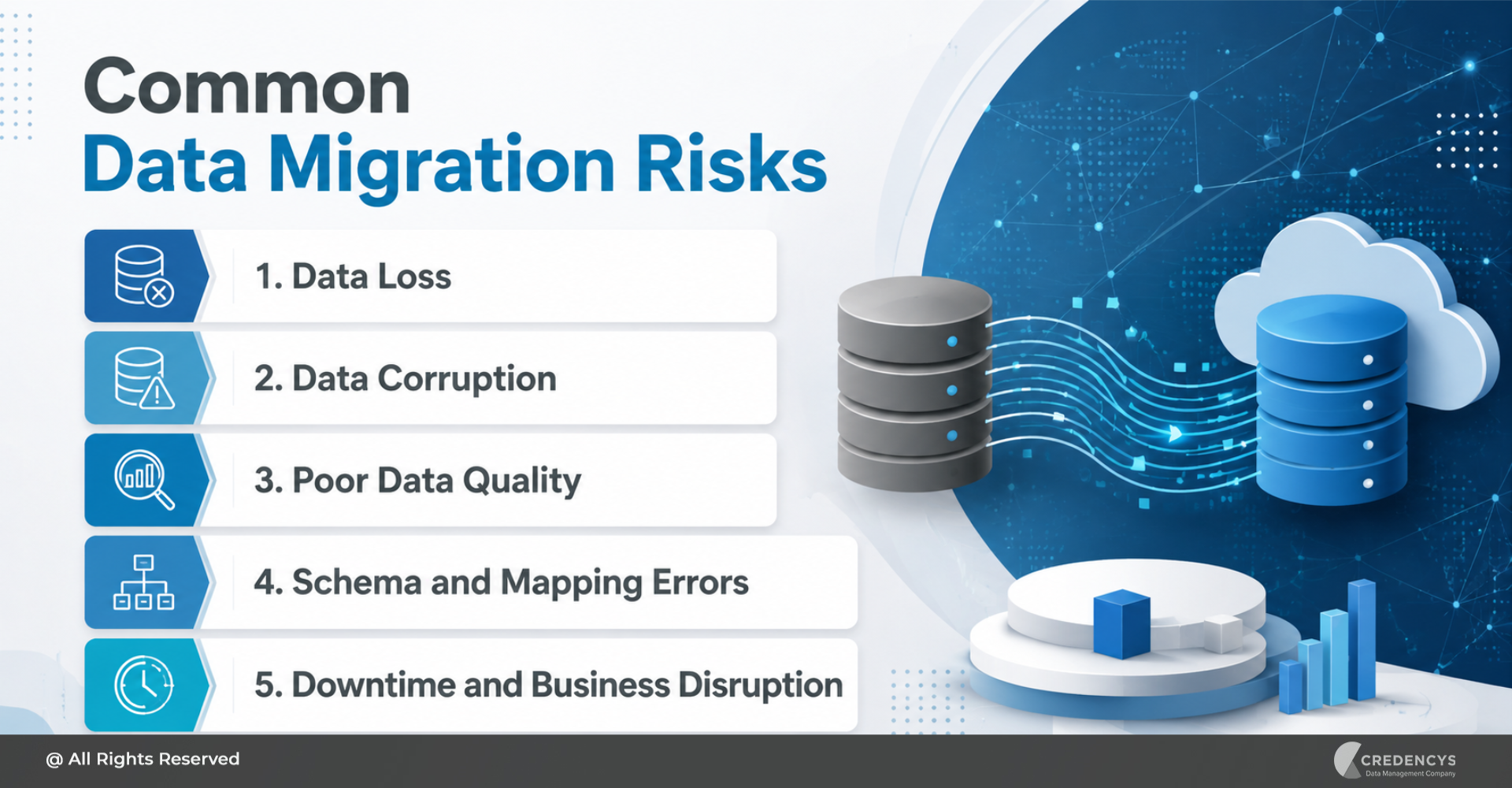
5 Common Data Migration Risks and How to Mitigate Them
Below are the most common data migration risks enterprises should identify and address before starting a migration project.
1. Data Loss
Data loss is one of the most serious risks in any migration project. It occurs when records, files, fields, or historical information are omitted, deleted, overwritten, or transferred incompletely during migration.
Why It Happens
Data loss can happen due to:
- Incomplete data extraction
- Poor backup planning
- Incorrect migration scripts
- Failed transfer processes
- Missing source systems
- Lack of reconciliation
- Human error during migration
Business Impact
Data loss can lead to:
- Missing customer, product, financial, or operational records
- Reporting gaps
- Compliance issues
- Poor decision-making
- Loss of business continuity
- Reduced user trust in the new system
For example, if customer transaction history is lost during migration, sales and marketing teams may lose visibility into customer behavior, purchase patterns, and engagement history.
How to Mitigate Data Loss
To reduce the risk of data loss:
- Create complete backups before migration.
- Identify all source systems and datasets.
- Define what data needs to be migrated, archived, or excluded.
- Use automated validation and reconciliation checks.
- Run pilot migrations before final cutover.
- Compare source and target data after migration.
- Keep a rollback plan ready.
A strong backup and validation strategy ensures that no critical business data is lost during migration.
2. Data Corruption
Data corruption occurs when data is changed, damaged, or altered incorrectly during migration. Even if the data is transferred, it may become unusable or unreliable if its structure, format, or values are corrupted.
Why It Happens
- Data corruption can happen due to:
- Incorrect transformation rules
- Data type mismatches
- Encoding issues
- Faulty migration tools
- Incomplete field mapping
- Broken relationships between datasets
- Manual errors during data handling
Business Impact
Corrupted data can result in:
- Incorrect reports and dashboards
- Broken business workflows
- Failed system processes
- Inaccurate customer or product records
- Poor analytics output
- Loss of confidence in the new system
For example, if date formats are converted incorrectly during migration, financial reports, customer records, and order histories may show inaccurate information.
How to Mitigate Data Corruption
To prevent data corruption:
- Validate source data before migration.
- Test transformation logic thoroughly.
- Use field-level mapping and validation.
- Perform checksum or hash-based verification.
- Compare sample records before and after migration.
- Run multiple test migrations before the production migration.
- Involve business users in validation.
Data corruption can be difficult to detect after go-live, so validation should happen at every stage of the migration process.
3. Poor Data Quality
Migrating poor-quality data into a new system is one of the most common mistakes enterprises make. If legacy data contains duplicates, incomplete records, outdated values, or inconsistent formats, migration will only move those problems into the new environment.
Why It Happens
Poor data quality usually exists because of:
- Duplicate records
- Missing mandatory fields
- Inconsistent naming conventions
- Outdated customer or product information
- Manual data entry errors
- Lack of data governance
- Siloed systems with different data standards
Business Impact
Poor data quality can affect:
- Reporting accuracy
- Customer experience
- Marketing personalization
- Inventory planning
- Forecasting
- Automation workflows
- AI and analytics initiatives
For example, if duplicate customer records are migrated into a new CRM or Customer 360 platform, teams may struggle to create a unified view of each customer.
How to Mitigate Poor Data Quality
To improve data quality before migration:
- Conduct data profiling.
- Identify duplicates, gaps, and inconsistencies.
- Cleanse and standardize records.
- Define data quality rules.
- Validate mandatory fields.
- Remove outdated or irrelevant records.
- Establish data governance ownership.
Data migration should not be treated as a simple lift-and-shift activity. It should be used as an opportunity to clean, standardize, and improve enterprise data.
4. Schema and Mapping Errors
Schema and mapping errors occur when data fields in the source system are not correctly aligned with those in the target system. This is especially common when migrating between platforms that use different data structures, naming conventions, formats, or business rules.
Why It Happens
Mapping errors can occur due to:
- Different source and target data models
- Missing field-level documentation
- Incorrect data type conversion
- Complex business rules
- Incomplete stakeholder input
- Lack of testing
- Poor understanding of relationships between datasets
Business Impact
Schema and mapping errors can lead to:
- Data landing in the wrong fields
- Missing relationships between records
- Broken workflows
- Incorrect calculations
- Failed reporting
- Application errors
For example, if customer address fields are mapped incorrectly, shipping, billing, and service operations may be affected.
How to Mitigate Schema and Mapping Errors
To reduce mapping risks:
- Create a detailed source-to-target mapping document.
- Define field names, data types, formats, and transformation rules.
- Validate mappings with business users.
- Test complex relationships and dependencies.
- Document all exceptions and special cases.
- Review mapping logic before production migration.
Accurate mapping is essential to ensure that data works correctly in the target system.
5. Downtime and Business Disruption
Downtime is a major concern during enterprise data migration. Some migrations require systems to be temporarily unavailable while data is extracted, moved, validated, and activated in the new environment.
Why It Happens
Downtime can happen due to:
- Large data volumes
- Complex system dependencies
- Poor cutover planning
- Slow migration tools
- Unplanned errors
- Integration failures
- Lack of rollback strategy
Business Impact
Downtime can result in:
- Interrupted business operations
- Delayed order processing
- Poor customer experience
- Lost revenue
- Reduced employee productivity
- Increased pressure on IT and support teams
For example, downtime during ERP migration can affect procurement, inventory, finance, manufacturing, and supply chain operations.
How to Mitigate Downtime
To minimize downtime:
- Plan migration during low-impact business hours.
- Use phased or incremental migration.
- Define a clear cutover strategy.
- Communicate downtime windows in advance.
- Test migration timelines before go-live.
- Prepare rollback and contingency plans.
- Monitor systems closely during migration.
Enterprises should aim for minimal disruption, especially when migrating mission-critical systems.
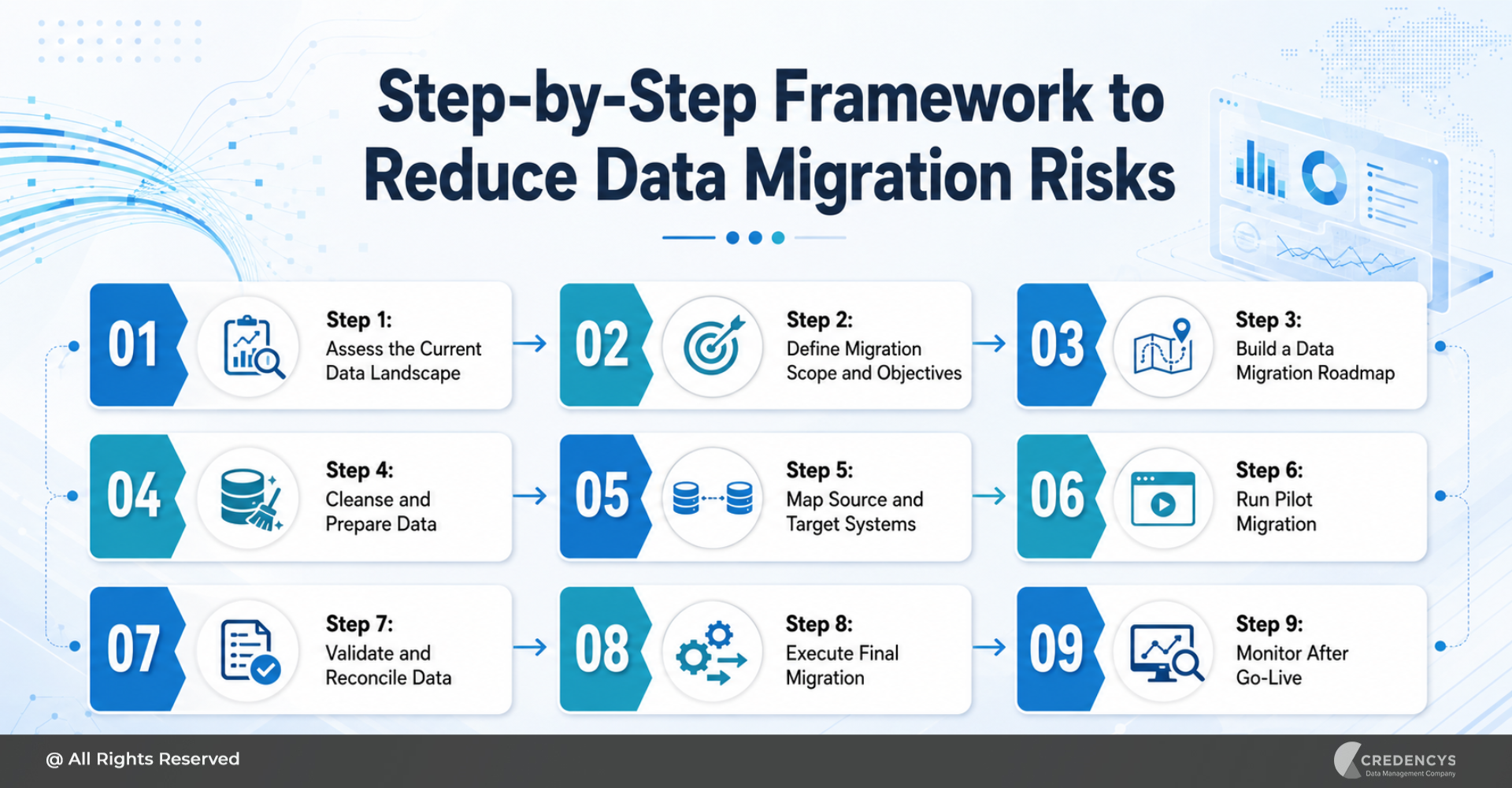
How to Reduce Data Migration Risks: A Step-by-Step Framework
Reducing data migration risks requires a structured approach. Enterprises need to assess their existing data landscape, define migration goals, prepare data, validate migration logic, and monitor results after go-live.
Here is a practical framework to minimize data migration risks.
Step 1: Assess the Current Data Landscape
Before migration begins, enterprises need to understand what data exists, where it resides, who owns it, and how it is used. This includes:
- Identifying all source systems
- Reviewing data volume and complexity
- Understanding business-critical datasets
- Mapping dependencies
- Identifying data quality issues
- Reviewing security and compliance requirements
A clear assessment helps teams avoid surprises during migration.
Step 2: Define Migration Scope and Objectives
Not every dataset needs to be migrated. Some data may need to be archived, cleaned, transformed, or excluded.
Define:
- What data will be migrated
- What data will be archived
- What data will be cleansed
- What data will be transformed
- What systems will be involved
- What success metrics will be used
Clear scope reduces confusion, cost overruns, and project delays.
Step 3: Build a Data Migration Roadmap
A migration roadmap defines how the migration will be executed from planning to post-go-live support. It should include:
- Project timeline
- Migration phases
- Roles and responsibilities
- Data mapping approach
- Testing plan
- Security controls
- Cutover strategy
- Rollback plan
- Post-migration support plan
A roadmap ensures that all stakeholders are aligned before execution begins.
Step 4: Cleanse and Prepare Data
Data cleansing is one of the most important steps in reducing migration risk. Before migration, enterprises should:
- Remove duplicate records
- Fix incomplete fields
- Standardize formats
- Validate business rules
- Remove outdated records
- Resolve inconsistencies
- Define data quality standards
Clean data improves migration accuracy and increases the value of the new system.
Step 5: Map Source and Target Systems
Source-to-target mapping ensures that data moves correctly from the old system to the new one. This includes:
- Mapping fields
- Defining data types
- Documenting transformation rules
- Validating relationships
- Identifying exceptions
- Reviewing mapping logic with business users
Proper mapping reduces the risk of data corruption, reporting errors, and broken workflows.
Step 6: Run Pilot Migration
A pilot migration allows teams to test the migration process using a smaller dataset before moving all data. This helps identify:
- Data quality issues
- Mapping errors
- Performance bottlenecks
- Security gaps
- Integration problems
- Validation challenges
A pilot migration reduces risk before full-scale execution.
Step 7: Validate and Reconcile Data
Validation confirms that migrated data is accurate, complete, and usable. Teams should validate:
- Record counts
- Field values
- Data formats
- Relationships
- Reports
- Dashboards
- Business workflows
- User access
Reconciliation helps compare source and target systems to ensure data integrity.
Step 8: Execute Final Migration
Once testing and validation are complete, the final migration can be executed. During this phase:
- Follow the approved migration plan.
- Monitor migration progress.
- Track errors and exceptions.
- Communicate status to stakeholders.
- Use rollback plans if required.
- Validate critical datasets immediately after migration.
Execution should be controlled, monitored, and aligned with business priorities.
Step 9: Monitor After Go-Live
After the migration, enterprises should continue to monitor the new environment. This includes:
- Data quality monitoring
- Integration monitoring
- System performance tracking
- Report validation
- User feedback collection
- Issue resolution
- Governance review
Post-migration monitoring helps ensure long-term stability and business value.
How Credencys Helps Minimize Data Migration Risks
At Credencys, we help enterprises plan and execute secure, scalable, and disruption-free data migration across legacy systems, cloud platforms, ERP systems, data warehouses, and modern data platforms. Our data migration approach focuses on reducing risks at every stage of the migration lifecycle.
We help enterprises with:
- Data discovery and assessment
- Migration strategy and roadmap creation
- Data cleansing and standardization
- Source-to-target mapping
- Data transformation and validation
- Secure data migration
- Integration testing
- Data reconciliation
- Rollback planning
- Post-migration monitoring and support
Whether you are migrating from legacy systems to the cloud, modernizing your ERP, moving workloads to Snowflake or Databricks, or consolidating enterprise data platforms, Credencys helps ensure that your migration is secure, accurate, and aligned with business goals.
Our experts follow a structured and validation-first approach to reduce data migration risks, minimize downtime, and accelerate time to value.
Conclusion
Data migration is a critical step in enterprise modernization, but it comes with several risks. Data loss, corruption, poor data quality, downtime, security gaps, integration failures, and inadequate testing can undermine business continuity and diminish the value of the migration.
The good news is that these risks can be reduced with proper planning, data assessment, cleansing, mapping, testing, validation, and post-migration monitoring. A successful data migration is not just about moving data.
It is about moving the right data, in the right format, with the right controls, and ensuring it supports business operations after go-live. Enterprises that take a structured and risk-aware approach can improve migration success, reduce disruption, and build a stronger foundation for analytics, automation, AI, and digital transformation.
FAQs
1. What are data migration risks?
Data migration risks are issues that can arise during the movement of data from one system to another, such as data loss, corruption, downtime, security gaps, and compliance failures.
2. What is the biggest risk in data migration?
The biggest risk is data loss or corruption because it directly affects business continuity, reporting accuracy, compliance, and user trust.
3. How can data migration risks be reduced?
Data migration risks can be reduced through proper planning, data profiling, cleansing, source-to-target mapping, testing, backup, validation, and post-migration monitoring.
4. Why do data migration projects fail?
Data migration projects often fail due to poor planning, unclear scope, poor data quality, lack of testing, inadequate stakeholder involvement, and weak governance.
5. What is a data migration risk assessment?
A data migration risk assessment identifies potential issues before migration, including data quality gaps, security risks, compliance concerns, integration dependencies, and the impact of downtime.



Tags: