ERP Data Migration Best Practices: A Complete Guide

Check How Much

insight
Blog
By: Manish Shewaramani

ERP Data Migration Best Practices: How to Move Business-Critical Data Without Risk

ERP data migration is one of the most critical steps in any ERP implementation, upgrade, or modernization project. It involves moving business-critical data such as customer records, vendor details, inventory data, financial transactions, product information, employee records, and historical business data from legacy systems into a new ERP platform. When done right, it creates a clean, reliable foundation for better operations, reporting, automation, and decision-making.

However, ERP data migration is also one of the biggest risk areas in an ERP project. Poor planning, duplicate records, incomplete mapping, inaccurate master data, and weak validation can lead to reporting errors, process disruptions, compliance issues, and low user trust after go-live.

According to Gartner, poor data quality costs organizations an average of $12.9 million every year, making data quality a business problem, not just a technical issue.

That is why following the right ERP data migration best practices is essential. A successful migration is not just about moving data. It requires proper planning, data cleansing, mapping, validation, testing, and post-migration monitoring to ensure the new ERP system runs on accurate, complete, and trusted data.

What is ERP Data Migration?

ERP data migration is the process of transferring data from existing systems, spreadsheets, legacy ERP platforms, or disconnected business applications into a new ERP system. This data may include customer information, supplier records, product catalogs, inventory details, financial data, purchase history, sales orders, employee records, and operational workflows.

But ERP data migration is not just a technical copy-paste activity. Before the data is moved, it must be reviewed, cleaned, structured, mapped, validated, and tested to make sure it fits the new ERP environment correctly.

A well-planned ERP data migration helps businesses:
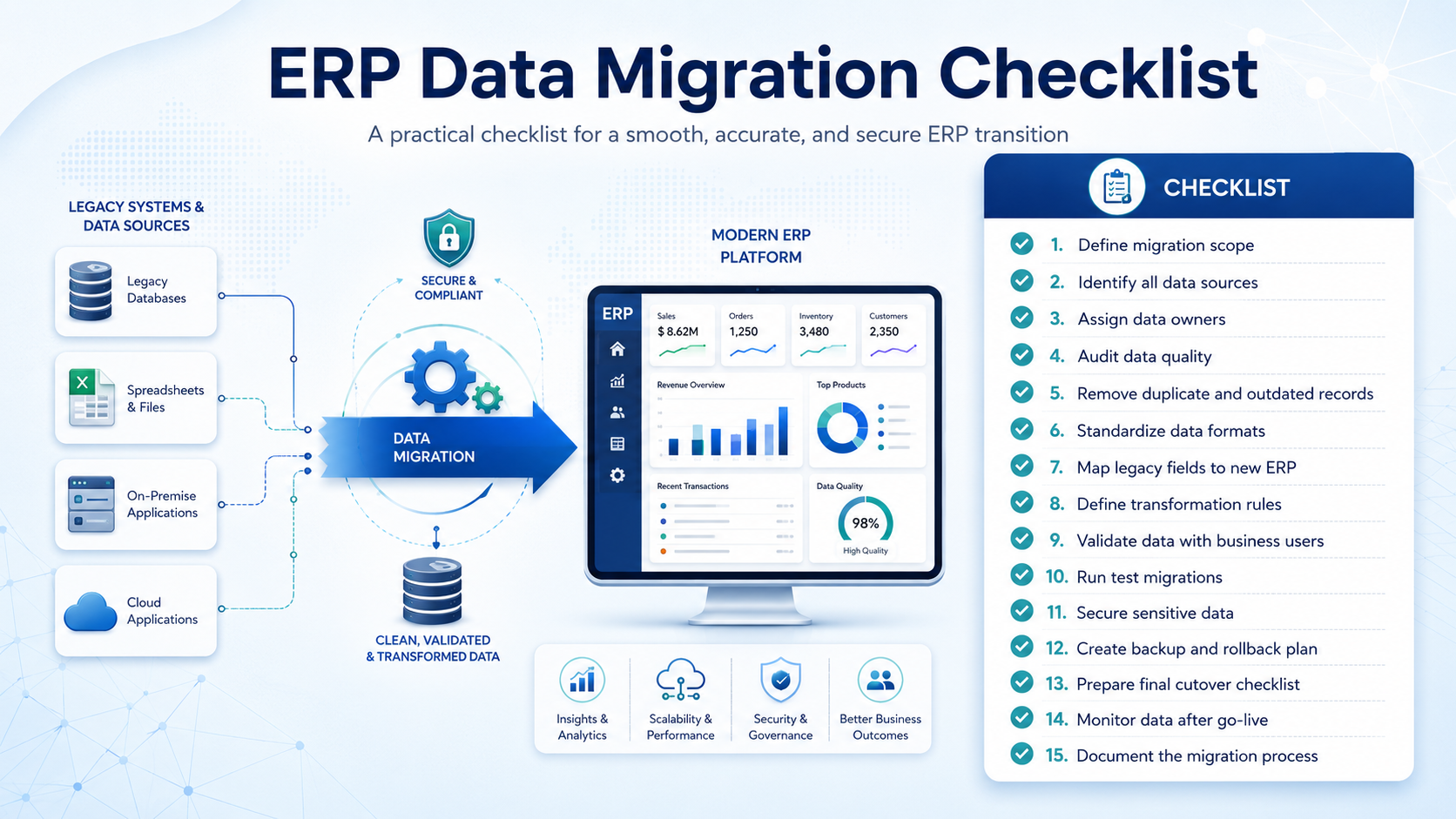
  • Remove duplicate, outdated, and inaccurate data
  • Standardize data formats across departments
  • Improve reporting and analytics accuracy
  • Support smoother ERP adoption
  • Reduce operational disruption during go-live
  • Build a trusted foundation for future automation and AI initiatives

ERP Data Migration Best Practices

A successful ERP data migration requires more than moving data from one system to another. It needs a clear strategy, strong ownership, clean data, proper testing, and continuous validation.

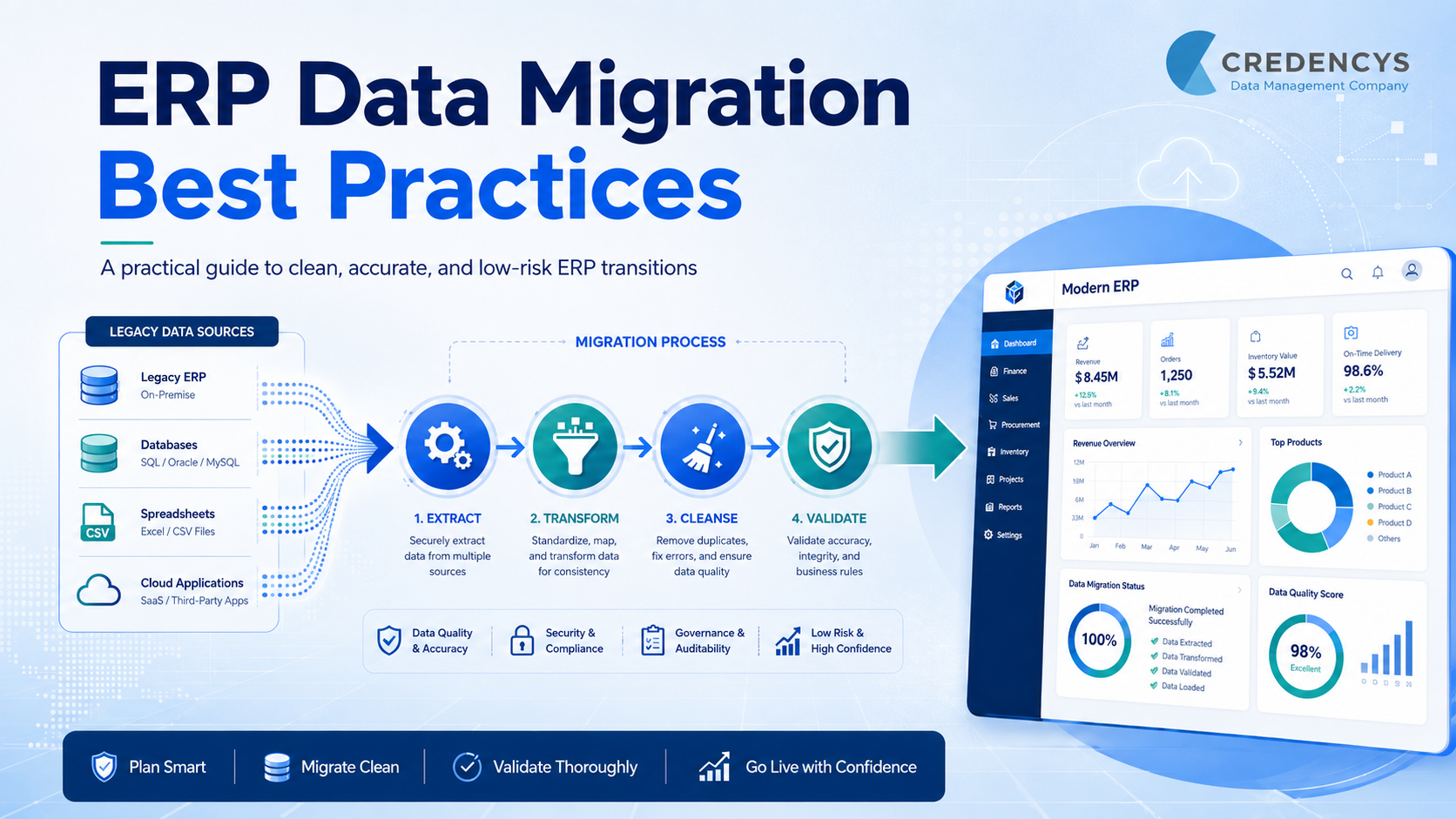
ERP Migration Best Practices Blog Inner Image

Following these ERP data migration best practices can help reduce risk and ensure a smoother transition to the new ERP system.

1. Define a Clear ERP Data Migration Strategy

Start by creating a detailed migration strategy that defines what data needs to be migrated, where it currently exists, how it will be transformed, and how it will be validated after migration.

Your strategy should include:

  • Data sources to be migrated
  • Business-critical data categories
  • Migration scope and timeline
  • Roles and responsibilities
  • Data quality rules
  • Testing and validation approach
  • Cutover and rollback plan

A clear strategy keeps technical teams, business users, and leadership aligned throughout the ERP migration journey.

2. Audit and Assess Your Existing Data

Before migration begins, review the current state of your data. Most legacy systems contain duplicate, outdated, incomplete, or inconsistent records. Moving this data directly into the new ERP system can create serious issues after go-live.

A proper data assessment helps you identify:

  • Duplicate customer, vendor, or product records
  • Missing fields and incomplete master data
  • Outdated or inactive records
  • Incorrect formats across systems
  • Data stored in spreadsheets or disconnected tools
  • Data that is no longer useful for business operations

This step helps you decide what should be migrated, archived, cleaned, or removed. It also prevents unnecessary data from increasing migration complexity and slowing down the new ERP system.

3. Cleanse and Standardize Data Before Migration

Once the data audit is complete, clean and standardize the data before moving it into the new ERP system. This step ensures that only accurate, complete, and usable data enters the new environment.

Data cleansing may include:

  • Removing duplicate records
  • Correcting inaccurate or outdated information
  • Filling missing mandatory fields
  • Standardizing formats for names, addresses, dates, currencies, and units
  • Removing inactive or irrelevant data
  • Validating customer, vendor, product, and financial records

Standardized data helps the new ERP system work more efficiently across departments. It also improves reporting accuracy, reduces manual corrections, and builds user confidence after go-live.

4. Map Data Fields Accurately

Data mapping is one of the most important steps in ERP data migration. It defines how data from the old system will fit into the structure of the new ERP system.

For example, customer IDs, product codes, vendor details, tax fields, inventory units, and financial records may be stored differently in the legacy system and the new ERP platform. If these fields are not mapped correctly, it can lead to inaccurate reports, broken workflows, and process errors.

During data mapping, make sure to:

  • Match old system fields with new ERP fields
  • Define transformation rules for different formats
  • Align naming conventions and data structures
  • Map master data, transaction data, and historical data separately
  • Involve business users to validate field-level accuracy
  • Document all mapping rules for future reference

Accurate data mapping ensures that migrated data is placed correctly in the new ERP system and supports business processes without disruption.

5. Validate Data With Business Users

ERP data migration should not be handled by the technical team alone. Business users from finance, sales, procurement, inventory, HR, and operations should be involved in validating the migrated data.

They understand how the data is used in daily workflows and can quickly identify gaps, mismatches, or incorrect values that technical teams may miss.

During validation, business users should check:

  • Customer, vendor, and product records
  • Opening balances and financial data
  • Inventory quantities and units of measure
  • Pricing, tax, and discount rules
  • Purchase and sales order history
  • Reports and dashboards
  • Workflow dependencies

Business validation ensures that the migrated data is not only technically correct but also usable for real business operations. This reduces post-go-live issues and improves user confidence in the new ERP system.

6. Run Test Migrations Before Go-Live

Do not wait until the final go-live to test your ERP data migration. Run multiple test migrations in a controlled environment to identify errors, gaps, and performance issues early.

Test migrations help you check:

  • Whether data is transferred completely
  • Whether field mapping is accurate
  • Whether business rules are working correctly
  • Whether reports show the right numbers
  • Whether workflows run without errors
  • Whether large data volumes affect system performance

Each test migration should be reviewed by both technical teams and business users. Any issues found should be fixed, documented, and retested before the final migration.

7. Ensure Data Security and Compliance

ERP data migration often involves sensitive business information such as financial records, customer details, employee data, vendor contracts, pricing information, and transaction history. This makes data security a critical part of the migration process.

Make sure your migration plan includes:

  • Secure access controls for migration teams
  • Data encryption during transfer
  • Backup of existing data before migration
  • Compliance with industry and regional regulations
  • Clear approval workflows for sensitive data
  • Audit trails to track data movement and changes

Strong data security reduces the risk of data loss, unauthorized access, and compliance issues during migration. It also ensures that confidential business information remains protected throughout the ERP transition.

Common ERP Data Migration Challenges

Even with a strong plan, ERP data migration can become complex if data quality, ownership, and validation are not handled properly. Understanding the common challenges early helps businesses reduce risks before they affect the final go-live.

Some common ERP data migration challenges include:

  • Poor data quality: Duplicate, outdated, incomplete, or inaccurate records can create problems in the new ERP system.
  • Unclear data ownership: When teams do not know who is responsible for which data, decisions and approvals get delayed.
  • Complex data mapping: Legacy systems and new ERP platforms often store data in different formats and structures.
  • Lack of business validation: If business users are not involved, migrated data may be technically correct but operationally unusable.
  • Limited testing: Skipping test migrations can lead to errors during go-live.
  • Security and compliance risks: Sensitive business, customer, financial, or employee data must be protected throughout the migration process.

The best way to overcome these challenges is to treat ERP data migration as a business-critical initiative, not just a technical task. With the right planning, governance, testing, and validation, businesses can reduce migration risks and build a stronger ERP foundation.

How Credencys Can Help with ERP Data Migration

ERP data migration requires the right mix of technical expertise, business understanding, and data governance. At Credencys, we help businesses migrate complex ERP data with a structured, secure, and quality-first approach.

Our ERP data migration experts support you across the complete migration journey, from data discovery and cleansing to mapping, validation, testing, and final go-live.

We help businesses with:

  • Legacy data assessment: Identify data quality issues, duplicate records, incomplete fields, and migration risks before the project begins.
  • Data cleansing and standardization: Prepare clean, consistent, and usable data for the new ERP system.
  • ERP data mapping: Map legacy system fields to the new ERP structure with proper transformation rules.
  • Secure data migration: Move sensitive business data with strong access controls, backups, and compliance-focused processes.
  • Testing and validation: Run multiple test migrations to ensure accuracy before go-live.
  • Post-migration support: Monitor migrated data after go-live and resolve issues quickly.

ERP Data Migration Case Study: How a Multi-Location Retailer Reduced Migration Errors by 82%

A multi-location fashion and lifestyle retailer wanted to move from legacy systems, spreadsheets, POS tools, and ecommerce platforms to Odoo ERP. However, its product, customer, vendor, inventory, and transaction data was fragmented, duplicated, and inconsistent.

The Challenge

The retailer needed clean and migration-ready data before implementing Odoo. Key issues included duplicate customer and vendor records, missing product attributes, complex SKU variants, inventory mismatches across locations, and no clear data governance rules.

The Solution

A structured Odoo data migration approach was implemented, including:

  • Data assessment and migration planning
  • Data cleansing and deduplication
  • Product hierarchy and SKU structuring
  • Legacy-to-Odoo data mapping
  • Test migrations, validation, and reconciliation
  • Governance rules for ongoing data quality

Business Impact

The retailer achieved:

  • 82% reduction in migration errors
  • 99.4% validated data accuracy
  • 45% faster go-live readiness
  • 38% improvement in inventory visibility
  • 60% reduction in duplicate records

Read full case study here.

Wrapping Up

ERP data migration plays a major role in the success of any ERP implementation, upgrade, or modernization project. Clean, accurate, and well-structured data helps the new ERP system perform better, supports smoother business operations, and gives teams confidence in the information they use every day.

By following the right ERP data migration best practices, businesses can reduce migration risks, avoid data quality issues, improve reporting accuracy, and ensure a smoother go-live. The key is to treat migration as a strategic business initiative, not just a technical task.

With proper planning, data cleansing, mapping, testing, validation, and post-go-live monitoring, organizations can build a stronger ERP foundation that supports better decisions, faster processes, and long-term business growth.

Tags:

Manish Shewaramani

VP - Sales

Manish is a Vice President of Customer Success at Credencys. With his wealth of experience and a sharp problem-solving mindset, he empowers top brands to turn data into exceptional experiences through robust data management solutions.

From transforming ambiguous ideas into actionable strategies to maximizing ROI, Manish is your go-to expert. Connect with him today to discuss your data management challenges and unlock a world of new possibilities for your business.

How Much Is Your Product Data Costing You?

Get your score + 90-day action plan in 3 minutes

Used by 500+ retail & manufacturing teams