


Databricks Cluster Optimization: How to Improve Performance and Reduce Compute Costs
Databricks gives enterprises a powerful platform for building data pipelines, running Spark workloads, supporting analytics, and preparing data for AI initiatives. But as usage grows, Databricks clusters can become one of the biggest sources of cost and performance inefficiency.
Many teams start with standard cluster configurations. Over time, more jobs, notebooks, users, pipelines, and workloads are added.
Clusters become oversized, idle resources stay active, autoscaling settings remain unchecked, and Spark jobs consume more DBUs than expected. This is where Databricks cluster optimization becomes important.
Databricks cluster optimization is the process of configuring, sizing, monitoring, and governing Databricks compute resources to improve workload performance, reduce DBU waste, and control cloud costs. It is not just about reducing cluster size.
It is about matching the right compute configuration to the right workload. For data engineering teams, platform teams, and cloud leaders, optimized clusters can improve job speed, reduce idle compute, support greater scalability, and make Databricks spending more predictable.
Cluster optimization is one part of a broader cost management strategy. For a broader view of workload-level savings, DBU visibility, governance, and FinOps practices, read our guide on Databricks cost optimization best practices.
What is Databricks Cluster Optimization?
Databricks cluster optimization focuses on improving the use of compute resources across workloads. A Databricks cluster includes driver and worker nodes that execute workloads such as notebooks, jobs, Spark tasks, ETL pipelines, machine learning workloads, and analytics queries.
If the cluster is too small, jobs may fail or run slowly. If the cluster is too large, the organization pays for unused capacity.
If the cluster is not governed, teams may create expensive configurations without realizing the cost impact. Databricks cluster optimization helps teams answer questions such as:
- Is this workload running on the right type of compute?
- Is the cluster oversized or underutilized?
- Are idle clusters being terminated automatically?
- Are autoscaling limits configured properly?
- Are Spark jobs using resources efficiently?
- Are computing policies preventing unnecessary costs?
- Are teams using job clusters where possible?
- Is cluster usage visible by job, workspace, project, and owner?
The goal is to create a compute strategy that balances performance, reliability, scalability, and cost. Cluster optimization works best when it is supported by a scalable pipeline architecture, efficient workload design, and strong governance.
To understand the broader architecture behind scalable pipelines, explore our guide on modern data engineering with Databricks.
Why Databricks Cluster Optimization Matters
Cluster configuration directly affects Databricks cost and performance. A poorly optimized cluster can increase DBU usage, slow down jobs, waste cloud resources, and create unreliable pipelines.
Common signs that clusters need optimization include:
- Monthly Databricks costs are increasing without a clear explanation
- Jobs take longer than expected to complete
- Clusters stay active after users finish working
- Teams use all-purpose clusters for scheduled production jobs
- Autoscaling is enabled without maximum worker limits
- Spark jobs fail because of memory pressure or skew
- Cluster usage cannot be attributed to teams or projects
- Developers choose large clusters to avoid performance issues
- Failed or retried jobs consume significant compute
These issues often appear gradually. As more workloads move to Databricks, small inefficiencies multiply.
A few idle clusters, oversized jobs, and inefficient Spark transformations can create substantial waste over time. Cluster optimization helps organizations prevent that waste before it becomes a larger FinOps problem.
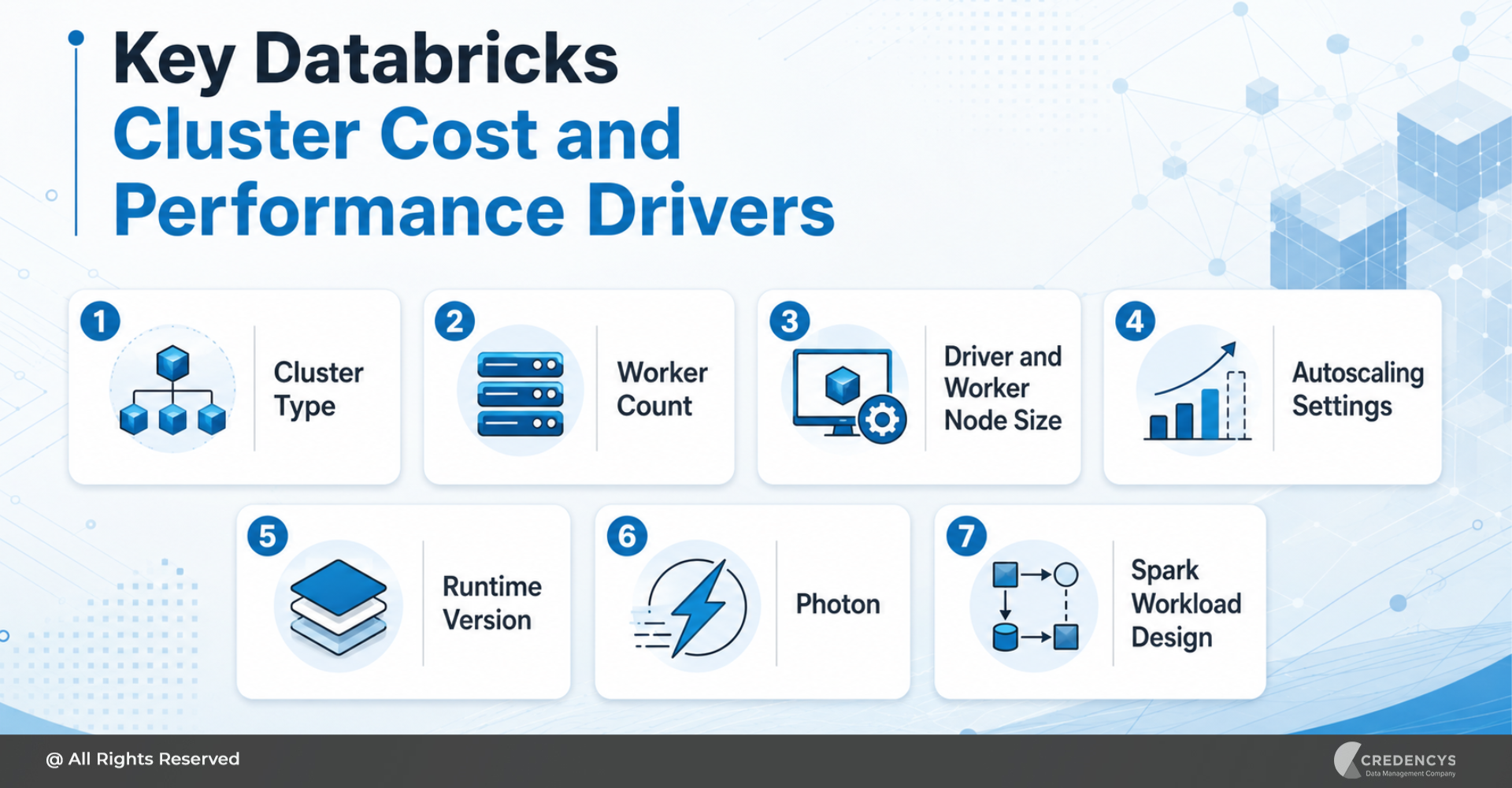
Key Databricks Cluster Cost and Performance Drivers
To optimize Databricks clusters, teams need to understand what drives cost and performance. The most important factors include:
1. Cluster Type
Databricks workloads can run on different compute types. All-purpose clusters are useful for exploration, development, and collaborative analysis.
Job clusters are better suited for scheduled and automated workflows because they start with the job and terminate after completion. Using all-purpose clusters for recurring production jobs can increase idle compute costs.
2. Worker Count
The number of workers affects parallel processing capacity. Too few workers can slow down workloads.
Too many workers can increase costs without improving performance. The right number of workers depends on data volume, task complexity, shuffle behavior, and job SLA.
3. Driver and Worker Node Size
The driver coordinates workload execution, while workers process tasks. If the driver is undersized, the job may become unstable.
If workers are oversized, the workload may consume more compute than needed. Cluster optimization requires reviewing both driver and worker node sizing.
4. Autoscaling Settings
Autoscaling allows Databricks to increase or decrease the number of workers based on workload demand. However, autoscaling should have practical minimum and maximum worker limits.
Without limits, clusters may scale beyond what the workload or budget requires.
5. Runtime Version
Using the right Databricks Runtime version can improve performance, stability, and feature compatibility. Older runtimes may not provide the same performance benefits or platform improvements available in newer versions.
6. Photon
Photon can improve performance for SQL workloads, DataFrame operations, ETL pipelines, and analytical workloads. However, it should be evaluated based on workload behavior, runtime improvement, and total cost per successful run.
7. Spark Workload Design
Cluster configuration cannot fix every performance issue. If the Spark job is inefficient, even a large cluster may perform poorly.
Full-table scans, expensive joins, skewed data, unnecessary shuffles, and poor partitioning can all increase runtime and cost.
The right cluster configuration depends on workload type, cloud provider, usage volume, and performance expectations. You can also use the Databricks Cost Calculator to estimate potential spend and understand how workload choices affect infrastructure planning.
Databricks Cluster Optimization Best Practices
1. Use Job Clusters for Scheduled Workloads
Scheduled ETL, ELT, ingestion, transformation, and data quality jobs should generally run on job clusters. Job clusters are created for a specific job and terminate upon completion.
This helps reduce idle compute and improves cost control. Use job clusters for:
- Production data pipelines
- Batch processing
- Recurring ETL jobs
- Data quality workflows
- Scheduled transformations
- Reporting pipelines
All-purpose clusters should be reserved for development, testing, exploration, and collaborative analysis. This simple shift can reduce unnecessary runtime for clusters.
2. Avoid Long-Running All-Purpose Clusters
All-purpose clusters are convenient, but they can become expensive to run. Development teams may keep clusters active between tasks.
Analysts may forget to terminate clusters after using notebooks. Teams may use the same interactive cluster for multiple workloads without reviewing usage.
To reduce waste:
- Set auto-termination for all-purpose clusters
- Use shorter termination windows for development environments
- Review clusters running outside business hours
- Monitor users or teams with frequent idle usage
- Move recurring workloads to job clusters
Idle compute is one of the easiest cost issues to fix.
3. Enable Auto-Termination
Auto-termination automatically stops a cluster after a period of inactivity. This should be a standard requirement for interactive clusters, sandbox environments, and development workloads.
For production jobs, job clusters are usually a better option because they terminate after completion. Auto-termination policies help prevent unnecessary costs caused by forgotten clusters.
Organizations should define default termination windows based on the environment:
- Shorter windows for development and testing
- Moderate windows for analytics exploration
- Controlled exceptions for special workloads
- Stronger governance for production environments
Auto-termination should be enforced through compute policies wherever possible.
4. Configure Autoscaling with Clear Limits
Autoscaling helps Databricks adjust cluster size based on workload demand. It is useful for workloads with variable data volumes or unpredictable processing needs.
However, autoscaling is not a complete optimization strategy by itself. If maximum worker limits are too high, clusters may scale aggressively, increasing costs.
If the minimum number of workers is too high, clusters may remain overprovisioned even when the workload does not require that capacity. Good autoscaling practices include:
- Set practical minimum and maximum worker limits
- Test autoscaling behavior under real workload conditions
- Avoid overly high max-worker settings
- Monitor whether scaling improves runtime
- Compare the cost per successful run before and after changes
- Review autoscaling settings regularly
Autoscaling should improve elasticity without removing cost control.
5. Right-Size Driver and Worker Nodes
Right-sizing is one of the most important parts of Databricks cluster optimization. Many teams increase cluster size when jobs are slow.
But slow jobs are not always due to insufficient computing resources. They may be caused by poor Spark logic, data skew, inefficient joins, or bad table layout.
Before increasing compute, review:
- Input data volume
- Shuffle size
- Memory usage
- Spill to disk
- Task duration
- Executor utilization
- Driver memory pressure
- Failed or retried tasks
- Job runtime trend
Right-sizing should be based on evidence of workload, not assumptions. The goal is to use enough compute to meet performance requirements without paying for unused capacity.
6. Choose the Right Instance Type
Different workloads need different instance types. Memory-intensive workloads may need memory-optimized instances.
Compute-heavy workloads may need compute-optimized instances. Analytical workloads may benefit from storage-optimized instances with strong I/O performance.
Choosing the wrong instance type can create both performance and cost problems. Cluster optimization should include instance type review based on workload profile.
7. Use Compute Policies
Compute policies help administrators control how Databricks compute is created and used. They are essential for enterprise-scale Databricks environments because they prevent users from creating expensive or non-standard clusters.
Compute policies can define:
- Approved instance types
- Maximum worker counts
- Auto-termination settings
- Runtime versions
- Required tags
- Photon settings
- Access modes
- Cluster configuration limits
This gives teams flexibility while maintaining cost and governance guardrails. Compute policies turn cluster optimization into a repeatable practice.
8. Evaluate Photon for the Right Workloads
Photon is Databricks’ native vectorized query engine. It can improve performance for SQL queries, DataFrame operations, ETL workloads, and analytical processing.
However, Photon should be evaluated based on workload results. Teams should compare:
- Runtime before and after Photon
- DBU usage
- Query speed
- Job reliability
- Cloud infrastructure cost
- Total cost per workload
Photon may be especially useful for workloads with joins, aggregations, filters, and repeated query patterns. The goal is not to enable every feature blindly.
The goal is to improve price-performance for the right workloads.
9. Review Failed and Retried Jobs
Failed jobs still consume compute. Every failed or retried workflow uses cluster resources without producing business value.
Teams should monitor:
- Jobs with frequent failures
- Jobs with repeated retries
- Runtime before failure
- DBUs consumed by failed runs
- Common failure patterns
- Memory or timeout issues
- Cluster-related failures
Fixing recurring failures can reduce compute waste and improve pipeline reliability. In many environments, failed jobs are hidden cost drivers because they are treated as operational issues rather than financial ones.
How Spark Workload Design Affects Cluster Optimization
Cluster optimization and Spark optimization are closely connected. If Spark workloads are inefficient, clusters will appear underpowered even when they are properly sized.
Before adding more compute, teams should review Spark workload design. Common Spark issues include:
- Full-table scans on large datasets
- Expensive joins
- Shuffle-heavy transformations
- Skewed partitions
- Unnecessary caching
- Too many small files
- Repeated processing of the same data
- Poor partitioning strategy
- Unused columns being processed
Good cluster optimization should always include Spark job analysis. Otherwise, teams may keep increasing cluster size without solving the root cause.
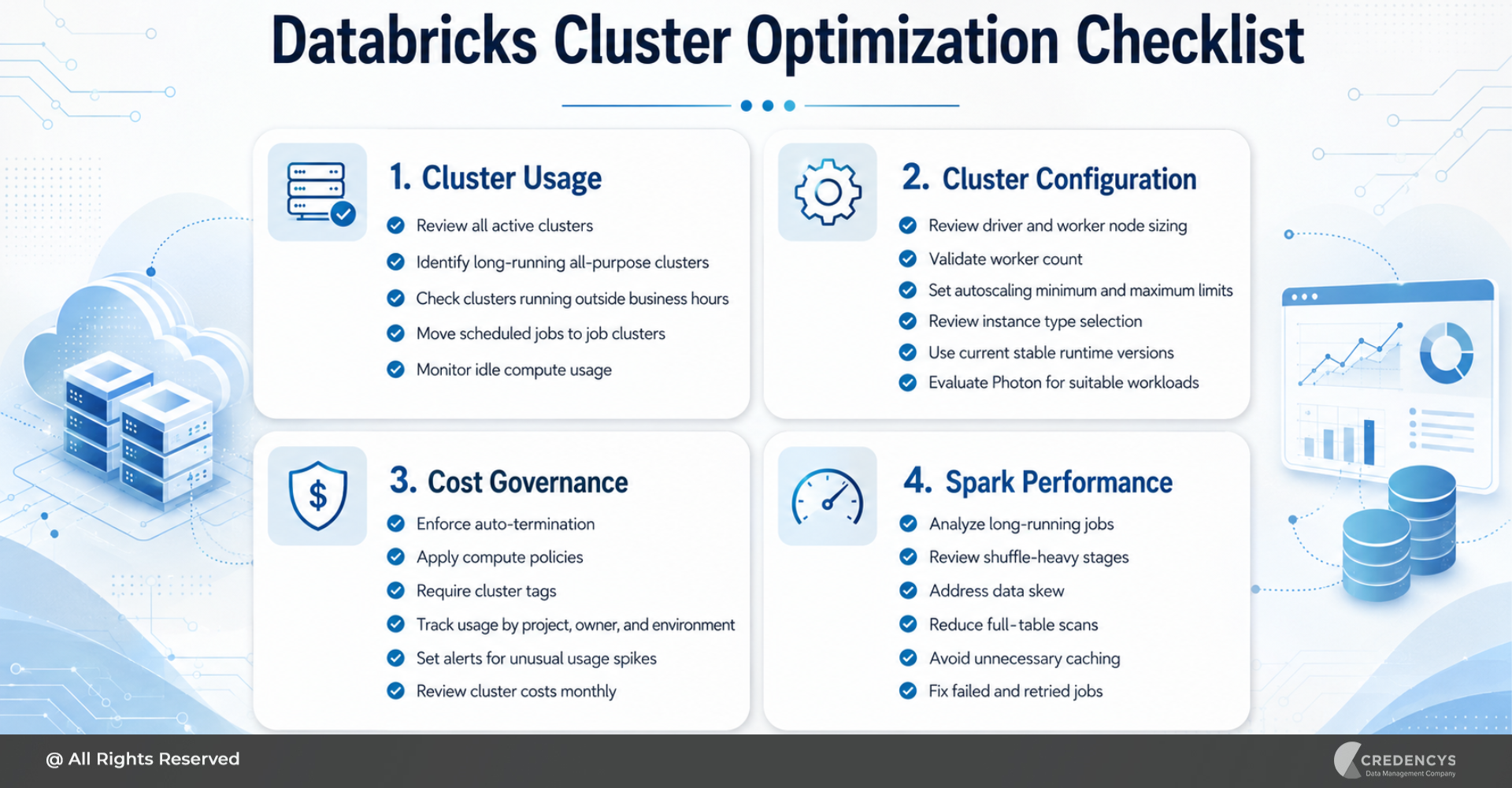
Databricks Cluster Optimization Checklist
Use this checklist to identify quick wins and long-term improvements.
1. Cluster Usage
- Review all active clusters
- Identify long-running all-purpose clusters
- Check clusters running outside business hours
- Move scheduled jobs to job clusters
- Monitor idle compute usage
2. Cluster Configuration
- Review driver and worker node sizing
- Validate worker count
- Set autoscaling minimum and maximum limits
- Review instance type selection
- Use current stable runtime versions
- Evaluate Photon for suitable workloads
3. Cost Governance
- Enforce auto-termination
- Apply compute policies
- Require cluster tags
- Track usage by project, owner, and environment
- Set alerts for unusual usage spikes
- Review cluster costs monthly
Cost governance depends on visibility, ownership, access control, and consistent standards across teams. For stronger governance across your lakehouse, explore how Databricks Unity Catalog helps centralize access, metadata, lineage, and control.
4. Spark Performance
- Analyze long-running jobs
- Review shuffle-heavy stages
- Address data skew
- Reduce full-table scans
- Avoid unnecessary caching
- Fix failed and retried jobs
Common Databricks Cluster Optimization Mistakes
Many organizations overspend on Databricks clusters because of avoidable mistakes. The most common mistakes include:
- Using all-purpose clusters for production jobs
- Keeping clusters running for convenience
- Setting autoscaling without max limits
- Oversizing clusters before tuning Spark code
- Ignoring failed job costs
- Not enforcing auto-termination
- Allowing users to create any cluster configuration
- Not tagging clusters by owner, project, or environment
- Using old runtime versions without review
- Treating cluster cost as only an infrastructure issue
These mistakes are easy to make when Databricks adoption grows quickly. The solution is to combine technical optimization with governance.
If you are moving from Hadoop, cloud warehouses, or legacy data platforms, our Databricks migration services help modernize workloads with performance and scalability in mind.
How Credencys Helps with Databricks Cluster Optimization
Databricks cluster optimization requires platform knowledge, Spark engineering expertise, cloud cost awareness, and strong governance practices. Credencys helps enterprises optimize Databricks environments by analyzing workload behavior, identifying compute waste, and building scalable cluster strategies.
Our Databricks cluster optimization services include:
- Cluster usage assessment
- DBU consumption analysis
- Job cluster and all-purpose cluster review
- Driver and worker node right-sizing
- Autoscaling configuration
- Spark performance tuning
- Photon evaluation
- Compute policy design
- Tagging and cost attribution setup
- Cost dashboard development
- Governance and FinOps enablement
We help data teams understand which clusters are driving cost, which jobs need tuning, and which configurations should be standardized. The result is a Databricks environment that is faster, more reliable, and easier to control.
Explore our Databricks consulting services to see how our experts support Databricks implementation, optimization, data engineering, and analytics initiatives.
Conclusion
Databricks clusters play a major role in data engineering performance and cloud cost efficiency. When clusters are oversized, idle, poorly configured, or used for the wrong workloads, organizations pay more without getting better outcomes.
Databricks cluster optimization helps teams improve performance, reduce compute waste, and create a more predictable cost model. The best approach starts with visibility.
Review active clusters, analyze DBU consumption, identify long-running workloads, and understand where compute is being used. Then right-size clusters, move scheduled jobs to job clusters, enforce auto-termination, configure autoscaling limits, evaluate Photon, and apply compute policies.
Cluster optimization should also include Spark workload tuning. If the underlying job is inefficient, adding more compute may only increase cost without solving the real issue.
With the right strategy, enterprises can improve Databricks performance, reduce unnecessary spend, and support scalable data engineering operations. Credencys helps organizations optimize Databricks clusters through workload assessments, Spark tuning, cluster right-sizing, compute governance, and cost-visibility dashboards.
If your Databricks clusters are becoming difficult to manage or your compute costs are increasing, now is the right time to review your cluster strategy.
FAQs
1. What is Databricks cluster optimization?
Databricks cluster optimization is the process of configuring, sizing, monitoring, and governing Databricks clusters to improve performance, reduce DBU waste, and control compute costs. It includes right-sizing clusters, using job clusters, enabling auto-termination, setting autoscaling limits, improving Spark workloads, and applying compute policies.
2. How do I reduce Databricks cluster costs?
You can reduce Databricks cluster costs by moving scheduled jobs to job clusters, enabling auto-termination, avoiding long-running all-purpose clusters, right-sizing driver and worker nodes, setting autoscaling limits, fixing failed jobs, and optimizing Spark workloads.
3. How do I choose the right Databricks cluster size?
The right cluster size depends on data volume, workload complexity, memory usage, shuffle behavior, runtime requirements, and performance SLAs. Instead of choosing a large cluster by default, review actual workload metrics and tune Spark jobs before increasing compute.
4. Are job clusters better than all-purpose clusters?
Job clusters are usually better suited to scheduled production workloads because they start when a job runs and terminate upon completion. All-purpose clusters are better for development, testing, exploration, and collaborative analysis.
5. Does autoscaling reduce Databricks costs?
Autoscaling can reduce costs when configured properly. However, it does not guarantee savings on its own.
Teams should set minimum and maximum worker limits, test performance, monitor cost per run, and avoid overly high scaling thresholds.






Tags: