Product Information Management: How PIM’s Workflow Management Boost Productivity?

Over the years, businesses around the globe managed their business data manually but now the situation has changed dramatically. The manual method of managing business data becomes time-consuming and obsolete. Literally, it becomes impossible to keep track of all those thousands of data records and to provide a better customer shopping experience with those track records.

To sort out those difficulties, modern businesses prefer to manage their vast amount of data electronically / with the aid of technology. That’s where the concept of PIM (Product Information Management) software evolved and very soon it became the most convenient method of storing, retrieving, and accessing all the business data in quick time.

Let have an overview of the points that we are to cover in this post.

Table of content

  • What is a Product Information Management (PIM)?
  • What types of data managed by the Product Information Management solution?
  • Challenges faced by businesses on not having a proper workflow
  • Benefits of implementing workflow management
  • What Is PIM Workflow Management?
  • PIM workflow management – key highlights
  • How PIM workflow management boost business productivity?
  • Purpose of Product Information Management
  • Boost productivity through Product Information Management workflow
  • Simplification of productive activities

What is a Product Information Management (PIM)?

PIM (Product Information Management) is one of the platforms which is specially designed to store and manage all types of product information.

A PIM system uses a variety of feeds for storing and retrieving the desired business data. All those feeds are listed below for your reference.

  • Excel sheets/Spreadsheets
  • Enterprise Resource Planning Systems (ERPs)
  • Product Lifecycle Management (PLMs)

A PIM system is specially designed to collate all product data in one location and to distribute those via various channels like an online eCommerce store, apps, and so. Having a PIM system will be really useful for any business because it improves business productivity and boosts the conversion rate significantly through streamlined workflow and reduced product time-to-market. Besides, businesses can achieve greater ROI by handling product data effectively.

What types of data managed by the Product Information Management solution?

As mentioned earlier, a PIM system is designed to store and manage all types of product-related data. Here we have enlisted a few of them for your reference.

  • Attributes of all business products (including product descriptions, titles, and so)
  • Product images or videos
  • All product’s marketing information
  • Product specification details (size, shape, materials, and so), and more…

By offering a platform to store and manage all these product data, PIM delivers efficient workflow management. The workflow management of a PIM system helps business authorities or managers to create or customize their business workflow in order to boost organizational productivity.

Yes! You heard it right, PIM boosts productivity through its efficient workflow management.

Challenges faced by businesses on not having a proper workflow

It is essential for every business to follow certain protocols and workflows in order to run the business operation smoothly. Without workflow management, businesses may fall into a typical situation where it requires facing severe management challenges. Here we have listed a few challenges for your references.

  • Difficulties to manage product data consistency
  • Complexity in distributing the quality and consistent product data across multiple teams within an organization
  • High risk of getting miscommunication between teams or across an organization. This may affect business planning processes.
  • Having improper communication within the team regarding product/business data may lead to affect the production timeline and planning schedule.

Apart from those, it would be really hard for the product managers and for the marketers to create an efficient campaign without having consistent product/business data. Also, improper product information creates confusion for the customers while they interact with the products. Eventually, it affects customers’ overall shopping experience.

Benefits of implementing workflow management

Visibility: Detailed product information along with relevant documents gets desire visibility in multiple devices. Besides, proper communication and progress reporting can be done within multiple devices at any time without any hassle.

Control: Workflow Management reduces risk and boosts work efficiency by offering desire control on the proper distribution of workload in-between teams based on their capabilities.

Efficiency: Improves work efficiency of an organization by streamlining business workflow along with the implementation of automated operations like approval, reporting, and so on. By doing so, unnecessary delays caused due to manual operation is eliminated.

Flexibility: Having Workflow Management will enable managers to receive day-to-day reports. Besides, it offers a business strategy to the manager that needs to be taken in time to increase the chances of improving business operation.

What Is Product Information Management workflow management?

Product Information Management Workflow Management is a coded system that allows business authorities to implement, manage, and execute business workflow comprehensively. Moreover, the workflow management in PIM is driven by an automated engine that simply eliminates all the hassles of manual operations, especially on giving approvals and sending reports.

PIM Workflow management gives the manager the power to set custom business workflow as per the business need.

Product Information Management workflow management – key highlights

The workflow management in the PIM solution allows enterprises to set their own business workflow and modify the workflow right from drop-down selections. Thus, it will be easier for enterprises to keep up with their business operations.

Here are a few more key highlights of PIM’s workflow management

1. PIM workflow configuration

PIM’s workflow configuration allows enterprises to configure multiple workflows based on the available PIM elements. The entire configurations of the PIM workflow take place on the basis of the Symfony configuration tree.

2. Events

Managers can get several events from PIM’s workflow management and all those events are customizable and extendable according to the desired functionality.

3. User Notifications

It has a feature of sending notifications to the users whenever a transition occurs through email or PIM system.

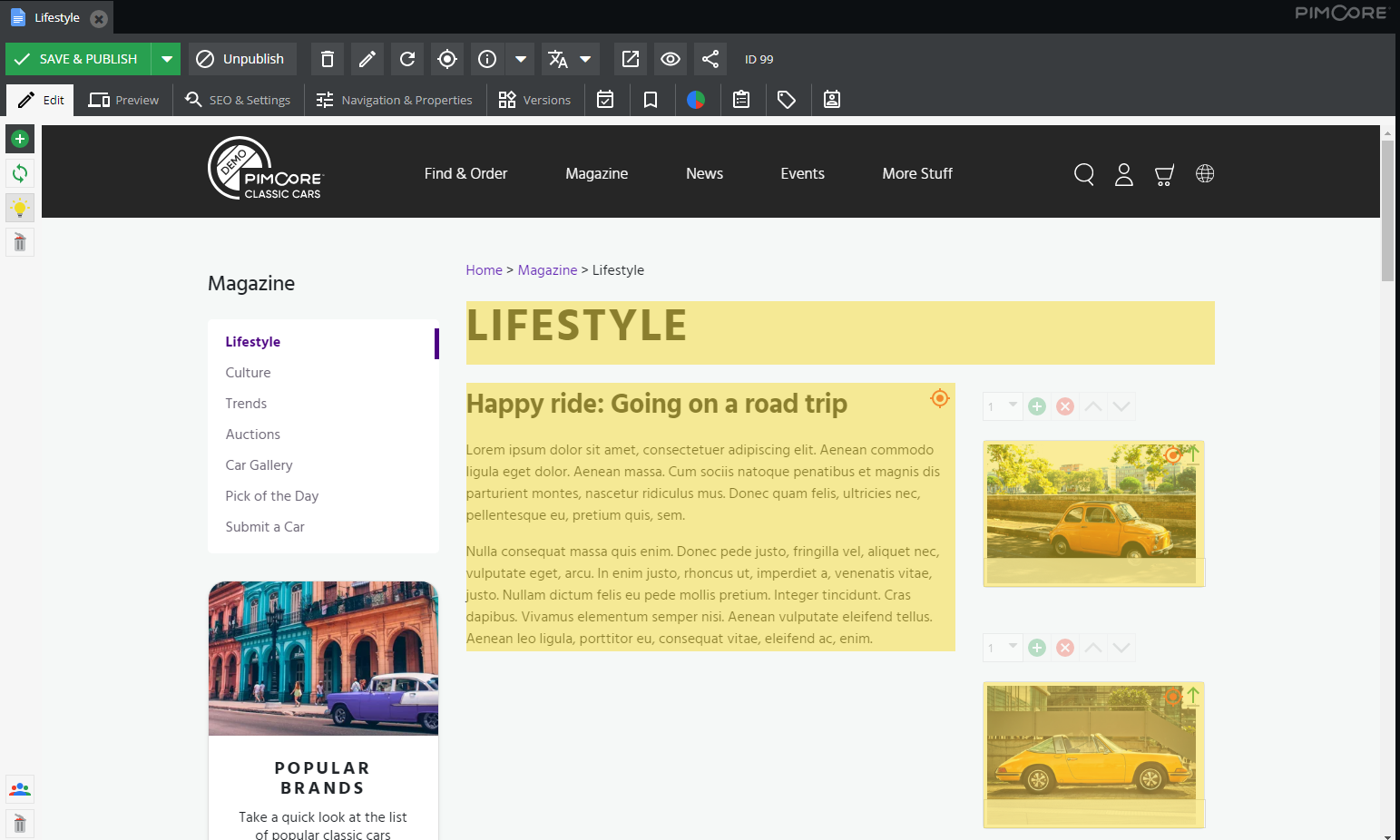
4. Workflow History

The Pimcore system has the option right under the “Notes & Events” tab where users can easily get the list of entire actions taken over the object.

Workflow History

Image Credit: Pimcore

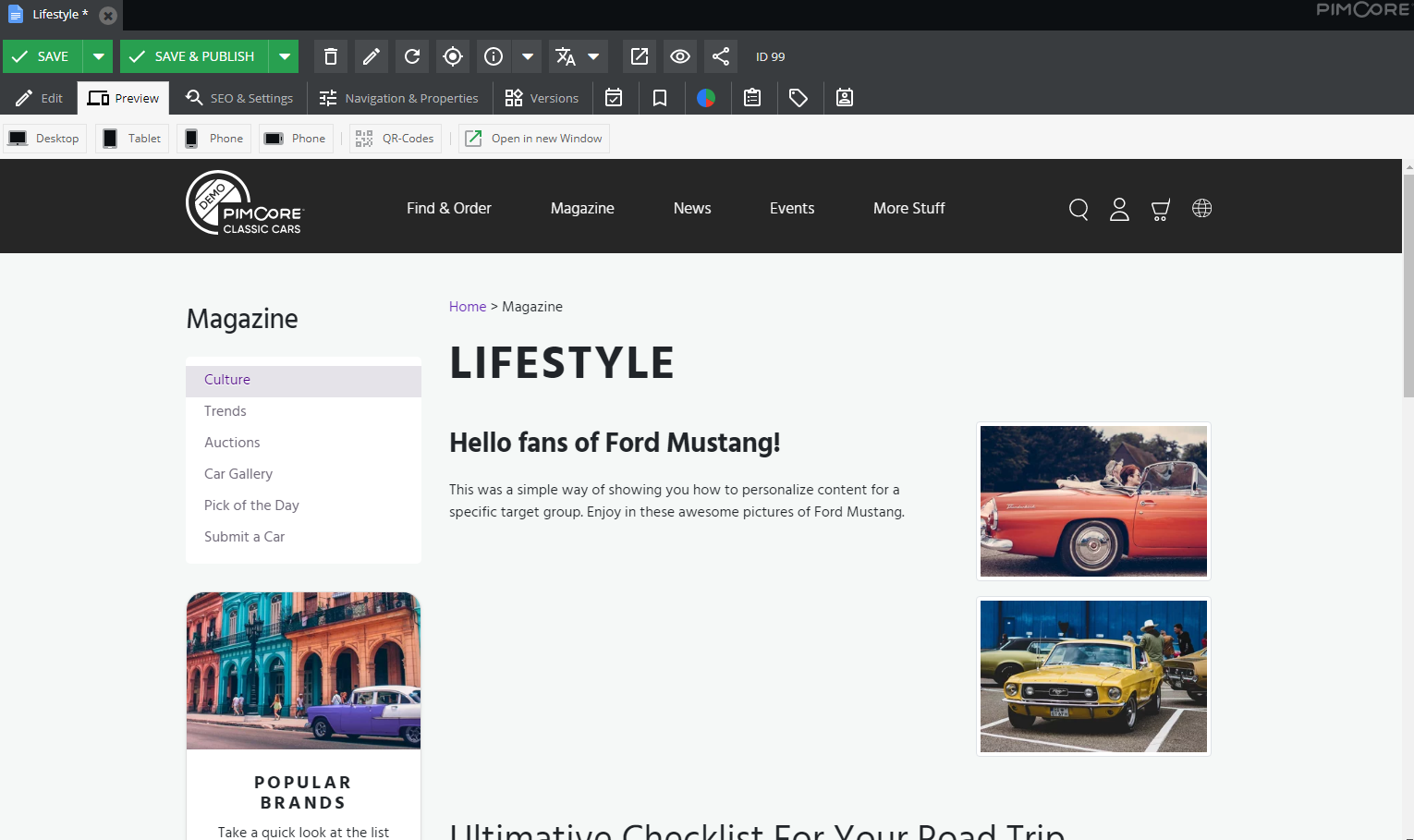
5. Workflow Overview

The system provides an additional tab for every workflow configured for a PIM element. In that additional tab, workflow details like place, graph, and all other details will be listed.

Workflow Overview

Image Credit: Pimcore

How Product Information Management workflow management boost business productivity?

A workflow is a program that identifies tasks in the process sequence, which informs team members when a task is essential. When an individual completes his role, the workflow is shown to be complete so that more work can be carried out and authorized.

Automation, efficiency, and productivity are the core concepts of a workflow. Everybody in the workflow has access to other activities so that projects are carried out promptly.

Product Information Management (PIM) Software can be interpreted and periodically updated by members of the company. PIM’s workflow allows companies to store and update information for everyday tasks when required.

Purpose of Product Information Management Workflow

Product information remains consistent across multiple channels through you process the data from a single platform. For instance, advertisers and manufacturers use the same data. If a user modifies the product data, it reflects in real-time, and all the users can access the updated information.

PIM software may also schedule reminders for companies using these data.

The purpose of integrating these data is to allow all parties involved in the distribution and marketing process to access them easily. This function improves the cross-channel distribution and minimizes errors.

PIM software can be very useful for large companies with high amounts of data. Also, small businesses would be astounded as the PIM Boost productivity.

PIM boost conversions and revenue

PIM will increase the conversion rate by 20-50 percentages, which leads to substantially higher profitability, sales, and success. PIM boosts productivity since one of the critical ways of driving a customer’s sales is to maintain a consistent impression and experience across multiple sales and marketing channels as described earlier.

The provision of the same product experience for a consumer through social media, ads, websites, and stores is vital for brand image and customer loyalty. It is very essential for the success of any retail business.

Flexible workflow management with PIM

PIM’s workflow management contains an automated engine that lets you describe, manage, and operate the workflows. It enables product managers to identify and model workflows according to their needs, set a deadline, have a better view of information flow, undertake an audit trail, minimize risks, and increase timeline estimation.

Effective workflow management of PIM allows managers to build and customize workflows as required to increase accuracy and productivity.

Product information workflow management

Brands have a better chance to communicate with consumers directly. But the growing number of touchpoints raises the risk that consumers will become frustrated or confused by too much conflicting product content.

Product data is typically hierarchical. Accessing product data must be supervised among product managers, legal teams, marketing and sales teams, etc. Workflow management is essential for aligning procedures, schedules, and workflows across teams.

Boost productivity through Product Information Management workflow management

1. Start reducing the use of spreadsheets

It will take hours to import the product description data into a spreadsheet manually. This method causes human errors due to incorrect information being entered. PIM helps in making product data accurate.

By entering mass product data and building workflows, users save time with PIM. For instance, you can set up a PIM workflow for authorization to update critical attributes. This allows you to share the correct information across the respective departments in a simplified way.

2. Keep in touch with group members

Cooperation among team members is necessary for any business to improve organizational performance. Users can interact across the departments in a PIM structure. This allows team members to update user details and ensures that all members are on the same page.

3. Automation is excellent

A significant benefit of PIM technology is automation. Companies can automatically generate information from various sources instead of manually extracting data.

It would be best if you focus on writing informative descriptions instead of worrying about where the data are. In this way, you can create better product experiences. This results in improved experiences with consumers and greater returns on investments.

PIM automation facilities also include the creation of customized networks. The channels can operate from eCommerce sites. PIM’s workflow management makes it simple if you want a new product to be distributed for a track.

4. The life cycle of a single product can be observed

Businesses must look at a product from the beginning to the end, to maximize their data power. Users will see the degree of completeness for a product through PIM technology. The PIM framework guides users through every step of a product life cycle ranging from image updates to SEO titles.

This methodical idea makes product data more accessible. Before an item goes to the market, businesses should have all the necessary information. This will lead to higher efficiency for companies. This is because they have full control over the life cycle of a product.

PIM also provides dashboards that display every product in a complete overview. Users will see what products are available for sale immediately. If it’s a product on Amazon or through the smartphone, your visibility is perfect.

5. Cost saving

Accurate data decreases the risk of incorrect product sharing of information. The data in PIM are configured through delivery methods, procurement procedures, and stored stock. As PIM solutions are easy to incorporate and allow to automate most of the workflows, businesses save money on management and manual ways of marketing.

Simplification of productive activities

Workflow management framework enables businesses to take advantage of powerful automation technologies. For example, manual data entry tasks are replaced by an automation solution, which collects and enters data into a centralized data management system.

A process management system greatly improves employee efficiency besides saving time and reducing errors. You are secure with understanding what tasks you have to do and enjoy working on tasks that make the business more profitable. Employees are now better able to control their time and communicate efficiently around the organization.

Bottom line

Organizations face more complexity and challenges than ever before. Using an integrated solution, such as workflow management they can experience unmatched flexibility and reliability for their businesses.

The centralization of product data & images is extremely important and helps in various ways to speed up the process. If several users and multiple teams work together to create the product content in the PIM solution, the proper workflow is necessary.

Why is Pimcore the Right Platform to Ensure the Success of Your Online Business?

When it comes to digital business, organizations are having cut-throat competition. Obviously, it is tough to attain remarkable success and maintain it without the right digital strategy.

Embracing the right digital platforms like Pimcore that are powered by advanced technologies, brands can definitely stay competitive and deal effectively in the ever-changing digital space.

The right digital solution changes the way you operate across the company. Most importantly, it helps organizations to work in more agile, faster, and communicative ways.

For the success of an online business, you need the right set of solutions for not only the operational department but also for other departments too. Here, I mean it is equally essential to consider the latest digital platform to support your sales and marketing activities.

So basically, you need a set of solutions for your online endeavor.

Where Pimcore fits in?

Pimcore is a data and experience management platform. It enables brands and startups with end-to-end and robust digital solutions to address their varied business requirements.

It allows companies to build solutions like

  • Product Information Management (PIM) – manage all the product data in a centralized repository
  • Master Data Management (MDM) – manage all the organizational data in a single platform
  • Digital Asset Management (DAM) – manage the media assets centrally
  • Customer Data Platform (CDP) – manage all your customers’ data in a single location to get a 360° view of each customer
  • Customer Experience Platform (DXP) – create the contextualized content for each customer to deliver the personalized experiences
  • Digital Commerce Platform – manage all your eCommerce related data in a commerce solution and create the product catalog effortlessly

Companies utilize one or more solutions from the above list to meet the different needs of various departments. It helps your varied teams like eCommerce, sales, and marketing in managing the massive organizational data seamlessly and creates compelling experiences for the customers.

Apart from allowing companies to manage the data, Pimcore enables them with the flexibility to distribute the product information across the online and offline channels. This philosophy of Pimcore allows companies to act quickly and in an agile way.

Let’s understand the contribution of Pimcore in making your online business successful.

11 Reasons that proves Pimcore is the right fit for the growth of your online business

1. Complete elimination of data silos, manage a master record of all the data

Data is the crux of today’s business world to gain a competitive edge.

When you manage your product data, customer data, marketing and analytics data, and other business data in different systems, it becomes challenging to collect, manage, syndicate, aggregate, consolidate and distribute them as and when required.

Most of the companies ignore the potential centralized data management where the data can be reused and merged easily. Eventually, it helps you to create and deliver a consistent brand experience that is the most beneficial factor from a marketing perspective.

Through flawless and uniform communication, it is possible to influence positively on the external stakeholders such as customers, vendors, suppliers, partners, etc., and thus improve the company image.

Pimcore manages all your data in a centralized system to eliminate the problems of data silos. While considering Pimcore, it is essential to analyze your system landscape and check out which existing data you can successfully connect, automate, and publish. Also, you need to make sure how you need to use the data and where.

Along with managing the data, it is essential to improve data quality. Before implementing a digital solution, you need to ask yourself in what form and where you need to improve the data quality. Pimcore allows you to keep enriching the data quality on the go seamlessly.

2. Ensured data privacy enables brands with secured data management

When it comes to data, the privacy of essential business information is always the topmost concern.

Pimcore enables companies with next-level data security. It also makes sure that your organizational and customer data are neatly managed in a single place in an aggregated manner.

Additionally, it allows you to decide in which system and where the data gets collected.

Implementing Pimcore, you can

  • Manage all the organizational, product, and customer data in compliance with data privacy laws
  • Provide information about the stored data rapidly
  • Delete the data automatically or manually if required

3. Rapid development of digital solutions

Pimcore allows organizations to develop advanced digital platforms by offering a holistic and flexible approach.

The flexibility of Pimcore lies in the variety of solutions it offers within a single platform to enable the brands with a complete system that simplifies the business processes and operations for your varied teams.

Moreover, Pimcore allows companies to create custom and complex data models as per their different requirements. As the importance of data is recognized everywhere, the benefit of custom data model creation seems quite relevant to the companies.

Do you want to understand the practical implementation of Pimcore’s data model capabilities?

Let’s get clarity on it through an example.

In 2020, when all the major events were banned across the globe due to the COVID outbreak, we converted an event platform into a delivery service. This happened within the two weeks’ time span. To achieve this, we connected Pimcore’s available layout components to a new data model of a delivery platform.

4. Use of Artificial Intelligence and Machine Learning open up the new opportunities

Pimcore has started integrating the latest technologies like Artificial Intelligence and Machine Learning by harnessing the potential of Google TensorFlow.

A general example of AI implication in Pimcore is the intelligent duplicate recognition of videos, images, and text. The recognition and search of object features in images. You can utilize the technologies for automatic product data enrichment from your online store.

5. Define a customized layout for your content for your specific target audience

Combine your marketing, customer, and business data with the behavioral data to create tailored content for your website to address the specific needs of the customers in order to enable them with a personalized experience.

Let’s get better insights into this with an example.

Provide a bunch of articles to specific target groups of your online store on different topics but relevant to your offerings. Analyze the users’ activities on your articles with the help of advanced marketing tools. Based on the analysis, you can easily define the target groups.

Then, send the offers to the respective target groups as per their interest and make sure that the targeted customers find it on the entry age.

While analyzing, you will realize that outdoor enthusiasts will explore the latest tent and hiking tools. While, on other hand, sports lovers will check out the details of sports related goods.

Apart from enabling your target audience with their expected products or services, it helps the organizations to increase conversion rates.

By delivering the right product or offer to the right customer, you can ensure the success of your online business. Also, you can increase customer engagement on your website by displaying the relevant products and offers immediately. If the customers won’t find the information they are looking for, they leave the store in a few seconds.

Personalization is the core offering of Pimcore. So, once you implement Pimcore’s Digital Experience Platform solution, practicing the DXP is not rocket science. In fact, it becomes your daily business.

6. Email marketing becomes more efficient and successful

As far as email marketing is concerned, you can send emails and high-quality newsletters by utilizing the email components of Pimcore. You do not require to integrate any other applications. Many organizations have implemented the DXP platform to automate their email marketing efforts.

MailChimp, the most popular and highly used email marketing tool across the globe. Pimcore allows you to integrate an n number of marketing tools including MailChimp.

There is a large customer base who are using MailChimp as their email software and highly admire its features. They prefer to utilize the possibilities of MailChimp or other email software that they are using explicitly.

To address such requirements, Pimcore allows brands to aggregate the data (customer segments, information about the newsletter lists, content, customer data including registration, address, and subscription) and synchronize the data continuously with MailChimp bi-directionally.

While hiring a firm like Credencys as your technology partner, we analyze and define which system is for which applications. This practice is essential so that Pimcore could deliver completely created templates or serve as a database to MailChimp.

Brands can unveil unlimited possibilities and implement Pimcore’s DXP as the customer wishes. Thus, it is no longer only about the companies who have to adopt the technology, but the technology too that needs to adapt to the business.

7. Leverage digitalization of your services

Along with accessing the newly integrated AI and ML technologies, it is recommended to consider all the solutions and features that have already proven themselves during the practices. It helps you to attain success fasters. One of such proven practices is the digitization of your most important services.

Let me clear this point to you through an example.

You need to implement an online pool planner that your customers use directly to compile their desired pool online or inspire themselves. For your business, this will work as a marketing instrument. But, for your customers, it also supports their decisions by providing partial automation of project planning and simplifying preliminary clarifications.

Pimcore enables you with a set of components that helps you to build an online pool planner. In such use cases, extensive use of the web-to-print component of Pimcore becomes quite essential. And, in case, your requirements are not satisfied with the standard components of Pimcore, you can use the freely available plugins that are developed and provided by the large tech community out there or you can build your own plugin.

8. Automate your most important media processes

Pimcore plays a vital role in automating your various business processes. When it comes to marketing automation, either you can use your familiar environment if you are using any or you can automate all the marketing processes by implementing the workflow of Pimcore.

Most importantly, Pimcore automates multi-channel publishing for organizations. Leveraging Pimcore’s capabilities, you can automatically use the product data to create the online and print catalog and send it to the right customer at the right time in the right format.

All your media and content are available in various quality, formats, sizes, and levels based on rules and then distribute or publish on social media.

Whenever you need to perform the same process again and again, then you should consider the automation for sure.

9. Your website can handle the mass rush efficiently

Marketing and other activities on a website is a constantly going process. These activities are continuously increasing at the regional or national level. It is a very common scenario for digital solutions that they have to perform excellently while they need to handle tens of thousands of users at the same time.

Using any random platform, your website won’t be able to respond to thousands of user requests efficiently.

Pimcore helps you deal with this probably by addressing the concept and modern development frameworks like MVC. In layman languages, implementing Pimcore, you can use data, media, function, and information in a resource-saving way.

Moreover, the platform also offers a backup of content delivery networks to outsource a large amount of information, especially the media assets. When it comes to hosting, Pimcore allows you to outsource the solutions to infrastructures of the leading internet service providers such as Google or Amazon or web services.

10. Manage your website in multiple languages

Localization is essential to growing your online business. It enables organizations with a lot of opportunities from a commercial perspective.

It may happen to you many times that you won’t be able to connect and engage the customers from other regions just because your website supports a single language. And, of course, customers from other regions won’t be able to understand your website languages.

But, language is no more a barrier to the growth of your business as Pimcore is here to help you.

Pimcore allows you to expand your business regardless of geographical boundaries. It helps you achieve internationalization or localization by offering multiple solutions for the translation of content or other data.

For instance, if you want to convert a website page into a different language, it is quite easy with Pimcore. You can simply copy and rearrange the content in another language in terms of content and appearance.

11. Website maintenance becomes easier like never before

Pimcore allows you to build the website using blocks so that website maintenance becomes easier and flexible. You can design the website as per your wish like you can arrange the text, functions, or graphic elements.

As the Pimcore allows to build the website in “Bricks”, it simplifies the implementation of complex use cases and adherence to structural or graphical concepts.

All set for your digital success story

Pimcore is an en source platform that allows you to develop and implement varied solutions using the different frameworks or create one solution using one or more or all the frameworks. The value that the platform delivers is incredible that is why the industry experts have started adopting and admiring the modern digital platform.

Credencys helps you pave the path of digital success faster

Credencys is a Silver Partner of Pimcore who has helped businesses for different industry domains by developing end-to-end digital solutions by offering a variety of digital platform development services.

We have proven expertise in utilizing all frameworks and capabilities of Pimcore to enable the companies with a complete software solution.

Harnessing the potential of Pimcore, we have helped the brands like IronLists and Kenmare by using PIM, DAM, MDM, DXP, digital commerce, and CDP of Pimcore.

We coordinate with the organizations, understand their business objectives or challenges, and suggest to them the right mixture of different frameworks of Pimcore. It helps them to achieve expected business growth through a single digital solution in a cost-effective way.

An Ultimate Guide to Digital Asset Management (DAM)

Digital assets are a crucial part of any organization. It helps them to attain maximum user engagement by offering rich media files such as images, videos, user guides, etc. Read out this Digital Asset Management guide to discover all the DAM-related aspects.

You might be managing all your digital assets in disparate systems. And, if you are practicing it for a long time that means you might be comfortable operating in that way.

But, are you aware of what you are losing by not considering centralized digital asset management?

I am sure you have no idea about it.

With the right Digital Asset Management (DAM), you can provide better customer services, create omnichannel experiences, and drive scalability within a specified time to attain remarkable expansion and substantial business growth.

Also, DAM manages all digital assets such as images, videos, documents, graphics, and other media files in a single location to allow you to reuse the data while creating new marketing material for your business.

In this post, we are going to explore each aspect of Digital Asset Management. Some of them are known to you and some of them are not.

Have a quick look at the points we are going to cover in this blog.

The journey seems pretty long. So, shall we get started?

What are Digital Assets?

The definition of digital assets keeps changing as more and more things go digital. It varies from source to source.

Usually, digital assets refer to images, videos, and other media content that represent a brand.

In addition to that, we can use the term digital asset for the digital knowledge base such as guidelines, training courses for new employees, books, and more. Along with that, documents, software, and many other things that hold considerable value for a company can be considered digital assets.

Here’s the list of the most common digital assets

Videos, photos, graphics, text documents, PDF files, audio files, spreadsheets, patents, slide decks, logos, animations, illustrations, audiovisual media, electronic mail, websites, etc.

You might have some assets that are not digitized from the beginning but later on, you need to turn them into digital format. For instance; you create a book and newspapers in printed form and later on you can turn them into digital files using the different digital publishing software available in the market.

What is Digital Asset Management?

Digital Asset Management (DAM) is a platform that allows brands to store, organize, find, share, publish, and retrieve digital contact. It allows you to create a centralized digital library that is accessible by internal and external stockholders.

You can enable your employees, partners, clients, vendors, and others to control your digital assets including photos, creative files, videos, documents, presentations, audio, and more.

Implementation of Digital Asset Management (DAM) helps organizations to drive efficiency in distributing content across the organization. It is a single source of truth for your media assets where you can allow your internal and external users to store, manipulate, share, and analyze all the branded content.

Considering a full-scale DAM solution for your organization, you can address several business challenges like

  • Asset duplication
  • Poor asset performance
  • Misplaced assets
  • Lack of brand consistency and version control
  • Underutilized and waste assets
  • Unintended sharing or misuse of unapproved assets
  • Time-consuming asset search

An advanced DAM solution can be integrated with any existing enterprise software and third-party applications used within your organization to work seamlessly in your existing workflow.

Before implementing a DAM solution, it is highly essential to plan taxonomy – the system of metadata and keywords. It helps brands effectively organize all media files so that the search for a specific file becomes simpler and faster.

Why is Digital Asset Management important to organizations?

Benefits of Digital Asset Management

Streamlined file repurposing and creation

Leverage the flexibility to create an asset once, edit the existing assets, and distribute the required assets rapidly through multiple output channels by developing a robust DAM solution. It streamlines file repurposing and creation for you.

Reduced file search time

DAM allows you to use metatags for each asset file. It simplifies the life of users as they find what they need faster. Also, it eliminates the requirements of recreating unfound assets.

Accurate analytics

DAM makes it easier to collect, interpret, and manage data from various sources. Empowering companies with powerful analytics, the solution allows them to make accurate predictions and take effective business decisions.

Enhanced brand consistency

DAM is highly used by companies specializing in content production and marketing teams. Enabling all your specialists (both internal and external users) with the same material, you can easily maintain brand consistency and style across all the different sales and marketing channels you are using for brand awareness and promotion.

Effective collaboration

DAM allows for smoother and faster data distribution and facilitates a set of tools for managing tasks such as assigning tasks to enterprise individuals, setting up deadlines, and more. It helps you to define the responsibilities of everyone and improve the collaboration amongst colleagues and teams who work remotely.

Accelerated processes

Digital Asset Management solution saves a lot of time for your employees that they spend on searching for the needed assets and eliminates most of the additional tasks related to finding an asset.

When a file cannot be found, we either upload the old file one more time or create the new one. It eats considerable working hours of your team and creates a duplicate file in the system.

While managing digital assets in the DAM, you can find your required asset data easily and quickly.

Improved time-to-market

Better collaboration and streamlined processes accelerate product time-to-market, updates, ad campaigns, etc. It helps you gain a competitive edge and improve products by considering customers’ feedback.

Provide a highly efficient workflow

Introducing automated workflows, DAM allows teams to keep projects moving forward and sends alerts to the stockholders so they can achieve their targets to meet deadlines for approvals and reviews.

Simplified license compliance

Now when you have all the assets in front of you with all the required information, it becomes easy for you to check the compliance with licenses that might have expired or changed. It keeps you updated with the required renewal of the documents.

What are the benefits of Digital Asset Management?

Benefits_of_Digital_Asset_Management

Digital Asset Management Development most commonly known as DAM has offered valuable business management techniques and reach techniques are highly preferred by the businessman who can easily organize, manage and share the information collected for marketing purposes.

Digital Asset Management is mainly useful in managing business activities that help in getting the attention of the end users and managing the business financially by keeping the operational costs in control. It offers a set of benefits while managing digital content letters discusses the advantages in brief:

1. Management of resources

DAM offers the best tools & techniques that help in digital Asset Management. It helps in collecting and organizing the data in a creative format. The organized data can be utilized by every professional working in the business organization.DAM offers the best techniques that maintain the intuitive hierarchy and store the assets perfectly well. It awards repeated entries of the data as well as the safety of data.

2. Useful metadata

Digital asset management tools categorize the information and organize it in the form of metadata. The metadata can be effectively used for brands and business promotional activities. DAM allows access to information at a high speed which is the main advantage.

It allows accessing hundreds of files and thousands of pages with ease and as per the specifications. The metadata can search the particular information and data relating to digital assets. You can make use of keywords to be tagged while searching the data.

3. Integrity & consistency

When handling multiple digital assets, the tools of DAM remain well-focused and consistent. It can allow outdated assets to be a part of the brand image building. The low-quality assets are also considered outdated.

DAM always looks for creating a brand image of the company by having a professional and harmonious approach. Integrating various tools and techniques, consistent efforts for brand building are made. According to a recent report, consistent brands are in demand by 20% more than inconsistent brands.

4. Higher efficiency

DAM offers a set of the most modern tools and the most effective techniques to be used and it helps quick search functionality, reuse of digital assets, and prompt decision-making. The digital assets establish the content by adding a graphical effect. It allows the metadata to be stored centrally. It can be allowed to be used for various functionalities such as quick search and re-usage of assets.

To boost efficiency and capability DAM doesn’t allow one-off design requests. The focus will be on creating new designs that can be duplicated from the already available designs.DAM offers the assets to be shared among the employees and displays them in real time.

5. Security

DAM offers internal security and it can allow authenticated users to access the assets. Digital asset management makes sure that permissions should be given to the users at different levels while accessing the assets, tools, and designs. The DAM system also sets expiry dates and sets limits on access to the employees. It makes the marketing team members feel relieved because all the assets remain well secured.

6. Usage analytics of assets

The assets analytics is useful in keeping the track of every asset and design. It makes it easy to understand that the assets are highly useful in marketing campaigns. The performance and usefulness of the assets help the management and the team members in making business plans & strategies.

7. Scalability of assets

Digital assets make the business effective and it also enhances flexibility while using various resources for business management. DAM also focuses on every activity of the business and makes the business run smoother.DAM offers equal benefits to small, medium, or bigger-sized business organizations and also helps in managing the business well.

8. Enhances the creative skills

DAM with its highly powerful business management skills can allow various effective techniques to be used. DAM offers various digital assets and creative designs to be a part of marketing complaints and can be used for effective business operations. DAM shares a significant part of the information among the other employees and departments and it gets beneficial for the business.

9. Reduces the cost of marketing

It is the main benefit of DAM that it keeps the marketing budget lower while planning and executing business promotional activities and while managing the business successfully. It offers a centralized approach and it allows important data to be shared as required.

10. Higher marketing turnouts

DAM tools and techniques help in expanding the business and extending the customer network. It manages businesses of different sizes by offering the most suitable business techniques and marketing activities. The business will grow consistently and will get support from the local market and new customers.

Who needs Digital Asset Management in an organization?

Who_Needs_Digital_Asset_Management

Sale and marketing professionals

By implementing a Digital Asset Management solution, you help sales and marketing teams drive efficiency in their day-to-day operations.

Marketing

Marketing and omnichannel professionals can create and store the different types of marketing material in the DAM system.

Sales

The sales team can be sure that they access the approved assets only and use them for their sales pitches. This helps them make sure the delivery of targeted and creative assets to the end clients.

Product managers

Product managers coordinate internally using the DAM to create marketing materials and gain authorizations from suppliers.

eCommerce manager

Digital Asset Management can be easily integrated with Product Information Management solutions, internal apps, content management systems, marketing resource management tools, product management tools, etc. It helps eCommerce managers to transfer the products in the webshop seamlessly.

Creative personals

Graphic designers of an organization can access DAM to upload new assets and access the already uploaded assets as and when required. Integration of creative tools like PhotoShop, Illustrator, etc. becomes easier that eventually increases the overall productivity of designers.

Communications managers

Communications managers are using the DAM to operate a press portal and automate the press release publications on the website.

IT professionals

Digital Asset Management is used by different teams of the organization including metadata managers, asset owners, archivists, and DAM managers. Based on the requirements of different teams, IT professionals need to configure the DAM system and assure their ingestion with proper information.

The IT team can assure the involvement of the right media asset-related data in the integration of DAM with other assets as well.

Moreover, DAM frees up the IT team, abolishes the FTP server, ensures compliance with security regulations, and unloads mail servers.

Documentation managers

A good DAM solution works as a centralized repository of all the documents for the documentation managers. They can share the same documents across the organizations and with all the employees by providing access privileges.

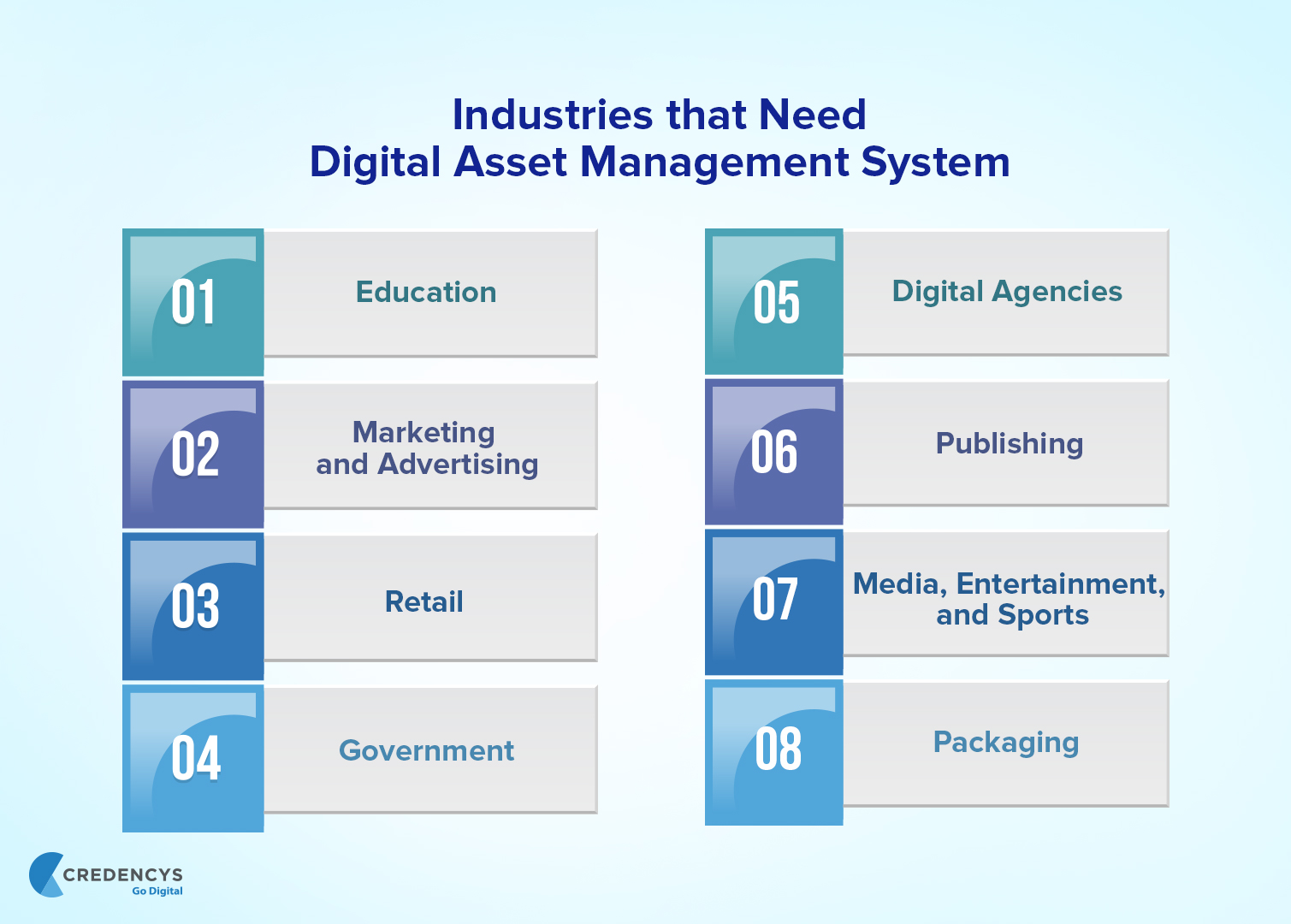
Which industries require to implement Digital Asset Management?

Industries_that_Need_Digital_Asset_Management_System

Education

Education institutes can implement Digital Asset Management to create targeted and customized communications quickly as well as use the material to outreach alumni or students. DAM also allows them to share event updates on varied educational platforms to gain acknowledgment and attention.

Marketing and advertising

DAM allows marketing and advertising agencies to automate product tasks so that they can create and share creative assets with their end customers securely.

Retail

Retailers that aim to improve customer engagement consider Digital Asset Management solutions to create more personalized and targeted communications that empower the loyalty and relationship of customers with their brands.

Government

DAM allows you to repurpose assets more easily. So, government agencies distribute creative materials quickly to the constituents in their regional languages.

Digital agencies

DAM simplifies the approval process of newly developed campaign assets for digital agencies. The solution provides extensive support to the agencies to access brand guidelines, lifestyle images, and logos to use as an integral part of campaigns.

Publishing

Publishers can leverage the proofing and approval capabilities of DAM and convert assets into different formats quickly.

Media, Entertainment, and Sports

Digital Asset Management allows the brands of these industries to ensure brand consistency and maintain brand control.

Packaging

Implementation DAM helps the packaging team to store and manage the packing assets in a centralized repository. It assists them to create and access updates with speed and agility.

14 Core features and functionality of Digital Asset Management

Key Features of Digital Asset Management

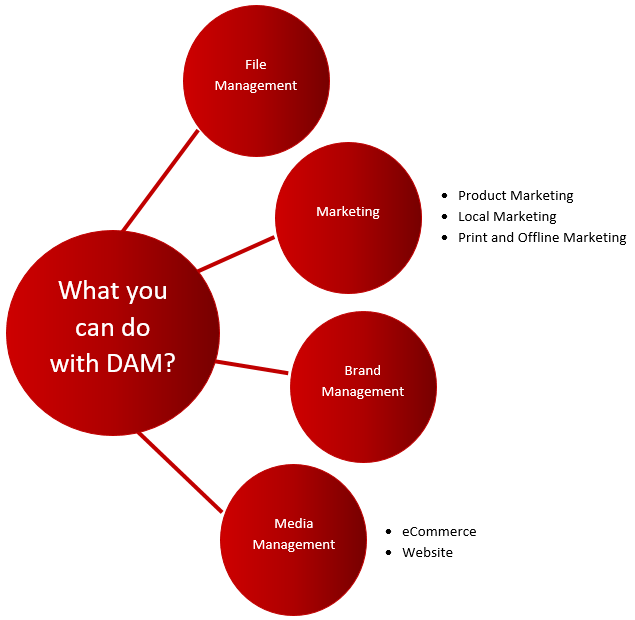
1. File management

Digital Asset Management contains the feature of file management that allows business administrators to store, edit, and share digital assets that include videos, graphics, documents, and audio files from an integrated and centralized location.

Asset Search

The Asset Search feature is the most robust and valuable component of file management. Specifically, it facilitates locating assets and quick search features that help users avoid recreating missing assets.

2. File access and sharing

It allows for the secure sharing of files across internal and external teams. You do not need to depend on CDs, shared servers, FTP, or send attachments via email. For access controls, DAM allows you to configure permission levels.

3. File search

DAM enhances the file search through the categorization and retrieval of AI-based tagging and metadata.

4. Workflow automation

Considering Digital Asset Management, you can get access to the exclusive functionality that streamlines the production and creation of assets by replacing the manual process completely and establishing an automated workflow.

The automated workflow feature of DAM enables the facility of project tracking. It helps business administrators with an assurance of project completion. Parallelly, it also ensures that no approval or proofing process is missed at any level.

5. Simple asset organization

DAM allows you to store and manage the assets in a centralized repository and share it with your internal and external stakeholders. You can organize the assets in folders, subfolders, permission-based, and collections as per the defined access control rules.

6. Digital publishing & distribution

DAM can be easily integrated with different applications or software as well as multiple output channels. So, you can distribute and publish digital assets on social media platforms, third-party distribution services, marketing automation solutions, content management systems, and so forth through advanced Content Delivery Networks (CDNs).

7. Rich media asset management

The media asset management feature focuses on managing images, videos, and audio files in both digital and analog formats. It allows organizations to store rich media assets including dynamic online ads, downloaded apps, and streaming videos.

Using Digital Asset Management, it becomes easy for you to update, store, tag, and run analytics on audio, video, and image files. It allows you to get video and image previews.

An advanced DAM also supports almost all file formats including PDF, JPEG, PNG, GIF, PSD, FLV, WebP, FLIF, HLS, documents, and more.

8. Remote proofing and approvals

The assets are easily available to collaborators to edit, review, and approve quickly at any time from anywhere. DAM digitizes the approval process which saves a lot of time and effort for the partners for performing the redundant tasks of sharing and approving drafts manually.

This process is possible to perform from remote locations so the team members who want to perform the approval and proofing process from a distance can easily do it.

9. Brand management

Leverage the features of brand management to manage your brand integrity efficiently. Actually, it is a by-product of digital asset management. It ensures the message, tone, and voice of brand assets across different delivery platforms and in multiple languages.

Harnessing the extensive potential of DAM, companies can gain maximum return out of the time, effort, and money inserted into marketing and communications.

10. Version control

DAM verifies the right version of those assets that are in use. It also allows for retention and tracking of version history.

11. Collaboration

Offering functionality like collaboration, Digital Asset Management empowers the teams and users of an organization to work together for asset development.

Implementation of the DAM not only stimulates collaboration across the groups but also increases productivity, drives efficiency, and enhances cooperation. Moreover, the feature of collaboration allows your team to create a project in real-time more often.

12. Marketing operations management

With the marketing operations management features, you can optimize the marketing activities that involve analytical content management and strategic planning. Organizations can use this feature of DAM in planning, managing, and analyzing the markets for their brand and the response of their customers. Eventually, marketing operations management ensures the companies attain brand consistency.

13. User access and authentication

Security of all digital assets is the prime responsibility of every system and user. DAM enables organizations with advanced layers of protection against data breaches. Administrators of the solution can set up permission-based access for the different users based on their department, role, location, and other criteria.

14. Metadata editing

To make the asset file search quicker and easier, Digital Asset Management provides the metadata editing feature to the users. It is more efficient to work with legacy metadata schemas. Allowing users to customize and edit the asset metadata, DAM helps companies to simplify their searches and make sure that the brands generate expected results.

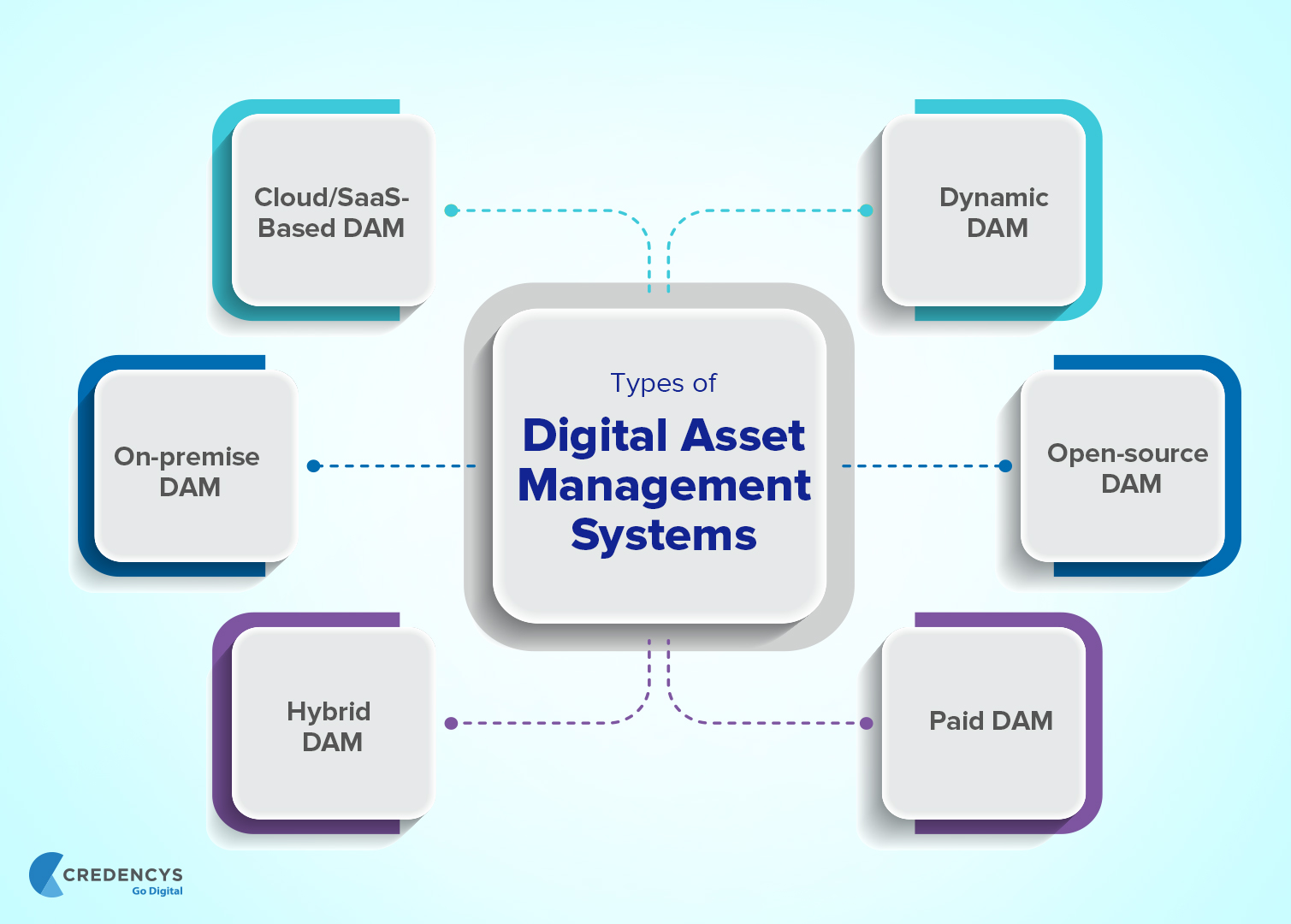
6 Types of Digital Asset Management Systems

Types_of_Digital_Asset_Management_Systems

When it comes to selecting the right type of DAM, you have multiple options to choose from. Well, we provide you with a brief about the different types of DAM systems to help you to pick the most suitable one. So, let’s start.

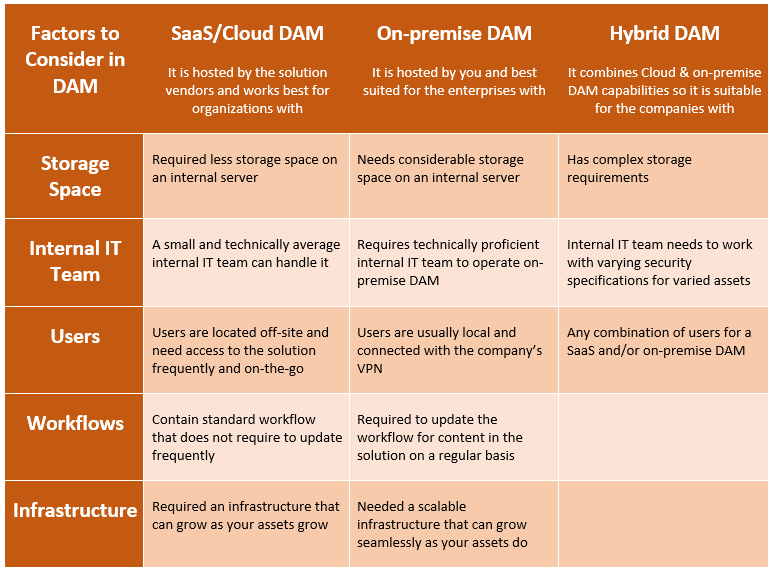
1. Cloud/SaaS-based DAM

This is a widely used and highly advanced DAM technology. Most organizations prefer the cloud/SaaS-based DAM platform that enables you with the benefits of cost-effectiveness, least maintainability, and scalability.

Key considerations of Cloud/SaaS-based DAM

  • A web-based solution interface makes it easier for your team to use and learn the system.
  • User authentication is quite simple. You can easily add or remove any user with no intervention from the in-house IT team. It also enables vendors and partners with quick access to digital assets.
  • As the solution is web-hosted, deployment of it is easier and faster.
  • It required no hardware integration. So, cloud-based DAM is the most cost-effective option for you. You can also consider a subscription model to operate effectively.

2. On-premise DAM

Are you a company that needs access to the extensive DAM features? If yes, then on-premise DAM is the right option for you to pick. Have a look at the essential information on on-premise DAM.

Key considerations of on-premise DAM

  • On-premise DAM requires IT maintenance and management to take care of security updates and system backup.
  • On-premise DAM solutions do not fully depend on internet connectivity. So, it eliminates the risk of downtime in a situation like an outage.
  • You can get support for the custom functionality in the on-demand DAM. Of course, you need to pay extra for that.

3. Hybrid DAM

You can opt for both cloud/SaaS-based DAM and on-premise DAM by considering Hybrid DAM.

For instance; you can manage marketing material and financial records in the Hybrid DAM which enables you to the benefits of the cost-effectiveness of the cloud-based DAM and higher uptime of the on-premise DAM platform.

Key considerations of Hybrid DAM

  • Providing asset access to the vendors and partners is simple
  • The DAM vendors manage all system backups, maintenance, and all upgrades seamlessly.
  • Hybrid DAM solutions do not fully depend on internet connectivity. So, it eliminates the risk of downtime in a situation like an outage.
  • As the Hybrid DAM contains a few cloud abilities, it matches your lower budget requirements too.

4. Dynamic DAM

By implementing Dynamic DAM, organizations maximize asset value, optimize visual experiences, and streamline asset workflow across all the different touchpoints.

Key considerations of Dynamic DAM

  • The single cloud platform provides a cloud-scale architecture that enables the brands to higher performance of the system.
  • Allows for API integration with different tools like Product Information Management (PIM), Content
  • Management Systems (CMS), and other project management tools
  • Helps you improve customer experience by creating contextual digital content and delivering it through the DAM.
  • Dynamic DAM automates the process of creating multiple versions of videos and images with no dependencies or delay.
  • Allow your creative, development, and marketing teams to collaborate seamlessly on the DAM to maximize the value of assets.

5. Open-source DAM

There are many open-source DAM platforms available in the market. They come with zero licensing costs. So, all you need to pay for is the implementation and customization of the platform. This definitely addresses your budgetary constraints.

Though it is cost-effective, it doesn’t mean at all that you need to compromise on features and functionality. By selecting the right DAM platform like Pimcore that covers all the basic and advanced features, you can build a robust solution. Moreover, you can easily integrate it with your existing enterprise systems and third-party applications.

The modern open-source DAM solution contains modules like workflow management, digital asset delivery, digital asset consolidation, metadata management, asset portal extensions, and more.

6. Paid DAM

Apart from the open-source, the rest including cloud-based DAM, Hybrid, Dynamic, and on-premises are paid platforms. The price may vary as per the features and effectiveness of the platforms.

4 most common Digital Asset Management use cases

1. File management

The widely experienced use case of DAM is file management. Digital Asset Management solution stores, manages, and catalogs videos, images, and other media assets. It allows you to search asset files by title, keyword metadata, and descriptions. DAM enables you with customized file management systems according to color, branding, and font preferences.

2. Enterprise brand management

The brand is not merely a logo. It is a perception of people about your organization that they have created through the interaction with your brand. Through effective brand management, you can gain higher business values. While poor brand management leads to customer loss, slow business growth, and lower sale.

DAM helps you tell your customers a consistent brand story by distributing media assets such as ads, presentations, videos, images, and other marketing content. Using Digital Asset Management, you can manage your brand well, connect with your audience effectively, and gain a competitive edge.

3. Creative workflow management

The asset creation ability of DAM plays a vital role for the brands that operate in an omnichannel and distributed way. The design and marketing teams can store and use digital assets across different media types with a simple conversion process.

Some of the DAM solutions are not so advanced when it comes to design creation. So, designers create the artwork with advanced design tools and store, manage, and organize them in a Digital Asset Management solution.

Though the DAM doesn’t provide any graphic design tool or creative suite to designers, it helps in the asset creation process by covering assets in appealing forms.

However, DAM streamlines marketing operations significantly by working as a centralized repository for the varied components of marketing campaigns.

4. Product marketing management

A robust Digital Asset Management with an advanced product database can capture detailed specifications, weight, SKUs, product data, and distribution channels. You can also link the DAM to different product literature such as branding material, packshots, and advertisements. Product marketing management is ideal for managing and sharing product information with distributors and retailers.

Real-time user stories of Digital Asset Management

Kenmare

Before Digital Asset Management implementation

Kenmare is used to manage the large volume of digital assets in disparate systems across multiple locations. There was no easy way for sharing, tagging, and tracking all the assets.

When they want to add media assets to a Product Information Management solution, they need to perform a manual search for the assets from the different systems and add them to the PIM.

It was a time and effort-consuming process for the Kenmare team.

To learn about this use case in detail, visit Kenmare.

After the Digital Asset Management implementation

Digital Asset Management implementation allows Kenmare to store and manage product images, documents, PDFs, excel sheets, and other product-related documents in a single platform.

Kenmare implemented Pimcore-based DAM which was quite easy to integrate with their PIM solution. Integration of PIM and DAM solutions streamlines the process of adding the required media assets from DAM to PIM.

Ironlist

Before Digital Asset Management implementation

IronList is in the business of importing and export of heavy equipment and machinery. They used to manage the data in local computers in different folders. They were looking for an effective way to store, manage, and organize the media assets of heavy equipment and machinery products.

After the Digital Asset Management implementation

Integrating Digital Asset Management in the web portal, IronList has simplified the storage and management of every digital file in a well-organizational and logical folder structure. Integration of the Category Image Management feature allows the client to manage the images under the relevant categories.

To learn about this use case in detail, visit IronList.

9 Best Digital Asset Management practices from experts

Digital Asset Management Practices

1. Audit your assets

Before moving ahead with the Digital Asset implementation process, you need to collect all your existing assets from the different locations and create a comprehensive inventory of them. You need to analyze all the assets to get clarity on

  • What assets do you have
  • Who is accessing the assets
  • Who creates new assets
  • What assets are being used for
  • Where assets are stored

Without the above-listed information, you cannot have an effective transition of your digital assets in the DAM.

This information is also required to define your DAM objectives and select the right Digital Asset Management solution with suitable features for your workflow.

For instance; if you have a large volume of media assets including videos, images, etc. that you want to distribute across multiple output channels, DAM implementation enables you with the built-in distribution that is an invaluable productivity tool. Also, the solution provides approval and workflow capabilities to ensure the quality of the assets.

2. Integrate DAM into your workflows

Implementation of DAM definitely changes your existing workflow as you set the new system as the center of your asset use. All the users who need to access the solution are required to be trained on how to use the new solution.

Also, redefine your access procedure to make sure productivity does not get affected negatively.

Ensure the new workflow is proficient to identify

  • Who is notified of use or changes
  • Acceptable file sizes and formats
  • How files are accessed, saved, and modified
  • How to track requests or changes

3. Leverage analytics

Some of the DAM solutions come with built-in analytics and enable brands with plenty of meaningful information. Companies can make informed business decisions about digital asset production.

Apart from that, with DAM, it becomes easy to find the asset you need at any point in time. You can also track who used an asset, for what purpose the asset was used, when it was last used, etc.

Modern DAM platforms contain the capabilities of Artificial Intelligence that help users with identifying, recommending, and tagging the value of assets.

So, whenever you need to create new digital assets, utilize DAM analytics to get insights about what media assets your marketing and sales teams are using the most. You can also have a quick audit of your existing assets to identify the gaps and define what is needed.

4. Standardize meta-tagging and naming conventions processes

To gain maximum benefit from the DAM’s search capabilities, you need to define a consistent and clear protocol for creating metadata and categorization of digital assets. By establishing a uniform process for tagging and categorization of assets for each user, you can enable the users with the required information on the fly.

Do you want to know how to define categories or meta-tags for your digital assets?

Here’re a few popular tactics to consider while categorizing or creating meta-tags for the asset file. You can use

  • Date
  • Campaign name
  • Metadata
  • Keywords or other tags

While considering dates as the file names for proper categorization or meta-tagging, make sure the date format is consistent. You can either use a particular date or a range of dates.

Considering the categorization and meta-tagging, you can leverage a highly organized, searchable, and refined database of assets.

5. Collaborate within DAM

One of the biggest benefits that you can leverage from implementing the DAM solution is it allows your teams to collaborate in context. Instead of relying on email communication that requires endless streams of back-and-forth, the built-in collaboration tools of DAM allow your team to communicate about assets in real time as they are being created, edited, and used.

6. Consider access control and alerts to avoid copyright issues

If you want to manage rights-managed stock photos procured for specific campaigns with security, DAM allows you to restrict access to only a few team members who need to access and use them. This helps you reduce the chances that an asset is being used for a non-approved purpose. This eventually decreased copyright infringement issues significantly.

If your DAM solution contains the feature of Alert, configure it in your solution so that the authenticated user whose license is expired can get intimation in advance. So, they can take the required actions to renew their license if needed.

7. Introduce role and permission-based access

In most organizations, varied professionals from different departments are allowed to access digital assets. Introducing role and permission-based access to the DAM, you can leverage

  • An added layer of security
  • Make DAM easier to use

For example; your different teams are working on multiple campaigns. You need to provide access rights to certain team members who are involved in a specific campaign. DAM allows you to provide access to the limited users who are involved in the specific campaign. So, only authorized users can access the assets related to that campaign.

DAM allows you to prevent users from accessing digital assets that are not approved yet for use or are currently under development.

Utilize the versioning capabilities of DAM that involve check-out and check-in functionality that ensures your teams that they are using the latest and approved version of every asset.

8. Automated workflow

Automation is the key requirement of every business these days.

Do you want to know how Digital Asset Management automates the manual and redundant processes of asset management?

Modern DAM solution contains the Workflow Engine to automate the varied processes of digital asset management. It saves considerable time and effort for your team by automating the tasks like converting images into different file formats, distributing the media assets across multiple output channels, and more.

9. Asset versioning

Over a period of time, companies accumulate multiple versions of digital assets. These versions could be related to marketing campaigns, branding, and others.

DAM allows you to manage the assets by creating versions. While creating the versions make sure that all versions are preserved and that you can distinguish between the versions. The easiest way to maintain versioning is by applying numbers for each version. For example: v1.0, v1.1, etc.

How Digital Asset Management contributes to your business?

DAM systems offer the most effective solutions to all types of problems that do not control the assets properly.

Following the given steps will help you to organize the assets and also the users.

Understand workflow

DAM defines various hierarchies and allocates the tasks. It allows effective work slow that streamlines the entire system.

Restricting access and permissions

DAM keeps track of every activity including sharing of assets among the employees. That it can be secured well by offering restrictions to access. Individuals are given permission based on time duration.

Effective usage of metadata

Metadata can be effectively used by setting tagging and also managing the Asset information conversion. The designs in form of text images, audio, video infographics, and other types of data can be used in the marketing campaign.

Training Schedule

Every user can be offered training to make use of DAM services. The users should understand the various techniques for managing and sharing assets.

Support services

When you decide to buy the system or when you subscribe to a useful model. You can choose the best suitable model for your business. You can change the system according to the requirements of your business requirements.

Do you really need Digital Asset Management?

Undoubtedly, the DAM enables all organizations with robust features and functionality that drive tremendous value by streamlining the asset management processes for an organization. Still, the companies need to analyze, do they really need to implement a Digital Asset Management solution.

Rather than just putting blind trust in the solution provider, as a business owner, you need to identify and understand the needs related to asset management within your company.

I would like to help you by suggesting in which situation you can consider a DAM solution.

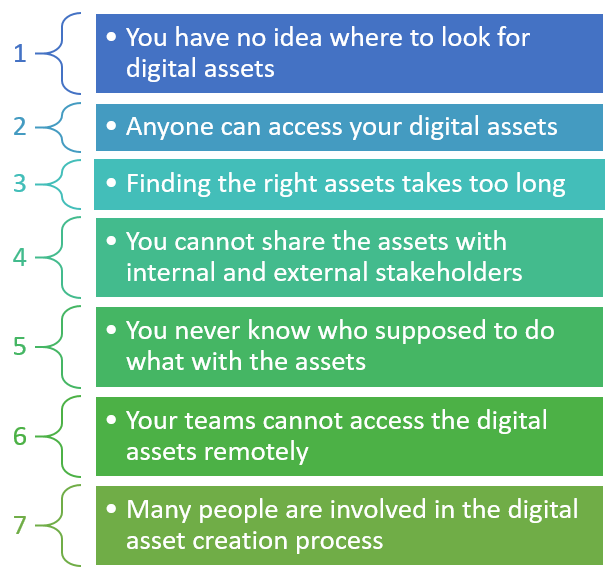
  • Tracking marketing projects seems difficult to your teams
  • Complex asset approval and version creation process
  • Uncertainty whether your different teams use an approved version of the asset
  • The problem in finding assets and utilizing them one time one
  • Uncertainty about the use of digital assets by external partners
  • The problem in converting digital assets into the different formats needed for varied campaigns
  • You need to create too many versions of assets or have version control issues
  • If your teams need to collaborate from remote locations
  • You require regular downloading of media in different formats and sizes on the fly
  • If you have confusion related to user permissions/access
  • You are losing 5 or fewer assets annually
  • You have budgetary constraints for investing in an enterprise-class DAM solution
  • Digital assets being used are not brand-consistent
  • The free solutions such as Google Drive or Dropbox or Box, etc. that you are using don’t have the functionality you need
  • There is difficulty in tracking how assets are used and by whom
  • Constantly increasing number of delivery delays and missed deadlines
  • Manual process for sending out assets
  • You do not want to appoint any resource for an Asset/Metadata Manager role
  • You are dealing with errors or discrepancies in distributed creative
  • You are losing 30 or more assets annually
  • Your DAM requirements are not handled by your existing document management system well
  • You need to deliver contextual content to different audiences across multiple channels
  • You have too long approval processes
  • You are using a DAM of a digital creative agency by paying them the required proportion
  • You are having creative assets that are primarily text-based
  • You are using a web CMS that allows you to resize, upload, and publish images and other assets
  • Your marketing team produces large volumes of marketing content
  • You realize that you are purchasing too many new assets

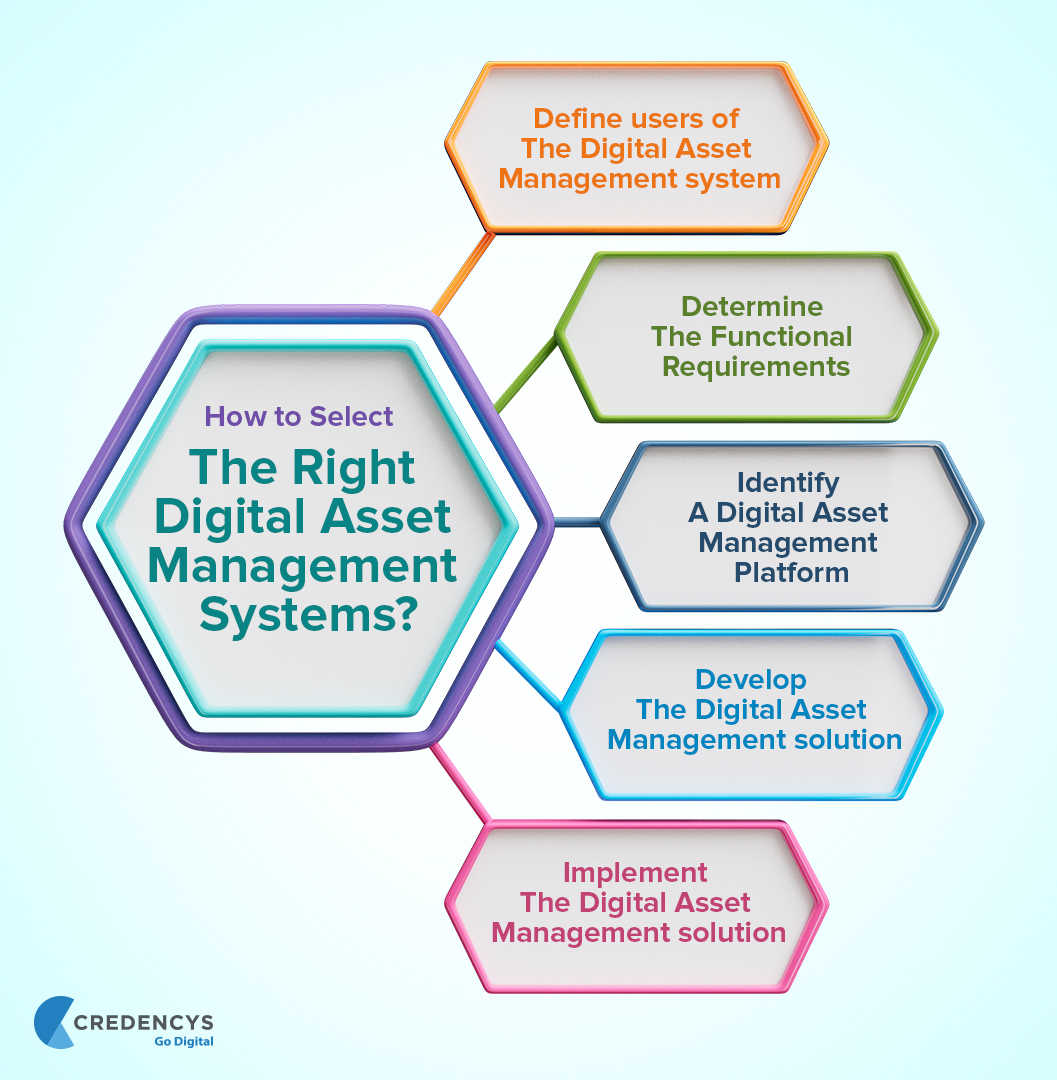
How to select the right DAM system for your organization?

To select a suitable DAM, you need to consider different aspects. Here’s the process you should use to choose the best one.

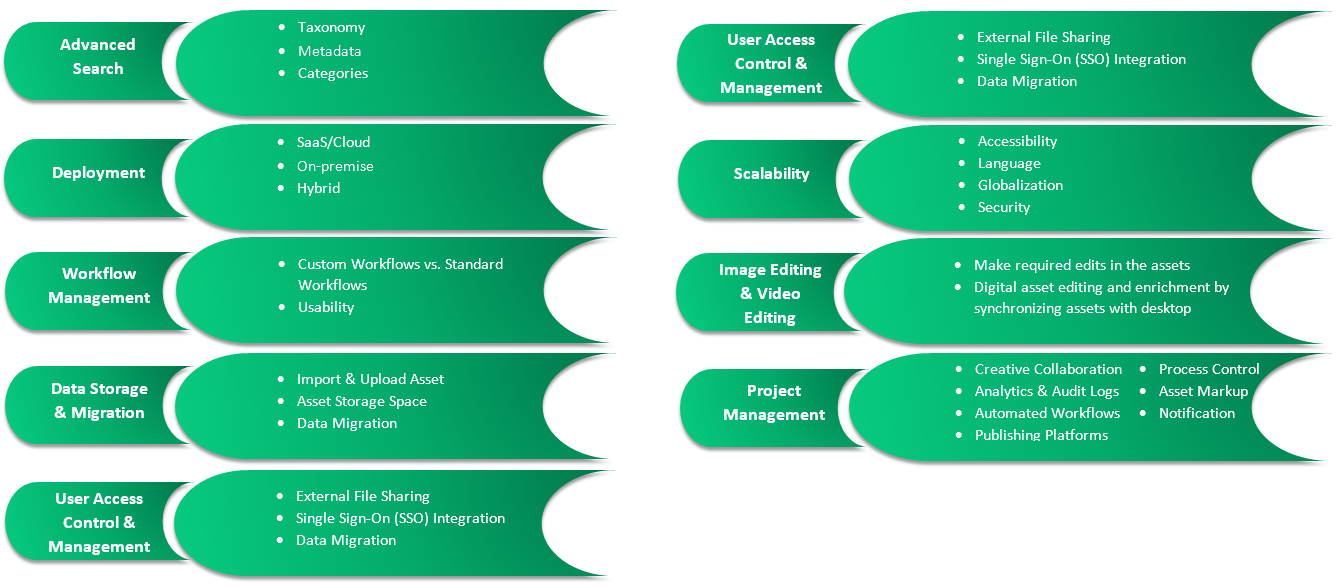
How_to_select_the_right_Digital_Asset_Management_system

5 Top Digital Asset Management platforms

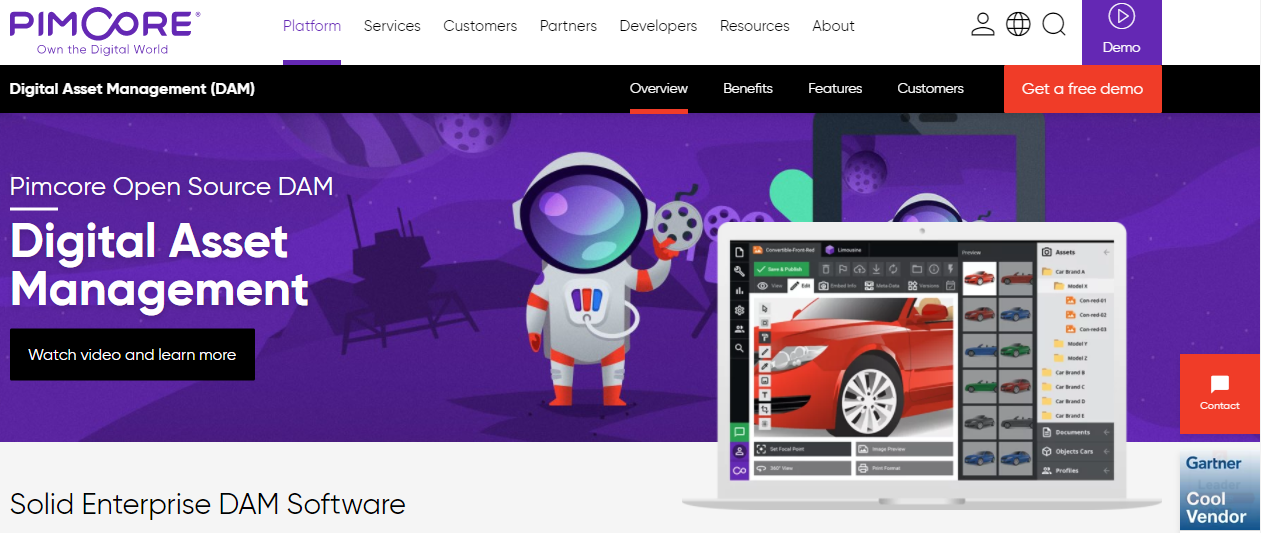
1. Pimcore

Pimcore DAM

Pimcore is one of the most reliable digital platforms that enables you with six different frameworks. One of the most essential frameworks of Pimcore is Digital Asset Management.

It allows brands to leverage centralized management of all your media assets such as images, videos, documents, graphics, and other media content. It enables organizations with the benefits of attaining brand consistency, creating a compelling customer experience, and removing data Silos.

Key features of Pimcore’s DAM

  • Digital asset consolidation
  • Metadata management
  • Workflow management
  • Digital asset delivery
  • Works with any file type
  • Image and video conversions

It provides a set of enterprise-class solution features such as Enterprise Metadata, Pimcore Direct Edit, Brand Hub & Asset Sharing, Asset Experience Portal, Enterprise Print Publishing, and Microsoft and Adobe Integration.

2. Adobe Experience Manager

Adobe Experience Manager DAM

Adobe Experience Manager is a cloud-native DAM platform that allows companies to manage thousands of digital assets at any scale. Being a robust and feature-rich DAM platform provider, Adobe Experience Manager enables users with features like asset automation to utilize AI capabilities to automate the process of asset distribution, file tagging, image cropping, and more.

Adobe allows the brands to perform the varied asset management tasks in minutes that usually take hours to be completed.

Key Features of Adobe Experience Manager

  • Asset collections
  • Brand portal tools
  • Asset check-out
  • File version history
  • Multilingual asset management
  • Asset insights
  • Support for advanced file types including panoramic, AR, VR, 3D, etc.

3. Bynder

Bynder Digital Asset Management

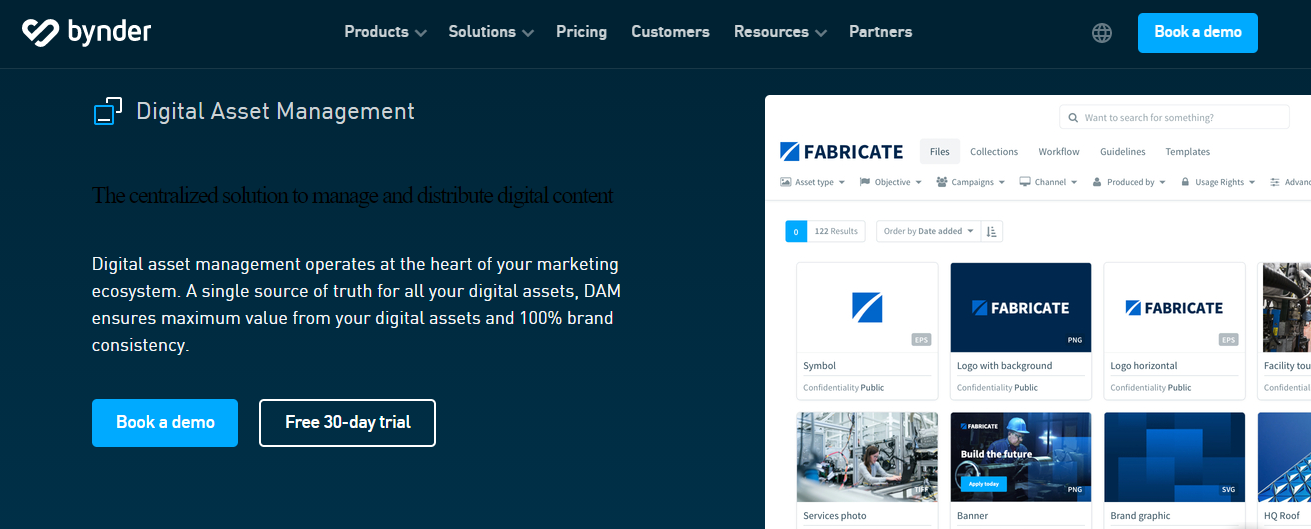
Bynder is a renowned digital asset management software used by popular brands such as Canon, Spotify, Puma, etc. You can automate creative workflows with annotations, customizable approval paths, and versioning.

It allows users to create marketing content by leveraging easy-to-use brand templates. Moreover, Bynder supports third-party integration such as Google Analytics, Magento, and more.

Key features of Bynder

  • Intuitive filter
  • Access and usage permissions
  • File sharing
  • File downloading in varied format
  • Automated content distributions

Bynder enables you with the advantages of an organized and easy search for the files, control usage, and access rights, quick sharing of files externally and internally, download your files in the desired format, and automated distribution of content across multiple customer touchpoints.

4. Canto

Canto DAM

Canto is the pioneer in the Digital Asset Management domain. It was founded 25+ years ago and during such a long journey they have grown its DAM platform extensively to meet the changing market needs and customers’ requirements.

Canto DAM is used by many leading organizations including NASA, United Airlines, Harvard University, etc. It allows the users to add digital assets by creating folders and albums and organizing the different files such as documents, presentations, videos, images, and other types of file formats automatically.

Key features of Canto DAM

  • Advanced search tools
  • User permissions
  • Security features
  • Custom shared libraries
  • Visual previews
  • Collaboration tools
  • Reporting, and more…

5. Cloudinary

Cloudinary DAM

Cloudinary is considered the best Digital Asset Management platform by 6000+ businesses. Peloton, Lyft, Petco, Under Armor, Sony, Whole Foods, and many other brands have trusted and utilized the platform.

Well, the platform is paid. You are allowed to access the limited features of Cloudinary’s DAM platform for free. To use the advanced features, you need to purchase a subscription plan.

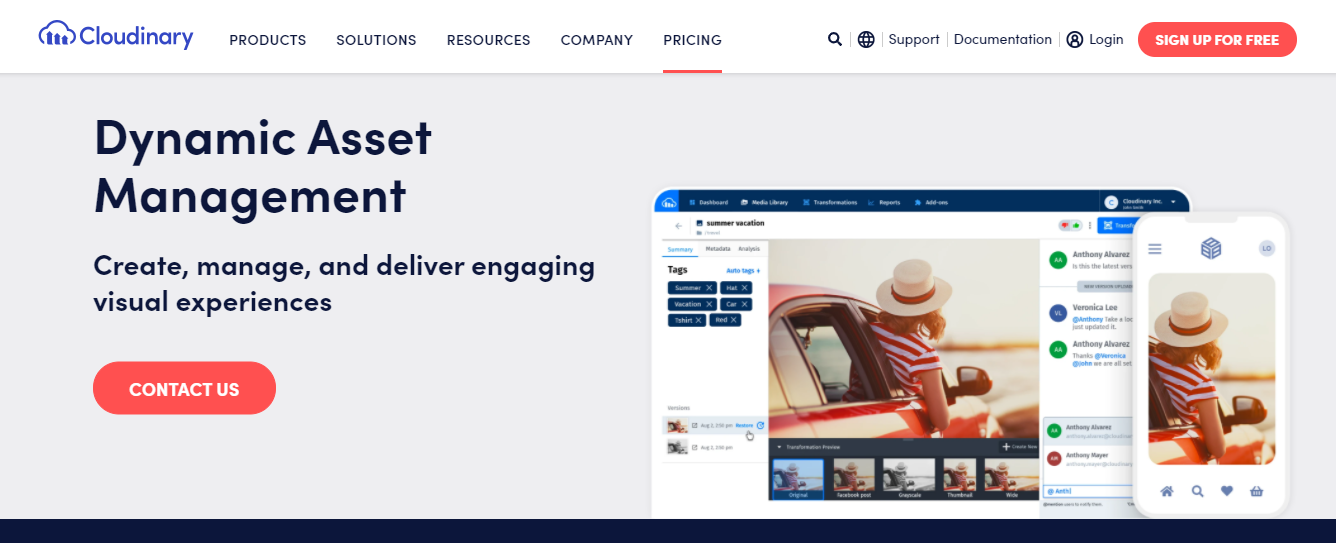
Moreover, the Cloudinary contains Artificial Intelligence capabilities that help you in asset tagging. Organizations can utilize the automated tagging feature by facial recognition, object, and color. The assets stored on the Cloudinary DAM can be manipulated in real-time.

Key features of Cloudinary DAM

  • File sharing and access
  • File search
  • Asset organization
  • Media asset management
  • Digital distribution and publishing
  • Version control
  • Brand management

How Digital Asset Management helps you maximize ROI?

Implementation of Digital Asset Management helps you increase your Return on Investment. For that, you need to have the right strategic planning in place.

Determine what asset management activities cost you without implementing the DAM. To know that, you need to evaluate that cost for

  • Asset searches
  • Asset distribution
  • Asset re-creation

After the successful DAM implementation, analyze the revenue factors that get affected by the introduction of DAM.

  • New revenue streams
  • Resource availability

Once you start working with your DAM, identify how long it will take for your DAM platform to pay for itself.

Verdict

Empower your internal teams and external users by creating a centralized repository of all your digital assets. Along with storing and managing the assets, you can utilize the DAM to streamline and automate the various asset management processes.

Pimcore enables you with a highly trusted and widely adopted DAM platform that ensures the brands with robust yet cost-effective Digital Asset Management solutions.

Book a 30 minutes free consultation with our DAM experts to get personalized consultation on your DAM requirements.

15 Best Practices for Successful Product Information Management (PIM) Solutions

Growth of the eCommerce domain is increased by leaps and bounds with each passing year as it allows manufacturers, retailers, and wholesalers to sell their products regardless of geographical limitations.

To sell the products online, you either prefer to sell on the marketplaces or develop your own Pim eCommerce solution. But, in both cases, the product information is the key. You need to ensure the customers receive relevant and updated product information to make the right decision at the right time.

Here is where Product Information Management (PIM) comes into the picture.

Let’s start exploring the core aspects of Product Information Management.

What Is Product Information Management?

Product Information Management is used to manage massive product data in a centralized platform. It allows entrepreneurs to collect, manage, enrich, syndicate, and distribute product data through a single place.

It allows brands to create a product catalog and keep them updated with the latest product information. So, when you distribute the catalog across the online and offline platforms, your target audience gets access to the latest information only.

Moreover, PIM allows you to manage all the information related to products such as name, title, descriptions, SKUs, UPCs, materials, measurements, warranties, ingredients, certifications, spreadsheets, assembly instructions, designer notes, style sheets, videos, images, documents, and much more.

To get exclusive insights on PIM, read What is PIM? – An Ultimate Guide for Product Information Management.

Rise of Product Information Management Market

According to MarketsandMarkets, “It is expected that the global Product Information Management (PIM) market size to grow from USD 7.0 billion in 2019 to USD 11.4 billion by 2024.

Every business that wants to centralize the product information, restrict data control personnel, increase overall productivity, and enhance data experiences prefer the PIM implementation for sure. Thus, it is expected that the PIM market will reach new heights by 2024.

Before moving ahead let me clear that you have to consider different practices before and during PIM implementation and after the PIM implementation. By following these practices thoroughly, you certainly taste the tremendous success that you are expecting from a Product Information Management system.

10 Best practices for Effective Product Information Management (PIM) Implementation [Before & Through]

1. Consolidate all product information

This is the first step of establishing an infrastructure to manage product information across your company from a single location. PIM is the system that manages all your product data in a centralized platform.

Using the PIM solution, your team members can manage, access, and publish the product data to one or multiple locations. Along with consolidating all the data in a single location, it is important to create consistency in terms of sharing the product data in a pre-defined structure.

Consolidation of all the product data enables you with several benefits such as

  • Reduced errors and fewer redundancies in the product information
  • Greater scalability in terms of adding new sales channels quickly and easily
  • Improved traceability
  • Better control over how products are managed

2. Understand your business objective for implementing a Product Information Management (PIM)

Do not make a decision to implement a PIM just because your competitors are doing it or someone suggested you implement it. If you do so, there are full chances that you might end up taking the wrong decision.

Before considering PIM, you need to analyze your business objectives and conduct a detailed study about how the PIM system helps you to accomplish your business goals.

It helps you to determine the parameters that help you define success and set expectations. Keep your objectives in the mind and develop your PIM that supports your eCommerce strategy.

Check out the below-listed objectives. If you are having any or many or all of them, then PIM will definitely help you to achieve them.

Accelerate time-to-market

Improve new product onboarding time and deliver the updated content faster across multiple channels including online marketplaces, eCommerce stores, mobile platforms, websites, print, catalog, and more.

Improve customer experience

Drive tremendous customer engagement by enabling them with complete product information including detailed product descriptions and images that establish an emotional consistency across different sales channels.

Deliver high-quality product data

Leverage the bulk editing tools and streamlined workflow of PIM to manage the product information in a complete, comprehensive, and error-free way across all the output channels.

Expand to new channels

PIM allows you to sell and market your wide range of products on the new sales channels. The solution enables you with several advanced capabilities that allow you to populate the product data automatically to these new channels with rich product information.

Enhance team collaboration

Increase the participation of the functional team to improve the quality of product data.

Boost marketers’ productivity

When the data is scattered across the different spreadsheets, it becomes a challenging job for the marketers to collect and syndicate the product data in order to get a unified view of all product information.

Moreover, PIM enables you with an efficient process and a guided interface that saves a lot of effort and time when it comes to product catalog management across different output channels.

Faster vendor data onboarding

Do you want to streamline the product data gathering process for your internal team and the suppliers?

PIM allows your suppliers to update their data directly in the system. With the flexible supplier information onboarding, you can improve vendor collaboration by allowing them to provide your required product data in your preferred format.

Market your products across new regions

Advanced translation and workflow management make localization more efficient and much faster than ever before.

3. Set up your Product Information Management (PIM) requirement and implementation plan

Based on your collected product information and business objectives, you need to define your PIM implementation plan. You need to determine

  • Do you want to manage your products from scratch?
  • Do you want to model your entire catalog?
  • Do you want to consider the “land and expand” approach to begin with, where you can start with a subset of your products, brands, channels, locales?

You need to make the right decision by analyzing your business objectives for PIM implementation and the maturity and complexity of your company.

To ensure the expected success through PIM, it is crucial to design your PIM project for all your existing and upcoming requirements, regardless of project size.

Small approach

Adoption of a small approach is the best way for large-scale organizations. It becomes easy for you to implement and test the PIM connections and processes with your other existing business applications and ensures everything works as expected.

Starting with a small approach, organizations can launch a single product line in a single region to test the market response for that product. Instead of taking the risk of introducing an entire range of products to a new region, it is a smart and cost-effective approach to analyze single product performance in the new location first.

Based on the response of the target market, you can roll out other product lines one by one or/and expand to the other areas of the specific region one after another.

Full-blown approach

Organizations also choose a large approach where they roll out all that products in one go. With this approach, you can realize the benefit of the PIM solution and experience the centralized data management capabilities of it.

Whatever approach you consider, you need to make sure the PIM implementation is right for your business objectives. To ensure that, ask these questions to yourself before making a concrete decision.

  • Should we tackle the entire catalog?
  • Can we start with a subset of products?
  • How crucial time-to-market for our PIM implementation initiative?
  • Which channels are most essential for our business?
  • Which regions/locals are more important for us than others to focus on at the initial phase?

4. Identify the right Product Information Management (PIM) platform

Once you determine the business objectives and PIM requirements of your organization, the next step is to select the right PIM platform.

Before coming to any conclusion, you need to thoroughly understand the existing condition of your business and determine all your needs that are connected to a PIM. You need to make a choice of a PIM platform that fulfills the expected gaps in your product ecosystem and helps you achieve your business goals.

Investing in the right PIM platform is the best Product Information Management strategy that allows you to set the right expectations, measure PIM’s effectiveness, and develop advanced eCommerce capabilities.

A lot of options available to you when it comes to the PIM platform. All you need to do is analyze all the options in detail and then make a perfect choice for your organization. Here’s the list of most popular PIM platforms:

  • Pimcore
  • Akeneo
  • EnterWorks
  • Agility Multichannel
  • PIMworks
  • Salsify
  • inRiver
  • Informatica
  • Plytix
  • Stibo Systems
  • Syndigo

Do you want to get detailed insight into the key features and core benefits of each platform listed above? Read Top 11 Product Information Management (PIM) Platforms to Consider in 2020 & Beyond.

5. Select the right Product Information Management (PIM) Team

Before moving towards defining a process, it is very essential to select a team that takes a charge to develop and implement the PIM solution as per your business-specific needs.

Make sure they have all the required data about your products, eCommerce channels requirements, and desirable catalog format.

Choose an experienced PIM solution development company like Credencys Solutions Inc. that has a team of skilled professionals who have successfully developed and implemented PIM solutions for the clients like Kenmare and IronLists from different industry domains.

The core purpose of PIM implementation is to help your marketing, sales, and eCommerce teams by simplifying, automating, and centralizing the management of multiple products and their attributes. So, identify your key team members who are going to use the PIM solution to manage the product data as well as save time and effort.

6. Define the process

Now that you have chosen your team, you need to focus on establishing the process that helps you realize the most product information management benefits. Start figuring out the best information management enrichment practices and analyze how your teams fit in the process.

Make sure all your team members are domain experts who have profound knowledge of how the workflow should function. Furthermore, as per the suggestion of your professionals, you need to enhance the process as moving forward.

To leverage the successful PIM implementation, ask your team to perform only high-value tasks, and leave the mundane activities of product information management.

For example; your team can sidestep repetitive tasks like attending complex datasets to computers. Instead, they can focus on establishing an emotional connection with the customers by writing compelling product descriptions.

7. Determine roles and responsibilities

Product content impacts customers’ buying decisions a lot. Thus, allow your teams to collaborate directly within the PIM solution to eliminate the content errors and speed up the workflow significantly.

To enable the customer with the right and updated, add your eCommerce managers, marketing executives, and external collaborators like wholesalers, vendors, distributors, etc. in the process of producing the product content.

Selecting a PIM system that allows you to create different roles with various access levels at minimal risk is critical work. PIM platforms like Pimcore allow you to include as many access levels as you want including admin, product management, publishers, read-only, and more. All the users consist of a set of default permissions based on their roles and responsibilities.

With Pimcore, you can be more granular to allow your users to perform only certain actions.

Internal users

With granular permission, your respective users can

  • Create product attributes
  • Update product attributes
  • Read product attributes
  • Delete product attributes

There are many other permissions too that you can define in the PIM solution based on roles and responsibilities such as

  • Update products
  • Sync products
  • Request approval for product
  • Publish products and more…

External users

Invite your wholesalers, suppliers, vendors, distributors, and other external users to collaborate on the product content. Ensure the external users provide you with the right data in the desired format.

You have full liberty to define how much access you want to provide to your internal or external users. The PIM system also allows you to keep a history of every action performed within it and revoke the access permissions if required.

8. Provide training to your team for Product Information Management (PIM) adoption

To leverage the utmost benefits of PIM, you need to provide training to your team and make them understand how the system works and how it streamlines their day-to-day operations. The success of PIM implementation depends on how smoothly and effectively your team adopts it.

Your employees are well worse with the existing system so they might resist this new change. Moreover, the adoption of new platforms requires establishing new habits and understanding of new processes. Thus, it is very obvious they won’t be ready to work with the new system.

You can address this issue by providing thorough technical and functional training to boost the confidence of your team about working with a new system.

Technical training

Provide technical training to your technical team where you can explain the technical implementation system integration and performance tuning.

Functional training

Enable your marketing and catalog management teams with functional training where you can cover day-to-day operations and use of PIM. You can make them understand how they can organize products, manage media assets and attributes, and create a catalog using the PIM.

Every new change seems tough to adopt at the first glance. So, support your team in adopting the new ecosystem of product data management seamlessly and ensure a successful implementation of the PIM that maximizes your operational and monetary benefits.

9. Avoid managing product data in multiple systems

According to research, more than 50% of the firms are managing their product data in more than 5 systems. With such scattered data, it becomes difficult for you to consolidate, syndicate, and enrich the product information as and when required.

Also, if you want to get a unified view of your product information, you need to invest a lot of time and effort in order to collect the data and organize them well.

Without a centralized system, you won’t be able to manage the massive product information effectively.

If you are thinking of managing all your product data in a database, then you are making a big mistake as you can store and manage the data in the database but it won’t allow you to view and access your data without a user interface. Thus, you need to build a front-end UI.

Eventually, you end up spending on a solution development that connects the database and provides you the output through a UI that costs you more than a PIM system.

10. Data integration with different systems and platforms becomes easier

Data integration with existing enterprise systems

If you are already managing the product data in multiple existing enterprise systems, then you might be hesitant to implement a PIM solution by thinking that integration of your massive product data will be problematic.

Moreover, you want to want to continue managing the product data on different platforms due to some business purpose.

Well, an advanced PIM solution allows you to integrate all the data available in your different enterprise systems like ERP, CRM, excel sheet/spreadsheet, any custom build system, etc. So you can easily import the product data from any or all of your current enterprise systems.

Not only that, but you can also export the updated product data from PIM to other systems by establishing seamless data integration.

Data integration with external sales channels

With a PIM platform offered by Pimcore, you can also distribute the product data from the PIM system to external sales channels like eCommerce stores, websites, marketplaces, etc. You can distribute the product data as per the defined format and data structure of your external channels.

5 Best Practices of Product Information Management (PIM) [After Implementation]

1. Product information enrichment

Product information is the key asset to engage the customers and helps retailers to gain a competitive edge. Thus, it is very essential to keep enriching the product data as per the customer’s expectations.

Are you confused about how to enrich your product data using PIM?

It’s very simple. With PIM, you can write high-quality content for the product description, use high-quality images, add HD quality videos, and more.

All these product elements are often overlooked by the brick and mortar stores while they are shifting their physical store to digital platforms. Apart from considering these standards, it is also important to utilize the tools and processes that make PIM usage more efficient.

It enables you with increased revenue, better conversions, improved customer loyalty and engagement, and stronger differentiation.

2. Product performance optimization

Product Information Management is more useful than simply managing the product data. It is not only about managing the data in a cartelized platform but also optimize the performance of your products across all the sales channels.

The success of an eCommerce platform is judged based on two factors.

  • Driving high-quality traffic
  • Converting visitors into customers

Product information impacts a lot on product performance and the above-listed factors. To improve product performance, you have to focus on the four below listed areas.

  • Strategize your product information and apply A/B testing to improve the conversions.
  • Create rich and SEO friendly product information to attract highly qualified buyers and increase traffic.
  • Create customized product information to better cater to the specific needs of the different market segments and sales channels that help you to increase the conversion rate.
  • Monitor product performance across all the output channels. Keep updating the product information moving forward.

3. Product information standardization

Managing all the product data in a centralized repository, PIM enables you with a unified view of product data where you can update, search, and publish the product content across multiple sales and marketing channels.

It also allows you to set validation rules to impose the common standard format on product categories and attributes. Effective data validation is required to ensure the consistency of your product catalog and safeguard. This helps you to generate a completely error-free product catalog.

Apart from product data format, product information standardization helps retailers to establish eCommerce relations between different products. Using a feature-rich PIM platform like Pimcore, you can utilize the cross-selling and up-selling of potential products by ensuring a faster time-to-market at the same time.

4. Design catalog structure

Your product catalog gets featured on various sales and marketing channels and locals as well as reflects the varied peculiarities of the product. Especially, when you are offering a wide range of products, catalog structuring matters the most.

When I say catalog structure, do not confuse it with product profiling. PIM is far beyond just a database interface. You can do much more than that. In fact, you can utilize the PIM potential as much as you can.

Product catalog creation is not everyone’s cup of tea. You need experienced marketing or eCommerce executives to do this job who have thorough knowledge about the profiled product.

Each product belongs to a product category, so there is a product family, product attributes, and product variants. Your team should be capable of analyzing the products based on the properties to design the robust catalog.

While creating a product catalog with PIM, you should consider varied factors like:

  • Product families, attributes, variants, categories, and families
  • Defined associations and relationships between different products
  • Manage channel specific attributes such as more images for marketplaces and eCommerce site or shorter
  • product description for mobile apps seamlessly
  • Product enrichment requirements to be considered “Fulfilled”
  • Locale specific attributes such as metrics, currencies, and more

5. Product Information Management (PIM) improves customer experiences

According to a survey, 96% of the respondents said that customer experience would impact if they purchase again from you and 83% of the respondents refer your brand to others as a result of a positive experience.

These statistics make it clear that customer experience is the crux to grow your business. And, PIM implementation ensures you improve the customer experience consistently. Also, it adds significant value to your B2C and B2B efforts.

PIM allows you to create and manage a whole body of content for your each and every product with different versions that allows you to enable your customer with the relevant information at the varied stage of their journey.

It simplifies multichannel sales for you as it allows you to present every sales channel where your customers are likely to make a purchase from you.

Last but not the least, PIM enables you to create error-free product content as well as empowers your team to focus on creating relevant product stories that drive tremendous customer engagement.

All these prove that PIM is a critical component of your customer experience strategy that helps you to boost your brand presence and sell products.

In nutshell

I guess now you are clear how you can leverage PIM to avail most benefits out of it. By following these practices you can not only manage your product information in a structured, meaningful, and unified way but also you can market and sell them with a greater impact like never before.

Are you ready to skyrocket your online business by implementing a robust PIM? Book 30 minutes free consultation with our PIM experts who help you to design, develop, and implement a custom Product Information Management solution that helps you to meet your specific business needs.

How to increase your website conversion rate by personalizing your content with Pimcore DXP/CMS?

Personalization of web content according to the interest of the target audience group will surely increase website conversion rate. A hike in website conversion rate will increase earnings opportunities through the website.

As per the recent survey report, nearly 95% of companies have reported that they experienced a significant increase in their conversion rate once they started to personalize content according to the target audience.

Here in this article, we have discussed website conversion rate in-depth along with its benefits and working tactics for improving conversion rate. Also, we have elaborated the ways to increase website conversion rate through content personalization with Pimcore Digital Experience Platform (DXP)/Content Management System (CMS).

Table of Content

  • What is Website Conversion Rate?
  • Benefits of Having High Website Conversion rate
  • How to Increase Your Website Conversion Rate?
  • Top 10 Tactics To Improve Conversion Rate
  • Increase Website Conversion Rate through Content Marketing
  • How to use the Pimcore personalization engine?
  • How to personalize content for a specific content group?

What is Website Conversion Rate?

Website conversion rate is the ratio of your website visitors who take desired actions like purchasing/subscribing or engaging with your business.

On average, the conversion rate of a normal website would be around 2% which means for every 100 visitors you may get 2 customers. Well, those numbers seem to be pretty good as per the experts’ view.

However, the majority of websites have a conversion rate of 0.1 to 0.2% only. That means they get a customer from every 1000 visitors. According to marketing experts, there are so many ways to improve your site traffic and also the conversion rate.

We are going to discuss those possible ways later in this post before that let’s get a brief idea about the benefits of having a high conversion rate.

Benefits of Having High Website Conversion rate

For every business having a good conversion rate is essential to achieve online business goals. Here, we have listed a few vital benefits that every business owner can avail of by having a high conversion rate on their business website.

1. Better Understanding of Your Customers

If you are an online retailer, understanding your customers from the deep down becomes necessary. By knowing who your customers are, what they need, you can keep the stock ready upon their orders and market to them effectively which plays an important role. In such situations, Conversion Rate Optimization (CRO) can help improve your entire eCommerce business.

CRO allows you to develop your buyer personas for your online store; therefore makes it viable to the right audience. Providing a product or service as per the customer’s preference is more important than just selling it.

2. Get More Customers with High CRO

If you are already implementing strategies to bring down your cost per acquisition, then CRO can help you perform the same in eCommerce. Optimizing your online store consistently can help you understand your customers even better than what you do now. Therefore, you can focus on making your online store engaging and streamlined to grab customers’ attention and convert them into real customers.

3. Improves Your Website Profits

This is one of the greatest benefits of conversion optimization because a simple improvement in your conversion rate can show a drastic change in your profits. In advertising and promotions, you need to wait for results whereas, in CRO, you get immediate results and tangible profits, which will only double your current profits.

4. CRO is your secret weapon

Your competitors may or may not be using CRO for their business. But, once you start, your competitors can easily figure out what you are working out for search engine optimization or social media marketing.

However, CRO is unlike other tools that let you achieve amazing results that neither you nor your competitors can imagine. It is not a simple tool for your competitors to analyze the efforts you put into increasing your conversion rates.

5. Leverages Your website traffic

CRO performs exceptionally well and works with the current website traffic of your online store. Though you have to invest in time and money during the initial period for a page to get optimized, once you see it working, you will really start getting more traffic for your webpage through CRO and also due to SEO and other marketing efforts.

6. Reduces Your Customer Acquisition Cost

If you are disparate in looking for funds to invest in some SMM campaigns or PPC, increasing your conversion rate is a great way to arrange some money for promotions. Since you optimize your site, traffic that comes from other campaigns will definitely improve as well. Therefore, you save good money from CRO and can utilize it for any other promotional activities you have been doing for your website traffic improvement.

When your focus is more on improving conversions, your customer acquisition costs will come down automatically and gradually. Therefore, converting these visitors to customers becomes easy for you and there will be an increase in sales as well.

The above section would make you aware of those benefits of having a high website conversion rate. Now, take a look over the working tactics to increase your website conversion rate.

How to Increase Your Website Conversion Rate?

People who are in the online marketing sector would be aware that conversion rate is the lifeblood to achieve marketing goals. A higher conversion rate will help you earn more bucks from your website.

Here we have provided those 10 best and working tactics for boosting your website conversion rate instantly.

Top 10 Tactics To Improve Conversion Rate

1. Add a pop-up on your site

In a survey conducted by Sumo, it was termed that the average conversion rate for all pop-ups is 3.09%. If you do it in the right way, it may increase up to the top 10% of pop-ups at which the average conversion rate comes to 9.28%.

Anyhow to get a high conversion rate, here are some of the tips you can make use of:

  • Try different offers such as PDFs, premium content, and other different products until you find the right one for your kind of flow. But make sure that you do not keep a 30-second delay timer on the pop-up, since it may annoy your visitors.
  • Keep the pop-up in such a way that it can easily be closed by visitors.
  • Set a cookie to the pop-up, so it appears only once to users. Moreover, you will have pop-up tools that allow you to do this.

By doing so, you can experience a higher conversion. Therefore, the rest of the methods may not be considered as well.

2. Delete unnecessary form fields

If you have ever had the intention of filling a form online, would you do it if it is too lengthy?

Of course not. Right?

Therefore, if you are planning to get details from your visitors, remove unnecessary fields from the form and get only what you need and helpful to you as well. It also increased the number of signups and shows an improvement in your conversion rate.

3. Add testimonials, reviews, and logos

No customer likes to be the first person for your product/service; therefore, to ease their mind, provide some testimonials or reviews/feedback of your previous customers. In case you are serving B2B, then add some logos of clients to instantly build trust with new clients/customers.

In case you have quality social proof that buffers notable uncertainty, then you can expect an extreme conversion impact even up to 400% sometimes.

4. Keep your website distraction-free for visitors

Your website should be clean and clear and it must be free from distractions. Make your landing page clear, easy to navigate and concise, and do not include any additional information if not required at all. Provide accurate information only according to your visitor’s interests and not anything else.

Make sure that your landing page has only the following so that it is simple to understand:

  • Headline and subheadings
  • Benefits and features
  • Info-graphics or images with text that shows what you are offering
  • Testimonial or customer reviews

At the same time, you should be able to clearly gather what is distracting your visitors on your website and remove it, which results in a higher conversion rate.

5. Ensure the initial step is very easy

If your website includes registration, make it very simple since it is the first step of your conversion process. Therefore, begin the process by entering an email address, and from there keep collecting more information.

As long as the initial step is easier, the chances of your visitors taking action become higher and keep them going on until the end of the registration process.

6. Link your website to a third-party signup service

Rather than creating a new account, visitors find easy and even quicker registration with alternate options such as linking through a Google account, Facebook, or any other social media account. This will create an impact on your conversion rate since dozens of websites have tried this third-party method.

7. Make your CTA copy stronger

Not just sign-ups and starting a trial may not give you the best conversion rates, instead of improving your call to action can give you a good conversion rate and take you to a win-win strategy. Start your CTA with the word Yes (“Yes I want my offer/discount!”) which creates a positive vibe in your visitor and sometimes, can turn out as luck.

This idea works a lot better than your CTA and can show an increase in your conversion rates.

8. Add live chat to your website

Many visitors to your website may want to buy your service but may have some hesitation due to certain reasons. They might have some finicky questions in mind which they would like to clarify but get stuck in one place. If you have a live chat option either the moment they enter your website or depending on the heatmap places they are navigating the live chat option can greatly help.

Moreover, it helps customers who do not like to have a wait time on calling your customer support.

9. Try implementing another offer

Your landing page design, copy, and other related factors may need to be focussed, but that does not mean that you overlook the importance of selecting the right offer. If your offer is very appealing to the market, the conversion rate automatically increases.

In case the conversion rate does not increase, then you should provide an offer until it is appealing to the market. If one does not click, you can try as long as you find a winner.

10. Issue a money-back guarantee

No customer will like to get at risk; therefore they always look for the loophole where either they get a new product or money-back. A money-back guarantee assists get away from fears and move from previous objections.

Do not worry and overthink that you may lose your returns because of implementing a money-back guarantee. Money-back guarantees your conversion rates get increased extensively. Nevertheless, other tips mentioned are indirect to improve trust in your brand, and even if something goes wrong, your customers will have the assurance that they will get their money back.

If your service or product is viable to add a money-back guarantee and you have not done it yet, implement it immediately. You will be astonished to see your conversion rates. But before you establish it, make sure you maintain certain limitations.

Increase Website Conversion Rate through Content Marketing

1. Keep your content updated

Your website may look eye-catching and you may get visitors as well, with great designs and a lot of blog content, but at the same time, your website can incur bounce rates if the content is not up-to-date. Therefore, keep your blog content updated and stay in line with the trend which will drive huge traffic to your website.

Once it drives traffic, later you have to plan how to convert these visitors to potential leads.

2. Show relevant content & make it highly visible

Websites that have more engaging and relevant content added with video representations have higher conversion rates and traffic compared to those websites that do not have so. This has been showcased in a study conducted by L2 in 2014 where the conversion rates were 20% higher for websites that had videos and relevant content with images.

3. Confirm your content copy is optimized

Content that is engaging, relevant, creative, and visible decides the half-success of your website. But if you do not optimize your content, it will not reach the target audience and at a certain point, you will find yourself left alone in the battle. Therefore, invest in SEO and ascertain that your content is regularly optimized with effective checking and time-to-time update.

This will increase the organic search of your website when new visitors enter your site when listed on the first page of Google and other browsers. However, it results in a high Google ranking which again brings traffic to your website.

4. Testing content and conversion rate optimization

When it comes to digital marketing and website designing, the conversion rate option (CRO) is a valuable concept. Ask us how. It is a process of increasing visitors to your website which definitely ends up in a sale. Though there are many ways to achieve this, many would like to begin it with A/B testing some content in order to see the results and then take necessary action.

Whichever content leads to high conversions, the same content you use for wider use for conversions to continue.

5. Tailoring your content

A great boon that digital marketing has offered to us is data. With Google analytic reports, you can see how customers do on your websites, their demography, how they come to know about your site, and how long they stay in your website, everything is captured. These data when analyzed and split down in deep, help you in creating tailored content.

You can understand your customers’ interests and disinterests and give them what exactly they are in search of. This will, in turn, show impact by increasing your website traffic and conversions, along with fetching you a top rank in Google.

6. Receiving feedback from verified users

The feedback you receive from your verified users can give you accurate information about the pros and cons of your website with respect to content or design; therefore rectifying it can move your place in Google to one or two steps ahead and still you will compete.

Moreover, it can help you generate different content to engage your target audiences since you show content according to their preference.

Other Vital Points to Note Down

  • To increase your conversion rates and keep your website effective to your visitors, it is ideal that you take efforts to minimize the conflict of interest between content creators and CRO experts if any. Scheduling changes in content and CRO campaigns combined is highly useful to drive traffic to your website but it can be a difficult task. However, with digital signage in place, you can now easily beat that condition as well.
  • Remember that your website should always run content as per your visitor’s desires. Otherwise, it may not drive traffic and you may tend to experience a huge loss to your brand, thereby resulting in poor conversion rates.
  • Sometimes, writing two different types of content with unique images and videos may work if the content you publish is eye-catching and interesting. Otherwise, it may not work as your visitors would have been habituated to using your original website and may consider the second one as your competitor or useless.
  • When you receive CRO test results, you might be required to change the layout of your website and can sometimes be lopsided by social sharing. Therefore, you should design a page with content that is not created for conversion purposes but for the purpose of only being shared. This will result in creating awareness for your brand and further enhancements when made.

But be sure while changing or removing content since it can create some confusion and induce a loss in traction if you lose track of what to change and when to change.

Many of you may or may not know the customization benefits of Pimcore and how to use its personalization engine. Therefore we would like to showcase some strong points of its usage and make you understand the incredibility of Pimcore personalization and how it helps improve your website conversion rate.

How to use the Pimcore personalization engine?

Pimcore provides a powerful engine that helps to increase the website conversion rate significantly. Features like behavioral targeting and personalization capabilities of Pimcore play a key role in improving conversion rate along with customer experience. Let’s understand how to increase website conversion rate by personalizing content with Pimcore.

Step 1: Determine your target groups

Defining your target group at the beginning can help you distribute different content according to the preference of the members of that group. To set your target groups, open the dashboard of Pimcore and click on Marketing. Now click on Personalization/Targeting and then on Target Groups.

Determine your target groups

You can see your existing target groups if any and can also create a new one on the same page. If you are not aware of using the Pimcore personalization engine to the core, then first take some small examples or test groups to try it once and then implement it in real.

Creating a new target group

While creating a new target group, you will have to provide a name, description, and threshold for it, to function according to your strategy. At the same time, Pimcore provides you with the facility to activate/deactivate target groups as per the need.

Creating a new target group

The threshold field plays a crucial role here where you can define a quantitative limit for a target group.

Step 2: Assigning a visitor to a target group

There are two ways to assign a visitor to a target group- one by assigning to a document and the next by using global targeting rules.

Using Global Targeting Rules

With global targeting rules, you can define a situation for a visitor to get assigned to a target group. To create a new rule, navigate to the left sidebar and click on Marketing. Now click on Personalization/Targeting and then click on Global Targeting Rules. Here, you can define settings, conditions, and actions for your targeting rule to work effectively.

Using Global Targeting Rules

Under settings, you have to define the name, description, and action scope. Since action scope can be a new topic to many, the following will help you understand how to set the action scope.

Pimcore provides four different action scopes, and each of them is unique in the following manner.

  • Hit – Denotes the actions run upon every request.
  • Session – Represents the actions implemented per session.
  • A session with variables – It means actions run per session with constantly changing visitor information.
  • Visitor – The visitor field represents actions implemented only once per visitor.

Now we know what action scopes can do, let us deal with defining conditions/situations to choose from.

There are different conditions to choose and creating a huge number of combinations of conditions can make your personalization even more effective.

You can choose multiple conditions, some of those conditions are displayed in the image below for your reference.

Using Global Targeting Rules_1

For example; if you choose the URL condition and provide the URL link and specify the time on-site to your required period, and now you are good to go. Once you set the condition, you have to choose the right actions for it. There are six different action types available in which Assign Target Group is also one among.

Assigning a target group to a document

This part explains you more of personalizing your website for every specific target group and determining customer automation rules than that just assigning a target group to a document.

To assign a target group to a document, first, you should have the specific document opened. Once you open the document, click on SEO & settings which you can see in the top toolbar. Under the Assign Target Groups option, you can see different target group names available, from which you can select one or multiple target groups.

Therefore, whichever group you assign for the first time until you add a new group, every time you are assigned to the same target group.

How to personalize content for a specific content group?

Now you know how to assign a visitor or target group to a document, it is time to customize content and allocate it to your target groups.

Open a document and click on the yellow light-bulb you can see on the upper left corner of the document. It will display you with the editable parts.

How to personalize content for a specific content group

Now you can personalize content accordingly and show anything you want.

How to personalize content for a specific content group_1

Once you customize your content and images on the right and left side of the positions available on the page, it is all set to go.

How to personalize content for a specific content group_2

Conclusion

Conversion rate plays an important role in developing your eCommerce/non-e-commerce websites. Pimcore platform makes it easier than any other solution. It is easy to learn and get adapted as well, showing a huge improvement in your website conversion rate. Follow the procedure discussed above for personalizing content with Pimcore and experience an instant hike in your website conversion rate.

36 Signs That Proves Your Business Needs a Digital Asset Management (DAM) Solution

Production and management of digital assets is usually the job of the creative team. Out of both the tasks, their main role is to create conceptual and compelling artworks. And, that’s where their competency lies.

Ensure they invest their time and energy in creating outstanding pictures, documents, videos, and content instead of resizing the images, trawling through files, and other such miscellaneous tasks.

If your creative team is more involved in managing the digital assets rather than producing them, it’s an alarm for you.

Your creative team is already distracted by many secondary tasks. You have to make sure media asset management shouldn’t divert them from their core job and enforce extra responsibility.

That is where the Digital Asset Management (DAM) solution comes in. Consideration of DAM facilitates you and your team with a cartelized platform for storing, managing, and sharing the critical brand assets. It saves a lot of time, effort, and money of yours by allowing your creative team to do what they are the best.

Also, it helps you address many day to day operational and business challenges related to digital assets.

Let’s get started with the definition.

What is Digital Asset Management (DAM)?

Digital Asset Management is a platform that allows companies to store, manage, organize and share digital assets from a single system. It streamlines and automates many of your asset-related processes. DAM ensures the secure and effective management of digital assets.

To understand Digital Asset Management in detail, read An Ultimate Guide to Digital Asset Management (DAM).

36 Signs That Proves Your Business Needs a Digital Asset Management (DAM) Solution

1. It’s always a challenge where to find an asset

The creative team creates the digital assets, but different teams across the organization use them. These teams store assets in varied locations such as local folders, servers, email attachments, cloud storage, network, and hard drive.

When assets are scattered across multiple locations, it becomes time-consuming and confusing to search required assets quickly. Specifically when you have large asset libraries.

Additionally, if the systems (where they store and manage the assets) do not have the search functionality, they need to check through all the digital assets. There is no single way for anyone in the organization to find digital assets quickly and download them. It is the most irritating job ever.

How a Digital Asset Management solution helps you?

DAM allows you to store, manage and organize all the digital assets in a centralized platform. All the teams can access and use the needed brand assets. The creative team can share the assets with other departments or users (who want to use assets but do not have access to the solution) directly from the Digital Asset Management solution.

All the DAM platforms contain features like Advanced Search so that users can find the digital assets in a matter of seconds.

2. Your assets need to be explained a bit more

Do you have asset libraries with special instructions or restricted use cases? Does your marketing team frequently receive fines for violating the usage rights unknowingly on licensed photos? All this happens due to unorganized assets. If your assets are distributed in an organized way, you can deal with these challenges seamlessly.

How a Digital Asset Management solution helps you?

DAM allows you to manage your asset data in a centralized location in an organized way. It also permits you to define access and usage rights for each asset file, folder, or collection.

Digital Asset Management solution allows you to add metadata that involves product details, expiration date, usage rights, other information of each asset file. It ensures your teams can access only those assets for which they hold the access rights. Thus, there is zero possibility for unauthenticated usage of any critical brand assets.

The platform allows you to attach other relevant files like a model release form so that your teams can access all the required assets from a single location.

Additionally, as your business grows, you need to interact with your target audience using the different output channels. An advanced DAM ensures proper digital asset usage across your team – when, where, how, and by whom.

3. You are managing the digital assets in disparate systems

Usually, organizations prefer to store and manage the assets in different systems such as Enterprise Resource Planning (ERP) system, Project Management software, and other software.

If assets are available in separate systems, it becomes difficult for the teams to find, download and use the digital assets when needed. To improve organizational productivity and accelerate business operations, your team must have quick access to media assets.

How a Digital Asset Management solution helps you?

With the DAM system, you can gather all the assets in a single location. It allows you and your teams to find, download, and share the assets as and when needed in a matter of seconds.

If you save the files with proper metadata, it becomes easier for you to find the intended files from the millions of digital assets using the search functionality of the Digital Asset Management solution.

4. Managing and sharing the digital assets is resource-sensitive

Creating digital assets is not an option. It is a necessity. Companies need to develop videos, product images, PDF files, etc. to make online sales effective. Using the data sheets and product catalogs, your teams can also boost online and offline selling.

Earlier, most businesses prefer to invest in human resources instead of a solution for the reliable management of digital assets. It takes a lot of time to manage and share the digital assets across the organization.

Gradually, they realized this approach is not sustainable. It eats up a lot of time and effort of the team and impacts their productivity negatively.

How a Digital Asset Management solution helps you?

Production, quality checking, sharing, and publishing for digital assets without a DAM system become complex tasks. Especially, when you have thousands of assets to sell through multiple reseller channels. Why engage your staff in the jobs that could be done effortlessly by a robust Digital Asset Management solution.

Implementation of DAM empowers you with the many advanced capabilities

  • Automation of repetitive tasks
  • The centralized repository of digital assets ensures management, tracking, reporting, sharing, and security of assets
  • Increased sales opportunities and reduced operational costs
  • Less dependency on human resources to manage and share digital assets
  • It reduces the time for finding digital assets and accomplishes the intended tasks sooner

5. Your different systems do not interact with each other

Undoubtedly, the right combination of technologies makes your creative and marketing operations way easier. But, if these departments of your organization do not work in sync, you may end up performing excessive, inefficient, and redundant work.

For example, you are using a file-sharing tool that is integrated with your marketing software partially. It takes too long to organize, communicate and release the content requirements for an upcoming campaign. Calculate the waste of time and efforts you might face.

How a Digital Asset Management solution helps you?

Integrate DAM solution with your existing enterprise systems or third party applications for easier and quicker access to your content. Improve your asset management workflow by using the cross-system integration capabilities of a Digital Asset Management solution.

This integration allows you to create a single source of truth for your all critical brand assets. The centralized repository of all digital assets enables you with improved security, productivity, brand consistency, and accessibility. The Digital Asset Management platform empowers your asset tracking efforts too.

6. You cannot share media assets whenever required

How do you address asset sharing requests raised by internal departments?

You probably send the needed assets like images, videos, documents, PDFs, etc. through email attachments. Sending digital assets over email requires considerable back and forth between colleagues. Eventually, it becomes an annoying task that consumes a lot of time.

How a Digital Asset Management solution helps you?

With a DAM platform, your brand assets are accessible to all the people and departments having the access rights. Users can access the digital assets relevant to their specific work areas.

Additionally, it becomes easy to share a single document, a folder, or an entire collection of assets by sending an email directly from the system using a predefined template or giving permissions.

7. You want to establish a strong brand presence

Brand consistency is crucial to connect with your target audience and to engage with your partners and internal people of the organization. For many companies, branded experiences and tools help reinforce a corporate voice and culture that is consistent across every customer touchpoint.

How a Digital Asset Management solution helps you?

Do you want to extend your branding efforts to the toolset that you are currently using? It’s a good idea, but consideration of DAM is a smart decision.

Most of the Digital Asset Management platforms available in the market offer branding options. Based on the DAM platform you choose, you can leverage customization facilities such as button colors, images, logos, and more.

In case your content workflow is quite complicated and involves multiple stakeholders, the DAM solution ensures that your brand is the center or front for every contributor at every step.

8. You are managing digital assets across varied groups

When an organization operates from a single location, they need to manage digital assets for one team. However, all multinational companies that operate from different regions need to create and manage the brand assets for all the locations. For efficient asset management, they prefer to store and manage digital assets in groups.

How a Digital Asset Management solution helps you?

If you consider a DAM with fundamental capabilities, it allows you to manage only a couple of thousands of web-based images.

While selecting an enterprise-class DAM like Pimore you can manage hundreds of assets from multiple regions smoothly.

The Digital Asset Management system supports the creative team to create artwork in different file types. It helps your sales, marketing, social media, commerce, catalog creator, and website development groups perform their diverse initiatives. All these users can find the right assets rapidly.

9. It becomes difficult to demonstrate the effectiveness of your campaigns

At the end of every marketing campaign, you are answerable to top management for its performance. While generating the performance report, the marketing team struggles to collect the data that gives clarity on how the assets are being used in the campaign.

You might have the most convenient option for asset management such as a free cloud platform. It is the right choice if you need to handle a limited number of assets. But, if you are managing thousands and millions of media files within the free cloud platform, then it would be a critical job for you to handle such a huge amount of digital asset data within it.

Moreover, the cloud solution cannot help you with converting assets into the right format, distributing them across the multiple output channels, and controlling the access sensitive asset files.

To measure your camping performance and manage your multimedia library, you need to implement a custom DAM solution.

How a Digital Asset Management solution helps you?

Digital Asset Management platform provides statistics about the performance of your media assets on the different devices. You can access the data any time you want. It helps you judge which assets are the most used ones, the most profitable, and the most effective.

Based on this data, you can generate the report of marketing campaigns and present it to the management to prove ROI in which they are interested.

10. You want to achieve brand consistency

Marketers of all organizations focus on improving brand consistency across all customer touchpoints. When a wrong asset is distributed across varied platforms, it impacts your brand awareness and growth.

For example, when a wrong logo or outdated messaging is used on the branded content, it hurts the company’s brand reputation.

Changes in the assets happen regularly and communicating these changes to every team member is nearly impossible. Also, it is quite hard to ensure that outdated assets aren’t used in the random asset files.

How a Digital Asset Management solution helps you?

Compared to poor brands, consistent and well-managed brands make a far better business.
Implementation of the Digital Asset Management platform allows you to distribute the digital assets across the teams so that they access the required assets right away and accomplish their intended tasks.

DAM enables you with a centralized repository of all the digital assets so it becomes easier for you to communicate the asset changes across all the teams. It also ensures that all the users are using the right and latest digital assets. All you need to do is update the assets in the DAM solution.

No need to send the email of new assets and to keep checking the old assets get discarded. Now you have total control over your digital assets, and you can decide which team can access what digital assets.

11. There is no way to monitor your digital assets

When your digital assets are scattered in different systems, and anyone is allowed to access them, it becomes difficult to monitor the usage of the digital assets. This results in some critical issues like critical brand assets are misplaced or deleted.

To address this situation, you need to determine

  • Who uses digital assets?
  • How are the digital assets being used?

How a Digital Asset Management solution helps you?

To facilitate you with effective asset monitoring and tracking, many of the Digital Asset Management platforms allow you to integrate analytics. Also, some of the platforms provide you a quick overview of your account activity.

Integration of analytics allows you to check which sales deck is being used frequently or whether the PR team has downloaded the new logo. This analysis helps the marketing team to identify the most valuable assets.

Additionally, asset tracking and monitoring also contribute effectively to building a powerful brand presence.

12. Accessing assets is a bottleneck

Unorganized and scattered digital assets become a bottleneck for certain people and teams of your organization as they won’t be able to get the digital assets they require. It becomes highly frustrating when the person or department needs to perform multiple tasks within a short period. It also impacts the overall productivity of the organization and slows down the bottleneck.

If you continue to work with scattered and unorganized data as your team grows, this challenge converts into a pain point.

How a Digital Asset Management solution helps you?

Using the DAM platform, you can manage all the assets in a single location in a well-organized way. It enables your team with quick access to the digital assets and performs their intended tasks quickly.

Therefore, your team cannot only self-serve using a DAM platform but also download multiple assets at a time to accomplish discrete tasks in time.

13. You never know when your media asset will expire

Just like food products, some content and assets also have an expiry date. Once the copyright and usage rights have expired, you need to archive the content/asset, update them and renew the rights.

If ignored, this will be a big issue for you in the upcoming time when an expired asset will be distributed by mistake. It impacts badly on your brand reputation.

How a Digital Asset Management Solution helps you?

To ensure the assets expire on time, you can rely on the Digital Asset Management platform. It enables you with the digital asset right management. It allows you to schedule notifications and manage the accessibility of the asset files effectively.

14. You work with multiple asset types

Do you need only 3-4 types of specific digital assets such as images, videos, documents, and PDFs?

Of course not.

Every organization needs to create, manage and use a wide variety of digital assets. Every software is not competent to manage different types of digital assets.

How a Digital Asset Management solution helps you?

Using the DAM solution, you can optimize the media content like images, videos, and other digital assets. When an organization builds a compelling brand story, DAM allows such brands to create and manage different kinds of creative files to support their content.

Apart from providing a rich media library, DAM also supports additional types of content such as animation, 3D images, design templates for online and printed product catalogs, and more.

Being a centralized repository of all the brand assets, DAM helps you understand which assets are being used most often and by which user and group of users. Being a single source of truth, DAM enables you with analytics capabilities to analyze the digital asset performance.

15. File conversions are eating up too much design time

Your creative might receive requests for file conversations from other departments. To accomplish the file conversation requirements, they need to stop and start their project work very frequently. This workflow distracts the designers and creates bottlenecks for other departments too.

How a Digital Asset Management solution helps you?

DAM solution automated the file conversions once and for all. Define the common use cases and accordingly set the conversations in the solution. Now your teams can automatically download the asset files in the format and size they need.

For example, your marketing team needs to promote a content piece on different social media platforms such as Twitter, Facebook, LinkedIn, Instagram, and more. They need relevant media files such as images or videos in different sizes and formats as per the specific requirements of each platform. Leveraging role-specific conversions, your social media team can download the photos for their intended platform in the needed size and format.

Your creative team needs to upload a master file directly from any design software like InDesign or Adobe Illustrator. The rest of the file conversion process is taken care of by the DAM solution.

So, there is no more dependency on the design team to convert the file size and format they need to use every day.

16. Your digital assets are all over the place

When your assets are available in different locations in a scattered way, and not in an organized way, this makes it difficult to find the assets when required.

How a Digital Asset Management solution helps you?

Digital Asset Management solution not only manages all the assets in a centralized repository but also allows users to manage them in a well-organized way by creating a logical structure for all the digital assets. To make the digital assets searchable, DAM allows users to define taxonomy, categories, and metadata.

17. Anybody can access and use your brand assets

If there is no restriction on your brand asset usage, then the security of your assets is riskier. Anyone within or out of your organization can access the assets from your intranet, extranet, or local systems without your permission. Thus, the tracking of asset distribution becomes extremely difficult.

In the absence of a Digital Asset Management system, the creative team cannot control and loses power over the asset once it is distributed. To allow your different teams to work independently, it is essential to allow them to access the assets. In this scenario, the control over the asset use becomes difficult.

How a Digital Asset Management solution helps you?

If you want to provide your team with the freedom to use brand assets, you need to be well organized and set up appropriate workflows. DAM solution allows your creative team to create workflows for efficient editing and approval process and to control who can access certain assets.

Allowing your creative team with the flexibility to define custom workflows, DAM simplifies many of your business operations too.

For example, when the marketing team needs approval to use a product picture and the sales team requires to resize the presentation template, the creative team can easily and quickly manage and address these requests using DAM.

Using the Digital Asset Management platform, you can leverage quick turnaround time, reduce pressure on the creative team, and keep the brand assets under control.

18. Digital Asset Management process is repetitive

Most of the asset management processes are mundane and irritating. Your team needs to perform these activities every day. Here’s the list of the most time-consuming asset management processes:

  • Creating, associating, and managing metadata to digital assets
  • Sending the assets to the internal or external users
  • Updating systems to record the asset details
  • Naming, formatting, and resizing the digital assets according to the precise requirements for external users (resellers for distribution) and internal users (eCommerce and catalog systems)
  • Keep updating the databases that consist of the location of all digital assets that are scattered throughout the organization

How a Digital Asset Management solution helps you?

Considering the right DAM solution, you can streamline and automate all the above listed repetitive activities and many other tasks related to asset management. Through the automation, DAM enables you with a bunch of benefits of

  • Your teams can focus on more important tasks rather than performing the mundane activities
  • Automation of repetitive tasks frees up the resources that lower the costs of sharing and managing the digital assets
  • Decreased time to market of assets increases the overall sales and eventually boosts your revenue stream. For example, DAM makes it easier to send the assets faster to multiple sales and marketing channels

19. Secure file sharing with your internal and external teams is difficult

Most of the time only a limited number of people in the organization have access to digital assets. They continuously receive requests for asset sharing from internal (sales, marketing, catalog, eCommerce, production, etc.) and external (resellers, customers, etc.) users.

They used to keep sharing the assets manually through emails or drive links. Over a period of time, email and drive communication becomes confusing and tedious.

How a Digital Asset Management solution helps you?

Digital Asset Management enables you with a more sophisticated way to hold control over the asset. It’s called digital asset management governance where you can define who has access to what. Most of the DAM platforms have governance features built-in.

It allows you to define the user group with specific access rights and provides you granular control over file permissions. You can share the assets with vendors, other departments, and customers without worrying about the security of the assets with the surety that it won’t expose any sensitive information of your organization.

20. Finding a digital asset easts up a lot of time

Sending requests for asset sharing through an email is the most common practice in most organizations regardless of size. To address such requests, the creative team needs to dig into the massive media libraries, find the relevant ones and share them with the respective user through the email chain.

If your company is always following this practice for asset sharing, then you must be aware of how much time it sucks. Along with wasting a lot of time on the creative team, it interrupts the operations of other departments and the efficient workflow.

How a Digital Asset Management solution helps you?

Implementation of a DAM solution makes it simple for your creative team to find, manage, and share the assets directly from the system. It stores all the digital assets in one place and optimizes them for quick search.

Moreover, the Digital Asset Management platform allows you to create groups of assets that contain sales sheets, presentations, logos, product shots, and more assets that can be grouped. Digital Asset Management can be also developed as a visual platform.

21. Buying or creating the new assets instead of repurposing the existing assets

When a new project is in, you simply start creating everything from the scratch. Am I correct?

Rather than jumping into the asset production, check if you can reuse already available assets. Most of the time you can definitely have a few or many assets that you have previously created for another project and you can reuse them for this project.

Repurposing the assets often results in reduced production cost, less investment in creating artwork, and fewer errors.

If you think your team is spending considerable time and effort in creating, purchasing, and re-creating the assets that end up with unnecessary and duplicated digital assets, you should consider the DAM to avoid asset duplication and leverage quicker asset production, management, and distribution.

How a Digital Asset Management solution helps you?

In the DAM solution, you can create, store and manage your existing assets. You can also import your earlier artworks that you have created before the DAM implementation. Make sure you have provided metadata and category to each asset for asset standardization and searchability.

DAM allows you to access all the artworks so you can check which assets are created before and what is available to you. Utilize the centralized asset archives and search functionality that allows users to browse all the previous artwork and reuse or edit them as per their requirements. It saves time and money for creating images, documents, audios, videos, and more from the scratch.

As all the digital assets are stored in a single place, it becomes easier for your employees across the organization to view and use the sales and marketing assets that have been already produced or purchased. It results in improved ROI.

DAM allows you to maximize your number of files by using the already available assets. It also ensures all the existing assets are used by the utmost amount of people across the company.

22. You need to enrich content frequently

Asset enrichment is the default capability of a DAM, but many organizations have requirements to enrich the content as well. So, they are looking for solutions that address their asset and content enrichment needs.

How a Digital Asset Management helps you?

Many of the DAM platforms provide you content enrichment facilities along with asset enrichment. So, it becomes easier for you to manage a wide variety of content versions, channels, regions, local/global content variations, digital rights by dates, and more by implementing a DAM with advanced capabilities.

23. Having a manual process for sending digital assets to resellers

All the manufacturers do not go out to sell their own products. Right? They sell the products through distributors and retailers. To help all the resellers with effective sales, businesses need to share and update digital assets regularly. If the resellers do not have access to the updated asset data, they won’t be able to sell properly.

Updating the assets and sending the updated asset data to the reseller in a structured and formatted way is costly, slow, and resource-sensitive for many reasons.

  • Manufacturers have to send the assets to many resellers. This count can be hundreds to thousands in some cases
  • Each reseller buys a certain set of products from the manufacturers
  • All the resellers have their own formatting requirements for the digital assets they receive from manufacturers. For example, resellers’ formatting requirements for an image could include variety in image resolution, dpi, file naming, file type, image width and height, and more

To address such a wide range of asset formatting requirements, medium to large scale manufacturers engage a full-time resource to fulfill all the needs of resellers for the digital assets they require.

How a Digital Asset Management solution helps you?

Consideration of DAM solution automates the end-to-end digital asset formatting process. The platform allows you to

  • Create the profile of each reseller that consist of the details like
    • Which products do they sell?
    • Which digital assets do they need?
    • What is the formatting specification of the resellers for the digital assets?
    • How frequently do they raise the request for assets?
    • In which format they expect to receive the assets (online file sharing, DVD, FTP, etc.)
  • DAM solution allows you to store and manage assets with all type of formatting and send it to the respective resellers directly from the system

It improves the time-to-market of digital assets as the resellers have everything in hand that they need to sell the products or services. Eventually, it boosts the sales for resellers.

24. Tracking of missing digital asset is complex

Digital assets play a critical role in eCommerce as all the assets like product images, videos, guideline documents, etc. are quite essential for sales and marketing teams. If any of the digital assets are missing, then you are losing the business.

And, if you have digital assets scattered across the disconnected systems, then it is extremely difficult to determine which digital assets are missing.

For example, you are a large scale manufacturer that produces more than 10000 products. It is very obvious that you need to manage product-related assets including videos, pictures, documents, PDFs, information sheets like how-to videos, brochures, flyers, catalogs, and more. All the products have more than one image to enable consumers to display the product from different angles.

How a Digital Asset Management solution helps you?

DAM platform ensures your products have all the required assets. It becomes simplest for your teams to navigate through the assets as well as manage and find them. Also, you can hire a full-time employee for the structured and organized storage of assets.

All the digital assets are managed centrally in a Digital Asset Management platform. Most of the assets are associated with the products. Your teams are responsible for ensuring that the asset library is complete. They can access the software to generate reports on which assets are misplaced. Later on, based on the reports, the missing assets can be reproduced.

If you are using product workflow systems, then the DAM solution can be integrated with the systems in order to track asset production in real-time.

25. Having excessive admin procedure that slows down the productivity

In an ideal business world, employees are hired to perform a specific job. They need to focus on the activities which are relevant to their role.

If analyzed closely, almost every employee across your organization requires to perform a lot of other tasks every day. This distracts their focus from their primary activities and drains their precious time in performing the least important tasks.

Some of your teams are performing a lot of admin work that they are not supposed to do. Sometimes, the administration tasks eat up more of their time than the core job. This results in frustration as the resources are not able to utilize their skills and they need to do mundane tasks.

How a Digital Asset Management solution helps you?

Implementation of the DAM solution automates varied time-consuming tasks for you such as resizing and cropping the images and videos.

For example, you have uploaded a high-resolution image to Pimcore’s Digital Asset Management solution. It will automatically resize the image as per the predefined range of resizing and formatting options.

It benefits you in different ways such as

  • DAM eliminates all the manual steps of assets reformatting and resizing
  • DAM reduces your dependency on any additional software
  • DAM enables you with access to the finished assets that your team can use quickly

DAM simplifies the various admin tasks such as editing, locating, and distributing assets and saves a lot of time for your team. It helps your team to focus on more creative activities, create strategies, and generate revenue.

26. Asset quality control processes are inconsistent

Digital assets are highly used in varied sales and marketing processes. Therefore, it is essential to ensure consistency in asset quality. To maintain asset quality, you need to set up a workflow and standards for the quality control of the digital assets.

Quality control becomes a difficult task in the below-listed scenarios:

  • Assets are created by varied user groups at a different time within the organization
  • Assets are available in scattered across the disconnected systems throughout the organization
  • Absence of workflow tools for asset QA before they are published

Let’s understand the above points through an example.

Brands have thousands of product images that are captured over a while by different user groups such as cataloging, marketing, sales, eCommerce, etc. These images are used for marketing productions, distributing to the resellers to publish the products on their respective eCommerce platform, creating catalogs, and many other sales and marketing initiatives.

Images that are captured for marketing purposes contain high quality. On the other hand, the production shots are taken at lower quality. When all these mixed quality images get displayed on resellers’ product catalog and site, it hurts your brand image. With these images, you cannot convey a consistent brand message to your customers. This also results in poor sales.

How a Digital Asset Management solution helps you?

Most of the DAM platforms have built-in QA functionality that allows users to review the quality of assets before they get published on any catalog and site of resellers. It also contains an Asset History feature that allows users to view the versions of the assets.

Advanced DAM platforms like Pimcore allow you to connect any of your existing software like Image Production Management systems in the quality control workflow.

27. Management and standardization of asset metadata is challenging

Before delving into the main point let’s take a background of the digital asset metadata.

What is Digital Asset metadata?

Metadata is the data that is embedded in the asset itself such as exchangeable image file format. Else, you can add the metadata directly to the digital asset such as tags, description, keywords, ownership, etc. through automated upload or manual data entry.

What happens in Digital Asset without metadata?

Without metadata, the assets are not digital assets at all. It is simply the electric files or rich media. These media files could be a product picture, a video, audio, a brochure, a flyer, a banner, a graphics file, and more.

Digital asset files that do not have metadata are difficult to manage and search for. Also, it slows the sales process a bit. Thus, it adds value to your business.

What happens with the Digital Asset with metadata?

A media file that contains metadata becomes the digital asset as it is manageable, searchable, and adds value to the business.

Metadata is a very important element in the DAM for the effective management and standardization of digital assets. When your assets are scattered across the different systems across the company, you won’t be able to apply metadata for the effective standardization of the assets.

Moreover, every asset has varying degrees of quality and complete metadata attached. Therefore, it becomes difficult to search, manage and share the assets with internal or external users.

How a Digital Asset Management helps you?

Implementation of DAM allows you to manage the media files with metadata in order to convert them into digital assets.

  • Create the metadata for each digital asset by using a built-in metadata form. It becomes easy to add and modify the asset metadata at any point in time
  • Using the metadata forms, you can enforce and define the standards for adding and managing asset metadata
  • Generate the reports for digital asset missing metadata
  • Empower users to collect the data and update the asset accordingly

DAM automates the process of updating and importing the metadata for digital assets

28. Personalization

Personalization is the key to success in today’s business. Content personalization is what every business is constantly working on. Along with content the relevant assets creation, management, and distribution gaining popularity as well.

In the absence of the right digital asset management system, it will be a mess of scattered and unorganized assets that negatively impact your sales and marketing initiatives.

How a Digital Asset Management solution helps you?

With a Digital Asset Management system, you can manage each asset that is created to address the need for personalized content. You can manage the different edited versions of the same image or videos within the DAM to address the personalization needs. You can organize your assets effectively and have them available whenever needed.

29. Designers waste time in recreating and reformatting the artwork file

In an organization, designers need to handle some small tasks related to or resizing the images. Sometimes, they need to recreate the digital assets from scratch if the original file is not found. All these image editings, formatting, and redesigning take a considerable time for the designers and hamper their productivity.

How a Digital Asset Management solution helps you?

Implementation of Digital Asset Management eliminates this problem completely. It automatically resizes and converts the media files into different formats and saves considerable time for the designers. In addition to that, DAM allows you to access the latest source files quickly whenever needed.

30. Longer time-to-market of each digital asset

Before delving into the main point, let’s understand the time-to-market in the context of digital assets. Time to market of digital asset can be defined through

  • Define which assets need to be created
  • Create digital assets
  • Quality Analysis and publish the assets in your DAM solution
  • Send the assets to your external users (resellers or customers) and to your internal users (eCommerce, sales, marketing, cataloging teams) through internal systems

We have already mentioned that digital assets are very crucial for sales and marketing assets. If your team can find the assets quickly, then they use them immediately to accelerate their sales and marketing process. Eventually, you can generate better sales for your business.

If your digital asset management process involves multiple departments, resources, non-automated workflows, and disconnected systems, then your asset time-to-market will be considerably longer.

How a Digital Asset Management solution helps you?

Using the DAM solution, you can easily and quickly identify which projects require digital assets and generate the reports for missing assets. By connecting the Digital Asset Management solution with your exciting production workflow systems, you can raise the request for the asset creation and monitor their progress.

Advanced DAM platform allows you to create assets within the solution by allowing you to integrate the third-party design software and has the built-in QA functionality. It allows you to check the quality of each asset before they are approved for publication and shared with the internal and external users for sales and marketing purposes as well as reselling of the products respectively.

31. Anytime, anywhere access to assets is not possible

If your assets are available across the disconnected systems, your team won’t be able to find and use them when needed. In this situation, your team has to deal with

Sales loss

In the absence of needed digital assets, your team won’t be able to provide any sales or marketing collateral with the client to enable the customer with a better understanding of intended products or services.

Asset duplication

Your team needs to create the new assets that result in asset duplication as an asset is already there in any of your systems. Moreover, the new asset is created in urgency so there are chances of potential inconsistency in terms of asset quality.

Ineffective accessibility of assets limits the search capabilities and your team cannot find and locate the assets they require. Also, asset duplication is the biggest issue as you have to invest time, effort, and resources twice to create the same asset.

How a Digital Asset Management solution helps you?

DAM platform works as a centralized repository of all your assets and simplifies the search and locate assets for the users whenever they require them. It allows you to manage the assets with proper tagging and categorization that enables you to search efficiently.

There is a complete elimination of asset silos across the company as the DAM solution enables your teams with easy browser-based access to the assets.

Moreover, you can define asset permission and business rules in the DAM and group the users with the digital assets. This ensures only authenticated groups of users can access the digital assets.

32. There is no way to process new assets

Once you complete the photo-shoot of a commercial, how do you proceed further with the product images? You probably send those assets to the Art Director, then to the creative team, after that to the printing company, and so on.

How a Digital Asset Management solution helps you?

When you share the new pictures with all the different members separately, imagine the time you invest in it.
Digital Asset Management solution provides the assets to all the team members starting from top management to junior executives they need in a matter of seconds. Most of the DAM solutions available in the market facilitate you with this feature. The platform also allows you to define the unique workflow and display the most relevant assets on a dynamic homepage.

33. It is difficult to enforce and monitor digital asset security

Producing digital assets like designing the graphics for brochures and flyers, editing and photographing product images, shooting videos, etc. is a time and effort-consuming activity and expensive too. As these assets are very critical for the sales and marketing departments, the backup and security of the assets are highly essential.

If you are managing the data in the departmental database, storage hard drive, local computers, network servers, and other systems that are not connected as well. It becomes quite difficult to monitor, enforce, and implement the backup and security. Soon, the asset becomes vulnerable and the chances of asset loss are inevitable.

How a Digital Asset Management solution helps you?

With DAM, all your assets are stored and managed in a single place so you can perform regular security checkups and data backup easily. It also allows you to set up policies to govern user permissions and rights. Thus, it ensures all your data is protected under strict digital surveillance.

34. Miscommunication amongst creative teams

A team in an organization keeps changing. Old employees leave, and new people join the company. They get trained with the processes of the enterprise. Every employee in the company has its own way of working too. As the people change in the organization, the processes become more and more complex.

If you are managing the assets in the disconnected systems and the new employees are unaware of previously created work by the old team, it becomes difficult for the new team to find which assets are completed and which ones are work in progress. They even do not get clarity on which user emailed what assets to who. This causes workflow redundancies.

How a Digital Asset Management Solution helps you?

DAM solution helps you to address the communication inefficiencies that are occurring across the different teams. The platform enables you with a single archive so that all the people across the organizations can have access to the same shared resources more effectively.

As DAM allows for remote access to the assets so your teams are working remotely from a different corner of the country or world. They can view and use the file created and referenced by their colleagues. Eventually, DAM helps you to minimize miscommunication by allowing everyone to access the same asset from a single system.

35. Your existing asset management system impacting your team’s potential negatively

When your assets are scattered in disconnected systems, it definitely impacts the productivity of your employees. They need to find and manage the assets on the priority so that they can use them for their interned sales and marketing initiatives.

Repetition of this practice drains their energy in performing the least important tasks that eventually impact your business success.

For example; you are managing the assets in Google Drive. When your sales and marketing team wants to use any asset in a catalog or collateral, it becomes challenging for them to find what they need from the organization’s disorganized Google Drive. Your team spends considerable time finding the right folder and the required image.

Sometimes, after investing the time, the team members would give up searching for the assets. In such cases, they need to recreate assets.

So, all these activities are time, efforts, and money consuming for your team.

How a Digital Asset Management Solution helps you?

DAM solution allows you to store, manage and distribute the digital assets across the organization as well as the external users like resellers and customers. Your teams can access the assets on the fly wherever they are whether they are working remotely or they are in the field.

By making the assets available to the teams all the time, DAM empowers the teams and allows them to perform their task seamlessly with full potential.

36. Your team and asset demands are constantly growing

As your team and the number of assets increases, the possibilities of scattered and misplaced assets, asset duplication, and other issues grow. To address these issues you need to have a cartelized repository to manage your wide set of assets which is scalable and flexible.

How a Digital Asset Management solution helps you?

Digital Asset Management platform can scale as your assets and team grow. It automates various processes and streamlines asset access across the organization. It is a valuable investment for the brand that is looking forward to designing multiple workflows in order to address the increased demand for assets.

The bottom line

Are you witnessing any r many of the signs listed above in your existing asset management processes? If yes, then it’s definitely the case of DAM. You should select the right Digital Asset Management Platform and implement it soon to streamline your asset management practices.

Credencys has outstanding experience in developing tailored Digital Asset Management solutions Using the Pimcore platform as per the specific needs of their business and industry vertical. To discuss your DAM requirements, book a 30 minutes free consultation with our DAM experts.

React vs. Ember: A Detailed Tabular Comparison with Pros and Cons

Developers around the globe look to complete their developing process of web or mobile applications as quickly as possible. However, the usage of the right frontend framework plays a key role in determining project completion time.

Meanwhile, picking the right frontend framework that allows developers to complete the frontend development quickly along by delivering a high User Experience is not an easy task for developers. Choosing the popular frameworks ReactJS or EmberJS could be the best solutions for achieving rapid frontend development.

However, a lot of developers are confused when it comes to deciding which is the best ReactJS or EmberJS. React Vs Ember is a subject that requires a lot of focus and determination over the project requirement. Here in this article, we have illustrated the in-depth comparison of React Vs Ember that will simplify your decision-making sense.

Table of Content

  • What is ReactJS
    • Market Share of ReactJS
    • Pros of ReactJS
    • Cons of ReactJS
    • Applications Powered by ReactJS
  • What is Ember JS
    • Market Share of EmberJS
    • Pros of EmberJS
    • Cons of EmberJS
    • Applications Powered by EmberJS
  • A Detailed Comparison of React JS vs EmberJS
  • Table of Comparison

What is ReactJS?

ReactJS is an open-source library framework that was specifically designed and launched by Facebook to build better interactive user interfaces for mobile applications and also for single-page applications.

ReactJS was launched in the year 2013 and ever since it’s been the number one priority among global developers. The simplicity, elegance along strong community support of the ReactJS front-end library framework has attracted many professional developers to make use of it for their development process.

Market Share of ReactJS

As mentioned above, ReactJS is the most preferred framework among the developer’s community and the survey report proves it. The survey report points that around 60% of the developers prefer to use ReactJS development regularly for their app development process.

Pros of ReactJS

  • Components can be reused
  • Uses SPA and SSR Architectures
  • Best of building large-scale applications
  • Fast Virtual DOM

Cons of ReactJS

  • Hard for proper documentation
  • Hard to integrate third-party plugins
  • Partial browser support

Applications Powered by ReactJS

Here are the lists of few popular applications which are powered by the ReactJS front-end framework.

  • Facebook Ads Manager
  • Bloomberg
  • AirBnB
  • Gryoscope
  • Myntra
  • UberEats
  • Discord
  • Instagram

What is EmberJS?

It is an open-source JavaScript framework that allows developers to build any application effectively within a short time. EmberJS framework is a Model-view-view-Model that enables developers to build highly scalable applications easily. The strong stability along with robust features of the EmberJS framework allows mobile app developers to build impressive mobile applications with better User Experience.

The reliability factor of the EmberJS frontend framework makes it the most preferred framework model by developers around the globe. Apart from saving a lot of app development time, using the EmberJS framework can reduce the overall project cost significantly.

Market Share of EmberJS

EmberJS is still growing the frontend framework in terms of community and also in the usage of developing complex applications. Although the framework EmberJS reached its popularity spike in-between 2012 and 2015, still it is in the state of far-cry as it is being discussed heavily by the developer’s circle around the world.

In a survey conducted by W3techs points, the frontend framework EmberJS is currently used by the margin of 0.1% by the websites which are exercising in the virtual world.

Pros of EmberJS

  • Easy Documentation
  • Strong and skilled Community
  • Fast, Comprehensive & Flexible
  • Server-side Rendering
  • Auto Template Update
  • Self Configuration

Cons of EmberJS

  • Hard To Learn
  • Heavy Weight
  • Hard to Customize
  • No Integration

Applications Powered by EmberJS

Here are the lists of few popular applications which are powered by the EmberJS front-end framework.

  • Discourse
  • Ghost
  • Wordset
  • HospitalRun
  • Kitsu

A Detailed Comparison of React JS vs. EmberJS

1. Technical Comparison

The presence of Virtual DOM in ReactJS is loved by users due to its high performance. Also, the usage of React fiber in ReactJS makes way to introduce new technologies in the web development process.

On the other hand, the presence of a data library in EmberJS helps data caching and querying data very easily. Also, EmberJS eliminates the inconvenience of data storage, data fetching, data caching, and so from the client-side.

2. Community Support

ReactJS is a very popular and widely used frontend framework by developers around the globe. With over 150k star ratings on the Github platform, ReactJS managed to find a place in the list of high growth frameworks right from the initial release.

On the other hand, EmberJS is so popular among big tech companies due to its strong foundation. Having more than 20k stars in the Github platform, EmberJS managed to gain a secured place among the growing community.

3. Learning Curve

Being one among the JavaScript library the learning process of ReactJS is so simple. Most of the developers manage to learn it in a day.

Learning could be difficult when it comes to EmberJS, especially for newbie developers.

4. Performance

ReactJS is a light weighted framework and delivers a brilliant performance. Features like reusable components, leaner architecture, JS page rendering gives a huge advantage for ReactJS to deliver super-fast performance.

Being a huge framework, the performance of EmberJS lags and it suits well for building large-scale applications. EmberJS is specially designed to handle complex functions and to resolve multiple problems at a time.

5. Security

Developers with best practices and proper utilization of features provided by ReactJS can protect its app users from cyber-attacks. Securing ReactJS applications requires considerable experience and it can’t be done easily.

EmberJS has Cross-site Request Forgery (CSRF) tokens which strengthen the security. Proper usage of CSRF tokens will lead to the pathway of next-level security for applications.

6. Code Architecture

Unlike EmberJS, ReactJS doesn’t have any default architecture. However, developers can make use of external libraries like Flux and Redux for building seamless architecture on their own.

The latest version of EmberJS supports Component-service architecture that helps app developers to build ambitious applications that satisfy the modern needs of app development.

7. CLI

ReactJS doesn’t have any official CLI since it follows component-based architecture; it maintains the same application code structure throughout entering programming codes.

EmberJS framework comes with high-end CLI (Command Line Input) and developers need to use the Ember CLI more frequently while coding.

8. Application Size

ReactJS is light weighted. Besides, the latest version of ReactJS comes with nearly 30% of the reduced size of the previous version.

Being a functional-view-controller framework, the EmberJS comes with a heavy size. However, if you remove all those additional libraries of EmberJS, the core size could come down to 128KBs.

9. Documentation

The latest version of the EmberJS framework comes with in-depth documentation with more information than the ReactJS documentation which offers only minimal information.

The documentation of EmberJS is poor when compared with ReactJS documentation.

10. API Development

ReactJS doesn’t have any predefined library to raise communication requests. However, within the react components developers can make use of any communication library.

The built-in library of EmberJS helps developers to make communication requests to the back-end which is essential for API development.

Table of Comparison

The below-listed table will elaborate React Vs Ember frameworks based on their features for easy understanding

Sr. No.FeaturesReactJSEmberJS
1TypeLibraryFramework
2Powered ByFacebookDeveloper’s Community
3Launch DetailsMar-13Dec-11
4Learning PerspectiveEasier than EmberJSA Bit Harder
5Filtering OptionNoneAutomatic
6Template EngineNoYes
7JSX UsageYesNo
8Animation SupportYesYes
9Input ValidationNot-SupportedSupported
10Local Storage SupportNoYes
11Data BindingOne-way Data BindingTwo-way Data Binding
12Routing & LinkingNoYes
13Server RenderingYesNo
14Github Star154K21.5K
15ArchitectureModel-View-View-ModelModel-View & Component
16Stack Overflow236.2k Questions23.6k Questions
17DocumentationGoodGood
18Top Companies UsingFacebook, Paypal, Walmart, etc.Netflix, LinkedIn, Sony, BMW, etc.

Suggestion To Choose Between EmberJS & ReactJS

  • If you are about to develop a light-weight application opting for ReactJS would be the best
  • Developers who are new to the developing environment can prefer ReactJS
  • If you planned to develop a strong server-side rendering application along with interactive UI preferring ReactJS would be the best.
  • Applications that require highly scalable technology and a python-like environment can prefer EmberJS
  • If you are looking for a framework that has a strong foundation along with strong community support then EmberJS is the best.
  • For sophisticated coding practices and to enjoy easy configuration utilizing the EmberJS framework could be the best.

Bottom Line

The in-depth comparison of React Vs Ember would surely improve the decision making sense of the developers when it comes to choosing ReactS or EmberJS for their project. It’s hard to predict the winner of React Vs Ember, each framework has its own set of pros and cons. It’s upon the project requirements and chooses the framework accordingly to avail better output.

Digital Asset Management (DAM): An Ultimate Buyer’s Guide 2023

Every organization produces a lot of content every day to sell or market its products or services. The proliferation of content creates some serious issues if you don’t have the right system in place to manage the related media assets like images, audios, videos, etc.

Without the right Digital Asset Management solution, it becomes difficult for you to share the assets with internal and external users of the company. Also, you cannot help users to locate and access the exact assets whenever they need them.

By considering a Digital Asset Management platform, you can start managing the media assets from the moment they are created, and throughout the asset lifecycle. Ensuring the secured and structured management of your critical digital assets, DAM allows businesses to save time, effort, and resources to recreate, search, distribute, and retrieve the assets.

Before making your mind about any DAM solution, it is very important to get clarity on your business requirements. Every company has different customer demands, content needs, and feature set requirements. So, to pick the right DAM, you require a proper evaluation, planning, and guidance.

This post is a must-read for you if you want to know about how to select the right DAM for your company and what aspects you should take care of during the platform selection process.

Table of content

  • 7 signs that prove your organization needs a Digital Asset Management solution
  • What is Digital Asset Management (DAM)?
  • Know your objectives for Digital Asset Management implementation
  • What are the capabilities of Digital Asset Management?
  • How does an ideal Digital Asset Management platform work?
  • What can you do with the Digital Asset Management solution?
  • What are the major benefits of Digital Asset Management? In-depth breakdown
  • Key business consideration while selecting a Digital Asset Management solution for your company
  • What are the Digital Asset Management essentials?
  • Questions to ask while selecting a Digital Asset Management solution

Let’s first focus on whether you require a DAM solution or not. Here’re the top challenges that you might have been facing in your day-to-day operations without a DAM system.

7 Signs that proves your organization needs a Digital Asset Management solution

Signs that Proves Your Organization Needs a Digital Asset Management Solution

1. You have no idea where to look for digital assets

How do you manage your media assets presently? There are three most common ways to manage digital assets. Here you go.

  • On online file sharing sites
  • In individual computers
  • In random folders on the intranet

If you are managing your assets through any of these methods, then it becomes a time-consuming task to find a single asset from such a huge data. There is no single way for your internal and external users to find the asset quickly, download them, and use them as per their specific requirements.

How DAM makes a difference?

DAM allows you to store, manage, and catalog all the data in a single place. So, it becomes easier for your teams and partners to find, download, share, and use the assets they want in a matter of seconds.

Say sayonara to myriads of long email threads and file-sharing apps.

2. Anyone can access your digital assets

If everyone across your organization can access your digital assets, then it’s not the right way to manage indispensable assets. This causes you some serious issues like damaged and missing files.

To address this inefficiency, you need to define the access rights for your internal and external users to ensure only limited users can access your digital assets.

How DAM makes a difference?

Digital Asset Management solution enables you with features like user role and permission that allows you to define access rights for each user for digital assets.

3. Finding the right assets takes too long

For example; you have uploaded an image of a red background in your cloud storage. How could you search for that image? You probably save the image with the file name “21st January 2022 red background for a marketing campaign”.

Are you able to remember this file name after a couple of months? Or in your absence, will any other user be able to find it?

Of course, not.

Storage of digital assets in the cloud server, intranet, internet, and individual computer makes asset finding difficult and time-consuming.

How DAM makes a difference?

A renowned DAM platform allows you to manage, organize, and sort needed assets through thousands of files in seconds. It allows you to create a good metadata structure for your digital assets to find the assets even when you don’t know what exactly you’re looking for. Additionally, to simplify the asset searching, you can apply filters by author, category, date, type, and more.

4. You cannot share the assets with internal and external stakeholders

Most of the time, only selective individuals have access to specific files. So, those individuals need to invest considerable time in sharing the asset files with others who need the assets but don’t have access to them.

How DAM makes a difference?

Why pass-through this pain when you have a more sophisticated way to share the asset quickly. Yes. I am talking about Digital Asset Management governance that allows you to define who can access what. DAM solution comes with built-in governance systems that allow you to define specific user groups with specific rights and provide granular control over file permissions.

You can share the digital assets with anyone regardless of your customers, external vendors, or internal teams with greater security.

5. You never know who supposed to do what with the assets

The content creation process involves many steps including briefing, creation, storage, validation, enrichment, conversion, and distribution. During this process, you never know who needs to do what to which asset file.

How DAM makes a difference?

Implementation of Digital Asset Management enables you with the history feature that allows you to access the history of all your assets. This feature also helps you keep workflows under control and manage media files with precision.

6. Your teams cannot access the digital assets remotely

Your team needs to work remotely in four scenarios.

1 – You are a multinational organization that has offices and employees across the world
2 – Your team members travel often
3 – You work with remote contractors and third party companies
4 – You might have other reasons for your employees work outside of your office

In all the above-listed cases, when it comes to sharing digital assets, it becomes an arduous task. To share digital assets, employees need to send several emails and wait until they receive a response from another party. This impacts negatively on their productivity, especially when your team needs to work in a different time zone.

How DAM makes a difference?

DAM eliminates this back and forth. It allows every authentic user of the solution who is working remotely to retrieve the assets quickly whenever and wherever needed, on any device.

7. Many people are involved in the digital asset creation process

Usually, graphic designers, photographers, marketing and sales teams, copywriters, content creators, etc. participate in the asset creation process. This list can be longer for you as per your content creation process. To manage digital assets effectively, you need a good process for collaboration.

How DAM makes a difference?

DAM solution allows you to annotate, tag a specific group or user, and store comments on what is required to be changed. This makes you sure that you are always using and working on the latest version of the digital asset as well as you can collaborate with the different stockholders in real-time remotely.

There are many more signs that you might be experiencing when it comes to digital asset management. Above I have covered the most common ones.

What is Digital Asset Management (DAM)?

Digital Asset Management is a process for storing, managing, organizing, and sharing digital assets securely and efficiently. Using a reliable DAM platform, you can perform this process seamlessly along with managing the user rights to ensure only users with permission can access the assets.

To get detailed insights about Digital Asset Management, read An Ultimate Guide to Digital Asset Management (DAM)

Know your objectives for Digital Asset Management implementation

Rather than selecting a Digital Asset Management platform randomly, I would suggest to make a well-planned decision by

  • Defining your objectives
  • Prioritizing the objectives
  • Determining who are the DAM users and stakeholders
  • Understanding how their participation in the DAM selection process will help you in achieving these goals

In turn, the users and stakeholders help you in deciding the capabilities and components that are required to streamline and simplify your asset management processes.

Here’re some goals related to Digital Asset Management that you want or achieve for your organizations knowingly or unknowingly.

  • Attain brand consistency
  • To have a “system for master record” of all your digital assets to help your teams not to worry about where to find the assets, what is the most current, and what is approved.
  • Reduce the asset integration time in digital marketing campaigns by improving customer experience
  • Streamline the digital asset production process
  • Make it easier for your marketing team to work and coordinate with external design agencies
  • Improve the consistency and quality of assets being created in the company with distributed marketing teams
  • Eliminate the manual process of requesting certain assets to groups and people specific files (headshots, logos, collateral, product images, camping assets, etc.) for your marketing team

What are the capabilities of Digital Asset Management?

Digital Asset Management (DAM) Capabilities

Most common capabilities of DAM

Asset repository

Digital assets, managed in a scattered way in different systems, won’t help companies to achieve efficiency. Implementation of a system where every individual has their own stash of images and/or documents will result in inefficiency, chaos, and waste.

Thus, every organization must have a centralized repository where they can manage and control all the digital assets with next-level security. This is what Digital Asset Management helps you with.

Asset creation

Using the built-in workflow management tools, Digital Asset Management helps organizations in the asset creation process. You might be thinking not to consider these tools as according to you they might be nice-to-have solutions.
If you have multiple agencies and/or departments working together, workflow management tools make the review, approval, and revision process faster and easier. It also simplifies the asset creation process by

  • Predefining roles and stages
  • Allowing you to know the status of every asset
  • Tracking the status of assets
  • Determining what required to be done with assets immediately based on the asset status

Consideration of the workflow management tools enables you with more efficient and faster asset creation that eventually saves a significant amount of money.

Asset consumption

The main objective of any organization for DAM implementation is to provide a way for its users to search and download the required digital assets on their own. Rather than wasting the time in responding to the asset-related requirements of marketers and creatives separately, DAM allows everyone to get the required assets on their own.

DAM saves time for the individuals who spend half of their time distributing and sharing digital assets with different departments, agencies, and partners. They focus more on productive tasks. This ultimately contributes to your ROI.

Along with managing the brand consistency, DAM allows employees to work independently by finding what they want, ensuring what they are using is the latest version, and promising that they are using the approved assets only.

Functional capabilities of DAM

Mobile-first

An advanced DAM supports all the latest technologies. It not only allows you to store and manage the assets but also distributes and displays them attractively on any device regardless of screen size. To achieve this, the DAM contains the capabilities like intelligent resizing, adjusting, and cropping of assets on the fly.

Cloud deployment

Cloud-based DAM is trending due to its capabilities like sharing of assets and effective global collaboration.

Digital asset delivery

DAM optimizes the digital assets and creates URLs for them. It utilizes Content Delivery Network for asset delivery to allow users to use the digital assets directly in mobile apps, websites, or other platforms. It allows users to access high-quality assets that also enables customers with fast loading.

Rich media management

Leverage the DAM capabilities of transforming the traditional file formats into the next-gen 3D models, image formats, 360-degree images, videos, and more. The built-in tools of the platform automatically resize, crop, transform, and transcode the version and creates multiple versions for different use cases.

Dynamic asset transformation

DAM allows you to create different variations and layouts for the assets to meet the changing needs of websites, mobile apps, and marketing processes. The platform generates variants by providing resizing, cropping, and image effects automatically.

It also allows generating new assets from the existing ones. For example; using the AI capabilities of DAM, you can create a short preview of a video. All these happen within the DAM so you do not need external tools for asset editing or downloading.

Non-functional capabilities of DAM

Integration

This is one of the most important capabilities of the DAM that you must consider during the DAM section process. Make sure that the platform comes with built-in connectors that allow the solution to connect with different types of systems including

  • Product Information Management (PIM) systems
  • Content Management System (CMS)
  • eCommerce platforms
  • Social Media
  • Customer Relationship Management (CRM) systems
  • Enterprise Resource Planning (ERP) systems
  • Digital Experience Management (DXP) Systems
  • Business Process Management (BPM) systems
  • Marketing tools, and more…

Performance

Do not miss to check the performance of the DAM before making a buying decision. The platform must be able to handle the heavy loads.

To check this, you can upload demanding files such as M4V video files with an H265 codec, TIFF files with 100+ megapixel, multilayer PDF files. Check if you could upload small JPEGs and a heavy video simultaneously and if the DAM platform contains multiple renders. Also, make sure the system handles concurrent downloads with five different users.

I would like to suggest you go for a Cloud/SaaS-based platform that allows you to build and implement dynamically scalable Digital Asset Management systems to ensure the excellent performance of the system.

User experience

Choose a DAM platform that has a web-based, user friendly, and seamlessly working user interface. There are many Digital Asset Management platforms available in the market that contain high-tech features and functionality but they have a steep learning curve that ultimately reduces productivity.

How does an ideal Digital Asset Management platform work?

How an ideal Digital Asset Management (DAM) platform works

Import the assets

DAM allows you to import assets either one by one or in bulk using convenient applications of images and metadata.
Asset security

After importing the digital assets, you should utilize DAM security privilege. The platforms ensure asset security with Access Control Lists (ACLs) and permissions that define which users can access or modify the digital asset based on their roles and responsibilities.

Asset storage

It allows brands to store and manage a large volume of creative assets and their metadata. Also, it facilities the users with fast retrieval of the asset.

Asset transformation

Advanced DAM converts the image formats automatically as per the requirements and creates the native thumbnails, without smart cropping or resizing.

Well, you won’t find this ability in all the DAM. There are a few platforms that allow users for manual editing of documents and images in the interface.

Asset enrichment

Once you have assets in place, you can enrich them easily using the metadata and generating analytics on asset usage.

Asset aggregation

You can track relationships between assets and versions or variants of the original assets using the DAM. Asset finding, bundling, and management become easier for you and your users.

Asset management

Each DAM system has its own structured process for working with assets that starts from asset creation, approvals, versions, to publishing.

Asset search

Implementation of DAM enables you with easy ways to search the required assets quickly. You can search for assets through metadata, workflow stages, collections, and image attributes.

Asset preview

DAM allows users to preview, videos, images, or other digital assets before downloading them.

Asset publishing

You can share the asset files with other creative users by using a link generated by the DAM.

What can you do with the Digital Asset Management solution?

What you can do with Digital Asset Management (DAM) solution

File management

  • Store, manage and catalog videos, images, audios, and other creative assets
  • Search assets by description, metadata, and title
  • Share the digital assets with every individual inside or outside the organization
  • Enable the end-users with dynamic URLs that support fast CDN delivery and on the fly image manipulation
  • Rather than sharing the file with another team who is responsible to upload the assets to a website or send the assets to the customers through emails, DAM allows you to add a dynamic URL link in the email or website
  • Leverage Artificial Intelligence to tag the video and images automatically in order to promote reuse and improve searchability

Marketing

Product marketing

  • Save all the creative files such as advertising materials, pack shots, 3D models, branding creatives, campaign material, SKUs, product data sheets, specifications, etc. related to products and their designing
  • Organize all these assets seamlessly and share them with distributors and retailers using DAM
  • To meet the specific needs of different marketing campaigns of retailers, DAM dynamically transforms advertising and branding material, product images, and packaging. For example; if you want to promote a badge your brand has earned, DAM allows you to add the badge to a product packing, poster, and advertisement without human intervention
  • Tagging to marketing assets happens automatically through AI. It allows to reuse assets for other marketing campaigns if required and improve searchability

Local marketing

  • If your brand is distributed in multiple locations, then DAM works as a storage of distributed brand assets to allow you to sell the product independently
  • Different teams can access the brand’s assets and use them in the local marketing content such as email marketing, store-front graphics, website creatives, and advertising
  • An advanced DAM extends and modifies all your generic brand’s assets and transforms them into the specific ones to help you serve the local marketing purpose
  • You can replace the text or graphics using DAM
  • Leverage automated transformation of brand images into a new format or size for local marketing creatives

Print and offline marketing

  • DAM allows creatives to search and access the assets to meet the printing requirements
  • Integrate the DAM that contains a web-to-print feature that allows you to send assets on an appropriate printer
  • Create different versions of assets with different images, different messaging or text, or different design rules and layout
  • DAM automatically generates the correct resolution for printing or image format

Brand management

  • Along with being a centralized repository of media assets of the organization, the DAM also serves the purpose of creating and managing the instructions and guidelines about using assets for the brand
  • Effectively manage a large number of brand assets/files for different campaigns, audiences, and channels
  • DAM allows you to extend brand assets with dynamic digital asset transformation. For example; the platform automatically removes the background, resizes or crops logos, and/or creates variants of an image to meet the specific requirements of multiple social media channels without the help of graphic designers

Media management

eCommerce

  • You can use a DAM for your online store where you can store, manage, and repurpose the product-related images, videos, and other media assets
  • You can easily address the quality-related needs of the eCommerce platform in terms of product images, sizes, colors, and other variants
  • DAM ensures to create and deliver high-quality images that are highly essential for the success of an eCommerce solution
  • Consideration of a highly advanced DAM platform facilitates the automatic transformation of product images into the correct format to make the display attractive. For example; high-resolution images for a product page or compelling thumbnails for a gallery
  • DAM creates a URL for each asset and allows you to add the required DAM asset URLs to the respective pages of your eCommerce solution

Website

  • You can easily generate, store and manage videos, images, and other creative assets for large scale websites
  • If you own a large-scale media, corporate, and news website that contains thousands of pages with millions of assets, then you can definitely consider the DAM. You can use these assets at different places in a website such as navigation, layout, and in between the page content
  • Distribute the assets across different devices having varied screen sizes using the DAM. It allows you to update the asset design across numerous pages automatically. For example; DAM automatically adjusts and crops the featured images for blogs.
  • Determine navigation icons and edit the icons directly from DAM without making any changes in website code

What are the major benefits of Digital Asset Management? In-depth breakdown

Benefits of Digital Asset Management (DAM)

Workflows automation

Define custom workflows

A feature-rich DAM allows you to design and configure custom workflow as per your specific operational requirements.

Asset approval workflows

Automate your asset approval workflow using the DAM. Once the digital assets are ready to get approved, respective authorities will receive a notification that the asset is ready for approval.

Reduced human error

The automated workflow of asset management, asset approval, and marketing processes allows you to eliminate the overhead cost caused due to human error as well as save time for your team too.

Project management workflows

Utilizing the product management workflow, you can easily consolidate the files and processes you required for successful project completion. DAM allows you to manage all the needed digital assets in a single location and access them on the fly.

Improved brand consistency

Complete control over the approvals

DAM facilitates you with approval and assigning capabilities to make sure that every piece of content that gets distributed physically and/or digitally is correct, accurate, and approved. It becomes easier for your marketing team to know how and where to track the campaigns they are working on.

Stronger brand presence

DAM allows your different teams to work together in multiple campaigns by managing the varied assets in a single repository. This helps you improve your brand consistency by spreading the same message across different output channels.

Consistency in creative assets and messaging helps you create a stronger impact of your brand on the customers. It also impacts your brand recall value as your brand stays top of the mind when a customer is determined to make a purchase.

Lower operating costs

Consolidate different platforms

A comprehensive DAM helps your team to complete a project by using all the required digital assets from a single source. Users from different departments know exactly which platform they need to use for the required assets. This saves them from performing an irritating process of finding the right information by logging in and out of multiple platforms.

Allowing you to manage all your projects from concept to customer effectively, DAM enables you with full control over each and every action. It saves time for your team for switching between various platforms. And, most importantly, it reduces the cost that you spend on platforms that you may not need any longer due to the ultramodern capabilities of DAM.

Advanced search capabilities

A user from your team with the access rights can use the DAM and search for the needed assets quickly and easily using the features like folder categorization, search-by color, keyword search (just like Google), and more.

Leveraging the search capabilities of a DAM, the users won’t spend extra time in finding the assets and being confused about where the required asset is stored in the solution.

Boost team productivity

DAM eliminates the assets search and usage-related issues for your associates as they know where they need to go to find the exact asset they are looking for.

Rather than interacting across different users and channels as well as searching through multiple platforms, they can use DAM to get the required assets. Enabling your teams with a streamlined process of asset management, DAM improves their productivity.

Simplify asset reuse

Instead of recreating or buying the images from scratch, DAM allows you to check if you have any images in your solution that you can re-use in your on-going project.

It again provides you benefits of time and money. You can save the time of your team that they spend on creating additional design and money spent on downloading the images from the stock photo sites when you already have an appropriate image that can be repurposed.

Prevention against legal problems

DAM provides you with features like digital right management that provide you protection against the issues like license abuse and asset misuse.

It provides you total control over your digital assets where you can define when and who can download the assets. Thus, the platform reduces the possibilities of license abuse and asset misuse. Eventually, it reduces the cost that you invest to deal with the legal issues.

Improved business processes

Single source of truth for all your assets

DAM is the single source of truth for all your digital asset-related requirements. It helps you overcome challenges with siloed departments. When all the digital assets are stored in a single location, it becomes easy for your teams to collaborate effectively and focus more on the success of the campaign.

Asset and project management integration

Improved and efficient processes are one of the major benefits of DAM implementation. Consolidate your assets and projects in a single location in order to improve the efficiency of your project and asset management process.

Key business consideration while selecting a Digital Asset Management solution for your company

Key business consideration of Digital Asset Management (DAM) platform

Plenty of Digital Asset Management platforms are available in the market that offers a wide variety of features. But, to select the best one, you should focus on the outcome that the platform delivers to your organization and not the features.

During the DAM selection process, make sure you are clear about the key purpose, primary users, internal user stories, metadata, file types, API requirements and integration, distribution channels, and budget.

Define the key purpose for DAM implementation

Before starting to search for a reliable DAM, it is very important to understand your key business objective for considering the DAM. And, during the selection of a DAM platform and vendor, keep this objective in your mind to ensure that you end up selecting the best fit for your digital asset management needs.

Who are the users of the DAM system?

Administrator

You need to elect a person as an administrator of the DAM solution. They will be responsible to keep updating digital assets, ensure everything is well organized, and make changes as and when required.

Identify this person during the DAM selection process only so they can participate in the training and decision-making process during the implementation.

Departments

Determine the users who are going to use the DAM on a regular basis in order to enable your organization with operational and business benefits. Define the departments in your company who will be using the DAM.

To gain maximum advantages out of a DAM solution, you need to conduct interviews of varied users from different departments to get a profound understanding of how DAM implementation helps them streamline asset management operations and improve productivity.

Number of users

Note that everyone that uses the assets is not considered as DAM users.

Yes, you heard it right.

Who are your users?

People who need to access the DAM to retrieve and search for the images as well as assign, approve, and complete the projects are your DAM users. You need to be clear about the number of users as it impacts the pricing of DAM.

Your authorized users can share digital assets with the people who are not using the Digital Asset Management system.

Provide the user information to your solution vendor when you view demos.

User stories

Define the ways that DAM is beneficial to your business. Also, determine how it will address your existing operational and business challenges. This information helps you to check the potential of the DAM solutions when you take the demos of different Digital Asset Management platforms.

Think about the relevant user stories by contemplating the below-listed elements:

  • What end result you want to achieve
  • Responsibilities and departments of the users involved in the story
  • All the roadblocks that users are facing contribute to complete the story
  • What actions the users need to perform

Ask the DAM vendor if they enable you with the Digital Asset Management solution that addresses the issues that you are facing in current processes as mentioned in your provided user stories.

Metadata

Metadata is an essential part of a DAM as it contains the information about each asset and makes the assets searchable and configurable to your existing workflows. Before creating metadata for your DAM solution, you need to check out

  • What kind of metadata are you currently using?
  • What types of metadata are you going to use while adding assets in the Digital Asset Management system?

Here’re the most common types of metadata

3 Most Common Types of Metadata

File types

You might be using varied digital assets such as images, videos, audio, and documents in different file types. While selecting a DAM, make sure your vendor provides you a solution that allows you to manage your asset seamlessly with your preferred file type.

Here’s the list of the most common file types that are usually supported by all the leading Digital Asset Management platforms.

Different Types of Files Supported by Digital Asset Management

API requirements and integration

DAM solutions should have proper APIs and integration in place to create a seamless working experience for your team and streamline the processes they are working with.

Thus, Digital Asset Management is usually used with some other systems as it is very rare that any organization needs a solution just to store and manage digital assets. Most of the time companies integrate it to manage product-related or business-related digital assets.

Implementations of DAM enables you with multiple possibilities listed below:

  • DAM holds some outstanding capabilities that replace the existing software you are using
  • DAM can easily be integrated with your existing software and third-party party applications
  • DAM will support the scalability and flexibility for the future

Here’re the few solutions with which DAM is widely integrated and used.

Product Information Management (PIM)

Product Information Management is used to manage a wide variety of products in a centralized location. PIM also allows them to market and sell the product through websites or eCommerce.

Integrating the DAM solution with your PIM system, you can manage the product-related videos, images, audios, documents, and many more digital assets in the DAM solution.

Content Management System (CMS)

CMS is considered the best marketing platform that allows you to promote the products or services related content to inform the customers about your offerings.

Integrating DAM solutions with CMS, you can create, assign, annotate, and compare the content versions as well as publish the content across multiple digital platforms. Thus, in some of the CMS solutions, DAM is the necessary requirement.

Digital Experience Platform (DXP)

Digital Experience Platform allows brands not only to manage the content but also the marketing related activities from a single platform.

DXP and DAM integration allows the companies to manage creative digital assets related to different marketing campaigns in a centralized location and use them as and when required.

Digital Commerce Platform

Yes, I am talking about your online store where you sell and promote your products or services.

Integrate DAM with your Digital Commerce Platform to manage all your offering related digital assets in a single location. DAM is highly used by almost all the B2B, B2C, and B2B2C organizations to ensure logical and structured asset management.

Master Data Management (MDM)

Master Data Management solutions allow organizations to manage all types of business data including products, services, marketing, sales, finance, accounts, human resource, employees, customers, and more.

Integrating DAM with MDM you can manage all digital assets like pictures, excel files, documents, videos, etc. in a single platform.

Project Management System

DAM contains project management capabilities too. It allows you to manage your marketing projects from scratch starting from concept to customer. So while selecting a DAM, don’t forget to discuss it with your vendor.

Enterprise Resource Planning (ERP)

Almost every organization uses Enterprise Resource Planning software to manage varied business data. Mostly, it allows to manage sales, procurement, and production-related information.

Integrating DAM with ERP, you can facilitate your sales team with the latest marketing collaterals, the procurement team with the quotation-related terms and conditions, and the production department with managing the documentation of guidelines and instructions to perform certain production processes.

Customer Relationship Management (CRM)

Customer Relationship Management solution saves all the customer-related information for an organization. Usually, customers share the requirements documents, pictures, and videos to convey what problems they are facing and what solutions they are looking for.

DAM allows you to manage all these documents, images, videos, and other digital assets that you have received and sent to the customers in a centralized repository.

Others

If you want to integrate the DAM for other third-party software or applications, then there you have multiple options to choose from. You can integrate with any of your existing enterprise systems and third-party applications to automate and streamline the digital asset management process.

Digital asset distribution channels

Once the assets get approved, you can use them for printing, digital channels, sharing to internal and external dealers, marketing, and packaging. Define your preferred distribution channel on which you want to deploy your assets to gain maximum benefit of DAM. Digital Asset Management solution allows you to work for any, many, or all the channels listed below.

Print

Before sending an asset from the DAM for printing, check out if there are approval workflows that are aligned with the printed materials process and what file types are available with you in DAM for that particular asset.

Digital platforms

You can store and manage the digital assets that you want to distribute across all your customer touchpoints in DAM. The platform allows you to establish a workflow for asset approval, scheduling and reporting. Thus, it provides you an opportunity for consolidating the programs in a single location.

Sharing with external dealers

Are you working with the external dealers to distribute your approved assets? Then, you need to consider a DAM that contains advanced features like rights management and assets sharing to improve asset time-to-market.

Marketing channels

All the companies are using digital assets for marketing campaigns and promotions. If you want to implement a DAM to fulfill this purpose, then the platform enables you with Marketing Asset Management capabilities where you are allowed for creating, editing, approving, versioning, distributing, and analyzing the digital assets.

Packaging channels

DAM allows you to create, manage, and approve the assets for packaging related media assets. Check with your Digital Asset Management solution vendor how they help you to improve the packaging process through packaging asset management. Make sure they offer advanced packaging focused integrations.

Budget

The most important for any business is the budget. Isn’t it?

Make sure to discuss the pricing of the DAM to check whether it fits into your budget or not. Along with investment you need to get clarity on ROI aspects too. The platform must increase your income after a certain time either by improving productivity or by reducing overhead costs.

The detailed understanding and analysis of the Digital Asset Management system ensure that you gain maximum ROI with all your expected features that are suitable for your budgetary constraints as well.

What are the DAM essentials?

Digital Asset Management Essentials

Advanced Search

When you have plenty of assets in your DAM, searching for the right asset quickly is the biggest challenge. By managing your digital assets in the DAM, you can leverage simplified asset search, navigation, and organization.

Taxonomy

Taxonomy allows you to classify and organize your assets and related information. You can also define the structure of your asset information using the DAM. So, make sure your solution vendor provides you a Digital Asset Management that has sophisticated taxonomy capabilities.

Metadata

Metadata represents information attached to the assets. It is very essential as it makes your content searchable. You can determine metadata based on the understanding of how you are going to use your assets.

Categories

Define the categories for your assets based on how people used to search for assets in your organization. Usually, they search for the asset by entering the brand, SKUs, product identification number, color, and more.

Create a list of categories you want to consider in your DAM solution and ask the solution provider whether they can include this category in the system.

Deployment

The Digital Asset Management solution should be flexible and scalable to meet your frequently changing business needs and achieve your specific organizational objectives. Digital Asset Management solution can be deployed in three ways

  • SaaS/Cloud
  • On-premise
  • Hybrid

Examine your business goals and DAM requirements to make the right choice for your business.

SaaS/Cloud

SaaS/Cloud-based DAM platforms are highly in demand as it enables your organization with the benefits of convenience and security.

On-premises

On-premise DAM allows you to drive your own software updates on your internal network. But you need to be dependent on your solution vendor to have full control over the system as they take care of the network connection, hardware, and initial configuration of the platform in your network.

But, the major benefit is you have all rights to run software updates and make required modifications in the system as and when required.

Hybrid

Hybrid is the right choice for companies who do not want to utilize the capabilities of SaaS/Cloud or on-premise models fully but want to consider specific elements of both the platforms. As the word itself says, the Hybrid Digital Asset Management solution enables you with the benefits of both types of models.

Let’s have a quick comparison of SaaS/Cloud, on-premise, and hybrid Digital Asset Management platforms so you can make the right choice.

Difference between SaaS, On-premises & Hybrid

Difference between SaaS Cloud DAM On-premise DAM and Hybrid DAM

Workflow management

Workflow plays an important role in any DAM as it gives you an understanding of how you can create, manage, consolidate, and distribute digital assets in different systems and multiple customer touchpoints.

When it comes to workflow management, you need to check whether the Digital Asset Management solution vendor provides you the custom or standard workflow as well as discuss the workflow usability with them too.

Custom workflows vs. standard workflows

Most of the Digital Asset Management platforms come with standard workflows that are built-in. But there are a few platforms that allow you to create a custom workflow for your Digital Asset Management system. It is better to go with the platform that provides custom workflow and gathers information on any associated implementation differences.

Usability

Check the workflow of the DAM and analyze how it is easy to configure, implement, and edit. The usability of the workflow is defined on the basis of the scalability and adaptability of the platform.

Data storage and migration

Digital asset import and upload

Before starting to upload the digital assets in the Digital Asset Management solution, it is good to get complete clarity about the asset uploading and importing capabilities of the platforms. It should contain various capabilities such as automated metadata, drag-and-drop uploads, uploading multiple files, file size capabilities, and editable metadata.

Asset storage space

Get the idea of how many assets you have right now that you want to shift to the DAM. Also, analyze how frequently and what amount of assets you need to upload in the solution. Once you have this data, discuss with the solution provider whether the solution is capable to fulfill your asset uploading requirements.

Data migration

After the DAM implementation, you need to migrate all your assets that are stored in disparate systems and local systems in the DAM. So, you need to do some homework where you need to check

  • How many assets do you have?
  • Where are the assets currently located?
  • What types of asset files do you have?
  • What kind of metadata do you want to attach with your assets while you add them in DAM?

It is crucial for you to understand the asset migration capabilities and process of the DAM platform before selecting the DAM.

User access control and management

External file sharing

DAM contains file-sharing capabilities and allows you to send the asset files to the people who need them. These people could be external users as well who need the assets but they don’t have access to the DAM for direct downloading of needed assets.

Moreover, the Digital Asset Management solution allows you to create collections of digital assets and share them with external users. But, while selecting a DAM, you need to discuss how to define permission for sharing the assets files with external users with your solution vendor.

Single Sign-On (SSO) integration

Talk with your vendor about user authentication options available with the DAM platform they offer. There is a Single Sign-On functionality available in many Digital Asset Management systems that allow users to sign in into the system with their corporate login credentials instead of using separate login to keep track of only authenticated users access the solution.

User roles and permissions

To ensure the security of your digital assets, it is very essential the DAM allows you to control the access rights based on user roles and permissions attached with each role. Integration of user roles and permission feature, you can have complete control over your digital assets and you have the right to decide who can edit, view, and organize the assets.

Scalability

Once you select a DAM you are going to use that platform for years. So it is very important to get an understanding of the scalability of the solution. Make sure that the platform can evolve as your business grows.

Accessibility

Create a list of users who are going to operate the system locally or globally. While selecting a DAM, make sure it consists of flexible accessibility options to ensure all your local or global users can seamlessly operate the solution and perform their tasks.

Language

Implement a Digital Asset Management solution that enables you with multi-lingual interfaces. It should allow users to create, manage, and distribute the digital assets in the native languages of targeted regions. It plays a key role in attracting your target audience available in different countries.

Globalization

Define your business goals and requirements for global expansion. Discuss those goals with your solution provider and understand how the Digital Asset Management platform helps you meet your international/global requirements.

Security

Security is the most important aspect for any software system and so for Digital Asset Management platforms as well. Go with the DAM solution that ensures you the high-end security standards for the safety of your critical digital assets.

Digital licensing and rights

International

Leverage digital rights and licensing to set your digital assets to adhere to embargo dates and different specifications related to international permissions.

Expiration dates

DAM allows you to define the expiration date for each asset. This eliminates the process of removing the assets manually from the Digital Asset Management system when the asset is no longer in use. Also, it ensures the users are using those assets only which are eligible for use.

Terms of use

Create terms of use that all the users need to agree to before downloading any asset from the Digital Asset Management solution.

Image and video editing

By managing the digital assets in the DAM, you can allow your creative and functional teams to make the required edits in the assets that are going to be used for packaging and non-packaging purposes such as marketing collaterals for print or digital use.

An advanced Digital Asset Management platform allows organizations to sync the images with the desktop in order to edit and enrich the digital assets on the go. As your files are seamlessly synced in the background, your creative team needs to work on their desktop only.

Project management

Creative collaboration

In a Digital Asset Management solution, when a creative is assigned to a task, they will receive an email notification. They can open the assets and start working on the assigned task.

In some of the platforms, you can utilize the sharing and synchronization capabilities of the system that allows the creative team to open the assets directly in their preferred third party software like Adobe application and start working on it right away. They do not need to work in the Digital Asset Management system.

Analytics and audit logs

Using DAM, you can publish the assets on the different output channels. Not only that, you can track the performance of each asset and understand which asset performs the best. With the help of an audit log, you check which assets have been downloaded and check the rights associated with them.

Automated workflows

Enabling you with automated workflows, DAM allows you to set appropriate sequences of the actions for your different marketing projects. These actions could be attaching appropriate images, due date, and assigning the creator to the project.

Publishing platforms

After the completion of the asset approval process, you can schedule to publish them on different sales and marketing channels such as Facebook, Twitter, Instagram, YouTube, etc.

Process control

Once you have assigned the project, you have a dashboard where you can have a full overview of the project completion status. You can check if the project is on track and meeting the deadline as well as see the bottleneck that slows the business processes.

Asset markup

Some Digital Asset Management platforms provide this feature to brands. It notifies them when the creative has completed the first draft of the design. You can review the assets and markup them with required revisions. Annotate the assets to describe the changes and edits you want to make and then provide them to the creatives for revisions.
Once you receive the new version of the asset, you can view both versions side by side and compare them in order to check the difference between the versions.

Notification

DAM allows you to set up email campaigns so that your teams are informed when you assign them a project or when an asset is ready for approval. Moreover, when any user downloads an image, you will be notified due to the copyright specific licensing limitations to control asset use.

Questions to ask while selecting a DAM solution

When you have multiple options, it is quite challenging to find the right one. There are multiple Digital Asset Management platforms available in the market and to select the best fit for your organization.

To check the potential of the Digital Asset Management solution, you need to ask a few essential questions to your solution vendors whom you have shortlisted. Compare the answers provided by the different solution vendors and select the best platform for you.

Here are the most common but most important questions that you must ask the vendors.

  • What is the data migration process in your DAM platform?
  • How does a creative team work within your DAM solution?
  • What are the integration capabilities of your DAM platform?
  • What is the strength of your DAM platform?
  • What kind of user roles, permissions, and rights management features does your DAM platform offer?
  • Does your DAM platform support 3D image rendering?
  • What kind of taxonomy, category, and metadata features does your DAM platform contain?
  • What kind of hosting option do you have?
  • How scalable is your DAM solution?
  • How easy are your DAM platform workflows to configure?

In the nutshell

Credencys has extensive experience working with Pimcore for developing a robust Digital Asset Management solution as per the specific business needs of every organization. It offers a wide range of feature sets that suit your basic and advanced requirements for digital asset management.

To learn about the hidden capabilities of Pimcore’s DAM, feel free to book a 30 minutes free consultation with our DAM experts.
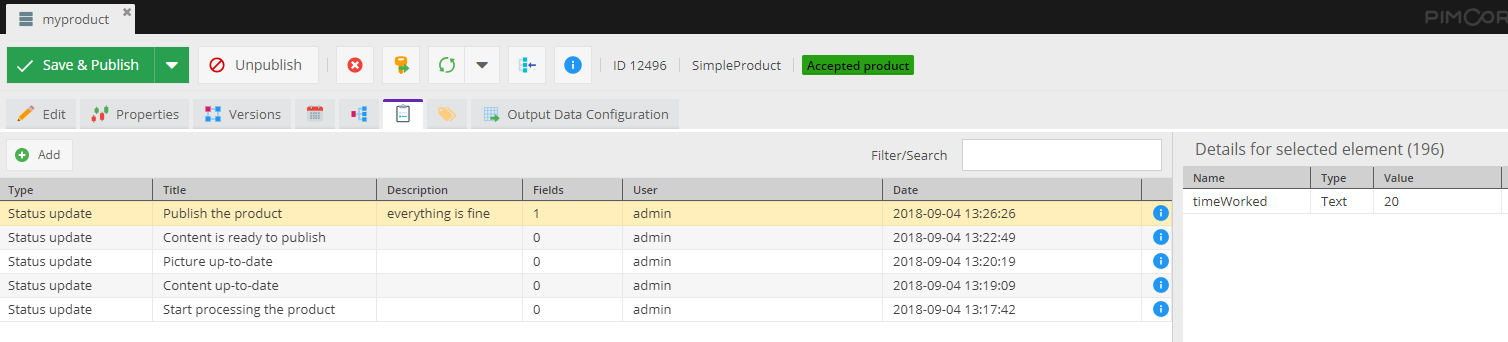
ReactJS Vs React Native – A Complete Expert Analysis

Both ReactJS and React Native are currently powering several popular and commonly used mobile applications and websites by people around the world. Though, React Native is almost similar to ReactJS, even in its workflow and syntax but their components are entirely different when compared with React.

Take a look over the upcoming sections of this blog, it will decode the key differences between ReactJS and React Native and gives app developers complete knowledge.

Table of Contents

  • What is ReactJS?
  • Features of ReactJS
  • Advantages of Using ReactJS
  • Drawbacks and Limitations of Using ReactJS
  • What is React Native?
  • Features of React Native
  • Advantages of Using React Native
  • Drawbacks and Limitations of Using React Native
  • Difference between React JS and React Native
  • Factors That Differentiate React JS and React Native
  • Comparison of ReactJS and React-Native in-terms of Simple Coding
  • Which is better-React or React Native?

What is React.JS?

React.JS is a JavaScript (JS) library that allows creating superfast and interactive user interfaces in mobile and web apps. As a developer, if your concern is particularly about the application’s view layer, then React.Js development is the best fit for you since it is an open-source library that serves as a component-based and front-end library as well.

React.JS naturally has the capability of parting the user interface (UI) into multiple components that makes it easier for coding to debug. Therefore this makes each component unique in terms of property and function.

Features of React JS

#1: JSX

React JS has JavaScript XML which is an extension of JavaScript and is used as syntax similar to how XML or HTML is used. This syntax when used is processed into JS calls of React framework. With extending ES6, React JS allows HTML like the text to go along with JS. Those who use JS need not use JSX necessarily, but if you use React JS, it is required.

#2: Components

We already know that React JS is full of multiple components and each component has its own logic and controls. You can use these components many times in your coding, especially when you work on large scale projects.

#3: Single data binding

One-way/single data binding gives complete control over your application and React JS is designed in the same manner following unidirectional data flow. More than a single data binding requires additional features to support the application since components keep changing but the data within them cannot be changed.

Therefore, React JS follows the Flux pattern that maintains the unidirectional data flow, making the application you develop to be more flexible and result in maximum efficiency.

#4: Virtual DOM

A virtual DOM functions similar to a one-way data-binding that represents the original DOM of the object. In case you make any changes in the web application, with the help of virtual DOM, the entire UI is re-rendered, thereby checking the difference between the previous DOM and the new one.

#5: Simplicity

React JS uses JSX as the coding platform that makes the application simple and easy for developers to code. Since it is a component-based approach, it provides the flexibility of reusing the code as per your need. This is how it is simple to use and easy to learn as well.

#6: Performance

Developers think that compared to other frameworks in the market, React JS is far much better to use because of its exceptional management of applications through virtual DOM. The DOM is a cross-platform and programming API that manages codes with HTML, XML, or XHTML.

Virtual DOM protects DOM from writing the code directly to it, and therefore, virtual components that turn into the DOM ensure the smoother and faster performance of React JS.

Advantages of Using React JS

#1: Better user experience with Virtual DOM in React

The main challenge with traditional DOM architecture is the way its processes keep changing in terms of user inputs, queries, etc. Therefore a server is required to constantly check the difference caused by these changes to provide the proper response. To do this, the traditional DOM has to update its trees of the whole document but might be challenging.

React manages to increase the speed of updates with the use of virtual DOM that provides a better UX to your application.

#2: Saves time with reusing React Components

Reusing components in React is the biggest plus with using the platform for app development. Developers find it easy since the same code can be applied wherever they need within the app architecture which saves a huge time in app development.

#3: Stability in codes due to unidirectional data flow

React.JS follows a single-way data binding and ensures changes made in child structures do not affect their parents, by using downward data binding.

#4: Constantly developing framework

React.JS is an open-source framework developed by Facebook with a lot of useful applications and additional tools from off-company developers. Therefore, developers get great community support while working with React.JS.

To learn about the more benefits of ReactJS, visit Why to Use React for Web Development and How Using React JS Can Add Value to Your Website?

Drawbacks and limitations of using React.JS

#1: Overhead costs and time

It becomes a frequent necessity for developers to download another react-enabled library, since the components may not match with the existing components used by React.JS, thereby resulting in increased overhead costs and time.

#2: Learning curve

Compared to React Native, developers may take more time to learn and adapt to React.JS, and therefore, new developers may find it hectic to create an app using React.JS.

#3: External library support

React.JS supports only very few native libraries although it gets support from several external and third-party libraries. External libraries can help developers to make use of both HTML and CSS features and create it into JSX.

But many developers fail to understand that doing so is involved with high complexities and steep learning curves as well.

What is React Native?

React Native is a JavaScript (JS) framework for developing real-time and natively rendering mobile applications for both Android and iOS. It was developed based on React, the best web app framework for producing single-page applications and which is Facebook’s JS library for creating attractive user interfaces.

Instead of targeting the web browser, React Native focuses on mobile applications. Along with the ability to create a native look and feel like applications using React Native, you can also share the codes you write between Android and iOS platforms and develop codes simultaneously as well.

React Native development basically supports app development in cross-functional platforms and has great potential to diversify to any future platforms as well.

Features of React Native

#1: Programming Language

React Native allows you to create native apps using JS, and apps that are developed through React Native can function on both the devices and platforms without negotiating on speed, efficiency, and quality.

Like how you develop effective and attractive web apps using React, React Native also lets you create mobile applications with the same quality and design. This is highly possible to React since it allows you to compose a rich mobile user interface (UI) from declarative components.

JS is an easy-to-learn language that anyone who comes with basic knowledge of web development can work on it. Therefore, it makes their job easy to work on React Native and quickly adapt to the mobile app framework.

#2: UI Focussed

React Native is very popular among developers who want to create quick mobile applications. React Native builds a hierarchy of UI elements to create a strong JS code, saving your time by providing a new way to build apps.

It allows customization in developing UI blocks using JS since it uses the fundamental UI building blocks by default in developing Android and iOS applications.

#3: Development Time

As we aforementioned, React Native allows you to develop mobile apps considerably in a very short time compared to other mobile app frameworks.

#4: Tested and Trusted

Many start-up companies prefer developing mobile apps using React Native because of its exceptional and user-friendly UI/UX features and the time is taken for development. Companies such as Walmart, Facebook, UberEats, Myntra, and more have developed their apps through React Native.

#5: Third-party Library Support

JavaScript is an ocean; therefore, it has great library support from the community and third-party as well. This helps developers extensively to choose and use features of their choice in mobile app development.

#6: Reusable components

React Native provides you with the facility of building blocks that can be reused any number of times as per your coding requirement. The components of React Native can be used to compile directly to native apps since it offers mobile app development on cross-platform services.

Advantages of Using React Native

#1: Cost-effective & re-usage of code

With React Native you can easily perform code deployment between two platforms because it provides flexible reuse of code service.

#2: Performance in mobile environments

React Native is a super-fast mobile app framework that performs exceptionally well in mobile environments compared to other web app frameworks. With using JavaScript for the development of coding, React Native stands out and supports start-up companies or fresher developers with a big hand in mobile app development.

#3: Hot Reload

Hot reload is one of the considerable benefits of React Native which is based on hot module replacement (HMR) that succeeds the first reload option and provides the same sequence of actions as the previous one.

#4: Live Reload

Live reload ensures reading and compiling a file that can be altered by developers anytime in front of a simulator. Moreover, it automatically reloads the app from the starting phase.

#5: React Similar Architecture

Like how React provides a modular and intuitive interface, React Native also provides the same benefits. React Native has a flexible environment for developers so they can easily update web apps whenever needed. Software testers can easily understand code logic for developing test scenarios in less time.

Drawbacks and Limitations of Using React Native

#1: The Pace of Development

Though React is a fast-moving framework, it becomes necessary for developers to update their knowledge with constantly changing technology. Some developers might not be comfortable with such a pace, and we should also understand that React’s core API has become more stable and seldom changeable.

#2: Poor documentation

With the constant releases of new tools in React Native, the problem arises when documentation backtraces. Though new libraries like Redux and Reflux are supporting to accelerate the work of a library or improve the complete React ecosystem. Therefore, finally, developers struggle with integrating these tools when using ReactJS.

#3: SEO hassle

There have been several statements of concern from developers that Google and other search engines lack indexing dynamic web pages poorly. Anyhow proper testing is required to ensure your app makes it out with SEO in Google.

Difference between React.JS and React Native

React JS is purely a JavaScript library that supports both front-end and backend in application development. It is used to create an effective user interface for mobile apps and websites. React Native is a cross-platform mobile framework that makes use of React JS for developing websites and applications.

The best part with React Native is it compiles to native app components which enable developers to produce mobile applications that can function well on multiple platforms such as Android, iOS, and Windows in JS.

In this blog, we will see the prominent factors that differentiate React JS vs React Native.

Factors That Differentiate React JS and React Native

#1: Setup and Bundling

React Native is a framework where React JS is a JS library that you can make use of for your website. If you are developing a new application with React JS, you will be required to choose a bundler like Webpack and identify which modules are needed to develop the application.

React Native has everything you need; therefore, you may not be likely to look for anything more. It is easy to set up and super fast in performance as well. It utilizes only one command line to execute in the terminal and then you are good to go.

#2: DOM Styling

React Native provides alternative components that work similar to HTML and does not use HTML for rendering the app. These components map the original real native iOS or Android UI components that are rendered on the app.

Most components available in React Native can be translated to something similar in HTML. Since your code cannot be rendered on an HTML page, you will not be able to reuse any libraries that you have already used with React JS which is highly capable of rendering any kind of HTML, Canvas, or SVG.

#3: Animation and Gestures

React Native provides a new way to animate different components of your app with JS. You will have to use the Animated API offered by React Native, which is the recommended way to animate a component. It lets you create different kinds of animations, based on the velocity connected to a gesture and can be used with various types of Easing.

React Native also provides Layout Animation which is very simple to use for transitions but currently works only for iOS and does not support Android. Moreover, React Native has a web API called the PanResponder that is similar to the JS touch events.

#4: Navigation

Many developers get confused initially when looking for navigation between HTML pages and think react-router can be the best choice. But in fact, React Native has a Navigator component that makes your job easy.

Like web apps, mobile apps do not have plenty of scenes executed in different directions. The Navigator component may initially seem to be complicated to use but provides you with everything you need to manage the transition between HTML pages.

#5: Platform-specific code

If you implement the same design for your app on multiple platforms with the same set of code, sometimes it can be confusing. React JS cannot give you the clarity of which code is used for which platform. Moreover, though you can apply the same code for Android and iOS apps, remember that the user interface and user experience looks different.

Therefore, if you want to reuse the code for multiple platforms define a universal design so that it stays intuitive and does not confuse with both platforms. In case you wish to define an independent set of codes for each platform, you will have a different DOM, stylesheets, and unique logic and animations for UI/UX guidelines, which is possible through React Native.

The upcoming table illustrates the basic difference between the React and React-Natives in-terms of their features.

Sr. No.FeaturesReactReact Native
1PlatformWebAndroid, iOS, JS
2Open-sourceYesYes
3Mode of presentationHTML, CSSNative components
4ArchitectureVirtual DOMVirtual DOM + Bridge Technology
5Mode of AnimationCSSNative
6Development StyleCSSJS Stylesheets
7OwnerFacebookFacebook


Comparison of ReactJS and React-Native in-terms of Simple Coding

Unlike the React JS, React Native doesn’t have any HTML elements for enhancing the presentational view. However, React Native has several components that suit a lot of developing mobile applications. The below mentioned simple coding elaborate it clearly.

Coding on React JS

Coding-on-React-JS

Coding on React Native

Coding-on-React-Native

The above coding example clearly showcases that React Native is not for designing web elements and by using React Native one can’t design the elements in a similar way which are styled by using React JS.

Which is better-React or React Native?

These are the straight simple differences to know of React vs React Native.

React JS

  • You can create flawless websites, web apps, single-page applications, etc. endlessly with React JS.
  • React JS creates a UI hierarchy with the JS library.
  • React functions on a virtual DOM which is faster than the conventional refresh model. Virtual DOM refreshes only a part of the page instead of refreshing the entire page.
  • React takes complete responsibility for rendering UI components and is considered as the V part of MVC architecture.
  • React is exceptional in reusing components that are the basic units of UI, thereby supporting in saving coding time.
  • It is simple and easy to learn as well with great community support.

React Native

  • React Native as a framework helps in creating cross-platform native apps. By creating splendid native apps,
  • you can run the same apps on Android and iOS as well.
  • React Native supports all features of React JS and allows developers to produce native apps in a web-style approach.
  • If you are a front-end developer, with learning React Native, you can easily become a mobile developer.
  • Both React JS and React Native are considered important pillars when it comes to the development of web or mobile applications because of this wide range of flexible functionalities and an array of evolving libraries.

Final Verdict

React JS vs React Native is hard to predict which one is better; it’s truly upon the mode of usage. Depending on which platform and what kind of application you wish to develop, both React JS and React Native can act efficiently. However, React Native has great features that React JS has and lets you develop dynamic applications in no time.

Frequently Answered Questions

1. Which should I choose between React JS and React Native?

React Native comes with all features inbuilt thereby making your job easy in terms of coding. It has all features similar to React JS and lets you develop extraordinary applications with great UI/UX.

2. When not to use React Native?

React Native lacks in the following:

  • Native libraries
  • A loosely held abstraction layer
  • More initializing time
  • Licensing and patenting issues

If your app requires any of these facilities, then do not choose to React Native.

3. When not to use React JS?

These are the limitations of React JS:

  • Overhead costs and time
  • Learning curve
  • External library support
  • Long data hierarchy

4. What kind of apps can I develop using React Native/React JS?

Here is the list of apps in the market developed using React JS and React Native. Maybe this can give you an idea.

  • Facebook
  • Instagram
  • Netflix
  • New York Times
  • WhatsApp
  • Myntra
  • Discovery VR
  • Discord
  • Airbnb

5. How much does it cost to develop an app with React / React Native?

Primarily, features of an app and UI/UX decide the cost of a React/React Native app. Therefore, you decide the compatible platform develop your app along with its features, which help you decide the cost.

How to Estimate Custom Software Development Costs for your Projects?

Custom software development can also be termed as the development of a peculiar digital technology solution for addressing the needs of a specific company. When compared with the development of off-the-shelf software development, the cost of custom software development is typically more expensive.

Usually, there should be a proper budget planning for developing software for every project to tackle the unexpected financial crisis. However, when it comes to custom software development predicting the average cost of custom software development is a bit harder, and we have discussed briefly why it is harder in this blog.

Before that, we discussed a few basic things about custom software development. Take a look.

Table of Content

  • What is custom software?
  • How to Develop A Custom Software?
  • Benefits of Custom Software Development
  • Factors Affecting Software Development Cost
  • How to Estimate Custom Software Development Cost?
  • Tips to Determine The Cost of Custom Software Development
  • Factors That Play a Crucial Role in Determining the Average Cost of Custom Software Development?

What is custom software?

Custom software is a user-specific product that is built as per the needs of any business user requirements and is different from the regular off-the-shelf software such as Microsoft Office which serves a common purpose to all businesses. Developing custom software involves several steps such as requirement analysis, code development, software testing, and finally, deployment.

Some of the important benefits of custom software are it provides personalized experiences to users, thereby increasing the return on investment and lowering the development cost. Since we just went through the basics of custom software, let us look at how to develop custom software and the factors that affect the custom software development costs.

How to Develop A Custom Software?

#1: Determine your software needs well prior

Defining crystal clear project goals enables proper development and execution of your custom software. Before you decide upon, it is ideal to brainstorm with managers and subordinates their views about what kind of changes in the system can make them adaptive, in the organization.

The custom software you develop should be ideated perfectly such that it influences all the departments of the organization positively. Therefore, before you implement your idea, know your current organizational measures and list out their pros and cons, which will make further processes involved easy.

#2: Get the right team to work on your custom software

You have multiple options to do this process. If you have an in-house development team, see if they are well-versed to work on the technology you wish to develop your custom software. If not, hire a new professional who can work efficiently and can do multi-tasking. Another option would be hiring freelance developers and pay them on an hourly basis and get the development done.

Otherwise, you can hire a technical expert on a contract basis and allow the person to train your existing team as well and work on the custom software development. Whichever you choose, make sure that it is cost-effective.

#3: Plan and set target milestones

If you have a proper roadmap for your project, it leads the entire project development cycle in the right way. Depending on whom you employ in custom software development, assign them the correct roles while creating the roadmap, and make sure that all the assigned tasks are completed within the available time and allocated budget.

This will help you with identifying any major changes and improvements needed if any.

#4: Carry out deepened testing

Testing plays a crucial role in custom software development and before deploying the new software across your organization. Two levels of testing are required for any developed software. Developers and IT professionals perform the initial level of testing, which provides you with the results of the functionality of fundamental features.

User testing is the second level which will be performed by real users to check whether the performance of the custom software is up to the mark. In developer words, we call it Beta testing. User feedback is more important in the testing phase because it helps you make real-time improvements to your custom software.

#5: Keep clean documentation of the entire process

Documenting each stage of the software development process is highly important so that it helps you as future references in case you make any changes or add any new features in between. You may have to document right from the project plan, implementation plan, test plan, scope statement, and training plan, to ensure everything is on track.

It also helps you define the usage of custom software, what resources are expected in this project development cycle, and several other details. If you develop some other custom software on the same technology, these documentations can help in aiding newcomers.

Benefits of Custom Software Development

#1: Tailored To Satisfy The Needs of Your Brand

Ready-to-use software/applications may have only some of the common features for the benefit of users, whereas custom software can be tailored according to your business needs and user expectations. Therefore, it increases the image of your brand among users extensively, thereby improves the scalability of the software in the future.

User’s demand for features keeps growing day by day, which means they need to include more customized features becoming necessary in the long-run. This is not possible in ready-made software and the Cost of Custom Software Development may be high if you change the features and developing the platform according to your needs.

#2: Optimized business process

Every organization has its own business model and different in-house processes. Preferring instant-to-use software can result in a mismatch of business needs and complications in being adaptive. However, if it is a large-scale enterprise, then definitely it requires the software to be designed and developed in a manner such that it integrates well with the business model and processes of the organization.

Therefore rather than replacing the software, custom software helps with optimizing your business processes.

#3: Custom software can lead to lowered costs over time

Ready-to-use software solutions may seem to be costing cheaper initially, but you should understand that it requires renewals/subscriptions on a monthly, quarterly, or yearly basis. Moreover, the extension of features becomes very difficult with such type of software. Custom software though may have higher upfront development and execution costs, keeps you stress-free from investing in more in the future.

Since you decide on which features to be in the software, it becomes easy to handle in the upcoming part. They do not incur any long-term recurring fees, thereby making it less expensive over time and show improvement in return on investment as well.

#4: You own your software; it adds credibility to your brand

The best thing about developing custom software is you hold the copyrights of the software and it adds value to your company among users as well. Whereas some software developed based on ready-to-use, for developing such software mostly utilized by the software companies and they own its copyrights. Added to that, for any kind of changes or implementation, it takes your life to get it done in ready-made software; whereas, it is quickly and easily performed in custom software.

With custom-made software, you will have complete control of activities that happen in your software, and you do not spend any money on licensing. Otherwise, if you require software for one-time use, then instant-to-use can benefit you more.

#5: Uniqueness

Every organization runs a unique business. If you look for a one-size-fits-all solution for all businesses, it may end up in failure and a waste of time, effort, and money. Therefore having custom-made software to suit your unique business requirements can accommodate the working model.

Some may worry about the Custom software development costs but still custom software can make your identity unique in the market standard and among your users as well. Moreover, the average cost of custom software development depends upon a few factors which are elaborated in upcoming sections. Custom software results in the immense growth of your business and returns on investment as well.

Factors Affecting Software Development Cost

Before you understand how to estimate the custom software development cost and the factors that influence the cost of developing custom software for your company, you must learn how general software development cost is influenced by various factors.

List of Top 10 Influencing Factors Of Basic Software Development Cost

1. The size of the software

The most important factor that determines almost half the development cost is the size of your custom software. For example, a simple mobile application or an online store offering your products will be cheaper than a multitasking ERP solution used by banks or hospitals. Similarly, CRM solutions, warehouse management, and security applications are premium software that is expensive and time-consuming to build before the final product is released. Make sure you know the exact features that your software should have when you explain it to your team.

2. Complexity

The complexity of your custom software can play a very important role in the final development estimate. The complexity refers to the overall purpose and additional requirements you have for your software development team. The more complicated it is, the higher the costs will be.

The features, design, user interface, and technological requirements are the main factors that make the software complicated or relatively simple. With traditional platforms and technologies, you can develop a simple software or application in just a few weeks. However, the degree of complexity can increase development time and the tools needed to add highly responsive functionality.

3. Design Structure

The Design structure covered by two main areas which are listed below:

Creative design: This is the creative aspect and visual elements of the software, including graphics, color schemes, and unique designs to attract customers on various platforms. Companies like Amazon have invested billions to make their designs as creative as possible. Therefore, they must want their projects to be perfect and attractive regardless of the investment cost.

UI/UX design: The user interface and user experience are the main aspects of software design that interact with users. It is important to find the best UI/UX designers who understand the process of designing B2B or B2C software for your company, and this can cost around $800-2000 separately.

4. Software development

For those who know the basic components of the development process, estimating development costs would not be an impossible task. But for a beginner, there is a whole step-by-step procedure included to create scalable and customized business software.

Implementing a design, platforms, front-end development, back-end development, and verifying that the software is bug-free can take some time. However, the process and timing also depend on the size and complexity of the project, as there are some challenges associated with development.

5. Integrations

Third-party integration or integration with other software involves significant research and effort, as you are not aware of potential security and performance issues. If it is a regular software or business application, buying third-party integrations and connecting to your application would not take much time for multi-integration such as WMS to track goods, payment gateways, shipping, and more. However, it can be expensive to include all of the pre-selected features.

6. Migration of existing data

Whether you have existing software or data to add to your new software, data migration is an accurate process. Data migration requires custom scripts, which take the data from your old system and remodel it to the new software. The steps are quite simple, but there are several channels to make data migration possible on the first attempt.

Most data migrations are completed after software development with translation functions according to your needs. The calculation of scripts, translation rules, migration space, and workload will take time and investment.

7. Time and budget

When it comes to estimating the average cost of custom software development, time has a significant impact on the cost of development. If you have a deadline in mind, your software development agency will need to increase the number of developers to meet your expectations and deadline. This can affect the total cost of the service and any additional costs.

On the other hand, if you have a budget within which you work, your development consultant will ask you to filter your needs or use software that fits your budget. You can choose to stick to your budget or focus on features depending on the size of your business.

8. Platform and features

Platforms on which you prefer to develop your custom software play a vital role in determining the custom software development costs. If you choose only one platform for your software, such as iOS, Android, or Web, the cost will be lower than choosing all three. Besides, the software and tools suggested by your team will add to the estimated cost.

The functions or pages you want in your software are a priority component of your idea. Therefore, you should make a list of features that you can’t commit to at any cost along with secondary features that can help reduce your development cost. Be sure to research the key features for high-performance software and consider an MVP to get the best result.

9. Testing

Once development is complete, your development team will make sure that the software is working properly. If there are bugs or errors, they will remove them and test the software on various devices. Testing is an inevitable part of any development project, and the cost depends on the total cost of development.

10. Maintenance and support

When your software is developed after weeks of technical work and implementation of changes, you have to prepare for extra costs such as updates and support costs. Maintenance and technical support are important to keep your software up and running for a long time. Usually, the software solution provider provides support and maintenance at a reasonable price, so you can anticipate the cost during the development budget.

Before completing the project, you should focus on the quality and features that will be beneficial to your business and worth the investment.

Find the right expertise in software development at a competitive cost

When choosing custom software services for your company, you should identify and research technical requirements and initial costs. At first, it may seem a bit complicated, but once you understand the basics (mentioned above), you will be able to create a budget for software development without any difficulty.

How to Estimate Custom Software Development Cost?

Businesses focus more on getting custom-made software for their customers rather than opting for an existing or a pre-defined model. The customized software is highly on demand since it is scalable, flexible, and can offer more in a personalized manner. Moreover, modern-day software solutions may not be the right fit for every business because of the type of businesses we see.

Upon the rising expectations of customers, businesses are looking for more customer-centric customizable software solutions. With the integration of technologies like artificial intelligence, the internet of things, augmented/virtual reality and machine learning, both businesses, and customers look for high-quality applications/software in usage.

Custom software development involves software tailored to your company’s specific needs. With the aid of developing custom software, companies can able to avail themselves of the digital solution for their specific needs. Moreover, custom software helps a lot in managing operations and to avail well-optimized data security.

In recent years, the demand for custom software development has increased, like optimization and accuracy for companies have become key factors in sustaining growth.

How much does custom software development cost?

For every product development, many factors are considered before the cost of the finished product comes out.

Similarly, developing custom software also has its own parameters while fixing up its cost. Like one other application, building custom software for your organization does not show much variance.

But there are certain critical considerations to take your investment on the right track, and how they show an impact on your project lifecycle. As per the recent study, the cost of developing custom software may vary from $2000 to $250,000 that depends on its size and requirements.

Regardless of the location and size of your company and the developers you choose, several key factors determine the total Cost of Custom Software Development. And few of those vital factors are discussed in brief here.

Custom Software Development Cost Influencing Factors

#1: Number of platforms

You can deploy your custom software on popular platforms such as Windows, Mac, Linux, Unix, Android, iOS, and Web. Depending on which platform you wish to deploy, the cost also varies accordingly. We all know that Android is one of the leading players in the current market and when you choose such a platform, the scalability enhances automatically.

Therefore, a robust software structure is required for efficient performance, which may need more effort in development.

#2: Development approach

Your project plan contains certain modules that may help you with executing a picture-perfect strategy and budget right from selecting a framework till you make a decision approach. Once you are set with the development approach, you may find it fast and reliable, with few errors as well.

This type of approach requires agile development where there is an iterative process involved in software development. The agile development process has certain steps that start with conception (the idea of your software product), initiation, and deployment. When the custom software development is under the initiation stage, it undergoes designing, code development, and testing.

#3: Launching the software

Launching deals with the timeline of the development of the custom software, and it is a crucial facet of the development process, which may affect the time of the product launch. Again, there are a few factors that may increase the time of your software development:

  • More number of features
  • Complexity added along to more number of features
  • Contains fewer features but with high complexity involved

These are the main concerns that start-ups and enterprises may encounter with developing custom software, which may greatly affect the timeline.

#4: MVP requirements

Any product before hitting the market can get the feedback introduced as a minimum viable product. This is one way you test whether your product will be successful after it is launched completely. Remember that an MVP may take up to 20–40% of your total development cost, but at the same time, it is worth it to get the feedback of your product users and revamp it according to their preferences and launch it finally.

In case you have complex features included, then releasing the MVP can get you some time to work on those challenges of the product.

#5: Complexity of software

Custom software provides the required scalability, flexibility, and maintainability of complexities involved in developing features, whereas standard software can cost you a high price than the custom one. Sometimes, complexity can also depend on the number of layers of users included testing the ability of the software.

If you want the price of the software development to be reduced, you should go for a less complicated architecture and a high-functional one.

#6: Design requirements

If your idea is to engage a large number of users towards your software, then creating some compelling and attractive designs with animations is always a great idea. High-end designs can result in huge development efforts and even increase the cost of custom software development.

Therefore, choosing a design that is appealing and simple can save you from costing more.

#7: Integration of systems

Custom software development should allow the integration of third-party APIs to include additional functionality to apps. With a clear understanding of the compatibility of third-party APIs with your customized software and the cost involved with integrations, you can achieve the finest output.

#8: Database migrations

If database migrations are not planned well, it can cost you double the development cost. Creating a backup of the existing database can save you from losing the data when database migration happens.

Tips to Determine The Cost of Custom Software Development

#1: Pick the right software

There are different types of software models available in the market, but choosing the right one at the first step is more crucial. It could be challenging to find a product that matches your unique needs. Therefore, to avoid the time you invest in thinking of the custom features, you may go for a boxed-product that has features close to your thoughts.

But what if you wish to extend the capabilities, integrations, maintenance, upgradations, training, and so on? So choose the right software at the beginning itself.

#2: Hire a suitable development team

You can choose between in-house developers and off-shore technical experts. Since we are looking at the cost aspect, off-shore experts win the race. If you prefer an in-house employee, you should provide insurance, perks, and productivity metrics and allowances sort of things. Though it is not a big deal, it is painful when you hire a new employee when migrating to a new technology which will cost you even more.

#3: MVP features to choose

Your product features will be the core reason for your product success; therefore, if you aim to increase your return on investment, then bifurcate your features into two priorities while you define your project requirements. Make your software’s primary features a top priority and the rest a second priority.
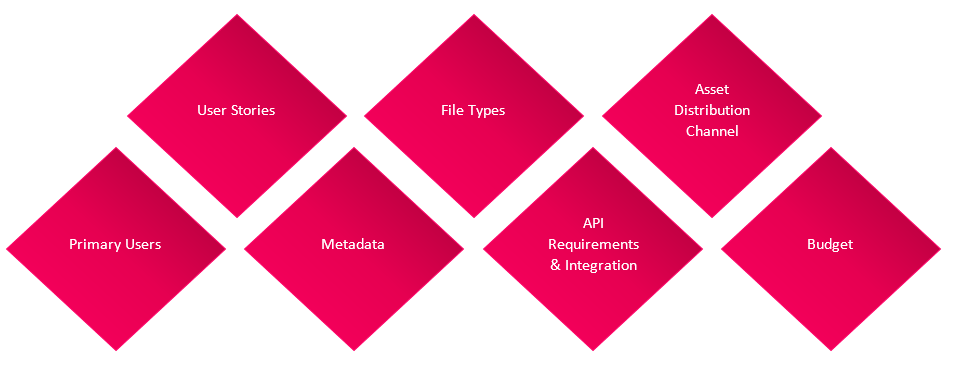
#4: Considering risks for future development

If you are developing a product, you should look at the futuristic approaches of its scalability and then make desired plans for its development. Failing to pay attention to considering risks may lead to loss of money and in some cases, users’ credibility as well.

#5: Impact of the funding type

The cost of developing custom software depends on what type of software you wish to develop. Small companies may go for a simpler architecture with low-cost development, whereas enterprise software comes with a bulk list of features that may end up in complexity and huge development costs also.

If enterprise-grade software needs substantial funding resources, then with investors such as NGOs, government authorities, and other firms, grant-funded software is highly feasible and scalable.

Factors That Play a Crucial Role in Determining the Average Cost of Custom Software Development?

1. Based on software type:

Enterprise-level custom software can cost you between $200,000 and $100, 00,00,000; mid-market software can cost you between $45,000 and $60,00,000; small-scale software can be between $10,000 and $5,50,000.

2. Based on working hours:

This may vary according to software type, technology, location, etc.

3. Size of the team:

Depending on designations, the number of employees, their salaries, etc. the cost of the software can vary.

4. Fixed-price package:

This is an agreement form of a standard package that depends on stakeholders and vendors.
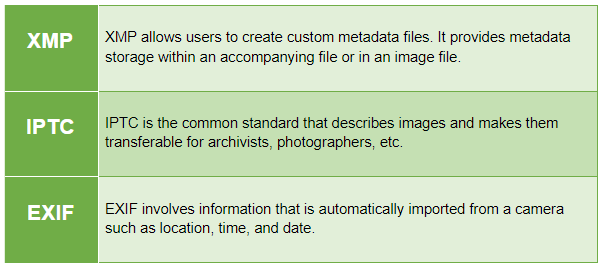
Wrapping up, the blog concludes that custom software development is always better than the predefined model, keeping futuristic developments in mind. Also, take a look over the factors which we elaborated that have a strong impact on determining the average cost of custom software development and go for the development accordingly.
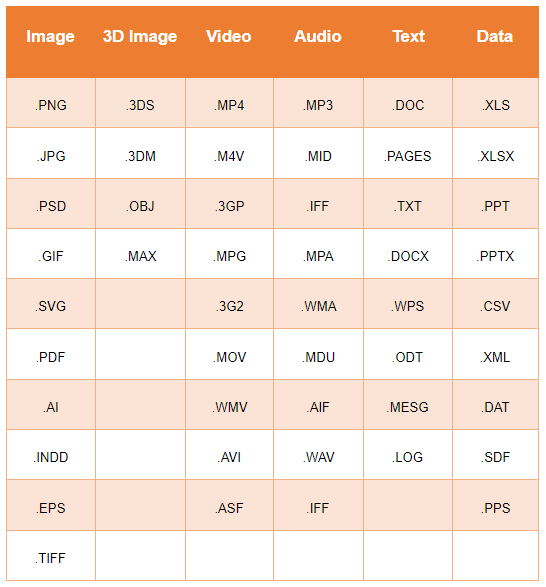
Final Words

As we mentioned, estimating the custom software development costs is difficult when compared with the development of ordinary off-the-shelf software development. However, if the project planning and strategy to estimate the cost of custom software development carried with perfection predicting the custom software development cost can be done at ease also it leads to reduce the development cost significantly.

Frequently Asked Questions On Custom Software Development

1. Which custom software is highly movable in the market?

It depends on your target users and which type of service can benefit and enable them to use your software all the time.

2. How is the cost of custom software calculated?

There is no predefined formula for calculating the cost of custom software as such. You can assume which features and factors to be considered for development, thereby it works out well.

3. How should I pay the software development cost?

Since there are different stages of the custom software development process, depending on how your developers work, you can release the payment.

4. How much, on the whole, does a custom software development cost?

As we said, depending on your project scope, requirements, and technical complexity, the cost of custom software development may vary accordingly.