Is React JS Framework (or is React a Library)?

JavaScript is known for its abundance of new plugins, frameworks, and other things created by its massive community of developers and designers.

The JavaScript community as a whole is thriving and is on its way to becoming one of the world’s largest online developer’s community.

You must be wondering what this fact has to do with the React JS framework and other frameworks. The truth is that many of the leading IT firms have already embraced JavaScript and leveraging its benefits.

The Significance of JavaScript and Framework

JavaScript has no longer remained a fancy language used for front-end web app development. It is much more than that. Frameworks like React are being used to build mobile web and mobile apps.

This is one of the primary reasons why developers are moving towards JavaScript frameworks and libraries. It helps a developer to develop stunning single-page applications in quite less time than earlier.

JavaScript has not only reduced the website development time but also fostered creativity among developers. Hence, today, even simple web apps such as single-page applications can be extremely creative.

However, all these benefits are of no use if these JS libraries can not build an application in the given time and budget. Hence, while using JS libraries, your first aim should always be to complete the project in a given time and money.

This is where the input framework> comes into the picture. It can deal with a majority of the project needs out-of-the-box. Sounds like an attractive solution? Well, not yet.

“React JS Framework” or “React JS Library”?

The hype of the React JS framework is so much that every small and big corporation is comparing it with the input framework. They are comparing React’s ability to handle view with the input framework, which is quite elegant and fast.

But, the truth is that unlike input framework, React cannot do these kinds of stuff. Then, why do people call React JS a framework?

It seems that the denotation of React JS as a framework has always been wrong. React JS is not a framework.

We know that React is really good at handling the view. While doing so, you’ll see a lot of perks of React such as modularity and separations of concerns.

React allows you to recycle components multiple times in a single web application. This method is recognized as a functional way of programming.

Why Use React for the Patch Work?

The view is handled by React JS components, which usually do not care about the outside world. They seem very much like pure functions React components that would always give the same output upon providing the same input.

This is one of the reasons why people use React to fix their broken projects. For example, Let’s say you want to fix an old web app project.

Will you start the project from scratch using Ruby on Rails or patch your software using React JS? The answer will be patching your project using React JS.

Scraping your old project and starting it again using other technology can be a massive risk that you’ll take. However, replacing a section or sections of your project’s view with React will not be a huge risk.

Before you start to fix any section using React, everyone on the team must be sure and confident to choose a section that needs improvement.

Since React JS is not a framework, you’ll not be in control of every aspect of your project. Also, you need to ask your back-end developers to tweak the API, which you can feed to React for it to deal with the view.

Why React JS in the first place?

Many businesses would have built their applications with a robust codebase. Hence, they will resist any kind of drastic of massive change. You will not be able to provide high flexibility with input framework.

No input framework can provide you the intrusive flexibility as React JS. Hence, you can never compare React with input framework since both of them have different applications.

One can not simply cast React as a framework because it is not the only one that allows you to perform non-intrusive view layers. One of the best things about React is that it pulls a developer into knowing how input framework works.

With React, you’ll mostly be coding with Vanilla JS, which is better than providing them with an end-to-end solution like a framework. Now, developers will learn JavaScript the way they want and not the other way around.

It is always good for developers to be known as a JavaScript developer rather than a particular input framework developer. Even if you want to specialize in a framework, you should know the basics of JS.

It is always recommended for novice developers to learn JavaScript first instead of a framework. Because, if you know JavaScript, you can learn any framework.

React is great not being a framework because it is so minimal and deals with so little that a developer will have to learn JavaScript anyway to deal with bigger problems that React JS cannot solve.

Conclusion

So, Is React JS framework? The answer is a big no. It is a library rather than a framework. Another reason for React to be a library and not a framework is the amount of flexibility it provides to users. It provides much more flexibility to users compared to a framework. Hence, React is not a framework but, a library.

FAQs

1) Why is Angular a framework and React is a library?

Angular is a framework because it controls and connects both Model and View, whereas React JS is a library because it controls only View.

2) What is the difference between a library and a framework?

One uses the library when he/she wants to control the flow of the application. One uses a framework when he/she wants the framework to be in charge of the flow.

3) What is React JS good for?

React JS is an opensource JS library that is used to build single-page applications. It allows a developer to create reusable UI components.

4) Why is React JS better?

React JS prevents updating DOM frequently. The app renders faster than other frameworks and delivers better performance and user experience than other frameworks.

Node JS vs React: Which Framework should you Choose (and Why) to Build your Next Web App

Looking to build an amazing web application? By this time, you must have figured out that JavaScript is your way-to-go-for developing your next web development project.

If you’re confused between Node JS vs React, then you’ve come to the right place. This article will help you figure out which framework is best for your upcoming project.

Although Node JS is not as popular as React JS, it has got a lot of significance in web app development. Many Fortune 500 companies, as well as startups, use Node JS for web app development.

Node JS vs React: A Detailed Comparision

What is React JS?

Developed and maintained by Facebook, React JS is more of a JavaScript library than a framework. Using it, you can build web pages that render quite smoothly.

React has an MVC or Model View Controller architecture. Facebook introduced it intending to solve rendering issues of massive datasets in the JavaScript framework.

Why React JS?

SEO-Friendly:

Despite rendering millions of JavaScript-based web and mobile applications daily, search engines find it difficult to read JS apps that are too heavy.

Using React JS, you can easily create light-weight web and mobile applications. One can easily run React JS on the server-side, and the virtual DOM will be rendered, which will return to the browser as a regular web page.

Component-based Architecture:
Shadow DOM and Polymer JS have already created a lot of hype that they are used to build customizable elements and self-contained elements that you can import into your React JS project easily.

Using React JS, you can create components of your own, which you can later nest, reuse, or combine your core content. Hence, it will not make use of Polymer JS or Shadow DOM.

Highly Efficient:
React JS creates its own virtual DOM where you can keep all the components that you made. It takes care of every change done in the DOM and updates the DOM tree accordingly.

Moreover, it discards time-taking DOM operations and makes updates regularly. This React JS functionality increases the efficiency of a web or a mobile application.

Pros of React JS

  • The Virtual DOM of React is faster as it only refreshes a portion of a web page, rather than the usual full refresh model.
  • Simple to create UI test cases.
  • Easy to reuse various code components.
  • It can display the component in a massive amount more efficiently and quickly.
  • Debugging code in React is simpler than other frameworks using a special chrome extension.
  • Manual processing is required while changing data.
  • React JS is view oriented.
  • It renders code from the server to browsers, which improves the SEO of a website.
  • React JS makes the job simple for developers because the debugging speed is high.
  • React can be used to develop both Android and iOS apps.
  • Rendering of hybrid applications in the Native environment is easy since React makes use of reusable components.
  • One can reuse the components of the existing React Native application’s UI.
  • React JS is one of the fastest-growing front-end frameworks.
  • It provides support for both server-side and front-end-side.

What is Node JS?

Rather than a framework, Node JS is a server. The Google Chrome v8 JavaScript engine powers it. The primary purpose of developing applications in Node JS is to execute JavaScript on the server-side.

Node JS simplifies and streamlines the development of complex applications. Using Node JS one can create various types of applications such as command-line interface, real-time chat application, REST API, web applications, and more.

Why Node JS?

Server-side Proxy:
Node JS can explicitly be used as a Server-side proxy, which is how it handles several connections simultaneously and in a non-blocking manner.

It is primarily used when one wants to collect data from multiple source points or want to proxying various services with different response times.

Moreover, it allows you to create a client-side application for assets and stubbing API requests using the Node JS development server.

Node Package Manager(NPM):
Node Package Manager or NPM plays a crucial role in web development, which no developer can overhear. It comes as a default program with Node JS package installer.

The main idea behind NPM is to introduce concepts similar to the idea of Ruby Gems. Some of the most famous NPM modules are MongoDB, Mongo JS, Connect, BlueBird, Lodlash, Pug, Socket.io, Socket JS, and moment.

Data Streaming:
HTTP responses and requests are considered to be isolated events, but in reality, they are actual data streams. These data streams are then used in Node JS to build eye-catchy features.

This helps in proxying between various data sources as well as for real-time audio and video encoding.

Pros of Node JS

  • Node JS helps developers to write server-side applications in JavaScript.
  • It helps you to upscale applications in both vertical as well as horizontal fashion.
  • The JavaScript engine of Google’s v8 allows you to compile the code written in JavaScript directly into machine code.
  • It supports the caching of individual modules.
  • Node JS is highly extensible.
  • Node JS also supports web app development in real-time.

Conclusion

The JavaScript frameworks mentioned in this article are advanced, high-performing, and widely used by a massive community of developers.

This article can only help you identify which framework is better in which scenario. However, the decision to choose the right framework for your project literally depends on your project requirements.

If you’re planning to build a mobile application soon, then we recommend you to go with React JS. On the other hand, if you have project requirements limited to server-side, then we recommend you to go with Node JS.

Hire React JS developers from Credencys to get the right advice for your next web development project.

Top 12 React JS Components and Libraries Every React JS Developer Must Know

React JS is one of the most prevalent front-end frameworks. Whether you are a team leader or a developer, If you’re working with React JS, you must be aware of these React JS components.

As a developer, it is one’s responsibility to keep himself/herself updated with the latest tech trends and practices. One must continuously learn and try to adjust to the ever-changing development environment.

If you’re a JavaScript pro or want to become a pro and React is your primary concentration, then these React JS components will help you stay ahead in the game of React JS development.

Top 12 React JS components you should know

#1 Create React App

Create React App is a Command-Line Interface (CLI) built by Facebook developers and programmers that helps you to create a React JS project in no time.

It creates structures of files and catalogs, includes tools that are required at the inception and helps you to build, test, and deploy your application.

Looking at its properties, it seems like a must-have for every React application. It helps you to save the time that is often spent by developers in manual configuration and setup of the mobile and web applications.

All a developer has to do is to run a command, and ‘Create React App’ will take care of everything.

#2 Material UI

Despite being an initial property of Facebook, Material UI is a component designed by Google. Material UI is so popular that it is mentioned in several blogs and is recommended by thousands of developers.

It also has 36,000 + stars on GitHub, making it one of the most popular UI packages among all React JS components on GitHub.

Material UI is famous because it is eye-catching, simple, user-friendly, and light-weight. It has been in the GitHub for around two years now and thanks to the active community of developers who provides regular updates, it has not lost its popularity.

#3 Styled Components

If you want to organize your React JS project, then Styled Components, which is a CSS tool, will help you to do it. It is one of those React JS components that help you build small and reusable components that provide “look” to your application.

Unlike traditional CSS, it prevents you from overwriting selectors used in different places of a website accidentally. It does that by using the components directly inside your components.

#4 MobX

MobX is a state management solution. It was created to make it impossible to develop a messy state and therefore, create a bug-packed application.

Contrasting with other libraries, which focuses on preventing developers from modifying the state, MobX makes sure that everything is extracted easily and automatically.

#5 Enzyme

Is testing React JS components a pain for you? Then Enzyme is the perfect library for you. A team of Airbnb engineers created this library in 2015.

This tool was built to be intuitive in use and easy to assert, transverse, and manipulate the out of React JS components.

#6 Redux

Similar to MobX, Redux is also a state management solution for JS applications. Although it is often seen used with React JS, it can also be used with other front-end frameworks like React.

Because of Redux, the need for using props or callbacks gets eliminated. It can do this because Redux connects every component directly to the entire state.

#7 React Virtualized

If you are want to improve the efficiency of the rendering of tabular data and large lists, then React Virtualize library can help you achieve that.

It restricts the number of DOM elements and requests and improves the overall performance of a React application. There are several other tools on GitHub that do the same job as React Virtualized, but none of them offers the number of functionalities as much as it.

#8 Redux Form

Redux Form is a set of reducers or action creators, which makes it easier to implement tailored complex forms. It was specially designed to function with Redux.

Compared to other tools, Redux Form is a relatively well-performing and straightforward solution. One can still write components and forms by themselves, which proves that it still provides you enough flexibility.

#9 React DnD

React DnD is a library used to develop complicated drag and drop interfaces. Unlike most of the drag and drop libraries, React DnD is built on modern HTML5 API. One of the major drawbacks of React DnD is that it is not compatible with touchscreens.

#10 React Intl

Every programming language has different conventions and rules. In international projects, adopting those differences can be tough at times, which is the reason why React Intl was built.

It is an opensource child of Yahoo, which was designed to make internationalization as simple as possible. It includes ready-to-use API to format dates, strings, handle pluralization and numbers.

#11 Onsen UI for React

It is a mobile UI library built with JavaScript and markup language that integrates with React JS. This library is widely used by people who are looking to create stunning UI for their Android and iOS apps.

The USP of this library is that it is also compatible with other front-end frameworks such as Vue JS and Angular JS.

#12 React MD

It is one of those React JS libraries that helps you to create a material design, which is fully accessible. It is simpler to create custom React JS components using the existing style as it supports the division of styles in Sass instead of inline styles.

Conclusion

Besides these, there are tons of other React JS components or libraries on GitHub that are worth using. Your decision to use a particular library depends on your project’s requirements.

One of the key aspects you should take care while choosing the appropriate library for your project will be checking if it is being updated on a regular basis.

At Credencys, you can hire React JS developers who know every library necessary to keep your project up and running in this competitive market.

Node JS Vs Angular – How Are They Different?

From being just a simple client-side scripting programming language to becoming the #1 programming language of the web, JavaScript has come really far in the web development industry.

Thanks to the birth of JavaScript frameworks like Node JS and Angular, JavaScript’s popularity has sky-rocketed to a level that no other programming language has ever experienced.

most popular technologies 1

Today, both Node JS and Angular are two of the most wildly used open-source JavaScript frameworks. But since you’re already here, we’re going to assume that you have already heard about Node JS and Angular too many times.

So, we will skip the unnecessary and get to the point.

If you’re someone who knows nothing about Node JS and Angular except for the fact that they are JavaScript frameworks, then you have come to the right place.

In today’s Node JS Vs Angular blog, we are going to share everything there is to know about both JavaScript frameworks and explain how they are different from one another.

What is Node JS?

The Node JS framework was created using JavaScript. It’s an open-source, cross-platform runtime environment that allows developers to write server-side scripting code.

Node JS comes with a rich library of modules that simplifies Node JS development to a great extent. It is built on top of Google’s V8 JavaScript Engine and has some incredible features like a non-blocking I/O model and Event-Driven to name just a few.

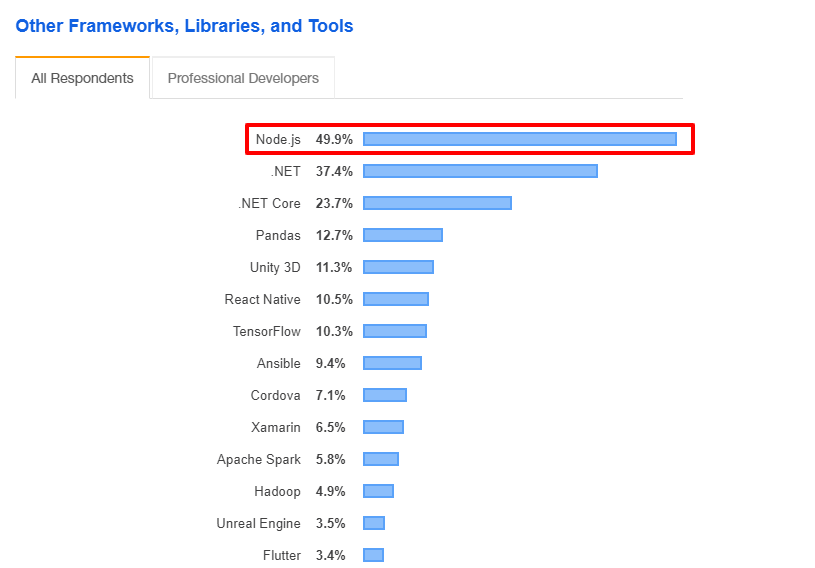
Today, Node JS is the number 1 framework used for developing modern web applications.

other frameworks libraries and tools

In case you want to get a deeper understanding of Node JS, be sure to check out our blog on What is Node JS.

What is Angular?

Angular is yet another popular JavaScript framework that was developed by Engineers at Google in 2009 and is maintained today by Google as well as its community of passionate developers.

Angular, just like Node JS, has also gained a top position. According to the Stack Overflow Survey 2019, Angular is on the 3rd position as one of the most preferred Web frameworks on the internet.

web framrworks

The main reason why Angular has attained 3rd position on the list of top web frameworks is due to its Model-View-Whatever architecture.

Angular’s MVW architecture helps developers build data-driven, interactive front-ends of web apps, which makes it one of the most preferred front-end JavaScript frameworks of today.

How Is Node JS Different from Angular and Other JavaScript Frameworks?

On the surface, both Node JS and Angular are JavaScript frameworks. But deep down, they’re totally completely different. For starters, Node JS is mainly used for writing server-side scripts to build back-ends of web applications.

Angular, on the other hand, is a front-end JavaScript framework design to build interactive web app interfaces.

One of the reasons why Node JS took off rapidly is mainly because it allows developers to build an entire web application from scratch using the same programming language, JavaScript.

Apart from this, Node JS is also more efficient, flexible, and is perfect for building data-intensive and real-time applications compared to other back-end development programming languages available in the market.

Furthermore, what makes Node JS standout from the rest of the back-end development languages is its different sets of APIs. Node JS APIs include streams, HTTP requests, child processes, and support for file systems, which makes it possible to handle the same amount of load with less horsepower.

Node JS Vs Angular – Key Differences

As you just saw above, Node JS and Angular are quite different from one another. And while we’ve covered the important differences, there are still certain differences we left out.

So, let’s get them to them so that you can be more confident about your knowledge in the difference between Node JS Vs Angular.

1 – Basics

We already covered this sort of, but let’s get over it one last time. The Node JS framework is designed specifically for building web servers and scalable back-ends of web applications.

The Angular JavaScript framework, on the other hand, was created to build structured applications for both mobile and web.

2 – Deployment Process

Since Node JS is a JavaScript runtime environment, it is compulsory to install Node JS in the computer system in order to use it and develop Node JS web applications.

That being said, we’ve also written a simple guide on how to install Node JS in case you don’t know how to do it.

Angular, on the other hand, does not require any installation process. You can use the Angular by simply embedding it in the code.

3 – Programming Language

While JavaScript is the primary language used in both Node JS and Angular. But since both these frameworks have evolved, they’ve both started supporting other programming languages to build web apps other than JavaScript.

Node JS, for example, now supports CoffeeScript, TypeScript, and Ruby, while Angular also allows using Dart, TypeScript, and CoffeeScript.

4 – Use Cases

The Angular JavaScript Framework basically allows developers and companies building Interactive interfaces in their web applications.

Node JS, on the other hand, is a back-end development framework that is used for building fast and scalable server-side applications. Node JS Use Cases actually differ from building real-time chat apps to live-stream web apps and many more.

5 – Working with Data

Angular’s MVW architecture supports two-way data binding. Hence, the data of a web app is synchronized automatically between the model and the view. However, Angular does not provide any sort of support or feature to write database queries.

Talking about Node JS, the framework does allow writing database queries even in non-relational databases like MongoDB and CouchDB, which as a result makes it much easier for developers to build web applications.

In a Nutshell…

Angular is a front-end JavaScript framework that allows developers to create dynamic web applications, while Node JS is a back-end JavaScript framework that allows writing server-side scripting to build fast & scalable web applications.

Together, Node JS and Angular can help you build isomorphic web applications. Although the development part is a bit tricky, so you might need to hire Node JS developer to get it done right.

General FAQs for Node JS Vs Angular:

Q:1 – What is Node JS and Angular?

Ans: Both Node JS and Angular are open-source JavaScript frameworks that is used for building web applications. Node JS is basically a back-end framework used for writing business logic, while Angular is a front-end framework used for creating intuitive user interface of a web application.

Q:2 – Which is better react or angular?

Ans: The core difference between angular and react is that React JS is simple, focused, and easier to learn. However, Angular goes with TypeScript which is more error-free and compact.

Q:3 – Why is node js needed?

Ans: Node JS is a JavaScript runtime environment that allows you to write server-side code of an application. It comes with an event-driven I/O model, which allows developers to build scalable real-time and network applications.

Q:4 – Which is better node js or python?

Ans: When it comes to Node JS vs Python, Node JS is better when you want to build real-time applications or high-performance web applications. Python is better when you want to do things like numerical computations, network programming, machine learning, or back-end integrations.


Why CRM Integrations are Necessary for Construction Companies?

In earlier days, the only technology required to run a construction business successfully were the tools and equipment needed in the construction of a building or a bridge. Although companies from various industries are embracing technological changes to excel in the digital economy, real estate and construction is an industry that has always been immune to technological changes.

Recently, construction companies have now started using tools like CRMs to improve their business processes, enhance client satisfaction, track essential data, and records, etc. However, to achieve these goals, construction companies must consider third-party CRM integrations. Today, CRM systems are so advance, that they can be integrated with marketing automation plugin, ERP, legacy databases, social media plugins, and phone systems. These third-party CRM integrations can bring tremendous benefits to your construction business.

5 Benefits of CRM Integrations

1. Document Management

Being in the construction business involves a lot of paperwork. Starting from creating proposals to creating invoices and quotes. Standalone CRM cannot handle such documents in one place. To overcome this problem, you’ll require a third-party integration such as iManage that helps you to manage your documents better. Purchasing the integration will take you halfway through. To achieve full efficiency, you’ll have to hire web developers who can make these two applications speak to each other.

Integrating external document manager with your existing CRM will help you avoid human errors and better manage every document, including your client names and addresses.

2. Marketing Automation and Email Marketing

Communication with your clients and employees is an essential element to scale up your business. Since most professional communication is done via email, you need to integrate email plugin into your existing CRM. Plugins such as MailChimp and SendGrid create, schedule, and disseminate emails easily. Also, you can create a list of customers whom you want to send updates about your work regularly. Using these plugins, you can share your upcoming projects with your past clients. It will automatically shoot an email as soon as you update the content. You can also send information or updates regarding the organization to your employees using the plugins.

3. Resource Planning

Currently, you must be using an ERP for cost estimation, bid management, project tracking, inventory management, reporting, payroll processing, and more. Since CRM and ERP both have separate databases, it might slow down certain operations such as bill processing, renewing inventory levels, arranging product returns for customers, and more. To complete these processes, you’ll need both CRM as well as ERP.

The core benefits you’ll achieve by integrating CRM and ERP are as follows,

  • From support and sales to accounting and finance, integrating CRM and ERP will help you get a 360-degree view of your clients
  • Get access to critical information faster
  • You’ll be able to eliminate the unnecessary data entry in ERP and CRM
  • The integration will help you improve inventory, order, and quote management
  • It reduces total IT costs since now you’ll only need to maintain one system

4. Social Media Integration

The importance of social media is growing exponentially. You need to have a strong presence on social media to grow your business and build your brand. Integrating various social media such as Facebook, Instagram, LinkedIn, Twitter, etc. to your CRM will help your social media manager to manage your social media accounts efficiently.

5. Customer Support

Currently, you might be receiving inquiries about your construction projects via phone or email. Gone are the days when phone calls were the primary medium of communication. Help your customer support staff by integrating plugins such as Zendesk and LiveChat. Using their live chat feature, your executive can chat with your customers and solve their queries instantly.

Conclusion

These CRM integrations will help you streamline your daily operations and increase your employee productivity. The database guy will no longer have to spend hours in migrating data from CRM to ERP and vice-versa. Employees will be able to receive organizational updates faster. The over-all paperwork will reduce to a great extent. The accounts manager will be able to manage accounts and finance seamlessly.

By integrating plugins for all the above applications and use cases, your CRM will no longer remain a CRM. It will be the next-generation system that has all the necessary elements to help you excel in the digital economy. Hire web developers now to merge all your legacy apps into one centralized system.

Top 10 React JS Interview Questions to ask before you hire React JS Developer (for React JS Development)

Searching for an appropriate React JS development company can be challenging. The reasons are that every React JS development project is different, and so are the development firms.

The first step for you should be to define a clear statement of requirements. Then you should look for a firm that has developers who have all the capabilities and skills to take up your project.

Preparing React JS interview questions and asking them to developers is one of the best ways to check their skills. However, the best-case scenario would be to ask them to create a small prototype. It will help you to judge a developer more accurately.

10 React JS Interview Questions to ask before Hiring a Development Company

Below mentioned React JS interview questions are the ones which every developer who has worked with React JS should know. This article is written from the perspective of a person looking to hire React JS developer for a web development project.

Q1 – Tell me something about your previous jobs, responsibilities, and projects

Knowing about the previous jobs and responsibilities of a developer will help you identify whether the person has done anything that you require in your current project.

It will give you an overview of a developer. You’ll also get to know the soft skills he or she possesses. Whether he/she has work in teams or not? You’ll also get to know the impact (created an app used by 1 million users today) he/she brought by his/her hard skills.

Q2 – Why did you decide to go with React and not the other frameworks?

Here instead of looking for answers like ” because of Virtual DOM, JSX, etc.”, you should look for answers like “I learned React because it was easy to learn, but challenging to master.”

This will help you identify the learning attitude of a developer. He/she will be willing to learn more if your project demands.

Answers like “because of better job opportunity” will make him/her an excellent choice for hire since React is going to dominate front-end development for at least five years.

Q3 – What is JSX and how can it be written in our JavaScript code. How does the browser recognize the code?

The reason behind asking this question is that a React developer must know the technical side of JSX along with its various shortcomings. He/she should know even the smallest elements of JSX.

Developers must know that the reason why Component names in JSX start with a capital letter because it helps React differentiate between components and HTML elements.

Q4 – What are the major two types of components that can be declared in React, and when should you use one over the other?

The true answer to this question is that instead of presentation and container components, it is more about function components and React.Component.

The correct answer should mention component state and lifecycle methods.

Q5 – Now that we have mentioned lifecycle, can you tell me the cycle of mounting a stateful component? In what order are the function called? Where could you place a request for data from the API and why?

In this question, make sure that you expect the developers to explain the changes that happened in the life cycle in recent months and not the life cycle itself.

If you get the answers such as “componentsWillMount,” then you can assume that the developer has been working with either the outdated version of React or he/she has gone through the outdated tutorials. The answer you should expect is “getDerivedStateFromProps.”

You must give bonus points to the developer who gives you the differences in the way the process goes on server-side.

Q6 – How can you make sure that the data is not re-fetched when the component is remounted?

This question is not entirely related to React. People who have worked with GraphQL might know the answer to this question.

This question helps you to judge whether the person you want to hire knows the idea of not-coupling the UI and other layers in the app. However, they can mention the API that is external to the React structure.

Q7 – Can you elaborate on the idea of “lifting the state up?”

Although it is one of the typical React JS interview questions, it is still worth asking.

You can expect answers such as “It allows you to pass the data between siblings” or “It allows you to have several pure-presentational components, which increases re-usability.”

If you get the answer as Redux, then you can assume that the candidate blindly follows the community recommendations without understanding its requirements in the project.

Q8 – In a React code, how would you debug a code? Which tools will you use and how would you investigate the reason for not re-rendering of a component?

The tools you should expect a developer to use our linter (eslint, jslint) and debugger (React Developer Tools).

You can expect answers like “I use RDT to debug the issue by checking if the component props/state are set properly” or “I use RDT to setup breakpoints.”

Q9 – What tools do you use for unit testing?

Here, you can expect a developer to name tools such as mocha, karma, jest, jasmin, selenium, enzyme, cypres, react-test-library, and more. Perhaps the worst answer could be “I don’t do unit testing. I only do manual testing.”

Q10 – What were the biggest challenges that you have faced on your previous projects, and what were your greatest achievements?

For this question, the answer can vary from developer to developer. A junior developer might say that he/she was thrown into solving a complex issue and conquered it.

Senior developers might explain how they optimized the performance of an app. Whereas, team leaders might explain how they finished a project before time with fantastic teamwork.

Final Words

The React JS interview questions mentioned above are the ones which give an overview of a React JS developer. However, if you want to choose the most appropriate developers, you can always ask questions specific to your project and requirements.

If you have a React JS project idea in mind, contact our experts who will help you from consultation to deployment to post-release support.

Vue JS vs React: A Battle for the Best Front-End Framework (with Latest Updates)

From tech giants to small and medium businesses, everyone is adopting JavaScript to build web and mobile applications. The benefits of JavaScript are immense.

Many new frameworks and languages are popping every day, and it is quite tough for a developer to keep up with all of them. One needs to decide the concentration.

Vue JS and React JS are the most popular front-end frameworks in the software development industry. So, in this article, we’ll help you determine the right framework for your project by comparing Vue JS vs React.

In this article, you’ll learn the difference between Vue JS and React JS, their specialties, and benefits.

Vue JS vs React

An introduction to Vue JS

Vue JS is an opensource JavaScript library which is popularly used to develop single-page web applications. The aim behind creating Vue JS library was to make web development simpler.

Lately, it has caught the attention of several web developers across the world because it is a progressive web framework and can be used to build eye-catching User Interfaces.

Evan You, an Ex-Googler, introduced Vue JS intending to remove the pain-points of Angular JS and to create a lightweight version of it.

There are immense benefits of Vue JS, but one of the most significant ones is its ability to re-render without any action. It allows you to add any component, built earlier, whenever required.

An introduction to React JS

One of the reasons for React to be popular is because of its origin. It was introduced by Facebook. Today, it is being managed by Facebook and a community of over a million developers.

Contrary to Vue Js, React JS is recommended when one wants to build a website where there is a necessity to update data quite frequently.

With React, it is easy to build reusable User Interface components. One can build a reusable user interface by breaking them into components rather than using templates or HTML.

React is a “learn once and write anywhere” framework. A developer can also develop mobile apps in JavaScript using its mobile-specific framework known as React Native.

React presents the use of JSX or JavaScript XML, which is a syntax extension of JS. JSX can be used in debugging and creating UI components.

Benefits of React JS

  • React JS offers excellent flexibility and responsiveness.
  • Since it is based on the document object model, it allows browser-friendly arrangements of documents in XML, HTML or XHTML format.
  • It has a rich community of developers who offer their inputs all the time to make React feature-rich.
  • React is an amazing choice for businesses who want a highly scalable framework.
  • React JS is a continuously improving and evolving framework since millions of developers and Facebook back it.
  • Using the React component model, one can build not only web applications but also iOS and Android mobile applications.
  • React can be used to build stunning user interfaces, be it native mobile applications or web applications.

Benefits of Vue JS

  • Since Vue JS uses HTML-based templates, revamping an existing application is simpler in it.
  • Be it a complex web application or single-page web application, Vue JS can be used to integrate smaller components without affecting the whole system.
  • Compared to other front-end frameworks, Vue JS takes up less space and gives better performance.
  • Vue JS is one of the easiest frameworks to learn as it requires one to know basic JavaScript and HTML.
  • Vue JS has great adaptability since it provides hassle-free migration reusable templates and an efficient and straightforward structure.

An In-depth Comparison

Optimization and Rendering

We may not consider speed and performance as the most significant decisive factor, but it still matters. When it comes to rendering React has a mechanism that triggers the rendering of the whole component tree when the state of a component is changed.

Vue’s rendering is, on the other hand, out-of-the-box. It offers optimized rendering, which keeps track of various dependencies while rendering and works accordingly.

HTML vs JSX

React uses JSX, which is a declarative JavaScript XML. It allows developers to write components using JavaScripts. Vue JS, on the other hand, uses HTML templates to generate views.

HTML-based templates are familiar to more number of developers, and they are also beneficial when it comes to revamping the existing websites.

State Management and Routing Solutions

While upscaling an application, one needs to take care of state management and data flow, especially when he/she is working with component-based frameworks like React and Vue.

React offers an innovative solution and alternative to the popular MVC architecture, which is known as Redux/Flux architecture that provides unidirectional dataflow.

Vue JS, being the new framework, offers a more advanced level architecture called Vuex, which integrates into Vue and provides an unmatched experience.

Building Tools

Both Vue and React offer similar and good development environments. One can create applications with little or no configuration. In Vue, the configuration is called Vue-cli, and in React it is known as Create React App or CRA.

Conclusion

When to opt Vue JS over React JS?

If you’re looking to develop a world-class single-page web application, which has a faster, lightweight, and modern UI library, then you must opt for Vue JS.

If you have to work with developers who know HTML, then it is beneficial for you to work with Vue rather than React.

When to use React JS over Vue Js?

JavaScript is at the heart of React. So, if you hire a developer who knows JavaScript, it is recommended you to go with React.

React is Ideal for large-scale web and mobile applications. Moreover, it is backed by Facebook and millions of developers, which makes it an obvious choice for many novice programmers.

If you’re looking forward to building a mobile application as soon as you’re done with a web application, then React is a perfect choice for you.

Learn Node JS (FAST) – 3 Best Online Node JS Courses to Become an Expert!

Let’s start with the obvious question: why should you care to learn Node JS?

Well, firstly, learning something new has never hurt anyone. And if you’re a JavaScript developer, learning Node JS will greatly help you in advancing your career.

Secondly, Node JS has been adopted by thousands of giant companies worldwide including Netflix, Uber, LinkedIn, and many more. So, you will have an ample amount of opportunities in the industry.

That being said, if you want to learn more about what are the top famous companies that use Node JS, we’ve also written a comprehensive blog post on it.

What is Node JS?

Node JS is basically a JavaScript runtime environment that allows JavaScript developers to write server-side scripting. That means, you can build front-end as well as the back-end of a web application using the same programming language.

For instance, you can use Node JS for back-end development, and for the front-end, you can use any of the Best Node JS Frameworks available in the market.

So, now that we’re clear what’s so great and why you should learn Node JS, it’s time we share why you should consider learning Node JS from the below-mentioned 3 best online Node JS courses.

3 Best Online Node JS Courses

As you might already know, there are hundreds, if not thousands, of Node JS courses available online. But, to make your life easier, we’ve already identified the top 3 online Node JS courses.

These are the same courses that our developers at Credencys have used to master Node JS and become an Expert Node JS developer.

P.S.: If you’d like to hire Node JS Developer for your upcoming project, you’ve just found the perfect match!

Coming back to the subject, let’s talk about what makes these 3 Node JS online coursed great.

  • Expert Instructor: You might have already heard about the saying that goes like “You’re only good as your teacher”. Well, that almost sums up our argument here. The instructors of all the below-mentioned Node JS courses have been created by leading experts in the industry.
  • Great Lessons: This goes without saying. – You need great lessons to learn anything. And the courses we’re about to mention are packed with the latest information, updates, and awesome demo projects, articulated in the best way possible to make difficult topics and concepts easy to understand.

Now, let’s jump in to discover the top 3 Online Node JS Courses.

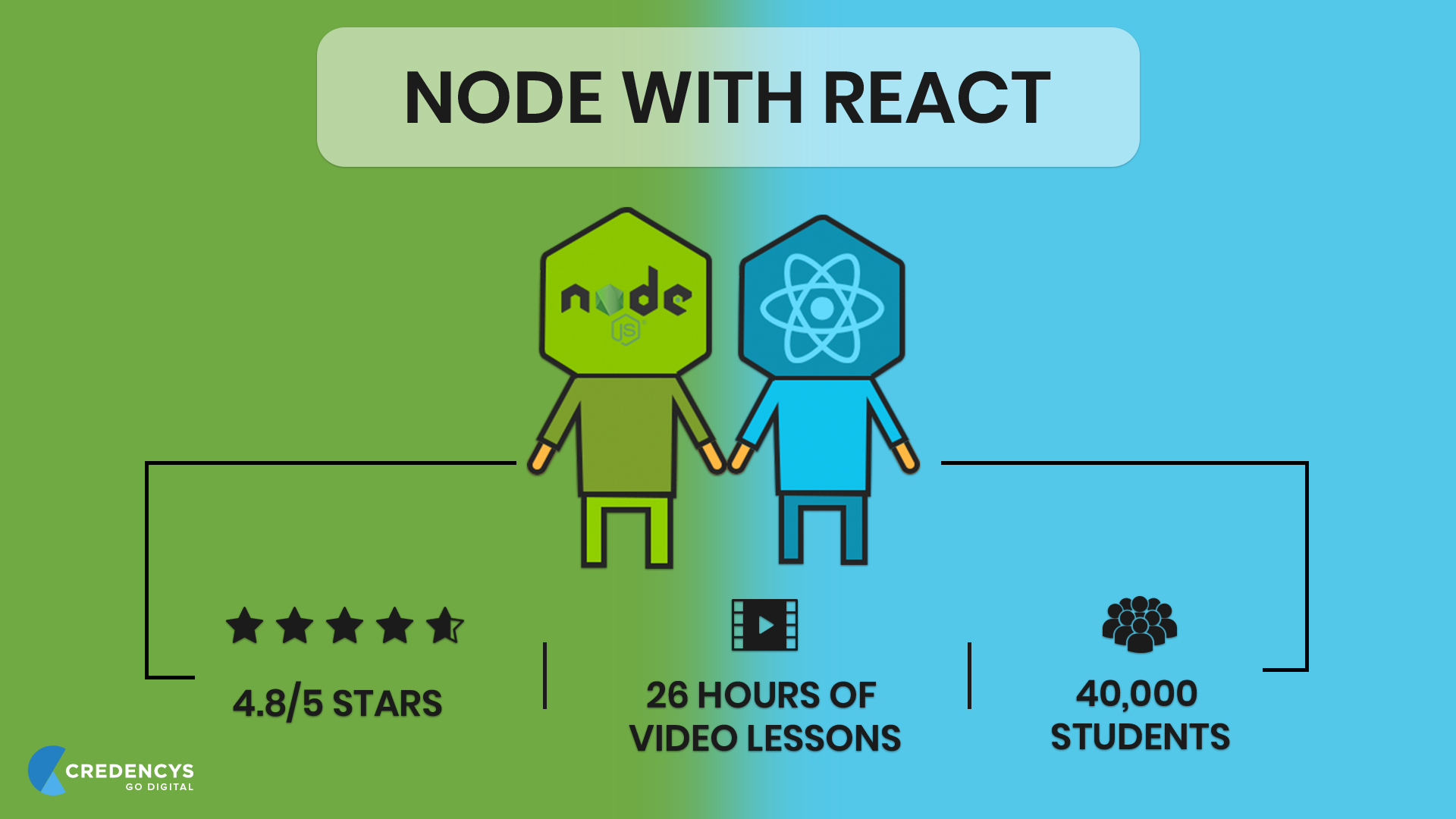
1 – Node with React

node with react

Node with React is a full-stack web development course created by a Node Expert named Stephen Grinder.

This course is relatively new and is packed with great lessons and content. And the best part is, you get to learn React and Node for the price of one course so we strongly recommend to check out this course.

The course is created in a way that once you finish all 25 hours of instructions, you’ll have developed your own web application using Node and React with proper hands-on experience.

Below are some of the things you’ll learn and master in this course:

  • Build and connect React app with Node JS backend.
  • Integrate Stripe to process credit card payments.
  • Send automated emails to users.
  • Fetch data from MongoDB to your React-Node App.

2 – The Complete Node.js Developer Course

The Complete Node js Developer Course

The complete Node.js developer is, hands down, the best Online Node JS on the internet.

This course was created and is taught by two most popular Node experts Andrew Mead and Rob Percival. From 100+ learning modules to 26-hours of on-demand video lessons, these guys have really thought of every aspect while creating this course.

While you don’t get the advantage of learning full-stack web development, but the complete Node.js developer course is project-based, meaning you’ll build several different Node.js applications throughout the course.

Specifically, here’s what you’ll learn to build in this course:

  • A to-do REST API
  • A note-taking app
  • A Weather App by using Dark Sky API and Google Maps
  • And a Real-Time Chat App

Besides these projects, you’ll also get the replies to every question or every time you run into a problem in this course.

Overall, this Node JS course is best for you if you want to become a freelance Node JS developer, build your own Node JS product, or just crack the interview at some large-scale enterprise.

3 – Learn and Understand NodeJS

Learn and Understand NodeJS

Though the complete Node.js developer course covers everything to learn Node JS and even master it, but if you really want to go in-depth, then this is the right course for you.

The above two Node JS courses basically teach you Node JS by showing what Node JS can do and helping you build a couple of projects, but this course is different.

This course focuses on teaching how Node JS works in-depth. In simple words, if you want to go where only a few go and learn the inner workings of Node JS, Learn and Understand NodeJS is the course for you.

This course starts from the very basic and history of Node JS. For example, the first chapter begins with looking at C++ written V8 JavaScript engine upon which the Node is built on.

Once you’ve learned that, you will then learn how Node event loop and asynchronous code works. During the final lessons, you’ll have an in-depth understanding of buffers, pipes, event emitters, streams, and working with files.

Overall, this course is especially for students who want to pursue their career as a Node JS developer.

Conclusion

Thank you for reading. We hope you find this list helpful.

Interested in other Node JS topics? We strongly recommend reading the following blogs too:

How to Install Node JS on Windows (with Pictures!)

Node.js, as you might already know, is one of the powerful JS frameworks out there. It is a lightweight and efficient JavaScript runtime environment that’s built on Google Chrome’s V8 engine.

Node JS was basically the first framework to bring JavaScript to the server-side. Before Node JS, JavaScript was only used for client-side scripting.

But, since Node JS’s arrival, it has dominated the backend technology space and has become the most preferred framework for building backends of different kinds of web applications.

In fact, Node JS offers so many benefits that many famous companies across the globe have adopted it in their software productions.

That being said, if you want to know in detail, what companies are using Node JS and what did they gain from it, we’ve written a separate compressive blog on it.

Once you read that article, you will know why Node JS is the most-preferred backend development framework and how Node JS can be beneficial to you in your next or existing project.

Coming back to the subject, using Node JS to build modern web apps will always require you to first install it.

This blog post will help you learn how to install Node JS on Windows as quickly as possible so that you can start building!

That being said, let’s dive right in!

How to Install Node JS on Windows

To use Node JS in your web app project, you need to install the following in your system first.

  • Node JS
  • Node Package Manager (NPM)
  • IDE or Text Editor

Let’s begin with how to install Node JS on Windows system.

Step #1

Before you do anything, first you need to make sure that your Windows system has sufficient space and RAM (minimum 4 GB).

Step #2

The next step is to download the Node JS from its official website.

Head over to https://nodejs.org/en/download/ and download the Windows Installer and Binary file.

Once you’ve downloaded both the files, go to your downloads folder where it is saved and initiate the installation process.

Step #3

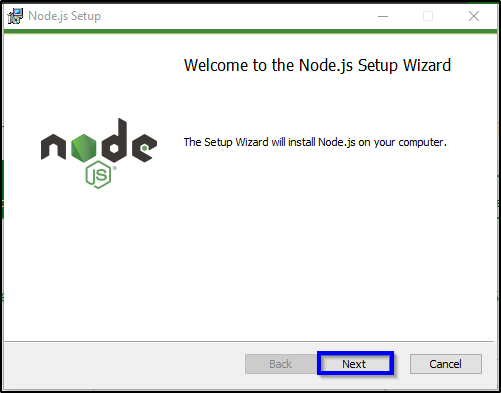
As you initiate the installation process, you’ll be prompted with Node JS installation wizard as shown in the image below.

node js setup wizard

Step #4

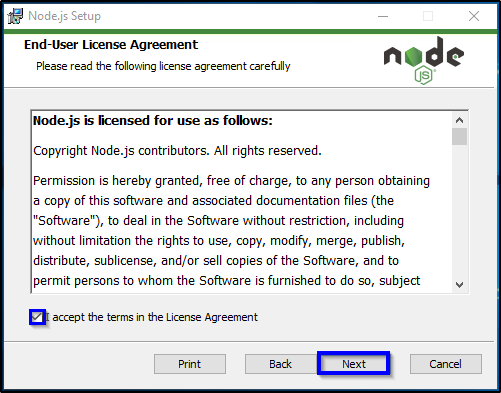
As highlighted in the above image, click on the ‘Next’ button a few times and you will reach the End-User License Agreement page in the installation wizard.

node js

As highlighted in the above image, click on the checkmark box that reads ‘I accept the terms in the License Agreement’ and click on the ‘Next’ button.

Step #5

In the next page, you will have an option to change the location to install Node JS to. You can either change it and keep it as it as.

node js

Step #6

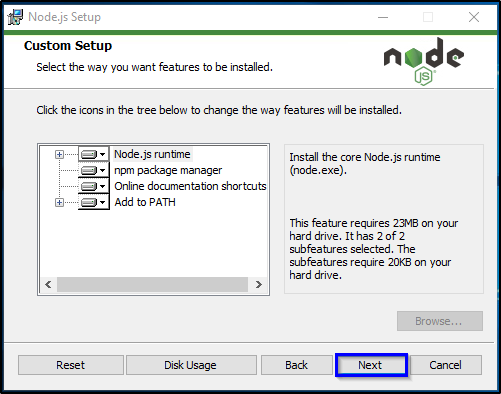
After clicking the ‘Next’ button, you will be prompted with a list of features to install.

node js

Step #7

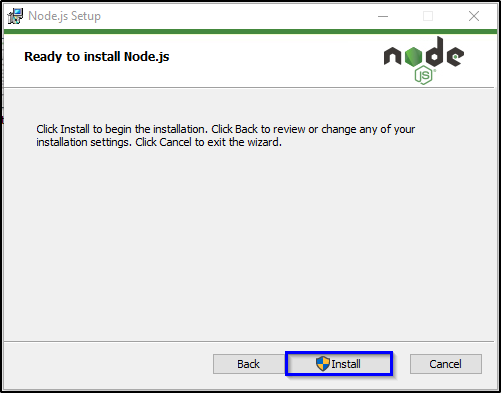
Click on the ‘Next’ button and then click on the ‘Install’ button as highlighted in the image below.

node js

Step #8

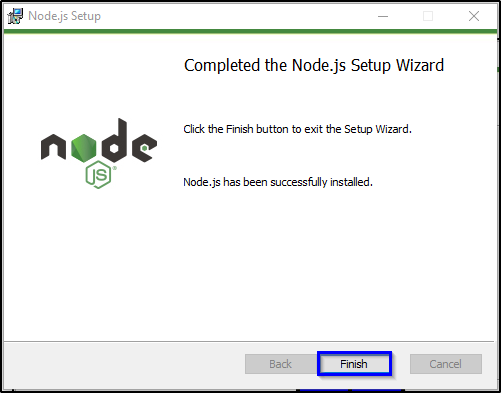
Once the installation is finished, exit the installation wizard by clicking on the ‘Finish’ button.

node js

With this step, you have finally installed the main part of Node JS on your Windows system.

The next step is to install the Node Package Manager (NPM) as we discussed in the beginning.

How to Install Node Package Manager (NPM) on Windows

Node Package Manager is written in JavaScript and is the default package manager of Node JS.

The NPM basically helps to manage modules and packages required for Node JS application functioning and gives a command-line client npm.

The difference between modules and packages in Node JS is that packages bundle up the important files required for a module.

Modules, on the other hand, are also known as JavaScript libraries that are incorporated into the Node JS project for a specific purpose.

Now, as far as the NPM installation is concerned, from Node JS 0.6.3 version, the NPM automatically comes with the Node JS as the default package manager. This means you don’t need to install NPM explicitly anymore.

As for the packages, you can use install, update, and uninstall Node JS packages via npm by using the following command:

– npm install package_name

Best IDE & Text Editors for Node JS Development

Now that we are done with the Node JS and NPM installation process, your system is now finally ready and you can start writing Node JS programs.

You can write your programs either using Node JS text editors or IDEs available for free.

Here, we’ve mentioned the Best IDEs & Text Editors that you can use for writing Node JS programs.

All of the above-mentioned IDEs and Text Editors work perfectly for writing Node JS programs.

So, what are you waiting for?

Get Started!

With this, we have finally completed the Node JS installation process. We hope you find this blog useful. If you face any issues or need help of any sort, hire Node JS developer to make sure everything is done in the right manner.


Top 8 React JS Tutorial and Courses to Follow (Updated)

React JS is one of the leading and fastest-growing JavaScript frameworks for web development. The framework is getting so popular that there are no chances for its disappearance in at least five years.

There are many job opportunities available for React developers. However, a developer needs to be skilled enough to handle the ups and downs of a development project.

To get yourself skilled, you need to follow the React JS tutorial. There are tons of tutorials available online from where you can get React JS training.

You might have heard speculations that it is one of the easiest frameworks to learn, which is true. However, it is also one of the toughest when it comes to mastering it.

To master it, all you need to do is follow these React JS tutorial and practice building the real websites and web applications. Below mentioned courses will help you accelerate your learning process.

Top 8 React JS Tutorial, Courses, Certificates to Follow

#1 React – The Complete Guide (incl Hooks, React Router, Redux) by Udemy

Maximilian Schwarzmüller is the tutor of this course. He is truly an expert when it comes to web development. He has taught 200,000+ students through online classes to date. He teaches various programming languages, and this is one of the most sought after courses taught by him.

  • This React JS tutorial will help you to start learning React from scratch.
  • You’ll receive training for React JS, animations, Redux, Redux Routing, Next.JS basics, and more.
  • You don’t have to be a JavaScript expert to start this course.
  • The course level is intermediate to expert.
  • This course will help you to shift from Angular or Vue to React.

#2 Become a React Developer – Nanodegree Certificate by Udacity

The Nanodegree program will help you to gain expertise in the UI library, which is known to be the heart of React. It is ideal for you to choose this course if you’re comfortable with JavaScript, HTML, CSS, command line, NPM, and Git. In this course, you’ll learn about the component model. You’ll also learn to manage complex state with Redux and build applications using React Native on Android and iOS.

  • Navigate the software and tools to solve real-life problems.
  • Work on hands-on projects as you cover the topics in the course.
  • Every topic is filled with a variety of demonstrations and examples.
  • Get personal coaching, one-to-one mentoring, and interview prep advice along with the course.

#3 Become a React Expert by Pluralsight

It is a multi-level React JS tutorial. First, it will help you get acquainted with the fundamentals of React such as JSX, component states, and Props object. Then it’ll take you to the intermediate level, which covers topics such as Redux, working with Flux, and working with other intricate elements. Finally, it will confront you with concepts like HOCs, API, external state, and more.

  • It provides a guided journey to developers from being a newbie to becoming an expert in React.
  • The course is filled with rich study material, videos, exercises, quizzes, and more.
  • It emphasizes both the conceptual as well as the practical aspect of the framework.

#4 Full-Stack Web Development with React Specialization by University of Hong Kong and Coursera

This course will help you to learn not only React JS but also Bootstrap, React Native, and server-side development. The course is filled with projects and practical exams through which you can learn the framework by implementing.

  • This course will help you become a full-stack developer with React as the primary front-end framework.
  • Learning with the Coursera community gives you a unique experience.

#5 Modern React with Redux by Udemy

This is one of the few courses available on Udemy that has 85,000+ student enrolments. The trainer of this course is Stephan Grider, who is a proclaimed web developer by many corporations in the San Francisco Bay Area.

  • This course teaches you to master the fundamentals of React and Redux by building apps with Webpack, ES6, and React Router.
  • After finishing this course, you’ll become a pro at Webpack, NPM, ES6/ES2015, and Babel JavaScript syntax.
  • The course will break down complicated topics into easier terms that will make it effortless to apprehend.

#6 The Complete React Developer Course (w/ Hooks and Redux) by Udemy

Taught by Andrew Mead, This React JS tutorial will help you to develop and launch React web apps using React v16, React Router v4, Redux, and Webpack.

  • Finishing this course will lead you to become an expert on React, React Router, and Redux.
  • You’ll get hands-on experience on ES6/ES7 JavaScript, user accounts, and set up authentication.
  • The trainer answers every question almost instantly.

#7 Advanced React and Redux: 2018 Edition by Udemy

Once you finish the above course, you can start with this advanced-level course, which gives you an intermediate understanding of Redux and Advance understanding of React. It will help you to excel in concepts like Testing, Middlewares, HOC’s, Authentication, and Deployment.

  • This course will help you learn to develop scalable APIs with authentication using Mongo, Express, and Python.
  • You’ll learn to set up testing environments using Chai and Mocha.
  • It will help you create Redux middleware from scratch and debunk what goes behind the scenes.

#8 GraphQL with React: The Complete Developers Guide by Udemy

This course helps you master GraphQL by developing React and Node. Similar to React, GraphQL was also developed by Facebook. It acts as an alternative to REST and other ad-hoc web service architectures.

  • You’ll learn the fundamentals behind structuring GraphQL servers.
  • Understand and learn the differences between Relay and Apollo.
  • Know everything about Apollo Data, Authentication, and Integration with React.
  • Understand how to develop servers that can be used with both React Native and React.
  • Learn to integrate React Router with GraphQL.

Conclusion

Alright. So, this was the list of my favorite React JS tutorials available online. Apart from these, there are many other courses as well, which can make you an expert on React.

Gaining extra competency on React from these courses will help you get more visibility among the companies looking to hire React JS developers.

FAQs:

1) Is React JS easy to learn?

Yes, React JS is quite easy to learn compared to other JavaScript frameworks. There is an abundance of material, courses, tutors, and online forums available that’ll help you learn React JS easily.

2) What is the best way to learn React JS?

If you’re a beginner, then the first thing you should do is to enroll for React JS basics class and then practice as many scenarios and functionalities as possible.

3) What should I know before I learn React JS?

You should have a good knowledge of HTML/CSS, know basic JavaScript commands and syntax, ES6, and should have a basic understanding of Webpack and NPM.

4) How hard is it to learn React JS?

React JS is one of the easiest libraries to learn among all JS libraries. However, if you already know enough of React JS and looking forward to becoming an expert, then it would be slightly tough for you.

5) Is React JS really worth learning, or is it just a fad?

It’s worth it. React has been widely adopted by many popular websites such as Netflix, Airbnb, and more. Unline other JS frameworks, learning React will open your doors to become a mobile app developer.