


How to Connect Pimcore to Magento for Product Data Synchronization
Managing product data directly in Magento becomes challenging as product catalogs grow. Retail and CPG businesses often manage thousands of SKUs, multiple variants, complex attributes, images, categories, and frequent updates.
Pimcore serves as a central platform for managing, enriching, validating, and approving product information, while Magento functions as the storefront. When connected, approved product data can be synced from Pimcore to Magento more efficiently.
However, effective product data sync requires more than a technical connection. It involves proper field mapping, validation, testing, error handling, and governance.
For businesses that need to go beyond basic product data synchronization and connect PIM with Magento or Adobe Commerce across product modeling, workflows, integrations, and downstream channels, our Magento PIM Integration services provide an end-to-end approach to planning, implementing, and scaling the integration.
This blog explains how to connect Pimcore with Magento to sync product data from an eCommerce operations perspective. For more information on integration approaches, see Credencys’ resources on Magento Pimcore Connector, Pimcore Magento 2 Integration, and Pimcore Magento Integration.
How Do You Connect Pimcore to Magento for Product Data Synchronization?
To connect Pimcore to Magento for product data synchronization, eCommerce teams need to define what product data moves from Pimcore to Magento, map Pimcore fields to Magento attributes, prepare clean product information, configure sync rules, validate product completeness, test records in Magento staging, and monitor sync errors after go-live. The objective is not just to transfer data.
The real goal is to ensure Magento receives accurate, complete, approved, and customer-ready product information.
What Makes Product Data Synchronization Different from Pimcore Magento Integration?
Pimcore Magento integration is the broader technical process of connecting Pimcore with Magento through APIs, connectors, middleware, or custom integration logic. Product data sync is more specific.
It focuses on how product information moves between Pimcore and Magento and how that data is prepared before it reaches the storefront. For example, a technical integration may define how Pimcore connects with Magento. But product data sync defines:
- Which product fields should be pushed to Magento
- Which attributes should appear on product pages
- Which fields should support filters and search
- Which images should be published
- Which products are complete enough to go live
- Which teams approve product content before publishing
- How failed product updates should be corrected and re-synced
This distinction matters because many product data issues aren’t caused by the integration layer. They stem from incomplete data, poor field mapping, inconsistent attributes, missing images, incorrect variant relationships, or weak approval workflows.
A connector can move data from Pimcore to Magento. But a well-planned product data sync process ensures that the data being moved is accurate, structured, and ready for customers.
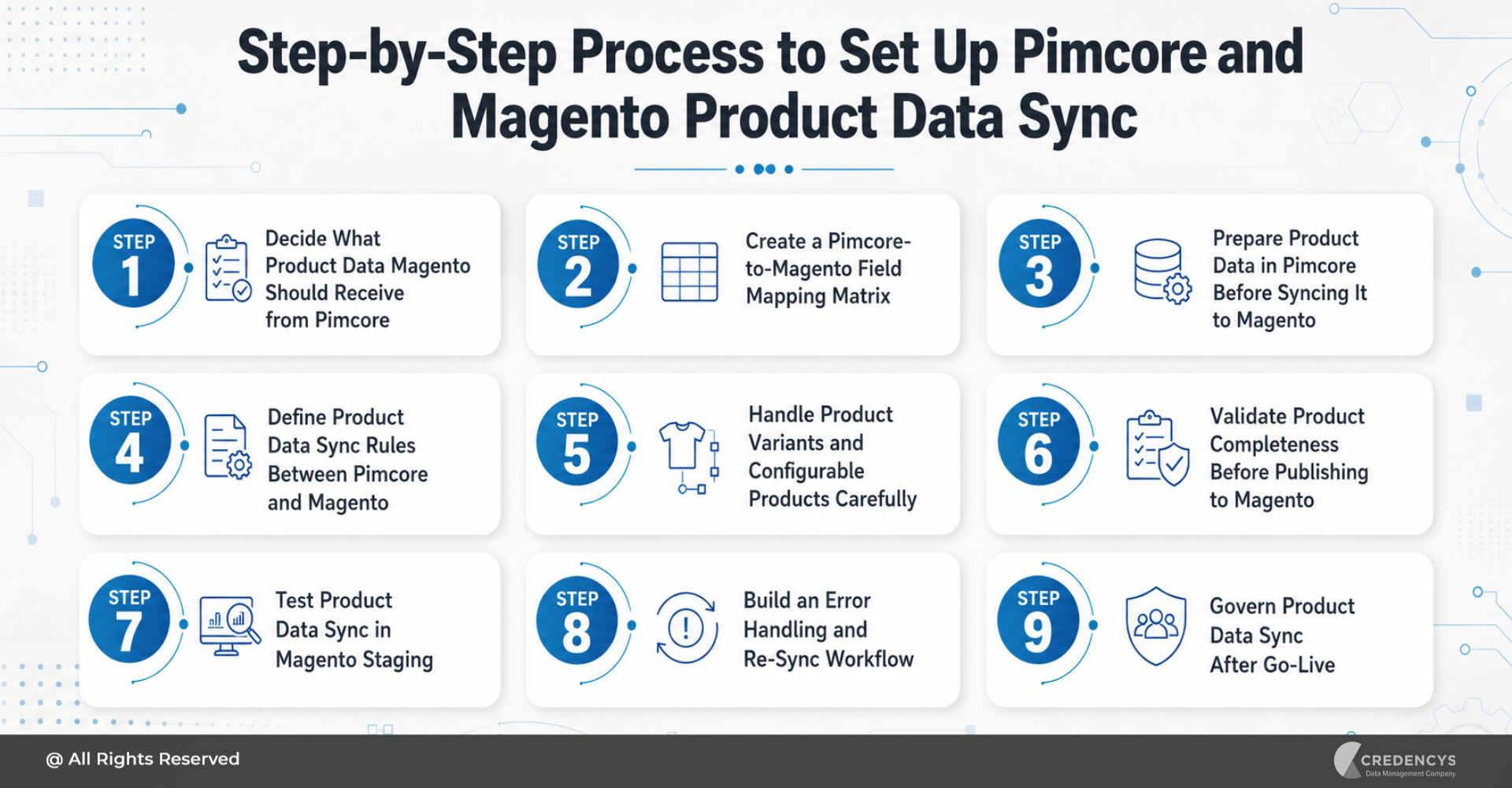
Step-by-Step Process to Set Up Pimcore and Magento Product Data Sync
Setting up product data sync between Pimcore and Magento requires a structured approach. eCommerce teams need to prepare the data, define ownership, configure sync behavior, test product records, and govern the process after launch.
Here is a step-by-step process to successfully set up Pimcore and Magento product data sync.
Step 1: Decide What Product Data Magento Should Receive from Pimcore
First, define the product data sync scope. Pimcore PIM may store a wide range of product information, including customer-facing product content, internal product notes, supplier data, packaging details, compliance information, enrichment status, and workflow comments.
Magento does not need all of this information. Magento should receive the product data required to power the eCommerce storefront, improve product discovery, support SEO, enable filtering, and help customers make purchase decisions.
For retail and CPG businesses, this may include:
- Product name
- SKU
- Short description
- Long description
- Product specifications
- Product attributes
- Category assignment
- Product images
- Gallery images
- Variant details
- Size, color, flavor, material, or packaging information
- SEO metadata
- URL key
- Store-view-specific content
- Product status
Some data may remain only in Pimcore. This can include internal supplier notes, backend approval comments, packaging compliance workflows, enrichment scores, and operational data that does not need to appear on Magento.
It is also important to identify which system owns pricing, stock, and availability. In many enterprise environments, these fields may come from ERP, OMS, inventory management, or other commerce systems rather than Pimcore.
A clear sync scope prevents unnecessary complexity and ensures Magento receives only the data it needs.
Step 2: Create a Pimcore-to-Magento Field Mapping Matrix
Once you define the sync scope, the next step is to create a field mapping matrix. A field mapping matrix shows how each Pimcore product field connects to the corresponding Magento product attribute.
This is one of the most important steps because even small mapping errors can affect product pages, filters, search results, SEO fields, category navigation, and product updates. For example, Pimcore may use the field name “Product Material,” while Magento may use “material.”
Pimcore may store packaging size as a structured field, while Magento may expect it as a dropdown value. Pimcore may store multiple media assets, whereas Magento may require a base image, a thumbnail image, and gallery images.
A simple field mapping matrix may look like this:
| Pimcore Field | Magento Field | Sync Rule | Required? | Owner |
|---|---|---|---|---|
| Product Name | Product Name | Push after approval | Yes | Product Team |
| Long Description | Description | Push after content approval | Yes | Marketing Team |
| Main Image | Base Image | Push after asset approval | Yes | Creative Team |
| Category | Category Assignment | Push after taxonomy approval | Yes | Catalog Team |
| Meta Title | Meta Title | Push after SEO review | Optional | SEO Team |
| Product Status | Product Status | Push after final approval | Yes | eCommerce Team |
The mapping matrix should cover all major product data areas. Product identity mapping should include SKU, product ID, product type, parent-child relationship, and product status.
Content mapping should include product names, short descriptions, long descriptions, feature bullets, specifications, care instructions, and usage details. Attribute mapping should include size, color, material, flavor, weight, volume, dimensions, certifications, ingredients, compatibility, and other product-specific attributes.
Category mapping should define how Pimcore taxonomy connects with the Magento category tree. Media mapping should specify which images, videos, manuals, labels, certificates, and packaging visuals to send to Magento.
SEO mapping should include meta title, meta description, URL key, image alt text, and store-view-specific metadata. A detailed mapping matrix helps business, content, product, and technical teams stay aligned before configuring the sync.
Step 3: Prepare Product Data in Pimcore Before Syncing It to Magento
Before pushing product data from Pimcore to Magento, clean, standardize, and validate it in Pimcore. If you sync poor-quality product data to Magento, the storefront will reflect the same issues.
The integration will not fix incomplete descriptions, duplicate SKUs, inconsistent attributes, missing images, or incorrect categories. Start by auditing the current product information.
Look for:
- Duplicate SKUs
- Missing mandatory fields
- Inconsistent attribute values
- Outdated descriptions
- Missing product images
- Incorrect category assignments
- Unstructured variant relationships
- Incomplete SEO metadata
- Inconsistent units of measurement
- Localization gaps
Then standardize the data before syncing. For example, if one product uses “500 gm,” another uses “500g,” and another uses “0.5 kg,” normalize the unit. If color values include “Dark Blue,” “Navy,” and “Blue-Navy,” teams should define a standard dropdown value.
Review outdated or unapproved product images before publishing. Product data preparation should include:
- Standardizing attribute names and values
- Removing duplicate SKUs
- Completing mandatory product fields
- Normalizing units of measurement
- Structuring product variants
- Cleaning outdated product images
- Reviewing category hierarchy
- Adding SEO metadata
- Validating regional or localized content
- Defining required fields for each product type
This step ensures that Magento receives product information ready to be displayed, searched, filtered, and purchased.
Step 4: Define Product Data Sync Rules Between Pimcore and Magento
After field mapping and data preparation, eCommerce teams need to define sync rules. Sync rules determine when product data moves from Pimcore to Magento, what conditions must be met, and what happens if the sync fails.
This step is important because not every product update should go live immediately. Some updates may require approval from product, marketing, legal, SEO, or regional teams before publishing to Magento.
Useful questions to answer include:
- Should a new product sync immediately after creation?
- Should only approved products be pushed to Magento?
- Should incomplete products be blocked from publishing?
- Should updates happen in real time or on a schedule?
- Should images sync before or after product content?
- Should SEO updates require a separate approval?
- Should discontinued products be unpublished or archived?
- Should regional content follow different approval workflows?
- What happens if Magento rejects a product update?
- Who receives alerts when product data sync fails?
For many retail and CPG businesses, an approval-based sync workflow works best. In this model, product data is created, enriched, reviewed, and approved in Pimcore.
Only after the product meets defined completeness and approval rules does it become eligible for sync with Magento. This reduces the risk of publishing incomplete, inaccurate, or unapproved product information on the storefront.
Step 5: Handle Product Variants and Configurable Products Carefully
Product variants are often the most complex part of Pimcore Magento product data sync. Retail businesses may sell products in multiple sizes, colors, styles, fits, or materials.
CPG businesses may sell the same product in different flavors, pack sizes, weights, packaging formats, or regional formulations. Magento supports different product types, including simple, configurable, grouped, and bundled products.
Pimcore must structure product data to support these Magento product relationships. For example, a T-shirt may have one parent configurable product and multiple child simple products for different sizes and colors.
A beverage brand may have one product family with several flavors and pack-size variants. A skincare product may have different sizes, bundles, and region-specific packaging.
To sync variants correctly, teams should define:
- Which product acts as the parent product
- Which products are child variants
- Which attributes define the variation
- Whether images are shared or variant-specific
- Whether descriptions are shared or customized
- How variant SKUs are structured
- How product availability is managed
- How store-view-specific variant content is handled
Test variant mapping carefully before a full catalog sync. If variant relationships are incorrect, Magento product pages may show incomplete options, wrong images, missing child products, duplicate listings, or incorrect product information.
Step 6: Validate Product Completeness Before Publishing to Magento
Don’t push a product to Magento just because it exists in Pimcore. It should meet defined completeness rules before publishing.
Product completeness validation ensures that Magento receives only customer-ready product information. This is especially important for businesses that manage large catalogs, frequent product updates, seasonal launches, or multiple regional storefronts.
A basic product completeness checklist may include:
- SKU is available
- Product name is complete
- Product description is approved
- Category is assigned
- Required attributes are filled
- Main product image is approved
- Gallery images are available
- SEO metadata is complete
- Variant relationships are correct
- Store-view content is ready
- Product status is approved for publishing
Pimcore can help teams define completeness rules and approval workflows for different product types. For example, a simple product may require fewer fields than a configurable product.
A CPG product may require ingredient details, packaging information, certifications, and compliance content. A fashion product may require information on size, color, fabric, fit, and care instructions, as well as variant-specific images.
By defining completeness rules in Pimcore, eCommerce teams can prevent incomplete or low-quality product content from reaching Magento.
Step 7: Test Product Data Sync in Magento Staging
Before syncing the full catalog to Magento production, teams should test product data in a Magento staging environment. Testing helps identify mapping errors, missing fields, media issues, category problems, broken product relationships, and display issues before customers see them.
Start with a small but representative product set. The test set should include:
- Simple products
- Configurable products
- Products with multiple images
- Products with missing optional fields
- Products assigned to multiple categories
- Products with regional content
- Products with SEO metadata
- Products with complex attributes
- Products with parent-child relationships
During testing, eCommerce teams should check:
- Product page display
- Product title and description formatting
- Image rendering
- Gallery order
- Category placement
- Search results
- Filter behavior
- Variant selection
- Product URLs
- SEO fields
- Store-view-specific content
- Failed sync records
- Error logs
Testing should involve both technical teams and business users. Developers can review the integration flow, logs, API responses, and failed records. eCommerce, catalog, and marketing teams can verify whether the product experience looks correct on the storefront.
This reduces the risk of catalog issues after go-live.
Step 8: Build an Error Handling and Re-Sync Workflow
Even with strong planning, sync errors can still happen. Magento may reject a product update due to a missing required field, an invalid attribute value, a duplicate SKU, an incorrect category mapping, an unsupported image format, or a broken parent-child relationship.
That is why teams need an error-handling and re-sync workflow. Instead of treating sync failures as purely technical issues, businesses should define clear ownership for resolving them.
An effective error-handling workflow should answer:
- Where are failed records logged?
- Who reviews sync failures?
- How are product data issues assigned?
- What errors can be fixed automatically?
- What errors need manual review?
- How often should failed records be retried?
- Who confirms that the product is published correctly?
- How are recurring sync issues tracked?
Common sync errors may include:
- Missing mandatory attributes
- Duplicate SKUs
- Invalid dropdown values
- Missing images
- Incorrect media format
- Category mapping errors
- Broken parent-child relationships
- Store-view content mismatch
- SEO field errors
Once an issue is fixed in Pimcore, revalidate the product and push it to Magento again. This prevents failed product records from remaining unresolved and helps eCommerce teams keep launches on track.
Step 9: Govern Product Data Sync After Go-Live
Product data sync does not end once the integration goes live. As the business grows, new products, attributes, categories, channels, regions, and content requirements will emerge.
Without governance, product data quality can decline again. Post-go-live governance defines who owns product data and how teams manage updates.
For example:
- Product teams may own core product information
- Marketing teams may own descriptions and enrichment content
- Creative teams may own product images and videos
- SEO teams may own metadata
- eCommerce teams may own Magento publishing
- IT teams may own integration performance and sync monitoring
- Data governance teams may own standards and quality rules
Governance should also define how to add new attributes. If every team creates attributes without standardization, Magento filters, product pages, and category experiences can become inconsistent over time.
A strong governance model should include:
- Product data ownership
- Attribute naming standards
- Category management rules
- Image approval guidelines
- Content approval workflows
- Change request process
- Sync monitoring routines
- Monthly catalog quality reviews
- Documentation for new fields and rules
This helps retail and CPG businesses maintain long-term product data accuracy across Pimcore and Magento.
How Credencys Helps eCommerce Teams Set Up Pimcore Magento Product Data Sync
Connecting Pimcore to Magento requires more than technical integration. It requires a strong understanding of product data, catalog operations, eCommerce workflows, digital assets, and system architecture.
Credencys helps retail and CPG eCommerce teams set up Pimcore Magento product data sync with a structured approach. Our team supports businesses with:
- Pimcore data modeling
- Magento attribute mapping
- Product data cleansing
- SKU and variant structure planning
- Category and taxonomy mapping
- Digital asset sync planning
- Product completeness rules
- Approval workflow configuration
- Connector, API, or middleware-based integration
- Magento staging validation
- Sync error handling workflows
- Post-go-live governance and support
For businesses that need a broader implementation across PIM, Magento or Adobe Commerce, ERP, DAM, supplier systems, and marketplaces, our Magento PIM Integration services cover the complete integration lifecycle, from architecture and product-data modeling to synchronization, validation, deployment, and ongoing optimization.
With the right product data sync strategy, businesses can reduce manual catalog updates, improve product data accuracy, accelerate product launches, and deliver consistent product experiences across Magento storefronts.
Conclusion
Connecting Pimcore to Magento for product data sync can help eCommerce teams manage product information more efficiently and publish accurate catalog content faster. But successful sync depends on more than the connector.
Teams need to define what data Magento should receive, map Pimcore fields carefully, prepare product data before sync, set clear publishing rules, validate completeness, test product records in staging, handle sync errors, and govern product updates after go-live. For retail and CPG businesses, this structured approach reduces catalog errors, improves product page quality, accelerates product launches, and creates a more consistent customer experience across Magento storefronts.
Frequently Asked Questions
How do I connect Pimcore to Magento?
You can connect Pimcore to Magento by defining the product data sync scope, mapping Pimcore fields to Magento attributes, configuring the integration layer, setting sync rules, testing product records in Magento staging, and monitoring sync performance after go-live.
Can Pimcore sync product data with Magento?
Yes. Pimcore can serve as the central product information system for managing, enriching, approving, and synchronizing product data with Magento. The sync may include product content, attributes, categories, images, variants, and SEO metadata based on business requirements.
What should be prepared before syncing Pimcore product data to Magento?
Before syncing product data to Magento, teams should clean duplicate SKUs, standardize attributes, complete mandatory fields, validate images, review category mapping, define variant relationships, and set product approval rules.
Why is field mapping important in Pimcore Magento product data sync?
Field mapping ensures every Pimcore product field connects to the right Magento attribute. Poor field mapping can lead to missing product information, broken filters, incorrect product pages, SEO issues, and failed product updates.
Should all Pimcore product fields be synced to Magento?
No. Sync only the product data required for the Magento storefront. Internal notes, supplier data, backend workflow details, enrichment scores, and non-commerce fields may remain only in Pimcore.







Tags: