


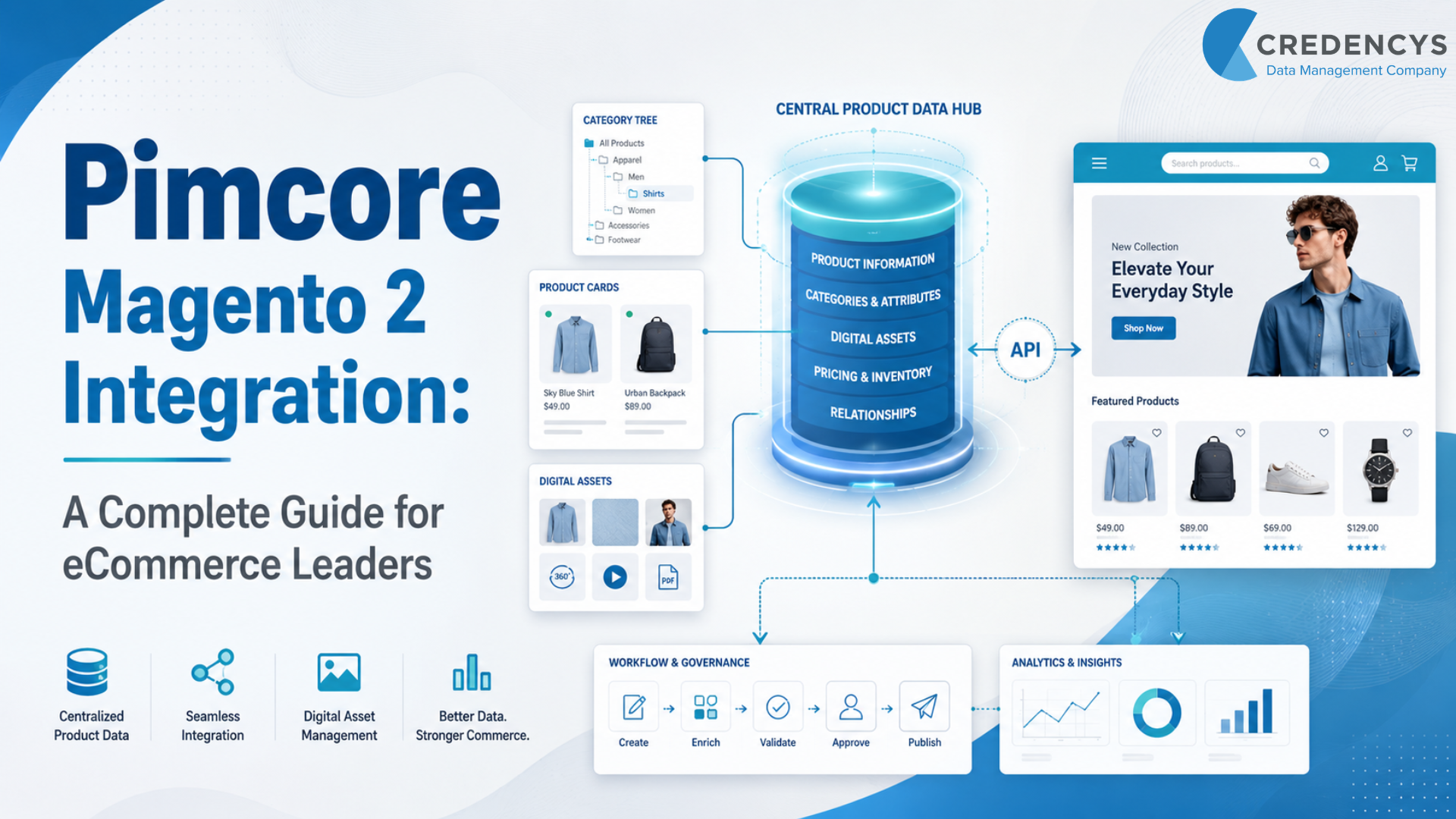
Pimcore Magento 2 Integration: A Complete Guide for eCommerce Leaders
Managing product data in Magento 2 can work well when the catalog is small, simple, and limited to a single storefront. But as eCommerce operations grow, product data becomes more complex.
Businesses need to manage thousands of SKUs, multiple product attributes, product variants, images, videos, technical documents, regional catalogs, languages, and channel-specific content. When all this data is handled manually or scattered across spreadsheets, ERP systems, DAM tools, and Magento, the result is slow execution and inconsistent product experiences.
This is where Pimcore Magento 2 integration becomes valuable. By integrating Pimcore with Magento 2, eCommerce businesses can centralize product information, enrich catalog data, manage digital assets, automate product publishing, and deliver accurate product experiences across digital channels.
For businesses managing large product catalogs, working with an experienced Pimcore development services partner can help create a scalable foundation for product data, digital assets, and eCommerce integrations. This integration is not just a technical connection between two systems.
It is a strategic foundation for faster product launches, better customer experience, stronger governance, and scalable commerce growth.
What is Pimcore Magento 2 Integration?
Pimcore Magento 2 integration connects Pimcore’s product data management capabilities with Magento 2 storefronts. In this setup, Pimcore acts as the central product data hub.
Magento 2 is a digital commerce platform where customers browse products, add items to their carts, and complete purchases. Pimcore manages, enriches, validates, and organizes product information before it is published to Magento 2.
This can include:
- Product names and descriptions
- Categories and subcategories
- Product attributes
- Product variants
- Images and videos
- Technical documents
- SEO metadata
- Store-specific product content
- Multilingual product data
The integration can be one-way or bidirectional. In a one-way integration, product data flows from Pimcore to Magento 2.
In a bidirectional integration, data moves between both systems based on business rules. The goal is simple: keep Pimcore as the source of truth for product data and use Magento 2 as the commerce experience layer.
Why Magento 2 Needs Pimcore for Enterprise Product Data Management
Magento 2 is a powerful eCommerce platform. It supports online storefronts, checkout, promotions, product display, customer accounts, and order management.
However, Magento is not always the best platform for managing complex enterprise product data. As the business grows, Magento teams often face challenges such as:
- Incomplete product descriptions
- Duplicate SKUs
- Inconsistent product attributes
- Missing images
- Poor category mapping
- Manual data uploads
- Delayed catalog updates
- Weak approval workflows
- Difficulty managing product variants
- Limited control over omnichannel data syndication
These issues directly affect customer experience. A customer may see missing specifications on one product page, inconsistent images on another, or incomplete product information across different store views.
This creates confusion, reduces trust, and can impact conversions. Pimcore Product Information Management solves this problem by becoming the centralized product data management layer.
It allows business, product, marketing, and eCommerce teams to manage product information in a structured, governed way before it reaches Magento.
How Pimcore and Magento 2 Work Together
Pimcore and Magento 2 serve different but complementary roles. Pimcore manages the product data foundation.
Magento 2 manages the digital commerce experience.
Pimcore’s Role
Pimcore helps businesses manage:
- Product Information Management
- Digital Asset Management
- Master Data Management
- Product data enrichment
- Data quality and validation
- Product hierarchy and taxonomy
- Approval workflows
- Multilingual product content
- Channel-specific product information
Magento 2’s Role
Magento 2 helps businesses manage:
- Online storefronts
- Product display
- Cart and checkout
- Promotions and discounts
- Customer accounts
- Orders and transactions
- Store views
- Commerce operations
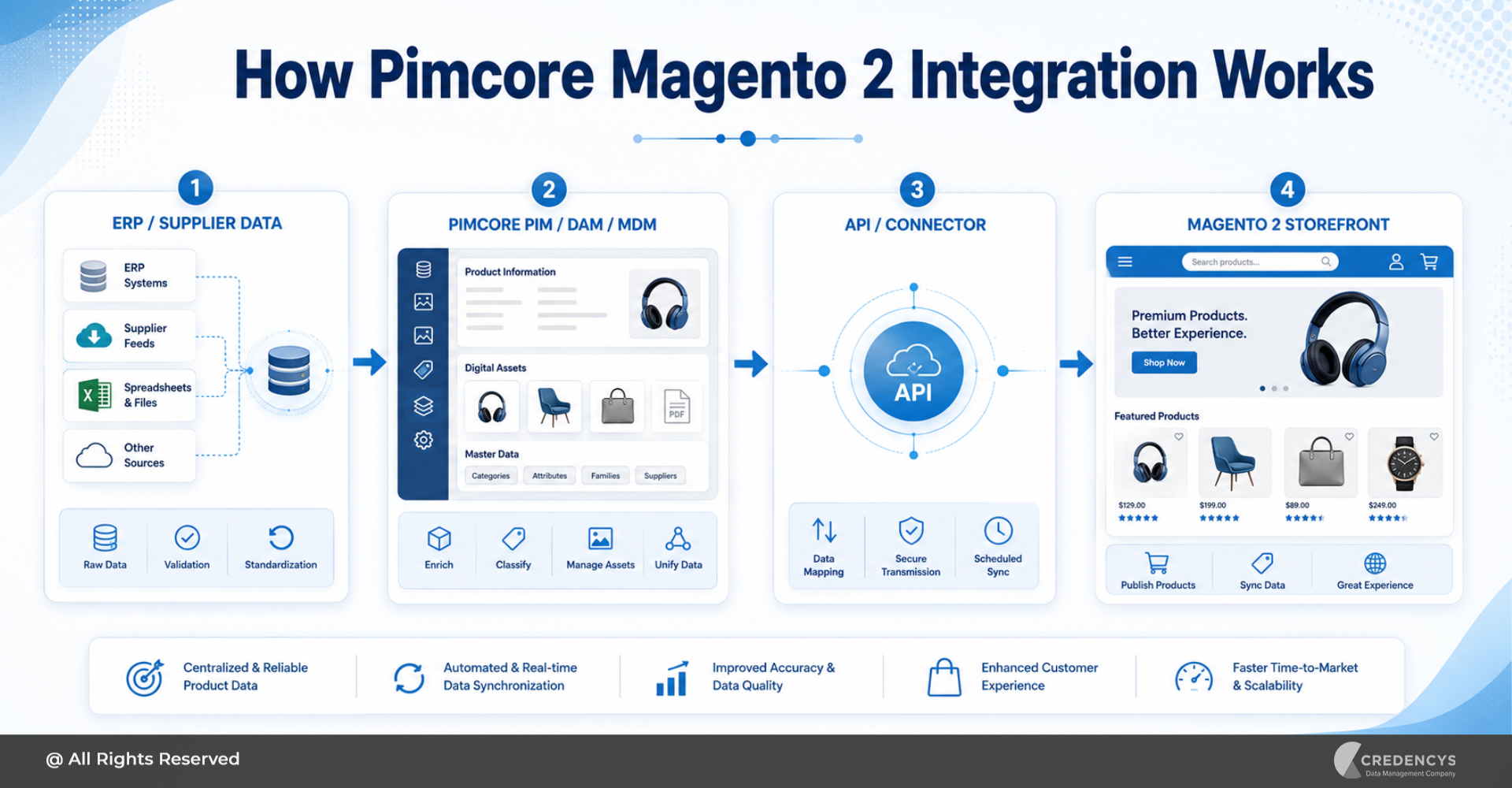
When integrated properly, Pimcore sends accurate, enriched, and approved product data to Magento 2. Magento then uses that data to create better product pages and shopping experiences.
This separation helps businesses reduce operational complexity. Instead of using Magento as both a commerce platform and a product data management system, businesses can use each platform for what it does best.
Key Benefits of Pimcore Magento 2 Integration
1. Centralized Product Data Management
The biggest benefit of Pimcore Magento 2 integration is centralization. Product data no longer needs to be scattered across spreadsheets, ERP systems, shared drives, supplier portals, and Magento admin panels.
Pimcore gives teams a single place to manage product information, assets, attributes, descriptions, and relationships. This improves control and makes it easier to maintain consistency across Magento storefronts.
2. Faster Product Launches
Launching new products manually in Magento can take time. Teams need to collect product data, upload images, format descriptions, map categories, validate attributes, and check product pages before publishing.
With Pimcore Magento 2 integration, much of this process can be automated. Once product data is enriched and approved in Pimcore, it can be pushed to Magento 2 based on defined rules.
This helps businesses launch products faster and reduce dependency on manual catalog updates.
3. Better Product Experience
Customers expect complete, accurate, and helpful product information. They want clear descriptions, high-quality images, specifications, compatibility details, size charts, documents, videos, and FAQs.
Pimcore helps businesses enrich this information before sending it to Magento. As a result, Magento product pages become more informative, consistent, and conversion-friendly.
4. Reduced Manual Errors
Manual product data entry often leads to errors. An incorrect attribute, a missing image, an incorrect category, or an inconsistent description can affect the customer journey.
Pimcore Magento 2 integration reduces these risks by enabling structured data models, validation rules, completeness checks, and approval workflows. This ensures only clean and approved product data reaches Magento.
5. Improved Omnichannel Readiness
Most eCommerce businesses do not sell through a single Magento storefront. They may also sell through marketplaces, mobile apps, dealer portals, print catalogs, social commerce, and retail channels.
Pimcore helps businesses prepare product data for multiple channels from one central platform. Magento 2 becomes one of the connected commerce channels, not the only place where product data is managed.
6. Better Scalability for Large Catalogs
Businesses with large and complex catalogs need a scalable way to manage data. This is especially important for industries such as retail, fashion, CPG, manufacturing, B2B commerce, automotive aftermarket, and electronics.
Pimcore Magento 2 integration allows businesses to handle large SKU volumes, complex attributes, product variants, and regional catalog requirements more efficiently.
What Data Can Be Synchronized Between Pimcore and Magento 2?
The data synchronized between Pimcore and Magento 2 depends on business needs, integration architecture, and Magento configuration. Common data types include:
| Data Types | How It Helps |
|---|---|
| Products | Publishes complete product records to Magento |
| Attributes | Ensures product specifications are accurate |
| Variants | Supports size, color, packaging, and configuration options |
| Operational efficiency | Faster product launches, reduced manual corrections, and smoother workflows |
| Images | Improves product page quality |
| Videos | Enhances product storytelling |
| Documents | Supports manuals, guides, datasheets, and certificates |
| SEO metadata | Improves product page discoverability |
| Product relationships | Supports related products, upsells, and cross-sells |
| Store-specific content | Enables regional and language-specific product information |
The more complex the catalog, the more important it becomes to define clear data ownership and synchronization rules.
Common Pimcore Magento 2 Integration Approaches
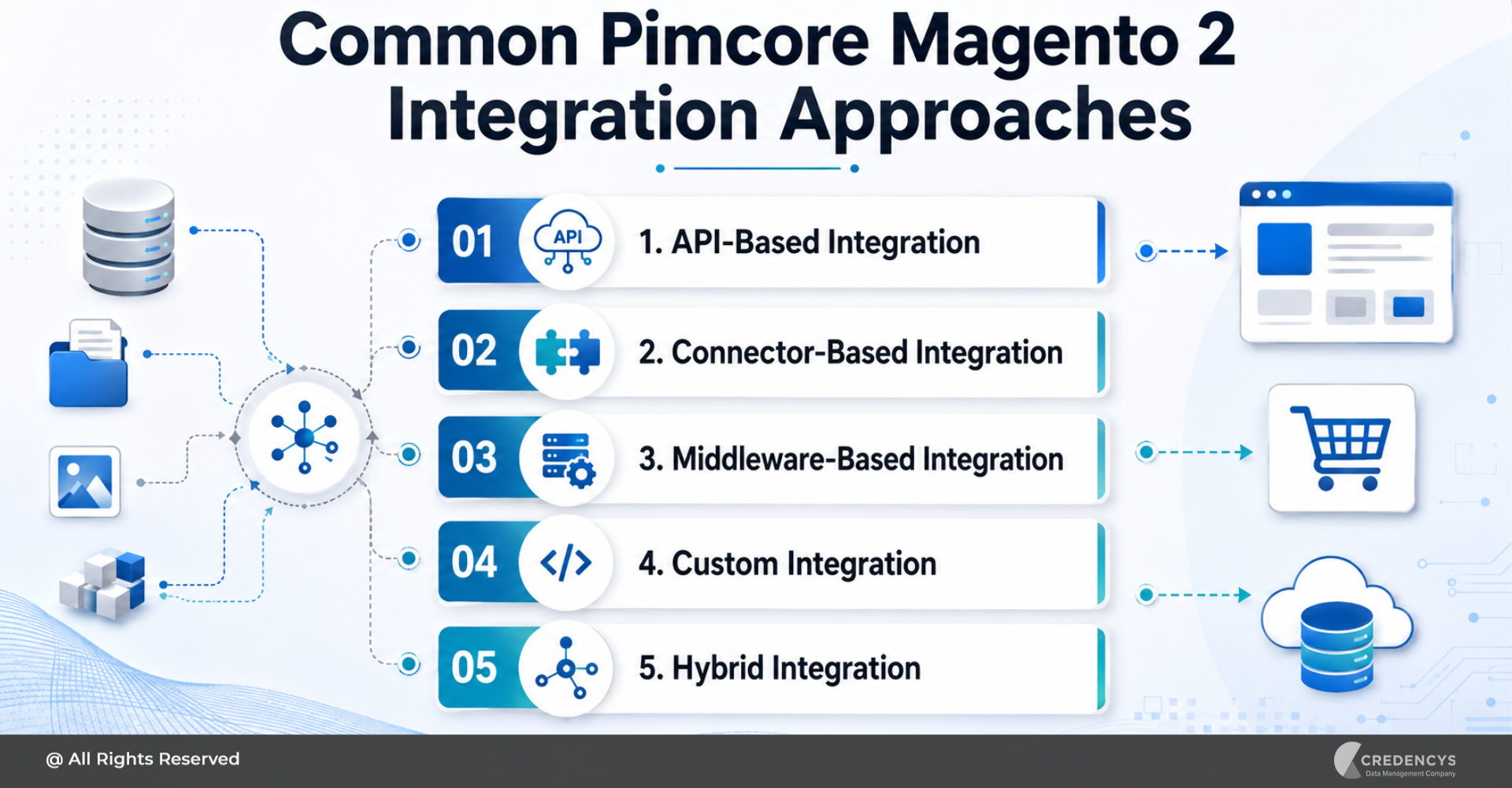
There is no single way to integrate Pimcore with Magento 2. The right approach depends on business goals, catalog complexity, technology landscape, and scalability needs.
1. API-Based Integration
API-based integration uses REST or GraphQL APIs to exchange data between Pimcore and Magento 2. This approach is flexible and suitable for businesses with custom requirements.
It allows teams to control what data is exchanged, when it is exchanged, and how it is transformed before reaching Magento. API-based integration is useful when the business needs a tailored, scalable, and future-ready architecture.
2. Connector-Based Integration
Connector-based integration uses a ready-made connector or extension to connect Pimcore with Magento 2. This approach can reduce implementation time when the integration requirements are standard.
It is useful for businesses that want to synchronize product and category data without having to build everything from scratch. However, connectors may require customization if the product data model, business workflows, or Magento setup is complex.
3. Middleware-Based Integration
Middleware or iPaaS platforms can be used when Pimcore and Magento are part of a larger enterprise ecosystem. For example, an eCommerce business may need to connect Pimcore with Magento, ERP, CRM, OMS, WMS, marketplaces, and analytics platforms.
Middleware helps manage data routing, transformation, validation, and monitoring across multiple systems.
4. Custom Integration
Custom integration is useful when businesses have unique catalog structures, complex approval workflows, multi-store requirements, or advanced synchronization logic. This approach gives maximum flexibility.
It is often preferred by enterprises that need full control over data flow, business rules, performance, and scalability.
5. Hybrid Integration
Many businesses use a hybrid approach. They may use APIs for certain data flows, connectors for standard product sync, middleware for enterprise orchestration, and custom logic for complex workflows.
A hybrid architecture allows businesses to balance speed, flexibility, and scalability.
One-Way vs Bidirectional Pimcore Magento 2 Integration
Before starting the integration, businesses must decide how data should flow between Pimcore and Magento 2.
One-Way Integration
In one-way integration, product data moves from Pimcore to Magento 2. This works well when Pimcore is the source of truth for product information.
It is suitable for:
- Product catalog publishing
- Product content enrichment
- Image and asset publishing
- Category synchronization
- Magento storefront updates
For many businesses, one-way integration is enough because product data should be managed and approved in Pimcore before reaching Magento.
Bidirectional Integration
In bidirectional integration, data flows between Pimcore and Magento 2. This may be needed when Magento also creates or modifies certain data that must be returned to Pimcore.
It is suitable for:
- Complex product workflows
- Category updates
- Product status changes
- Store-specific updates
- Enterprise commerce ecosystems
Bidirectional sync requires stronger governance because both systems can influence data. Without clear ownership rules, data conflicts can occur.
Pimcore Magento 2 Integration Architecture
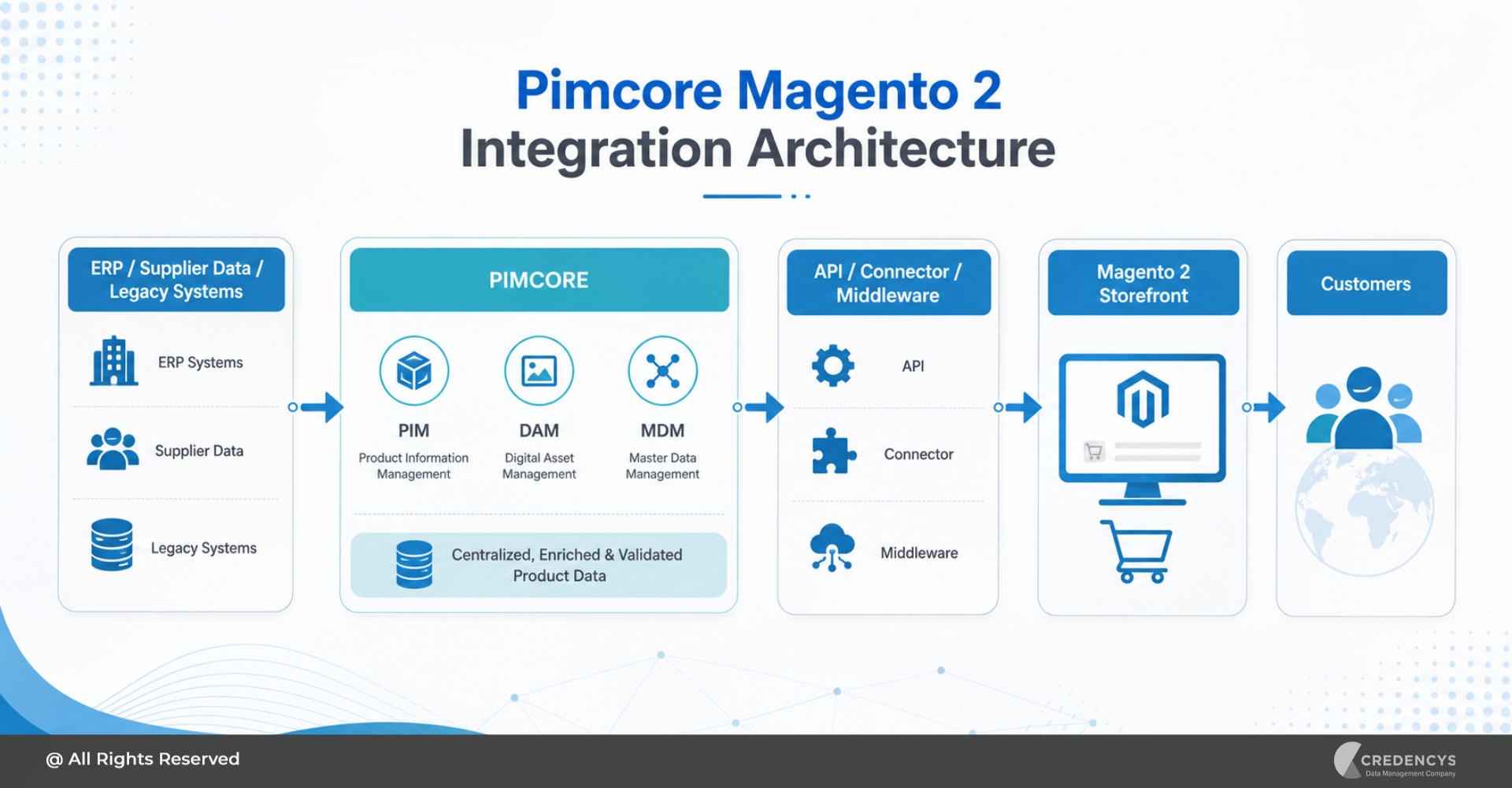
A typical Pimcore Magento 2 integration architecture includes multiple systems. Product data may come from ERP, supplier portals, spreadsheets, legacy databases, or third-party applications.
Pimcore collects this data, standardizes it, enriches it, and connects it with digital assets. After validation and approval, the data is pushed to Magento 2 through APIs, connectors, middleware, or custom integration logic.
A simple integration flow looks like this:
For enterprise environments, Pimcore implementation services help define the right architecture, integration patterns, data model, workflows, and publishing logic. In advanced architectures, other systems may also be connected, such as:
- ERP for pricing and inventory
- OMS for order management
- CRM for customer data
- DAM for rich media
- WMS for fulfillment
- Marketplaces for product syndication
- Analytics tools for reporting
The goal is to create a reliable data flow where Magento always receives accurate, enriched, and approved product information.
Step-by-Step Pimcore Magento 2 Integration Process
Step 1: Assess the Current Product Data Landscape
Start by understanding where product data currently exists. Review spreadsheets, ERP systems, supplier files, shared drives, Magento catalogs, DAM tools, and legacy platforms.
Identify data quality issues such as missing attributes, duplicate SKUs, inconsistent naming, outdated images, and incomplete product descriptions. This assessment helps define the scope of the integration.
Step 2: Define Integration Goals
The next step is to define what the business wants to achieve. Common goals include:
- Faster product launches
- Centralized catalog management
- Better product data quality
- Reduced manual effort
- Improved product page experience
- Multi-store catalog support
- Omnichannel product syndication
Clear goals help teams choose the right integration approach.
Step 3: Design the Product Data Model in Pimcore
The product data model is the foundation of the integration. It defines how products, categories, attributes, variants, images, and documents will be structured in Pimcore.
This step should include:
- Product hierarchy
- Attribute groups
- Mandatory fields
- Variant logic
- Category structure
- Localization rules
- Asset relationships
- Validation rules
A well-designed data model reduces complexity during Magento integration.
Step 4: Map Pimcore Data with Magento 2 Fields
Once the Pimcore data model is ready, the next step is to map fields. This means matching Pimcore fields with Magento 2 fields.
For example:
- Pimcore SKU maps to Magento SKU
- Pimcore product name maps to Magento product name
- Pimcore category maps to Magento category
- Pimcore product image maps to Magento product image
- Pimcore SEO title maps to Magento meta title
Accurate field mapping ensures smooth product synchronization.
Step 5: Choose the Right Integration Method
Based on business requirements, choose whether to use APIs, connectors, middleware, custom integration, or a hybrid approach. For simple product sync, a connector may be enough.
For complex enterprise commerce, custom or middleware-based integration may be better. The decision should consider scalability, performance, maintainability, security, and future business needs.
Step 6: Configure Synchronization Rules
Synchronization rules define how and when data moves between Pimcore and Magento. Businesses need to decide:
- Should sync happen in real time or batches?
- Which fields should be synchronized?
- What happens when a sync fails?
- Who approves product data before publishing?
- How should store-specific data be handled?
- How should updates be logged and monitored?
These rules help ensure predictable and reliable integration.
Step 7: Test the Integration
Testing is critical before going live. Teams should test product sync, image sync, category mapping, configurable products, variants, multilingual content, SEO fields, and store views.
They should also test failed-sync scenarios, performance under heavy catalog loads, and rollback processes. This reduces the risk of errors after launch.
Step 8: Go Live and Monitor Performance
After testing, the integration can go live in a controlled manner. Start with selected products or categories if needed.
Monitor sync logs, product pages, image rendering, attribute accuracy, and Magento storefront performance. After launch, continuously optimize workflows, mappings, and automation rules.
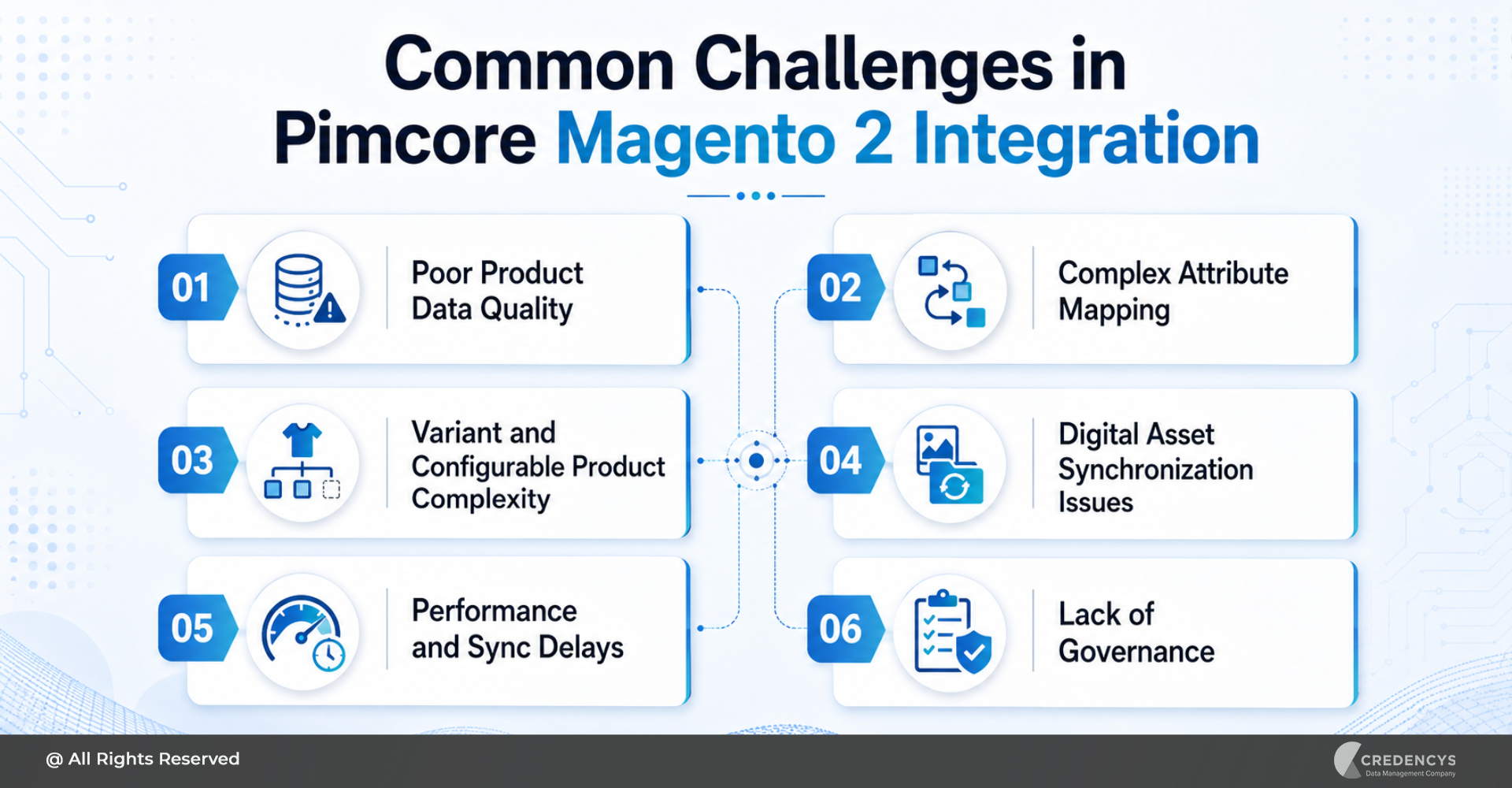
Common Challenges in Pimcore Magento 2 Integration
Poor Product Data Quality
Integration does not automatically fix bad data. If product data is incomplete or inconsistent before integration, those issues will carry over into Magento.
That is why data cleansing should happen before synchronization.
Complex Attribute Mapping
Magento and Pimcore may have different field structures. Mapping product attributes, category hierarchies, store views, and variant logic requires careful planning.
Variant and Configurable Product Complexity
Products with variations in size, color, material, region, or packaging require a robust product model. If variant logic is not designed properly, Magento product pages may show incorrect or incomplete options.
Digital Asset Synchronization Issues
Images, videos, manuals, and documents must be correctly linked to product records. Poor asset naming, missing metadata, or inconsistent image formats can create issues during publishing.
Performance and Sync Delays
Large catalog updates can affect performance if the integration is not optimized. Businesses need to carefully plan sync frequency, batch size, indexing, caching, and error handling.
Lack of Governance
Without governance, teams may not know who owns product data, who approves changes, or which system is the source of truth. This can create confusion and data conflicts.
A strong Pimcore MDM strategy helps businesses establish product data ownership, validation rules, approval workflows, and a single source of truth across systems.
Best Practices for Successful Pimcore Magento 2 Integration
- Start with a clean product data model before integrating systems.
- Define Pimcore as the source of truth for product information.
- Use validation rules to ensure only complete and accurate product data is published to Magento.
- Plan for multi-store, multi-language, and regional catalog requirements from the beginning.
- Use APIs and scalable integration patterns where flexibility is important.
- Monitor sync errors continuously.
- Document data ownership, approval workflows, and publishing rules.
- Test the integration with real catalog scenarios before going live.
- Most importantly, treat the integration as a business transformation initiative, not just a technical project.
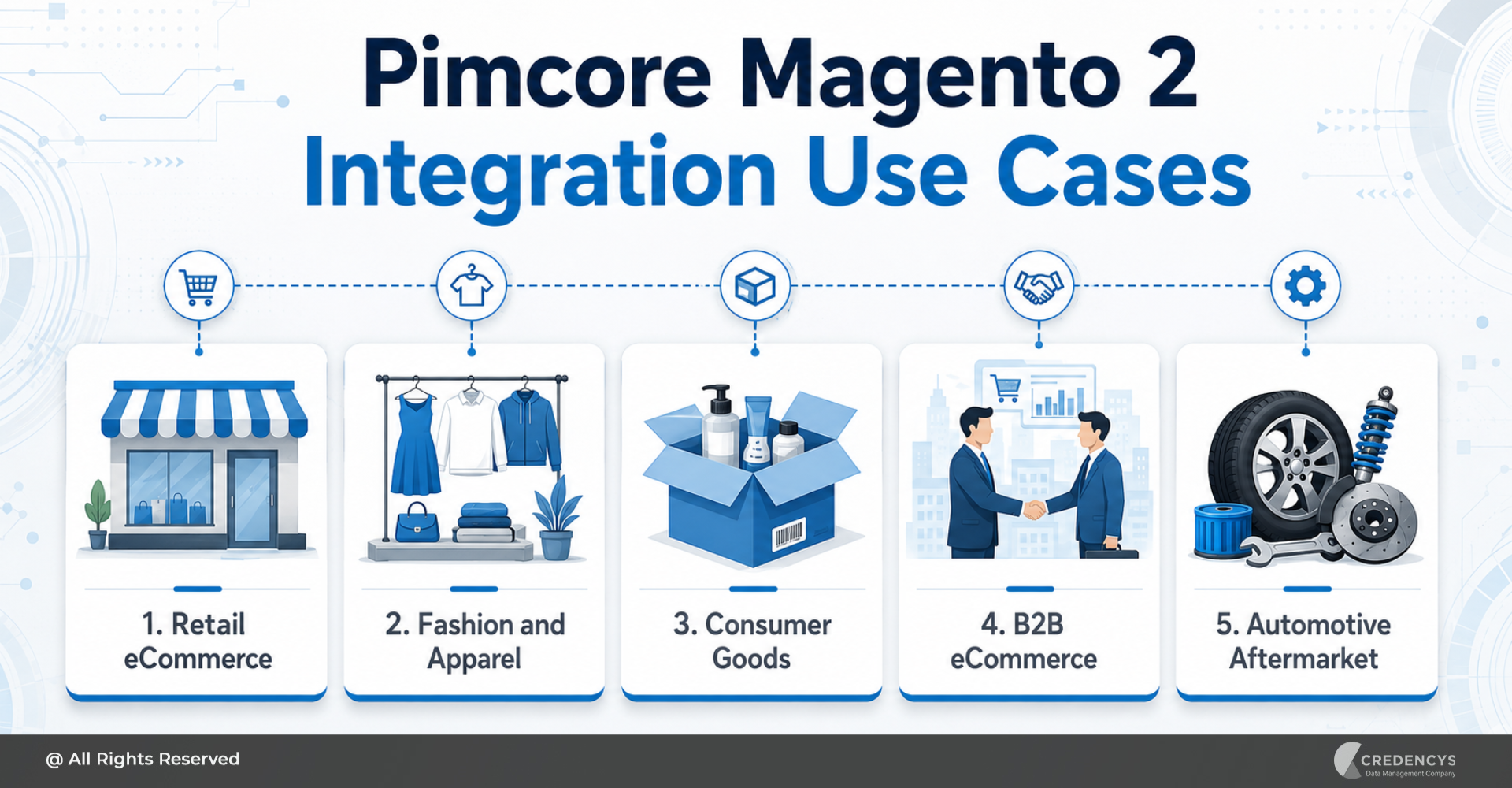
Pimcore Magento 2 Integration Use Cases
Retail eCommerce
Retailers can use Pimcore Magento 2 integration to manage large catalogs, seasonal product launches, product images, descriptions, and category structures from one central platform.
A scalable digital commerce platform helps businesses connect product data, storefront experiences, and customer journeys across multiple digital channels.
Fashion and Apparel
Fashion brands can manage product variants such as size, color, material, style, and collection data in Pimcore before publishing to Magento.
Consumer Goods
CPG businesses can manage product specifications, packaging details, compliance information, ingredients, images, and marketing content across multiple stores.
B2B eCommerce
B2B companies can manage technical specifications, product documents, customer-specific catalogs, spare parts, and bulk product data more efficiently.
Automotive Aftermarket
Automotive businesses can manage fitment data, part numbers, compatibility rules, product relationships, and technical documents through Pimcore and publish commerce-ready data to Magento.
How Much Does Pimcore Magento 2 Integration Cost?
The cost of Pimcore Magento 2 integration depends on the scope and complexity of the project. Key cost factors include:
- Number of SKUs
- Number of product attributes
- Product data quality
- One-way or bidirectional sync
- Connector vs custom integration
- Number of Magento stores
- ERP, CRM, OMS, or marketplace dependencies
- DAM requirements
- Data migration effort
- Testing and support needs
A simple connector-based integration may require less effort. A custom enterprise integration with multiple systems, complex workflows, and large catalogs will require a more detailed implementation roadmap.
How Long Does Pimcore Magento 2 Integration Take?
The timeline depends on data readiness, integration complexity, Magento customization, and the number of connected systems. A basic integration with the standard product and category sync may be completed faster.
A complex integration involving custom product models, multiple stores, ERP systems, approval workflows, and bidirectional sync may require a phased approach. The best way to estimate the timeline is to start with a discovery phase.
This helps define business goals, system architecture, data quality, integration scope, and implementation priorities.
How Credencys Helps with Pimcore Magento 2 Integration
Credencys helps eCommerce businesses plan, implement, and optimize Pimcore Magento 2 integration with a business-first and architecture-led approach. Our team helps you define the right product data model, integration strategy, synchronization rules, and governance workflows.
Credencys supports businesses with:
- Pimcore consulting
- Pimcore PIM implementation
- Pimcore DAM implementation
- Pimcore MDM setup
- Magento 2 integration strategy
- Product data modeling
- Data cleansing and migration
- API-based integration
- Connector-based integration
- Custom integration development
- Multi-store catalog setup
- Product workflow automation
- Testing and quality assurance
- Ongoing support and optimization
Whether you want to centralize product data, reduce manual catalog work, improve product experience, or scale Magento commerce operations, Credencys can help you build a reliable integration foundation. If you need dedicated technical expertise, you can also hire Pimcore developers from Credencys to design, customize, integrate, and optimize your Pimcore Magento 2 ecosystem.
Conclusion
Pimcore Magento 2 integration helps eCommerce businesses solve one of the biggest challenges in digital commerce: managing accurate, complete, and scalable product data. Magento 2 is a powerful commerce platform.
But when product catalogs become large, complex, and omnichannel, businesses need a dedicated product data management foundation. Pimcore provides that foundation.
By integrating Pimcore with Magento 2, businesses can centralize product data, enrich product content, automate catalog publishing, improve data quality, and create better customer experiences. For eCommerce leaders, this integration is not just about connecting two platforms.
It is about building a scalable product experience engine that supports faster growth, better operations, and stronger digital commerce performance.
FAQs
1. What is Pimcore Magento 2 integration?
Pimcore Magento 2 integration connects Pimcore with Magento 2 to manage product data centrally and publish enriched product information to Magento storefronts.
2. Can Pimcore sync product images with Magento 2?
Yes. Pimcore can manage product images, videos, documents, and other digital assets and associate them with products before publishing them to Magento.
3. Is Pimcore Magento 2 integration one-way or bidirectional?
It can be either. One-way integration sends data from Pimcore to Magento, while bidirectional integration enables data exchange between the two platforms.
4. Does Pimcore replace Magento 2?
No. Pimcore does not replace Magento 2. Pimcore manages product data and digital assets, while Magento 2 manages the storefront, checkout, and commerce operations.
5. What is the best way to integrate Pimcore with Magento 2?
The best approach depends on business needs. Companies can use APIs, connectors, middleware, custom integrations, or a hybrid model, depending on catalog complexity and system architecture.





Tags: