

How to Choose a Digital Asset Management System: Buyer's Guide
Short answer: To choose a digital asset management system, start from your use cases and your files, not from feature lists. A digital asset management (DAM) system is software that stores, organizes and delivers images, videos, documents and brand files from one place. List the asset types and volumes you hold, map how assets link to products and to systems such as your PIM, ERP and eCommerce platform, weight your requirements, then shortlist three or four vendors, test them with your own files in scripted demos and a small pilot, and compare total cost over several years.
Updated November 2026
A brand, manufacturer, distributor or retailer with thousands of SKUs holds product images, lifestyle shots, videos, spec sheets, manuals and brand files, and every sales channel wants them in its own size and format. When those files live in shared drives and inboxes, launches and listings wait for assets.
Without the right Digital Asset Management solution, it becomes difficult for you to share the assets with internal and external users of the company. Also, you cannot help users to locate and access the exact assets whenever they need them.
Before making up your mind about any DAM solution, it is very important to get clarity on your business requirements. Every company has different customer demands, content needs, and feature set requirements. So, to pick the right DAM, you require a proper evaluation, planning, and guidance.
This buyer’s guide gives you a step-by-step selection process, a scoring table, how DAM systems are priced, the capabilities and essentials to test, and the questions to ask each vendor.
Is It Time to Choose a Digital Asset Management System?
It is time to choose a digital asset management system when finding, resizing and sending files, rather than the products themselves, holds up launches and listings. For a brand, manufacturer, distributor or retailer, that usually looks like this:
- Your product images, spec sheets and manuals sit in shared drives, and the eCommerce team asks the studio for the same files every week.
- A retailer or marketplace rejects your listings because images are the wrong size, background or count, and someone fixes them by hand.
- When a product changes, you cannot tell which images, PDFs or videos on which channel still show the old version.
- A launch waits for files, because assets are not linked to the SKU in your PIM or ERP.
- Your distributors and dealers email you for logos and product images.
If this list describes your week, the eight steps below are the selection process to follow.
How to Choose a Digital Asset Management System in 8 Steps
Choosing a digital asset management system well takes eight steps, from your use cases to a pilot with your own files. Each step narrows the field before you spend time on demos.
- Write down your use cases. Who needs which files, for which channels: the eCommerce team, retailers and marketplaces, dealers, print, packaging, sales.
- Count your assets. List the asset types (images, video, 3D, PDFs, InDesign and other creative files), how many you hold, file sizes, how fast the library grows and where the files live today.
- Map how assets connect to products. Decide how each image, video and document links to a SKU, a product family or a brand, which system holds that link (DAM, PIM or both) and which renditions each channel needs.
- List the integrations. PIM, ERP, eCommerce platform (Shopify, Adobe Commerce, BigCommerce, Salesforce Commerce Cloud), CMS, creative tools such as Adobe Creative Cloud, and single sign-on.
- Write and weight your requirements. Use the scoring table below, so every vendor is judged on the same criteria.
- Shortlist three or four vendors and run scripted demos. Give each vendor the same script and your own files, not their sample library.
- Run a small pilot. Load one brand or product line, then test search, renditions, permissions, approvals and the feed to one channel.
- Check references, cost and migration, then decide. Speak to customers with a similar catalog, compare total cost over several years and agree how your existing files and metadata will move.
For a list of platforms to start your shortlist, see our comparison of the best digital asset management platforms.
Criteria to Score When You Choose a Digital Asset Management System
The criteria to score when you choose a digital asset management system are the ones that decide daily work: how assets link to products, how channel renditions are made, how people find files, and how the DAM connects to your other systems. Weight each criterion from 1 to 5 for your business, then score each vendor from 1 to 5 after the demo and pilot.
| Criterion | What to ask or test | What good looks like |
|---|---|---|
| Links to products | Can one image belong to many SKUs and one SKU to many assets? | Assets linked to SKUs, families and brands, shared with your PIM |
| Channel renditions | Produce each retailer’s and marketplace’s image size, format and background | Renditions made automatically from one master file |
| Metadata and taxonomy | Load your categories, fields and required metadata | Required fields checked on upload; bulk metadata edits |
| Search | Find a file by SKU, brand, color or keyword | Your team finds the right file in seconds |
| Integrations and API | Show the connection to your PIM, eCommerce platform and creative tools | Documented API, ready connectors, no manual exports |
| Workflow and approvals | Run your review and approval steps in the demo | Configurable steps, versions and comments in one place |
| Rights and expiry | Add a usage right with an end date | Expired files blocked or flagged automatically |
| Scale and performance | Upload large video and image files while others download | No slowdown at your volumes and growth |
| Deployment and security | SaaS, private cloud or on-premise; SSO and roles | Fits your IT policy and your sign-in system |
| Migration and cost | Plan for moving files and metadata; full cost over several years | A clear migration plan and no surprise fees |
In this scoring table, the first two rows matter most for a product catalog: a DAM that cannot link assets to SKUs or make channel renditions leaves the hard work in spreadsheets.
7 Signs Your Business Has Outgrown Folders and Shared Drives
A business has outgrown folders and shared drives when people spend more time finding, checking and sending files than using them. These are the seven most common signs. For a longer list, read the signs your business needs a DAM solution.
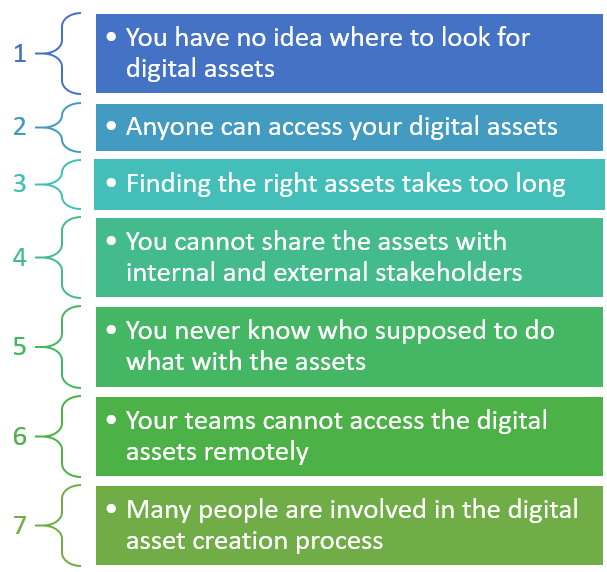
1. You have no idea where to look for digital assets
Without a DAM, files usually sit in one of three places:
- On online file sharing sites
- In individual computers
- In random folders on the intranet
If you are managing your assets through any of these methods, then it becomes a time-consuming task to find a single asset from such a huge data.
How DAM makes a difference?
DAM allows you to store, manage, and catalog all the data in a single place. So, it becomes easier for your teams and partners to find, download, share, and use the assets they want in a matter of seconds.
2. Anyone can access your digital assets
If everyone across your organization can access your digital assets, then it’s not the right way to manage indispensable assets. This causes you some serious issues like damaged and missing files.
To address this inefficiency, you need to define the access rights for your internal and external users to ensure only limited users can access your digital assets.
How DAM makes a difference?
Digital Asset Management solution enables you with features like user role and permission that allows you to define access rights for each user for digital assets.
3. Finding the right assets takes too long
For example; you have uploaded an image of a red background in your cloud storage. How could you search for that image? You probably save the image with the file name “21st January 2022 red background for a marketing campaign”.
A few months later, neither you nor a colleague will remember that file name.
Storage of digital assets in the cloud server, intranet, internet, and individual computer makes asset finding difficult and time-consuming.
How DAM makes a difference?
A DAM platform allows you to manage, organize, and sort needed assets through thousands of files in seconds. It allows you to create a good metadata structure for your digital assets to find the assets even when you don’t know what exactly you’re looking for. Additionally, to simplify the asset searching, you can apply filters by author, category, date, type, and more.
4. You cannot share the assets with internal and external stakeholders
Most of the time, only selective individuals have access to specific files. So, those individuals need to invest considerable time in sharing the asset files with others who need the assets but don’t have access to them.
How DAM makes a difference?
Digital Asset Management governance lets you define who can access what. A DAM solution comes with built-in governance systems that allow you to define specific user groups with specific rights and provide granular control over file permissions.
You can share the digital assets with anyone regardless of your customers, external vendors, or internal teams with greater security.
5. You never know who supposed to do what with the assets
The content creation process involves many steps including briefing, creation, storage, validation, enrichment, conversion, and distribution. During this process, you never know who needs to do what to which asset file.
How DAM makes a difference?
Implementation of Digital Asset Management enables you with the history feature that allows you to access the history of all your assets. This feature also helps you keep workflows under control and manage media files with precision.
6. Your teams cannot access the digital assets remotely
Your team works remotely when you have offices in several countries, people who travel, or outside agencies and contractors. In each case, sharing digital assets becomes an arduous task. To share digital assets, employees need to send several emails and wait until they receive a response from another party.
How DAM makes a difference?
DAM eliminates this back and forth. It allows every authorized user of the solution who is working remotely to retrieve the assets quickly whenever and wherever needed, on any device.
7. Many people are involved in the digital asset creation process
Usually, graphic designers, photographers, marketing and sales teams, copywriters, content creators, etc. participate in the asset creation process. To manage digital assets effectively, you need a good process for collaboration.
How DAM makes a difference?
DAM solution allows you to annotate, tag a specific group or user, and store comments on what is required to be changed. This makes you sure that you are always using and working on the latest version of the digital asset as well as you can collaborate with the different stakeholders in real-time remotely.
These seven signs are the most common ones; most catalogs show several at once.

If you are dealing with any or many or all the challenges listed above or facing other issues related to Digital Asset Management, feel free to connect with our DAM experts.
What Is Digital Asset Management (DAM)?
Digital asset management (DAM) is the practice of storing, organizing, finding and sharing digital files such as product images, videos, spec sheets and brand files from one controlled library. A DAM system is the software that runs it, with user rights so only people with permission can open, change or send each asset.
To get detailed insights about Digital Asset Management, read Digital Asset Management: The Complete Guide.
Set Your Objectives Before You Choose a Digital Asset Management System
Before you choose a digital asset management system, write down two to four business objectives, rank them, and name the users and stakeholders who will judge each platform against them. In practice that means:
- Defining your objectives
- Prioritizing the objectives
- Determining who are the DAM users and stakeholders
- Understanding how their participation in the DAM selection process will help you in achieving these goals
In turn, the users and stakeholders help you in deciding the capabilities and components that are required to simplify your asset management processes.
Common DAM goals for a brand, manufacturer, distributor or retailer:
- Attain brand consistency
- To have a “system for master record” of all your digital assets to help your teams not to worry about where to find the assets, what is the most current, and what is approved.
- Get approved assets into campaigns and onto product pages faster
- Speed up the digital asset production process
- Link every product image, video and document to its SKU, so each sales channel gets the right files
- Make it easier for your marketing team to work and coordinate with external design agencies
- Improve the consistency and quality of assets being created in the company with distributed marketing teams
- Eliminate the manual process of requesting certain assets to groups and people specific files (headshots, logos, collateral, product images, campaign assets, etc.) for your marketing team
Are you trying to achieve the same business objectives? Let us help you understand how a Digital Asset Management solution meets your business goals.
What Capabilities Should a DAM System Have?
A DAM system should cover three groups of capabilities: core capabilities (repository, creation, consumption), functional capabilities (delivery, renditions, rich media) and non-functional capabilities (integration, performance, user experience).

Core capabilities of DAM
Asset repository
Digital assets, managed in a scattered way in different systems, won’t help companies to achieve efficiency. Implementation of a system where every individual has their own stash of images and/or documents will result in inefficiency, chaos, and waste.
A DAM gives you one central, access-controlled repository for all digital assets.
Asset creation
Using the built-in workflow management tools, Digital Asset Management helps organizations in the asset creation process.
If you have multiple agencies and/or departments working together, workflow management tools make the review, approval, and revision process faster and easier. It also simplifies the asset creation process by
- Predefining roles and stages
- Allowing you to know the status of every asset
- Tracking the status of assets
- Determining what required to be done with assets immediately based on the asset status
Consideration of the workflow management tools enables you with more efficient and faster asset creation that eventually saves a significant amount of money.
Asset consumption
The main objective of any organization for DAM implementation is to provide a way for its users to search and download the required digital assets on their own.
Along with managing the brand consistency, DAM allows employees to work independently by finding what they want, ensuring what they are using is the latest version, and promising that they are using the approved assets only.
Functional capabilities of DAM
Mobile-first
An advanced DAM supports all the latest technologies. It not only allows you to store and manage the assets but also distributes and displays them attractively on any device regardless of screen size. To achieve this, the DAM contains the capabilities like intelligent resizing, adjusting, and cropping of assets on the fly.
Cloud deployment
A cloud-hosted DAM makes sharing files across offices, agencies and dealers easier.
Digital asset delivery
DAM optimizes the digital assets and creates URLs for them. It utilizes Content Delivery Network for asset delivery to allow users to use the digital assets directly in mobile apps, websites, or other platforms. It allows users to access high-quality assets that also enables customers with fast loading.
Rich media management
A DAM should manage 3D models, 360-degree images and video alongside standard image files. Its built-in tools resize, crop, convert and transcode a master file into versions for each use case.
Dynamic asset transformation
DAM allows you to create different variations and layouts for the assets to meet the changing needs of websites, mobile apps, and marketing processes. The platform generates variants by providing resizing, cropping, and image effects automatically.
It also allows generating new assets from the existing ones. For example, some DAM platforms use AI to create a short video preview. Ask which edits run inside the DAM and which still need a separate tool.
Non-functional capabilities of DAM
Integration
This is one of the most important capabilities of the DAM that you must consider during the DAM selection process. Make sure that the platform comes with built-in connectors that allow the solution to connect with different types of systems including
- Product Information Management (PIM) systems
- Content Management System (CMS)
- eCommerce platforms
- Social Media
- Customer Relationship Management (CRM) systems
- Enterprise Resource Planning (ERP) systems
- Digital Experience Management (DXP) Systems
- Business Process Management (BPM) systems
- Marketing tools, and more…
Performance
Do not miss to check the performance of the DAM before making a buying decision. The platform must be able to handle the heavy loads.
To check this, you can upload demanding files such as M4V video files with an H265 codec, TIFF files with 100+ megapixel, multilayer PDF files. Check if you could upload small JPEGs and a heavy video simultaneously and if the DAM platform contains multiple renders. Also, make sure the system handles concurrent downloads with five different users.
Ask each vendor how the platform scales as your library grows, whether it runs as SaaS, in a private cloud or on-premise. Our digital asset management services team can help you plan and run these tests.
User experience
Choose a DAM platform that has a web-based, user-friendly and reliable user interface. There are many Digital Asset Management platforms available in the market that contain high-tech features and functionality but they have a steep learning curve that ultimately reduces productivity.
Do you want to implement a DAM solution that enables you with all the above listed common, functional, and non-functional capabilities?
How Does a DAM System Work, from Import to Publishing?
A DAM system works as a pipeline: files are imported and secured, stored, transformed into renditions, enriched with metadata, linked to related assets, managed through approvals, found through search, previewed and published to channels.

Import the assets
DAM allows you to import assets either one by one or in bulk using convenient applications of images and metadata.
Asset security
After importing the digital assets, you should utilize DAM security privilege. The platforms ensure asset security with Access Control Lists (ACLs) and permissions that define which users can access or modify the digital asset based on their roles and responsibilities.
Asset storage
It allows brands to store and manage a large volume of creative assets and their metadata. Also, it facilities the users with fast retrieval of the asset.
Asset transformation
An advanced DAM converts image formats automatically and creates thumbnails and channel renditions, with smart cropping and resizing where the platform supports it.
Asset enrichment
Once you have assets in place, you can enrich them easily using the metadata and generating analytics on asset usage.
Asset aggregation
You can track relationships between assets and versions or variants of the original assets using the DAM. Asset finding, bundling, and management become easier for you and your users.
Asset management
Each DAM system has its own structured process for working with assets that starts from asset creation, approvals, versions, to publishing.
Asset search
Implementation of DAM enables you with easy ways to search the required assets quickly. You can search for assets through metadata, workflow stages, collections, and image attributes.
Asset preview
DAM allows users to preview, videos, images, or other digital assets before downloading them.
Asset publishing
You can share the asset files with other creative users by using a link generated by the DAM.
Looking for a Digital Asset Management platform that allows you to perform end-to-end activities related to asset management and simplify your day-to-day business processes?
What Can You Do with a DAM System?
With a DAM system you can manage and find files, run marketing and product marketing, adapt assets for local and print campaigns, protect the brand, manage video and other media, and send channel-ready product images to eCommerce sites, retailers and marketplaces.
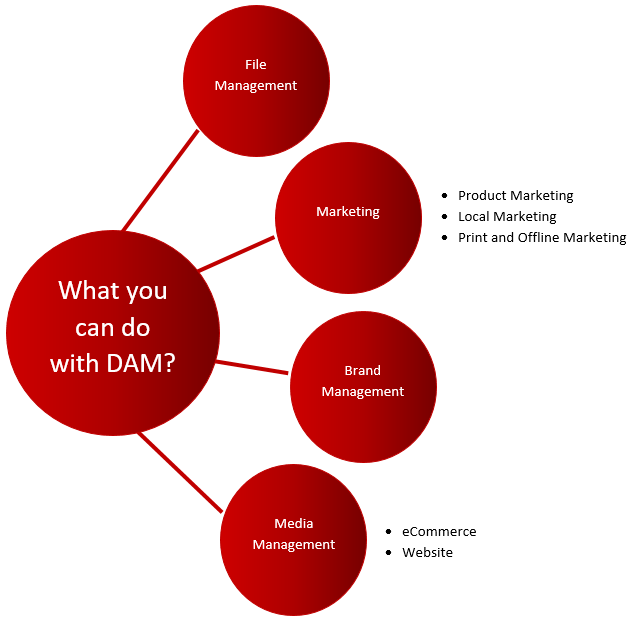
File management
- Store, manage and catalog videos, images, audios, and other creative assets
- Search assets by description, metadata, and title
- Share the digital assets with every individual inside or outside the organization
- Enable the end-users with dynamic URLs that support fast CDN delivery and on the fly image manipulation
- Rather than sharing the file with another team who is responsible to upload the assets to a website or send the assets to the customers through emails, DAM allows you to add a dynamic URL link in the email or website
- Use artificial intelligence to tag the video and images automatically in order to promote reuse and improve searchability
Marketing
Product marketing
- Save all the creative files such as advertising materials, pack shots, 3D models, branding creatives, campaign material, SKUs, product data sheets, specifications, etc. related to products and their designing
- Organize all these assets and share them with distributors and retailers using DAM
- To meet the specific needs of different marketing campaigns of retailers, DAM dynamically transforms advertising and branding material, product images, and packaging. For example; if you want to promote a badge your brand has earned, some DAM platforms can add the badge to packaging, posters and ads from templates
- Tagging to marketing assets happens automatically through AI. It allows to reuse assets for other marketing campaigns if required and improve searchability
Local marketing
- If your brand is distributed in multiple locations, then a DAM gives each location approved brand assets to use on its own
- Different teams can access the brand’s assets and use them in the local marketing content such as email marketing, store-front graphics, website creatives, and advertising
- An advanced DAM extends and modifies all your generic brand’s assets and transforms them into the specific ones to help you serve the local marketing purpose
Print and offline marketing
- DAM allows creatives to search and access the assets to meet the printing requirements
- Create different versions of assets with different images, different messaging or text, or different design rules and layout
- DAM automatically generates the correct resolution for printing or image format
Brand management
- Along with being a centralized repository of media assets of the organization, the DAM also serves the purpose of creating and managing the instructions and guidelines about using assets for the brand
- Effectively manage a large number of brand assets/files for different campaigns, audiences, and channels
- DAM allows you to extend brand assets with dynamic digital asset transformation. For example; the platform automatically removes the background, resizes or crops logos, and/or creates variants of an image to meet the specific requirements of multiple social media channels without the help of graphic designers
Media management
eCommerce
- You can use a DAM for your online store where you can store, manage, and repurpose the product-related images, videos, and other media assets
- You can easily address the quality-related needs of the eCommerce platform in terms of product images, sizes, colors, and other variants
- DAM ensures to create and deliver high-quality images that are highly essential for the success of an eCommerce solution
- Consideration of a highly advanced DAM platform facilitates the automatic transformation of product images into the correct format to make the display attractive. For example; high-resolution images for a product page or compelling thumbnails for a gallery
- DAM creates a URL for each asset and allows you to add the required DAM asset URLs to the respective pages of your eCommerce solution
Want to discuss what else you can do with an advanced Digital Asset Management solution?
What Are the Main Benefits of a DAM System?

The main benefits of a DAM system are automated workflows and approvals, consistent brand and product assets on every channel, lower operating costs, and better business processes:
- Workflows automation: custom workflows, asset approval notifications and fewer human errors.
- Improved brand consistency: every piece of content is approved before it reaches a channel.
- Lower operating costs: fewer platforms, faster search, more reuse of existing images and fewer licensing problems through digital rights management.
- Improved business processes: one source of truth for all assets, shared by every department.
Each benefit is explained in detail in why you need a digital asset management platform.
Do you want these benefits for your catalog? We can walk you through how a DAM platform would fit your business operations and ROI.
Business Questions to Settle Before You Choose a Digital Asset Management System
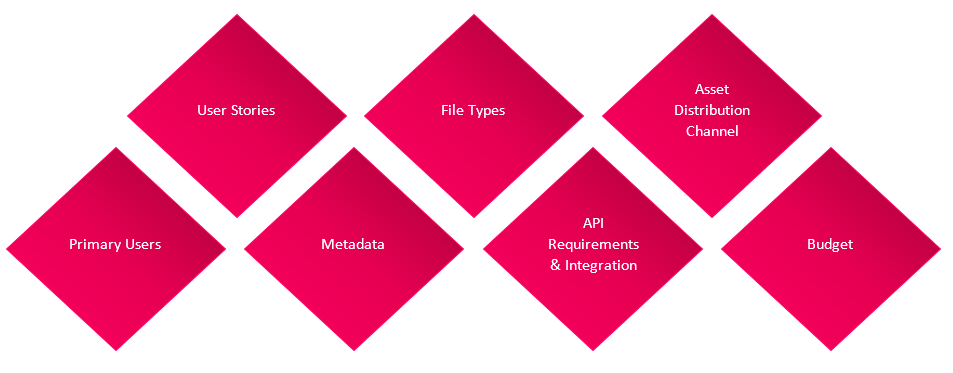
The business questions to settle before you choose a digital asset management system are its key purpose, its primary users, their user stories, your metadata, the file types you hold, API and integration needs, your distribution channels and your budget. Judge platforms by the outcome they deliver on these, not by the length of their feature lists.
Define the key purpose for DAM implementation
Write down the key business objective for the DAM before you search, and judge every platform and vendor against it.
Who are the users of the DAM system?
Administrator
You need to elect a person as an administrator of the DAM solution. They will be responsible to keep updating digital assets, ensure everything is well organized, and make changes as and when required.
Identify this person during the DAM selection process only so they can participate in the training and decision-making process during the implementation.
Departments
Determine the users who are going to use the DAM on a regular basis in order to enable your organization with operational and business benefits. Define the departments in your company who will be using the DAM.
To gain maximum advantages out of a DAM solution, you need to conduct interviews of varied users from different departments to get a profound understanding of how DAM implementation helps them simplify asset management operations and improve productivity.
Number of users
Note that everyone that uses the assets is not considered as DAM users.
People who need to access the DAM to retrieve and search for the images as well as assign, approve, and complete the projects are your DAM users. You need to be clear about the number of users as it impacts the pricing of DAM.
Your authorized users can share digital assets with the people who are not using the Digital Asset Management system.
Provide the user information to your solution vendor when you view demos.
User stories
Define the ways that DAM is beneficial to your business. Also, determine how it will address your existing operational and business challenges. This information helps you to check the potential of the DAM solutions when you take the demos of different Digital Asset Management platforms.
Think about the relevant user stories by contemplating the below-listed elements:
- What end result you want to achieve
- Responsibilities and departments of the users involved in the story
- All the roadblocks that users are facing contribute to complete the story
- What actions the users need to perform
Ask the DAM vendor if they enable you with the Digital Asset Management solution that addresses the issues that you are facing in current processes as mentioned in your provided user stories.
Metadata
Metadata is an essential part of a DAM as it contains the information about each asset and makes the assets searchable and configurable to your existing workflows. Before creating metadata for your DAM solution, you need to check out
- What kind of metadata are you currently using?
- What types of metadata are you going to use while adding assets in the Digital Asset Management system?
Here’re the most common types of metadata
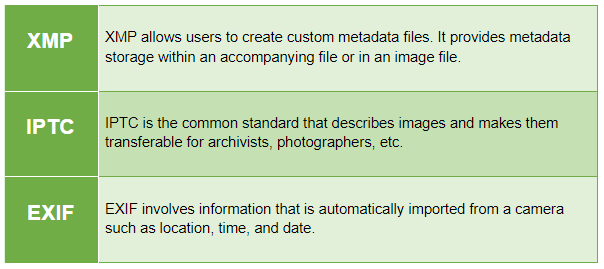
File types
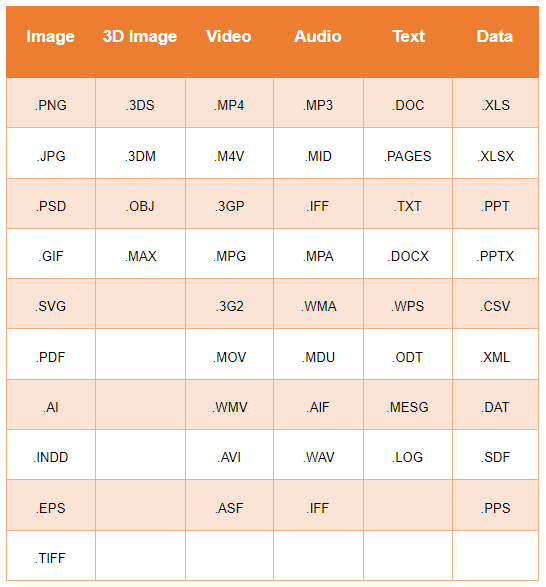
You might be using varied digital assets such as images, videos, audio, and documents in different file types. While selecting a DAM, make sure your vendor provides you a solution that allows you to manage your assets in your preferred file types.
Here’s the list of the most common file types that are usually supported by all the leading Digital Asset Management platforms.
API requirements and integration
DAM solutions should have proper APIs and integrations, so your team does not export and re-upload files between systems.
A DAM is rarely used on its own: most companies connect it to the systems that hold their product and business data.
Implementations of DAM enables you with multiple possibilities listed below:
- A DAM can replace some tools you use today, such as shared drives and file-transfer services
- DAM can easily be integrated with your existing software and third-party party applications
- DAM will support the scalability and flexibility for the future
Here’re the few solutions with which DAM is widely integrated and used.
Product Information Management (PIM)
Product Information Management holds the product data: names, attributes, descriptions and relationships for every SKU, and sends it to websites, marketplaces and retailers.
Integrating the DAM solution with your PIM system links each product image, video and document to the right SKU, so a product and its assets reach every channel together. Some platforms, such as Pimcore, include PIM and DAM in one system; read PIM vs DAM for how the two work together.
Content Management System (CMS)
A CMS runs your website content and tells customers about your products or services.
Integrating DAM solutions with CMS, you can create, assign, annotate, and compare the content versions as well as publish the content across multiple digital platforms.
Digital Experience Platform (DXP)
Digital Experience Platform allows brands not only to manage the content but also the marketing related activities from a single platform.
DXP and DAM integration allows the companies to manage creative digital assets related to different marketing campaigns in a centralized location and use them as and when required.
Digital Commerce Platform
Integrate DAM with your online store or Digital Commerce Platform to manage all your product-related digital assets in a single location. B2B, B2C and B2B2C sellers use this link to keep product pages and their images in step.
Master Data Management (MDM)
Master Data Management (MDM) keeps one trusted record of core business data such as products, customers, suppliers and locations.
Integrating DAM with MDM keeps each asset linked to the right master record.
Enterprise Resource Planning (ERP)
Enterprise Resource Planning software manages sales, procurement, and production-related information.
Integrating DAM with ERP, you can facilitate your sales team with the latest marketing collaterals, the procurement team with the quotation-related terms and conditions, and the production department with managing the documentation of guidelines and instructions to perform certain production processes.
Digital asset distribution channels
Once the assets get approved, you can use them for printing, digital channels, sharing to internal and external dealers, marketing, and packaging. Define your preferred distribution channel on which you want to deploy your assets to gain maximum benefit of DAM. Digital Asset Management solution allows you to work for any, many, or all the channels listed below.
Before sending an asset from the DAM for printing, check out if there are approval workflows that are aligned with the printed materials process and what file types are available with you in DAM for that particular asset.
Digital platforms
You can store and manage the digital assets that you want to distribute across all your customer touchpoints in DAM. The platform allows you to establish a workflow for asset approval, scheduling and reporting. Thus, it provides you an opportunity for consolidating the programs in a single location.
Sharing with external dealers
Are you working with the external dealers to distribute your approved assets? Then, you need to consider a DAM that contains advanced features like rights management and assets sharing to improve asset time-to-market.
Marketing channels
For marketing campaigns and promotions, look for Marketing Asset Management capabilities: creating, editing, approving, versioning, distributing, and analyzing the digital assets.
Packaging channels
DAM allows you to create, manage, and approve the assets for packaging related media assets. Check with your Digital Asset Management solution vendor how they help you to improve the packaging process through packaging asset management. Make sure they offer advanced packaging focused integrations.
Budget
Budget covers more than the licence: users, storage, delivery, integrations, migration and implementation all add to the cost, as the pricing section of this guide shows.
Ask each vendor to price your own numbers over several years, and agree up front how you will measure the return, such as time saved finding and resizing files.
If you are not sure about your DAM requirements but you have clarity on your business needs and want to get clarity on technical aspects
Which DAM Essentials Should You Test in a Demo?
The DAM essentials to test in a demo are search, deployment, workflow, storage and migration, access control, scalability, licensing and rights, editing, and project management, each with your own files.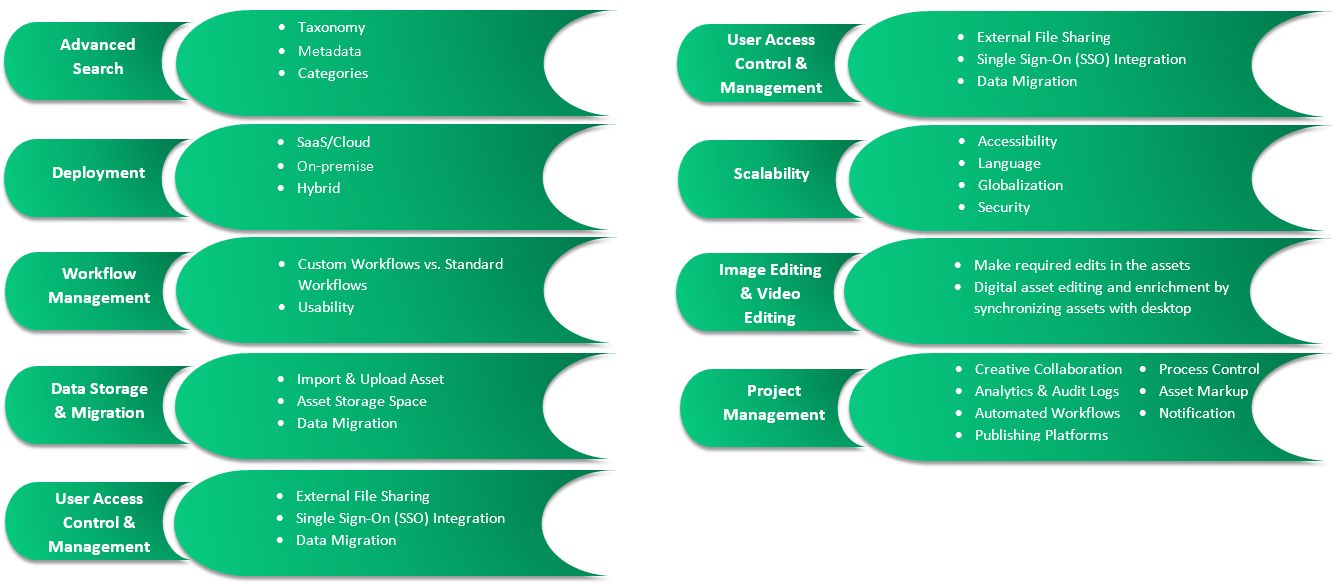
Advanced Search
When you have plenty of assets in your DAM, searching for the right asset quickly is the biggest challenge. By managing your digital assets in the DAM, you get simpler asset search, navigation, and organization.
Taxonomy
Taxonomy allows you to classify and organize your assets and related information. You can also define the structure of your asset information using the DAM. So, make sure your solution vendor provides you a Digital Asset Management that has sophisticated taxonomy capabilities.
Metadata
Metadata represents information attached to the assets. It is very essential as it makes your content searchable. You can determine metadata based on the understanding of how you are going to use your assets.
Categories
Define the categories for your assets based on how people used to search for assets in your organization. Usually, they search for the asset by entering the brand, SKUs, product identification number, color, and more.
Create a list of categories you want to consider in your DAM solution and ask the solution provider whether they can include this category in the system.
Deployment
The Digital Asset Management solution should be flexible and scalable to meet your frequently changing business needs and achieve your specific organizational objectives. Digital Asset Management solution can be deployed in three ways
- SaaS/Cloud
- On-premise
- Hybrid
Examine your business goals and DAM requirements to make the right choice for your business.
SaaS/Cloud
A SaaS/Cloud DAM is run by the vendor: hosting, updates and file delivery are part of the subscription.
On-premises
An on-premise DAM runs on your own servers or private cloud. Your IT team controls updates, hardware and changes, usually with the vendor or an implementation partner doing the first setup.
Hybrid
Hybrid suits companies that want some elements of SaaS/Cloud and some of on-premise, for example sensitive files kept in-house.
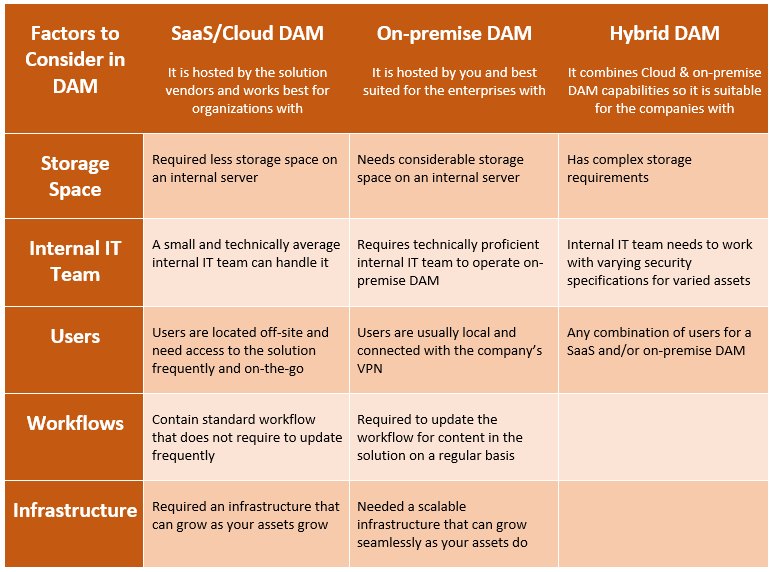
Let’s have a quick comparison of SaaS/Cloud, on-premise, and hybrid Digital Asset Management platforms so you can make the right choice.
Difference between SaaS, On-premises & Hybrid
Workflow management
Workflow plays an important role in any DAM as it gives you an understanding of how you can create, manage, consolidate, and distribute digital assets in different systems and multiple customer touchpoints.
When it comes to workflow management, you need to check whether the Digital Asset Management solution vendor provides you the custom or standard workflow as well as discuss the workflow usability with them too.
Custom workflows vs. standard workflows
Most of the Digital Asset Management platforms come with standard workflows that are built-in. But there are a few platforms that allow you to create a custom workflow for your Digital Asset Management system. It is better to go with the platform that provides custom workflow and gathers information on any associated implementation differences.
Usability
Check the workflow of the DAM and analyze how it is easy to configure, implement, and edit. The usability of the workflow is defined on the basis of the scalability and adaptability of the platform.
Data storage and migration
Digital asset import and upload
Before starting to upload the digital assets in the Digital Asset Management solution, it is good to get complete clarity about the asset uploading and importing capabilities of the platforms. It should contain various capabilities such as automated metadata, drag-and-drop uploads, uploading multiple files, file size capabilities, and editable metadata.
Asset storage space
Get the idea of how many assets you have right now that you want to shift to the DAM. Also, analyze how frequently and what amount of assets you need to upload in the solution. Once you have this data, discuss with the solution provider whether the solution is capable to fulfill your asset uploading requirements.
Data migration
After the DAM implementation, you need to migrate all your assets that are stored in disparate systems and local systems in the DAM. So, you need to do some homework where you need to check
- How many assets do you have?
- Where are the assets currently located?
- What types of asset files do you have?
- What kind of metadata do you want to attach with your assets while you add them in DAM?
It is crucial for you to understand the asset migration capabilities and process of the DAM platform before selecting the DAM.
Want to migrate and store your asset data from the disparate systems to a DAM and build a centralized repository of digital assets?
User access control and management
External file sharing
DAM contains file-sharing capabilities and allows you to send the asset files to the people who need them. These people could be external users as well who need the assets but they don’t have access to the DAM for direct downloading of needed assets.
Moreover, the Digital Asset Management solution allows you to create collections of digital assets and share them with external users. But, while selecting a DAM, you need to discuss how to define permission for sharing the assets files with external users with your solution vendor.
Single Sign-On (SSO) integration
Talk with your vendor about user authentication options available with the DAM platform they offer. There is a Single Sign-On functionality available in many Digital Asset Management systems that allow users to sign in into the system with their corporate login credentials instead of using separate login to keep track of only authenticated users access the solution.
User roles and permissions
To ensure the security of your digital assets, it is very essential the DAM allows you to control the access rights based on user roles and permissions attached with each role. Integration of user roles and permission feature, you can have complete control over your digital assets and you have the right to decide who can edit, view, and organize the assets.
Scalability
Once you select a DAM you are going to use that platform for years. So it is very important to get an understanding of the scalability of the solution. Make sure that the platform can evolve as your business grows.
Accessibility
Create a list of users who are going to operate the system locally or globally. While selecting a DAM, make sure it consists of flexible accessibility options to ensure all your local or global users can operate the solution and perform their tasks.
Language
Implement a Digital Asset Management solution that enables you with multi-lingual interfaces. It should allow users to create, manage, and distribute the digital assets in the native languages of targeted regions. It plays a key role in attracting your target audience available in different countries.
Security
Security is the most important aspect for any software system and so for Digital Asset Management platforms as well. Go with the DAM solution that ensures you the high-end security standards for the safety of your critical digital assets.
Digital licensing and rights
International
Use digital rights and licensing to set your digital assets to adhere to embargo dates and different specifications related to international permissions.
Expiration dates
DAM allows you to define the expiration date for each asset. This eliminates the process of removing the assets manually from the Digital Asset Management system when the asset is no longer in use. Also, it ensures the users are using those assets only which are eligible for use.
Terms of use
Create terms of use that all the users need to agree to before downloading any asset from the Digital Asset Management solution.
Image and video editing
By managing the digital assets in the DAM, you can allow your creative and functional teams to make the required edits in the assets that are going to be used for packaging and non-packaging purposes such as marketing collaterals for print or digital use.
An advanced Digital Asset Management platform allows organizations to sync the images with the desktop in order to edit and enrich the digital assets on the go. As your files are synced in the background, your creative team needs to work on their desktop only.
Project management
Creative collaboration
In a Digital Asset Management solution, when a creative is assigned to a task, they will receive an email notification. They can open the assets and start working on the assigned task.
In some of the platforms, you can utilize the sharing and synchronization capabilities of the system that allows the creative team to open the assets directly in their preferred third party software like Adobe application and start working on it right away. They do not need to work in the Digital Asset Management system.
Analytics and audit logs
Using DAM, you can publish the assets on the different output channels. Not only that, you can track the performance of each asset and understand which asset performs the best. With the help of an audit log, you check which assets have been downloaded and check the rights associated with them.
Automated workflows
Enabling you with automated workflows, DAM allows you to set appropriate sequences of the actions for your different marketing projects. These actions could be attaching appropriate images, due date, and assigning the creator to the project.
Asset markup
Some Digital Asset Management platforms provide this feature to brands. It notifies them when the creative has completed the first draft of the design. You can review the assets and markup them with required revisions. Annotate the assets to describe the changes and edits you want to make and then provide them to the creatives for revisions.
Once you receive the new version of the asset, you can view both versions side by side and compare them in order to check the difference between the versions.
Are you looking for the right DAM platform that can tackle your project management related challenges and requirements effectively?
How Are Digital Asset Management Systems Priced?
Digital asset management systems are priced in three main ways: a SaaS subscription, a licence with yearly maintenance, or an open-source or source-available platform where the licence costs less and implementation and hosting carry more of the cost. Vendors rarely publish full prices for large libraries, so ask each one to quote your own numbers.
| Pricing model | How it is usually charged | Watch for |
|---|---|---|
| SaaS subscription | Yearly, by users, storage, delivery and modules | Extra fees as storage, delivery or AI tagging grow |
| Licence plus maintenance | Licence fee, then yearly support; you or a partner host it | Hosting, upgrades and in-house IT time |
| Open-source or source-available | Free or lower-cost core; paid editions and support | Implementation, hosting and ongoing maintenance |
Whatever the model, the cost of a DAM system grows with:
- The number of users who log in, and whether viewers and editors are priced differently
- Storage volume and how fast your library grows
- Delivery of files to websites, retailers and marketplaces
- Video, renditions and AI tagging add-ons
- Integrations with your PIM, ERP and eCommerce platform
- Migration of existing files and metadata
- Implementation, training and support
Questions to Ask a DAM Vendor
The questions to ask a DAM vendor test what is hard to change later: migration, integrations, links to products, permissions, hosting and scale. Ask every shortlisted vendor the same questions, in writing, and compare the answers side by side:
- What is the data migration process in your DAM platform?
- How do assets link to SKUs and to our PIM?
- How does your platform produce the image sizes and formats each retailer and marketplace asks for?
- How does a creative team work within your DAM solution?
- What are the integration capabilities of your DAM platform?
- Which customers with a catalog like ours use your DAM platform, and can we speak to one?
- What kind of user roles, permissions, and rights management features does your DAM platform offer?
- Does your DAM platform support 3D image rendering?
- What kind of taxonomy, category, and metadata features does your DAM platform contain?
- What kind of hosting option do you have?
- How scalable is your DAM solution?
- How easy are your DAM platform workflows to configure?
Got the answers to the above-listed questions? Let us help you in suggesting the best DAM platform that meets all asset management related objectives.
The Short Version: Choose a Digital Asset Management System That Fits Your Product Data
To choose a digital asset management system, start from your use cases, your files and how assets reach each channel, and test the shortlist with your own data. For a product catalog, the deciding questions are how assets link to SKUs, how renditions reach each retailer and marketplace, and how the DAM works with your PIM.
Credencys is a PIM and DAM consulting and implementation firm and a Pimcore and Syndigo partner; Pimcore includes DAM alongside PIM. Once you have chosen, our guide to DAM implementation best practices covers the next stage, and more planning guides are in our PIM resources.
To test your shortlist against your own files and product data, book a free 30-minute consultation with our DAM team.
How to Choose a Digital Asset Management System: FAQ
How do you choose a digital asset management system?
You choose a digital asset management system by starting from your use cases and files: list who needs which assets for which channels, count your asset types and volumes, map links to SKUs and integrations with your PIM, ERP and eCommerce platform, and weight your criteria. Then test three or four vendors with scripted demos and a pilot using your own files.
What criteria should you use to choose a digital asset management system?
The main digital asset management assessment criteria are links between assets and products, automatic channel renditions, metadata and search, integrations and API, workflow and approvals, rights and expiry dates, performance at your volume, deployment and security, and the migration plan and full cost. Weight each criterion for your business before any demo, so every vendor is scored the same way.
How much does a digital asset management system cost?
The cost of a digital asset management system depends on the pricing model (SaaS subscription, licence with maintenance, or open-source with paid support) and on your numbers: users, storage, delivery volume, add-ons such as video or AI tagging, integrations, migration and implementation. Ask each vendor to quote the same scenario over several years, so fees that rise with users, storage or delivery are visible before you sign.
What questions should you ask a DAM vendor?
Ask a DAM vendor how migration works, how assets link to SKUs and your PIM, which integrations and APIs exist, how channel renditions are produced, which roles and permissions are available, which hosting options exist, how the platform scales and how easy workflows are to configure. Ask for the answers in writing and a demo with your own files.
Should a DAM system be cloud (SaaS) or on-premise?
A SaaS DAM system suits most brands and retailers that want the vendor to run hosting, updates and file delivery. An on-premise or private-cloud DAM suits companies with strict data rules, heavy customization or an IT team that wants to control upgrades. A hybrid setup keeps some files or functions in-house. Decide by your IT policy, integration needs and total cost.
Do you need a PIM and a DAM, or one platform for both?
A PIM holds product data such as attributes and descriptions, and a DAM holds the images, videos and documents, so a large catalog usually needs both, linked by SKU. Some platforms, such as Pimcore, include PIM and DAM in one system; others connect a separate PIM and DAM through an API. Decide by how closely your assets and product data must stay in step.


Tags: