Top 15 Android App Development Frameworks to Consider

Though iOS gives a tough competition to Android, the mobile operating system still holds the maximum share in the mobile app development market.
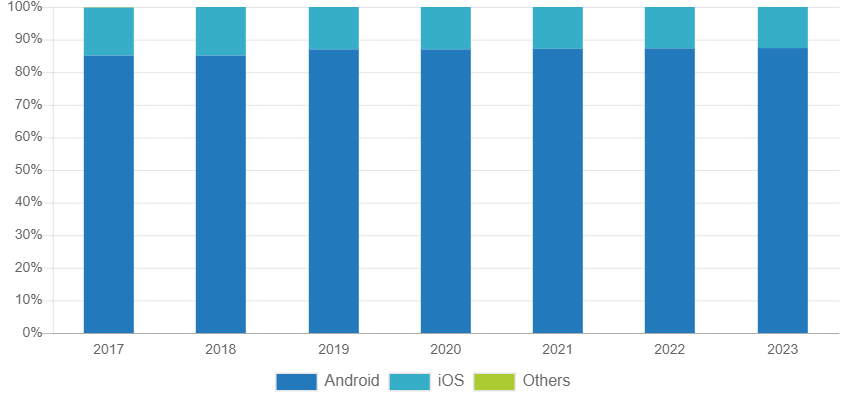
Mobile OS Market Share

Image Source: IDC

“In 2019, market share of the Android OS will increase to 87.0% from 85.1% in 2018. Volumes are expected to grow at a five-year compound annual growth rate (CAGR) of 1.7% with shipments of 1.30 billion in 2023.” – IDC

As per Statista, the Android has 2.8 million apps available on the Google Play Store in 2019.

The numbers prove that the Android OS continues to climb new heights with constant growth. Android is more flexible and open technology than iOS when it comes to development. This is the main reason businesses prefer Android app development. Moreover, it allows companies to reach out to a large audience.

Developers have different ways to build Android apps. The widely adopted way is to download Android Studio. It is an Integrated Development Environment (IDE) that provides necessary packages that help in Android app development.

Well, Android Studio just provides an environment for app development that is not enough to build an app. Selection of the right programming language is essential to write code for the Android app.

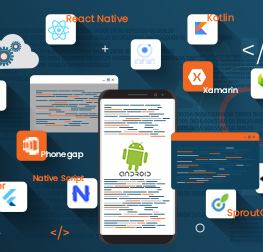
This post will introduce different Android app development frameworks to you so that you can select the best one for your Android app. Of course, Android app developers will suggest you the best suit. But, with a technology little knowledge, you can judge whether the selected tech stack is appropriate.

15 Best Android App Development Frameworks to Consider 2022

1. React Native

React Native is an Open source framework developed by Facebook to build native mobile apps. The JavaScript framework allows to develop apps through building blocks just like native apps. Thus, it is quite tough to identify whether the app is developed using React Native or Java.

Android app developers can optimize the React Native apps by adding codes written in other languages such as Objective C, Swift or Java. The technology has been used by various Fortune 500 companies like Walmart, Tesla, Instagram, and many others for mobile app development.

2. Ionic

Ionic is a free & open-source framework and used to build progressive web apps and native mobile apps. As it is a cross-platform technology, developers can develop an Android app and then transfer it to another platform.

It allows developers to build progressive hybrid apps using JavaScript, HTML5, or CSS3. Ionic offers features like live reload, logging, and emulators. Being an Angular and Cordova based technology, Ionic holds a large community of 5 million developers across the globe who have developed around 4 million apps using Ionic.

3. Kotlin

The programming language is invented by JetBrains. It is a modern platform that combines function, features and object-oriented programming. It is 100% interoperable with Java language and runs on the Java Virtual Machine (JVM). Google has declared Kotlin as an official IDE for Android app development in 2017.

The developers use it as a replacement of Java as it streamlines the app development process. Moreover, it can be used as a primary language for app development. As per a Stcekover Flow survey, Kotlin held the fourth position as a most loved programming language.

The large scale organizations like Uber, Twitter, Airbnb, Pinterest, Trello, Netflix are migrating their Android apps to Kotlin.

4. Corona SDK

It is a software development kit that is used to develop Android app 10x faster than any other Android app development frameworks. It is a multi-layered and lightweight programing language that builds an app with greater flexibility, usability, and speed.

Corona is highly used for gaming app development. It is available for free for both Windows and Mac OS X along with real-time testing support. The framework has a feature-rich API suite that contains networking, graphics, particle effects, widgets, and more.

5. Xamarin

This is the best framework for those who want to build Android apps without using Java. Xamarin is used by around 1.5 million users globally. It offers a complete set of C# code base to develop native apps for Android and other mobile operating systems. Developers also use Xamarin in Android Studio to build native apps using .NET code base.

6. PhoneGap

Developed by Apache and Adobe, the technology allows to build Android apps using web development technologies such as HTML5, CSS3, and JavaScript. PhoneGap is an open-source framework and allows developers to see changes in the app in real-time.

Highly used for Hybrid app development, the framework provides excellent performance and freedom to work without hardware-related limitations. It has a bunch of third-party software tools, extended plugin libraries, and a growing community to develop robust Android apps.

7. Sencha Touch

Sencha Touch is an enterprise-first framework introduced by the Android community for native mobile app development. The Android app development framework is based on HTML 5 and JavaScript that allows to build universal applications for the Android platform.

Offering 50 built-in native themes and UI components, it allows developers to create attractive apps. Sencha Touch is the first choice of big organizations due to its high-level flexibility, compatibility & performance, fast execution, and responsive touch features.

The programing language allows to develop Android apps with smooth scrolling and fluid animations that are highly adaptive. Android app developers can use the enriched UI, a huge collection of themes, a vast data package and an integrated MVC system offered by Sencha.

8. Cordova

It is a free and open-source framework that develops mobile apps using HTML, CSS, and JavaScript. Cordova is developed by the Apache and allows developers to build multi-platform mobile applications using a single code base.

As Cordova uses native device API for mobile app development, it is tough to know whether the app is developed using native languages or not. Moreover, Apache Cordova supports offline scenarios, it is an excellent platform to build desktop apps.

9. Unity

Unity is basically a game engine that is used to develop 2D and 3D augmented reality and virtual reality games and other situations. The technology is compatible with other platforms along with Android. Being a cross-platform technology, it allows developers to export games to multiple platforms like Windows, Web, PlayStation, iOS, Xbox, and more.

It creates an amazing experience for augmented reality and virtual reality using the Unity engine. The technology controls different graphic elements, game objects, momentum and more. It creates an interactive experience with immersive content that drives tremendous user engagement for the companies.

10. TheAppBuilder

TheAppBuilder allows to build Android apps with a code less user interface. Thus, developers can create an app without knowing the coding of different programming languages. Offering drag and drop interface, it helps in developing the app faster.

Pre-built blocks of the framework come with various features such as polls, feedback, push notification, content updates, and much more. TheAppBuilder allows developers to submit the app directly on the Google Play Store and businesses to integrate social media to drive user engagement.

Companies can generate analytics reports using the framework to identify the issues that affect app performance and fix them in time.

11. Flutter

Flutter is introduced by Google and written in dart language. It is a multi-platform SDK that allows to build robust mobile apps. It is quite different from other Android app development frameworks as it simplifies the cross-platform development process. If you want to develop hybrid applications, then Flutter the best option to choose from.

The technology provides a solid testing framework that allows developers to perform unit, functional, and UI tests. As Flutter contains hot-reload functionality, developers can perform testing seamlessly without restarting the application.

12. NativeScript

This is the best framework for hybrid app development and supported by Telerik, a Bulgarian software company. It is an open-source and free framework and allows developers to build apps using Angular, Vue, and TypeScript. It allows the skilled web developers to build advanced progressive web apps.

Using NativeScript for Android app development, you can achieve native-like UI and performance of the app. Providing JavaScript on the UI thread, the framework provides high performance on all native platform APIs.

13. SproutCore

SproutCore is a JavaScript-based framework that allows to build Android apps faster and with advanced features. Being an HTML5 based framework, it runs with a clear MVC design that optimizes the performance and scalability of the application.

The framework contains a set of tools that can be used in desktop-like applications for browser, including UI components, deployment & testing tools, and routing. With the help of these tools, SproutCore maintains the app code and business logic effectively.

14. Appcelerator Titanium

The titanium framework uses the functionality of JavaScript to call different APIs to boost app performance. It is an open-source framework that builds applications with a mobile-first approach. With Appcelerator Titanium, you can build a visually appealing and clean app that provides native-like look & feel and functionality.

Moreover, the framework builds a multi-platform mobile app using the existing code. The framework can be used in game development. When it comes to mobile app development, Titanium contains the hardware-specific features such as platform-centric notification, OS related controls, and Android menu buttons.

Other important features of Titanium are app monitoring, performance regulations, and automated testing on mobile devices.

15. jQuery Mobile

jQuery Mobile contains appealing function such as progressive enhancement, theme design, semantic makeup along with Cordova support. It has a large community support. The framework allows to write the code once for Android and reuse it across different mobile operating systems such as iOS, Windows, Blackberry, and more.

It builds responsive wen portal and mobile applications that are compatible with different smartphones, tablets, and desktops.

Key Takeaway

Selection of the right framework for your Android app development is a quite strategic decision. Credence has a team of 50+ Android app developers who have proven experience in developing robust business solutions for versatile industry verticals. We offer end-to-end Android app development services start from consultation, design, development, testing, deployment, and enhancement and help the organizations improve time to market of their Android apps.

General FAQs about Android App Development Frameworks [H2]

What is the Android application framework?

Android Framework is the stack of code that makes up the OS. It includes native libraries that may or may not be accessible to the Android developers.

What is the best framework for Android development?

For different Android apps, you need different frameworks. Every project has specific requirements. To address those specific needs, you need to choose different Android frameworks. With the help of an experienced Android app development company, you can make the right choice.

Which framework is used in Android Studio?

Java is the primary technology is used to develop the backend of Android apps. To create the design layout of Android apps, developers use XML. To build an app with Android Studio, you need to use both Java and XML.

Is Kotlin better than Java?

Get the detailed insights about the how Kotlin is better than Java by visiting 10 Reasons You Should Know Why Kotlin is Better than Java for Android App Development.


How to Select the Right iOS Architecture for Your iPhone App?

If you tend to judge the book by its cover (here, the post by its title ;)), then you might feel it is for iPhone app developers. Am I right?

Well, most of the iPhone developers have more or less understanding about different iOS architectures as per their experience level.

Undoubtedly, the selection of suitable software architecture is the job of iPhone app developers. But, your involvement is highly important in all decisions whether they are strategic and technical.

Of course, technology is not your forte so you can not make the right choice. But a basic understanding of different technical aspects helps you to get better insights about the decisions taken by your technology partner.

This post is written to serve this purpose. It enables entrepreneurs with an overview of the best iOS architecture patterns so that they can end up with having a quality and cost-effective iPhone app.

Why It Is Important to Choose The Right iOS Architecture?

Election of the right iOS architecture is essential to build a highly functional iPhone app. The software architecture focuses on how major elements and components within an iPhone app are used and interact with other key components and elements. It also helps in managing the algorithm and implementation detail of each component.

Selection of architecture depends on the complexity of your app. And, app complexity depends on a number of features and functions integrated into the app. Each feature contains a set of components, class, entity, and elements.

Without an appropriate software architecture, it is quite difficult to manage and update the application code on the go. Especially when the iPhone app developers need to fix any bug or address feature enhancement requirements.

Characteristics of A Good Architecture

  • Distribution: It’s about a balanced distribution of responsibilities across different entities with strict roles.
  • Testability: A good architecture simplifies the code testing by allowing developers to find and resolve the issue in the app run time, before the end-user encounters with it.
  • Ease of Use: The less the code, the fewer the bugs. It allows iPhone app developers to resolve the issues quickly. It directly reduces app maintenance cost.

Different Types of iOS Architecture

MVC

Model-View-Controler the oldest and highly popular design architecture for iPhone app development. Most of the iPhone app developers prefer this code as iOS SDK is developed based on this architecture. It separates the application code into three layers Model-View-Controller.

iPhone app developers prefer this architecture for small size and simple iPhone app development.

  • Model: In this layer, the data resides. It takes responsibility for modeling objects, parsing, and persistence.
  • View: This layer manages the UI elements where the user interacts. It takes the input from the users and provides the relevant output.
  • Controller: It plays the role of mediator between the model and the view.

Diagram

Apple's MVC Architecture

Features

  • Distribution – There is the least distribution of responsibility as View and Model are separated while View and Controller are tightly coupled.
  • Testability – Bed distribution means bad testability. iOS developers can only test the Model layer of the architecture.
  • Ease of Use – Least amount of code so quite easy to use and also least cost of code maintenance.

MVVM

The acronym of this architecture is Model-View-ViewModel. This architecture provides more separation of concerns. It is an augmented version of MVC architecture so that we can keep View and Controller smaller and easily manageable. We can incorporate MVVM into an existing MVC architecture as Model, View, and Controller of both the architecture patterns is similar.

iPhone developers prefer this architecture for medium size and complex iPhone app development.

  • Model: This layer manages the data logic
  • View: It takes responsibility for anything that users interact with. It could be anything that we see on the screen such as text fields, labels, etc.
  • ViewModel: The layer is responsible for exposing the data objects from the model to the view in the defined form.

MVVM considers ViewController as the View. So it doesn’t add a new layer. In this architecture, the code goes into the ViewModel instead of ViewController. The ViewModel passes the data to ViewController in a defined format to be presented on the screen to the end-users.

In this pattern, the ViewController provides passive view, it has no responsibility and no power to make decisions.

Diagram

Apple's MVVM Architecture


Features

  • Distribution – More distribution compare to MVC
  • Testability – Testability is easy as ViewModel has no binding with the View.
  • Ease of Use – Easier to use as responsibilities are divided and code management is easy. But the code maintenance cost is high.


VIPER

It is an adoption of Clean Architecture for iPhone apps. The architecture is specifically designed to build components for different user cases. It is the only architecture pattern of iOS that does not contain MV(X).

VIPER is an acronym of View, Interactor, Presenter, Entity and Routing. With these five layers, VIPER provides a lot more separation of concerns. The architecture can be considered when you have many different components.

iPhone app developers prefer this architecture for large size and extremely complex iPhone app development.

View: It sends the user actions to the presenter and displays the output provided by the presenter.

Interactor: It contains business logic and other data related entities. This layer fetches the data from the Model layer.

Presenter: The presenter layer contains the UI logic. It changes the view of data as per the format required by the UI. It mainly engages in the transformation of data.

Entity: This layer contains only data objects and does not include the method of data processing.

Router: It takes care interaction between different modules in order to control which view will be displayed and what will be the next view.

Diagram

Apple's VIPER Architecture


Features

  • Distribution – A great level of distribution of responsibility. It has the most separation of power.
  • Testability – Better distribution comes with easier testability.
  • Ease of Use – Extremely easy to use. But, there is a considerable cost of maintenance as developers need to write a huge amount of code for each component with very small responsibilities.

Conclusion

Having a decade long experience in developing the robust iPhone applications, Credences iOS team has implemented all the three architectures as per the complexity level of the project. Leverage hands-on experience of our iPhone app developers who ensure the quality and stability of your iPhone app.

Our experienced software engineers can understand your requirements and suggest the most suitable and cost-effective iOS architecture for your iPhone apps. Connect with our iPhone experts to explore our expertise and get the best suggestion for the effective execution of your project.

How to Generate Revenue Through Fintech Apps? (5 Proven Strategies)

There are a few industries where constant innovations not only improve the respective domain but also disrupt the other verticals as well. Undoubtedly, Fintech is one of them.

Fintech is the amalgamation of Finance and Technology. The world is continuously moving towards digitization by embracing advanced technologies. The finance industry also harnessing emerging technologies such as Blockchain, Data Science, Artificial Intelligence, Machine Learning, etc.

With Fintech apps, financial institutions transform their conventional ways of serving the people by delivering a wide verity of financial services in a new format.

Classification of Fintech Services

  • Payment (consumer payment, cryptocurrency, & payment backend infrastructure)
  • Investment Management (institutional & private investment management)
  • Capital Rising (alternative financing & crowdfunding)
  • Deposit & Landing (digital banking, personal finance & alternative lending)
  • Enterprise Financial Software (collaboration & workflow software, accounting & invoice software, data & analytics software)
  • Market Provision (financial social networks and matchmaking & comparison)

Overview of Fintech Market

Fintech is relatively a new domain compared to other industries. It’s an advanced version of the financial industry. Fintech is disrupted by the startups who align all the financial services and activities with advanced technologies to provide financial services to businesses and individuals. Fintech apps help financial services providers serve their customers quickly, effectively and continuously.

Fintech Startups by Region

Image Source: Statista

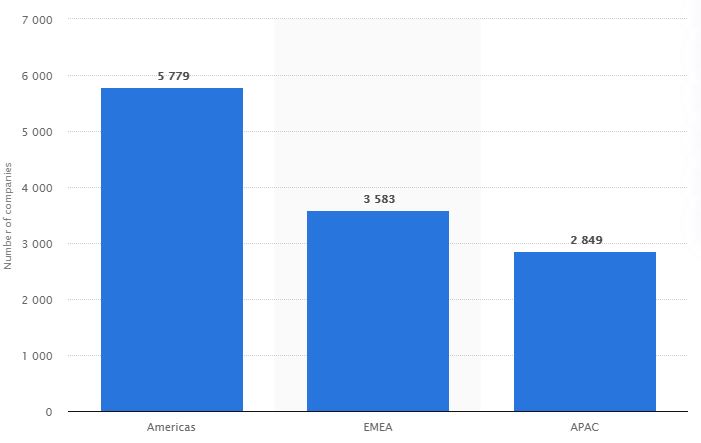
As a result, “There were 5,779 financial technology (Fintech) startups in the Americans in February 2019, making it the region with the most Fintech startups globally. In comparison, there were 3,583 such startups in Europe, the Middle East, and Africa, followed by 2,849 in Asia and the Pacific region.” – Statista

Though there are numerous Fintech companies across the globe, very few are getting customer attention along with revenue generation through Fintech apps. Robinhood, Acron, Mint, Venmo, Coinbase, and Tycoon are the best apps in the industry.

This post contains the top five strategies that financial service providers have to consider to monetize their Fintech apps. Let’s redefine the business model of your app to empower your revenue stream.

5 Strategies to Make Money from Fintech Apps

Advertising [H3]

The most common and simple way to generate revenue from Fintech apps is by displaying commercials in the app. The app owners get paid by the third-party ad networks for running their advertisements. You can also earn bucks for each time users clicked.

You can associate with banking tutors, trading businesses, loan firms, etc. to promote their products and services through your app.

Another way to make money through Fintech apps is by considering banner ads and rich media.

Banner Ads

Banner ads appear on the home page of the app. You can display them with different sizes and at different places (top or bottom) on the screen.

Rich Media

Rich media are interactive advertisements that engage users for a long time, so they do not quite the session. The rich media ads could be mini-games, video, text, images, audio, etc. It is a smart way to run the commercials without hurting the user experience.

Subscriptions

This one of the most successful strategies to monetize Fintech apps. Allow users to use your app for the free trial for one month. After a month, if they want to use your app, they need to pay. If they are comfortable with your app, they will definitely subscribe it.

It is the most secure way of money making. As subscriptions are changed with flat rates, third party integration or percentage plannings are not needed. It’s a direct way to generate revenue for your finance business.

Peer to Peer Lending

The concept is all about an individual can take a loan from another individual using the Fintech app. It cuts down the layer of any intermediary and financial institution.

With this model, an individual can lend money to other individuals and earn interest. The main benefit to financial service providers is, they can charge a small amount as brokerage the connection. Thus, its an extra income source for the financial institutions.

This seems quite simple and easy to the borrower compared to passing through a complex process of financial institutions. Moreover, peer to peer lending removes paperwork.

Value of Global Peer to Peer Landing

Image Source: Statista

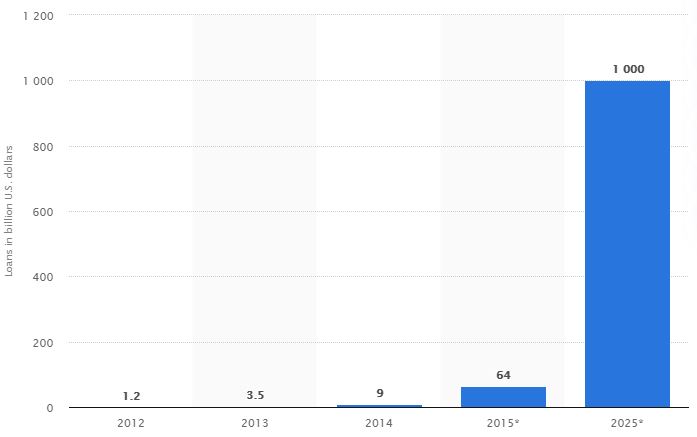
“The global Peer to Peer lending market was US$3.5 billion by the end of 2013 and it is expected to reach one trillion in 2025.” – Statista

According to Bloomberg, “The P2P lending market is forecast to reach $370 billion by 2025, after growing at a CAGR of 5.6% during the forecast period 2019-2025.”

P2P is a popular monetization method that gains attention and acceptance across different regions like North America, South America, Asia-Pacific, Africa, and Europe. However, North America is the largest market of Peer to Peer lending.

Robo-advisors

Robo-advisors are highly admired money-making platform that generates revenue through trading. It replaces the human financial advisors.

Usually, customers take the help of financial advisors for the better management of their wealth. Robo-advisers provide automated and algorithm-driven financial services that are at little or no human intervention.

It is beneficial for both parties: customers and app owners. App owners can earn money by charging less commission than traditional advisors. Customers can buy services at lower prices. Moreover, Robo-advisors automatically allocate, manage and optimize the customer’s assets.

Additionally, the app is available for the customers all the time that is quite comfortable for them. You can try this advanced monetization tactic for your Fintech app development.

In-app Purchases

Most of the Fintech apps are free to download. Most of them are making money through in-app purchases. Considering this business model, you can sell your products or services directly to the customers and boost your revenue stream.

While going with in-app purchases for your app, keep experimenting with the different options and analyze which one works best for you. Later on, you can define your business strategy by focusing on highly impactful in-app purchases.

How Does Credencys Help in Fintech App Development?

Credencys has successfully developed varied Fintech apps by understanding client requirements and analyzing Fintech market trends. Along with the development, we equally focus on the UI/UX if the mobile application to make users comfortable with the navigation and flow of the application.

We have a team of 100+ Android & iPhone app developers who have better insights about the must-have features and functionality of a Fintech market. Thus, they won’t only help you in developing a robust Fintech app but also provide technical consultation to build a cost-effective business solution.

Frequently Asked Questions

How much does it cost to make a Fintech app?

It is quite tough to define the exact cost of Fintech app development. The app cost depends on the features and functionality you want to add in the app. The Fintech app required a lot of integration and API services so it charges more than any simple app. A simple Fintech app with basic features costs you around $30000 to $50000. If you want to consider advanced and complex functionality integration then it would cost more than $100000.

How much time it will take to develop a Fintech app?

The development time of the Fintech app is based on how many features and functionality you want to add in the app. The more features you consider, the app development will take more time. A simple app can be developed within 6-8 months. An app with all the advanced features takes up to 12 months.

What are the important features of a Fintech app?

The essential features of a Fintech app are multi-tier functionality, real-time processing, fast & secure transactions, batch processing, integration with other applications (baking &financial apps and backend of web applications), and more.

What are the popular Fintech apps?

The list of best Fintech apps contains Revolute, Coinbase, Staring Bank, Mint, Lemonade, Trigger, acorns, BudgetBakers, Lawnmower, Robinhood, and more.


15 (Highest Grossing) Best Apps for Book Lovers

It is quite tricky for a voracious book reader to carry their favorite books with them all the time. This shift to a mobile-focused world is affecting customers from all walks of life.

Book lovers have started to pick up their iPads, smartphones, and Kindle readers to read books rather than picking up physical books. According to Statista, in 2018, a quarter of Americans have read an e-book rather than a hardcopy.

Apps for book lovers are getting more and more popular every day.

Reason?

More convenient, technological benefits, i.e., built-in dictionary, digital bookmarking, etc., can convert an e-book into an audiobook with a simple text-to-speech, and more.

In this article, you’ll find a list of 15 best apps for book lovers from which you can get inspired to create an app like Kindle or Audible or Goodreads.

Best Apps for Book Lovers

  • Wattpad
  • Amazon Kindle
  • Audible
  • OverDrive
  • Goodreads
  • Inkitt
  • Blinkist
  • Comixology
  • Marvin 3
  • Leio
  • Epic!
  • Scribd
  • Serial Reader
  • Litsy
  • Aldiko

#1 Wattpad – A Social Storytelling Platform

Wattpad

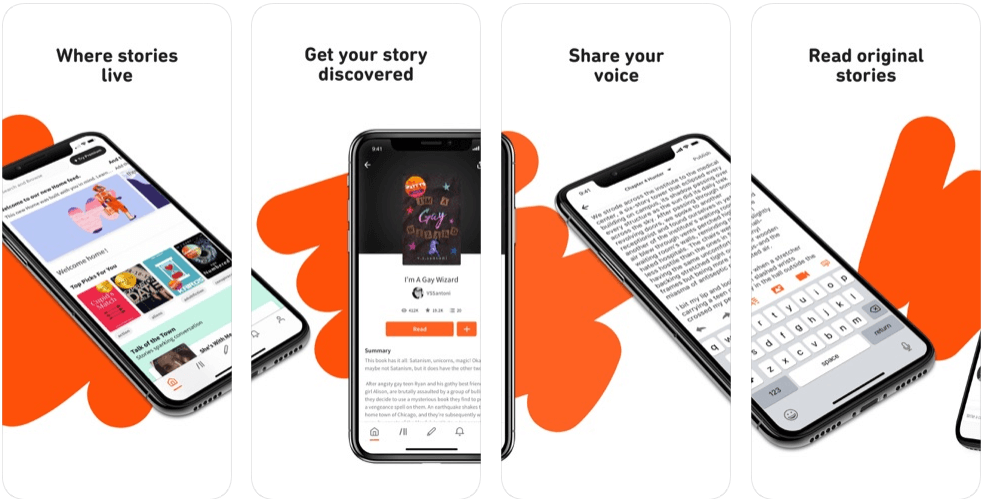
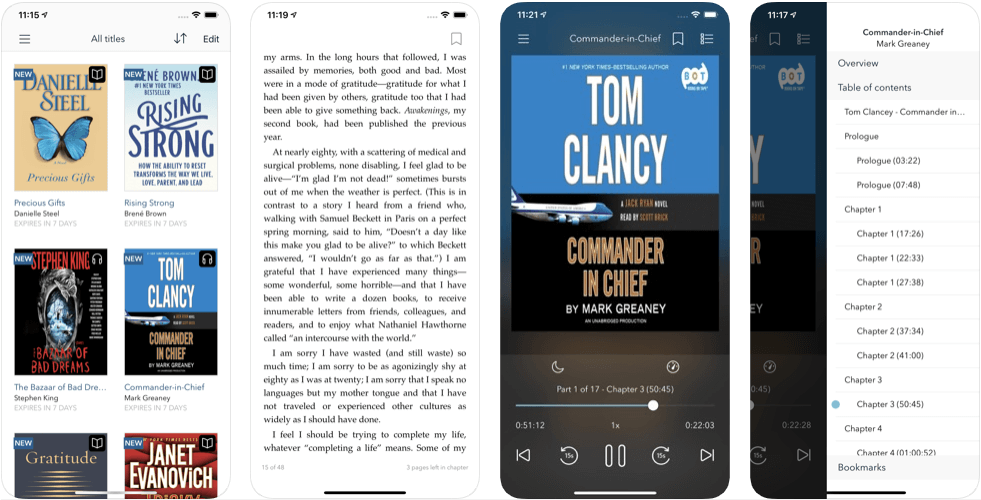
Wattpad is one of the best apps for book lovers. It connects over 80 million readers across the globe. It connects writers from all over the world to its readers directly.

This platform allows you to not only read original stories but also provides a platform to write your stories and share them with the world.

Moreover, it also has collaboration with popular video sharing platforms like Hulu and Netflix that provides you a platform to convert your stories into movies and tv shows.

#2 Amazon Kindle – An e-book reader and store

Amazon Kindle

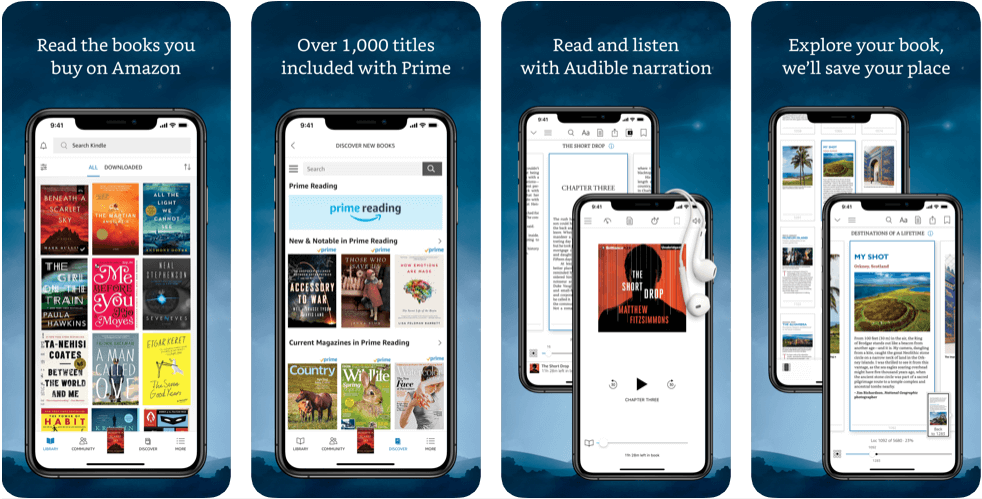
Amazon offers Kindle devices that provide readers a real book reading experience. However, Amazon also provides a Kindle app for its readers that provides a similar reading experience to the readers like a Kindle device.

Here, you can not only read books but also purchase books at a cheaper rate than a hardcover or a paperback book. Features such as Whispersync, X-ray, and Dark mode makes it one of the best apps for book lovers.

#3 Audible – The Largest Platform for Audio Books

Audible

Audible is one of the best and largest platforms for people who can’t read or don’t like to read. It has one of the most significant collections of audiobooks.

It offers subscription-based services where you need to purchase a pack and listen to some of the most compelling stories. Since it is an Amazon company, one can access it via Alexa and Echo devices.

#4 OverDrive – An On-the-go Library

OverDrive

OverDrive has access to over 30,000 libraries across the world. You can create your library using the app. It allows you to purchase and rent e-books and audiobooks.

You can create wishlists, place holds, and return the titles in a jiffy. Once your account has been created, you can build a library of your own and access it from any mobile device.

#5 Goodreads – The Largest Community of Book Lovers

Goodreads

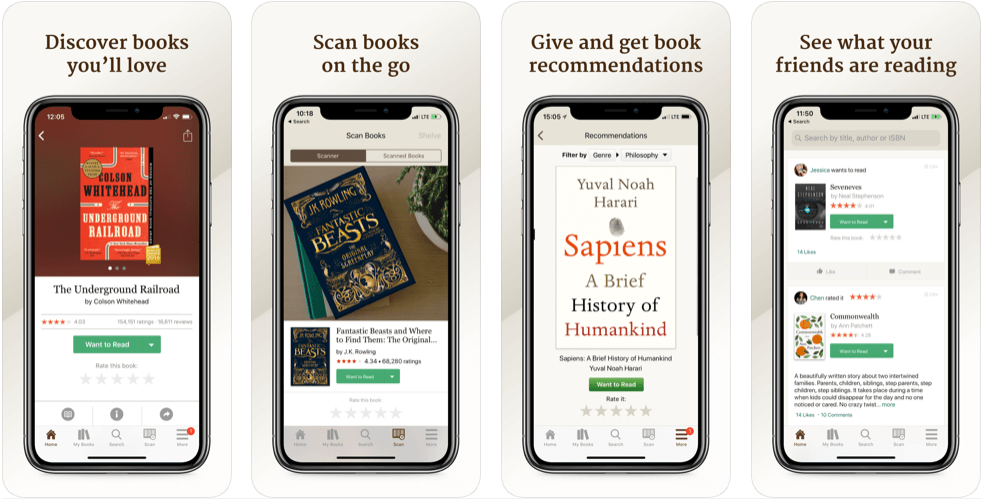
Goodreads is a platform that connects all the readers across the world. You can read and write book reviews, get book recommendations, save your favorite genre/books/authors, and more.

You can participate in various reading challenges and win prizes. You can connect with any of the Goodreads account holders and share experiences. Moreover, you can also see what your friends are reading.

#6 Inkitt – A Free App to Read Novels

Inkitt

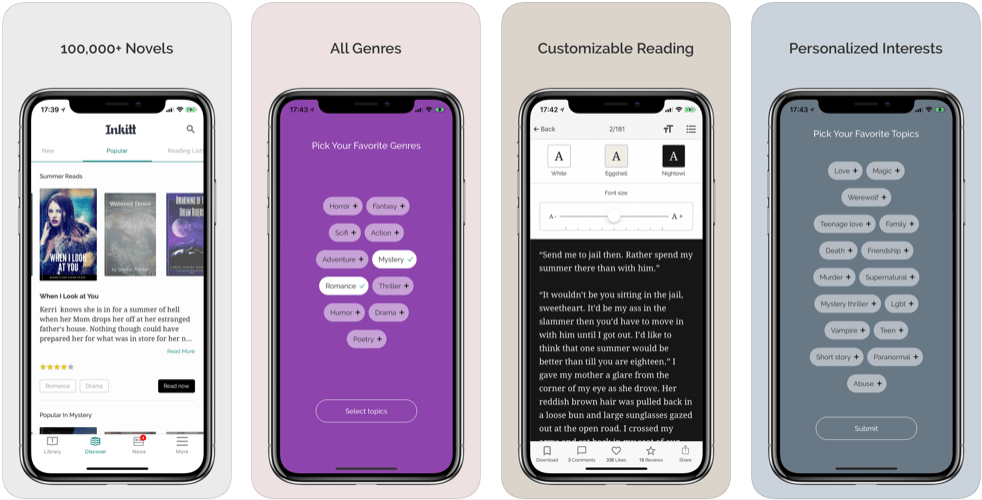
Inkitt has a collection of thousands of fiction, non-fiction, drama, sci-fi, thriller, action, adventure, erotica, and poetry collection of novels. It allows you to download books for free from its collection.

Once you download the book, you can read it offline whenever you want. It also provides multiple fonts options and dark mode to make reading more engaging.

#7 Blinkist – An App for Readers Who Don’t Have Time

Blinkist

The USP of the Blinkist app is that it converts the key idea of books into a 15-minute explanation. You can either listen to the audio or read the miniature description of over 3000 non-fiction novels.

The app allows users to create personalized playlists and download the audio so that they can listen to them offline. The app also suggests titles based on user preferences and listening history.

#8 ComiXology – An App for Comic Book Lovers

ComiXology

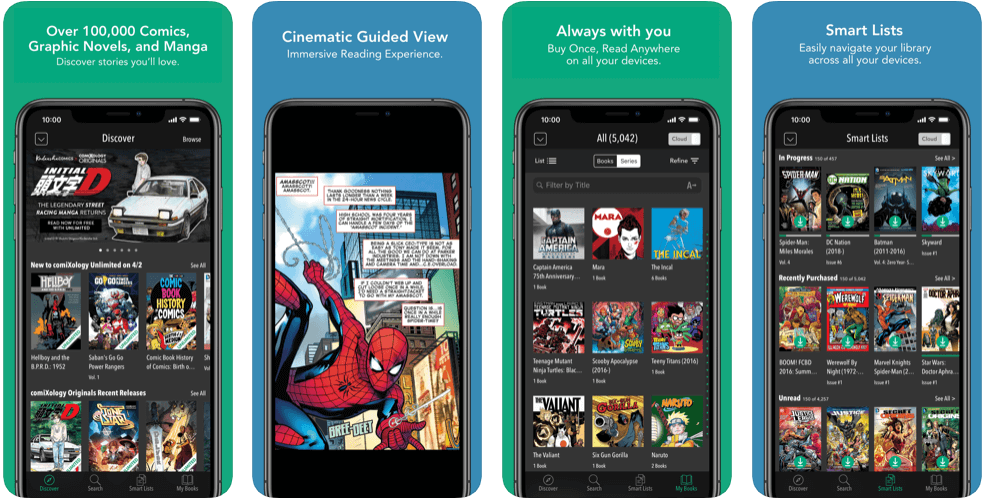
ComiXology is an app that holds a collection of over 100,000 graphic novels and manga from DC, Marvel, Image, and more. ComiXology offers subscription-based services.

It allows you to create your library where you can store and download as many graphics novels and manga as you want. It provides immersive reading experience through its cinematic guided view.

#9 Marvin 3 – A DRM-free E-book Reader App

Marvin 3

Marvin is a personalized and customizable e-book and comic book reader for your DRM-free files. It can also read CBR and CBX comics along with DRM-free EPUB books.

Marvin 3 allows you to adjust UI, light and dark adjustments, highlight sentences, and export e-books to Dropbox, iCloud, etc., and more. It is integrated with Goodreads, which is more known to many users.

#10 Leio – A Reading Planning and Tracking App

Leio

The app is a digital journal that allows you to manage and track your reading. You can use this app with physical books as well as e-book readers like Kindle.

You can set goals and receive achievements whenever you finish the goal. It is one of the best apps for book lovers because it shows you various statistics such as read time, pages left, pages read, and more.

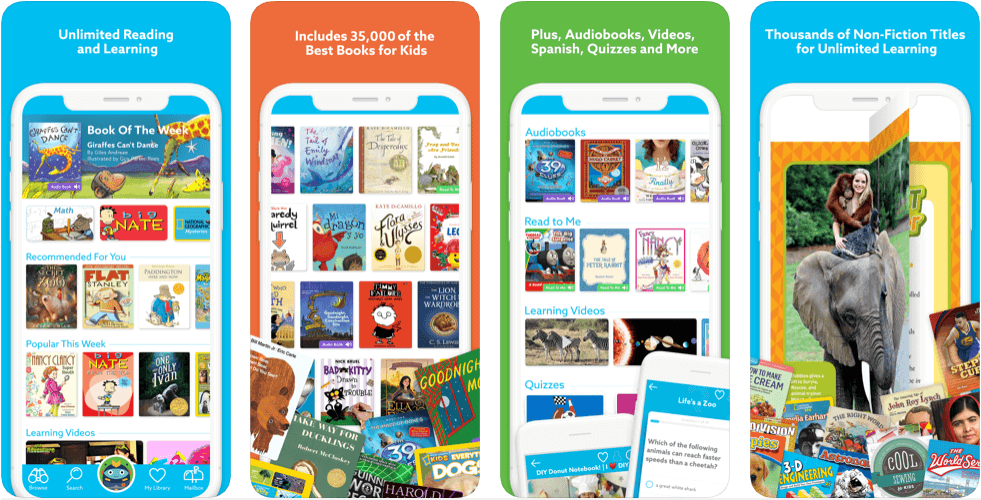
#11 Epic! – Best Books App for Kids

Epic

Epic holds a collection of record-breaking 35,000 high-quality e-books, videos, audiobooks, and quizzes for the children aged 12 or less. It is a two in one app for home use and educators.

The user interface of Epic is quite colorful and kid-friendly. An educator can create classrooms and save money to hire an actual classroom. Hence, it is also one of the best apps for book lovers.

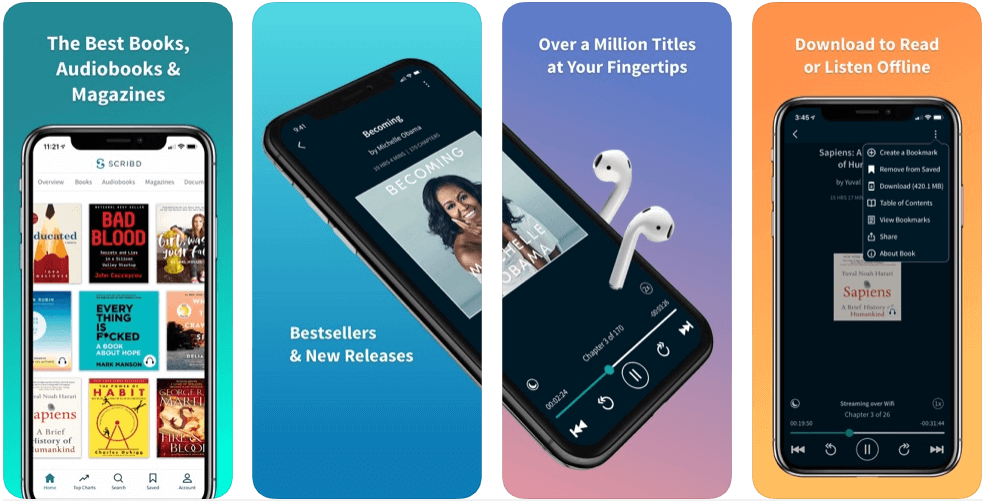
#12 Scribd – One of the Best Subscription-based Apps for Book Lovers

Scribd

Scribd is a silicon valley-based startup that offers a subscription-based service model, similar to Amazon Kindle and Audible. In addition to millions of books, one can also read articles from the NewYork Times and NPR, and more.

With Scribd, you can download unlimited e-books and listen to audiobooks. Moreover, while listening to an audiobook, you can adjust the narration speed, add sleep timer, and download the audio to listen offline.

Apart from this, it has all the options to customize fonts, background color, etc. similar to other e-book readers, which makes it one of the best app for book lovers.

#13 Serial Reader – An App for Bite-sized Reading

Serial Reader

Serial Reader is an app preferred by users who do not have much time to read or the ones who cannot read for long. It converts classic books into 20-minutes read snippets.

The app allows you to sync your reading with a Goodreads account as well as across multiple devices that you use. There are hundreds of classic e-books in Serial Reader.

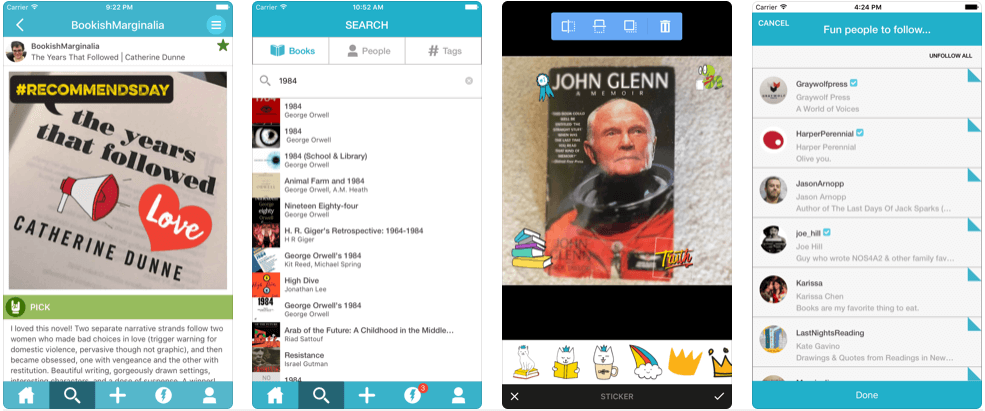
#14 Litsy – A Social Media App for Book Lovers

Litsy

Litsy is a social media of book lovers. The app allows you to create groups and share your book reading experience with your friends and family. Here you can also discover books that you would love to read.

It is one of a kind app that allows you to post reviews of any books that you’ve read and allows you to add various hashtags to help more people outside your community.

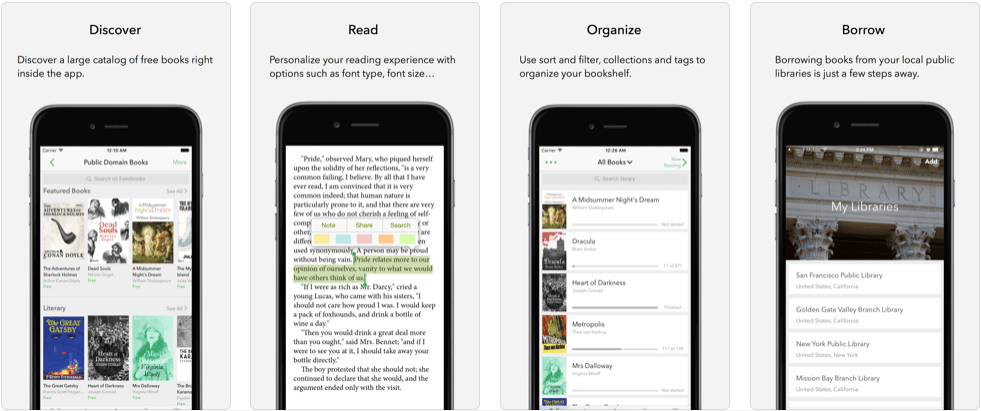
#15 Aldiko – One of the Best Book Reader Apps for Book Lovers

Aldiko

Aldiko is an e-book reader app that allows you to read books available in formats like EPUB, PDF, Adobe DRM format, and more. You can adjust fonts, font-size, background color, brightness, sleep timer, etc. using the app.

The reason why it is one of the best apps for book lovers is that it has one of the largest collection of free e-books. It has an advanced library management system, a user-friendly interface, and a built-in dictionary to search for words.

Final Thoughts

At Credencys, we have definitive experience of developing the best apps for book lovers. If you have an app idea or want to develop an app like one of the above, or want support for your existing book app, contact our mobile app development experts to get the best consulting in the industry.

Best Apps for Book Lovers – General FAQs

1) How much does it cost to build an app like Goodreads?

Generally, it takes around 200-300 hours of development and 100 hours of designing to build an app like Goodreads. If you choose Credencys for mobile app development, it will cost you approximately $15,000-$30,000.

2) Which apps are good for keeping track of books read?

Google Sheets, Goodreads, Libib, Litsy, LibraryThing, etc. are some of the best apps for book lovers to keep track of your book reading.

3) Which is the best firm for books app development?

Credencys has extensive experience in developing mobile apps for over a decade now. It follows Agile methodologies to build mobile apps at a reasonable price. Hence, it is the best mobile app development company.

4) Apart from these apps, are there any useful apps for book lovers?

We Read Too, Shelfie, Poetry, Simple Book Catalog, Storyville, Kobo, Moon + Reader, Libib, The Pickle Index, Serial Box, Pocket, Gerty, The Paris Review, Indigo, etc. are some of the best apps for book lovers.


Top 10 Advantages of Node.js for Web Application Development

JavaScripts are an inseparable part of the web app while developing front-end applications. It is one of the widely used and highly popular client-side programming languages. Angular.js, Node.js, and React.js fall under the roof of JavaScript. Out of these three, Node.js holds the prime position.

Most Used Technology Worldwide by 2019

Image Source: Statista

According to Statista, 49.9% of software developers used Node.js, while 37.4% used .NET. Only 0.6% of the respondents reported that they are using the CryEngine framework.

Let’s have profound insights about the Node.js from scratch and get an overview of the technology.

What is Node.js?

Node.js is neither a framework nor a library. It’s a cross-platform runtime environment for JavaScript. It is a free, open-source and full-stack development environment that can be used to build server-side and client-side of a web application.

It uses V8, an open-source high-performance JavaScript engine, to build web apps. To deliver excellent performance, Node uses an event-driven, non-blocking Input /Output model to build data-intensive real-time applications.

Node.js is widely used for developing large scale applications. It is widely used for building real-time applications, video streaming websites, single-page apps, and other web applications for varied businesses.

Top 10 Advantages of Node.js that have Won the Hearts of Developers and Enterprises

Equipped with modern tooling, Node.js allows developers to build complex web applications with numerous features, functionality, and modules. This is the key advantage of the technology that makes Node stand apart from other programming languages.

#1. Scalability

Using the Node.js for web application development, developers find it easy to scale the app vertically and horizontally. While scaling the app horizontally, web developers can add new nodes to the existing system. On the other hand, to achieve vertical scalability, programmers need to add additional resources that can be added to the existing system.

As the technology uses the event mechanism, it provides high scalability and helps the server in a non-blocking response. Node.js applications do not require a large block in the core development. It can work with a set of micro services and modules which are running in their own process. Thus, it is a highly scalable environment than the other JavaScript servers.

#2. High Performance

Node interprets the Java code through Google’s V8 JavaScript engine. The V8 engine complies with JavaScript code directly into the machine code. It enables developers with the effective implementation of the code.

As Node.js is supported by the non-blocking run input-output operations, developers can take the benefit of faster code execution along with an enhanced runtime environment.

#3. Extensibility

Node.js is a highly extensible technology and it can be customized as the changing and specific requirements of the business and the project. Moreover, using JSON with Node.js, web developers can achieve data exchange between the client-server and web server. Programmers can also use built-in APIs to develop TCP, HTTP, DNS, etc. server.

#4. Single Programming Language

With Node.js, developers can build frontend and backend of the web applications in JavaScript using a runtime environment. It enables programmers with the ability to write code for the server-side applications using JavaScript.

They do not need to use other server-side programming languages. Thus, application deployment becomes easier for the developers as almost all browsers support JavaScript.

#5. Caching

Node.js, an open-source runtime environment, provides a caching module too. Whenever the application gets the request for the first module, the request cached in the application memory. It helps developers by reducing the tasks of the re-execution of the code. The caching module loads the web pages swiftly and responds to the users within no time.

#6. Boosted Web App Development Speed

Being a lightweight technology and supported by the varied tools, Node.js allows developers to accelerate the app development speed. The Node Package Management registry provides several libraries and solutions to build web apps with more value by investing less effort.

By offering reusable templates, the technology reduces the number of bugs, cuts down the size of the application and improves the time-to-market of the app by shortening the development cycle. As the client-side and server-side are written using Node.js, it becomes easy for developers to manage the data by consuming less timing.

#7. Community Support

Node.js has a large and active community of software developers that continuously contributing to the further improvement and development of the technology. The web developers are well supported by the JavaScript developers who provide them the ready to use code in GitHub to build their complex solutions.

#8. Improved App Response Time

The technology is capable to handle the multiple requests at the same time by offering the option of nob-block I/O systems. The system can manage several requests with the lowest response time and in a highly efficient way compared to other languages Python or Ruby. All the incoming requests get lined up and quickly executed in a very systematic way.

#9. Low Learning Curve

JavaScript is a widely-used programming language amongst the developers to build the front-end of web applications. It becomes easy for programmers to learn and adopt Node.js for backend development. It helps them to write code in less time.

#10. Mobile Friendly

Node.js improves app response time, development time, and productivity to enable businesses with a competitive edge The technology holds the next-level efficiency and adaptability by managing the growing volume of mobile traffic, preserving the server from crashing and distributing the load. Node.js developers can develop responsive sites much faster by integrating necessary features.

In the Nutshell

By considering the above-listed benefits, node.js is the prime choice of the developers to build real-time and live streaming applications for startup projects or enterprise mobility solutions. Credencys has proven experience in developing web applications by harnessing the potential of Node.js.

Offering a complete range of Node.js development services, we enable businesses with a robust web solution that helps them run the data-driven applications seamlessly with next-level performance and productivity.

Frequently Asked Questions

How is node.js being used in web development?

Node.js uses JavaScript, a programming language that makes the web app development simplest for developers for all the browsers. Generally to build server-side applications JavaScript required to consider additional programming languages such as Python, PHP, Ruby, etc. But While creating the web app with Node.js, they do not need support from other languages.

Is Node.js good for enterprise applications?

Yes, definitely. Node.js is an advanced runtime advanced that had to be considered to build an enterprise app. Node Package Manager enables developers with access to an arsenal of tools that allow developers to build high-end applications if they know how to use them.

Why Node.js is so popular?

Node.js is the part of the JavaScript that is the main language to build the web application. Nowadays, JavaScript the only option with the developers to develop web apps in the browser. Node.js is an advanced JavaScript that has revolutionized server-based development.

Is Node.js used for frontend or backend?

Yes, developers can use Node.js to develop frontend and backend of web applications. It is also a lightweight and efficient application runtime environment that opens new avenues for application development.


Top 14 AngularJS Frameworks to Follow in 2023 [Updated List]

Introduced and maintained by Google, AngularJS was founded in the year 2012. It is an opensource JavaScript framework that is used to build stunning web and mobile applications.

The reason for AngularJS’s popularity is its flexibility, scalability, and easiness to learn as a new JavaScript framework. The front-end community has already started to believe that Angular is the biggest asset in front-end web development.

Angular is often compared with other JavaScript Frameworks as well, such as VueJS, NodeJS, ReactJS, and more. And while comparing these frameworks with Angular, we found that Angular is not popular because it is the best. It is popular because it is an all-in-one package.

From single-page applications (SPA) to complex dynamic web applications, AngularJS has been a preferred choice for front-end web developers.

Let’s take a look at the most famous and used AngularJS frameworks, which makes AngularJS the favorite JavaScript framework for developers.

List of 14 Best AngularJS Frameworks

  • Videogular
  • Supersonic
  • UI Bootstrap
  • Angular Material
  • Mobile Angular UI
  • LumX
  • Ionic
  • Angular Foundation
  • UI Grid
  • OnsenUI
  • Radian
  • Suave UI
  • Mean.io
  • Protractor

#1 Videogular

If you’re looking for a framework that allows you to create videos in HTML5, then Videogular is for you. Using it, you can create HTML5 based video-based mobile and web applications.

It offers features like bindable themes, properties, and plugins, and cue point system.

#2 Supersonic

Supersonic is one of those few AngularJS frameworks that allows you to create hybrid applications. It offers a dynamic framework and is quite reliable.

The framework consists of web components, JavaScript, and CSS that can be used with other popular frameworks, which is why it’s called an agnostic framework.

One can implement the framework with the REST API functions and features. One of the easiest tasks that developers can do with Supersonic is designing intuitive application interfaces.

#3 UI Bootstrap

As the name suggests that this AngularJS framework uses one of the most potent and robust front-end development tools, Bootstrap. Various components of Bootstrap back it.

It provides fantastic support for developing native AngularJS web applications by using HTML5 and CSS3 because it gives an additional boost.

One of the best things about using this framework is that now, you won’t have to rely on jQuery or Bootstraps JavaScript.

It is recommended to go for a new directive such as color picker, dropdown, carousel, and so on. In most cases, the new guidelines can be smaller than the actual JS code size.

#4 Angular Material

Angular Material is a UI-based component library. Google’s material design inspires it. It offers 30 components and UI services.

It helps AngularJS developers to build consistent, attractive, and functional web applications while following the latest webpage design guidelines and principles.

Using this AngularJS Framework, you can create a beautiful, faster, and flexible website because it supports built-in-ink, themes, hover effects, and ARIA support.

#5 Mobile Angular UI

It is one of those AngularJS frameworks that has proven its worth in building mobile applications using HTML. It is quite simple to work with this framework because it allows you to convert web apps into a responsive mobile website.

It provides extensive support to exceptional libraries like overthrow.js and fastclick.js. Moreover, it offers important components such as sidebars, overlays, switches, scrollable areas, and more.

#6 LumX

This fully flexible front-end framework allows developers to build user interfaces under Google’s Material design guidelines.

LumX relies on AngularJS to support web app development based on the MVC design pattern. Also, it uses jQuery to improve web-based application performance.

#7 Ionic

Ionic is one of the most robust and capable front-end AngularJS frameworks. It is also one of the preferred choices of web developers. It makes building responsive apps with less budget possible.

It is often used to enhance the performance and responsiveness of a low performing and less responsive application to improve the end user’s experience.

It also supports HTML5 and CSS3 based mobile apps. It has also been powered by a library of UI components and a Software Development Kit (SDK) for developing hybrid applications.

#8 Angular Foundation

Angular Foundation is an AngularJS framework that has a modern and modified Foundation having several directives that depend on the Foundation markup and CSS elements.

The core benefit of this framework is that it offers the designing of web apps that have more semantic HTML components. For example, it should include dropdown, accordion, interchange, alert, process bar, trigger, and more.

#9 UI Grid

Angular UI Grid is an ideal AngularJS framework when the developer has to work with complicated modules and sets with a variety of features, including filtering, visualization, grouping, expanding, sorting, and more. It assists in connecting the cells and run the column.

#10 OnsenUI

Despite being less famous than Ionic, OnsenUI has been a fierce competitor against Ionic. Both OnesenUI and Ionic were launched in 2013.

Unlike Ionic, OnsenUI can be utilized for both web app as well as mobile application development. Before that, OnsenUI provides high-quality speed in terms of application development.

#11 Radian

Radian is one of the most scalable AngularJS frameworks that has been built on Asynchronous Module Definitions (AMD) and usually considered ideal for rapid app development.

Because of the presence of the Asynchronous Module Definitions, both the team and individual developers can work in excellent coordination to develop remarkable apps. Moreover, files like SAANS, JADE, and CoffeeScript are well supported by it.

#12 Suave UI

In Suave UI, the presence of directives, CSS services, and definitions are adequately enough for a programmer to create an appealing mobile and web apps.

Suave UI is an AngularJS framework that can only be used if you have added JS and CSS bundle-files and have also included the Suave Angular module.

#13 Mean.io

MEAN means Mongo DB, Express, AngularJS, and NodeJS. It is a full-stack JS framework that helps you in quickly developing stunning apps based on MEAN.

Mean.io also can create valuable modules such as Passport and Mongoose, which is pre-bundled and configured. It can also design dynamic or single and multiple web pages.

#14 Protractor

Protractor is generally thought of as one of the most reliable and efficient NodeJS testing frameworks for Angular.

The Wire Protocol, JSON Web-Driver, searches for DOM components and controls the browser, thereby communicating with it that do not cross paths. One can perform the testing while operating it in a real browser.

Conclusion

AngularJS is unbelievably the most robust JS frameworks that actually simplified web and mobile app designing and development to a great extent.

At Credencys, we understand the necessity of selecting the appropriate AngularJS framework for web and mobile app development. We only jump towards designing and development when we have a complete list of requirements.

AngularJS Frameworks – General FAQs

1) Why choose AngularJS for responsive web development?

Angular offers feature such as two-way data binding, dependency injection, HTML template, directives, simple code testing, and more.

2) Which framework is better: AngularJS or ReactJS?

If you are starting a project from scratch and looking for a holistic framework, which also helps you to start the project rapidly, then Angular is the right choice for you.

If you’re looking for a JS framework that scales your app as you grow your business, then ReactJS is the right choice for you.

3) Which is the best AngularJS web development company?

Credencys is one of the top AngularJS development companies in the USA. They have a proven ten years of experience in AngularJS development.

4) How much does it cost to build an AngularJS web app?

The final cost of the application will depend on your requirements. AngularJS developers usually charge between $20-$50 per hour.


How to Develop a Scooter Sharing App [A Complete Guide]

Electric Scooters are an amazing way to commute to your workplace, home, etc. It’s fun and fast. If you’re planning to start your scooter sharing services and looking forward to building a ‘scooter sharing app’ for the same, you might be wondering how you will make your app go viral?

The reason why you’ll get business is that it targets a niche audience. You’ll have to choose the appropriate area/place/city where people love to ride scooters. Once you’ve identified the right place, it’ll be easier for you to acquire that audience.

If you’re planning to launch your scooter sharing app in the USA, you must target cities like San Diago, Santa Monica, San Jose, Washington DC, Los Angeles, etc.

Evolution of Scooter Sharing App

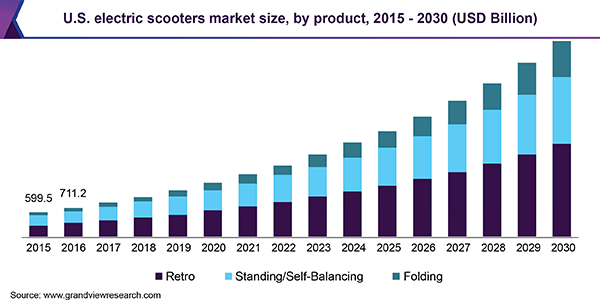
The growth of electric scooter apps is evidential. The market size of the scooter sharing app was measured $17.43 billion in 2018. The market is expected to grow at a rate of 8.5% annually.

us-electric-scooters-market

Numbers show that the market is growing at a steady rate and is rapidly becoming a trend in some of the major cities of the USA. They are becoming part of daily commutes for activities like attending college, going to the office, classes, and more.

One of the primary reasons why VCs are hunting electric scooter sharing startups is because of the worldwide climate change movement. Plus, the government is also quite supportive of startups that work for environmental conservation.

What’s all the fuss about Electric Scooters?

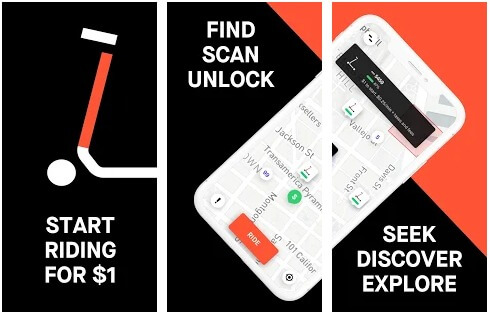
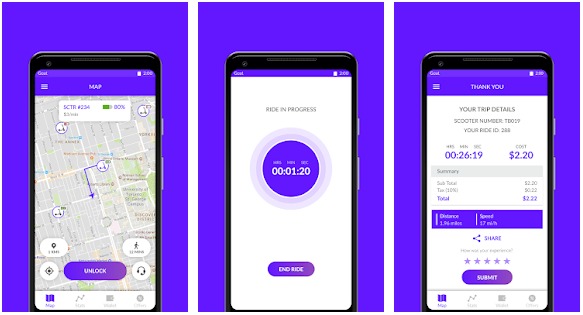
There is no doubt that mobile apps are changing the face of the transportation industry, which is the second reason for the rise of scooter apps. Below are a few reasons why scooter sharing apps like Lime, Bird, and Goat gained popularity.

e-scooter

Less Expensive

Needless to say, that price is one of the primary factors for customers to adopt a particular trend. When compared to cab sharing apps like Uber and Lyft, a scooter sharing app turns out to be a cheaper solution for the daily commute.

A ride on a scooter costs around $2-3, compared to (an average) $20 for a trip of a cab. The low prices will also attract the college and low wage audience to use the app.

It’s Fun

In an era where on-demand cab sharing has been for a decade now, electric scooters are breaking the stereotype, which attracts customers. In a survey by bikeportland.org, 28% of the Portlanders choose to ride an electric bike because it was pure fun.

There are laws in different states for a person to ride an electric scooter. However, the amount of paperwork required to ride an electric scooter is quite less than in non-electric vehicles.

Parking-friendly and Portable

Electric scooters are portable. You can carry them on buses, metro, crossing roads, etc. Compared to parking a car, parking an electric scooters require little or no effort as they can fit anywhere.

Environment-friendly

Electric bikes/scooters spread zero air and noise pollution, which is one of the major concerns in not only the USA but in the whole world. Countries like India and China are heavily suffering from noise and air pollution.

Therefore you can use Environmental factors as a USP to sell your product to customers.

A Quicker Option

Another most significant concern of the public is traffic. No one likes to get stuck in a traffic jam, which brings us to electric scooters. They save our time not only in heavy traffic but also save our time in parking.

Your Personal Small Distance Travelling Companion

E-scooters are a fantastic way to finish small tasks. When a person has to travel a short distance, which can’t be covered by walking and will cost more upon taking a cab, electric scooters come to the rescue.

Challenges associated with starting a scooter sharing company

There are five major challenges that one could face while starting their scooter sharing business:

Getting permission from cities

getting permission from cities

Despite having so many benefits, companies might face a challenge in starting their business in some cities. For instance, if you launch a scooter sharing service, you first need to take permission from the local authorities.

They will decide which companies will operate and which ones will not. Lime and Bird, which are a popular scooter sharing services provider, faced this problem while launching their kick scooter sharing services in San Francisco.

Funding

Funding

The reason why the scooter sharing business is thriving is the USA is because of the VCs. If they stop offering funds, the current services providers will go bankrupt.

Big shots like Bird, Jump, and Lime will still have a chance to survive. However, companies like Scoot, Skip, and Spin will not have a chance to survive without funding.

The ultimate option for such companies would be to get acquired or merge with the big shots. It will reduce competitiveness, which will ultimately lead customers to suffer because of the monopoly.

Lack of technology adoption

Lack of technology adoption

A scooter sharing app can fail because of not using enough technology to save their business. Your business can perish if your customers don’t take enough care while driving or parking the scooter at the right place.

Therefore, before you allow customers to use your services, you must educate them enough not to make any mistakes while driving or parking. It will help you save your company’s reputation.

To make sure that the customers are using your services appropriately, you can incentivize the ones who are following the rules and penalize the ones who aren’t. You will have to implement advanced technologies to measure and track such activities.

Lack of infrastructure

lack of infrastructure

Since the vehicles run on electricity, they need a well-established charging infrastructure to sustain in the market. European countries, despite being one of the early adopters of electric scooters, do not have the required infrastructure to charge scooters.

Companies will have to establish enough parking spaces and charging stations across the city. Moreover, the government will also have to provide support by developing separate pathways or pavements for such scooters.

Seasonal business

seasonal business

Scooter sharing is a seasonal business in some cities. In winters during the snowfall, these scooters lose their mobility, which leads to a decline in business.

However, if you are a high-risk taker and have a huge loyal customer base, you can continue to offer services even during winters. Provided the streets are not covered in snow.

How to develop a scooter sharing app? [Must-Have Features]

Onboarding

Make the sign-up process as simple as possible for new users. The less time you take to onboard them, the more likely they are to use your service. You can use an interactive tutorial to introduce users to your scooter sharing app.

Google Maps Integration

Google Maps API is a must-have API for apps that work in the transportation sector. Integrating maps will help your customers to locate the nearby scooter station and navigate them to their desired destination or a charging station.

QR Code Scanner

QR code scanners can be used to lock and unlock the scooter from the parking dock. Apps like Bird and Lime use the scanner SDKs for Android and iOS operating systems.

ID Verification

The in-app scanner will also help to verify the IDs of a user. It will only allow creating an account if a person is over 18 years. To check the person’s age, you can use documents such as a driver’s license.

Smart Lock

You will have to keep an IoT-enabled locking and unlocking system, which would allow a user to lock and unlock the scooter upon scanning the QR code. To make this feature work, you will have to equip your bikes with a microcontroller-based system.

In-app Payments

The scooter sharing app must allow users to pay directly via the app. To make this feature a reality, you’ll have to integrate payment gateways such as PayPal, Braintree, and Stripe.

Ride Stats

Ride stats are essential to measuring customer drive efficiency. It will help you to judge a driver and incentivize or penalize based on it and help customers to drive better by providing driving suggestions.

Booking

Allow users to pre-book the scooter/s to plan a trip with their friends, family, and colleagues.

Social Media Integration

Engage your customers by allowing them to share their riding experiences on social media directly via the app. It will also help you acquire more customers.

Push Notifications

Use push notification services to tell them about discounts and offers, suggested routes, special events, and more.

How much does it cost to develop an app like Bird, Lime and Spin?

Customer-side App FeaturesAndroid AppiOS App
Design HoursDevelopment HoursDesign HoursDevelopment Hours
Registration/Login with Social Media440440
Google Maps Integration816816
Real-time GPS Tracking832832
Payment Gateway Integration816816
QR Code Scanning (Integration)816816
Lock and Unlock the scooter using QR Code880880
Social Media Integration816816
Online Booking832832
Ride Statistics824824
Push Notifications824824
ID Verification824824
Total Hours8430484304


Admin Panel FeaturesDesign HoursDevelopment Hours
Admin Base Setup and creating architecture88
Payment Management88
Analytics88
Customer Management816
Product Management816
Total Hours4056

Based on the above information, it’ll take a total of 872 hours to develop the entire application, including front-end and back-end.

If you develop the scooter sharing app from the USA, the average development rate per hour varies around $50 – $100 per hour. Hence, it will cost you about $43,600 – $872,000.

However, if you outsource mobile app development from India, the average development rate per hour will be $30 – $70 per hour. Hence, it will cost you approximately $26,160 – $61,040.

Monetization

There are three ways to monetize your scooter sharing app:

  • Show targeted ads in the application. For example, you can promote shops, restaurants, and hotels.
  • Sell memberships by offering your customers weekly, monthly, and annual pass.
  • Offer discounts to loyal customers by distributing coupons and promo codes.

Top Five Scooter Apps in the USA

#1 Bird

Bird

Based out of Santa Monica, California, Bird is a dockless scooter sharing app startup that is famous for operating electric scooters in 100+ cities worldwide.

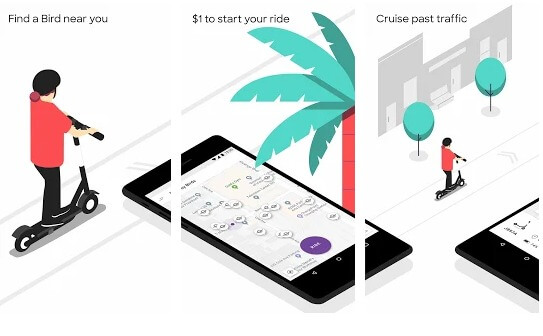
The startup allows you to rent an electric bike in just a dollar. It costs 15 cents per minute. It offers both standing scooters and cruiser bikes to its customers.

The app allows customers to locate, lock, and unlock the scooter via the scooter sharing app.

Notable features of the app:

  • Smart lock
  • QR code integration
  • Payment gateway integration
  • Real-time GPS tracking
  • Maps to find a nearby scooter

#2 Lime

Lime

Founded in the year 2017, Lime is one of the youngest and popular scooter sharing app in the USA. It helps their customers to move around in their cities in an affordable way.

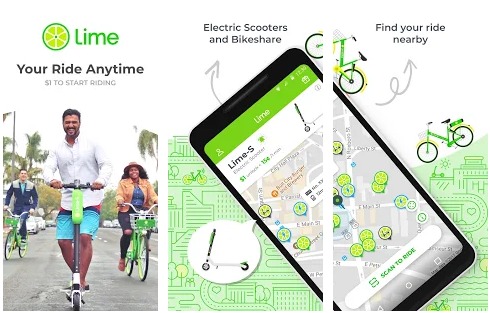
Lime offers three modes of transportation to its customers, i.e., Lime-S (electric scooter), Lime-E (e-assist bike), and LimeBike.

Notable features of the app:

  • Find the nearby vehicle
  • Lock and Unlock the vehicle using vehicle ID or QR code
  • Secure and safe payment through payment gateway integration.

#3 Spin

Spin

Founded in the year 2016, Spin is an e-scooter startup that has raised total funding of $8 million from some of the most popular venture capitalists in the USA.

Currently Spin is available in more than 62 cities and 17+ campuses. Spin recently brought its stationless scooter sharing program to many of the popular cities of the USA.

Notable features of the app:

  • Google maps integration to find the nearest electric scooter
  • Enter payment details to receive an automatic free trip
  • Scan QR code to lock and unlock the vehicle

#4 Goat

Goat

Speaking of dockless electric scooters, Goat – an Austin based e-scooter startup has received official permission from the city’s transportation department for its program.

The company’s spokesperson has announced that it is planning to partner with more and more state governments across the nation.

Notable features of the app:

  • Search a nearby scooter
  • Lock and unlock scooter through the scooter sharing app
  • Schedule or reserve a scooter beforehand
  • Share the ride details with your friends with social media integration

#5 Swiftmile

Swiftmile

Swiftmile is a Silicon Valley startup that offers e-bike charging stations and corporate e-bike sharing systems. One can drive a Swiftmile bike for 40 miles on a single charge. It offers a top speed of 20 miles per hour.

Notable features of the app:

  • Reserve your electric bike in advance
  • Real-time issue-reporting through the scooter sharing app
  • Track and share trip details with your friends and family
  • Get ride summary at the end of each ride

Final Thoughts

The scooter sharing app development market is growing at a constant rate. The market is getting competitive. If you don’t invest in developing scooter apps now, then when?

If you have any e-scooter app development idea or you are ready to start your e-scooter sharing business with a dockless mobility platform app, get in touch with our scooter sharing app development experts now.

We have understood the scooter sharing app market quite well. We can help you acquire the market by creating a robust mobile application and a strong back-end.

Scooter Sharing App Development – FAQs

1) How long does it take to develop an app like Bird or Lime?

To develop a scooter sharing app along with an admin panel, it will take 600 – 900 manhours. It will include planning, designing, developing, testing, and deployment of the application.

2) How much will it cost to develop a scooter sharing app?

If you develop the app from the USA, it’ll take $50,000 to $80,000. However, If you outsource the app development from India, then it’ll take around $30,000 to $50,000.

3) How will your team offer to support post development?

We provide free support to all our clients for four weeks. After that, if you want to increase the support period, we ask our clients to take an AMC contact.

4) What development process do you follow to develop mobile applications?

We follow Agile software development practices such as Scrum to create mobile apps and web apps. We also have dedicated scrum masters in place to manage software development projects.


Top Android Application Development Trends

It’s that time of the year again. Time to identify and acknowledge the latest Android app development trends for the next year.

Today, we live in an era where each new year brings new innovations, ideas, and trends that signify changes. And since Android adoption has grown so drastically in the past recent years, it’s important to keep up with the latest trends to knock out competitors in the race of acquiring market share.

Before we jump right into it, though, it’s also important to understand the implications of trends, which is why it’s recommended to partner with an Android app development company to rightly capitalize on the benefits.

That being said, let’s dive right in!

5 Android App Development Trends to Follow in 2023

1 – Continued Rise of Android Instant Apps

Android Instant Apps basically allows users to try an application or game before having to install it on their devices.

android-instant-apps-example

As you can see, Android Instant apps make it possible to completely skip the installation process and remove the clutter of having to install unnecessary apps on Android devices.

In simple words, Android Instant Apps are nothing but simple to use mobile websites that are operated directly from the cloud.

While 2019 already saw a significant rise of Android Instant Apps, next year it will keep growing further with more innovations.

2 – Android Jetpack

Android Jetpack is Google’s latest Android application development suite of tools, libraries, and guidance that will help developers build higher-quality Android apps.

The Jetpack suite was designed to help developers cope up with important issues like backward compatibility, application management, and so on.

Google has basically smartly structured all these things in a suite with four simple categories: UI, architecture, behavior, and foundation.

The Jetpack’s components, on the other hand, are unbundled libraries that are not part of the Android platform, meaning you can easily adapt any component depending on your requirements.

3 – Kotlin

Kotlin, as you might already know, is a new programming language that runs on Java Virtual Machine (JVM).

To put it simply, Kotlin is capable of utilizing all the existing tools of Android Studio!

In other words, not only building apps with Kotlin is easy, but converting the existing Java-based Android app to Kotlin is also easy.

The nullability and immutability features in Kotlin allows creating high-performance and quality Android apps.

The best features of Kotlin are its interoperability, compatibility, fast compilation time, and performance. In fact, these are the features that make Kotlin one of the best frameworks for Android app development.

4 – Android Enterprise

After iOS, Android devices are the most used devices in corporate enterprises for work.

Keeping this in mind, Google created Android Enterprise, a program that establishes the best Android app development practices specifically for the Enterprise ecosystem.

This new Google-led program basically provides complete control over the Android enterprise apps and the data owned by the enterprise organization.

Apart from this, Android Enterprise also offers various APIs and tools that let Android app developers integrate the support for Android in Enterprise mobility management.

5 – AI & Machine Learning

Artificial Intelligence (AI) has already shown its potential in the world of Android app development. As you might already know, the technology is powerful enough to make unimaginable changes.

For instance, a normal machine can do specific tasks repetitively without any issue, but if you program them intelligently using AI & Machine Learning, you can also make the machine do tasks that are out of the league.

In simple words, you can collect, feed, and process a huge amount of data using AI & ML in your app development process and perform tasks like Face recognition, text recognition, landmark recognition, image labeling, barcode scanning, and so on.

There are many tools available for Android app development to build such functionalities in your Android app.

Bonus: Multiplatform Application Development with Flutter

Created by Google, Flutter is a mobile app development framework that allows developers to build native Android and iOS applications from a single codebase.

Flutter framework is basically a mobile software development kit (SDK) that offers reactive views without the need for JavaScript bridge.

Though Flutter had been around for a couple of years, but it gained most attention after Google announced a release preview of Flutter at Google I/O 2018.

Then on 4th December 2018 at Flutter Live, Google released the first stable version with lots of features and many big brands like Alibaba soon adopted it to build mobile apps.

Conclusion

There you have it!

These are the top Android app development trends you need to keep in mind . As you just saw, there will be a major shift in the Android app industry in the year 2023.

We hope that this blog will help you in developing an Android app stand out in the market and outrun your competition. If you have any questions, feel free to ask in the comment section below.

General FAQs on Android Application Development Trends:

Q:1 – What technology is used to develop mobile apps?

Ans: There are many technologies available in the market such as Swift, Flutter, Phonegap, React Native, and a lot of others.

Q:2 – What software is used for Android application development?

Ans: Android application development process requires various things such as a programming language, an IDE, tools, libraries and so on.

Q:3 – Can I build my own app for Android?

Ans: Yes, you can build your own Android app using online tools like AppyPie.

Q:4 – How can I make a free app without coding?

Ans: There are many online tools available in which coding is not required to build mobile apps. For example, you can use AppMakr, Swiftic, Appy Pie, and other available tools.


Top 10 Mobile App Development Frameworks to Consider in 2023

Most of us, nowadays, largely depend on mobile apps.

Take this scenario for example. You hit the snooze button far too many times in the morning and now you’ve no time to cook your lunch.

What do you do?

You order lunch from Uber Eats.

This is just one example of how mobile apps have made our lives easier.

From ordering food and getting laundry done to transportation and shopping online, mobile apps have made almost everything available at just a few taps.

But, have you ever wondered what goes into making such mobile apps that make our lives so much easier?

A few years back, Mobile app development required lots of money to hire mobile app developers, which only large-scale businesses & corporations were able to afford.

But thanks to mobile app development frameworks, it’s not the case anymore.

Today, there are a plethora of mobile development frameworks available to choose from.

And the best part? – These mobile app development frameworks allow building mobile apps in limited time & budget.

Although, since there are lots of options available, choosing the best framework for app development is tough.

There is a lot to think about.

But to help you in making this decision, below we have listed the top 10 mobile app development frameworks along with their features, pros & cons, and a few app examples.

Top 10 Mobile App Development Frameworks

Let’s learn about each mobile app development framework individually.

1- React Native

React Native is one of the most popular mobile app development frameworks. It was built by Facebook and is used for developing both, Android & iOS applications.

From startups to Fortune 500 companies, it allows building high-performance mobile apps in a short time.

In simple words, this mobile development framework reduces the time it takes to build a mobile app that is both powerful and reliable.

React Native does this because it’s actually a cross-platform mobile app development framework that uses the same code base for both iOS and Android applications.

Best Features:

  • Cross-Platform framework
  • Easy Maintenanibility
  • Re-usable components
  • JavaScript

2- Flutter

Flutter is more of a software development kit than a mobile app development framework that is popular for faster coding.

It was built by Google and is also a cross platform mobile app development framework that uses a single code base for both iOS and Android app development.

Apart from being a cross platform framework, Flutter also allows developers to modify old widgets & create new widgets effortlessly.

Best Features:

  • Flexible UI
  • Native Performance
  • Fast Development
  • Cross-Platform Framework

3- Ionic

Ionic is also a popular, open-source mobile development framework which also supports cross-platform development.

It supports iOS 7 and Android 4.1 to the rest of upgraded Android & iOS versions.

The biggest benefit of using Ionic for mobile app development is its UI elements. Ionic provides a set of default UI elements such as action sheets, tab bars, forms, filters, and navigation menu, which helps developers focus on the development part rather than on UI elements.

In fact, Ionic also has its own CLI (Command Line Interface) tool that makes the app development process easier.

Best Features:

  • Cross-Platform Framework
  • Platform Independent
  • Easy to Adopt
  • Built on Angular

4 – Xamarin

Xamarin is also an open-source, cross-platform mobile development framework, which also uses the same code base for iOS and Android applications.

It was founded in 2011 and five years later, Microsoft acquired it in 2016.

Xamarin provides an excellent user interface and comes with almost all important tools that are needed to build a mobile app.

One thing you need to know about Xamarin is that it uses C# programming language, which means there is no need to learn Swift or Java to build iPhone & Android apps.

Best Features:

  • Native API Access
  • Native UI Support
  • Huge Community (1.4 million developers)
  • Targets Every Platform
  • Easy API Integration

5 – Adobe PhoneGap

PhoneGap was built by Nitobi and was initially launched as Apache Cordova.

However, when Adobe purchased Nitobi in 2011, they changed its name to Adobe PhoneGap.

PhoneGap is one of the only few mobile app frameworks that support using smartphone hardware such as GPS, Storage, Accelerometer, Phonebook, Camera, and much more.

It uses HTML5, CSS, and JavaScript to build mobile apps without any hardware restrictions. Although, that’s not its main benefit. PhoneGap provides best-in-class app performance and it can build apps for almost every major operating system out there in the market.

Best Features:

  • Robust Support
  • No Hardware Restrictions
  • High Compatibility

6- Corona SDK

Corona is a free, open-source, and powerful cross-platform framework that allows building apps to most of the platforms including Android, iOS, macOS, Tablets, Android TV, Fire TV, Apple TV, and Amazon Fire.

It is a Lua based framework, which is a popular scripting language and is mostly used for developing apps as well as games.

In fact, many popular games like Warcraft and Angry Birds, for example, have utilized the Corona framework.

Best Features:

  • Plugins Availability
  • Lua Programming
  • Predominant APIs
  • Native Library Support

7 – Mobile Angular UI

Mobile Angular UI, as the name suggests, is a UI framework that helps to build mobile apps with combination of bootstrap and Angular framework.

It is licensed under MIT so it’s an open-source mobile development framework using which you can build rich internet mobile apps.

Apart from this, Mobile Angular UI also consists of various components such as overlays, switches, and sidebars that greatly contribute to delivering a robust mobile experience to users.

Best Features:

  • Interactive Components
  • JavaScript
  • LightWeight

8 – Intel XDK

Intel XDK is another cross-platform development framework that is mostly used for building web applications and hybrid mobile applications.

The biggest plus point of this mobile development framework is its drag-and-drop user interface, which allows developers to build mobile UI really fast.

Apart from this, Intel XDK also has an inbuilt app debug & profiling options that make the mobile app testing on a large device range considerably easy.

Best Features:

  • Device Testing
  • Drag-and-Drop UI
  • Integrated Development Environment

9 – JQuery Mobile

JQuery Mobile is HTML5-based cross-platform development framework that allows building both mobile as well as web applications.

It supports an extensive range of operating systems including Android, iOS, Windows, macOS, Kindle, Blackberry, Firefox, and a few others.

Apart from this, JQuery Mobile also comes with different plugins such as Pop-Up Boxes, Image Slider, Content-Slider, etc., which make the web pages simpler, user-friendly, and more interactive.

Best Features:

  • Built on JQuery Core
  • Automatic Initialization
  • Powerful Theming Framework
  • Lightweight

10 – Appcelerator Titanium

Appcelerator Titanium is a hybrid app development framework that allows to build mobile apps for all platforms.

It is actually built on an Award-Winning open-source project called Titanium, which is basically a JavaScript-based SDK having 5000+ APIs for HTML5, Android, iOS, and Windows.

In fact, if you’ve hands-on experience in web app development, then you can easily learn to build mobile apps using Appcelerator Titanium.

Apart from this, the Appcelerator Titanium framework also allows developers to reuse 90% of the code, which helps to save a ton of time and resources.

Best Features:

  • API Management Features
  • Efficient Code Modules
  • Eclipse-based IDE

Conclusion

With this, we’ve come to the end of this list of top 10 mobile app development frameworks.

We hope that you found this blog useful. And as far as the choice of the mobile development framework is concerned, the final decision largely depends on the requirements of your project.

Therefore, it’s recommended to consult with a mobile app development company to make sure you’re choosing the right framework.

General FAQs on Mobile App Development Frameworks:

Q:1 – What is mobile app development framework?

Ans: A mobile app development framework is basically a software framework that is created to support mobile application development.

Q:2 – What is hybrid mobile app framework?

Ans: Hybrid mobile app frameworks are same as mobile app development frameworks, the only difference is, a Hybrid app development framework allows you to build hybrid apps.

Q:3 – What is a hybrid app?

Ans: A hybrid mobile app is just like any other mobile application. What differentiates a hybrid app from a native mobile app is that the hybrid apps are basically web apps deployed in a native container with a mobile WebView object. Native apps, on the other hand, is a smartphone application developed using a specific programming language and for a specific operating system.

Q:4 – Which framework is best for hybrid app development?

Ans: There are lots of hybrid app development frameworks available in the market. But one had to pick, the following frameworks are considered the best in the market right now:

  • PhoneGap
  • Ionic
  • Onsen UI

Q:5 – Which framework is best for mobile app development?

Ans: The following 3 mobile development frameworks are best in the market right now:

  • React Native
  • Flutter
  • Xamarin


Pimcore Master Data Management: Manage Your Multi-Domain Data Easily

Are you managing all your essential data related to customers, assets, products, employees, partners or vendors, references, locations, etc. in the different third party software?

If yes, then it’s a challenge for you to have a holistic view of all the different data and get the actionable insights out of it.

Well, you can add one more software in your network that collects data from different 3rd party software, processes them to generate the results, and enables you with meaningful information to make important business decisions.

But, what if you can manage all your data (regardless of any size and type), process it, and provide the right information to the right person at the right time using a single platform.

This post helps you explore the Pimcore Master Data Management (MDM) module that exactly performs the above-mentioned activities.

Let’s unlock the key elements of Pimcore MDM.

Overview of Pimcore Master Data Management (MDM) Platform

Pimcore MDM is the most powerful MDM platform that allows businesses to manage different types of data with a great level of detail. It contains the functionality of data versioning, data validation, data hierarchy, and data structure.

Moreover, the module allows to manage each data with its description, attributes, documentation, translation, and other components.

With a centralized data repository, Pimcore MDM presents all the business information in a single authoritative view. It reduces data redundancy, improves data readability, provides actionable insights, and increases operational efficiencies.

Master Data Management of Multiple Domains

With Pimcore MDM, businesses manage any type and any size of data starts from customer data, vendor/supplier data, product data, asset data, reference data, employee data, location data, and more at the single location.

It allows to create flexible data models with a great level of scalability and expandability. Combining Product Information Management and Master Data Management platforms of Pimcore, companies can create an enterprise-scale B2B and B2C e-commerce portals.

The MDM is available with multiple implementation styles to address the different needs of the diversified business domain. And, Pimcore supports both operational and analytical MDM requirements.

Scalable Architecture

MDM Architecture_PIM-MDM

Master Data Management Architecture

Master Data Management of Pimcore enables the businesses and developers with the next level flexibility to identify the best suitable architectural role as per your organizational ecosystem.

To simplify the adoption of MDM, you can leverage the cloud, on-premises and hybrid capabilities of Pimcore.

Pimcore is an open-source technology that comes with the free license fee. The digital platform allows you to use unlimited users, languages, and channels as well as varied aspects of different types of data.

Top 6 Features of Pimcore Master Data Management System

Master Data Management of Pimcore enables you with immense flexibility to manage data of any type and any domain at a centralized platform. The advanced features of MDM allow manage the data rapidly, smoothly, and cost-effectively.

#1. Data Quality/Semantic

pim-data-quality-and-completeness

These days, data is a crucial element for businesses to understand customer behavior and preferences as well as streamline business operations. With Pimcore MDM, you can meet the data quality standard ranging from unstructured to structured data, external to internal data and diversified datasets.

It allows you to define cleansing rules and match, verify, standardize the master data. It ensures that you always have accurate and up-to-date data for operations.

Manage your diversified datasets in a custom format according to your business rules, industry standards, machine learning, and metadata. Moreover, you can modify data values to meet data integrity restraints, domain limitations, and other business rules.

#2. Hierarchy Management

It is a very crucial and important part of Master Data Management. Pimcore automatically manages the relationships and hierarchies across the wide variety of data. With Pimcore MDM, you can manage multiple data domains, multiple hierarchies and create data stewardship with a streamlined process.

Leverage flexibility to create multiple models with complex hierarchies to classify all the data effectively. It also allows to manage multi-domain hierarchies at a centralized location as per your diverse and specific business requirements.

The advanced hierarchy models also enable businesses with extensive functionality such as searching, BI (Business Intelligence) reporting, and more.

#3. Rich Content Integration

Pimcore-mdm-rich-content-integration

Pimcore helps organizations to maintain brand consistency and compliance by allowing the use of rich media content and master data together in a hassle-free way.

Deliver engaging user experience in a simplified way across different channels by combining digital assets and rich media content. With Pimcore, content integration is easier to extend and simpler to configure.

#4. Audit Trail

pim-compare-versions

Pimcore Master Data Management platform keeps a record of all changes made in the data such as who edited the data and when. IT captures and preserves all the versions of along with the changes made in each version, with other relevant information.

The digital platform enables organizations with better data governance and data stewardship by managing and maintaining the structured and unstructured data in one place.

With this auditable, historical and holistic view of data, data governance becomes easy in your own business infrastructure.

#5. Superior Connectivity

Pimcore-Data-Hub

Use/reuse and access the master data from any system and applications with Pimcore. The platform easily connects with your existing business enterprise system and external 3rd party applications.

Experience the powerful connectivity amongst your master data, structured & unstructured data, external & internal data, on-premises data, cloud data, and more. Thus, you have access to updated master data all the time.

#6. Workflow Management

Harnessing the potential of the Workflow Management feature, you can classify, assign, escalate, and quarantine that along with maintaining quality standards of your master data. The workflow engine of Pimcore helps you to introduce your business processes to your internal and external stakeholders quickly and in detail.

If you want to incorporate any specific benchmarking to your master data, then Pimcore can do that for you. Thus, the tech technology platform helps you to define your editorial workflow and business processes.

Allowing to create custom frontend, Pimcore MDM fastens the collaboration between the data and improves persistent monitoring.

Advantages of Pimcore Master Data Management Platform

Reduced Cost

Being an open-source platform, MDM reduces the development costs and provides the flexibility of integrating with future systems. Thus, it is best suitable to meet your agile business needs with scalability, flexibility, and security.

The platform is multi-domain in nature that allows to expand new data domains as per your growing business requisites without incurring a huge cost.

Accelerated Digital Transformation

Pimcore MDM offers an open-source and end-to-end architecture that eliminates data silos across your organizations. It helps you to meet your objectives of digital transformation timely by accelerating the deployments. It helps boost the business outcome by combining customer experience management and data management.

Improved Time-to-Market

Manage and record your critical business data of any type and any size in no time in the centralized location using the Master Data Management platform of Pimcore. It contains GUI based data modeling engine, workflows, and business rules that you can configure without writing a single line of code.

MDM helps companies to achieve better operational efficiency by managing risks, meeting the governance criteria, and addressing the specific compliance requirements.

Robust Master Data Management Solutions Offered by Pimcore

Product Information Management

In the Pimcore MDM, you can manage your sales, marketing, and product data. Its centralized storage where you can manage information on buy-side and sell-side products easily, in a harmonized way.

The combination of Product Information Management and Master Data Management allows retailers to build next-generation B2B and B2C e-commerce platforms. Explore about Pimcore Revolutionizes Retail Experience for Retailers and Customers.

Customer Data Platform

Manage your B2B and B2C customer data in MDM and take the benefits of the advanced features of the Customer Data Platform of Pimcore. It allows you to store and manage the data, segmentation, personalization, and marketing automation.

Pimcore Data Hub

It is a revolutionary tool that prepares and transforms the data for input and output channel through a central Graphical User Interface (GUI).

Build Up A Custom MDM Platform with Credencys by Leveraging Pimcore Capabilities

Being a certified partner of Pimcore, Credencys has profound exposure to build custom Master Data Management for your business using the capabilities of Pimcore. We help you to manage the wide range of data in a single platform to enable you with a holistic view of each information you are looking for.

Credencys has a team of 30+ developers who excel in delivering the end to end Pimcore development services start from consultation, design, development, integration, testing, and support. We hold expertise in integrating third-party apps, enterprise systems, and business APIs with the MDM.

Download Master Data Management PPT

We have created the PPT version of the “Manage Your Multi-Domain Data Easily with Pimcore Master Data Management” blog. It allows readers to save information about Pimcore Master Data Management on their personal computers. You can download the Master Data Management PPT here.

Frequently Asked Questions

What is the role of Master Data Management?

Master Data Management is a tool that brings the entire organization on a single page by ensuring the master data is coordinated across the organization. Providing unified master data, the MDM tool provides a complete, consistent, accurate, insightful, and actionable master data to all the stakeholders.

What are the popular Master Data Management tools?

The list of popular Master Data Management tools includes Profisee, Pimcore, SAS, Hybris, Orchestra, Ataccama, Tibco, SAP, IBM, Stibo, VisionWare, and many more.

Why is master data so important?

In today’s competitive era, data is a crucial asset for organizations that ensures strategic business growth. With the detailed data analysis, companies can get insights about different business aspects such as customers, products/services, employees, vendors, partners, and more. The holistic view of each data domain helps companies to channelize their efforts to achieve better financial results.

What is MDM architecture?

Master Data Management is a method that enables an organization to link all of its critical data in one file. The file is a common point of contact of reference for each stakeholder of the company. Moreover, MDM provides computing in multiple platforms, architecture, and applications.